Ubiquiti EdgeRouter 4 Wired Router
Overview
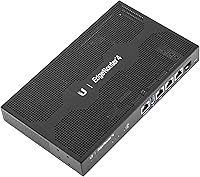
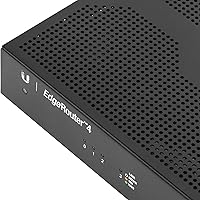
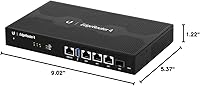
The Ubiquiti EdgeRouter 4 Wired Router sits firmly in prosumer territory — powerful enough for demanding small business deployments, yet priced within reach of serious home lab builders. Ubiquiti has built its reputation on delivering near-enterprise networking hardware without the enterprise invoice, and the ER-4 fits squarely in that philosophy. Under the hood, a quad-core processor and 1GB of RAM give it genuine horsepower for a device in this category. The fanless, compact chassis — just over nine inches wide — can sit on a desk, mount on a wall, or slide into a rack. Set expectations early, though: this wired router runs EdgeOS, and it will not configure itself.
Features & Benefits
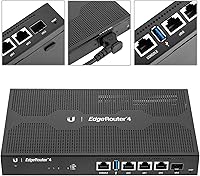
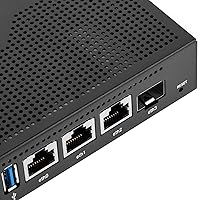
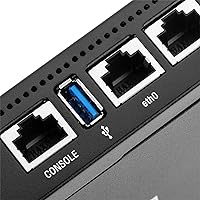
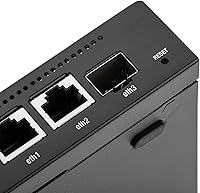
The ER-4 packs three gigabit Ethernet ports and an SFP port for fiber uplinks into a surprisingly small footprint, making it genuinely useful in mixed copper-and-fiber environments. There is also a dedicated RJ45 serial console port — something you rarely find at this price point — that proves invaluable when a misconfigured firewall rule locks you out remotely. EdgeOS, based on Vyatta, handles VLANs, policy-based routing, VPN tunnels, and fine-grained QoS without strain, largely because the CPU supports hardware-offloaded routing. Add a 13W power ceiling and an internal PSU, and you have a router built for continuous, low-fuss operation over the long haul.
Best For
The EdgeRouter 4 is an ideal fit for home lab enthusiasts who want to work with advanced routing protocols without spending enterprise money. Small offices and remote sites benefit from its multi-WAN load balancing and failover capabilities, while network engineers use it as a practical training platform for real-world BGP and OSPF configurations. If you are running fiber to the building, the SFP port lets you terminate that connection directly without a separate media converter. One important note: this wired router has no built-in Wi-Fi — it is purely a routing and firewall device, so pair it with a dedicated access point if wireless coverage is part of your setup.
User Feedback
Buyers consistently praise the ER-4 for delivering real throughput gains thanks to hardware offloading, which sharply separates it from consumer-grade alternatives. Build quality and the internal PSU get repeated mentions too — no one misses hunting for a replacement wall adapter. The honest flip side is that the learning curve is real. Newcomers frequently report frustration during initial setup, and the web GUI, while functional, has limitations that push serious users toward the CLI. Firmware update frequency has drawn criticism over the years, and some buyers question whether Ubiquiti's long-term software support matches the hardware lifespan. Those comparing it to MikroTik generally favor the ER-4 for its more approachable interface, even if both reward patience.
Pros
- Hardware-offloaded routing delivers real multi-gigabit throughput that consumer routers simply cannot match.
- The built-in SFP port lets you terminate fiber uplinks directly, saving cost on extra hardware.
- EdgeOS supports VLANs, policy-based routing, VPN, and QoS — all in one compact box.
- An internal PSU means no fragile external power brick to lose or replace.
- The fanless design runs silently, making it practical in office or living spaces.
- A dedicated RJ45 serial console port is a genuine safety net for remote management scenarios.
- The ER-4 draws only 13W max, keeping long-term energy costs low in always-on deployments.
- Build quality consistently impresses buyers who have handled far more expensive networking gear.
- Flexible mounting options — desk, wall, or rack — suit a wide range of deployment environments.
- A large and active community means solid third-party documentation and troubleshooting resources are easy to find.
Cons
- Initial configuration is not intuitive; expect a real time investment before the router is production-ready.
- The web GUI has known limitations and frustrates users who prefer not to work in the command line.
- No built-in Wi-Fi means additional hardware is required for any wireless coverage.
- Firmware updates have historically been infrequent, raising questions about long-term software support.
- Only three gigabit Ethernet ports may feel limiting in environments that need more wired connections without a separate switch.
- EdgeOS documentation from Ubiquiti itself can be sparse, pushing users toward community forums for answers.
- Buyers coming from MikroTik may find the feature set comparable but the price slightly harder to justify.
- The GUI does not expose every EdgeOS feature, forcing CLI work for advanced configurations regardless of skill preference.
Ratings
Our AI-generated scores for the Ubiquiti EdgeRouter 4 Wired Router were built by analyzing verified buyer reviews from around the world, with automated filtering applied to remove incentivized, duplicate, and bot-driven submissions. The result is an honest, data-grounded breakdown that reflects both what users genuinely love and where real frustrations surface. Nothing has been smoothed over — the scores tell the full story.
Routing Performance
Build Quality
Ease of Setup
Value for Money
Software & EdgeOS
Firmware & Updates
Port Selection
Fanless & Noise
Power Efficiency
CLI & Advanced Configuration
Mounting & Form Factor
Reliability & Uptime
Community & Documentation
Comparison to Alternatives
Suitable for:
The Ubiquiti EdgeRouter 4 Wired Router is an excellent choice for anyone who has outgrown consumer-grade networking hardware and wants genuine control over their traffic without spending thousands on a dedicated enterprise appliance. Home lab enthusiasts will find it a rewarding platform for learning real-world routing protocols like BGP and OSPF in a hands-on environment. Small offices and remote sites benefit from its multi-WAN failover and load balancing features, which provide the kind of redundancy that keeps critical operations running during ISP outages. Network engineers and technically inclined IT pros will appreciate the RJ45 serial console port for out-of-band management — a feature that pays for itself the first time a bad config change cuts off remote access. If you are bringing fiber into your building, the SFP port lets you terminate that connection directly on the router, eliminating the need for a separate media converter.
Not suitable for:
The Ubiquiti EdgeRouter 4 Wired Router is genuinely the wrong tool for buyers expecting a straightforward, app-guided setup experience. If you have no familiarity with networking concepts like subnetting, firewall rules, or routing tables, the learning curve here is not just steep — it can be discouraging enough to leave the device sitting in a box. This is a wired-only router with no built-in Wi-Fi, so anyone looking for a single device to handle both routing and wireless coverage will need to budget for a separate access point. Households or very small setups that just need reliable internet sharing from a single ISP connection are better served by a capable consumer router that costs a fraction of the price and requires far less configuration time. Buyers who rely on vendor support for firmware issues should also weigh whether Ubiquiti's update cadence meets their expectations before committing.
Specifications
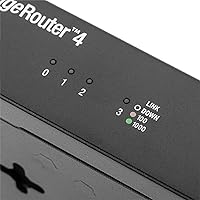
- Ethernet Ports: The ER-4 includes three 10/100/1000 Mbps gigabit Ethernet ports for wired LAN and WAN connectivity.
- SFP Port: One SFP port is included for fiber uplink connections, supporting standard small form-factor pluggable transceivers.
- Serial Console: A dedicated RJ45 serial console port enables out-of-band management access independent of the network interfaces.
- Processor: A quad-core CPU handles routing workloads with hardware offloading support for multi-gigabit throughput.
- RAM: 1024 MB of DRAM provides ample memory for complex routing tables, firewall rules, and concurrent VPN sessions.
- Operating System: The device runs EdgeOS, a Vyatta-based operating system offering a web GUI and full CLI access.
- Max Power Draw: Maximum power consumption is rated at 13W, making it efficient for continuous 24/7 deployment.
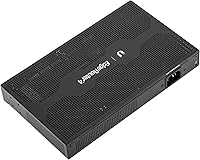
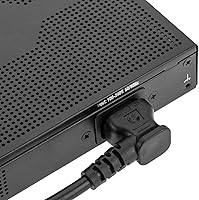
- Power Supply: An internal PSU is built directly into the chassis, eliminating the need for an external power adapter.
- Cooling: The fanless thermal design operates in complete silence with no moving parts to wear out over time.
- Dimensions: The unit measures 9.02 x 5.37 x 1.22 inches, fitting comfortably in tight rack or shelf installations.
- Weight: The ER-4 weighs 1.75 pounds, light enough for wall mounting without heavy-duty fasteners.
- Mounting Options: The router supports desk, wall, and rack mounting, with rack ears and all necessary mounting hardware included in the box.
- Color: The chassis is finished in black with a clean, understated profile suited to office and lab environments.
- Wireless: The ER-4 has no built-in wireless radio and functions exclusively as a wired routing and firewall device.
- Voltage: The unit is rated for up to 240V input, making it compatible with international power standards.
- Form Factor: At 1U slim, the device fits standard network racks without consuming excessive rack unit space.
Related Reviews
Ubiquiti AirRouter HP Indoor WiFi Router
Evoluent Vertical Mouse 4 Wired (Medium to Large)
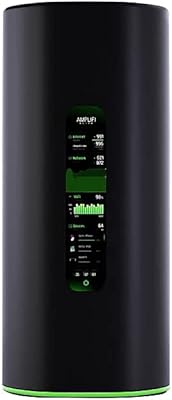
Ubiquiti AmpliFi Alien WiFi 6 Mesh Router
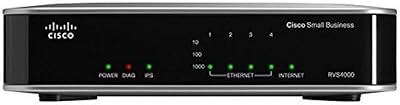
Cisco RVS4000 Gigabit Security Router
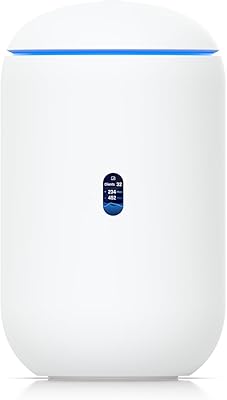
Ubiquiti UDR7 Dream Router Wi-Fi 7
ELAC BS41-BK 4″ Passive Wired Bookshelf Speakers
Ubiquiti Dream Router Wi-Fi 6 Router
Dual Electronics LU43PW 4″ Outdoor Wired Speakers
LEE DAN PK-543A 5-4-3 Wire Apartment Intercom Amplifier