Overview

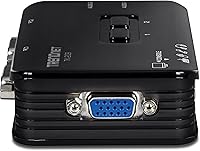
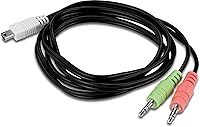
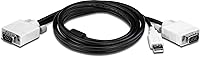
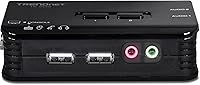
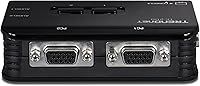
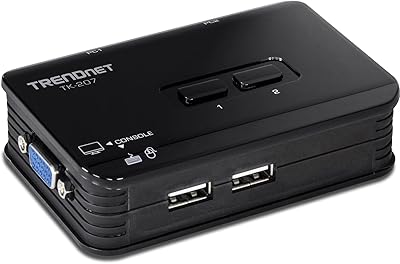
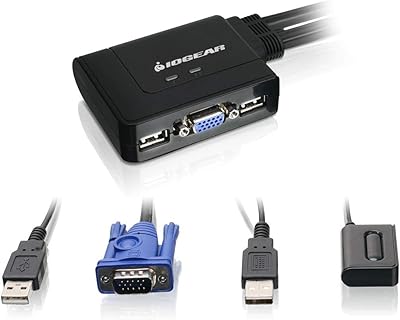
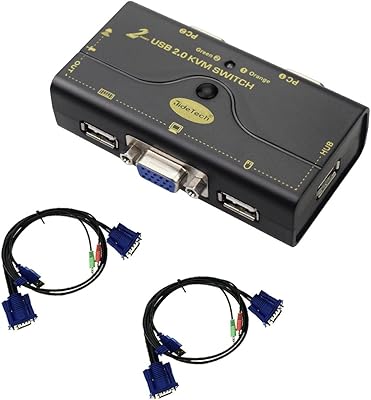
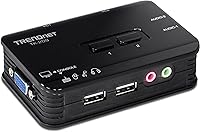
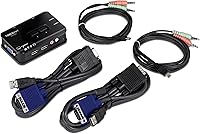
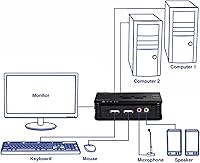
The TRENDnet TK-209K 2-Port USB KVM Switch is one of those unglamorous desk accessories that quietly solves a real problem: needing two computers but only wanting one monitor, keyboard, and mouse. It's been around since 2007, which in tech years sounds ancient, but that's actually reassuring here — this is a mature, well-proven design rather than something rushed to market. Setup is refreshingly low-tech. You connect both PCs via VGA for video and USB for your keyboard and mouse, then use the front panel push buttons to flip between machines. There's no software to install, no drivers to chase down. It even handles audio switching, routing speakers and microphone along with whichever PC is active, which isn't always a given on budget switches in this class.
Features & Benefits

Where this KVM switch earns its keep is in the details. Video tops out at 2048 x 1536 resolution at 60Hz over VGA, which covers most older monitors comfortably but won't stretch to modern 4K displays. Switching between machines happens through hotkeys or the included auto-scan mode, so you're not stuck manually clicking through menus every time you need to jump computers. Hot-plug support means you can connect or disconnect peripherals without powering anything down first, a small convenience that saves real hassle during setup. The 3.5mm audio and microphone jacks switch right along with the video feed, so you're not juggling separate cables for sound. It works fine across both Windows and Linux machines, and the compact footprint tucks easily behind a monitor or against a wall.

Best For

This switching kit makes the most sense for people with a specific, practical need rather than anyone chasing flashy features. Home users juggling a personal laptop and a work desktop on the same desk are the obvious fit — flip a switch instead of unplugging cables every morning. Small offices on a budget will appreciate not having to buy a second monitor and keyboard just to manage a couple of workstations. IT folks who oversee a small rack of servers or test machines will find it handy for quick diagnostics without dragging over extra hardware. The built-in audio switching is a nice bonus for anyone who wants sound to follow the active computer automatically. That said, skip it if your setup demands HDMI, 4K output, or control over more than two systems at once.

User Feedback

Owners generally speak well of the TK-209K, with reliability coming up again and again in long-term reviews — people who bought one years ago often say it's still running without issue. The hotkey and button switching gets consistent praise for being quick and intuitive, with no real learning curve involved. On the downside, a handful of buyers point out that it's strictly VGA, so anyone running a newer graphics card without a VGA output will need an adapter, which adds a small extra cost and one more thing to manage. A few people also mention needing to reseat cables occasionally to keep the connection stable, particularly after moving the unit around. Even with those minor gripes, standout trait durability keeps coming up, especially among repeat buyers who've purchased a second one for another desk.

Pros

  • Lets two computers share one monitor, keyboard, and mouse without constant cable swapping
  • Audio and microphone jacks switch automatically along with the active PC
  • Hot-key and auto-scan switching feel quick and intuitive in daily use
  • Hot-plug support means peripherals can be connected without powering anything down
  • Compact size tucks easily behind a monitor or in a tight desk setup
  • Works across both Windows and Linux without needing extra drivers
  • Long track record of reliability, with many owners reporting years of trouble-free use
  • Simple push-button controls mean zero software or learning curve required
  • Repeat buyers often purchase a second unit, a solid sign of trust

Cons

  • Limited strictly to VGA, so newer graphics cards may need an adapter
  • Maxes out at 2048 x 1536 resolution, which feels dated next to modern displays
  • Only supports two computers, with no path to expand further
  • A few users report needing to reseat cables for a stable connection
  • No HDMI or DisplayPort option for buyers with newer hardware
  • Audio switching is basic and limited to a single 3.5mm connection
  • Lacks any software interface for remote or centralized switching control

Ratings

Our scores for the TRENDnet TK-209K 2-Port USB KVM Switch come from an AI analysis of verified buyer reviews collected across multiple marketplaces worldwide, with spam, bot activity, and incentivized feedback actively filtered out before scoring. What's left is a realistic picture of how this switching kit performs in everyday desks and small offices. Both the praised strengths and the recurring frustrations are reflected honestly below, so you can weigh the trade-offs before buying.
Build Quality
84%
Owners frequently describe the casing as solid for something this small and inexpensive, with buttons that feel firm rather than mushy. It doesn't feel like it'll crack if bumped while reaching behind a monitor or shifted around on a cluttered desk.
A handful of buyers note the plastic housing feels lightweight, which can make it slide around on smooth desk surfaces. It's not a rugged or industrial-feeling device, so rough handling over time may eventually loosen the ports.
Ease of Setup
91%
Most reviewers say they had it running within minutes of unboxing, plugging in VGA and USB cables without needing any drivers or configuration. For non-technical users sharing a desk with a spouse or roommate, this plug-and-go simplicity is a major selling point.
A small number of users report initial confusion about which port maps to which computer, especially when cable labeling on their own PCs was unclear. First-time KVM buyers occasionally need a minute to understand the hotkey combinations.
Switching Speed & Responsiveness
88%
Switching between machines using the front button or hotkeys is described as immediate, with no noticeable lag or screen flicker delay. For people constantly bouncing between a work laptop and personal desktop during the day, this responsiveness genuinely speeds up the workflow.
Auto-scan mode isn't always praised, with some users finding the timing between switches either too fast or too slow for their workflow. There's no way to fine-tune the scan interval, which limits flexibility for specific use cases.
Video Output Quality
61%
39%
For standard office monitors and older displays, VGA output at up to 2048 x 1536 is plenty sharp, and users running basic productivity tasks rarely complain about clarity. It handles spreadsheets, browsers, and everyday business software without visible artifacts.
Buyers with newer monitors or graphics cards frequently mention needing a VGA adapter, since modern hardware has largely moved to HDMI and DisplayPort. The 60Hz cap and analog signal also feel dated next to anything used for gaming or video editing.
Audio Switching
79%
21%
Reviewers appreciate that speakers and microphone follow the active computer automatically through the 3.5mm jacks, removing the need to manually replug audio cables every time they switch. This is called out repeatedly as a useful extra most basic KVM switches skip entirely.
A few users wish for digital audio support rather than analog-only jacks, since headset compatibility can be inconsistent depending on the connector type. Audio quality itself is functional but unremarkable, with no enhancement or amplification built in.
Windows & Linux Compatibility
82%
18%
Since switching happens entirely through hardware rather than software, users running Windows, Linux, or mixed environments report no compatibility headaches whatsoever. IT techs managing test machines particularly value not needing OS-specific drivers.
Mac compatibility isn't officially listed, leaving some buyers uncertain whether it'll work cleanly with macOS systems. A couple of reviewers mention trial and error was needed to confirm functionality on less common operating system combinations.
Cable & Connection Stability
68%
32%
Most users report stable, consistent connections once everything is properly seated, with the bundled cables fitting securely into the unit's ports. For a permanent desk setup that isn't moved often, stability tends to hold up well over months of use.
Several reviews mention needing to reseat cables occasionally to restore a clean signal, particularly after the unit has been bumped or relocated. This intermittent flakiness is one of the more commonly repeated complaints in negative reviews.
Long-Term Durability
89%
This is consistently one of the strongest themes in feedback, with many owners reporting years of daily use without failure. Repeat buyers purchasing a second unit for another desk is a recurring pattern that speaks to genuine long-term trust in the hardware.
Being an older design, replacement units or official support resources may become harder to find as time goes on. A few long-term owners mention the push buttons feel slightly less responsive after years of heavy daily switching.
Value for Money
86%
Given the low price point, buyers consistently feel they're getting solid functionality without overpaying, especially compared to pricier multi-port or digital KVM alternatives. For a simple two-computer setup, it's frequently called the most sensible budget option available.
Buyers who later need to upgrade to HDMI or add a third computer end up needing a completely different switch, making this a less future-proof investment. The VGA-only limitation can mean added adapter costs down the line.
Port Count & Expandability
47%
53%
For users who only ever need to manage two systems, the simplicity of a fixed 2-port design avoids unnecessary complexity or confusing menus. It does exactly what it promises without overcomplicating the interface.
Anyone needing to manage three or more computers will hit a hard wall immediately, since there's no expansion option whatsoever. This rigid limitation is the most frequently cited reason reviewers say they'd consider a different model next time.
Design & Footprint
77%
23%
The compact size is regularly praised for tucking neatly behind a monitor or into tight desk spaces without adding clutter. Several reviewers specifically mention forgetting it's even there once installed, which they count as a genuine positive.
The understated, dated aesthetic won't appeal to anyone wanting a more modern-looking desk setup, and the small buttons can be a bit fiddly for users with larger hands. It's purely functional rather than visually distinctive.
Hot-Plug Functionality
81%
19%
Being able to plug or unplug peripherals without powering down the unit first is a convenience users mention appreciating during troubleshooting or when adding a new mouse or keyboard mid-session. It removes an extra step that older switches often required.
A small number of reviewers report occasional recognition delays when hot-plugging certain USB devices, requiring a brief wait or reconnect. It's not a universal issue, but it does come up enough to be worth noting.

Suitable for:

The TRENDnet TK-209K 2-Port USB KVM Switch makes the most sense for anyone juggling two computers on a single desk who's tired of unplugging cables every time they switch tasks. Home users running a personal laptop alongside a work desktop are a natural fit, since flipping between them takes one button press instead of a tangle of swapped connections. Small offices on a tight budget benefit too, since one monitor, keyboard, and mouse can now serve two workstations without buying duplicate peripherals. IT technicians managing a couple of servers or test machines will also appreciate the quick access for diagnostics without dragging over extra hardware. Anyone who values having audio follow the active computer automatically, rather than manually replugging speakers, will find this a small but genuinely useful convenience.
Not suitable for:

This switching kit isn't a good match for anyone working with modern displays that lack a VGA input, since the connection is strictly analog and tops out well below 4K resolution. Buyers managing more than two systems will hit a hard limit immediately, as there's no way to expand beyond the two ports built in. Gamers or creative professionals who need high refresh rates or sharp digital video should look elsewhere, since 60Hz VGA simply wasn't built for that kind of performance. Anyone hoping for a plug-and-play HDMI experience will be disappointed, since adapters become necessary on most newer machines. The TRENDnet TK-209K 2-Port USB KVM Switch is also not ideal for buyers who want centralized software control rather than physical button switching.
Specifications

  • Model Number: The product is identified by TRENDnet model number TK-209K.
  • Port Count: This is a 2-port switch, allowing exactly two computers to share one set of peripherals.
  • Video Connection: Video is handled through a VGA connection rather than HDMI or DisplayPort.
  • Max Resolution: Supported video output reaches up to 2048 x 1536 at a 60Hz refresh rate.
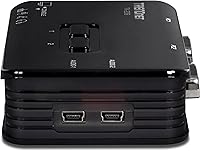
  • Keyboard/Mouse Input: Keyboard and mouse are connected via USB 1.1 ports.
  • Audio Support: A 3.5mm speaker jack and a 3.5mm microphone jack switch automatically with the active computer.
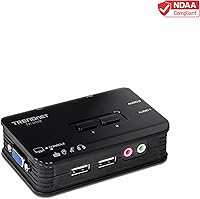
  • Switching Method: Users can switch between computers using front panel push buttons, hotkeys, or auto-scan mode.
  • Hot-Plug Support: Peripherals can be connected or disconnected without powering down the unit first.
  • Operating Systems: The device is compatible with both Windows and Linux operating systems.
  • Dimensions: The unit measures 2.76 x 3.86 x 1.1 inches.
  • Weight: The switch weighs 3.53 ounces.
  • Manufacturer: The product is manufactured by TRENDnet.
  • Power Source: The switch draws power from the connected USB ports rather than requiring a separate adapter.
  • Setup Requirement: No additional software or drivers are required for basic operation.
  • Compliance: The unit is listed as NDAA compliant for U.S. and Canada government procurement use.
  • Warranty: The product is backed by 2 years of TRENDnet manufacturer protection.

Related Reviews

TRENDnet TK-207K 2-Port USB KVM Switch
84%
90%
Setup and Installation
88%
Usability and Ease of Use
84%
Build Quality
60%
Hotkey Functionality
85%
Switching Speed
More
TRENDnet TK-240DP Dual Monitor DisplayPort KVM Switch
79%
88%
4K Signal Stability
84%
Dual Monitor Switching
71%
Value for Money
63%
Audio Switching Reliability
79%
USB Hub Functionality
More
TRENDnet TK-1603R 16-Port Rack Mount KVM Switch
74%
74%
Ease of Setup
81%
Build Quality
71%
Video Quality
78%
Switching Reliability
69%
OSD Interface
More
IOGEAR 2-Port USB DisplayPort KVM Switch
85%
88%
Ease of Use
92%
Display Quality
85%
Build Quality
89%
Compatibility with Mac and Windows
91%
Setup Process
More
JideTech JD-21UA 2-Port VGA KVM Switch
67%
91%
Ease of Setup
83%
Switching Reliability
78%
Video Output Quality
58%
Audio Switching
63%
USB Hub Functionality
More
IOGEAR 2-Port USB VGA KVM Switch
85%
89%
Ease of Use
72%
Video Quality
85%
Build Quality
92%
Value for Money
95%
Setup/Installation
More
ATEN CS22U 2-Port VGA KVM Switch
77%
93%
Ease of Setup
88%
Switching Reliability
71%
Video Quality
76%
Build Quality
67%
Cable Design & Length
More
StarTech SV231USB 2-Port VGA USB KVM Switch
81%
88%
Switching Reliability
91%
Setup & Out-of-Box Experience
79%
Video Quality
67%
Compatibility
74%
Value for Money
More
ATEN CS22HF 2-Port HDMI KVM Switch
78%
93%
Ease of Setup
91%
Switching Convenience
84%
Video Quality
78%
Build Quality
66%
Cable Length & Management
More
Steetek 8-Port USB 2.0 HDMI KVM Switch
78%
88%
Ease of Setup
62%
Hotkey Reliability
78%
Video Quality
81%
Peripheral Sharing
83%
EDID Performance
More

FAQ

This KVM switch is built for a single shared monitor setup, not dual-display use. Both computers connect to the same VGA output, so whichever PC you switch to takes over that one screen.

Not directly, since the TK-209K only accepts VGA input. You'd need a separate HDMI-to-VGA or DisplayPort-to-VGA adapter on the newer machine to make the connection work.

No, this switching kit is designed to work right out of the box. You just plug in your cables and use the front panel buttons or hotkeys to switch between computers.

It's sold as a kit, so the cables needed to connect your computers are typically included. It's still worth double-checking cable lengths against your desk setup before buying, especially if your towers sit farther away.

There are 3.5mm speaker and microphone jacks on the unit that automatically follow whichever computer is currently active. So when you switch PCs, your sound output and mic input switch right along with it, no manual replugging needed.

Officially, it's listed as compatible with Windows and Linux. Mac compatibility isn't confirmed in the official specs, so if you're running macOS, it's worth testing carefully or reaching out to TRENDnet support before relying on it for that setup.

Just two. This is strictly a 2-port switch, so if you're trying to manage three or more systems, you'll want to look at a higher-port-count model instead.

Based on real-world feedback, switching is quick and fairly seamless using either the hotkeys or the front button. There's no noticeable software delay since it's a hardware-based switch.

The TRENDnet TK-209K 2-Port USB KVM Switch has earned a reputation for durability, with plenty of users reporting years of reliable use. The main limitation is the VGA-only video connection, so pairing it with modern graphics cards may require an adapter, but the switch itself tends to keep working long-term.
A few users have mentioned needing to reseat their cables to get a stable connection, so that's the first thing worth checking. Make sure both the VGA and USB connections are fully plugged in and not loose, and try power-cycling the switch if the issue persists.