Overview

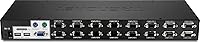
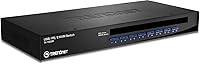
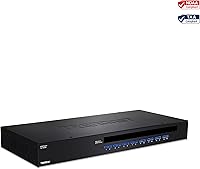
The TRENDnet TK-1603R 16-Port Rack Mount KVM Switch is a purpose-built solution for IT professionals who need to manage a bank of servers or computers from a single keyboard, monitor, and mouse setup. Designed with rack deployment in mind, this server management switch supports both USB and PS/2 connections — a practical touch that lets it work with older legacy hardware alongside modern systems. It carries NDAA and TAA compliance, which matters significantly for anyone purchasing on behalf of U.S. or Canadian government entities. One important note before buying: cables are sold separately, so budget accordingly when planning your installation.
Features & Benefits

This rack KVM switch packs in a genuinely useful set of controls. You can switch between computers using the on-screen display, keyboard hotkeys, or the front-panel push buttons — whatever fits your workflow. The auto-scan mode is particularly handy for monitoring environments, letting you set intervals anywhere between 10 and 100 seconds to cycle through active ports without touching a thing. Video output reaches up to 2048x1536 resolution over VGA, which holds up well for standard server management tasks. For larger setups, daisy-chain support lets you connect up to 16 units together, covering as many as 128 machines total. Audible feedback and dual LED indicators round out the awareness features nicely.

Best For

The TRENDnet 16-port switch is a strong fit for IT administrators running a rack of servers in a compact server room or small data center where desk space and peripheral costs need to stay lean. If your organization operates under government procurement requirements, the NDAA and TAA compliance is a real checkbox-tick, not just marketing copy. It also suits shops that have not fully retired their PS/2-era equipment — the dual-interface support means you won't need separate adapters for older keyboards or mice. And if there's any chance your infrastructure will grow, the daisy-chaining capability means scalable expansion without replacing hardware. The two-year warranty adds a reasonable layer of purchase confidence.

User Feedback

Buyers generally appreciate that this server management switch installs without much fuss — the plug-and-play behavior works as expected in most setups, and the build quality earns solid marks for a rack-mounted unit. The OSD navigation gets decent reviews too, described as more straightforward than some competing switches. That said, the recurring frustration is the separate cable requirement; people don't always notice this before purchasing, and the added cost stings. A handful of users have reported signal quality issues at maximum resolutions over longer cable runs, so plan your rack layout accordingly. Overall sentiment sits at a cautious positive — reliable for everyday use, but not without its rough edges.

Pros

  • Controls up to 16 servers from one console, cutting hardware redundancy and keeping your rack organized
  • Both USB and PS/2 peripherals are supported, so older keyboards and mice work without adapters
  • NDAA and TAA compliance makes government and regulated-sector procurement straightforward
  • Auto-scan mode monitors all ports hands-free, with intervals you can tune between 10 and 100 seconds
  • Daisy-chaining up to 16 units lets you manage as many as 128 machines without replacing your switch
  • OSD navigation is generally well-regarded by users — cleaner and more intuitive than many competing units
  • Audible feedback and dual LED indicators give you instant status awareness at a glance
  • Works across Windows, Linux, Unix, and Mac, so mixed OS server environments are not a problem
  • The rack-mount form factor is solid and stable, with build quality that earns consistent positive mentions
  • A two-year manufacturer warranty provides a reasonable safety net for a business-critical piece of hardware

Cons

  • Cables are not included, and buying the right lengths for a full 16-port setup adds a noticeable extra cost
  • VGA-only video output is a real constraint if your console monitor is a modern display without a VGA input
  • Some users report signal degradation at maximum resolution over longer cable runs, requiring careful rack planning
  • USB 1.1 compliance feels dated and may cause compatibility friction with certain newer peripheral devices
  • At its price point, the lack of any IP or remote access capability is a meaningful gap versus some rivals
  • The power adapter is external, which adds one more cable to manage in an already dense rack environment
  • A 3.9-star average rating suggests a meaningful minority of buyers have run into reliability or compatibility issues
  • No built-in cable management features, so keeping 16 connections tidy depends entirely on your own planning
  • Front-panel push buttons can be easy to bump accidentally in a busy rack environment
  • Replacement or compatible cables must come from TRENDnet-specified models, limiting sourcing flexibility

Ratings

The TRENDnet TK-1603R 16-Port Rack Mount KVM Switch earns a nuanced scorecard — our AI has processed verified buyer reviews from across global markets, actively filtering out incentivized, bot-generated, and duplicate submissions to surface what real IT professionals actually experienced. Scores reflect both where this server management switch genuinely delivers and where it falls short, so you can make a fully informed decision before committing at its mid-to-upper price point.
Ease of Setup
74%
26%
Most buyers report that the initial installation is straightforward for anyone with basic rack experience — plug in the power adapter, connect your console peripherals, and the switch is typically recognized without needing to install drivers. IT admins setting this up in a server closet for the first time generally get it running within an hour.
The absence of included cables means setup requires a separate purchasing step that some buyers overlook entirely, leading to frustrating delays on installation day. A small number of users also encountered hotkey configuration quirks during initial setup that required consulting the manual more than expected.
Build Quality
81%
19%
The metal chassis feels appropriately solid for a rack-mounted unit, and the front-panel buttons have a satisfying, positive click that holds up well under daily use in busy server environments. Verified purchasers consistently describe the unit as sturdy and well-fitted for standard 19-inch racks without any flex or rattle once mounted.
A handful of users noted that the port labeling can wear over time in high-traffic environments, and the external power adapter feels slightly underdone for an otherwise professional-grade piece of hardware. The overall finish, while functional, does not quite match the premium feel of higher-end competing brands at similar price points.
Video Quality
71%
29%
For standard server administration tasks — checking logs, running configuration commands, monitoring dashboards — the VGA output at typical resolutions performs cleanly and without noticeable artifacts. Users managing servers at 1280x1024 or similar practical resolutions report a consistently clear picture across all 16 ports.
At the maximum rated resolution of 2048x1536, particularly over longer cable runs, a measurable portion of users reported softening or slight signal degradation that made fine text harder to read. VGA as the sole video interface is also a real limitation for anyone running modern monitors without a legacy VGA input.
Switching Reliability
78%
22%
Day-to-day port switching via hotkeys and front-panel buttons is responsive and dependable for the majority of users, with the selected port confirmed quickly by both the audible beep and LED indicators. IT admins who switch between servers frequently throughout a workday generally find the response time acceptable for a non-IP KVM.
A subset of users reported occasional instances where a hotkey command was missed or the switch failed to register a port change cleanly, requiring a second input. These occurrences appear more common when switching rapidly between ports in quick succession rather than during deliberate, paced navigation.
OSD Interface
69%
31%
The on-screen display is functional and covers the essential tasks — naming ports, configuring scan groups, setting auto-scan intervals — without requiring you to leave the console. Users familiar with older KVM OSD interfaces will find the layout relatively intuitive and consistent with category conventions.
Compared to some competing switches in this tier, the OSD menu navigation feels a bit dated and slow, with several buyers describing multi-step processes for tasks that should take one or two keystrokes. First-time KVM users may find the menu logic less intuitive than expected without spending time with the documentation.
Auto-Scan Performance
76%
24%
The programmable 10–100 second scan interval gives administrators genuine flexibility for monitoring scenarios, whether you need a fast sweep across active servers or a slower pace for detailed visual checks. Users running light monitoring duties across multiple machines found this feature genuinely useful for catching anomalies without being physically present at each machine.
Auto-scan cycles through all configured ports including inactive ones by default unless scan groups are manually set up through the OSD, which adds configuration overhead. A few users noted that the scan does not always resume correctly after a manual port selection interruption, requiring a restart of the scan sequence.
Compatibility
83%
The dual USB and PS/2 support on both the computer and console sides is a standout practical advantage, particularly for organizations still running a mix of legacy servers alongside modern hardware. Cross-platform OS support covering Windows, Linux, Unix, and Mac means this rack KVM switch works across almost any realistic server environment without driver installation.
USB 1.1 compliance is the one notable compatibility caveat — while it covers standard keyboards and mice without issue, it can create friction with certain newer peripheral devices that expect USB 2.0 negotiation. A small number of Mac users also reported needing to adjust settings to get full keyboard functionality working as expected.
Cable Ecosystem
47%
53%
TRENDnet does offer a clear range of compatible cables in multiple lengths — 6, 10, and 15 feet — so once you know which models to order, sourcing them is at least straightforward through TRENDnet's own catalog. Buyers who plan ahead and order cables with the switch avoid most of the friction this constraint creates.
Requiring proprietary TRENDnet-branded cables rather than standard VGA or USB cables is a recurring frustration, both at initial setup and when replacements are needed later. The fact that none are included in the box at this price point is widely considered a shortcoming, and total cost of ownership rises noticeably once 16 cable sets are factored in.
Daisy-Chain Capability
86%
The ability to chain up to 16 units and manage 128 machines from a single console is a legitimate infrastructure advantage for growing organizations that want to avoid a costly full replacement when they add server capacity. Users who have actually implemented daisy-chained setups report that the feature works as documented, with consistent switching performance across units.
The 30-meter total daisy-chain distance limit requires thoughtful rack room planning, and exceeding it will result in signal issues that are not always easy to diagnose. Setting up a multi-unit daisy-chain configuration also requires more deliberate planning and OSD configuration time than a single-unit deployment.
Value for Money
63%
37%
For buyers who specifically need NDAA and TAA compliance in a 16-port rackmount KVM, the TRENDnet 16-port switch occupies a relatively competitive position since compliant options at this port count are limited. The two-year warranty and broad OS compatibility add legitimate value for business deployments where reliability over time matters.
At its price point, the VGA-only output, USB 1.1 standard, excluded cables, and lack of any remote access capability leave some buyers feeling the value equation does not fully hold up against newer competitors offering more modern feature sets for similar or lower prices. For purely performance-focused buyers without compliance requirements, alternatives deserve serious comparison shopping.
Rack Integration
82%
18%
The 1U rack footprint is efficient and the unit mounts cleanly into standard 19-inch racks without adapter hardware, which experienced rack builders appreciate. The physical dimensions are consistent and predictable, making cable management planning straightforward for a well-organized server room layout.
The external power adapter is the main rack integration annoyance — it adds a loose cable to manage and takes up a PDU outlet that an internal power supply would eliminate. A small number of users also noted that the rack-mount ears, while functional, feel slightly less robust than those on competing enterprise-grade switches.
Indicator Feedback
79%
21%
The dual-LED system — red for online status, green for the selected port — gives a fast visual read on which machines are live and which port is active without navigating any menu. The audible beep on port switching is a small but genuinely useful touch that confirms an action even when your eyes are elsewhere in the rack.
The LED brightness, while adequate in a dimly lit server room, can be difficult to read under bright ambient lighting conditions in some office environments. There is no way to adjust LED brightness or disable the audible beep for environments where noise is a concern, which a minority of users flagged as an oversight.
Documentation & Support
72%
28%
TRENDnet provides a reasonably detailed product manual that covers OSD configuration, hotkey commands, and daisy-chain setup with enough clarity for most IT professionals to work through independently. The two-year manufacturer warranty provides a concrete support backstop, and TRENDnet's support channels are generally accessible for follow-up questions.
Some users reported that troubleshooting documentation for edge-case compatibility issues — particularly around specific Linux distributions or older PS/2 hardware combinations — required reaching out to support rather than finding answers in the manual. Response times from TRENDnet support received mixed reviews, with some buyers waiting longer than expected for resolution on technical queries.

Suitable for:

The TRENDnet TK-1603R 16-Port Rack Mount KVM Switch is purpose-matched for IT administrators and systems engineers who need to manage a rack full of servers without running a separate keyboard, monitor, and mouse to every machine. It fits naturally into small-to-mid-sized data centers, server closets, and on-premise server rooms where space efficiency matters and hands-on management is routine. Organizations under U.S. or Canadian government contracts will find the NDAA and TAA compliance particularly valuable, since sourcing non-compliant hardware can create real procurement headaches. The dual USB and PS/2 support is a genuine practical advantage for mixed environments where some older hardware hasn't been retired yet — you're not forced to choose one interface standard or buy adapters. Teams planning to grow their infrastructure will also appreciate the daisy-chain architecture, which allows scaling up to 128 machines across 16 units without ripping out what you've already installed.
Not suitable for:

The TRENDnet TK-1603R 16-Port Rack Mount KVM Switch is not the right call for buyers expecting a complete out-of-the-box experience — cables are sold separately, and depending on your rack layout and cable lengths needed, that additional cost adds up quickly. If you're running a fully modern setup with DisplayPort or HDMI monitors, the VGA-only output is a hard limitation; there's no adapter path that preserves quality at higher resolutions over long runs. Home users or small offices managing just two or three computers will find this switch significantly over-engineered and over-priced for their actual needs. If your environment is entirely USB-based and you have no legacy PS/2 hardware, you're paying for dual-interface support you'll never use. Buyers who need IP-based or remote KVM access over a network should also look elsewhere, since this is a strictly local, physical-access switch with no remote management capability.
Specifications

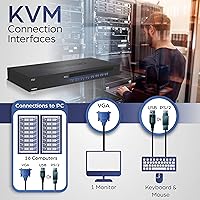
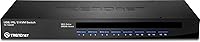
  • Computer Ports: The switch provides 16 computer-side ports using VGA HDB 15-pin female connectors for connecting servers or desktops.
  • Console Ports: The console side offers one USB Type-A and PS/2 keyboard port, one USB Type-A and PS/2 mouse port, and one VGA HDB 15-pin female monitor port.
  • Max Resolution: Video output supports resolutions up to 2048x1536 over VGA, suitable for standard server administration and monitoring tasks.
  • Switching Methods: Computers can be selected via the on-screen display menu, programmable keyboard hotkey commands, or front-panel push buttons.
  • Auto-Scan Interval: The auto-scan feature cycles through active ports at user-defined intervals ranging from 10 to 100 seconds, configurable through the OSD menu.
  • Daisy-Chain: Up to 16 units can be daisy-chained together, allowing centralized control of as many as 128 computers from a single console.
  • USB Standard: The switch is USB 1.1 compliant for keyboard and mouse connections on both the computer and console sides.
  • Power Supply: The included external power adapter accepts 100–240V AC at 50–60 Hz input and delivers 9V DC at 1A output.
  • Power Consumption: Maximum power draw under full load is rated at 14 watts, making it suitable for continuous 24/7 rack operation.
  • Dimensions: The unit measures 407 x 164 x 45 mm (16 x 6.5 x 1.8 in), occupying 1U of rack space in a standard 19-inch rack.
  • Weight: The switch weighs 1.89 kg (4.17 lb), which is typical and manageable for a 1U rack-mounted device.
  • Operating Temp: The switch is rated to operate reliably in environments between 0°C and 40°C (32°F and 104°F).
  • Storage Temp: When not in use, the unit can be safely stored in temperatures ranging from -20°C to 60°C (-4°F to 140°F).
  • Humidity Rating: Maximum operating humidity is 80% non-condensing, covering most typical indoor server room conditions.
  • Certifications: The switch holds CE, FCC, NDAA, and TAA compliance certifications, meeting requirements for U.S. and Canadian government procurement.
  • Compatible OS: Supported operating systems include Windows, Linux, Unix, and Mac, covering the most common server and workstation environments.
  • Status Indicators: Each port has two LEDs — a red online indicator and a green select indicator — providing immediate visual port status at a glance.
  • Audible Feedback: The switch emits an audible beep when a port is selected, confirming the switch action without requiring visual confirmation.
  • Cables Included: No KVM cables are included in the box; compatible cables must be purchased separately using TRENDnet models TK-CU06, TK-CU10, or TK-CU15.
  • Warranty: TRENDnet backs the switch with a 2-year manufacturer protection plan covering defects in materials and workmanship.

Related Reviews
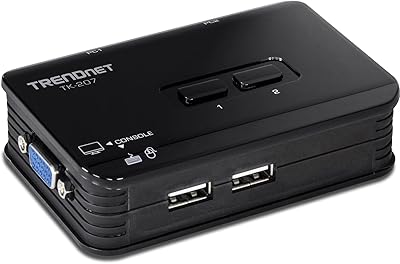
TRENDnet TK-207K 2-Port USB KVM Switch
84%
90%
Setup and Installation
88%
Usability and Ease of Use
84%
Build Quality
60%
Hotkey Functionality
85%
Switching Speed
More
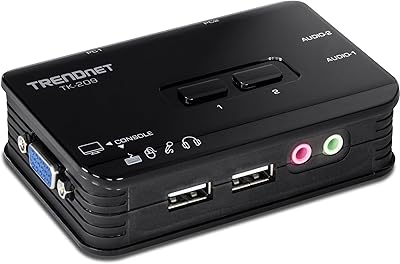
TRENDnet TK-209K 2-Port USB KVM Switch with Audio
86%
88%
Ease of Use
91%
Value for Money
84%
Audio Quality
80%
Build Quality
86%
Resolution Support
More
TRENDnet TK-440DP 4-Port Dual Monitor DisplayPort KVM Switch
85%
92%
Video Quality
85%
Ease of Use
90%
Compatibility
88%
Build Quality
87%
USB Hub Functionality
More
TRENDnet TK-240DP Dual Monitor DisplayPort KVM Switch

79%
88%
4K Signal Stability
84%
Dual Monitor Switching
71%
Value for Money
63%
Audio Switching Reliability
79%
USB Hub Functionality
More
MT-VIKI MT-1601HK-C 16-Port HDMI KVM Switch
80%
88%
Switching Reliability
81%
EDID Storage Performance
79%
Build Quality
62%
IR Remote Usability
86%
Value for Money
More
TRENDnet TEG-S17D 16-Port Gigabit Switch
86%
91%
Build Quality
96%
Ease of Setup
88%
Network Performance
89%
Port Count & Density
74%
Thermal Management
More
TESmart HKS1601 16-Port HDMI KVM Switch
80%
93%
Port Capacity & Scalability
89%
EDID Emulation Reliability
74%
Switching Speed & Responsiveness
81%
LAN & RS232 Remote Control
76%
Video Output Quality
More
TRENDnet TEG-S16DG 16-Port Gigabit Switch
84%
96%
Ease of Setup
91%
Build Quality
89%
Network Performance
97%
Noise Level
84%
Value for Money
More
Cisco SG100-16 16-Port Gigabit Network Switch
72%
91%
Ease of Setup
54%
Build Quality
83%
Port Performance
49%
Value for Money
47%
Long-Term Reliability
More
Zyxel GS1100-16 16-Port Gigabit Ethernet Switch
85%
88%
Performance
94%
Ease of Setup
91%
Energy Efficiency
85%
Build Quality
92%
Noise Levels
More

FAQ

Yes, cables are not included in the box — this catches a lot of buyers off guard. You will need TRENDnet-branded KVM cables: the TK-CU06 for 6-foot runs, TK-CU10 for 10-foot, and TK-CU15 for 15-foot. Factor that cost in before you finalize your order, especially if you are wiring up all 16 ports.

Either works fine. The console ports accept both USB and PS/2 keyboards and mice, so you can plug in whatever you already own. If your keyboard and mouse are USB, just use the USB ports on the console side and leave the PS/2 ports unused.

On the computer-side ports, each connected machine can use either a USB or PS/2 connection via the KVM cable you purchase. PS/2 is the older round-connector interface found on legacy servers and workstations, while USB is the modern standard. The dual support means you are not locked out of using older hardware that lacks USB ports.

It works across Windows, Linux, Unix, and Mac, so mixed-OS server racks are not a problem. Since it operates at the hardware level through keyboard, video, and mouse signals, it doesn't need OS-specific drivers for basic switching functionality.

You connect a second switch to the first using a dedicated daisy-chain port, then repeat the process for up to 16 units total. From your single console, you can then access any of the connected computers across all chained switches. It is a practical way to grow your infrastructure without replacing your existing switch when you add more servers.

Yes, it carries both TAA (Trade Agreements Act) and NDAA (National Defense Authorization Act) compliance certifications. In practical terms, this means the product meets sourcing requirements for U.S. federal government contracts and defense-related procurement. If you are purchasing for a government agency or a contractor with federal compliance obligations, this switch qualifies; many comparable units do not.

In most standard server management scenarios, video quality holds up well. However, some users have reported that at the upper resolution limits and over longer cable runs, there can be minor signal degradation. Keeping cable runs as short as your rack layout allows, and using quality TRENDnet-specified cables, will help you get the most consistent image quality.

The easiest method for fast switching is keyboard hotkeys, which let you jump to a specific port with a key sequence without touching the menu at all. You can also just press the physical push buttons on the front panel for quick one-press access. The OSD is more useful for setting up scan groups or adjusting configuration settings.

Yes, the unit is designed for standard 19-inch racks and takes up 1U of space. The rack-mount hardware should be included, but it is worth double-checking the box contents when it arrives to confirm all mounting brackets and screws are present before you start your installation.

The connected computers themselves will keep running — they are powered independently and the switch just handles the keyboard, video, and mouse signals. You will lose console access to all machines through the switch until power is restored, but no running processes or data on the servers should be affected by a switch power interruption.

Where to Buy