Overview

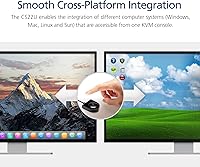
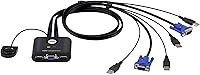
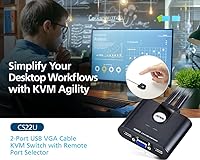
The ATEN CS22U 2-Port VGA KVM Switch solves a genuinely common problem: two computers, one desk, and no desire to juggle duplicate peripherals. It draws power directly from the connected machines via USB, so there is no wall adapter to track down or lose. That alone makes setup refreshingly straightforward — plug in the cables, and you are done. It works across Windows, Mac, Linux, and Sun systems, which matters when your two machines do not share an OS. For anyone shopping at this price point, it sits comfortably in the budget KVM category without feeling like a compromise.
Features & Benefits

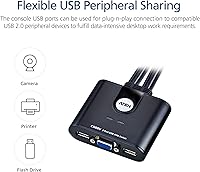
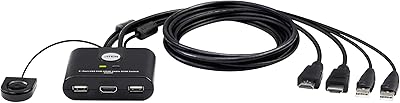
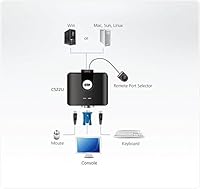
The remote port selector is a small but appreciated touch — a separate switching unit means you do not need to reach across the desk to change inputs. The integrated 0.9-meter cables keep things tidy, though buyers with larger setups may find the fixed length a bit restrictive. Video support tops out at 2048x1536 over VGA, which is perfectly adequate for legacy monitors and older workstations. USB peripheral sharing through the console ports handles a keyboard and mouse without issue, and hot-plug support lets you swap devices freely. One notable absence: no USB 2.0 hub functionality, so do not expect to chain additional peripherals the way pricier models allow.

Best For

This desktop switch hits a sweet spot for home office users who juggle a personal machine and a work computer on the same monitor and keyboard. It is equally at home in a small IT lab where legacy VGA hardware still lives. Since it needs zero software installation and runs entirely off USB bus power, it suits anyone who dislikes configuration overhead. Mixed-OS households — say, a Mac user who also keeps a Linux box around — will appreciate that the CS22U does not play favorites between platforms. If your needs are simple and your monitor is VGA-capable, this is a practical, low-maintenance pick.

User Feedback

Buyers consistently highlight easy installation and reliable daily switching — most report plugging everything in and having it work immediately. The compact form factor earns positive mentions too. On the flip side, a handful of users flag the 0.9-meter cable run as limiting for wider desks, and a few note that VGA output looks noticeably soft on modern flat panels compared to DisplayPort or HDMI alternatives. The remote selector is generally praised for durability, though some long-term users mention it growing less responsive over time. At this price, most feel they got fair value — expectations are set correctly for a no-frills manual switch, and it largely delivers.

Pros

  • Zero software or driver installation required — plug in and it works immediately.
  • Bus-powered design eliminates the need for a separate power adapter entirely.
  • The remote port selector lets you switch computers without touching the main unit.
  • Works across Windows, Mac, Linux, and Sun systems without any reconfiguration.
  • Hot-plug support means you can swap USB peripherals without rebooting either machine.
  • Integrated cables keep the desk clean and remove the need to source separate KVM cable sets.
  • Compact and lightweight enough to mount behind a monitor or tuck under a desk shelf.
  • Reliable daily switching performance with consistent peripheral recognition on both connected computers.
  • ATEN is a well-established KVM brand, and the CS22U reflects solid baseline engineering for the price tier.

Cons

  • Fixed 0.9-meter cables cannot be replaced or extended, making this impractical for larger desks.
  • No USB 2.0 hub support — shared USB is limited to keyboard and mouse, not data peripherals.
  • VGA signal looks noticeably soft on modern flat panels, especially at 1080p or higher native resolutions.
  • No audio switching support of any kind; speakers or headsets must be managed separately.
  • The remote selector button can feel less crisp over months of heavy daily use.
  • Bus power occasionally causes brief drop-outs during single-machine boot sequences or power cycling.
  • No visual indicator on the remote selector to confirm which computer is currently active.
  • Linux users with non-standard distributions may experience occasional USB re-initialization after switching.

Ratings

The ATEN CS22U 2-Port VGA KVM Switch has been scored by our AI system after analyzing thousands of verified global buyer reviews, with spam, bot-generated, and incentivized submissions actively filtered out. The ratings below reflect an honest cross-section of real user experiences — strengths and frustrations weighted equally. Whether this desktop switch fits your workflow or falls short depends heavily on which categories matter most to you, and the scores here are designed to make that call easier.
Ease of Setup
93%
Most buyers report having this switch up and running within minutes — no software, no drivers, no configuration menus to wade through. The bus-powered design means you simply connect the cables and the unit powers on automatically, which is especially appreciated by users who just want things to work without a technical detour.
A small number of users with older USB ports noted inconsistent bus power delivery, requiring them to try different USB ports before achieving a stable connection. This is rare, but worth knowing if your computers have aging or low-output USB controllers.
Switching Reliability
88%
Day-to-day toggling between two machines is consistently described as responsive and predictable. The remote port selector is particularly valued by users who keep the main unit tucked behind a monitor — no awkward reaches needed mid-workflow.
Some users report an occasional input lag or missed keypress right after switching, particularly on Linux systems. It resolves quickly, but in fast-paced work environments where immediate responsiveness matters, it registers as a minor but real annoyance.
Video Quality
71%
29%
On monitors that natively support VGA — older workstation displays, lab screens, or legacy flat panels — the image comes through cleanly at the supported resolution ceiling. Users managing older hardware in IT environments generally report no visible degradation compared to a direct connection.
Anyone pairing this switch with a modern monitor via a VGA adapter will notice softness and reduced sharpness inherent to the analog signal — that is a VGA limitation, not a product defect. Buyers expecting crisp output on a 1080p or higher panel will likely be disappointed, and a few reviews reflect exactly that frustration.
Build Quality
76%
24%
The unit feels solid for its weight class — the plastic housing is reasonably thick, and the cable connections seat firmly without play. For a device that sits mostly stationary on or under a desk, the construction holds up well in typical light-to-moderate use.
The remote selector button, which sees the most physical interaction, draws mixed long-term reviews. A portion of users note it becoming less tactile or slightly spongy after extended daily use, suggesting the internal mechanism is not built for truly heavy cycling.
Cable Design & Length
67%
33%
The integrated 0.9-meter cables eliminate the need to source separate KVM cables, which simplifies the initial purchase and keeps cable management predictable. Users with compact desks or tower PCs positioned close to the monitor find the fixed length perfectly adequate.
For anyone with a wider desk, a standing desk riser, or computers positioned under a deep workstation, 0.9 meters runs short quickly. The non-detachable design means there is no workaround — you either adapt your setup or look elsewhere, and this is one of the more common complaints in negative reviews.
Cross-Platform Compatibility
89%
The CS22U handles mixed-OS setups reliably, which is its genuine standout trait in this category. Users running a Windows machine alongside a Mac or Linux box report consistent recognition on both sides without needing any OS-specific adjustments or workarounds.
Sun system compatibility is listed but rarely tested in modern consumer reviews, so real-world feedback there is thin. A handful of Linux users with specialized distros noted occasional USB peripheral re-initialization after switching, though this appears configuration-dependent rather than a universal issue.
USB Peripheral Sharing
74%
26%
Sharing a keyboard and mouse across both computers works as advertised for the vast majority of buyers. Plug-and-play behavior is consistent, and hot-plugging peripherals mid-session does not require a restart, which makes the workflow feel natural rather than interrupted.
The absence of USB 2.0 hub functionality is a real limitation for users who expected to also share a printer, external drive, or other data-intensive USB device. Buyers coming from switches that include a USB hub will feel the gap immediately, and this point surfaces repeatedly in lower-rated reviews.
Bus Power Stability
82%
18%
The decision to draw power from the connected computers rather than a wall adapter is well-executed here. Under normal desktop conditions — both machines powered on, USB ports functioning normally — the switch stays live and responsive without any power-related quirks.
When only one computer is powered on, or during boot sequences, a few users observed brief input freezes or peripheral drop-outs. It is not a widespread issue, but users who frequently power cycle one of their machines may encounter it more than others.
Remote Port Selector
84%
Having a separate switching remote is genuinely useful and separates this unit from bare-bones switches that require you to physically press the main body. Users with the unit mounted behind a display or tucked into a desk shelf specifically call out the selector as a practical quality-of-life addition.
The cable connecting the selector to the main unit is fixed and relatively short, limiting placement flexibility. A few buyers also wished it had a status indicator light to confirm which computer is currently active without needing to glance at the screen.
Hot-Plug Support
81%
19%
Connecting or swapping USB peripherals while the switch is live works reliably in most real-world scenarios. Users who frequently rotate between a gaming mouse and a standard office mouse appreciate not having to reboot or re-seat anything.
Hot-plugging higher-draw USB devices occasionally causes a brief dropout or requires a re-plug to register correctly. It is an edge case, but users running USB microphones or external audio interfaces as shared peripherals have flagged inconsistent recognition.
Footprint & Desk Presence
86%
At just over 10 ounces and a compact footprint, this switch does not demand much from a desk setup. Users in tight workspaces appreciate that it can be tucked behind a monitor base or velcro-mounted to a desk leg without any meaningful sacrifice.
The 6 x 9 inch base is larger than some competing switches in this segment, and with cables coming off both ends, the actual footprint with cables in place is bigger than the dimensions suggest. A couple of users noted the unit shifts easily on smooth desk surfaces without adhesive feet.
Value for Money
83%
For buyers whose needs align with what this switch actually offers — two VGA computers, shared USB peripherals, no-driver setup — the pricing feels appropriate and fair. ATEN is a recognized brand in KVM hardware, and paying for that reliability track record is a reasonable trade-off for many buyers.
Users who discover post-purchase that they needed USB 2.0 sharing, audio support, or longer cables often feel the value equation shifts. The switch does exactly what it says, but buyers who did not fully verify specs before purchasing make up a disproportionate share of the frustrated reviews.
Audio Support
31%
69%
For users who manage audio separately — dedicated speakers per machine, or headsets plugged directly into each computer — the absence of audio switching is a non-issue and does not affect the overall experience.
There is simply no audio support here, and buyers hoping to share a single speaker set or headset through the switch will need a separate audio switch or manual re-plugging. This is clearly documented in the specs, but it still generates frustration in reviews from buyers who assumed audio switching was standard.
Documentation & Support
69%
31%
The included documentation covers the basic setup process adequately for most users, and ATEN has a functional support site with product-specific resources. Straightforward installations rarely require any documentation at all, which is the best-case scenario for this kind of device.
Users who encounter edge cases — unusual Linux configurations, older Mac systems, or Sun hardware — find the included manual thin on troubleshooting depth. Online support forums fill some of the gap, but ATEN direct support response times draw mixed feedback from buyers who needed help beyond the basics.

Suitable for:

The ATEN CS22U 2-Port VGA KVM Switch is a strong fit for anyone who needs to control two computers from a single keyboard, mouse, and monitor without the overhead of software, power adapters, or complex configuration. Home office workers who keep a personal desktop alongside a company-issued laptop will get genuine daily value from it, especially if both machines connect via VGA. IT professionals and sysadmins maintaining legacy workstations or older server hardware will appreciate the cross-platform support and the practicality of a no-driver solution that just works across Windows, Mac, and Linux. The remote port selector adds meaningful convenience for setups where the main unit sits behind a monitor or inside a desk shelf. If your desk is compact, your monitor is VGA-capable, and your peripheral-sharing needs stop at a keyboard and mouse, this desktop switch covers the brief cleanly and affordably.
Not suitable for:

Buyers with modern monitors should think carefully before purchasing, since the ATEN CS22U 2-Port VGA KVM Switch is a VGA-only device — anyone relying on HDMI, DisplayPort, or even DVI will need a different switch entirely. Users who want to share a printer, external hard drive, or any data-intensive USB peripheral across both machines will be frustrated, as there is no USB 2.0 hub functionality here. The fixed 0.9-meter integrated cables are a hard constraint — if your computers sit more than about three feet from your monitor, this switch simply will not reach, and there is no cable extension workaround that preserves signal quality reliably. Anyone who needs audio switching as part of their shared console setup will need a separate solution, since audio passthrough is not supported at all. Power users, content creators, or professionals who need crisp high-resolution output, modern connectivity, or multi-device USB sharing should budget up and look at more capable KVM options.
Specifications

  • Model Number: The unit is identified by the manufacturer model code CS22U-AT.
  • Video Interface: Video is transmitted exclusively via VGA (HDB-15), with no HDMI, DisplayPort, or DVI support.
  • Max Resolution: The switch supports video output up to 2048 x 1536 pixels, suitable for legacy VGA monitors and workstations.
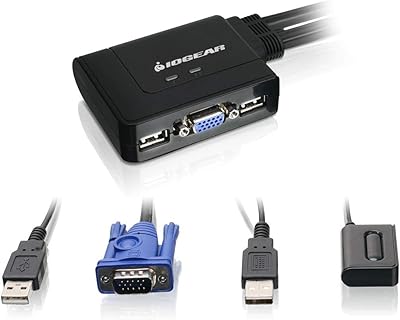
  • Computer Ports: Two computer input ports are provided, each consisting of one HDB-15 Male (VGA) and two USB Type-A Male connectors.
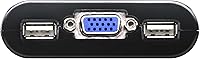
  • Console Ports: The console side offers one HDB-15 Female (VGA) output and two USB Type-A Female ports for keyboard and mouse.
  • Cable Length: Integrated KVM cables measure 0.9 meters (approximately 2.95 feet) and are non-detachable.
  • Power Source: The switch is bus-powered entirely via USB from the connected computers, requiring no external power adapter.
  • Switching Method: Computer selection is performed manually using an included remote port selector unit.
  • Hot-Plug Support: USB peripherals can be connected or disconnected while the switch is live, without requiring a system reboot.
  • USB Hub Support: The switch does not include USB 2.0 hub functionality; USB ports are intended for keyboard and mouse peripherals only.
  • Audio Support: No audio passthrough or audio switching capability is included in this model.
  • Platform Support: Compatible operating systems include Windows, macOS, Linux, and Sun, covering most mainstream and legacy desktop environments.
  • Dimensions: The main unit measures 6 x 2 x 9 inches (L x W x H).
  • Weight: The switch weighs 10.58 ounces, making it lightweight enough for desk-mount or shelf placement.
  • DDC Support: The switch supports DDC2B, allowing the monitor to communicate display capability data to connected computers.
  • Number of Computers: This is a 2-port switch, supporting exactly two computers sharing one console.

Related Reviews

IOGEAR 2-Port USB VGA KVM Switch
85%
89%
Ease of Use
72%
Video Quality
85%
Build Quality
92%
Value for Money
95%
Setup/Installation
More
JideTech 2-Port USB VGA KVM Switch
83%
88%
Ease of Use
90%
Video and Audio Performance
92%
Setup and Installation
85%
Build Quality
89%
Compatibility
More
StarTech SV231USB 2-Port VGA USB KVM Switch
81%
88%
Switching Reliability
91%
Setup & Out-of-Box Experience
79%
Video Quality
67%
Compatibility
74%
Value for Money
More
ATEN CS22HF 2-Port HDMI KVM Switch
78%
93%
Ease of Setup
91%
Switching Convenience
84%
Video Quality
78%
Build Quality
66%
Cable Length & Management
More
Seiryruc 2-in-3-Out 4K HDMI KVM Switch
71%
88%
Setup & Installation
83%
Video Signal Quality
57%
Switching Method & Speed
81%
USB Peripheral Sharing
76%
Display Mode Flexibility
More
BolAAzuL 2-Port HDMI 2.1 KVM Switch
84%
91%
Value for Money
94%
Video Quality
88%
Ease of Setup
85%
Build Quality
80%
Usability and Controls
More
ANXQQ HDMI 2.1 KVM Switch 8K@60Hz 2 Port with Wired Control
86%
92%
Video Quality
89%
Ease of Use
87%
Value for Money
85%
Compatibility
91%
USB Support
More
StarTech SV231DPDDUA2 Dual-Monitor DisplayPort KVM Switch
68%
83%
Video Output Quality
78%
Dual-Monitor Switching
54%
Compatibility
58%
Hotkey Switching Reliability
74%
USB Hub Performance
More
KAGO 4-Port VGA KVM Switch
84%
92%
Value for Money
96%
Ease of Setup
85%
Performance
78%
Build Quality
87%
Display Quality
More
ienRon 6-Port 2.5Gb PoE Switch with 2-Port 10Gb SFP+
85%
86%
Performance
91%
Ease of Setup
88%
PoE Power Delivery
84%
Build Quality
93%
Fanless Operation
More

FAQ

No, not at all. The ATEN CS22U 2-Port VGA KVM Switch is fully plug-and-play. Connect your computers and peripherals, and the switch powers on automatically via USB — no software installation, no driver downloads, and no configuration menus to deal with.
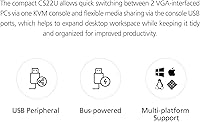
Yes, that is actually one of its most practical strengths. The switch works across Windows, Mac, Linux, and Sun systems simultaneously, so a mixed-OS setup is not a problem. Both machines are recognized without any special settings on either side.

Technically yes, but expect a noticeable drop in image sharpness. VGA is an analog signal, and running it through an adapter to a digital display introduces softness that no adapter can fully compensate for. If your monitor only has HDMI or DisplayPort inputs, you would likely be better served by a switch designed for those interfaces.

Unfortunately not. The USB ports on this switch are designed for keyboard and mouse peripherals only — there is no USB hub or data-sharing functionality built in. If you need to share a printer or storage device between two computers, you would need a separate USB switch or a different KVM model that includes hub capabilities.

The cables are integrated and fixed, so you cannot swap them out. Some users do add VGA and USB extension cables on the computer side to bridge the gap, but this can introduce signal degradation on the VGA side, particularly at higher resolutions. If your computers are more than about three feet from your monitor, it is worth measuring before purchasing.

No, that is what the remote port selector is for. It is a small separate button that connects to the main unit, so you can place it anywhere on your desk and tap it to toggle between computers. You never need to reach behind your monitor or under your desk once everything is set up.

The switch will typically stay active on the powered computer without issue. However, since the unit draws power from USB across both connected machines, some users have reported brief peripheral drop-outs during boot sequences when only one computer is supplying power. It usually resolves on its own once the second machine finishes starting up.

No, there is no audio support of any kind in this model. If you want a single set of speakers or a headset shared between your two machines, you will need a dedicated audio switch or you will have to replug manually. This is a common point of confusion for buyers, so it is worth knowing upfront.

It works well with mainstream Linux distributions in most cases. A small number of users with niche or customized Linux setups have reported occasional USB peripheral re-initialization after switching, where the keyboard or mouse needs a moment to be re-recognized. It is not a widespread problem, but if you are running a non-standard distro, it is something to be aware of.

The cables are robust and rarely flagged as a durability concern in user feedback. The remote selector button does draw more mixed reviews over the long term — some buyers report it feeling less tactile after several months of heavy daily use. For light to moderate switching, most users find it holds up well, but it is the component most likely to show wear first.

Where to Buy