Overview

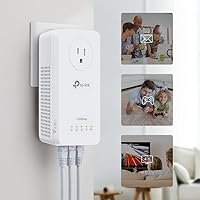
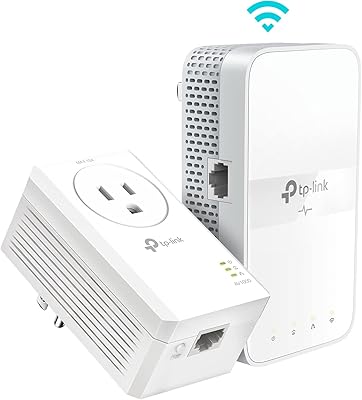
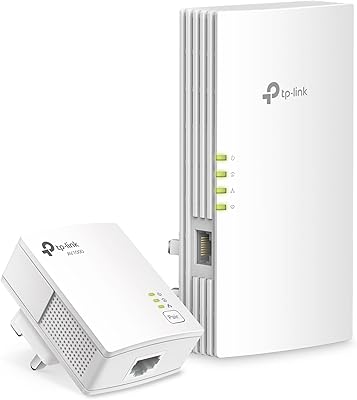
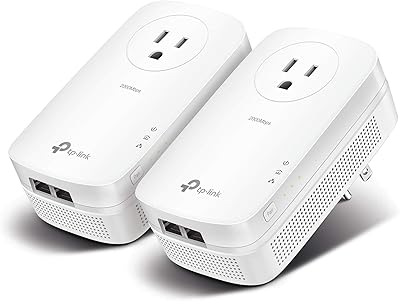
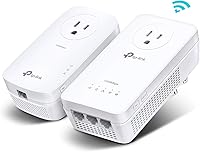
The TP-Link TL-WPA8631P KIT Powerline WiFi Extender takes a fundamentally different approach to dead zones than a typical range extender — instead of rebroadcasting a weakened wireless signal, it carries your network through the electrical wiring already inside your walls. That distinction matters in homes where concrete floors, brick walls, or sheer distance defeat even the strongest router. The kit ships with two adapters and Ethernet cables, and setup really is as close to plug-and-play as networking hardware gets. It follows the HomePlug AV2 standard, which means solid interoperability with other compliant devices. One honest caveat upfront: actual speeds depend heavily on your home's wiring age and quality, so treat the rated maximums as a ceiling, not a guarantee.
Features & Benefits

The backbone of this powerline extender kit is its ability to push network traffic through electrical wiring across distances up to 750 feet — enough to reach most detached garages or far-end bedrooms without a single new cable. On the wireless side, the extender unit broadcasts on both the 5 GHz and 2.4 GHz bands, giving nearby devices solid headroom for 4K streaming or video calls. Three Gigabit ports on the remote adapter handle wired connections for TVs, consoles, or a desktop that needs rock-solid latency. The built-in passthrough outlet means you are not losing a wall socket to the adapter — a small but practically useful detail. Pairing the two units takes about sixty seconds; there is no app, no account, no fuss.

Best For

This plug-and-play network extender earns its place in homes where Wi-Fi genuinely struggles — think three-story townhouses, basements below a concrete slab, or garages separated from the main living space. Gamers and anyone who streams regularly will appreciate having a wired backhaul option to a far-off room without the hassle of fishing Ethernet through walls. It is also a solid pick for small home offices that need a dependable, consistent connection for video conferencing or large file transfers. If you have already tried a Wi-Fi repeater and found it underwhelming — which is common — powerline technology is the logical next step before committing to a full mesh system overhaul. Keep both adapters on the same electrical circuit; cross-circuit setups are the top cause of failed installations.

User Feedback

Across thousands of verified reviews, the TP-Link powerline adapter set earns consistent praise for how quickly it gets working — most buyers report being online within minutes of unboxing. Long-term stability is another frequent highlight, with many users noting the units have run without a reset for months on end. The criticism centers on throughput: real-world speeds in homes with older or mixed wiring often fall well short of the rated figures, and some buyers are caught off guard by the same-circuit requirement. The passthrough outlet receives specific positive mentions as a well-appreciated design choice. TP-Link customer support gets mixed marks — some buyers find it responsive, others considerably less so.

Pros

  • No need to drill walls or run cable — the electrical wiring you already have does the heavy lifting.
  • Setup takes under five minutes with no app, no account, and no configuration menus required.
  • Three Gigabit ports on the extender end handle a console, TV, and desktop simultaneously without a separate switch.
  • The integrated passthrough outlet means you do not sacrifice a wall socket to the adapter.
  • Long-term stability is strong — most buyers report months of continuous use without needing a reboot.
  • Dual-band Wi-Fi on the extender unit covers nearby wireless devices on top of the wired connections.
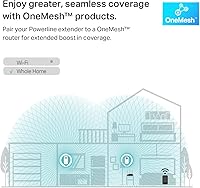
  • EasyMesh support lets TP-Link router owners fold this kit into a broader roaming network.
  • A clear, practical solution for basements, garages, and upper floors that Wi-Fi simply cannot reach.
  • Wired backhaul dramatically reduces latency compared to a wireless repeater for gaming or streaming.

Cons

  • Real-world speeds in older homes can fall drastically short of the rated maximums — sometimes by more than half.
  • Both adapters must be on the same electrical circuit; cross-panel setups will not pair and are hard to diagnose.
  • The same-circuit requirement is not clearly communicated in the packaging, leading to avoidable returns.
  • Incompatible with surge protectors, which rules out a common installation preference for sensitive electronics.
  • Wi-Fi coverage from the extender unit is limited to its immediate area — it is not a secondary router.
  • Customer support quality is inconsistent, with some buyers reporting scripted responses that do not resolve nuanced issues.
  • The adapters run noticeably warm under sustained heavy load, which is a concern in poorly ventilated spaces.
  • No built-in diagnostic tool helps buyers verify wiring compatibility before committing to the purchase.
  • Included Ethernet cables are short and will not reach across most rooms without sourcing longer ones separately.

Ratings

The TP-Link TL-WPA8631P KIT Powerline WiFi Extender has been scored by our AI system after parsing thousands of verified global purchase reviews, with spam, bot-generated, and incentivized submissions actively filtered out. The scores below reflect the honest consensus of real buyers — covering everything from first-boot experience to months of daily use — and do not shy away from the frustrations that show up repeatedly alongside the genuine strengths.

Ease of Setup
91%
Most buyers are fully connected within five minutes of opening the box. There is no app to download, no account to create, and no configuration menus to navigate — plug both adapters in, press the sync button once, and the link establishes itself. Reviewers with no networking background repeatedly call this the easiest hardware they have ever installed.
A small but vocal group runs into trouble when their home has multiple electrical sub-panels or the two adapters end up on different circuits — a situation the packaging does not warn about prominently enough. In those cases, the units simply will not pair, and diagnosing the root cause is not obvious for non-technical users.
Real-World Throughput
67%
33%
In homes built within the last two decades with clean, single-circuit wiring, buyers consistently report speeds that comfortably handle 4K streaming, large file transfers, and low-latency gaming — a clear step up from what a typical Wi-Fi repeater delivers to the same location. The wired Gigabit ports in particular deliver noticeably stable, low-jitter connections for consoles and desktop setups.
Real-world throughput is the single most divisive aspect of this kit. Buyers with older homes, aluminum wiring, or long distances between outlets frequently report speeds well below expectations. The advertised figures represent an absolute ceiling under lab conditions, not a promise, and some users in challenging homes see only a fraction of the rated bandwidth.
Wiring Compatibility
61%
39%
For the majority of buyers in standard modern homes with copper wiring and a single electrical panel, compatibility is a non-issue. The HomePlug AV2 standard is widely adopted, and the kit works alongside other compliant powerline adapters from different brands without conflict.
Homes with older wiring, mixed-gauge circuits, or multiple breaker panels are a real risk factor. Several reviewers who live in pre-1980s houses or apartments with shared electrical infrastructure report either no connection at all or speeds so degraded the kit is essentially unusable. This is not a product flaw per se, but it is a significant compatibility lottery.
Long-Term Reliability
83%
Extended ownership reviews — spanning six months to over a year — paint a reassuring picture. The majority of buyers report that once the units are paired and running, they stay that way without needing reboots or re-pairing. For always-on use cases like a home office workstation or a permanently connected smart TV, the stability holds up well.
A smaller subset of long-term owners report one unit eventually becoming unresponsive, requiring a factory reset or replacement. Heat may be a contributing factor for units installed in enclosed spaces. These are not widespread failures, but they do appear often enough to be worth noting.
Wi-Fi Coverage & Performance
72%
28%
The extender unit broadcasts on both the 5 GHz and 2.4 GHz bands simultaneously, which is genuinely useful in a garage or basement where you want wireless coverage for phones and tablets as well as a wired drop for a desktop. The 5 GHz band handles short-range, high-demand tasks well, and buyers using it for streaming on nearby devices are broadly satisfied.
The Wi-Fi range from the extender unit itself is not exceptional — it covers the immediate area well but should not be treated as a secondary whole-home router. Buyers hoping to blanket a large garage or sprawling basement with strong wireless signal from a single extender unit may find the coverage area smaller than anticipated.
Passthrough Outlet
88%
The integrated power socket on the adapter is one of the most consistently praised design choices in the reviews. In rooms where outlet real estate is at a premium — a crowded home office power strip or a single outlet behind a TV cabinet — the ability to plug through the adapter rather than lose the socket entirely is a practical win buyers notice immediately.
The passthrough outlet does not support surge protection, which is worth flagging if you plan to plug sensitive electronics through it. A handful of reviewers also note that the adapter's physical footprint can partially block an adjacent outlet depending on the wall plate configuration.
Build Quality
79%
21%
The housing feels solid and the plug prongs seat firmly in the outlet without wobble. The overall finish is clean and unobtrusive — the white plastic blends into most wall contexts without drawing attention. Nothing about the physical construction feels cheap for a networking device in this price tier.
The plastic casing shows scuff marks and fingerprints more easily than expected given the matte finish. A few buyers have also flagged that the units run noticeably warm during heavy sustained use, which is not dangerous but does give pause over very long deployment periods in poorly ventilated spots.
Value for Money
74%
26%
For buyers whose homes are well-suited to powerline networking, the kit delivers a level of connectivity reliability that would otherwise require either running physical Ethernet cable or investing significantly more in a full mesh system. The all-in-one nature — powerline backbone, Wi-Fi extender, three Gigabit ports, and passthrough — makes the price feel justified in the right context.
Buyers who discover post-purchase that their wiring is incompatible feel the sting of the price acutely. Without a simple diagnostic tool to check compatibility before buying, the purchase carries real financial risk for homes with older electrical infrastructure. Return rates likely reflect this.
Ethernet Port Utility
86%
Having three Gigabit ports on the remote extender unit is a practical differentiator. Buyers with a TV, a game console, and a streaming box all in the same room can wire all three without needing a separate switch, keeping the setup tidy and the connection wired end-to-end. Reviewers consistently call this out as a reason they chose this kit over single-port alternatives.
The Ethernet ports are located only on the extender end, not the router-side adapter. Buyers who also need wired ports near their router are out of luck unless they already have a switch there, which is a minor but occasionally frustrating layout constraint.
EasyMesh Integration
71%
29%
For TP-Link router owners already invested in the EasyMesh ecosystem, the integration works as advertised — the extender shows up as a mesh node and participating devices roam between access points without manual network switching. It is a thoughtful addition for users building out a broader home network over time.
EasyMesh is only relevant if your primary router also supports it, which limits the audience considerably. Buyers with routers from other brands get no benefit from this feature, and the documentation on how to actually configure the mesh mode is sparse enough that several reviewers gave up and used it in standard mode instead.
Noise & Heat
76%
24%
Under typical light-to-moderate load — streaming video, web browsing, occasional large downloads — the adapters operate silently and stay at a comfortable temperature. For most living room or bedroom installations, they are genuinely unobtrusive.
Under sustained heavy load, such as a NAS transfer running for hours or a gaming session with simultaneous streaming, the units get noticeably warm. There is no active cooling, so installation in a confined cabinet or enclosed power strip is not advisable for heavy-use scenarios.
Packaging & Contents
84%
The box includes both adapters and Ethernet cables, so buyers are ready to go immediately without needing to source accessories separately. The quick-start guide is clear enough for non-technical users, and the overall unboxing experience matches the product's price positioning.
The included Ethernet cables are functional but short — long enough for basic desk or console setups, but buyers who need to route cables across a room will need to source their own. The documentation also undersells the same-circuit requirement, which causes avoidable confusion.
Customer Support Experience
63%
37%
TP-Link prominently advertises free expert support, and some buyers do report positive, responsive interactions when troubleshooting pairing or throughput issues. For straightforward problems, the support team generally provides workable guidance.
Support experiences are inconsistent. A meaningful share of reviewers describe long wait times, scripted responses that do not address their specific issue, or difficulty escalating beyond basic troubleshooting steps. For a networking product where compatibility issues can be nuanced, this inconsistency is a noticeable weak point.

Suitable for:

The TP-Link TL-WPA8631P KIT Powerline WiFi Extender is built for homeowners who have genuinely run out of options with conventional Wi-Fi solutions — people living in multi-story houses where the signal drops off between floors, or anyone trying to get reliable connectivity to a basement, detached garage, or attic without the cost and disruption of running physical Ethernet cable through walls. It is a particularly strong fit for gamers and heavy streamers who need a wired backhaul to a distant room, since the three Gigabit ports on the extender end let you hardwire a console, smart TV, and desktop simultaneously without any additional hardware. Small home office users who rely on stable video calls or large file transfers will also find this plug-and-play network extender a meaningful upgrade over the dropouts and speed inconsistencies that plague wireless repeaters. If you have already tried a range extender and been disappointed, powerline technology represents a fundamentally different approach that sidesteps the wireless interference problem entirely. Provided your home has reasonably modern copper wiring and a single electrical panel, this kit is one of the most practical and least invasive ways to extend a wired-quality connection across a large or structurally complex home.
Not suitable for:

The TP-Link TL-WPA8631P KIT Powerline WiFi Extender carries real compatibility risks that make it a poor fit for certain homes, and buyers should be honest with themselves before purchasing. If your house was built before the 1980s, has aluminum wiring, or sits on multiple electrical sub-panels — common in older properties and some apartments — there is a meaningful chance the two adapters will struggle to maintain a stable link or will not pair at all. Renters in large apartment buildings with shared electrical infrastructure face a similar risk, since powerline signals do not reliably cross between separate metered circuits. This plug-and-play network extender is also not the right tool if your primary goal is blanketing a large area with strong Wi-Fi; the wireless coverage from the extender unit is adequate for its immediate surroundings, not for replacing a router across an open floor plan. Buyers expecting to hit the advertised speed ceiling will likely be disappointed — real-world throughput depends heavily on wiring age, distance between outlets, and electrical noise on the circuit, none of which you can fully predict in advance. Finally, anyone who needs surge protection on the outlet they plan to use is out of luck, since powerline adapters are incompatible with surge protectors by design.
Specifications

  • Powerline Standard: Uses the HomePlug AV2 standard, which provides broad interoperability with other AV2-compliant powerline adapters from third-party brands.
  • Powerline Speed: Rated at up to 1300 Mbps over the electrical wiring backbone, representing the theoretical maximum under ideal wiring conditions.
  • Wi-Fi Standard: Delivers AC1200 dual-band Wi-Fi 5, broadcasting simultaneously on both the 5 GHz and 2.4 GHz frequency bands.
  • 5 GHz Band: The 5 GHz band supports speeds up to 867 Mbps, suited for high-demand tasks like 4K streaming and online gaming in close proximity to the extender.
  • 2.4 GHz Band: The 2.4 GHz band reaches up to 300 Mbps and provides broader coverage for lower-bandwidth devices and longer-range wireless connections.
  • MIMO Configuration: Equipped with 2x2 MIMO antenna technology, which improves wireless throughput and signal stability compared to single-antenna designs.
  • Ethernet Ports: The extender unit includes three Gigabit Ethernet ports, enabling full-speed wired connections to devices such as consoles, smart TVs, and desktop computers.
  • Powerline Range: Rated for a maximum powerline transmission distance of 750 feet through home electrical wiring, covering most multi-story residential layouts.
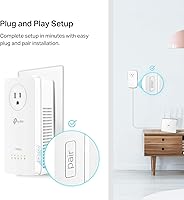
  • Passthrough Outlet: An integrated power socket on the adapter body allows a standard plug to be inserted directly into the unit, preserving the original wall outlet.
  • EasyMesh Support: Compatible with TP-Link EasyMesh, allowing the extender to function as a mesh node alongside any EasyMesh-certified router or access point.
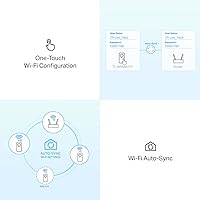
  • Setup Method: Pairs via a single button press with no app installation, web interface login, or manual configuration required out of the box.
  • Data Protocol: Uses Gigabit Ethernet as the data link protocol for all three wired ports on the extender unit.
  • Surge Protector Use: The adapters must be plugged directly into a wall outlet and are not compatible with surge protectors or extension strips, which block the powerline signal.
  • Circuit Requirement: Both adapters must reside on the same electrical circuit and the same breaker panel to establish and maintain a stable connection.
  • Dimensions: Each adapter unit measures 9.1 x 7.6 x 4 inches, making it a relatively compact wall-mounted form factor for a combined powerline-and-Wi-Fi device.
  • Weight: The complete kit weighs 1.85 pounds, inclusive of both adapter units and the bundled Ethernet cables.
  • Compatible Devices: Supports wired and wireless connectivity for desktops, laptops, smart TVs, game consoles, printers, projectors, IP cameras, tablets, and smartphones.
  • Color: Available in white, designed to blend unobtrusively into standard residential wall outlet surroundings.
  • What Is In the Box: The kit includes two powerline adapter units and Ethernet cables; no additional accessories are required to complete a basic installation.
  • Manufacturer: Designed and sold by TP-Link, a globally recognized networking hardware brand with a dedicated consumer support line for this product line.

Related Reviews

TP-Link TL-WPA7617 Powerline WiFi Extender Kit
70%
91%
Ease of Setup
67%
Real-World Throughput
88%
Wired Ethernet Performance
72%
Wi-Fi Coverage & Signal Quality
38%
Surge Protector Compatibility
More
TP-Link TL-WPA7817 Powerline Wi-Fi 6 Extender Kit
86%
88%
Wi-Fi Performance
94%
Setup & Installation
91%
Value for Money
85%
Powerline Range
89%
Dual-Band Speeds
More
TP-Link N300 WiFi Extender TL-WA855RE
82%
91%
Value for Money
96%
Ease of Setup
75%
WiFi Performance (Range)
80%
Build Quality
88%
Compatibility with Devices
More
TP-Link TL-PA9020P KIT AV2000 Powerline Adapter
77%
72%
Real-World Throughput
88%
Setup & Installation
76%
Connection Stability
74%
Value for Money
86%
Passthrough Outlet
More
TP-Link RE500X WiFi Extender
86%
89%
Setup and Installation
85%
WiFi Performance
90%
Coverage Area
87%
App Experience
92%
Value for Money
More
TP-Link RE650 AC2600 WiFi Extender
85%
88%
Performance
92%
Ease of Setup
86%
Range Coverage
82%
Build Quality
87%
WiFi Speed
More
TP-Link RE300 WiFi Range Extender
76%
88%
Ease of Setup
82%
Signal Coverage
61%
Throughput & Speed Performance
78%
Device Capacity
84%
Build Quality & Form Factor
More
TP-Link RE600X WiFi 6 Extender
87%
87%
Performance
93%
Ease of Setup
85%
WiFi Coverage
89%
Dual-Band Speed
84%
Reliability
More
TP-Link AC750 WiFi Extender RE190
84%
85%
Wi-Fi Performance
91%
Ease of Setup
88%
Build Quality
92%
Value for Money
78%
Coverage Range
More
TP-Link RE450 WiFi Range Extender
73%
83%
Coverage Extension
61%
Signal Throughput
88%
Ease of Setup
79%
Dual-Band Flexibility
67%
Ethernet Port Utility
More

FAQ

It might, but older homes carry real risk with powerline adapters. Wiring from that era is often aluminum rather than copper, and the electrical infrastructure may include multiple sub-panels or mixed-gauge circuits — any of which can severely degrade performance or prevent the two units from pairing at all. If your home has had electrical updates since then, your odds improve, but there is no way to know for certain without trying.

No, and that is one of its genuine strengths. Plug the first adapter into an outlet near your router and connect it with an Ethernet cable, plug the second adapter wherever you need coverage, then press the pair button on both units. The connection establishes itself in under a minute with no app, no browser interface, and no TP-Link account required.

No — this is a hard incompatibility, not just a recommendation. Surge protectors and power strips filter out the high-frequency signals that powerline adapters use to communicate, so the two units will either fail to pair or deliver such degraded performance that the connection is unusable. Both adapters need to go directly into wall outlets.

They will not communicate reliably, if at all. Powerline technology requires both units to share the same electrical circuit and ideally the same breaker panel. This is the most common reason buyers experience a failed setup, and it is not always obvious which outlets in a home share a circuit. If pairing fails and you have ruled out other causes, try moving one adapter to a different outlet and test again.

The rated figures are engineering maximums measured under controlled lab conditions — treat them as a ceiling, not a target. In a modern home with clean copper wiring and a short run between adapters, many buyers see throughput comfortably sufficient for 4K streaming and gaming. In older homes or across longer distances, real-world speeds can be significantly lower. Your actual ISP plan speed also caps what the kit can deliver.

Yes, provided your garage shares the same electrical circuit and breaker panel as your main house — which is the case in most standard residential setups where the garage was built with the home. If your garage has its own sub-panel, you may run into pairing issues. Assuming the wiring is compatible, the TP-Link TL-WPA8631P KIT Powerline WiFi Extender is actually one of the more practical solutions for exactly this scenario, since running physical Ethernet underground or overhead is the only alternative that guarantees performance.
No, the integrated passthrough outlet is a straight pass-through of line power with no surge suppression built in. It is designed purely to recover the wall socket you would otherwise lose by plugging in the adapter. Do not rely on it to protect sensitive electronics from power spikes.

Yes. The powerline and Wi-Fi extender functions work independently of your router brand — as long as you connect the first adapter to your router via Ethernet, it does not matter whether that router is from Asus, Netgear, Eero, or anyone else. The EasyMesh feature is the only part that requires a compatible TP-Link router to unlock, but that is entirely optional.

Yes, the HomePlug AV2 standard supports networks of more than two adapters. You can add additional compatible powerline adapters to the same electrical circuit and they will join the existing network, effectively giving you wired or Wi-Fi coverage in multiple locations simultaneously. Just keep in mind that adding more nodes sharing the same powerline bandwidth will reduce the throughput available to each one.

Under typical everyday loads — streaming video, browsing, light downloads — the adapters stay warm but not uncomfortably hot. Under sustained heavy use, such as continuous large file transfers or extended gaming sessions, they do get noticeably warmer. This is normal for powerline hardware, but it does mean you should avoid installing them inside enclosed cabinets or tight spaces where heat cannot dissipate freely.

Where to Buy