Overview

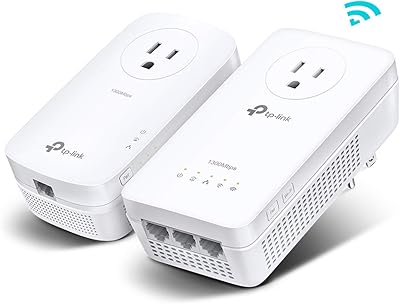
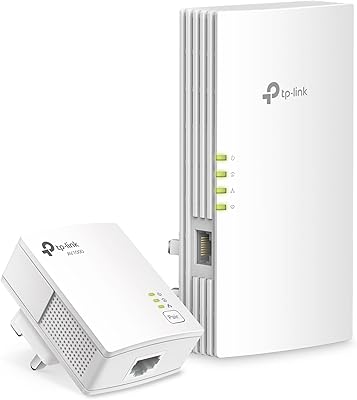
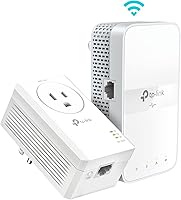
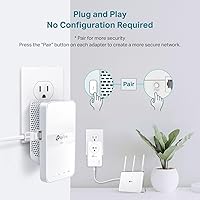
The TP-Link TL-WPA7617 Powerline WiFi Extender Kit takes a fundamentally different approach to dead zones: instead of blasting more radio waves through walls, it sends your network signal through the electrical wiring already inside your home. Think of it like a data highway running alongside your power circuits. The two-piece setup is straightforward — one adapter plugs in near your router, the other goes in the room where coverage falls short. There is no app to configure and no settings to fumble with. One thing buyers often miss, though: both units must share the same electrical circuit. If your garage or basement runs on a separate breaker panel, this kit simply will not function there.
Features & Benefits

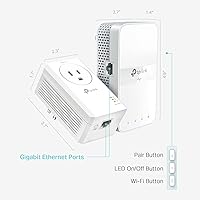
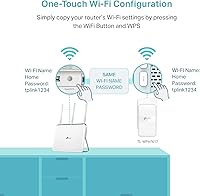
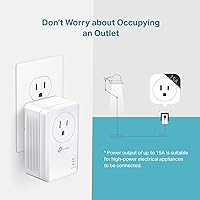
The powerline backbone in this plug-and-play network extender can theoretically handle up to 1,000 Mbps across your wiring — though real-world speeds vary, and homes with older electrical infrastructure will see lower numbers. On the Wi-Fi side, the dual-band radio covers the 5 GHz band for faster nearby devices and 2.4 GHz for broader reach. The Gigabit Ethernet port on the extender unit is arguably the most underrated feature: plug in a smart TV or game console and you get a genuinely stable wired connection. A built-in passthrough outlet means you do not sacrifice a plug point. If you already own a compatible TP-Link router, OneMesh lets you fold this unit into your existing network under a single shared name.

Best For

This powerline extender kit earns its place in multi-story homes where thick concrete slabs or old plaster walls kill Wi-Fi before it reaches another floor. Renters who cannot run Ethernet cables through walls will find it especially practical. It is a strong pick for anyone who needs a reliable wired connection in a room too far from the router — a bedroom console setup, a home-office desk, or a garage workstation. Less technically inclined users will appreciate that there is nothing to configure; pair the units, and they work. It sits comfortably between cheap range extenders and expensive mesh systems, delivering useful performance without the complexity or the price premium.

User Feedback

Across nearly 900 ratings, the TP-Link WPA7617 kit holds a 4-star average — respectable, but the breakdown tells a nuanced story. Most satisfied buyers highlight how painless the initial setup is and how noticeably the wired Ethernet backhaul improves streaming quality on distant TVs. The passthrough outlet gets consistent praise, too. On the critical side, a recurring theme is that real-world speeds can disappoint in older homes, where aging wiring limits throughput considerably. Several one-star reviews trace back to one avoidable mistake: plugging an adapter into a surge protector rather than directly into the wall. OneMesh praise comes almost exclusively from existing TP-Link router owners, and a handful of longer-term users mention occasional dropouts, though outright unit failures appear relatively uncommon.

Pros

  • Plug-and-play setup works right out of the box — no app, no login, no configuration required.
  • The Gigabit Ethernet port delivers a genuinely stable wired connection for consoles, smart TVs, and desktop PCs.
  • Passthrough outlet design means you never sacrifice a wall socket just to run the adapter.
  • Reaches through concrete floors and thick walls where Wi-Fi extenders and routers consistently fail.
  • Works over existing electrical wiring, so renters and apartment dwellers avoid any drilling or cable runs.
  • OneMesh support lets compatible TP-Link router owners unify everything under one network name with no manual switching.
  • Includes Ethernet cables in the box, so there is nothing extra to buy before you can get started.
  • CISA Secure-by-Design certification means security was built in from the ground up, not bolted on later.
  • Sits at a practical mid-range price point — meaningfully more capable than cheap repeaters, far less expensive than a full mesh system.

Cons

  • Real-world speeds in older homes with aging wiring can fall well short of the advertised theoretical maximum.
  • Neither adapter works when plugged into a surge protector or power strip — a wall outlet is non-negotiable.
  • Detached garages and spaces on separate electrical sub-panels are entirely incompatible, regardless of physical distance.
  • Only one Gigabit port on the extender unit means connecting multiple wired devices requires purchasing a separate switch.
  • The extender unit is physically large and can block adjacent outlets depending on socket plate spacing.
  • Firmware update notifications do not appear unless you install the Tether app, leaving many units running outdated software.
  • OneMesh compatibility is locked to TP-Link routers, making that feature useless for buyers on other brands.
  • Occasional pairing dropouts have been reported by long-term users, sometimes requiring a manual reset to restore the connection.
  • Minimal printed documentation makes troubleshooting setup failures frustrating for buyers who hit problems on first install.

Ratings

The TP-Link TL-WPA7617 Powerline WiFi Extender Kit has been evaluated by our AI system after analyzing verified global buyer reviews, with spam, bot-generated feedback, and incentivized posts actively filtered out. The scores below reflect an honest, unvarnished picture of how this plug-and-play network extender performs across real homes — strengths and frustrations alike. Where buyers consistently agree, the scores reflect that consensus; where experiences diverge sharply, the ratings land in the middle ground they deserve.
Ease of Setup
91%
The vast majority of buyers report being up and running in under five minutes — plug one unit into a wall outlet near the router, plug the other in the target room, and the two find each other automatically. Non-technical users, including older adults setting this up without assistance, specifically call out how refreshing it is to avoid any app or web interface.
A meaningful minority of buyers hit a pairing failure on first boot and had no clear guidance on what went wrong. Troubleshooting without a proper manual — just a quick-start card — left some users stuck until they discovered the reset button on their own.
Real-World Throughput
67%
33%
In homes built within the last 20 years with modern wiring, buyers report noticeably faster and more stable connections compared to what a wireless range extender delivered in the same spot. Streaming 4K content to a distant TV or maintaining a stable video call in a basement office becomes reliably achievable.
Older homes with aging or mixed-circuit wiring see a significant drop from the theoretical maximum, sometimes to a fraction of the advertised ceiling. Buyers in pre-1980s construction frequently report speeds that disappoint, and the variability makes it genuinely hard to predict results before purchasing.
Wired Ethernet Performance
88%
The Gigabit port on the extender unit is frequently praised by gamers and home-office users who plug in directly rather than relying on Wi-Fi. Latency drops and connection dropouts become rare once a console or desktop is wired in, which is the primary reason many buyers chose this kit over a wireless-only extender.
The kit includes only a single Gigabit port, which limits direct wired connections to one device at a time. Buyers who wanted to connect both a smart TV and a game console simultaneously had to purchase a separate Ethernet switch, adding unexpected cost and complexity.
Wi-Fi Coverage & Signal Quality
72%
28%
The dual-band radio does a reasonable job covering a single room or an adjoining hallway, which is exactly what it is designed for. Buyers using it to blanket a basement or a garage workshop report solid 2.4 GHz reach even when the 5 GHz band falls short beyond one or two walls.
This is not a whole-room Wi-Fi solution — it is a localized extender, and buyers who expected it to cover an entire floor were disappointed. The 5 GHz band in particular drops off quickly through walls, limiting its practical advantage to devices sitting relatively close to the extender unit.
Surge Protector Compatibility
38%
62%
When plugged directly into a wall outlet as designed, the units pair reliably and perform consistently. Buyers who followed the direct-outlet instruction from the start had zero issues related to this limitation.
This is the single most common source of one-star reviews. A significant number of buyers plugged one or both units into a power strip or surge protector, got no connection, and concluded the product was defective. The restriction is mentioned in fine print but not prominently enough to prevent widespread frustration at the point of setup.
Same-Circuit Requirement
54%
46%
For buyers in standard single-family homes where all outlets share the same electrical panel, the same-circuit requirement is rarely a problem in practice. Most interior rooms on the same floor or adjacent floors connect without issue.
Detached garages, garden offices, and some basement circuits run off separate sub-panels, making this kit completely non-functional in exactly the locations many buyers intended to use it. This limitation is not clearly communicated before purchase, leading to returns from buyers with legitimate use cases that the hardware simply cannot support.
Passthrough Power Outlet
86%
Retaining the wall outlet is a thoughtful design decision that buyers genuinely appreciate. In rooms where outlets are scarce — a bedroom nightstand, a home-office corner — not losing a socket to the adapter itself matters more than it might seem on paper.
The passthrough outlet sits low on the unit, which can make plugging in a bulky adapter or angled plug awkward. A few buyers noted that the physical orientation of the unit on the wall made the passthrough less accessible than expected.
OneMesh Integration
69%
31%
Buyers who already own a OneMesh-compatible TP-Link router praise how the extender folds into their existing network without creating a separate SSID. Devices hand off between the router and extender without requiring a manual network switch, which is a genuine quality-of-life improvement.
OneMesh is only useful if you already own a qualifying TP-Link router, and that caveat is easy to miss before purchase. Buyers coming from other router brands get no benefit from this feature, effectively paying for functionality that is locked behind an ecosystem requirement.
Build Quality & Physical Design
74%
26%
The units feel solid for a mid-range networking product, with no reports of the plastic casing cracking or the prongs feeling flimsy. The white finish blends into most wall outlets without drawing attention.
The extender unit is on the larger side and protrudes noticeably from the wall, which causes problems near furniture or in tight spaces. A handful of buyers mention that it partially blocks the adjacent outlet depending on the socket plate layout.
Long-Term Reliability
71%
29%
Many buyers report using the kit for a year or more without any hardware failure or meaningful degradation in performance. The units run warm but not hot, and daily-use scenarios like always-on streaming or a persistent home-office connection do not appear to stress the hardware unduly.
A pattern in lower-star reviews involves one unit failing or losing its pairing after several months, with no clear cause. Re-pairing resolves the issue for some buyers, but others report the problem recurring — suggesting occasional firmware instability or a hardware inconsistency in a subset of units.
Value for Money
76%
24%
For buyers in newer homes with good wiring who need a no-fuss wired backhaul to one specific room, this kit delivers a clear and practical upgrade over a cheap Wi-Fi repeater at a price well below entry-level mesh systems. The included Ethernet cables add a small but appreciated touch.
Buyers who experience reduced speeds due to older wiring — or who discover the garage circuit is incompatible — feel the price is hard to justify. In those scenarios, a mesh Wi-Fi node at a similar price point would have been a more versatile and reliable investment.
Security & Firmware
79%
21%
TP-Link's CISA Secure-by-Design commitment is meaningful for buyers with privacy concerns, and the powerline connection itself is encrypted out of the box without any user configuration. Security-conscious home-office users find this reassuring compared to relying entirely on Wi-Fi.
Firmware update notifications are non-existent without the Tether app, which is not required for basic operation. Buyers who want to stay current on security patches have to remember to check manually, which most will not do — leaving the device running older firmware over time.
Package Contents & Documentation
66%
34%
The kit ships with both Ethernet cables needed to connect the adapters to a router and an end device, so buyers can get started without a separate cable purchase. The physical packaging is tidy and clearly labeled.
The included documentation is minimal — essentially a picture-based quick-start card with no detail on troubleshooting, the same-circuit requirement, or surge-protector limitations. Buyers who hit any friction at setup have little to rely on beyond searching support forums independently.
Compatibility with Older Homes
49%
51%
Some buyers in older properties do report functional results, particularly in homes where the wiring has been partially updated or where the two units are on the same branch circuit and relatively close together. It is not a guaranteed failure in older buildings.
The honest picture from reviews is that pre-1980s homes with knob-and-tube or early aluminum wiring are high-risk environments for this technology. Speeds can fall to levels barely better than a congested Wi-Fi signal, making the purchase feel like a gamble that older-home buyers are more likely to lose.

Suitable for:

The TP-Link TL-WPA7617 Powerline WiFi Extender Kit is a strong match for anyone living in a newer home who needs reliable internet in a room where Wi-Fi simply does not reach. Renters who cannot run Ethernet cables through walls or ceilings will find this the most practical cable-free alternative available at this price tier. It is particularly well-suited to gamers and cord-cutters who want a wired backhaul to a console or smart TV in a distant room — the Gigabit port makes a real, tangible difference in connection stability compared to any wireless extender. Home-office workers in basements or attics who need dependable connectivity for video calls and file transfers will also get solid mileage from this kit, provided their workspace shares the same electrical circuit as the main living area. Less tech-savvy buyers who dread logging into router interfaces will appreciate that the whole thing works without any configuration whatsoever.
Not suitable for:

The TP-Link TL-WPA7617 Powerline WiFi Extender Kit is likely to disappoint buyers who live in homes built before 1980, where older wiring can reduce throughput to levels barely better than a congested Wi-Fi signal. Anyone planning to use this kit to reach a detached garage, a garden office, or any space served by a separate electrical sub-panel should stop and reconsider — if the two units are not on the same circuit, the kit will not function at all. Buyers who expect whole-floor Wi-Fi coverage from the extender unit will find its wireless range underwhelming; this is a room-level solution, not a replacement for a mesh system. Those who rely heavily on power strips or surge protectors throughout their home should be aware that plugging either adapter into anything other than a direct wall outlet will kill the connection entirely, and this trips up a surprisingly large number of buyers. Finally, anyone deeply invested in a non-TP-Link router ecosystem will get no benefit from the OneMesh feature, which narrows the kit's value proposition compared to router-agnostic alternatives.
Specifications

  • Brand & Model: Manufactured by TP-Link under the model designation TL-WPA7617 KIT.
  • Powerline Standard: Uses the HomePlug AV2 standard for transmitting network data over existing household electrical wiring.
  • Powerline Speed: Rated at a theoretical maximum of 1,000 Mbps (AV1000) over the powerline connection.
  • Max Wiring Range: Supports powerline connectivity across up to 750 feet of electrical wiring within the same circuit.
  • Wi-Fi Standard: The extender unit broadcasts dual-band Wi-Fi using the 802.11ac (Wi-Fi 5) standard.
  • Wi-Fi Speeds: Delivers a combined theoretical AC1200 rating: up to 867 Mbps on the 5 GHz band and up to 300 Mbps on the 2.4 GHz band.
  • Ethernet Port: The extender unit includes one Gigabit Ethernet port supporting wired connections at up to 1,000 Mbps.
  • Passthrough Outlet: Both units feature an integrated power passthrough socket so the wall outlet remains available for other devices.
  • Setup Method: Plug-and-play pairing requires no app installation, web interface login, or manual network configuration.
  • OneMesh Support: Compatible with TP-Link OneMesh, allowing the extender to join a unified network with supported TP-Link routers under a single SSID.
  • Outlet Requirement: Both adapters must be plugged directly into wall outlets; surge protectors and power strips block the powerline signal entirely.
  • Circuit Requirement: Both units must be connected to outlets that share the same electrical circuit for any network link to be established.
  • Security Compliance: TP-Link is a signatory of the CISA Secure-by-Design pledge, meaning security protections are built into the hardware and firmware by default.
  • Package Contents: The kit includes one powerline adapter, one dual-band Wi-Fi extender unit, and Ethernet cables for connecting each unit to a router or device.
  • Item Weight: The complete kit weighs 1.43 pounds as shipped.
  • Dimensions: The kit box measures 9.8″ long by 7.6″ wide by 4″ tall.
  • Encryption: Powerline communication is encrypted by default to prevent unauthorized access through shared electrical wiring in multi-unit buildings.
  • Compatibility: Works with any standard broadband router regardless of ISP, though OneMesh features are exclusive to compatible TP-Link router models.

Related Reviews

TP-Link TL-WPA8631P KIT Powerline WiFi Extender
77%
91%
Ease of Setup
67%
Real-World Throughput
61%
Wiring Compatibility
83%
Long-Term Reliability
72%
Wi-Fi Coverage & Performance
More
TP-Link TL-WPA7817 Powerline Wi-Fi 6 Extender Kit
86%
88%
Wi-Fi Performance
94%
Setup & Installation
91%
Value for Money
85%
Powerline Range
89%
Dual-Band Speeds
More
TP-Link N300 WiFi Extender TL-WA855RE
82%
91%
Value for Money
96%
Ease of Setup
75%
WiFi Performance (Range)
80%
Build Quality
88%
Compatibility with Devices
More
TP-Link TL-PA9020P KIT AV2000 Powerline Adapter
77%
72%
Real-World Throughput
88%
Setup & Installation
76%
Connection Stability
74%
Value for Money
86%
Passthrough Outlet
More
TP-Link RE500X WiFi Extender
86%
89%
Setup and Installation
85%
WiFi Performance
90%
Coverage Area
87%
App Experience
92%
Value for Money
More
TP-Link AC750 WiFi Extender RE190
84%
85%
Wi-Fi Performance
91%
Ease of Setup
88%
Build Quality
92%
Value for Money
78%
Coverage Range
More
TP-Link RE600X WiFi 6 Extender
87%
87%
Performance
93%
Ease of Setup
85%
WiFi Coverage
89%
Dual-Band Speed
84%
Reliability
More
TP-Link RE300 WiFi Range Extender
76%
88%
Ease of Setup
82%
Signal Coverage
61%
Throughput & Speed Performance
78%
Device Capacity
84%
Build Quality & Form Factor
More
TP-Link RE650 AC2600 WiFi Extender
85%
88%
Performance
92%
Ease of Setup
86%
Range Coverage
82%
Build Quality
87%
WiFi Speed
More
TP-Link RE450 WiFi Range Extender
73%
83%
Coverage Extension
61%
Signal Throughput
88%
Ease of Setup
79%
Dual-Band Flexibility
67%
Ethernet Port Utility
More

FAQ

No, the TP-Link TL-WPA7617 Powerline WiFi Extender Kit is genuinely plug-and-play. You plug the first adapter into a wall outlet near your router and connect it with the included Ethernet cable, then plug the second unit into an outlet in the room where you need coverage. They find and pair with each other automatically, usually within a couple of minutes.
Unfortunately, no. This is one of the most common setup mistakes buyers make. Surge protectors and power strips filter out the signal frequencies that powerline adapters use to communicate, so both units must be plugged directly into wall outlets. If one of them is on a strip, you will get no connection at all.

The key requirement is that both outlets you plan to use share the same electrical circuit — meaning they trace back to the same breaker in your home's electrical panel. In most standard single-family homes, outlets throughout the house meet this requirement. The tricky cases are detached garages, garden offices, or any space served by a separate sub-panel or breaker box; those locations will not work with this kit at all.

It depends on your setup. The powerline connection will generally be more stable and reliable than a Wi-Fi signal struggling through walls, but the actual speeds you see are limited by two things: your internet plan's speed and the quality of your home's electrical wiring. In a newer home, you can expect a meaningful improvement. In a home with older wiring, speeds can be noticeably lower than the theoretical maximum printed on the box.

The extender unit has a single Gigabit Ethernet port, so you can connect one device by wire directly. If you want to hard-wire multiple devices — say, both a smart TV and a game console — you would need to add a small Ethernet switch, which is an inexpensive and simple addition. The Wi-Fi radio on the extender can serve multiple wireless devices simultaneously.

By default, it creates its own network name on the extender unit. However, if you own a compatible TP-Link router that supports OneMesh, you can configure the extender to join your existing network under the same name and password, so your devices switch between the router and the extender automatically without you having to manually change networks.

Powerline adapters are designed to stay on your home's own electrical circuit, and the signal is encrypted by default. In practice, powerline signals rarely cross between separate apartment units because the circuits are independent, but it is worth knowing the encryption is there as an extra layer of protection in shared-building environments.

It is a real risk. Older homes with original wiring tend to produce significantly lower throughput than newer homes, and some buyers in pre-1980s construction report speeds that are only marginally better than a weak Wi-Fi signal. If your home's wiring has been updated or partially replaced, your odds improve. If it is fully original, a mesh Wi-Fi system might be a more predictable investment for your situation.

Almost certainly not, and this is an important one to check before buying. Detached garages almost always run on a separate electrical sub-panel, which means they are on a different circuit from the main house. Since the two adapters need to share the same circuit to communicate, a separate sub-panel breaks that requirement entirely. The kit will not establish a connection in that scenario.

A small but notable number of long-term users report occasional pairing drops, particularly after power outages or electrical fluctuations. The standard fix is to hold the reset button on each unit until the LEDs blink, then re-pair them from scratch by pressing the pair buttons in sequence. Most buyers find this resolves the issue, though a handful report it recurring, which suggests some sensitivity to unstable household power conditions.

Where to Buy