Overview

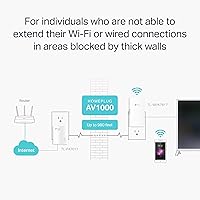
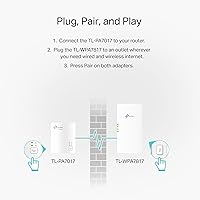
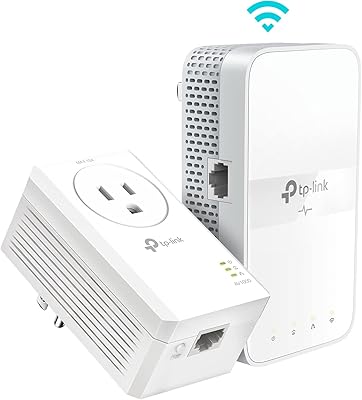
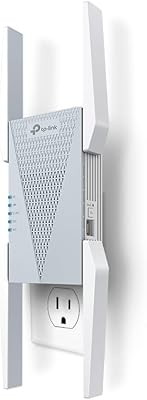
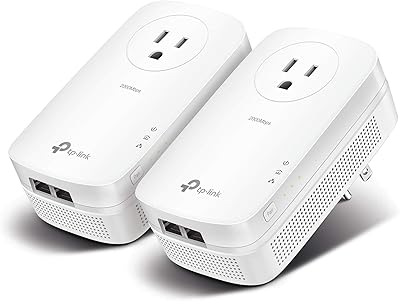
The TP-Link TL-WPA7817 KIT Powerline Wi-Fi 6 Extender takes a different approach to dead zones than a standard range extender — instead of rebroadcasting a weakened Wi-Fi signal, it runs your internet connection through your home's existing electrical wiring. The kit ships with two adapters: one plugs in near your router and connects via Ethernet, the other goes wherever you need coverage. Released in early 2025, it pairs that proven powerline backbone with current-generation Wi-Fi 6 wireless. Before buying, though, know this: both adapters must share the same electrical circuit and plug directly into a wall outlet — no surge protectors allowed. That single requirement trips up more buyers than anything else.
Features & Benefits

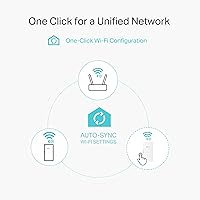
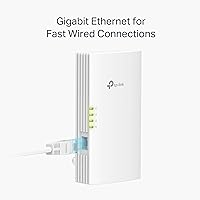
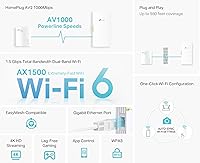
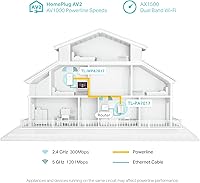
The powerline backbone runs on the HomePlug AV2 standard with a theoretical ceiling of 1,000 Mbps — but real-world throughput through older wiring typically lands somewhere lower, and that holds true across every powerline brand, not just this one. The Wi-Fi side is where this TP-Link powerline adapter set earns its keep in 2025: Wi-Fi 6 dual-band radios handle up to 64 connected devices without the congestion older Wi-Fi 5 extenders show under load. The Gigabit Ethernet port on the extender unit is a genuine bonus for consoles or smart TVs. If your router supports EasyMesh, the extender joins your existing network rather than broadcasting a separate SSID — genuinely useful, though only if you are already in the TP-Link ecosystem.

Best For

This powerline Wi-Fi 6 kit makes the most sense in buildings where Wi-Fi simply will not travel — thick concrete, brick, or old plaster walls that kill signals before they reach the next room. Gamers and streamers who cannot run a cable across the house will appreciate the Gigabit wired port at the far end, which delivers a steadier connection than any wireless extender realistically can. Multi-floor households juggling dozens of smart devices are also a natural fit. If you already own a compatible TP-Link router, the mesh integration removes one of the biggest frustrations with traditional extenders. Non-technical users will find setup about as close to plug-and-play as this category gets.

User Feedback

With a 4.1-star average drawn from over 31,000 ratings, the TL-WPA7817 KIT has a large enough sample to read reliably. Most satisfied buyers highlight two things: how quickly the adapters pair straight out of the box, and how stable the wired connection stays in rooms where Wi-Fi previously gave up entirely. The criticism that surfaces most often is inconsistent speeds, usually traced to older home wiring or adapters accidentally placed on separate electrical circuits — a real limitation, not a defect. A handful of users also flag the no-surge-protector rule as awkward when outlet space is tight. Long-term reliability, however, reads positively across the board, with many owners reporting months of steady, trouble-free operation.

Pros

  • Brings wired and Wi-Fi connectivity to rooms that thick walls make completely unreachable for standard routers.
  • Wi-Fi 6 support handles up to 64 devices simultaneously without the slowdowns older extenders show under heavy load.
  • The Gigabit Ethernet port gives gamers and smart TV users a stable, wired-quality connection at the remote end.
  • One-click WiFi Clone setup is genuinely fast — most users are up and running in under five minutes.
  • EasyMesh compatibility lets existing TP-Link router owners extend their network without introducing a second SSID.
  • Covers up to 980 feet of electrical wiring distance, making it viable across large or multi-floor homes.
  • A pool of over 31,000 ratings adds real credibility — long-term users consistently report stable, trouble-free operation.
  • Launched in early 2025, this powerline Wi-Fi 6 kit ships with current-generation wireless rather than the aging Wi-Fi 5 standard found in older kits.

Cons

  • Both adapters must share the same electrical circuit — a hard dealbreaker in many larger or older homes.
  • Surge protectors and power strips are off-limits, creating genuine outlet placement headaches in furnished or busy rooms.
  • Real-world powerline speeds through aging wiring can fall well short of the advertised 1,000 Mbps theoretical ceiling.
  • EasyMesh roaming only delivers its benefit if you already own a compatible TP-Link router — it adds nothing otherwise.
  • The adapter body is bulky enough to block an adjacent outlet on many standard dual-outlet wall plates.
  • Speed consistency varies noticeably based on circuit load, wiring condition, and the physical distance between the two units.
  • Advanced network adjustments require logging into a browser-based web interface rather than a modern mobile app.
  • Buyers in homes wired before the 1980s may experience persistent performance degradation that no configuration change can resolve.

Ratings

The scores below were generated by AI after deep analysis of verified purchase reviews for the TP-Link TL-WPA7817 KIT Powerline Wi-Fi 6 Extender worldwide — with spam, incentivized feedback, and bot-generated reviews actively filtered out before any category was scored. Drawing on a pool of more than 31,000 ratings, the breakdown covers both the strengths that make this powerline adapter set a top seller and the friction points that push one- and two-star experiences. Nothing has been smoothed over: each score reflects the honest spread of buyer sentiment across real home environments.
Setup & Installation
88%
The one-click WiFi Clone button is praised across thousands of reviews for making the pairing process genuinely painless — no app downloads, no web portal, no networking background required. Most buyers report having both units active and broadcasting within five to ten minutes of opening the box.
A meaningful portion of users who skipped the same-circuit check ran into apparent setup failure, only realizing afterward that their two outlets sit on separate breakers. The Pair button sequence also trips up a small number of buyers who skip the quick-start guide and try to configure manually.
Powerline Speed Performance
67%
33%
In homes with newer copper wiring and moderate adapter distances, buyers consistently report stable, usable throughput — enough to sustain 4K streams and video calls in rooms that were previously dead zones. For the primary use case of bypassing thick-wall signal loss, the real-world performance lands where it needs to for most users.
Reviewers in older homes with aluminum or degraded wiring frequently report speeds that fall well below expectations, sometimes struggling to clear 100 Mbps through the powerline link. The gap between the 1,000 Mbps theoretical ceiling and what buyers actually measure is the single most common source of disappointment across negative reviews.
Wired Connection Quality
91%
The Gigabit Ethernet port on the extender unit draws consistent praise from gamers and home office workers who need a rock-solid connection without running cable through walls. Reviewers connecting consoles and desktop PCs via Ethernet describe the connection as stable, low-latency, and vastly more consistent than any wireless alternative they had tried previously.
Only one Gigabit port is available on the extender unit, which limits direct wired connectivity to a single device — anyone needing to wire two pieces of equipment at the far end must add a separate Ethernet switch. There is no pass-through outlet on either adapter, which some buyers note would have simplified the one-port-per-unit trade-off.
Placement Flexibility
53%
47%
Buyers who happen to have a free, directly accessible wall outlet near both their router and their target room find placement entirely straightforward, with the indicator lights confirming the powerline link without needing to check any management interface. In newer construction with generous outlet placement, this is rarely a problem.
The no-surge-protector requirement is the most frequently cited frustration across negative reviews, since the majority of households have every outlet occupied by a strip or power bar. Combine this with the same-circuit constraint, and usable outlet options can narrow dramatically — particularly in apartments or older homes where outlet positioning was never designed around modern device density.
Value for Money
76%
24%
For buyers who genuinely need what a powerline extender offers — reliable internet through walls and floors where Wi-Fi fails entirely — the kit delivers real value at its mid-range price point. The inclusion of Wi-Fi 6 and the Gigabit Ethernet port adds long-term relevance compared to cheaper, older-standard powerline kits that are already feeling dated.
Buyers who purchase without verifying the same-circuit requirement, or who expect throughput matching their internet plan, frequently conclude the price is not justified by their experience. It also costs noticeably more than a basic range extender, and in homes with favorable wiring and shorter distances, a simpler solution might have been sufficient.
Wi-Fi 6 Performance
83%
Households running 15 or more wireless devices — smart bulbs, thermostats, streaming sticks, phones, and laptops simultaneously — report that the Wi-Fi 6 radio handles the load without the congestion bottlenecks they experienced on older extenders. The 5 GHz band in particular shows a tangible improvement for close-range, high-demand devices in the target room.
The wireless performance at the extender is ultimately capped by the powerline backbone feeding it, so buyers cannot fully realize the AX1500 potential when their wiring limits throughput to 150 or 200 Mbps. The 2.4 GHz band's 300 Mbps ceiling also feels modest for a device released in 2025, especially for range-dependent IoT devices.
EasyMesh Integration
74%
26%
For buyers already running a compatible TP-Link router, the EasyMesh integration works as described — devices move between the router and extender without manually switching networks, and the whole setup presents as a single unified connection. Several reviewers specifically credit this feature for eliminating the manual network-hop they previously had to manage between floors.
EasyMesh is entirely irrelevant to anyone without a compatible TP-Link router, which represents a large share of the buying audience. Even within the TP-Link ecosystem, a handful of reviewers note that device handoff is not always instant, with phones and laptops occasionally clinging to the weaker signal longer than expected before switching.
Long-Term Reliability
84%
Long-term reviewers posting after six to twelve months of daily use are largely positive, with many describing the kit as a set-and-forget solution that keeps running without resets or firmware intervention. This is a genuine differentiator compared to cheaper powerline kits that reviewers say require periodic power-cycling to stay functional.
A small but consistent group of reviewers reports that one adapter unit stops responding after several months, requiring a full manual re-pair of both units to restore the connection. While this appears to affect a minority, it suggests reliability is not universal, and knowing the reset procedure before you need it is a reasonable precaution.
Range & Coverage
71%
29%
The 980-foot electrical wiring range covers the majority of single-family homes comfortably, and reviewers in medium-sized multi-floor houses consistently report signal reaching areas their router never could. The Wi-Fi radio at the extender end adds solid wireless coverage within the target room itself, which buyers treat as a meaningful bonus.
The 980-foot ceiling is a best-case figure, and several reviewers in larger properties or older buildings report connection degradation or complete dropout at distances well short of that number. Wiring layout and circuit quality ultimately determine range far more than any printed specification does.
Device Capacity & Load Handling
82%
18%
Reviewers running dense smart-home environments — combining streaming devices, security cameras, phones, and laptops — report noticeably fewer slowdowns compared to the Wi-Fi 5 extenders this kit commonly replaces. The underlying Wi-Fi 6 improvements in handling simultaneous connections translate into real, observable gains in busy households.
The powerline backbone remains the shared bandwidth ceiling for all devices connecting through the extender, so heavy simultaneous use — multiple 4K streams plus active video conferencing — can expose the wiring limitation rather than the Wi-Fi radio's capability. The more devices actively pulling data at once, the more the powerline speed becomes the constraining factor.
Build Quality & Design
79%
21%
The adapters feel solid and well-constructed for a mid-range networking product, with no widespread reports of overheating, loose prongs, or physical failure within the first year of use. The white finish blends into most outlet configurations without standing out, which reviewers placing units in living rooms and bedrooms tend to appreciate.
Both units are bulky enough to block the second outlet on a standard dual-outlet wall plate, a complaint that surfaces regularly across reviews from buyers with limited outlet access. Neither adapter includes a pass-through outlet, a feature found on several competing products that would meaningfully reduce the placement inconvenience.
App & Management Experience
61%
39%
For basic use, no management interface is needed at all — the one-click setup handles the entire configuration process, and buyers who simply want the connection to work and never touch settings again will find this perfectly adequate. The LED status lights provide enough at-a-glance feedback to confirm the powerline link is healthy without logging into anything.
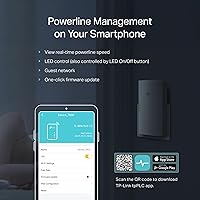
Users who want to adjust advanced settings — band steering, connected device lists, or firmware updates — must navigate a browser-based web interface that reviewers consistently describe as dated and hard to navigate. The absence of a modern mobile app is a noticeable shortcoming for a product released in 2025, particularly given how competitors have moved toward app-based management.
Compatibility
72%
28%
The HomePlug AV2 standard means the core powerline and Wi-Fi functions work with any router brand, and buyers migrating from older AV600 or AV1200 adapters can add these units to an existing powerline network without replacing everything at once. Compatibility with common devices — smart TVs, consoles, desktop PCs, and IP cameras — is consistently confirmed across reviews.
The EasyMesh roaming feature locks buyers into the TP-Link ecosystem, leaving non-TP-Link router owners with a noticeably less integrated experience and no upgrade path short of changing their router. More advanced users also note the lack of integration with third-party network monitoring tools, which limits visibility for those managing a more complex home network.

Suitable for:

The TP-Link TL-WPA7817 KIT Powerline Wi-Fi 6 Extender is best understood as a targeted fix for a specific problem: getting reliable internet to a part of your home where Wi-Fi cannot realistically reach. It is an especially strong fit for anyone living in older construction — brick rowhouses, concrete apartment buildings, or homes with thick plaster walls — where even high-end mesh routers struggle to push a signal through. Gamers and 4K streamers who need a stable, wired-quality connection in a distant room will get genuine value from the Gigabit Ethernet port on the extender unit, which bypasses wireless variability entirely. Households juggling 20 or more smart devices across multiple floors will also benefit from the Wi-Fi 6 radio's ability to handle dense device loads without degrading. If you already own a TP-Link EasyMesh-compatible router, this kit slots into your existing network with minimal effort, extending coverage rather than creating an awkward second network. Non-technical users will find the one-click WiFi Clone setup far less intimidating than app-based configuration processes.
Not suitable for:

The TP-Link TL-WPA7817 KIT Powerline Wi-Fi 6 Extender carries one constraint that disqualifies it for a meaningful share of buyers: both adapters must be on the same electrical circuit, and there is no workaround for this. In a home where your living room and basement — or your garage and a far bedroom — run on separate circuits, the two units simply will not communicate, regardless of how close together they physically are. Buyers who rely on surge protectors or power strips at every outlet will also face real placement headaches, since the adapters require a direct wall outlet connection to function. If your home already has solid Wi-Fi coverage and you are simply looking for a modest speed boost, a simpler range extender or an additional mesh node would likely serve you better without the circuit compatibility risk. Anyone expecting to consistently hit the full 1,000 Mbps powerline throughput through aging wiring will also be disappointed — those figures assume modern, well-maintained copper wiring, not the older infrastructure common in pre-1980s homes.

Specifications

  • Powerline Standard: Uses HomePlug AV2 technology with a theoretical maximum throughput of 1,000 Mbps over existing home electrical wiring.
  • Wi-Fi Standard: Dual-band Wi-Fi 6 (802.11ax) wireless on both the 5 GHz and 2.4 GHz bands.
  • Wi-Fi Speeds: Delivers up to 1,201 Mbps on the 5 GHz band and up to 300 Mbps on the 2.4 GHz band under ideal conditions.
  • Powerline Range: Rated for up to 980 feet of distance through home electrical wiring, with real-world performance varying by wiring age and condition.
  • Ethernet Port: The extender unit includes one Gigabit Ethernet port supporting up to 1 Gbps wired connections.
  • Device Capacity: Supports up to 64 simultaneous wireless device connections on the extender unit.
  • Mesh Compatibility: Supports the EasyMesh standard, enabling unified network roaming when paired with a compatible TP-Link EasyMesh router.
  • Setup Method: Features a one-click WiFi Clone button that copies the router's SSID and password to the extender without requiring an app or web interface.
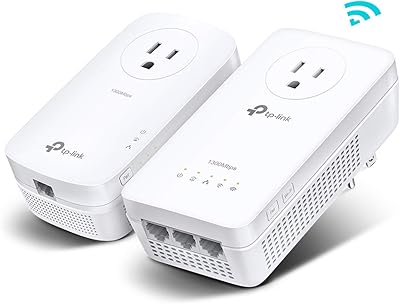
  • Kit Contents: Includes one powerline Ethernet adapter (for placement near the router) and one powerline Wi-Fi 6 extender (for the remote location).
  • Outlet Requirement: Both adapters must plug directly into a wall outlet; surge protectors and power strips block the powerline signal and are not compatible.
  • Circuit Requirement: Both adapters must be connected to the same electrical circuit in the home — units on separate circuits will not communicate.
  • Item Weight: Total kit weight is 8.8 oz (0.55 lb).
  • Dimensions: Package measures 9.17 × 7.56 × 4.02 inches.
  • Color: Available in white.
  • Model Number: Manufacturer model number is TL-WPA7817 KIT, produced by TP-Link.
  • Release Date: First made available in February 2025, representing a current-generation product at launch.

Related Reviews

TP-Link TL-WPA7617 Powerline WiFi Extender Kit
70%
91%
Ease of Setup
67%
Real-World Throughput
88%
Wired Ethernet Performance
72%
Wi-Fi Coverage & Signal Quality
38%
Surge Protector Compatibility
More
TP-Link TL-WPA8631P KIT Powerline WiFi Extender
77%
91%
Ease of Setup
67%
Real-World Throughput
61%
Wiring Compatibility
83%
Long-Term Reliability
72%
Wi-Fi Coverage & Performance
More
TP-Link TL-WA860RE Wi-Fi Range Extender
86%
95%
Ease of Setup
84%
Performance in Larger Homes
90%
Wi-Fi Range Extension
88%
Reliability
85%
Build Quality
More
TP-Link RE705X AX3000 Wi-Fi 6 Range Extender
79%
88%
Setup & Installation
79%
Signal Coverage
74%
Wi-Fi Speed Performance
71%
OneMesh Roaming
91%
Ethernet Port Utility
More
TP-Link TL-WR1502X Travel Router
81%
91%
Ease of Setup
94%
Portability & Form Factor
88%
Captive Portal Handling
79%
Wi-Fi Performance
86%
Multi-Mode Versatility
More
TP-Link TL-WR3002X AX3000 Wi-Fi 6 Travel Router
81%
83%
Ease of Setup
88%
VPN Performance
79%
Captive Portal Handling
93%
Portability & Form Factor
74%
Wi-Fi Speed & Range
More
TRENDnet TPL-410APK Powerline Wi-Fi Extender Kit
71%
91%
Ease of Setup
62%
Real-World Powerline Speed
67%
Wi-Fi Coverage & Signal Quality
88%
Wired Ethernet Ports
71%
Reliability & Connection Stability
More
TP-Link RE813XE Wi-Fi 6E Range Extender
86%
91%
Performance
89%
Wi-Fi Coverage
81%
Ease of Setup
95%
Compatibility with TP-Link Routers
88%
Streaming & Gaming Performance
More
TP-Link Archer AX55
TP-Link Archer AX55
76%
83%
Wireless Performance
74%
Coverage & Range
86%
Device Handling & Congestion
91%
Setup & Ease of Use
78%
Build Quality & Design
More
TP-Link RE370K Smart Plug & Wi-Fi Range Extender
85%
92%
Setup and Installation
84%
Wi-Fi Performance and Coverage
88%
Voice Control Integration
80%
App Usability (Kasa)
75%
Reliability and Connection Stability
More

FAQ

No app is required for basic setup. The extender has a physical WiFi Clone button that copies your router's network name and password in a single press. For most people, the whole process — plugging in both units, pairing them, and cloning the Wi-Fi — takes under ten minutes.

They can work, but you should set realistic expectations. Older wiring introduces more electrical resistance and interference than modern copper, which pulls real-world speeds below the theoretical maximum. You will likely see something in the range of 100 to 300 Mbps through the wiring rather than anything close to 1,000 Mbps — but for streaming, video calls, and browsing, that is still a meaningful upgrade over no signal at all.

The core powerline and Wi-Fi functions work with any router brand. The only feature that requires a TP-Link router is EasyMesh integration, which allows the extender to join your existing network under one name instead of broadcasting a separate SSID. Without a compatible TP-Link router, you just get a second Wi-Fi network in the far room, which works fine for most people.

EasyMesh lets your phone or laptop hand off automatically between your main router and the extender without you switching networks manually. If your router supports it, the extender appears as part of your existing network rather than a separate one. If your router does not support EasyMesh, you can ignore the feature entirely — the kit still works, the extender just shows up as its own Wi-Fi network.

Power strips and surge protectors contain filters that suppress electrical noise on the line — and the powerline signal is, essentially, structured noise riding on top of your home's electrical current. Those filters strip out the signal before it can travel through the wiring, so the two adapters cannot find each other. It is a genuine inconvenience if your walls are already occupied by strips, and worth figuring out before purchase.

The simplest way is your breaker panel. Flip one breaker at a time and note which outlets lose power — everything that goes dead is on that circuit. If the outlet near your router and the outlet in your problem room both go dark from the same breaker, you are good to go. If they are on different breakers, this kit will not bridge that gap.

Yes, and this is honestly one of the best reasons to buy this type of kit. The extender unit has a Gigabit Ethernet port, so you can run a short cable from the extender to your console or PC. That gives you a effectively wired connection in a distant room without physically running cable all the way from your router.

Treat the 1,000 Mbps figure as a ceiling, not a guarantee. In a typical home with reasonably modern wiring, you can realistically expect somewhere between 150 and 400 Mbps through the powerline link, depending on how far apart the adapters are, how old the wiring is, and how loaded the circuit is at any given moment. That range is more than sufficient for 4K streaming, online gaming, and large file transfers.

You can add more HomePlug AV2-compatible adapters to expand to additional rooms, and TP-Link sells individual units separately. Keep in mind that all units still need to share the same electrical circuit, and adding more adapters splits the available bandwidth across them, so each unit gets a smaller share of the total throughput. For most households, two to three units work well before performance starts to thin out.

A standard range extender rebroadcasts your existing Wi-Fi signal, which means it still has to punch through the same thick walls and long distances that are causing your dead zone in the first place — and it typically halves your bandwidth in the process. The TP-Link TL-WPA7817 KIT Powerline Wi-Fi 6 Extender routes the connection through your electrical wiring instead, bypassing walls entirely. The real trade-off is the same-circuit requirement and the wall-outlet-only rule, neither of which a basic range extender imposes.