Overview

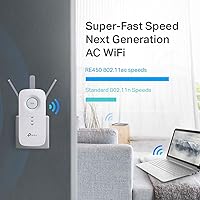
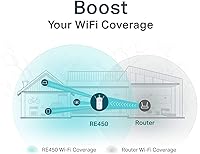
The TP-Link RE450 WiFi Range Extender has been a dependable mid-range option for households battling dead zones since it first launched in 2015 — and the fact that it still sells well says something. PCMag awarded it an Editor's Choice distinction, which gives it real third-party credibility in a crowded category. On paper, it's a dual-band AC1750 device, combining a 2.4GHz channel at 450Mbps and a 5GHz channel at 1300Mbps — more bandwidth headroom for more devices. One thing worth stating upfront: this range extender improves coverage, not your ISP's raw speed. Manage that expectation and it rarely disappoints.
Features & Benefits

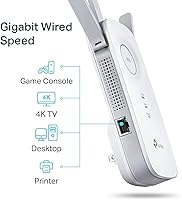
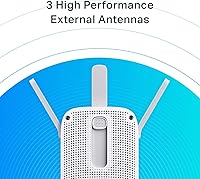
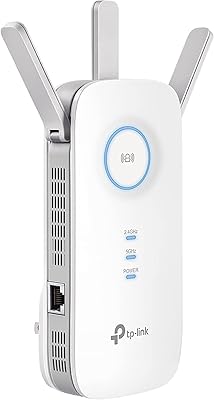
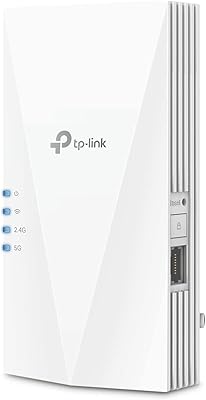
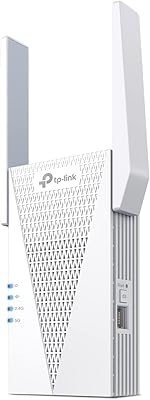
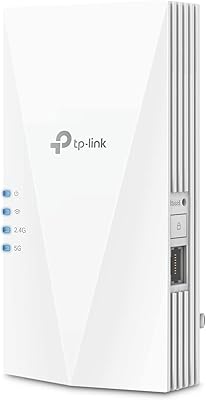
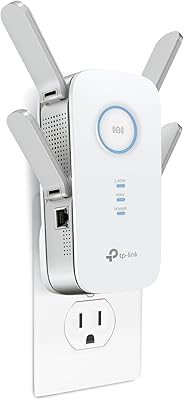
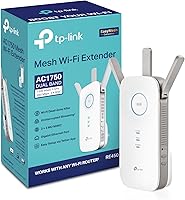
The RE450 runs on Wi-Fi 5 across two bands, so slower or longer-range devices can sit on 2.4GHz while streaming and gaming devices grab the faster 5GHz channel. Three adjustable external antennas let you physically direct the signal toward whichever rooms need it most — a small but genuinely useful detail. There is also a Gigabit Ethernet port on the unit, which lets you hardwire a smart TV or console directly for a more stable connection. A built-in signal indicator light takes the guesswork out of placement during setup. It covers up to 2,000 square feet, handles up to 32 devices, and works with any existing router or gateway.

Best For

This TP-Link booster makes the most sense for homeowners dealing with a single router that just cannot reach a back bedroom, home office, or second floor. Thick walls, long hallways, and older construction all chip away at signal strength — this is exactly the gap it fills. It is also a solid pick for casual streamers and gamers who need dependable coverage in a distant room without the complexity of a mesh system. Non-technical users will appreciate that setup requires no app or web portal — the indicator light does most of the guiding. If you are still running an older N-standard extender, the speed difference here is noticeable.

User Feedback

With over 31,000 ratings averaging 4.1 out of 5, the RE450 has earned a broadly positive reputation — but the reviews tell a nuanced story. Most buyers praise how straightforward the setup is and report real improvement in rooms that previously had weak or no signal, with antenna flexibility cited as a practical advantage. On the critical side, a recurring complaint is noticeably reduced throughput — an inherent limitation when a single-radio extender must both receive and retransmit data on the same band. Some users also report inconsistent results through the Ethernet port. Long-term durability holds up for most owners, though a small number mention hardware failures beyond the first year.

Pros

  • Plug-and-play setup takes minutes, with a physical signal indicator that guides optimal placement.
  • Dual-band design lets you split devices across 2.4GHz and 5GHz based on speed or range needs.
  • The built-in Gigabit Ethernet port lets you hardwire a TV or console at the extension point.
  • Three adjustable antennas give you real control over signal direction, not just raw output.
  • Compatible with any router or gateway — no brand lock-in required.
  • Supports up to 32 connected devices simultaneously without requiring configuration changes.
  • Covers up to 2,000 sq ft, making it genuinely useful in medium to large home layouts.
  • Over 31,000 user ratings with a 4.1 average reflects consistent real-world satisfaction.
  • PCMag awarded it an Editor's Choice distinction, adding meaningful third-party validation.
  • Long market presence means mature firmware and a well-documented setup process.

Cons

  • Throughput is noticeably reduced compared to your router's direct signal — that is unavoidable with single-radio repeater architecture.
  • The RE450 tops out at Wi-Fi 5, which may feel limiting if you have already invested in a Wi-Fi 6 setup.
  • Some users report inconsistent performance through the Ethernet port, which undermines one of its stronger selling points.
  • A small but recurring number of long-term owners report hardware failures after the first year of use.
  • Coverage claims of 2,000 sq ft assume open layouts — walls, floors, and interference can reduce that significantly.
  • No dedicated app means advanced configuration options are limited compared to newer extender models.
  • Creates a separate network SSID by default on some setups, which can cause devices to switch networks unexpectedly.
  • Not a viable solution if you have multiple dead zones spread across a large or multi-story home.

Ratings

The scores below reflect an AI-driven analysis of thousands of verified global reviews for the TP-Link RE450 WiFi Range Extender, with spam, bot-submitted, and incentivized feedback actively filtered out before scoring. Every category is calibrated to reflect what real buyers experienced day-to-day — not just what the spec sheet promises. Both the genuine strengths and the recurring frustrations are represented here without sugar-coating.

Coverage Extension
83%
The majority of buyers report a clear, tangible improvement in signal reach after placing this booster roughly midway between their router and the dead zone. Rooms that previously dropped to one bar — back bedrooms, garages, detached home offices — consistently picked up a usable connection. For a mid-sized home with one problematic area, the RE450 does exactly what it claims.
The rated 2,000 sq ft figure assumes an open layout with minimal obstructions, which rarely reflects real homes. Buyers in older construction with plaster walls, or in homes with multiple floors and thick concrete ceilings, often find effective coverage falls noticeably short of that ceiling.
Signal Throughput
61%
39%
For casual web browsing, video calling, and standard-definition or HD streaming in extended areas, the RE450 delivers enough throughput to feel functional. Users upgrading from older N-standard extenders notice a real improvement in responsiveness, particularly when connecting to the 5GHz band from a nearby room.
This is where the single-radio repeater architecture shows its limits. Because the extender uses the same radio to receive and retransmit, effective bandwidth at the extension point is roughly halved — buyers expecting near-router speeds in a distant room are regularly disappointed, and this complaint appears consistently across thousands of reviews.
Ease of Setup
88%
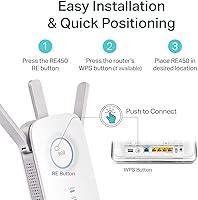
Setup is one of the most praised aspects of this range extender across the entire review pool. Most users report being fully operational within five to ten minutes using either the WPS button or a browser-based walkthrough. The signal indicator light that guides placement is a detail buyers genuinely appreciate — it removes the guesswork.
A smaller but vocal segment of users encounters issues when their router has non-standard security settings or older firmware. WPS-based setup occasionally fails to pair on the first attempt, requiring a manual browser setup instead, which trips up less technical users who expected a one-button process.
Dual-Band Flexibility
79%
21%
Having both 2.4GHz and 5GHz available at the extension point gives households a real advantage — smart home devices and phones can sit on the lower band while a gaming console or streaming stick grabs the faster 5GHz channel. Users with mixed-device households specifically call out this flexibility as a reason they chose the RE450 over cheaper single-band alternatives.
The extender creates separate SSIDs for each band by default, and devices do not always roam between them intelligently. Several users note that phones or laptops stubbornly hold onto the weaker 2.4GHz network rather than switching to 5GHz, which requires manual intervention to resolve.
Ethernet Port Utility
67%
33%
The inclusion of a Gigabit Ethernet port genuinely sets this booster apart from entry-level competitors. Buyers who hardwire a smart TV or a streaming box into it report a noticeably more stable connection than relying on the extended wireless signal alone, particularly for 4K content.
Feedback on the Ethernet port is more mixed than the spec alone suggests. A recurring complaint involves inconsistent wired performance — some users find the port delivers well below Gigabit speeds in practice, and a few report the port becoming unreliable after several months of use.
Antenna Performance
76%
24%
Three physically adjustable external antennas give buyers something to work with that fixed-antenna designs do not — you can angle them toward specific rooms, floors, or corners of a home rather than broadcasting equally in all directions. Users in longer, narrower home layouts mention this as a meaningful advantage during placement.
The practical benefit depends heavily on how well users understand antenna positioning, and many do not experiment beyond the default upright configuration. The antennas also add to the unit's overall bulk, making it slightly awkward in tight outlet locations or rooms with limited clearance around sockets.
Build Quality
72%
28%
The RE450 has a solid, well-finished plastic casing that feels appropriately sturdy for a plug-in extender. It does not feel flimsy or cheap in hand, and the hinge connections on the antennas hold their position without drooping after repeated adjustment — a small but telling indicator of reasonable build standards.
A portion of long-term owners report that units begin showing signs of wear — discoloration, loose antenna hinges, or intermittent connectivity — after 18 to 24 months of continuous use. For a device that stays plugged in around the clock, that timeline is shorter than ideal for the price point.
Long-Term Reliability
69%
31%
Many buyers have used the RE450 for two or three years without incident, and the product's continued strong seller ranking since 2015 suggests a broad base of satisfied long-term owners. TP-Link's firmware update history for this model also indicates continued support beyond the typical consumer hardware lifecycle.
Hardware failure reports, while not dominant in the review pool, are consistent enough to flag. A subset of buyers describes units that stop broadcasting or lose the ability to connect to the source router after extended use, with no clear resolution outside replacement — an outcome that feels premature for a mid-range networking device.
Router Compatibility
91%
Universal compatibility is one of the most dependable aspects of this device. Across thousands of reviews, buyers report successful pairing with routers from virtually every major brand — Netgear, ASUS, Linksys, Xfinity gateways, AT&T modems, and more — without needing to change any settings on the existing router.
Compatibility with ISP-provided combination modem-router units can occasionally be more finicky, particularly with older or locked-down gateway firmware. A small number of users with ISP-issued hardware report needing to disable certain router features before the extender pairs reliably.
Value for Money
78%
22%
At its price point, the RE450 offers a genuinely competitive feature set — dual-band AC1750 performance, a Gigabit Ethernet port, and three adjustable antennas are not standard inclusions at this tier. For buyers with a single dead zone to address, it represents a cost-effective alternative to replacing their entire router or investing in a full mesh system.
The inherent throughput loss of repeater architecture does raise fair questions about value when faster mesh nodes have dropped in price in recent years. Buyers who eventually realize they needed a mesh system rather than a single extender sometimes feel the purchase was a stepping stone rather than a solution.
Network Management
57%
43%
Basic configuration through the browser-based interface is clean and accessible for a non-technical audience. Changing the network name, setting a password, or adjusting band preferences can be done in a few clicks without any networking background.
The management interface is noticeably limited compared to newer extenders with companion apps. There is no bandwidth monitoring, no device prioritization, no scheduling, and no real-time signal visualization — features that users who want more control over their extended network will find notably absent.
Physical Footprint
74%
26%
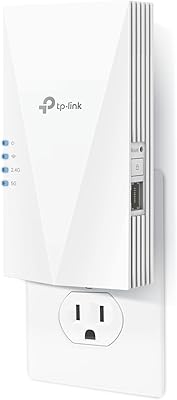
At 3 x 6.4 x 2.6 inches and just over 11 ounces, the RE450 is reasonably compact for what it includes. It plugs directly into a wall outlet without needing a separate power cable cluttering up a shelf or table.
The three protruding antennas make the unit taller and wider than it appears in product photos, and it can block an adjacent outlet on a standard duplex socket. Buyers with limited outlet clearance — in a hallway, behind furniture, or in a cramped corner — sometimes find the physical form factor more inconvenient than expected.
Streaming Performance
73%
27%
For single-stream HD and most 4K content on the 5GHz band, the RE450 delivers a stable enough connection to avoid buffering in the extended area — which is the primary use case for most buyers who purchase it for a living room or bedroom TV setup.
Multi-device simultaneous streaming on the extended network is where things degrade. When two or three devices in the extended zone try to stream at the same time, bandwidth contention becomes noticeable, with some users reporting dropouts or quality reductions that did not occur when closer to the main router.
Gaming Suitability
58%
42%
Casual gaming on titles that are not highly latency-sensitive generally works acceptably on the RE450, particularly when connected via the Ethernet port rather than wirelessly. Several buyers mention using it successfully for less competitive online games from a back bedroom or basement.
Latency-sensitive gaming — competitive shooters, real-time strategy games, fighting games — is a poor match for any repeater-based extender, and this one is no exception. The added hop and bandwidth halving introduce enough latency variability that competitive gamers in the review pool consistently advise against relying on it.

Suitable for:

The TP-Link RE450 WiFi Range Extender is a strong fit for homeowners who have one router doing its best but simply cannot push a reliable signal through thick walls, across two floors, or to the far end of a larger home. If your main frustration is a dead zone in a specific room — a basement office, a bedroom at the end of a hallway, or a garage — this range extender addresses that problem directly and without requiring you to replace your existing router. It works particularly well for households with a mix of device types: you can point the 5GHz band toward a streaming TV or a gaming console in the far room, while leaving the 2.4GHz channel open for smart home gadgets and phones. The built-in Gigabit Ethernet port is a genuine bonus for anyone who wants to hardwire a device at the extension point rather than relying on wireless. Non-technical users will also find the setup refreshingly straightforward, since placement guidance comes from a physical indicator light rather than a confusing app or web interface.

Not suitable for:

The TP-Link RE450 WiFi Range Extender is not the right tool if you are hoping to boost your internet speed — it extends coverage, and like all traditional single-unit repeaters, it must receive and retransmit data on the same radio, which cuts effective throughput roughly in half compared to what your router delivers directly. Power users running bandwidth-heavy workflows, multiple 4K streams simultaneously, or competitive online gaming across several devices will likely find that limitation frustrating. If your home exceeds 3,000 square feet or has a genuinely complex layout with multiple problematic areas, a mesh Wi-Fi system will serve you far better than a single extender ever could. Households already running Wi-Fi 6 routers and devices may also feel the RE450 is a step backward, as it tops out at Wi-Fi 5 (802.11ac). Finally, anyone who relies heavily on wired backhaul or needs dedicated network segmentation should look at more advanced solutions.
Specifications

  • Brand: Manufactured by TP-Link, a widely recognized networking hardware brand.
  • Model Number: This unit carries the model designation RE450.
  • WiFi Standard: Operates on 802.11ac (Wi-Fi 5), compatible with older 802.11a/b/g/n devices as well.
  • Combined Speed: Delivers a maximum combined wireless throughput of 1750 Mbps across both bands.
  • 2.4GHz Band: The 2.4GHz band provides up to 450 Mbps, suited for longer range and lighter-use devices.
  • 5GHz Band: The 5GHz band provides up to 1300 Mbps, suited for streaming, gaming, and bandwidth-heavy tasks.
  • Frequency: Dual-band operation allows simultaneous use of both 2.4GHz and 5GHz networks.
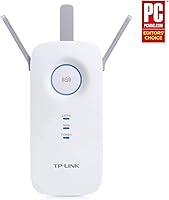
  • Antennas: Equipped with three external antennas that can be manually adjusted to direct coverage as needed.
  • Ethernet Port: Includes one Gigabit Ethernet port for connecting wired devices directly at the extension point.
  • Coverage Area: Rated to extend WiFi coverage across up to 2,000 square feet under typical open-space conditions.
  • Device Capacity: Supports up to 32 simultaneously connected wireless devices.
  • Dimensions: Physical footprint measures 3 x 6.4 x 2.6 inches, designed to plug directly into a wall outlet.
  • Weight: Unit weighs 11.3 ounces, which is typical for a plug-in extender of this size.
  • Operating Temp: Rated for operation in environments between 0°C and 30°C (32°F to 86°F).
  • Setup Aid: A built-in signal indicator light helps identify the optimal placement location during initial installation.
  • Compatibility: Works with any WiFi router, gateway, or access point regardless of brand or ecosystem.
  • User Ratings: Has accumulated over 31,054 customer ratings on Amazon, averaging 4.1 out of 5 stars.
  • Market Presence: Originally released on November 15, 2015, and remains actively sold and supported as of this writing.

Related Reviews

TP-Link RE550 Wi-Fi Range Extender
78%
86%
Coverage & Range
91%
Setup & Installation
62%
Throughput & Speed Performance
78%
Build Quality & Design
88%
Gigabit Ethernet Port
More
TP-Link RE200 AC750 WiFi Range Extender
81%
94%
Ease of Setup
85%
Signal Range
80%
Speed Performance
82%
Dual-Band Performance
77%
Build Quality
More
TP-Link RE715X
TP-Link RE715X
75%
88%
Signal Coverage
91%
Setup Experience
63%
WiFi Speed in Extended Zones
79%
EasyMesh & Roaming
72%
Build Quality & Design
More
TP-Link RE700X AX3000 WiFi 6 Range Extender
85%
91%
Setup & Installation
88%
WiFi Performance
85%
Coverage Range
80%
Build Quality
90%
App & Software Experience
More
TP-Link RE615X
TP-Link RE615X
77%
91%
Ease of Setup
76%
WiFi Coverage
63%
Throughput Performance
93%
Ethernet Port Utility
71%
Signal Stability
More
TP-Link RE815X AX5400 WiFi 6 Range Extender
85%
88%
Performance
91%
Setup & Installation
82%
Coverage Area
77%
Speed Stability
89%
App & Software Experience
More
TP-Link RE500X WiFi Extender
86%
89%
Setup and Installation
85%
WiFi Performance
90%
Coverage Area
87%
App Experience
92%
Value for Money
More
TP-Link RE300 WiFi Range Extender
76%
88%
Ease of Setup
82%
Signal Coverage
61%
Throughput & Speed Performance
78%
Device Capacity
84%
Build Quality & Form Factor
More
TP-Link AC750 WiFi Extender RE190
84%
85%
Wi-Fi Performance
91%
Ease of Setup
88%
Build Quality
92%
Value for Money
78%
Coverage Range
More
TP-Link RE650 AC2600 WiFi Extender
85%
88%
Performance
92%
Ease of Setup
86%
Range Coverage
82%
Build Quality
87%
WiFi Speed
More

FAQ

Not directly — and it is worth being upfront about that. The RE450 extends the reach of your existing WiFi signal, so devices in previously weak areas get a usable connection. However, because a traditional repeater like this receives and retransmits on the same radio, the effective throughput at the extension point is roughly half of what your router delivers at close range. You are trading raw speed for coverage.

It works with any router, gateway, or access point regardless of brand. There is no TP-Link ecosystem requirement — just plug it in, connect it to your existing network during setup, and it handles the rest.

The built-in signal indicator light does most of the work for you. During setup, it shows whether the connection to your router is strong, acceptable, or too weak at the chosen location. A general rule of thumb is to position the RE450 roughly halfway between your router and the dead zone, somewhere it still has a solid connection to the source signal.

Yes, the TP-Link RE450 WiFi Range Extender includes a Gigabit Ethernet port specifically for this purpose. You can run a cable from the extender directly to a TV, console, or desktop PC in the extended area, which often provides a more stable connection than relying on the extended wireless signal alone. That said, some users have reported inconsistent Ethernet performance, so results can vary.
By default, the RE450 creates a new extended network with a suffix added to your existing SSID — for example, your network might become YourNetwork_EXT. This means some devices may not roam between networks automatically. You can configure it to use the same SSID as your router if you prefer, though seamless roaming is not guaranteed without additional setup.

Setup is genuinely straightforward for most users. You plug it in, connect to the temporary setup network it broadcasts, open a browser or use the WPS button on your router, follow the prompts, and the indicator light confirms you are good. No dedicated app is required, and most users report completing setup in under ten minutes.

It can work well in a two-story home, but placement is everything. Floors and ceilings attenuate signal, so positioning the booster on the first floor near a stairwell — where it still has a clear path to the router — often gives the best results for covering the upper level. If the layout is complex or the home is large, you may need to experiment with placement.

The RE450 supports up to 32 connected devices simultaneously. In practice, performance quality will depend on how many of those devices are actively using bandwidth at the same time, but for a typical household this ceiling is more than sufficient.

Most owners report reliable performance for two or more years with regular use. The product has been on the market since 2015 and has a broad user base, which suggests it is reasonably durable. A small percentage of reviews do mention hardware failures after extended use, which is not unusual for any consumer networking device in this category.

Yes, noticeably so. The jump from 802.11n to 802.11ac (Wi-Fi 5) brings meaningful improvements in both speed headroom and dual-band flexibility. If your older extender only operated on 2.4GHz, gaining access to the 5GHz band alone makes a real practical difference for streaming and other bandwidth-sensitive activities.

Where to Buy