Overview

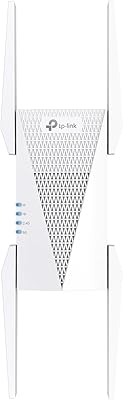
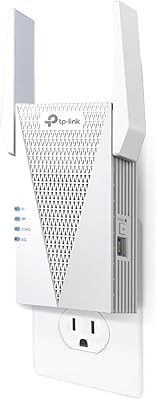
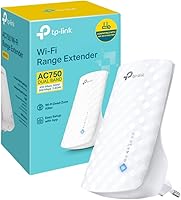
The TP-Link RE190 AC750 WiFi Range Extender is a compact, wall-plug device built to push your router's signal into rooms it simply cannot reach on its own. TP-Link has been a dependable name in home networking for years, and the RE190 sits in their practical, no-frills extender lineup. The AC750 label refers to a combined dual-band ceiling of 750 Mbps across both frequencies — real-world throughput per device runs noticeably lower, but that is true of every extender on the market. Think of this range extender as a targeted fix for one or two stubborn dead zones rather than a full mesh replacement. For anyone who dreads router admin pages, the plug-and-play setup alone makes it worth considering.
Features & Benefits

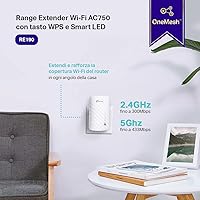
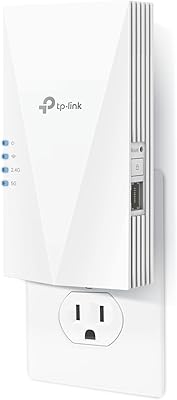
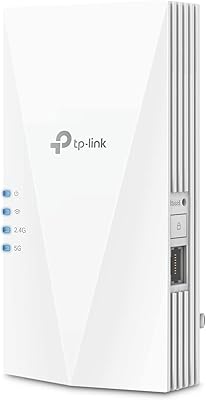
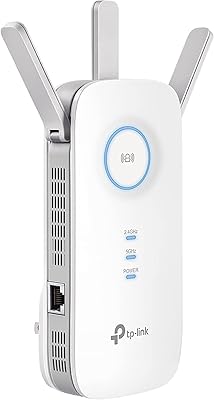
On the hardware side, the RE190 runs two separate bands — the 2.4 GHz band covers greater distances while the 5 GHz band offers faster speeds for devices sitting closer to the extender. That trade-off is worth understanding before you buy: range and speed rarely peak at the same time. A trio of internal antennas helps keep the signal more stable and evenly distributed than a single-antenna design would. The LED signal indicator is a small but genuinely practical detail; it removes the guesswork from placement by showing you whether a chosen outlet is receiving a strong enough source signal before you commit. A built-in RJ45 Ethernet port lets you hard-wire a nearby TV or console, a bonus many buyers overlook entirely.

Best For

This TP-Link plug-in booster makes the most sense for renters or homeowners dealing with a couple of specific dead zones in a small to mid-sized space — think a back bedroom, a detached garage, or a home office sitting just past the router's comfortable reach. If you have been putting off fixing your Wi-Fi because setup sounded complicated, this is a reasonable starting point; no router login required for basic WPS pairing. The built-in Ethernet jack also makes it a practical pick for anyone needing a wired connection in a room without a wall port. It is not the right tool for whole-home coverage or households with heavy simultaneous demands across multiple devices.

User Feedback

With over 17,000 ratings averaging 4.2 out of 5, the RE190 has earned a broadly positive reception. Most buyers highlight how painless the initial setup is, and several credit the signal LED specifically for helping them find a genuinely good placement spot. Stable performance during HD video calls and standard streaming gets mentioned often on the positive side. Where feedback turns critical, users flag the expected speed drop at longer distances or through dense walls — worth knowing, but this is an inherent extender-category limitation rather than a defect unique to this device. Long-term reliability reports are generally solid, though a share of users note occasional drop-outs after extended use. Customer support experiences across the broader TP-Link base appear somewhat mixed.

Pros

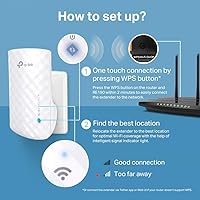
  • One-button WPS setup gets most users connected in minutes, no technical knowledge needed.
  • The LED signal indicator takes the guesswork out of finding a placement spot that actually works.
  • Dual-band support lets you choose between range on 2.4 GHz or faster speeds on 5 GHz depending on your need.
  • A built-in Ethernet port is a genuinely useful bonus for wiring in a TV or console.
  • Three internal antennas provide a more stable and evenly distributed signal than basic single-antenna extenders.
  • The compact wall-plug form factor draws no attention and frees up both outlet slots in most cases.
  • Over 17,000 ratings averaging 4.2 out of 5 reflects a consistently reliable ownership experience.
  • Solid choice for light-to-moderate workloads like HD streaming, video calls, and everyday browsing.
  • Works with virtually any router brand, making it a flexible addition to most existing home setups.

Cons

  • Real-world throughput per device drops noticeably at longer distances or through dense walls.
  • The extended network often broadcasts as a separate SSID, so devices may not switch over automatically.
  • Not suited for households with heavy simultaneous bandwidth demands across many devices.
  • No dedicated backhaul channel means the RE190 shares the same bandwidth for both receiving and rebroadcasting the signal.
  • Long-term reliability reports are mostly positive, but a subset of users do mention occasional drop-outs after months of use.
  • Customer support experiences across TP-Link have been mixed, which matters if you ever need warranty help.
  • No companion app means advanced troubleshooting or fine-tuning requires navigating a browser-based interface.
  • Speed reduction through walls is an inherent extender trade-off, but buyers expecting near-router performance will be disappointed.

Ratings

The scores below were generated by AI after analyzing thousands of verified global user reviews for the TP-Link RE190 AC750 WiFi Range Extender, with spam, incentivized, and bot-flagged submissions actively filtered out to reflect genuine ownership experiences. The RE190 earns strong marks in setup simplicity and value, but the analysis also surfaces real frustrations — particularly around throughput limitations and network management — so buyers can make a fully informed decision.

Ease of Setup
93%
The one-button WPS pairing is consistently praised as genuinely fast — most users report being connected in under three minutes without touching a single setting. Even buyers who described themselves as non-technical found the process straightforward, which is rare praise in the networking category.
A small but recurring group of users found WPS pairing failed on older or ISP-locked routers, forcing them into the browser-based setup, which is functional but less intuitive than the WPS experience suggests.
Signal Coverage
76%
24%
In open-plan layouts and single-floor homes, the RE190 reliably pushes usable signal into rooms that previously had none, with users in apartments and smaller houses noting a clear improvement in dead-zone coverage. The dual-band design gives it a meaningful advantage over older single-band extenders in the same price bracket.
Performance drops off noticeably when multiple walls or floors stand between the extender and its devices, with several users in older brick or concrete homes reporting that coverage gains were modest at best. Large homes with complex layouts will find the coverage ceiling hits sooner than expected.
Throughput & Speed
61%
39%
For everyday tasks — browsing, HD video calls, and standard-definition or 1080p streaming — the speeds delivered in the extended zone are sufficient and stable enough that most casual users notice no frustrating interruptions during typical sessions.
The AC750 label represents a combined theoretical ceiling, not a real-world per-device figure, and users who test actual speeds in the extended zone regularly see bandwidth cut roughly in half compared to near-router results. Anyone expecting 4K streaming, fast downloads, or lag-free gaming from the extended signal will likely be disappointed.
Signal Placement Indicator
88%
The LED signal strength display is called out repeatedly in positive reviews as a feature buyers did not expect to find useful but ended up relying on heavily during initial placement. It removes a frustrating trial-and-error cycle that plagues extender setup in general.
The indicator reads source signal strength at the outlet, not the quality of coverage being delivered to end devices, so users who interpret a strong LED reading as a guarantee of fast extended speeds can still end up in a suboptimal spot relative to their actual devices.
Value for Money
84%
Buyers who purchased the RE190 specifically to solve a single dead-zone problem in a smaller home consistently describe it as money well spent, particularly when weighed against the cost of a full mesh upgrade. The inclusion of an Ethernet port at this price point is a recurring positive highlight.
A subset of buyers who purchased hoping to cover larger spaces or replace a struggling router feel the value diminishes quickly once its limitations become apparent, with some wishing they had invested in a better solution from the start.
Ethernet Port Utility
82%
18%
Users who discovered the RJ45 port and used it to hard-wire a smart TV or streaming device in a room without a wall jack consistently rate this feature as a genuine bonus that exceeded their expectations for a compact wall-plug extender.
The port is capped at Fast Ethernet speeds — 100 Mbps — which is more than adequate for streaming but becomes a bottleneck for NAS transfers or high-speed wired use cases, a limitation some buyers did not notice until after purchase.
Network Compatibility
86%
The RE190 pairs reliably with routers from a wide range of brands — Netgear, ASUS, Linksys, and standard ISP-provided gateways — without firmware conflicts or compatibility headaches, which is something users switching from other extender brands particularly appreciate.
ISP gateways with WPS disabled by default or custom firmware occasionally cause pairing issues, requiring the browser-based setup path, and a small number of users report the extender losing its saved settings after a power outage requiring a fresh setup.
Long-Term Reliability
69%
31%
The majority of users who have owned the RE190 for six months or longer report stable day-to-day performance with no major hardware failures, and the unit running warm but not hot during continuous operation is noted as within normal expectations.
A meaningful share of longer-term owners report intermittent drop-outs or the extender needing a periodic manual restart to recover stable connectivity, which becomes more disruptive in households that rely on it for consistent work-from-home or smart home device connections.
Network Handoff
53%
47%
Users who manually connect their devices to the correct extended network and leave them static — a TV in one room, a laptop in another — tend to have a clean, frustration-free experience without any handoff issues to contend with.
The RE190 broadcasts a separate SSID by default, and devices moving between rooms often cling to the weaker signal rather than switching automatically, forcing manual reconnection — a workflow that frustrates users accustomed to the seamless handoff of mesh systems.
Build Quality & Design
79%
21%
The compact, all-plastic housing feels solid enough for a wall-mounted device, and its slim profile means it does not crowd adjacent outlets — something users in homes with limited outlet access appreciate more than the spec sheet might suggest.
The all-plastic casing and lack of any premium material finish make the unit feel entry-level on close inspection, and the white color, while neutral, shows dust and scuffs over time in high-traffic outlet locations.
Customer Support
58%
42%
Users who reached TP-Link support for basic troubleshooting steps generally found the documentation and online knowledge base sufficient for resolving common setup or connectivity questions without needing to contact a live agent.
Reviews referencing direct contact with TP-Link support are mixed, with complaints about slow response times and generic troubleshooting scripts that do not always resolve the underlying issue, which becomes particularly frustrating when warranty replacement is needed.
App & Management Experience
55%
45%
Users who only need to set the extender up once and leave it running find the lack of a mandatory app to be a positive rather than a gap — there is simply nothing to manage, and the browser portal covers the basics adequately for occasional changes.
Buyers who want visibility into connected devices, real-time speed monitoring, or firmware update notifications through a clean mobile interface will find the RE190 frustrating — the management experience feels dated compared to competing extenders with dedicated companion apps.
Dual-Band Performance Balance
71%
29%
Having both bands active simultaneously gives devices the option to use 5 GHz for faster nearby connections and 2.4 GHz for greater range, which works well in practice for households with a mix of device types and usage distances from the extender.
There is no band steering feature to automatically guide devices to the optimal band, so users end up with phones or laptops stubbornly sitting on the slower 2.4 GHz channel when they could benefit from the faster 5 GHz signal nearby.

Suitable for:

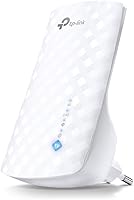
The TP-Link RE190 AC750 WiFi Range Extender is a practical pick for renters and homeowners who have one or two frustrating dead zones — a back bedroom that drops calls, a garage workshop where the signal barely reaches, or a home office sitting just past the router's comfortable range. Non-technical users will particularly appreciate it; the one-button WPS pairing means you can be up and running in under five minutes without ever touching a browser or admin panel. The built-in Ethernet port adds real value for anyone who wants to hard-wire a smart TV, streaming stick, or older game console in a room that has no wall jack. It also works well as a low-effort coverage boost for vacation rentals, small apartments, or single-floor homes where a full mesh system would be overkill and an unnecessary expense.
Not suitable for:

The TP-Link RE190 AC750 WiFi Range Extender is not the right solution for households that need consistent, high-throughput coverage across multiple floors or a large square footage — in those situations, a mesh system is simply the better investment. The AC750 rating represents a combined dual-band ceiling, and real-world speeds per device, especially at distance or through multiple walls, will fall well short of that figure; anyone running 4K streaming, large file transfers, or competitive online gaming in the extended zone may find the performance underwhelming. Households with many simultaneous users or devices competing for bandwidth will hit the RE190's limits quickly. It also creates a separate network name by default in many setups, which means devices do not always hand off cleanly between the router and the extender — a minor but real friction point that mesh systems handle automatically.
Specifications

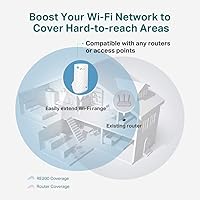
  • Model: This device carries the model designation RE190, part of TP-Link's entry-level range extender lineup.
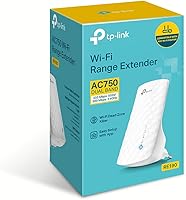
  • Wi-Fi Standard: It operates on the 802.11ac (Wi-Fi 5) standard, offering backward compatibility with older 802.11a/b/g/n devices.
  • Combined Speed: The AC750 rating represents a combined dual-band ceiling of up to 750 Mbps across both frequency bands simultaneously.
  • 2.4 GHz Band: The 2.4 GHz band delivers theoretical speeds of up to 300 Mbps, prioritizing longer range over raw throughput.
  • 5 GHz Band: The 5 GHz band reaches up to 433 Mbps theoretically, best suited for devices positioned closer to the extender.
  • Antennas: Three internal antennas are built into the housing, contributing to a more stable and evenly distributed wireless signal.
  • Setup Method: Users can connect via one-button WPS pairing or through a standard browser-based configuration interface at tplinkrepeater.net.
  • Ethernet Port: One RJ45 Fast Ethernet port (up to 100 Mbps) allows a single wired device to connect directly to the extender.
  • Signal Indicator: An LED signal strength display on the unit helps users identify the optimal wall outlet placement before committing to a location.
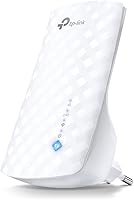
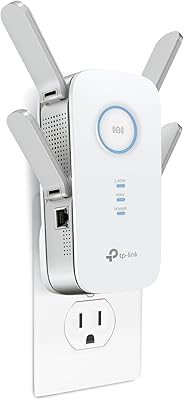
  • Form Factor: The RE190 uses a wall-plug design that draws power directly from a standard outlet, requiring no separate power cable or desk space.
  • Dimensions: The unit measures 1.53 × 2.59 × 4.33 inches, making it one of the more compact extenders in its class.
  • Weight: At 3.17 ounces, the extender is light enough that it does not stress or pull away from a standard wall outlet over time.
  • Color: The RE190 ships in a neutral white finish designed to blend with most home wall plates and outlet covers.
  • Manufacturer: The device is designed and manufactured by TP-Link, a globally recognized brand specializing in consumer networking hardware.
  • User Rating: Based on over 17,163 customer ratings on Amazon, the RE190 holds an average score of 4.2 out of 5 stars.
  • Compatibility: The extender is compatible with virtually any wireless router or gateway operating on standard 802.11 Wi-Fi protocols.
  • Operating Frequency: It supports simultaneous dual-band operation, broadcasting on both the 2.4 GHz and 5 GHz frequency bands at the same time.
  • Release Date: The RE190 was first made available for purchase in February 2020 and remains an active, non-discontinued product.

Related Reviews
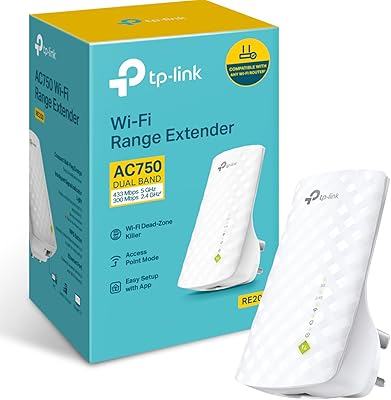
TP-Link RE200 AC750 Dual-Band WiFi Extender
70%
88%
Setup & Installation
72%
Signal Coverage
61%
Wireless Speed
79%
2.4GHz Performance
58%
5GHz Performance
More
TP-Link RE550 Wi-Fi Range Extender
78%
86%
Coverage & Range
91%
Setup & Installation
62%
Throughput & Speed Performance
78%
Build Quality & Design
88%
Gigabit Ethernet Port
More
TP-Link RE615X
TP-Link RE615X
77%
91%
Ease of Setup
76%
WiFi Coverage
63%
Throughput Performance
93%
Ethernet Port Utility
71%
Signal Stability
More
TP-Link RE815X AX5400 WiFi 6 Range Extender
85%
88%
Performance
91%
Setup & Installation
82%
Coverage Area
77%
Speed Stability
89%
App & Software Experience
More
TP-Link RE715X
TP-Link RE715X
75%
88%
Signal Coverage
91%
Setup Experience
63%
WiFi Speed in Extended Zones
79%
EasyMesh & Roaming
72%
Build Quality & Design
More
TP-Link RE700X AX3000 WiFi 6 Range Extender
85%
91%
Setup & Installation
88%
WiFi Performance
85%
Coverage Range
80%
Build Quality
90%
App & Software Experience
More
TP-Link RE500X WiFi 6 Range Extender
75%
86%
Coverage & Dead Zone Elimination
61%
Real-World Speed Performance
89%
Setup & Installation Experience
78%
Multi-Device Handling
91%
Gigabit Ethernet Port Utility
More
TP-Link RE600X WiFi 6 Extender
87%
87%
Performance
93%
Ease of Setup
85%
WiFi Coverage
89%
Dual-Band Speed
84%
Reliability
More
TP-Link RE650 AC2600 WiFi Extender
85%
88%
Performance
92%
Ease of Setup
86%
Range Coverage
82%
Build Quality
87%
WiFi Speed
More
TP-Link RE300 WiFi Range Extender
76%
88%
Ease of Setup
82%
Signal Coverage
61%
Throughput & Speed Performance
78%
Device Capacity
84%
Build Quality & Form Factor
More

FAQ

No — if your router supports WPS (most routers made in the last decade do), you just press the WPS button on the router, then the button on the RE190, and they pair within about two minutes. If your router does not have WPS, you can still set it up through a browser by visiting tplinkrepeater.net, which walks you through the process step by step.

By default, the extender creates a new network name with an underscore suffix added to your existing name — for example, if your network is called HomeWifi, the extended network would appear as HomeWifi_EXT. You can rename it to match your main network during setup if you prefer, though automatic device handoff between the two signals is not guaranteed the way it is with a mesh system.

That depends heavily on your home's layout and building materials. In an open-plan space, you can realistically expect coverage to push an additional 30 to 50 feet beyond where your router signal fades. Thick concrete walls, brick, or multiple floor transitions will reduce that range noticeably. The LED indicator on the unit is genuinely useful here — it shows you whether a given outlet is receiving a strong enough source signal to extend effectively.

Yes, and this is one of the more underappreciated features of the RE190. The built-in RJ45 port lets you run a cable directly from the extender to any wired device — a smart TV, a streaming box, or a game console. Keep in mind the port is Fast Ethernet, capped at 100 Mbps, which is more than sufficient for HD streaming and most gaming but would bottleneck very high-speed transfers.

Yes, it works with routers from any brand — Netgear, ASUS, Linksys, ISP-provided gateways, and others. It connects to your existing network like any other wireless device would, so brand compatibility is not a concern in normal home setups.

This is expected behavior for all Wi-Fi extenders, not a flaw specific to this device. The extender receives your router's signal and rebroadcasts it using the same radio band, which effectively cuts available bandwidth in half for devices using the extended network. If you need near-router speeds in a distant room, a mesh system or a wired access point would be a more appropriate solution.

The sweet spot is roughly halfway between your router and the dead zone — close enough to your router to receive a solid signal, but far enough to actually push coverage into the problem area. The LED indicator helps a lot here: look for a location where it shows two or three bars of signal strength rather than just one. Avoid plugging it in right next to the router, or in the dead zone itself, as either extreme reduces effectiveness.

Yes, it broadcasts on both bands simultaneously. The 2.4 GHz band is better for devices that are farther away or need to pass through walls, while the 5 GHz band offers faster throughput for devices that are closer to the extender. Your devices will typically connect to whichever band they prefer, though you can also connect manually if needed.

If you have one or two specific dead zones in a home under roughly 1,500 square feet, this range extender is a cost-effective fix. If you need consistent, fast coverage throughout a larger home across multiple floors, or if you have several people streaming and video calling at the same time, a mesh system will serve you far better in the long run. The RE190 is a targeted solution, not a whole-home one.

There is a reset button on the unit that clears all settings and returns it to factory defaults — useful if you move or switch routers. After a reset, you just go through the initial setup process again, which takes only a few minutes. Moving it to a different outlet within the same network does not require a reset; just unplug and replug it in the new location.

Where to Buy