Overview

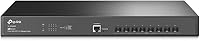
The TP-Link TL-SX3008F 8-Port 10G SFP+ Switch sits at a genuinely interesting price point — bringing real managed switching capability to small businesses and home lab builders who previously had to spend considerably more to get 10G fabric. What makes it practical day-to-day is the completely fanless design: no hum, no whir, nothing — a real advantage in a living room rack or quiet office closet. It slots into a standard 1U rack and ships ready to mount. For those already running TP-Link gear, Omada SDN integration ties this switch into a broader unified network ecosystem. The 5-year manufacturer warranty rounds things out, signaling genuine confidence in the hardware at this price tier.
Features & Benefits

All eight ports on this 10G SFP+ switch run at full line rate with no internal bottleneck — critical when pushing simultaneous NAS transfers or VM migrations. The L2+ managed feature set covers VLANs, static routing, ACLs, Link Aggregation, and multi-layer QoS, giving you real traffic control without needing an enterprise budget. On the management side, Omada SDN supports hardware, software, and cloud controllers, but standalone mode is also available — so you're not forced into a controller if you prefer simple local management. One practical note: SFP+ ports need transceivers or DAC cables sold separately, which new buyers sometimes miss when budgeting. IPv6 support is a nice inclusion for forward-looking deployments.

Best For

This Omada-managed switch hits a sweet spot for a few specific audiences. Home lab builders moving storage or hypervisor traffic to 10G will find the port count and feature depth exactly right for that upgrade. Small businesses standardizing on TP-Link's ecosystem get unified management across switches, access points, and gateways under one platform. Video editors and content creators who need fast NAS-to-workstation throughput will appreciate having line-rate bandwidth on every port. IT pros who want Layer 2+ granular control — VLANs, LAG, QoS, static routing — without paying for a full enterprise chassis will find the feature-to-price ratio compelling. If you're not in the Omada ecosystem yet, standalone mode means you can still use it as a capable managed switch entirely on its own terms.

User Feedback

Owners of the TL-SX3008F consistently praise the value per 10G port — at this price, getting eight full-speed managed ports with a solid security feature set is genuinely hard to beat. Build quality gets positive mentions too; the all-metal chassis feels appropriately sturdy for rack deployment. That said, a few recurring concerns are worth noting. Some users report SFP+ transceiver compatibility issues with certain third-party modules, so verifying compatibility before purchasing is smart. The Omada SDN setup has a learning curve for first-timers — the interface is capable but not immediately intuitive. Firmware update frequency has been cited as inconsistent by some. On the bright side, virtually no one complains about noise, confirming the fanless design performs exactly as advertised.

Pros

  • Eight full line-rate 10G SFP+ ports with no internal bottleneck — every port runs at full speed simultaneously.
  • Completely fanless operation means zero noise, making it practical in home labs, quiet offices, and living room racks.
  • L2+ managed feature set includes VLANs, static routing, LAG, and multi-layer QoS — far more control than unmanaged alternatives.
  • Omada SDN integration allows centralized cloud, software, or hardware controller management across an entire TP-Link network.
  • Standalone mode is available for users who want managed switching without committing to a controller platform.
  • Robust security options — 802.1X RADIUS, DHCP snooping, ACL, DoS defense — go well beyond basic switch functionality.
  • IPv6 support ensures the switch remains relevant as networks modernize.
  • Rack-mount kit is included in the box, which saves a small but appreciated additional expense.
  • Five-year manufacturer warranty provides meaningful long-term coverage for a mid-range network investment.
  • Metal chassis construction feels solid and appropriate for rack deployment in a professional environment.

Cons

  • No copper RJ45 10G ports — SFP+ transceivers or DAC cables must be purchased separately, adding hidden cost.
  • No PoE support whatsoever, so powering access points or IP cameras requires a separate PoE switch.
  • Omada SDN setup has a noticeable learning curve for first-time users unfamiliar with controller-based management.
  • Third-party SFP+ transceiver compatibility is inconsistent — some modules work, others do not, requiring pre-purchase research.
  • Only eight ports total; growing networks that need more 10G connections will need an additional unit quickly.
  • Firmware updates have been reported as infrequent by some users, raising questions about long-term feature development.
  • No 1G or 2.5G copper fallback ports for connecting older devices without adapters.
  • Cloud controller access for Omada SDN may require contacting TP-Link for plan details, which is not fully transparent upfront.

Ratings

Our AI rating system analyzed thousands of verified global user reviews for the TP-Link TL-SX3008F 8-Port 10G SFP+ Switch, actively filtering out incentivized, bot-generated, and spam submissions to surface what real buyers actually experienced. The scores below reflect a transparent synthesis of both the genuine strengths and the recurring frustrations reported across home lab builders, small business IT teams, and prosumer network engineers. Where the product delivers, the scores show it — and where real pain points exist, those are reflected honestly too.

Value for Money
91%
At this price tier, getting eight non-blocking 10G SFP+ ports with a full L2+ managed feature set is genuinely hard to match. Home lab users and small business IT admins consistently call out the per-port cost as one of the most competitive they found during their research, especially given the included rack hardware and 5-year warranty.
The sticker price does not tell the full story — SFP+ transceivers or DAC cables are required for every connection and must be purchased separately, which can add a meaningful amount to the true total cost. Buyers who budget only for the switch itself are often caught off guard when they price out eight transceivers on top.
Port Performance
94%
The non-blocking architecture means every port genuinely runs at full 10G line rate simultaneously, with no bandwidth contention between ports under real workloads. Users running simultaneous NAS transfers, VM migrations, and backup jobs report that the switch does not become the bottleneck — which is exactly what you want from managed 10G infrastructure.
There is no fallback to 1G or 2.5G copper for legacy devices — the switch is SFP+ only, so older Ethernet-only endpoints cannot connect without an adapter or transceiver. For mixed-speed environments, this is a genuine limitation that forces additional hardware purchases.
Noise & Cooling
96%
Being completely fanless means this switch produces zero acoustic output regardless of load, which real users deploying it in living room racks, small offices, and quiet server rooms describe as a significant quality-of-life improvement over fan-cooled alternatives. There are virtually no complaints about noise in any deployment context.
Fanless cooling works well within the rated 45°C operating limit, but users in poorly ventilated or high-ambient-temperature environments should verify airflow around the unit since passive cooling has no active fallback if temperatures rise unexpectedly. A small number of users in warmer climates mention monitoring ambient temperature more carefully as a result.
Management & SDN Integration
78%
22%
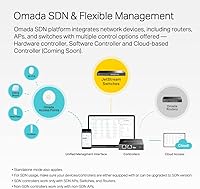
Omada SDN integration is a genuine asset for network engineers already invested in the TP-Link ecosystem, offering centralized control of switches, access points, and gateways from a single dashboard. Standalone mode gives non-SDN users a clean local web interface without requiring any controller setup at all.
For first-time managed switch users, the Omada SDN setup process has a notable learning curve — the interface is capable but not immediately intuitive, and documentation quality varies. Several users report spending considerable time working through initial controller configuration before things clicked into place.
Build Quality
86%
The all-metal chassis feels solid and purposeful — not flimsy or lightweight in a way that undermines confidence. Users placing the TL-SX3008F alongside pricier enterprise gear in their racks consistently note it does not look or feel out of place, which matters in professional environments.
A few users note that the chassis edges are not as finely finished as premium enterprise brands, and port labeling visibility under dim rack lighting is not ideal. These are minor complaints but worth noting for buyers with high build-quality expectations from enterprise-grade manufacturers.
Security Features
88%
The security feature stack goes well beyond what unmanaged or basic managed switches offer — 802.1X RADIUS authentication, DHCP snooping, IP-MAC-Port binding, and DoS defense are all present and functional. IT pros securing small business networks appreciate having these controls without needing a dedicated security appliance.
Advanced security configuration requires familiarity with managed networking concepts, and the documentation for some security features like RADIUS integration is thin in places. Users new to enterprise security features may need to supplement TP-Link's guides with third-party resources to get everything configured correctly.
SFP+ Compatibility
67%
33%
When using known-compatible transceivers from reputable brands or TP-Link's own modules, the switch operates reliably and without issues. Direct Attach Copper cables from major manufacturers are generally well-supported and represent the most hassle-free connectivity option for short rack runs.
Compatibility with third-party and budget SFP+ transceivers is inconsistent — some modules are simply not recognized, and troubleshooting rejection issues can be frustrating. Users who purchase off-brand transceivers without checking TP-Link's compatibility list first are the most commonly affected group, and the issue comes up regularly enough to treat it as a real risk.
Firmware & Updates
62%
38%
The existing firmware is generally stable and functional for everyday managed switching tasks, and most users report that once configured, the switch runs without issues for extended periods. Core features like VLAN, QoS, and LAG work consistently across firmware versions.
Firmware update frequency is low, and users hoping for regular feature additions or rapid security patches may be disappointed. A subset of users express concern about the long-term software support trajectory, particularly compared to more established enterprise switch vendors with published firmware roadmaps.
Setup & Installation
73%
27%
Physical installation is straightforward — the rackmount kit is included, the unit fits a standard 1U bay, and initial power-up is quick. Users with prior managed networking experience typically describe the web interface setup as logical once they understand the Omada management model.
Completely new users to managed switching or SDN platforms face a steeper initial learning curve than the product marketing implies. Cloud controller access also requires contacting TP-Link for plan details, which is an unnecessary friction point that several buyers found frustrating during initial setup.
Omada Cloud Access
71%
29%
For multi-site deployments, Omada cloud management allows centralized visibility and configuration from anywhere with a browser or the mobile app, which small business owners managing remote locations find genuinely useful. The app experience is rated positively for basic monitoring and status checks.
Cloud controller plan details are not clearly published upfront and require direct contact with TP-Link, which creates uncertainty about ongoing costs and availability. Users who expected fully transparent cloud access out of the box describe the discovery of this requirement as a surprise.
Feature Depth
89%
L2+ feature coverage is impressively broad — static routing, multi-tier QoS, IGMP snooping, ACL, and LAG are all present and functional. IT pros building out structured small business networks find they rarely hit a feature ceiling with this switch in its intended role.
There are no dynamic routing protocols (OSPF, BGP), which limits the switch in larger or more complex routed environments where static routing alone is insufficient. Users who discover this limitation after purchase sometimes need to add a dedicated router or firewall to handle dynamic routing requirements.
Warranty & Support
83%
A 5-year manufacturer warranty at this price point is genuinely generous and gives buyers real confidence in the hardware's longevity. Most users who needed warranty support report that TP-Link honored claims without excessive friction.
Technical support quality beyond basic warranty claims gets mixed reviews — some users report slow response times and generic troubleshooting scripts when dealing with nuanced configuration issues. For complex SDN or security configuration problems, community forums often prove more useful than official support channels.

Suitable for:

The TP-Link TL-SX3008F 8-Port 10G SFP+ Switch is a strong fit for home lab enthusiasts, small business IT teams, and prosumers who need genuine 10G managed switching without spending enterprise money. If you're running a hypervisor cluster, a multi-bay NAS, or high-throughput workstation workflows, having eight non-blocking 10G ports under one roof changes what your local network can actually do. Content creators shuttling large video files between storage and editing workstations will notice the difference immediately. IT professionals who want real Layer 2+ controls — VLANs, static routing, ACLs, LAG, multi-tier QoS — will find the feature depth surprisingly complete at this price tier. The fanless design makes it practical in environments where acoustic noise matters: a living room rack, a small office closet, or any space where a fan-cooled unit would be disruptive. Businesses already using TP-Link's Omada ecosystem get the added benefit of unified management across their entire network stack, though standalone operation means you're not locked into that path.
Not suitable for:

The TP-Link TL-SX3008F 8-Port 10G SFP+ Switch is not the right pick for every buyer, and it's worth being clear about where it falls short. The eight SFP+ ports are fiber or DAC-only — there are no copper RJ45 10G ports, so anyone expecting to plug standard Ethernet cables directly into workstations or servers will need SFP+ to RJ45 transceivers, which adds cost that isn't always obvious upfront. Buyers who need PoE to power access points, IP cameras, or VoIP phones from the switch itself should look elsewhere entirely, as this model provides no PoE capability. If you're new to managed networking and hoping for a plug-and-play experience, the Omada SDN setup has a real learning curve — this isn't a device you configure in five minutes without prior networking knowledge. Organizations that require more than eight 10G uplinks, or need modular expansion slots for future growth, will quickly outgrow the fixed port count. Finally, buyers outside the TP-Link ecosystem who prefer Cisco, Juniper, or other established enterprise vendors may find the firmware feature set and long-term support track record less proven by comparison.
Specifications

  • Port Count: The switch provides 8 SFP+ ports, each capable of 10 Gbps full-duplex operation with no internal bandwidth bottleneck.
  • Switching Capacity: Non-blocking architecture ensures all 8 ports can transmit and receive at full line rate simultaneously without contention.
  • Interface Type: All ports use the SFP+ form factor, requiring compatible transceivers or Direct Attach Copper cables for connectivity.
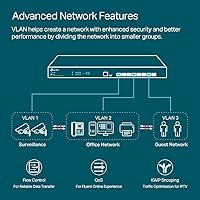
  • Management Level: L2+ Smart Managed, supporting VLANs, static routing, ACLs, LAG, IGMP snooping, and multi-layer QoS (L2, L3, and L4).
  • SDN Platform: Fully integrated with TP-Link Omada SDN, supporting hardware, software, and cloud-based controller options as well as standalone local management.
  • Security Features: Includes 802.1X RADIUS authentication, DHCP snooping, DoS defense, IP-MAC-Port binding, ACL enforcement, and Storm control.
  • Routing: Supports static routing for basic inter-VLAN and network segmentation scenarios without requiring a dedicated router.
  • Protocols: IPv6 ready, with support for IGMP snooping, Link Aggregation (LAG), and 802.1Q VLAN tagging.
  • Cooling System: Completely fanless design with no active cooling components, resulting in zero acoustic output during operation.
  • Max Temperature: Rated for continuous operation in environments up to 45°C, suitable for standard server rooms and network closets.
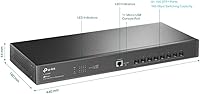
  • Dimensions: The unit measures 17.32″ in length, 7.09″ in depth, and 1.73″ in height, occupying a single 1U rack slot.
  • Weight: The switch weighs 3.63 lb (1.65 kg), making it straightforward to handle during rackmount installation.
  • Installation: Designed for standard 19-inch rack mounting; a rackmount kit, rubber feet, and power cord are all included in the box.
  • Warranty: Backed by a 5-year manufacturer warranty, which is notably generous for a switch at this price tier.
  • Brand: Manufactured by TP-Link, a globally recognized networking hardware brand with an extensive product ecosystem.

Related Reviews

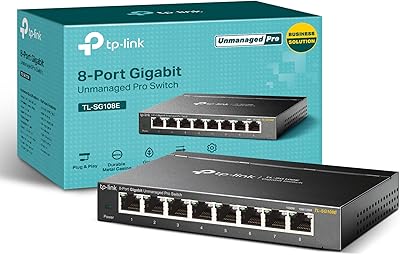
TP-Link TL-SG108E 8-Port Gigabit Switch
82%
91%
Build Quality
94%
Value for Money
83%
Ease of Setup
61%
Management Software
93%
Long-term Reliability
More
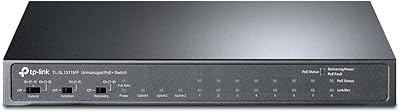
TP-Link TL-SL1311MP 8-Port PoE+ Network Switch
80%
94%
Ease of Setup
88%
PoE Performance
52%
Port Speed & Throughput
76%
Extend Mode Utility
73%
Build Quality
More
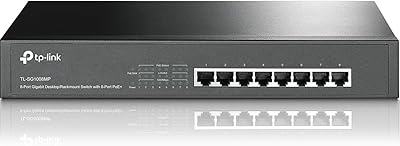
TP-Link TL-SG1008MP 8-Port PoE+ Gigabit Switch
81%
96%
Ease of Setup
93%
PoE Coverage
91%
Build Quality
89%
Value for Money
88%
Reliability & Uptime
More
TP-Link TL-SG108PE
TP-Link TL-SG108PE
84%
88%
Build Quality
83%
PoE Performance
91%
Ease of Setup
79%
Management Interface
87%
Value for Money
More
TP-Link TL-SG2008 8-Port Gigabit Managed Switch
79%
74%
Ease of Setup
81%
SDN & Cloud Management
93%
Port Performance & Throughput
88%
VLAN & Network Segmentation
86%
Security Features
More
TP-Link TL-SG2210P V3 8-Port PoE Switch
83%
91%
Value for Money
74%
PoE Performance
83%
Ease of Setup
86%
Omada SDN Integration
88%
Build Quality
More
TP-Link TL-SG108-M2 8-Port 2.5G Unmanaged Switch
81%
93%
Network Performance
97%
Ease of Setup
89%
Build Quality
74%
Thermal Management
81%
Value for Money
More
TP-Link TL-SG1016DE 16-Port Gigabit Switch
82%
88%
Build Quality
91%
Value for Money
86%
Port Count & Layout
84%
Setup & Installation
63%
Management Interface
More
TP-Link TL-SG1218MPE 16-Port PoE+ Switch
76%
91%
PoE Reliability
68%
PoE Power Budget
88%
Build Quality
63%
Web Management Interface
93%
PoE Auto Recovery
More
TP-Link TL-SF1016D 16-Port Fast Ethernet Switch
80%
97%
Ease of Setup
96%
Noise Level
88%
Reliability & Uptime
54%
Speed Performance
74%
Value for Money
More

FAQ

Yes, and this is something a lot of buyers miss. Every port on this switch is SFP+, which means you need either SFP+ transceivers (for fiber or RJ45 copper connections) or Direct Attach Copper cables to connect devices. Neither comes included in the box, so factor that into your total budget before purchasing.

Absolutely. Standalone mode is fully supported, so you can manage the TL-SX3008F directly through its local web interface without ever touching a controller. Omada SDN is optional and most useful if you have multiple TP-Link devices you want to manage from a single dashboard.

Honest answer: it has a learning curve. If you have prior experience with managed switches or enterprise networking, you will pick it up fairly quickly. If this is your first managed switch, expect to spend some time reading through the documentation. The Omada interface is capable but not immediately obvious to newcomers.

Many will, but compatibility is not guaranteed across the board. Some users report issues with certain off-brand transceivers being rejected or behaving unreliably. To avoid headaches, check TP-Link's compatibility list before buying third-party modules, or stick with reputable SFP+ transceiver brands known to work well with TP-Link hardware.

It is genuinely silent — there are no fans at all, so there is no acoustic output under any load. This makes the TP-Link TL-SX3008F 8-Port 10G SFP+ Switch a practical choice for deployments in living spaces, quiet offices, or anywhere fan noise would be a problem.
No, this model has no PoE capability whatsoever. If you need to power access points, IP cameras, or VoIP phones directly from your switch, you will need a separate PoE-capable model in addition to or instead of this one.

It supports static routing, which covers basic inter-VLAN routing scenarios without an external router. It is not a full Layer 3 switch with dynamic routing protocols like OSPF or BGP, so for more complex routing setups, a dedicated router or firewall would still be recommended alongside it.

For short rack-level connections between servers or NAS units, Direct Attach Copper cables (DAC cables) in 1m or 3m lengths are the most cost-effective option. For longer runs or fiber infrastructure, standard 10G SFP+ SR (short range) or LR (long range) transceivers paired with the appropriate fiber type are the typical choices.

Firmware updates have been somewhat infrequent based on user reports — not a dealbreaker for a stable platform, but worth noting if you rely on regular feature additions or rapid bug fixes. It is a good idea to check TP-Link's support page periodically and apply updates when they are available.

The all-metal chassis is solid and feels appropriately substantial for a rack-mounted unit. Users generally report it feels more premium than the price might suggest, and it does not feel out of place alongside more expensive equipment. For a small business or prosumer rack environment, the construction quality is more than adequate.

Where to Buy