Overview

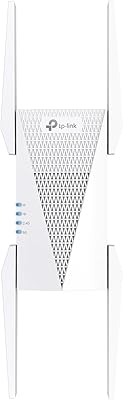
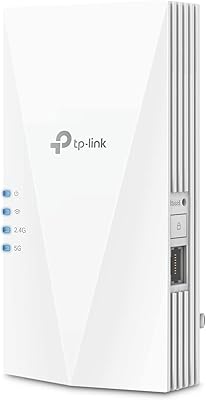
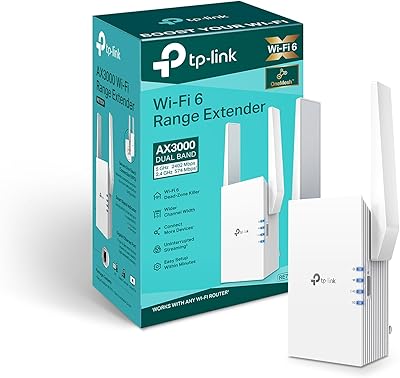
The TP-Link RE700X AX3000 WiFi 6 Range Extender sits in the mid-range of TP-Link's well-regarded networking lineup, aimed squarely at households where the router simply can't reach every corner. Unlike bulkier router-style units that sit on a desk or shelf, this range booster plugs directly into a wall outlet — compact, unobtrusive, and easy to reposition. It runs on WiFi 6 (802.11ax), the current standard built for homes packed with smart devices, streaming sticks, and laptops all competing for bandwidth. One thing worth stating plainly: extenders boost coverage, not your ISP's raw speed. If your internet is slow at the source, this won't change that.
Features & Benefits

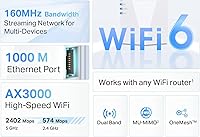
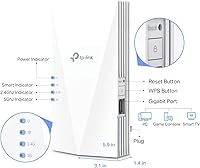
The RE700X's dual-band radio covers both the 2.4 GHz and 5 GHz frequencies, with the faster band handling high-demand tasks like 4K streaming or large downloads without choking. The Gigabit Ethernet port on the side is genuinely practical — plug in a smart TV, desktop PC, or gaming console and you sidestep wireless interference entirely. Two built-in technologies are worth understanding: OFDMA allows the extender to serve multiple devices simultaneously instead of making them queue up, while Beamforming directs the signal toward a specific device rather than scattering it equally in all directions. Four internal amplifiers then push that focused signal into awkward spaces — thick walls, stairwells, or rooms far from the router.

Best For

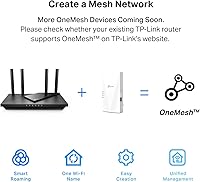
This WiFi 6 extender makes the most sense for single-router households where coverage starts to fall apart anywhere between 1,500 and 2,500 square feet — a back bedroom, a home office above the garage, or a basement media room. If you already own a compatible TP-Link router, you unlock OneMesh support, which keeps your phone or laptop connected as you move through the house without manually switching networks. Gamers and heavy streamers sitting at the far edge of their home coverage area will especially value that wired Ethernet option. It is not a full mesh system replacement, but for plug-and-play dead zones, it handles the job without fuss.

User Feedback

Across more than 18,000 ratings, buyer sentiment is strong, with most reviewers highlighting how quickly the Tether app walks you through setup and how noticeably signal improves in previously weak spots. Build quality earns consistent praise too — it feels solid rather than flimsy. That said, buyers are candid about a real limitation: like all extenders, the RE700X can reduce throughput compared to a direct router connection. That is a known technology trade-off, not a defect, but it is worth knowing going in. OneMesh also has a catch — it only works with select TP-Link routers, so mixed-brand households miss out. A handful of reviewers mention that placement is more sensitive than expected, making the LED signal guide a tool you should actually use.

Pros

  • WiFi 6 support means the RE700X handles busy networks with many simultaneous devices far better than older extenders.
  • The built-in Gigabit Ethernet port lets you hardwire a console, smart TV, or PC for a rock-solid wired connection anywhere in your home.
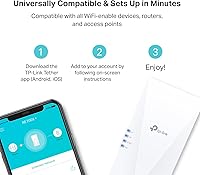
  • Setup via the TP-Link Tether app is genuinely quick — most users report being up and running within minutes.
  • The LED signal indicator takes the guesswork out of placement, helping you find a sweet spot between router reach and coverage extension.
  • OneMesh support with compatible TP-Link routers allows devices to roam without manual network switching — a real convenience for larger homes.
  • Four internal amplifiers give this range booster a meaningful edge in pushing signal through thick walls or into awkward layouts.
  • Dual-band operation lets bandwidth-hungry devices use the faster 5 GHz band while older gadgets stay on 2.4 GHz without competing.
  • At its price point, the build quality feels solid and premium — not the flimsy plastic typical of budget extenders.
  • Backward compatibility with older WiFi standards means it works with virtually any router you already own.
  • Ranked among the top performers in its Amazon category, backed by over 18,000 customer ratings — this is a well-proven product.

Cons

  • Like all extenders, the RE700X introduces a noticeable speed reduction compared to connecting directly to your main router.
  • OneMesh roaming is locked to a short list of compatible TP-Link routers — mixed-brand households get none of that benefit.
  • Placement is more sensitive than expected; putting it in the wrong outlet can leave you with worse performance than no extender at all.
  • It cannot replace a proper mesh system for whole-home coverage across multiple floors or very large spaces.
  • The wall-plug form factor, while compact, blocks the outlet completely and may conflict with furniture or outlet placement in some rooms.
  • Users with older WiFi 5 routers will not unlock the full potential of the WiFi 6 hardware — some of the value is wasted in those setups.
  • There is no dedicated backhaul band, meaning the extender uses the same wireless connection for both receiving and rebroadcasting — a common but real limitation.
  • Advanced users looking for detailed network controls or custom firmware support will find the management options fairly basic.

Ratings

The TP-Link RE700X AX3000 WiFi 6 Range Extender has been scored by our AI system after analyzing thousands of verified global buyer reviews, with spam, bot-submitted, and incentivized feedback actively filtered out. Scores reflect a balanced picture — standout strengths and recurring frustrations are weighted equally so you get an honest read before you buy.
Coverage Extension
88%
The vast majority of buyers report a clear and immediate improvement in dead zones — back bedrooms, basement offices, and detached garages that previously had one or two bars suddenly hold a stable connection. Four internal amplifiers give this range booster a meaningful edge over thinner, cheaper alternatives.
A minority of users found the effective range shorter than expected when walls are particularly thick or constructed from materials like concrete or brick. Placement matters enormously, and buyers who plug it in the wrong outlet sometimes report disappointing results that they initially blame on the device.
Setup Experience
91%
The TP-Link Tether app walks you through configuration in a way that feels genuinely straightforward — most buyers report being connected and running within ten minutes, with no need to log into a browser-based admin panel. The LED signal indicator is a practical touch that removes the frustrating guesswork of finding the right outlet.
A small but vocal segment of reviewers ran into pairing issues, particularly when their existing router had non-standard security settings or older firmware. In those cases, the setup process requires a bit of networking know-how that goes beyond what the app alone can guide you through.
WiFi Speed Performance
73%
27%
For everyday tasks — HD streaming, video calls, smart home device communication — the RE700X delivers a noticeably more reliable signal than having no extender at all. Devices on the extended network rarely stall or buffer during typical household use, which is the primary benchmark most buyers actually care about.
Speed-conscious users consistently note a throughput drop compared to connecting directly to the main router, which is an inherent limitation of how extenders work rather than a defect specific to this unit. Buyers running large file transfers or competitive online gaming over the extended wireless connection may find the reduction more disruptive than casual users would.
Wired Ethernet Port
93%
The Gigabit Ethernet port is a standout feature that buyers specifically call out as a reason they chose the RE700X over competing extenders. Connecting a smart TV, desktop, or game console via cable through this port effectively sidesteps wireless latency and throughput reduction entirely, making it the most reliable connection point in any extended coverage setup.
There is only a single LAN port, so users who want to hardwire multiple devices simultaneously need an additional network switch. The port itself is not recessed, which means the cable connection is exposed and slightly awkward depending on where the extender is plugged in relative to furniture.
OneMesh Compatibility
69%
31%
For buyers who already own a compatible TP-Link router, OneMesh genuinely delivers on its promise — devices hand off between router and extender automatically as you move through the house, eliminating the irritating experience of manually reconnecting to a different network name in the kitchen versus the bedroom.
OneMesh is locked to a relatively short list of TP-Link routers, leaving mixed-brand households completely excluded from this functionality. Buyers who purchase the RE700X specifically for OneMesh without verifying router compatibility first are often disappointed, and this accounts for a notable share of lower-star reviews.
Multi-Device Handling
82%
18%
WiFi 6 technology — specifically OFDMA, which allows the extender to communicate with multiple devices at the same time rather than one after another — makes a real difference in busier households where ten or more devices compete for bandwidth at the edges of the network. Smart home gadgets, phones, and laptops coexist far more gracefully than they would on an older WiFi 5 extender.
Under very heavy simultaneous load, some users with particularly congested networks notice connection instability on the extended band. This is less common but worth noting for households running dedicated NAS drives, multiple 4K streams, and gaming simultaneously through the same extender.
Build Quality
86%
The RE700X feels noticeably more solid than budget extenders in its class — the casing has a premium matte finish and the wall plug mechanism seats firmly without wobbling. Buyers who have owned cheaper extenders frequently comment that this one feels like it is built to last rather than to be replaced annually.
The white plastic, while clean-looking, does show scuffs and yellowing over time in some user reports, particularly in high-traffic hallway outlets. A few buyers also noted the device runs warm during extended use, though no reports of overheating or safety concerns surfaced in the feedback.
Placement Flexibility
67%
33%
Being a plug-in unit rather than a desk-bound router-style device gives buyers real flexibility in positioning it wherever there is an available outlet — hallways, stairwell landings, and laundry rooms are all viable spots that router-style units cannot easily reach. The LED guide actively helps users compare signal strength across different outlets before committing.
The physical size of the unit blocks the second outlet on a standard duplex wall socket in most installations, which frustrates buyers in rooms with limited outlet access. Wall outlet placement in older homes is also often not ideal relative to where the extender needs to sit for optimal coverage.
App & Management
79%
21%
The Tether app is polished by networking standards and gives buyers a clean overview of connected devices, signal strength, and basic settings without requiring any browser admin panel access. For non-technical users, having a mobile-first management experience is genuinely appreciated and reduces the learning curve considerably.
Power users looking for granular controls — QoS settings, advanced band steering, or detailed traffic monitoring — will find the app frustratingly limited. Remote management outside the home network also has occasional reliability issues based on user reports, making it less useful for buyers who want full remote control.
Value for Money
81%
19%
At its price point, the RE700X offers a compelling feature set relative to competitors — WiFi 6, a Gigabit Ethernet port, OFDMA, and OneMesh support together represent genuine hardware value rather than spec padding. Buyers who compare it side by side with pricier mesh node add-ons frequently conclude the RE700X solves their problem at a fraction of the cost.
Buyers with non-TP-Link routers lose the OneMesh feature entirely, which effectively reduces the value proposition compared to what is advertised. For those users, some comparable WiFi 5 extenders at a lower price point deliver a similar practical outcome, making the WiFi 6 premium feel less justified.
Signal Consistency
76%
24%
Most buyers report that once the unit is correctly placed, the extended connection stays stable day-to-day without requiring frequent reboots or reconnections. Beamforming — which focuses the signal toward connected devices rather than broadcasting blindly in all directions — contributes to this consistency, particularly for devices in a fixed location like a desk or TV stand.
Some users report periodic drops in connection stability, particularly after firmware updates or when multiple new devices join the extended network simultaneously. A handful of long-term owners mention that the connection becomes less stable over months of use, requiring the occasional manual reboot to restore normal performance.
WiFi 6 Device Compatibility
84%
The RE700X works with virtually every WiFi-capable device on the market, including the latest generation of AX-class phones and laptops that can fully utilize the WiFi 6 radio. Backward compatibility with older standards means there are no compatibility headaches when mixing newer and legacy devices on the same extended network.
Households still running predominantly WiFi 5 or older devices will not notice any tangible benefit from the WiFi 6 hardware, since the extended network only performs to the capability of the connected client. Buyers without any WiFi 6 client devices are essentially paying a modest premium for future-proofing rather than immediate performance gains.
Interference Resistance
72%
28%
The dual-band configuration helps reduce interference by allowing the extender to separate high-demand and low-demand devices across the two frequency bands. In typical apartment or suburban home environments with competing neighboring networks, the RE700X holds up reasonably well without requiring manual channel adjustments.
In dense urban environments with dozens of overlapping WiFi networks, some buyers report more signal inconsistency than they expected. The extender does not offer manual channel selection through the Tether app in a user-friendly way, which limits the ability to fine-tune performance in high-interference situations.
Physical Footprint
77%
23%
The compact wall-plug design keeps the unit visually unobtrusive in most home settings — it sits flush against the wall, does not require a power cable, and takes up no shelf or floor space. The clean white finish blends into standard interior walls without drawing attention.
The unit's size, while reasonable for what it does, is large enough to block the second outlet on many dual-socket wall plates, effectively halving the usable outlets in whatever room it occupies. Buyers in rooms where every outlet is already in use need to plan around this carefully before purchasing.

Suitable for:

The TP-Link RE700X AX3000 WiFi 6 Range Extender is a strong fit for anyone dealing with a specific, localized dead zone in an otherwise functional home network. Think of the homeowner whose router sits in the living room but whose home office at the far end of the hallway barely gets two bars — this range booster was built for exactly that scenario. It works particularly well in homes between 1,500 and 2,500 square feet where a single router falls just short of full coverage. Households with lots of connected devices — smart TVs, phones, laptops, tablets, game consoles — will appreciate the WiFi 6 technology, which handles multiple simultaneous connections more efficiently than older extenders. Gamers or streamers stuck in a back bedroom or basement will find real value in the wired Ethernet port, which delivers a more stable connection than wireless alone. If you already own a compatible TP-Link router, the OneMesh feature is a meaningful bonus, letting your devices hand off between router and extender as you move through the house without any manual network switching.
Not suitable for:

The TP-Link RE700X AX3000 WiFi 6 Range Extender is not the right tool if your goal is to blanket a large multi-story home with consistent, high-speed coverage from top to bottom. For that, a dedicated mesh system with multiple nodes and a proper backhaul connection will always outperform a single wall-plug extender. Buyers expecting their internet speeds to jump after installing this will be disappointed — all extenders introduce some throughput reduction because they receive and then rebroadcast the signal, and the RE700X is no exception. If you own a non-TP-Link router, the OneMesh roaming feature is simply off the table, which removes one of the more practical advantages this unit offers over competitors. Anyone living in a studio apartment or small home where the router already reaches every room has no real use for this. And if your underlying internet connection is the bottleneck, no extender will solve that problem.
Specifications

  • Model Number: The unit is officially designated as the RE700X, manufactured by TP-Link.
  • WiFi Standard: Operates on WiFi 6 (802.11ax) and is fully backward compatible with 802.11ac, 802.11n, 802.11g, and 802.11b devices.
  • Frequency Bands: Dual-band design broadcasts on both the 2.4 GHz and 5 GHz frequencies simultaneously.
  • Combined Speed: Maximum combined wireless throughput reaches approximately 3 Gbps across both bands under ideal conditions.
  • 5 GHz Band: The 5 GHz band supports speeds up to 2402 Mbps, suited for high-demand tasks like 4K streaming and gaming.
  • 2.4 GHz Band: The 2.4 GHz band delivers up to 574 Mbps, providing broader range for smart home devices and lighter-use connections.
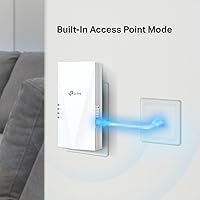
  • Ethernet Port: Includes one Gigabit LAN port for wired device connections or use as a wired access point.
  • Antennas: Features four internal high-performance amplifiers to extend signal reach into hard-to-cover areas.
  • OFDMA Support: OFDMA technology is enabled, allowing the extender to serve multiple devices in parallel rather than sequentially.
  • Beamforming: Beamforming is supported, directing wireless signal toward connected devices for improved efficiency and stability.
  • Mesh Compatibility: OneMesh compatible, enabling unified network roaming when paired with a supported TP-Link OneMesh router.
  • Setup Method: Initial configuration is handled through the TP-Link Tether app, available for both iOS and Android devices.
  • Signal Indicator: An intelligent LED indicator helps users identify the optimal wall outlet placement for maximum coverage extension.
  • Form Factor: Wall plug-in design mounts directly into a standard electrical outlet, requiring no additional cables or shelf space.
  • Dimensions: Physical size measures 5.87 x 3.07 x 1.42 inches, making it compact enough to avoid blocking adjacent outlets in most cases.
  • Weight: The unit weighs 9.1 oz, light enough that it does not strain or pull away from standard wall outlets.
  • Color: Available in white, designed to blend unobtrusively into typical home wall and outlet surroundings.
  • Release Date: First made available to consumers in March 2022.
  • Universal Support: Compatible with any WiFi-enabled router or access point regardless of brand, including devices that support newer AX-class WiFi 6 clients.
  • Category Ranking: Holds a top-five position in the Amazon Repeaters category, reflecting sustained sales volume and consistent buyer satisfaction.

Related Reviews
TP-Link RE715X
TP-Link RE715X
75%
88%
Signal Coverage
91%
Setup Experience
63%
WiFi Speed in Extended Zones
79%
EasyMesh & Roaming
72%
Build Quality & Design
More
TP-Link RE615X
TP-Link RE615X
77%
91%
Ease of Setup
76%
WiFi Coverage
63%
Throughput Performance
93%
Ethernet Port Utility
71%
Signal Stability
More
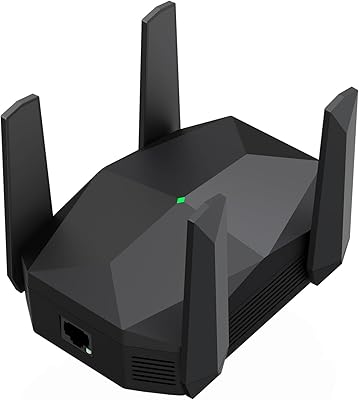
TP-Link RE815X AX5400 WiFi 6 Range Extender
85%
88%
Performance
91%
Setup & Installation
82%
Coverage Area
77%
Speed Stability
89%
App & Software Experience
More
TP-Link RE600X WiFi 6 Extender
87%
87%
Performance
93%
Ease of Setup
85%
WiFi Coverage
89%
Dual-Band Speed
84%
Reliability
More
Surncest WIFI6 AX3000 WiFi 6 Range Extender
76%
81%
Signal Range & Coverage
84%
Setup & Ease of Use
83%
5 GHz Performance
58%
Bandwidth Trade-off (Repeater Mode)
78%
2.4 GHz Device Coverage
More
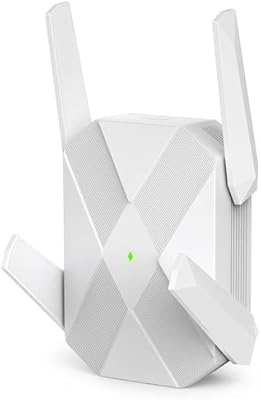
ingabis M-A25 AX3000 WiFi 6 Range Extender
77%
91%
Ease of Setup
78%
Signal Coverage
82%
WiFi Speed Performance
88%
Gigabit Ethernet Port
79%
Multi-Device Handling
More
TP-Link RE550 Wi-Fi Range Extender
78%
86%
Coverage & Range
91%
Setup & Installation
62%
Throughput & Speed Performance
78%
Build Quality & Design
88%
Gigabit Ethernet Port
More
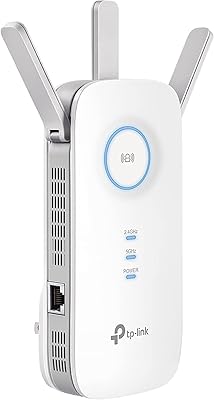
TP-Link RE200 AC750 Dual-Band WiFi Extender
70%
88%
Setup & Installation
72%
Signal Coverage
61%
Wireless Speed
79%
2.4GHz Performance
58%
5GHz Performance
More
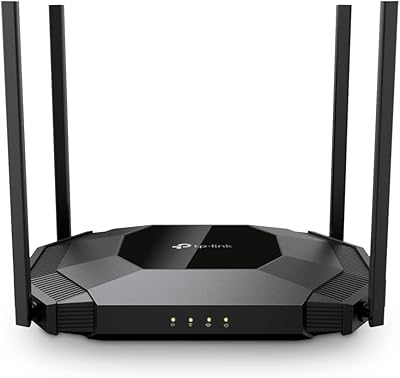
TP-Link RE705X AX3000 Wi-Fi 6 Range Extender
79%
88%
Setup & Installation
79%
Signal Coverage
74%
Wi-Fi Speed Performance
71%
OneMesh Roaming
91%
Ethernet Port Utility
More
TP-Link EAP655-Wall WiFi 6 AX3000 Wall Plate Access Point
85%
88%
Overall Performance
91%
Wi-Fi Speed and Range
87%
Ease of Setup
85%
PoE Passthrough Flexibility
82%
Build Quality
More

FAQ

Yes, the RE700X works as a standard range extender with any WiFi router, regardless of brand. You will get full dead-zone coverage benefits out of the box. The one feature you miss out on with a non-TP-Link router is OneMesh, which enables automatic network roaming — but the core extension functionality is completely universal.

Some speed reduction is inevitable with any extender because the device has to receive the signal and then rebroadcast it, all on the same radio. In practice, you can expect real-world throughput to be noticeably lower than what you get right next to your router. That said, for streaming, browsing, and casual gaming, the extended signal is usually fast enough that the reduction is not disruptive. If maintaining near-full speeds is critical, a wired connection through the Gigabit Ethernet port is a much better option.

OneMesh is TP-Link's system for making your router and extender behave like a single unified network. Practically speaking, it means your phone or laptop stays connected as you walk from one room to another — no manual switching between two network names. You only get this feature if your router is on TP-Link's OneMesh compatibility list. If you have a different brand of router, this feature simply does not apply to you, but the extender still works fine as a standard repeater.

Setup is genuinely straightforward for most users. You plug the unit in, download the TP-Link Tether app, and follow the on-screen steps — typically takes under ten minutes. The app is well-designed and the LED signal guide helps you pick a good spot without guessing. That said, if you run into a network hiccup, basic router troubleshooting knowledge helps.

The built-in LED indicator is the key tool here. You want to place the extender roughly halfway between your router and the dead zone — close enough to receive a solid signal from the router, but far enough to actually push coverage into the problem area. The LED will change color based on signal strength; aim for a green or solid reading rather than red. Getting this placement right makes a significant difference in performance.

It can work well for a garage attached to your home or a room near an exterior wall, since the four internal amplifiers are specifically designed to push through obstacles. For an unattached structure or a large outdoor area, results will vary depending on wall materials and distance. If the garage shares a wall with your home and your router signal reaches that wall, the extender placed nearby should be able to bridge the gap effectively.

By default, the RE700X creates an extended network that can share the same name (SSID) as your existing network if you configure it that way. However, without OneMesh, your devices may not hand off automatically between the two — some devices will stick with whichever signal they connected to first, even if a stronger one is nearby. With OneMesh and a compatible TP-Link router, the handoff becomes automatic and transparent.

The Gigabit LAN port is genuinely versatile. You can connect a desktop PC, a smart TV, a gaming console, a streaming device like an Apple TV, or even a network switch to add multiple wired ports. It effectively turns the extender into a wireless access point with a wired output, which is ideal for any device that performs better on a cable than on WiFi.

For a single extra room, this range booster is a capable but arguably more capable option than you strictly need. A less expensive WiFi 5 extender would likely handle one room just fine at a lower cost. Where the RE700X earns its place is if that one room has multiple devices, thick walls, or you plan to stream or game heavily — in those cases, the WiFi 6 hardware and stronger amplifiers make a real difference over cheaper alternatives.

The RE700X supports WPA3 encryption, which is the current security standard for WiFi networks. This matters if you have newer devices that are capable of WPA3 and want to ensure the extended network matches the security level of your main router. For most home users the practical difference over WPA2 is minimal, but it is good to know the hardware is current on that front.