Overview

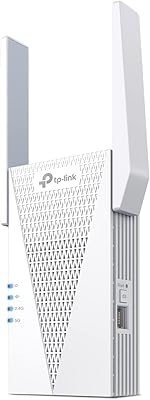
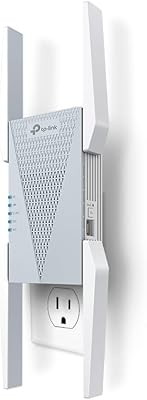
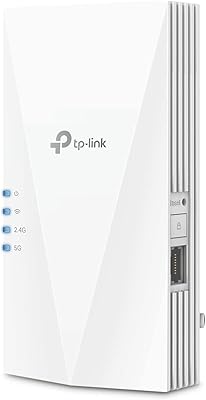
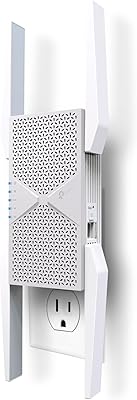
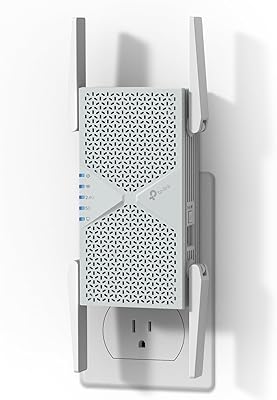
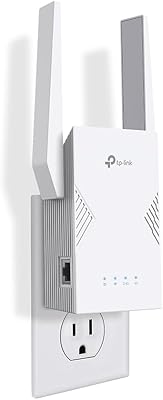
The TP-Link RE705X AX3000 Wi-Fi 6 Range Extender is a solid mid-range upgrade for anyone still running older Wi-Fi 5 gear and tired of watching videos buffer in the back bedroom. It plugs directly into a wall outlet — no extra cables, no shelf space required — and fits into most home setups without any fuss. The built-in Gigabit Ethernet port is a genuinely useful addition, letting you hardwire a TV or desktop in rooms where your router can't reach. If you're already in the TP-Link ecosystem, OneMesh compatibility makes this range extender a compelling option. That said, it works best in medium-sized homes; don't expect it to cover a sprawling multi-floor house the way a dedicated mesh system would.
Features & Benefits

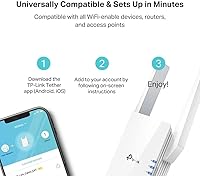
Wi-Fi 6 — the 802.11ax standard — isn't just a marketing label. In practical terms, it handles more devices simultaneously without the slowdown you'd notice during a busy evening when everyone's streaming or video calling at once. The RE705X keeps its two bands separate: the 5 GHz band delivers fast throughput for bandwidth-hungry devices nearby, while the 2.4 GHz side reaches further through walls. The Gigabit Ethernet port adds real flexibility — plug in a game console or smart TV and skip the wireless entirely. There's also an AP Mode, where you connect the unit directly to a wired router and it broadcasts its own independent Wi-Fi network, which is a handy option many extenders skip. Setup through the Tether app takes under ten minutes for most users.

Best For

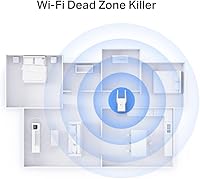
This Wi-Fi 6 extender makes the most sense if you have a specific dead zone problem — a bedroom on the far end of the house, a basement home office, or a living room that's just one wall too many from your router. It's an especially strong fit for TP-Link router owners, since OneMesh lets both devices act as one network rather than forcing your phone to manually switch between two separate SSIDs. If you have wired devices in a distant room — a desktop PC, a streaming box, a NAS — the Ethernet port alone could justify the purchase. Renters and apartment dwellers will appreciate that the whole thing requires nothing more than a free outlet. Just don't expect it to blanket a genuinely large multi-story home on its own.

User Feedback

Across more than 650 ratings, the RE705X averages 4.2 out of 5 stars — a solid score, though not a perfect one. The most consistent praise centers on easy setup: most buyers get connected within minutes using the Tether app, and speed gains over older Wi-Fi 5 extenders are frequently mentioned. Home office users specifically call out the Ethernet port as a dependable addition for wired connections. On the critical side, a recurring complaint involves roaming performance with non-TP-Link routers — the OneMesh handoff that works well within the TP-Link ecosystem can behave inconsistently when paired with other brands. A handful of reviewers also note that the unit's physical footprint is bulkier than expected, blocking an adjacent outlet in some wall configurations. Overall, satisfied buyers clearly outnumber the dissatisfied ones.

Pros

  • Wi-Fi 6 support reduces network congestion in households juggling streaming, gaming, and video calls simultaneously.
  • The Gigabit Ethernet port lets you hardwire a TV, game console, or desktop without running cables across the house.
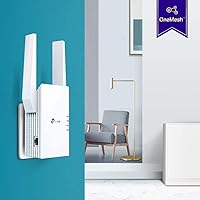
  • OneMesh integration with TP-Link routers creates a single unified network so devices roam without manual reconnection.
  • Plug-in design requires no drilling, no extra cables, and no dedicated shelf or desk space.
  • Setup via the Tether app is quick — most users are connected and running in under ten minutes.
  • Dual-band separation prevents slower 2.4 GHz devices from dragging down performance on the faster 5 GHz band.
  • AP Mode lets the RE705X function as a standalone access point when connected directly to a wired router.
  • Wi-Fi 6 hardware keeps the extender relevant as newer, Wi-Fi-6-capable devices continue to enter the home.

Cons

  • OneMesh roaming works reliably only with TP-Link routers; pairing it with other brands produces inconsistent handoff behavior.
  • The unit protrudes noticeably from the wall outlet and can block the adjacent socket in tight configurations.
  • As an extender, throughput to connected devices is always lower than what the main router delivers directly.
  • A single unit won't reliably serve a large home; coverage fades significantly across multiple floors or walls.
  • Users without a TP-Link router miss out on OneMesh entirely, reducing functionality to standard dual-band extension.
  • No tri-band option means backhaul and client traffic share the same radio, which can create a performance ceiling under heavy load.
  • Fixed internal antennas offer no physical adjustability, limiting options when placement requires pointing signal in a specific direction.
  • Homes with thick concrete or masonry walls may still experience weak signal even with the extender in an optimal position.

Ratings

Our AI rating system analyzed verified global buyer reviews for the TP-Link RE705X AX3000 Wi-Fi 6 Range Extender, actively filtering out bot activity, incentivized submissions, and duplicate entries to surface what real owners actually experienced in their homes. Scores are generated from this cleaned review pool and reflect the full range of sentiment — including recurring frustrations and compatibility limitations — not just the highlights. Both the genuine strengths and honest trade-offs are represented so you can make a confident, well-informed buying decision.

Setup & Installation
88%
Most buyers report the Tether app guides them through the process in under ten minutes, with automatic detection of the existing network making initial configuration nearly foolproof. The step-by-step visual interface is particularly appreciated by users who aren't comfortable configuring networking hardware manually.
A portion of users hit friction when integrating the unit with a non-TP-Link router, encountering manual configuration steps the app doesn't fully anticipate. Firmware update prompts during initial setup can also catch first-time users off guard, adding time to what should be a quick process.
Signal Coverage
79%
21%
In medium-sized homes with standard drywall construction, the RE705X consistently eliminates dead zones one or two rooms away from the main router. Users frequently cite improved streaming and video call stability in previously unreachable spaces like back bedrooms or upstairs home offices — exactly the use case this extender was built to handle.
Buyers with larger homes — particularly those with multiple floors, concrete construction, or brick walls — report coverage falls noticeably short of expectations, with a single unit often unable to reach the far end of the house. The signal range is adequate for apartments and mid-sized homes but should not be compared to a dedicated mesh system.
Wi-Fi Speed Performance
74%
26%
Users upgrading from older Wi-Fi 5 extenders notice a clear speed improvement, especially on the 5 GHz band when multiple devices are active simultaneously. The Wi-Fi 6 chipset handles congested networks more gracefully than its predecessors, which translates to fewer buffering events during busy evenings when several family members are streaming or on calls.
As with all wireless extenders, throughput to connected devices is always lower than what the main router delivers directly, since the unit must receive and retransmit the signal wirelessly. Users expecting near-router speeds in distant rooms are often disappointed, and the real-world gap can feel significant during bandwidth-heavy tasks like 4K streaming or large file transfers.
OneMesh Roaming
71%
29%
For households already running a TP-Link OneMesh-compatible router, the roaming experience is noticeably better than a traditional extender setup — devices transition between the router and extender without requiring manual network switching, which is a genuine quality-of-life improvement for homes where people move between rooms with laptops or phones.
Users with non-TP-Link routers consistently report that roaming behavior is inconsistent — devices tend to cling to the weaker router signal rather than switching to the closer extender, a frustrating limitation the product packaging does not make obvious. The OneMesh benefit is effectively locked to the TP-Link ecosystem, leaving a large portion of buyers without this key differentiator.
Ethernet Port Utility
91%
The Gigabit Ethernet port is one of the most consistently praised features across the review pool — home office workers frequently note how running a short cable to a desktop PC in a far room delivers stable wired speeds without routing cables back to the main router. Gaming and media room users highlight similar benefits when hardwiring a console or smart TV.
The port accommodates only a single wired device, which limits users who need to hardwire multiple devices in the same room — a small network switch is required to expand beyond one connection. A few buyers also note that the port's placement on the unit makes cable routing slightly awkward depending on which wall socket is available.
AP Mode Functionality
83%
Users who have a wired network port available in their target room find AP Mode delivers noticeably better performance than standard extender operation, since the backhaul connection is wired rather than wireless. More technically inclined buyers appreciate the flexibility of deploying this unit as a proper access point, extending its usefulness well beyond a typical plug-in extender.
The distinction between Range Extender mode and AP Mode is not well explained in the out-of-box documentation, and many users are unaware the feature exists until they dig into the app or manual. Non-technical buyers frequently skip this mode entirely, meaning a meaningful performance advantage goes untapped for a large share of the user base.
App Experience
86%
The Tether app makes initial setup approachable for non-technical users, with a clean interface and guided configuration that covers the most common network scenarios. Ongoing management features — such as checking connected devices and adjusting band preferences — work reliably and are well-organized within the app's navigation structure.
A minority of users report occasional connectivity drops between the app and the extender, requiring a restart of either the app or the unit to re-establish communication. Advanced configuration options are limited compared to a dedicated router management interface, which can frustrate power users who want finer control over their network settings.
Physical Design
62%
38%
The all-white plug-in form factor blends into most home interiors, and the absence of cables or a dedicated surface requirement makes installation flexible — you can position it wherever a wall outlet is available without cluttering a shelf or desk. For tight living spaces like apartments, this zero-footprint approach is a genuine practical advantage.
Standing over 6 inches tall, the extender protrudes quite noticeably from the wall, and several buyers report it blocks the adjacent outlet in standard two-socket configurations, forcing the use of a power strip instead. The fixed internal antennas also mean the device cannot be physically oriented to optimize signal direction, limiting troubleshooting options when placement is tricky.
Backward Compatibility
92%
Every device in the home — from a decade-old laptop to the newest smartphone — connects without any configuration changes, since this range extender supports all mainstream wireless standards from 802.11b through 802.11ax. This makes it a clean drop-in addition to mixed-device households where not every gadget has been recently upgraded.
While older devices connect without issues, they naturally won't benefit from the Wi-Fi 6 improvements in congestion handling and efficiency — those gains are exclusive to Wi-Fi 6-capable hardware. Households where most devices still run on Wi-Fi 4 or older standards may find the premium paid for Wi-Fi 6 capability goes largely unrealized in day-to-day use.
Value for Money
77%
23%
For TP-Link router owners who want to extend coverage and unlock OneMesh without replacing their entire router setup, the RE705X sits at a reasonable price for what it delivers. The combination of Wi-Fi 6 support and a Gigabit Ethernet port in one unit adds tangible utility that distinguishes it from cheaper Wi-Fi 5 extenders at lower price points.
Buyers who don't own a TP-Link router lose access to the OneMesh feature that most justifies the price premium, making this range extender a weaker value proposition for that segment. Those with larger homes may also find the same budget better directed toward an entry-level mesh system rather than a single extender with inherent coverage limits.
Congestion Handling
82%
18%
Households with ten or more connected devices find the Wi-Fi 6 chipset noticeably more capable of keeping everyone online without the random drop-offs more common on older extenders. The OFDMA capability built into the 802.11ax standard allows the extender to serve multiple devices within the same transmission window, which directly benefits busy smart home environments.
The congestion-handling advantages of Wi-Fi 6 are most pronounced when connected devices also support Wi-Fi 6 — in homes where most devices still run on older standards, the improvement over a capable Wi-Fi 5 extender is less obvious. Users with only a handful of devices in the extended zone may not notice a meaningful practical difference in everyday use.
Placement Flexibility
67%
33%
Being a plug-in extender rather than a tabletop unit gives buyers a wider variety of potential placement spots — any accessible wall outlet is a valid option, which is useful in hallways, stairwells, and shared living areas. There are no power bricks, adapter cables, or surface clutter to manage, keeping the installation visually clean.
Placement is still constrained by where wall outlets happen to be, and the ideal midpoint between router and dead zone doesn't always align with an available socket. Unlike tabletop extenders with power adapters, repositioning this unit to fine-tune signal coverage means physically moving it to a different outlet rather than simply adjusting its position on a surface.
Network Stability
78%
22%
Under typical home usage — streaming video, working remotely, casual gaming — the RE705X holds a steady connection without the random disconnects that tend to characterize cheaper extenders in the same price range. Users who primarily extend coverage to streaming devices and smart speakers report reliably stable performance over extended periods of daily use.
A subset of users — particularly those pairing it with third-party routers — report periodic disconnections or the need to reboot the extender after firmware updates. In edge cases involving heavy concurrent traffic from multiple devices, some buyers note the connection can become less stable, though this appears to affect a minority rather than the broader user base.

Suitable for:

The TP-Link RE705X AX3000 Wi-Fi 6 Range Extender is a strong pick for anyone dealing with a stubborn dead zone that simply repositioning the router won't fix — think a back bedroom, a basement home office, or a detached garage within reasonable range of the main router. It's particularly well-suited to households already running a TP-Link router, since the OneMesh feature lets the extender and router behave as one unified network, so devices roam automatically without manual reconnection. Home office workers will find real value in the Gigabit Ethernet port — if your desk is two floors from the router, a short cable from this extender to your PC delivers stable wired speeds without any complex rewiring. Renters and apartment dwellers benefit from the plug-in design, which requires no drilling, no mounting hardware, and no tools. If you're still on a Wi-Fi 5 extender and want hardware that holds up as your device count grows, this range extender represents a practical, forward-compatible upgrade.

Not suitable for:

The TP-Link RE705X AX3000 Wi-Fi 6 Range Extender is the wrong tool if your goal is blanket coverage across a large, multi-story home — for that, a dedicated tri-band mesh system will deliver a far more consistent experience in every corner of the house. Buyers who don't own a TP-Link router should also temper expectations around the OneMesh roaming feature; the intelligent handoff is largely confined to the TP-Link ecosystem, and with third-party routers you're essentially running a conventional extender broadcasting a separate network name. Homes with significant physical barriers — thick concrete walls, steel beams, or multiple floors separating the router from the problem area — may find a single extender of any kind insufficient. People expecting zero-configuration networking may also find the Tether app setup slightly more involved than anticipated, especially when fine-tuning placement for optimal signal. Finally, if your main router is still on Wi-Fi 4, the Wi-Fi 6 capabilities here go largely unused, since the backhaul connection becomes the performance bottleneck.
Specifications

  • Brand: Manufactured by TP-Link, a globally recognized networking hardware company.
  • Model: Model number RE705X, part of TP-Link's AX-series Wi-Fi 6 extender lineup.
  • Wi-Fi Standard: Supports Wi-Fi 6 (802.11ax), the latest mainstream wireless standard designed for higher throughput and reduced network congestion in multi-device homes.
  • Frequency Bands: Dual-band design operates across both the 2.4 GHz and 5 GHz frequency ranges simultaneously.
  • 5 GHz Speed: Delivers a maximum wireless speed of 2402 Mbps on the 5 GHz band, suited for high-bandwidth devices in closer proximity.
  • 2.4 GHz Speed: Provides up to 574 Mbps on the 2.4 GHz band, better for longer-range connections and lower-demand smart home devices.
  • Combined Speed: Total combined wireless throughput of up to 3000 Mbps across both bands, reflected in the AX3000 designation.
  • Ethernet Port: Includes one Gigabit Ethernet port supporting speeds up to 1000 Mbps for hardwiring a single device such as a TV, PC, or game console.
  • Supported Modes: Operates in Range Extender mode to amplify an existing wireless network, or Access Point mode to create a new Wi-Fi network from a wired connection.
  • Mesh Support: Compatible with TP-Link OneMesh technology, enabling unified single-network roaming when paired with a OneMesh-compatible TP-Link router.
  • App Control: Managed via the TP-Link Tether app, available for both iOS and Android mobile devices.
  • Legacy Standards: Backward-compatible with 802.11ac, 802.11n, 802.11g, and 802.11b, ensuring it works with older devices and routers.
  • Antenna Type: Uses fixed internal antennas with no external or repositionable antenna elements.
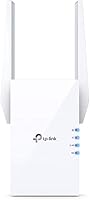
  • Dimensions: Physical dimensions measure 6.26 x 3.78 x 2.48 inches, making it a mid-sized wall-plug unit with a noticeable physical footprint.
  • Weight: Weighs 10.9 oz, which is typical for a full-featured dual-band wall-plug range extender.
  • Color: Available in white, designed to blend into most home wall outlets and interior decor.

Related Reviews

TP-Link RE813XE Wi-Fi 6E Range Extender
86%
91%
Performance
89%
Wi-Fi Coverage
81%
Ease of Setup
95%
Compatibility with TP-Link Routers
88%
Streaming & Gaming Performance
More
TP-Link RE715X
TP-Link RE715X
75%
88%
Signal Coverage
91%
Setup Experience
63%
WiFi Speed in Extended Zones
79%
EasyMesh & Roaming
72%
Build Quality & Design
More
TP-Link TL-WA860RE Wi-Fi Range Extender
86%
95%
Ease of Setup
84%
Performance in Larger Homes
90%
Wi-Fi Range Extension
88%
Reliability
85%
Build Quality
More
TP-Link RE700X AX3000 WiFi 6 Range Extender
85%
91%
Setup & Installation
88%
WiFi Performance
85%
Coverage Range
80%
Build Quality
90%
App & Software Experience
More
TP-Link RE403BE BE6300 Wi-Fi 7 Range Extender
79%
81%
Wireless Performance
78%
Coverage Range
84%
Setup & Installation
91%
2.5G Ethernet Port
73%
EasyMesh Integration
More
D-Link AX1800 Mesh Wi-Fi 6 Range Extender
84%
90%
Wi-Fi Range and Coverage
85%
Setup and Installation
88%
Device Compatibility
80%
Wi-Fi Speed and Stability
93%
Security Features
More
TP-Link RE653BE Wi-Fi 7 Range Extender
80%
88%
Wireless Performance
83%
Wi-Fi 7 Feature Depth
79%
Coverage Range
93%
Ethernet Port Utility
86%
Setup & App Experience
More
TP-Link RE223BE Wi-Fi 7 Range Extender
81%
88%
Coverage & Dead Zone Elimination
71%
Wi-Fi 7 Feature Implementation
91%
Setup & Ease of Use
67%
Real-World Throughput
78%
Build Quality & Design
More
TP-Link RE370K Smart Plug & Wi-Fi Range Extender
85%
92%
Setup and Installation
84%
Wi-Fi Performance and Coverage
88%
Voice Control Integration
80%
App Usability (Kasa)
75%
Reliability and Connection Stability
More
TP-Link TL-WPA7817 KIT Powerline Wi-Fi 6 Extender
75%
88%
Setup & Installation
67%
Powerline Speed Performance
91%
Wired Connection Quality
53%
Placement Flexibility
76%
Value for Money
More

FAQ

The TP-Link RE705X AX3000 Wi-Fi 6 Range Extender works as a standard range extender with virtually any router brand — you will get improved coverage in dead zones regardless of what router you own. However, the OneMesh feature, which allows your devices to roam between the router and extender without manually switching networks, only activates when paired with a TP-Link OneMesh-compatible router. With other brands, expect to manage two separate network names unless you manually configure them to match.
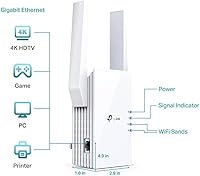
Setup is fairly straightforward. You plug the unit into a wall outlet, download the TP-Link Tether app on your phone, and follow the guided steps — most people are done in under ten minutes. If you prefer not to use the app, there is also a browser-based setup option. The most important part is choosing the right spot: place it roughly halfway between your router and the room with weak signal so it can still receive a strong enough signal to rebroadcast.

Some speed reduction is inherent to how range extenders work — the device receives the signal wirelessly and then rebroadcasts it, which introduces overhead. In practice, the coverage gain usually matters far more than the speed trade-off, especially if the alternative is barely usable signal in that room. If raw speed matters most, plug your device directly into the Gigabit Ethernet port rather than connecting over Wi-Fi, since the wired connection avoids that wireless overhead entirely.

In standard extender mode, the RE705X receives your existing Wi-Fi signal wirelessly and rebroadcasts it — no cables involved. AP Mode is different: you run an Ethernet cable from your router or a wall network port to the extender, and it creates its own Wi-Fi network from that wired source. Because the backhaul connection is wired rather than wireless, AP Mode typically delivers better performance. It is ideal if you have a network port already run to a distant room, such as a home office or media room.

Yes, and this is one of the more practical reasons to choose this extender over models without a wired port. You can run a short Ethernet cable from the extender to a TV, game console, desktop PC, or streaming device and get a stable, high-speed connection without pulling cables across the house. Keep in mind only one device can use the Ethernet port at a time, so if you need multiple wired connections in the same room, a small network switch plugged into the extender's port would solve that.

Real-world coverage depends heavily on your home's construction. In a standard house with drywall partitions, the extender can reasonably cover an additional 1,500 to 2,500 square feet when placed correctly. Concrete walls, brick, metal structures, or floors between the router and extender can cut that range noticeably. If you have a genuinely large home with heavy building materials and multiple floors, a dedicated mesh system with several nodes will likely outperform a single extender.

Not at all — the extender is fully backward-compatible with Wi-Fi 5, Wi-Fi 4, and older devices. Any device that connects over Wi-Fi will benefit from the improved coverage. The Wi-Fi 6 advantages, like better performance in congested, multi-device environments, will only be noticeable on devices that also support Wi-Fi 6. Buying Wi-Fi 6 hardware now does mean you are better positioned as your devices gradually upgrade over the next few years.

With a non-TP-Link router, automatic roaming is not guaranteed. Your phone may hold onto the weaker router signal longer than expected, which is a common frustration with traditional extenders. If you pair this range extender with a compatible TP-Link OneMesh router, both devices share one network and roaming handoffs are handled more intelligently by the system. Even so, the final roaming decision partly depends on your device's own Wi-Fi software, so some variation is normal regardless of setup.

By default, the extender creates its own separate network name. You can manually set it to match your router's name, which encourages devices to connect to whichever signal is strongest. If you are using it with a TP-Link OneMesh router, both devices share a single network name automatically and the system manages device connections behind the scenes. Without OneMesh, manually matching the names is a reasonable workaround, though the handoff between devices will not be as polished.

It is worth checking before you commit. The extender stands over 6 inches tall and protrudes noticeably from the wall — a handful of buyers have found it covers the adjacent outlet depending on the socket's layout. Standard side-by-side outlets tend to be more of a problem than vertically stacked ones. Plugging it into a power strip with wider spacing between sockets is usually a simple workaround if your wall outlets are tightly spaced.

Where to Buy