Overview

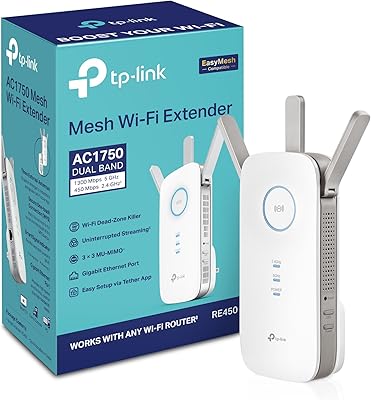
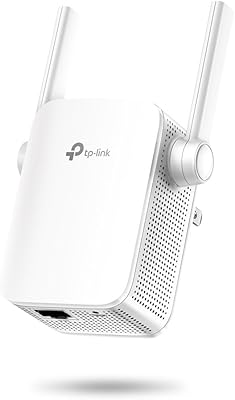
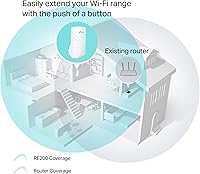
The TP-Link RE200 AC750 Dual-Band WiFi Extender is a wall-plug unit that quietly slots into any standard outlet — no cables trailing across the floor, no box sitting on a shelf. It's been around since 2014, which makes it a well-tested option in the budget extender space, though buyers should honestly consider whether newer mesh systems at comparable prices might serve them better today. The RE200 handles two frequency bands independently, meaning your 2.4GHz devices and your 5GHz devices aren't competing over the same airspace. At just under four ounces and a compact footprint, it stays out of the way wherever you put it.
Features & Benefits

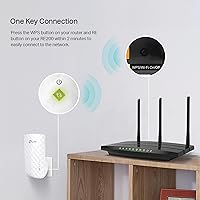
This range extender keeps setup refreshingly simple. Press the WPS button on both the extender and your router, wait about a minute, and you're connected — no web interfaces, no typing passwords. For those who prefer manual control, a browser-based setup is also available. The built-in signal LED is genuinely useful: plug it in halfway between your router and your dead zone, watch the indicator, and move it closer or farther until the light shows a solid connection. There's also a Fast Ethernet port on the side, handy for wiring in a smart TV or streaming stick that performs better over cable. It works with any router brand, which removes the compatibility guesswork entirely.

Best For

This TP-Link plug-in extender is a practical fit for renters or anyone living in a mid-sized home with a stubborn dead zone in one corner of the house. Think the back bedroom that barely gets two bars, or the garage where your phone drops to mobile data the moment you step outside. It handles everyday tasks — HD streaming, video calls, general browsing — without complaint. Where it starts to strain is heavy gaming or 4K streaming, workloads that push past what a budget extender can reliably deliver. Older 2.4GHz-only devices benefit especially from the extended reach. If you're not ready to invest in a mesh system, this is a reasonable bridge solution.

User Feedback

With over 5,600 ratings averaging 4.1 out of 5, the RE200 has earned a broadly positive track record. Most buyers highlight how little effort the initial setup takes and how noticeably it improves signal in rooms that previously struggled. The recurring complaints are worth taking seriously, though. Speed drops off more steeply at longer distances than the spec sheet implies, and the 5GHz band in particular can be inconsistent. A few long-term owners mention having to manually reconnect devices after the extender loses its handshake with the router — a minor but recurring annoyance. On the physical side, it does run warm during extended use. That's normal for wall-plug electronics in this class, but worth monitoring if yours is in an enclosed space.

Pros

  • Plugs directly into a wall outlet with no cables or shelf space required.
  • WPS setup takes under two minutes, even for users with zero networking experience.
  • The signal LED removes placement guesswork — move it until the light confirms a solid connection.
  • Compatible with any router brand, so there's no compatibility homework before buying.
  • The built-in Ethernet port lets you hardwire a nearby TV or console for a more stable connection.
  • Dual-band operation keeps 2.4GHz and 5GHz devices on separate frequencies, reducing congestion.
  • Over 5,600 ratings averaging 4.1 out of 5 reflect a genuinely consistent track record.
  • Access Point mode adds useful flexibility if your needs change later.
  • At under four ounces, this range extender is practically invisible once it's in the outlet.
  • Ranked among the top-selling repeaters on Amazon, showing staying power over many years.

Cons

  • Real-world speeds after the extension penalty fall well short of the 750Mbps headline figure.
  • The 5GHz band is noticeably inconsistent, limiting its value for faster short-range connections.
  • Some users report needing to manually reconnect devices after the extender drops its router link.
  • Firmware update support is limited, leaving this aging unit behind on security and performance patches.
  • Modest range means large homes with multiple dead zones will need more than one unit.
  • The extender runs noticeably warm during extended use — worth monitoring in enclosed outlet spots.
  • Launched in 2014, the RE200 lacks Wi-Fi 6 support now available in budget-tier alternatives.
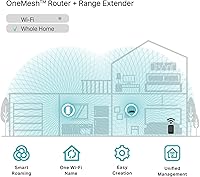
  • Creates a separate network name by default, so devices don't always roam smoothly between zones.
  • Single-band routers negate most of the dual-band benefit, reducing the extender's overall value.

Ratings

Our scores for the TP-Link RE200 AC750 Dual-Band WiFi Extender are produced by AI analysis of thousands of verified buyer reviews gathered globally, with automated filters applied to remove incentivized, bot-generated, and duplicate submissions before any scoring takes place. Each category reflects the honest weight of real user sentiment — strong performers are credited where earned, while genuine frustrations are recorded without being softened or explained away. The result is a balanced, transparent profile of how this range extender holds up in real homes across a wide range of use cases.
Setup & Installation
88%
WPS pairing is about as close to plug-and-play as home networking gets — press two buttons and the connection is established within 60 seconds. Users who have never configured a router appreciate that the LED gives immediate visual feedback during the pairing process, removing the guesswork entirely.
A small number of users on older or ISP-locked routers found that WPS was disabled, forcing them into the manual browser setup, which is functional but requires navigating TP-Link's web interface. Occasionally, the initial WPS attempt fails and needs a second try before the devices link successfully.
Signal Coverage
72%
28%
In compact apartments and single-story homes, the RE200 consistently delivers meaningful dead zone relief — a bedroom that previously dropped calls or buffered video regularly becomes usable after placing the extender in a hallway outlet midway between the router and the problem area.
Coverage gains shrink noticeably in two-story homes or any space with concrete walls, thick insulation, or metal structures between floors. Several buyers covering areas beyond roughly 1,000 square feet found that one unit was not enough, and adding a second introduces device-roaming confusion.
Wireless Speed
61%
39%
For households that primarily browse the web, check email, or stream Netflix in HD, the extended connection holds up perfectly fine — most everyday tasks do not require the full speed of a direct router connection, and in those scenarios users rarely notice the reduction.
The inherent retransmission penalty cuts real-world throughput by 40 to 50 percent compared to a direct router connection, which is a meaningful gap for anyone gaming online, video conferencing in 4K, or moving large files across the network. This is a trade-off buyers should factor in before purchasing.
2.4GHz Performance
79%
21%
The 2.4GHz band is the RE200's most reliable performer, covering longer distances through walls and floors with more consistency than its 5GHz counterpart. Older smart home devices, IoT sensors, and legacy laptops that only support 2.4GHz connect reliably and hold their signal without frequent drops.
The 2.4GHz band is inherently slower and more prone to interference from neighboring networks, microwaves, and Bluetooth devices, which can cause congestion in dense apartment buildings. Buyers in crowded urban environments may see more fluctuation in reliability than those in suburban or rural settings.
5GHz Performance
58%
42%
When it does connect solidly, the 5GHz band delivers noticeably smoother performance for nearby devices — users in the same room as the extender report clean video streaming and responsive browsing without the lag that sometimes plagues the 2.4GHz band under load.
Inconsistency is the defining complaint about the 5GHz band — multiple users report it dropping or simply refusing to connect devices that sit more than one room away. Given that 5GHz has a naturally shorter range, the RE200's retransmission of an already-weakened signal leaves little margin for distance.
Build Quality
74%
26%
The all-white housing is clean and unobtrusive, blending into standard home decor without drawing attention. At under four ounces, the unit does not pull away from the outlet or sag over time, and the plastic casing feels solid enough for a device meant to stay plugged in indefinitely.
The build is purely functional rather than premium — the plastic housing flexes slightly under pressure and brings nothing distinctive to the table aesthetically. Because it plugs directly into the wall, there is no option to orient it differently if the outlet placement turns out to be awkward.
Value for Money
76%
24%
At its price point, the RE200 delivers a measurable improvement in WiFi coverage for a low financial commitment — for renters or anyone reluctant to invest in a mesh system, it solves a specific, bounded problem without overcomplicating the home network.
The value calculation has shifted as entry-level mesh kits have dropped in price over the years. Buyers comparing options today may find that spending a bit more gets them fundamentally better technology with automatic roaming, stronger speeds, and ongoing firmware support — making this range extender feel like a diminishing return for some.
Device Compatibility
91%
Universal router compatibility is one of the most consistently praised aspects of this range extender — it paired without issue across dozens of reported setups, including Xfinity, AT&T gateways, and third-party routers from Netgear, ASUS, and Linksys. There is no vendor lock-in, making it a low-risk purchase for virtually any home network.
A handful of users on ISP-provided routers with non-standard firmware experienced setup hiccups, particularly when WPS was disabled by the carrier. While these cases are a minority, buyers with ISP-locked routers should be prepared to use the manual browser-based setup as a fallback.
Placement Flexibility
83%
The signal LED is a practical and underrated feature — it gives real-time feedback on whether the chosen outlet position is receiving a strong enough signal from the router to rebroadcast effectively. In practice, this removes the trial-and-error frustration that plagues many extender setups.
Coverage is fundamentally limited to wherever a wall outlet happens to exist, which is not always the ideal midpoint between the router and the dead zone. In homes with awkwardly spaced outlets — particularly open-plan living areas or long hallways — users sometimes have to accept a compromised placement position.
Long-term Reliability
67%
33%
Most buyers who use this range extender for basic tasks — keeping a smart TV connected or providing stable coverage for a spare bedroom — report it runs reliably for months without intervention. The hardware itself has shown genuine staying power, with many units purchased years ago still in daily use.
A recurring complaint from longer-term owners involves the extender occasionally losing its connection to the router and requiring a manual restart or re-pairing to recover. Some users also report that certain devices need to be manually reconnected after the extender resets, which grows into a real annoyance in households with many connected devices.
Wired Connectivity
77%
23%
The Fast Ethernet port is a genuinely useful addition for a plug-in extender — connecting a smart TV or gaming console directly via cable delivers far more consistent performance than relying on the extended wireless signal, and several buyers cited this port as the deciding factor in their purchase.
The port is capped at Fast Ethernet speeds (100Mbps), which has become a bottleneck relative to the gigabit connections now standard in most routers and devices. For wired transfers of large files or sustained 4K streaming, this hard ceiling can become a meaningful limiting factor.
Heat Management
54%
46%
Most buyers accept that the unit runs warm and report no operational issues related to heat under normal use — in open wall outlets with adequate airflow, the temperature stays within a range that does not cause concern or affect performance in any observable way.
The extender runs noticeably warmer than many buyers expect, particularly during sustained use over several hours. A subset of users report it feeling uncomfortably hot in enclosed outlet positions or during summer months in warm rooms, which raises reasonable questions about long-term component longevity in less-than-ideal spots.
Firmware & Software
48%
52%
The initial firmware is stable enough for basic use, and TP-Link provides a browser-based management interface that gives users access to core settings without requiring a dedicated app — a no-frills approach that covers what most home users actually need.
As a device launched in 2014, this range extender sits at the tail end of its supported lifecycle, and firmware updates have become increasingly infrequent. Security-conscious buyers and those wanting ongoing performance improvements should weigh this aging support window seriously against newer alternatives with active maintenance schedules.
Ease of Use
86%
Beyond the initial setup, day-to-day use requires essentially zero maintenance for most people — pair it once, and it runs quietly in the background. The absence of required apps or ongoing configuration is consistently cited as a genuine strength by buyers who prioritize simplicity above all else.
The occasional need to manually reconnect devices after a dropout, or to restart the extender when it loses sync with the router, adds friction for less technically confident users. When something does go wrong, troubleshooting requires logging into the web interface, which can feel unfamiliar to first-time extender buyers.
Network Roaming
43%
57%
Users who keep devices stationary — a tablet docked in the kitchen, a streaming stick in the back bedroom — experience stable, uninterrupted connectivity within the extended zone without ever needing to think about which network they are on.
Mobile users moving between rooms frequently find that phones and laptops cling to the weaker router signal rather than switching to the extender, or vice versa. Because the RE200 creates a separate network name by default, automatic roaming across the home requires manual connection management that most users do not want to deal with.

Suitable for:

The TP-Link RE200 AC750 Dual-Band WiFi Extender is a practical, low-hassle choice for anyone living in a small to mid-sized home who has one or two specific dead zones they want to fix without overhauling their network. Renters who can't run ethernet cables through walls will appreciate how it slots into any standard outlet and simply disappears — no cords, no shelf space consumed. It works particularly well for households with older devices that rely on the 2.4GHz band, where the extended reach alone can meaningfully improve reliability for smart home gadgets, security cameras, or aging laptops. Everyday internet users who primarily stream HD video, browse, or jump on video calls will find the performance more than adequate for those tasks. If you're not ready to invest in a full mesh system and just need a low-effort fix for that one stubborn corner of your home, this range extender is a reasonable and proven starting point.
Not suitable for:

Anyone chasing strong performance or covering a large, multi-floor home should think carefully before committing to the TP-Link RE200 AC750 Dual-Band WiFi Extender. Like all range extenders, it rebroadcasts your existing signal rather than creating a new one, which means real-world throughput after the retransmission penalty can drop significantly below the 750Mbps specification — a meaningful gap if you're running 4K streaming, competitive gaming, or frequent large file transfers. The 5GHz band has also drawn consistent criticism for inconsistency, making it less dependable for anything latency-sensitive. Buyers with large homes, thick walls, or more than two dead zones will likely find that a single unit doesn't reach far enough, and daisy-chaining multiple extenders introduces its own device-roaming frustrations. At this price point, modern entry-level mesh kits have become a genuinely competitive alternative, and for anyone whose usage demands more than basic browsing and HD streaming, that route is worth the extra consideration.

Specifications

  • Brand: Manufactured by TP-Link, a globally recognized networking hardware company.
  • Model: Designated as the RE200, part of TP-Link's plug-in range extender lineup.
  • WiFi Standard: Built on the 802.11ac (AC750) standard, with backward compatibility for 802.11b/g/n devices.
  • Combined Speed: Offers a total combined wireless throughput of up to 750Mbps across both frequency bands.
  • 2.4GHz Speed: The 2.4GHz band provides up to 300Mbps, prioritizing wider coverage at moderate speeds.
  • 5GHz Speed: The 5GHz band provides up to 433Mbps, suited for less congested, shorter-range connections.
  • Frequency Bands: Operates simultaneously on both 2.4GHz and 5GHz as a true dual-band device.
  • Form Factor: Designed as a wall-plug unit that inserts directly into a standard electrical outlet.
  • Dimensions: Measures 2.6 x 4.3 x 3 inches, compact enough to fit unobtrusively in most outlet positions.
  • Weight: Weighs 3.88 oz, light enough to sit in a wall outlet without straining the socket.
  • Ethernet Port: Includes one Fast Ethernet port for wiring a nearby device such as a smart TV or game console.
  • Setup Methods: Supports WPS one-button pairing and manual configuration via a browser-based web interface.
  • Operating Modes: Functions as a Range Extender to boost an existing network, or as an Access Point when connected via Ethernet.
  • Signal Indicator: An onboard LED displays connection strength to assist with finding the optimal placement position.
  • Compatibility: Works with any 802.11a/b/g/n/ac WiFi router regardless of manufacturer or ISP.
  • Memory Type: Uses DDR3 SDRAM for onboard memory operations.
  • Processor Speed: Powered by a 300MHz processor that handles standard home network routing and rebroadcast tasks.
  • Color: Available in white to blend with standard home wall plates and outlet surrounds.

Related Reviews
TP-Link RE190 AC750 WiFi Range Extender
73%
93%
Ease of Setup
76%
Signal Coverage
61%
Throughput & Speed
88%
Signal Placement Indicator
84%
Value for Money
More
TP-Link Archer AX23 WiFi 6 Router
78%
91%
Value for Money
93%
Ease of Setup
74%
WiFi Speed Performance
67%
Range & Coverage
83%
Connection Stability
More
TP-Link Archer A6 AC1200 WiFi Router
76%
74%
WiFi Speed & Performance
67%
WiFi Range & Coverage
88%
Setup & Ease of Use
71%
Build Quality & Design
91%
Wired Port Performance
More
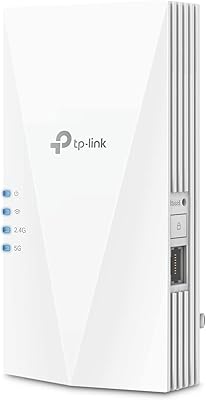
TP-Link RE500X WiFi 6 Range Extender
75%
86%
Coverage & Dead Zone Elimination
61%
Real-World Speed Performance
89%
Setup & Installation Experience
78%
Multi-Device Handling
91%
Gigabit Ethernet Port Utility
More
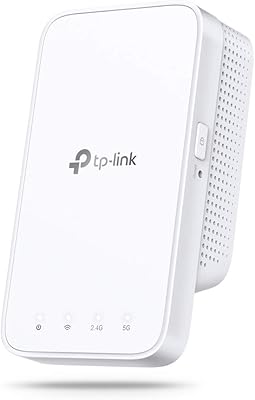
TP-Link RE600X WiFi 6 Extender
87%
87%
Performance
93%
Ease of Setup
85%
WiFi Coverage
89%
Dual-Band Speed
84%
Reliability
More
TP-Link RE450 WiFi Range Extender
73%
83%
Coverage Extension
61%
Signal Throughput
88%
Ease of Setup
79%
Dual-Band Flexibility
67%
Ethernet Port Utility
More
Vonets VAP11AC AC1200 Dual Band WiFi Bridge
65%
74%
WiFi-to-Ethernet Bridging Performance
71%
Dual-Band Radio Coverage
78%
Thermal Management & Reliability
44%
Setup & Configuration Experience
81%
Operating Mode Versatility
More
TP-Link RE650 AC2600 WiFi Extender
85%
88%
Performance
92%
Ease of Setup
86%
Range Coverage
82%
Build Quality
87%
WiFi Speed
More
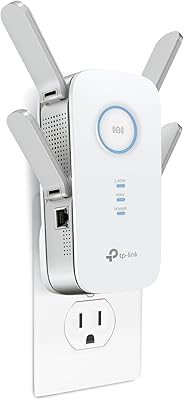
TP-Link RE300 WiFi Range Extender
76%
88%
Ease of Setup
82%
Signal Coverage
61%
Throughput & Speed Performance
78%
Device Capacity
84%
Build Quality & Form Factor
More
FjUoLzgK M-97G WiFi Extender
74%
91%
Ease of Setup
67%
Signal Coverage
62%
5GHz Band Performance
78%
2.4GHz Band Reliability
83%
Ethernet Port Utility
More

FAQ

It works with any standard WiFi router, regardless of brand — Netgear, ASUS, Linksys, Eero, or whatever your ISP provided. The RE200 joins your network the same way any WiFi device would, so brand compatibility simply isn't a concern here.

Setup is genuinely straightforward. The easiest method is WPS: plug the extender into an outlet, press the WPS button on your router, then press the WPS button on the extender, and within about a minute they pair automatically. If your router doesn't have a WPS button, you can also configure it manually through a browser by visiting TP-Link's setup page — the on-screen instructions walk you through each step clearly.

The built-in LED indicator does most of the work. Start by placing this range extender roughly halfway between your router and the dead zone you want to fix, then check the LED — a solid light means it has a strong signal to rebroadcast. If it's blinking or dim, nudge it a few feet closer to your router. The sweet spot is usually one room away from the router, not right on the edge of your existing coverage.

Not automatically in most cases. By default, this TP-Link plug-in extender creates its own network name — often your original network name with an _EXT suffix — so devices treat it as a separate network. You can manually rename the extended network to match your main network's name and password, which helps some devices switch more gracefully, but seamless automatic roaming is a feature of mesh systems, not traditional range extenders.

Expect a noticeable reduction — typically somewhere in the range of 40 to 50 percent compared to connecting directly to your router. The TP-Link RE200 AC750 Dual-Band WiFi Extender, like all repeater-style units, has to receive and retransmit the signal on the same channel, which cuts available bandwidth roughly in half. For everyday browsing, HD streaming, and video calls that loss is usually acceptable, but it's worth keeping in mind if you plan to game competitively or transfer large files over the extended connection.

Yes, that's common for wall-plug electronics running continuously. The RE200 has been noted by a number of buyers for running on the warmer side during extended use, though no safety incidents have been reported. As a general precaution, avoid installing it in a recessed or enclosed outlet, directly behind furniture, or anywhere airflow is restricted — a standard open wall socket with some clearance around it is fine.

Yes, and it's actually one of the better use cases for this extender. There's a Fast Ethernet port on the side, so you can run a cable from the extender directly to your TV or console. A wired connection from the extender is more reliable and consistent than connecting to the extended WiFi wirelessly, so if your device supports Ethernet, it's worth using.

This is an honest trade-off worth considering. The RE200 launched in 2014, and while TP-Link has issued firmware updates over the years, support for older hardware does taper off eventually. Before buying, it's worth checking TP-Link's official support page to see when the most recent firmware was released. If active, ongoing security patches are important to you, a newer device may be a better fit.

You can, but there are real limitations. Each extender needs to be within solid range of your main router's signal — they can't reliably extend off each other in a chain. So if you have dead zones spread across different parts of your home, you would need each unit positioned within reach of the original router, not the previous extender. For a home that size, a mesh WiFi system tends to handle multi-zone coverage more cleanly and with fewer headaches.

Range Extender mode is the standard setup — it picks up your router's existing WiFi signal wirelessly and rebroadcasts it to extend coverage. Access Point mode is different: you connect the unit to your router via an Ethernet cable, and it creates a fresh wireless network from that wired connection. Access Point mode generally delivers better and more consistent performance because it avoids the retransmission speed penalty, but it requires running a physical cable to the extender, which isn't always practical. If you can run a cable, Access Point mode is the better choice.

Where to Buy