Overview

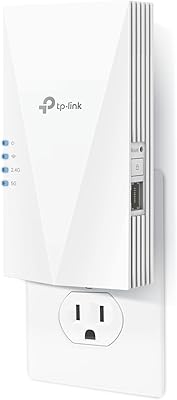
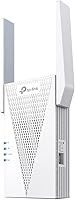
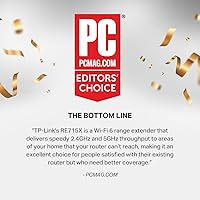
The TP-Link RE715X is one of the more capable WiFi 6 range extenders available for homes where the router signal simply doesn't reach the back bedroom, basement, or detached garage. Its dual-band architecture — covering both 2.4 GHz and 5 GHz — fits naturally into modern home networks without feeling like a step backward in technology. PCMag recognized it with an Editor's Choice award, which lends credibility. But something worth saying upfront: like every repeater, this range extender cuts throughput roughly in half in extended zones. It won't make your internet faster. What it does, and does well, is push reliable coverage into places your router can't reach on its own.

Features & Benefits

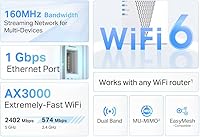
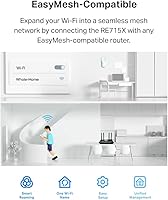
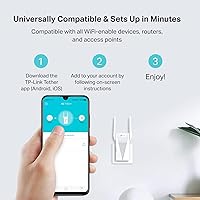
On the spec side, this WiFi 6 booster delivers up to 2404 Mbps on the 5 GHz band and 574 Mbps on 2.4 GHz — enough headroom for 4K streaming and video calls in rooms that previously struggled to load a webpage. Two high-gain directional antennas with Beamforming technology focus the signal where it's needed rather than broadcasting in all directions equally. There's also a Gigabit Ethernet port, which is genuinely useful if you want to hardwire a smart TV or gaming console in a distant room. For households with compatible TP-Link routers, EasyMesh support means devices can roam between access points without manually switching networks. Setup runs through the Tether app and rarely takes more than a few minutes.

Best For

This range extender is best suited to homeowners dealing with stubborn dead zones in medium-to-large homes — think 1500 to 2400 square feet spread across multiple floors. If you already own a WiFi 6 router and want to extend that standard rather than dropping back to older technology, it's a logical pick. The built-in Ethernet port makes it particularly appealing for anyone needing a wired connection in a room that's too far from the main router for a direct cable run. It also works well for non-technical users who want a guided, app-based setup experience. One important note: if you're running a Deco or other mesh system, this extender is not compatible — it's designed for EasyMesh-capable routers only.

User Feedback

Across a large pool of verified buyers, the most common praise centers on how quickly the unit gets up and running — many report being online within ten minutes of opening the box. Signal improvement in previously dead areas like basements and far-end bedrooms is by far the most cited win. On the flip side, some users were caught off guard by the speed reduction in extended zones, even though the product itself discloses this clearly. A handful of buyers also mention that the unit takes up noticeable wall-outlet space. More concerning is a recurring thread of connectivity drops after firmware updates — not widespread, but consistent enough to mention. Overall, satisfaction rates are high, with most complaints being manageable trade-offs rather than deal-breakers.

Pros

  • Extends WiFi 6 coverage into dead zones without replacing your existing router or rewiring anything.
  • The Tether app makes setup approachable for non-technical users — most report being online in under ten minutes.
  • A built-in Gigabit Ethernet port lets you hardwire devices in rooms far from your main router.
  • Dual-band WiFi 6 support means the range extender stays compatible with modern, faster router hardware.
  • Beamforming-equipped antennas target signal toward devices rather than broadcasting it loosely in all directions.
  • EasyMesh compatibility enables genuine whole-home roaming for households with a compatible TP-Link router.
  • Supports up to 64 connected devices simultaneously, making it practical for busy, gadget-heavy households.
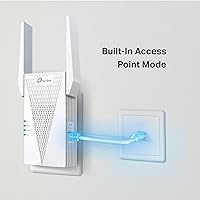
  • Access point mode adds flexibility for users who want to run it off a wired backhaul instead of wirelessly repeating.
  • PCMag awarded it Editor's Choice recognition, providing third-party validation beyond manufacturer claims.
  • Smart Adaptive Roaming connects devices to the strongest available signal automatically as you move through your home.

Cons

  • Speeds in extended zones drop by roughly half — a fundamental repeater limitation that frustrates buyers who didn't expect it.
  • Multiple reviewers report connectivity drops following firmware updates, sometimes requiring a full factory reset.
  • The tall form factor blocks the adjacent wall outlet on most standard dual-socket plates.
  • Not compatible with Deco or other mesh systems, despite being made by the same brand — a common and costly surprise.
  • Only one Ethernet port limits usefulness in rooms with more than one wired device.
  • EasyMesh roaming benefits are locked to compatible TP-Link routers; buyers with other brands get a basic repeater only.
  • Coverage claims assume open floor plans — heavily partitioned homes or thick masonry walls will see reduced real-world range.
  • The app provides minimal diagnostic information when something goes wrong, making troubleshooting a guessing game.

Ratings

The scores below were generated by AI after analyzing thousands of verified buyer reviews for the TP-Link RE715X from global marketplaces, with spam, bot-submitted, and incentivized feedback actively filtered out. The result is an honest picture of where this WiFi 6 range extender genuinely performs well and where real users have run into friction. Both the strengths and the recurring pain points are reflected directly in the numbers.

Signal Coverage
88%
Buyers in homes between 1500 and 2400 square feet consistently report that previously unreachable areas — back bedrooms, basement home offices, detached garages — finally get a stable, usable signal. The directional antennas and Beamforming technology appear to make a tangible difference compared to older extender hardware.
A minority of users in homes with thick concrete or brick walls found coverage gains more modest than expected. The advertised 2400 sq. ft. figure assumes relatively open floor plans, so heavily partitioned homes may see less impressive results.
Setup Experience
91%
The Tether app walkthrough is one of the most praised aspects across all reviews. Most buyers report being fully set up and connected in under ten minutes, with no need to type in IP addresses or navigate router admin panels — a genuine relief for non-technical users.
A small number of users on older Android versions or certain iOS configurations reported the app failing to detect the extender during initial pairing. In these cases, the fallback web browser setup felt less polished and required a few extra steps.
WiFi Speed in Extended Zones
63%
37%
For everyday tasks like 4K streaming, video calls, and general browsing, the speeds delivered in extended zones are more than adequate. Users who primarily needed to fix dead zones rather than push maximum throughput found the performance completely acceptable.
The roughly 50% speed reduction inherent to repeater operation is a real and consistent complaint. Users who expected near-router speeds in distant rooms were frequently disappointed, even though this limitation is disclosed in the product listing. Heavy gamers and large file transfer users will feel this most.
EasyMesh & Roaming
79%
21%
For households already running a compatible TP-Link EasyMesh router, the roaming experience draws strong praise. Devices hand off between the router and this range extender without requiring a manual network switch, which makes the whole-home experience feel considerably more cohesive.
EasyMesh functionality is entirely dependent on having a compatible router, and buyers who discovered this after purchase expressed clear frustration. The extender does not work with Deco mesh systems, and this incompatibility catches a notable share of buyers off guard despite being listed in the specs.
Build Quality & Design
72%
28%
The unit feels solid for a wall-plug extender — no creaking plastic or loose ports. The overall finish is clean and unobtrusive, and the status LED is readable without being obnoxiously bright in a dark room.
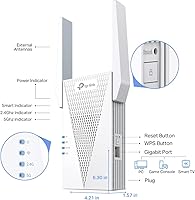
Several buyers flagged the physical footprint as a genuine inconvenience. At over 6 inches tall, it blocks the adjacent outlet on most standard wall plates, which limits placement options in rooms with limited socket locations.
Gigabit Ethernet Port
86%
Having a wired port on a range extender is a feature many buyers only appreciate after the fact. Smart TVs, gaming consoles, and desktop PCs in distant rooms can be hardwired directly through this extender, bypassing wireless congestion entirely and delivering noticeably steadier performance.
There is only one Ethernet port, which limits its usefulness in rooms with multiple wired devices. Buyers hoping to connect a small switch off this single port can do so, but it adds cost and complexity that some found unnecessary at this price point.
App & Software Experience
74%
26%
The Tether app handles routine tasks like checking connected devices, updating firmware, and adjusting basic settings without requiring any networking knowledge. For the majority of users, it covers everything they need day-to-day in a clean, navigable interface.
Firmware update management has been a recurring sore spot. A consistent thread of reviews across different time periods cites connectivity drops following automatic or prompted firmware updates, and the app provides limited diagnostic feedback when this happens.
Firmware Reliability
58%
42%
When the firmware is stable, the extender runs quietly in the background for weeks without intervention. Users who have not experienced update-related issues report it as essentially a set-and-forget device with no ongoing maintenance burden.
The firmware stability issue is significant enough to lower this score meaningfully. Multiple reviewers describe needing to reboot or even factory-reset the unit after firmware pushes, which is disruptive for households that rely on consistent connectivity for remote work or smart home devices.
Smart Adaptive Roaming
77%
23%
In practice, devices moving around the home do transition to stronger signals without requiring manual network switching in most tested configurations. This works particularly well for smartphones and laptops used across multiple rooms throughout the day.
Roaming handoff speed is not instantaneous, and during transitions some users notice a brief drop in real-time applications like video calls or online gaming. It functions adequately for general use but falls short of the responsiveness found in dedicated mesh systems.
Value for Money
71%
29%
For a WiFi 6 extender with Beamforming, EasyMesh support, and a Gigabit Ethernet port, the price sits at a reasonable point relative to competing hardware. Buyers upgrading from older WiFi 5 extenders frequently note the performance improvement justifies the premium.
At this price tier, some buyers feel the single Ethernet port and firmware reliability concerns are harder to forgive. A true mesh node from TP-Link's own Deco lineup can often be found at a comparable price point, making the value calculation less clear-cut for some shoppers.
Compatibility Range
67%
33%
The extender works with virtually any router brand in standard repeater mode, which gives it broad appeal beyond TP-Link customers. Access point mode adds flexibility for users who want to run it off a wired connection rather than wirelessly repeating.
The EasyMesh restriction and Deco incompatibility meaningfully narrow its appeal for buyers already invested in certain ecosystems. Shoppers with non-TP-Link routers get a functional extender but miss out on the more advanced roaming features entirely.
Device Capacity
83%
Support for up to 64 simultaneous devices is genuinely practical in dense households with smart home gadgets, multiple phones, laptops, and streaming devices all competing for bandwidth. Users in busy households report no obvious degradation with 20 to 30 active devices connected.
Real-world performance with 50-plus devices simultaneously active has not been widely tested in user reviews. The 64-device ceiling is likely adequate for most homes, but buyers running high-density smart home setups should treat that number as a ceiling, not a guaranteed comfortable operating point.
Installation Placement Flexibility
69%
31%
Being a wall-plug unit with no cables required (beyond optional Ethernet) means placement is flexible within reach of an outlet. Users appreciate the ability to reposition it when the first chosen spot does not deliver the expected coverage improvement.
The tall form factor and outlet-blocking design do limit where it can practically go. In rooms with furniture pushed close to walls or limited outlet locations, finding an unobstructed spot with a strong enough source signal can take some trial and error.
LED Indicators & Status Feedback
76%
24%
The signal strength LED gives useful at-a-glance feedback during placement — a simple but effective feature that helps users identify the best spot without pulling out a phone or app. Most buyers found the indicator intuitive within minutes of setup.
There is no granular feedback for diagnosing connection issues beyond basic signal strength. When something goes wrong — particularly after a firmware update — the LED offers little actionable information, leaving users to guess whether a reboot, reset, or repositioning is the right fix.

Suitable for:

The TP-Link RE715X is a strong pick for homeowners in medium-to-large single-family homes — roughly 1500 to 2400 square feet — where the main router simply can't push a reliable signal to the far end of the house, a finished basement, or a detached workspace. If you're already running a WiFi 6 router and want to extend that standard rather than fall back to older technology, this range extender preserves the investment you've already made in your home network. It's particularly well-suited to people who need a wired connection somewhere far from the router — a home office TV, a gaming console, or a desktop PC — thanks to the built-in Gigabit Ethernet port. Non-technical buyers will find the Tether app setup genuinely accessible, with most users up and running in under ten minutes without touching a single router setting. And if you're in the TP-Link ecosystem with a compatible EasyMesh router, the roaming experience is meaningfully better than a standard repeater, with devices transitioning between access points without manual network switching.

Not suitable for:

The TP-Link RE715X is not the right solution for anyone expecting to maintain near-router speeds in extended zones — every repeater cuts throughput significantly, and this one is no exception, with real-world speeds in extended areas typically dropping by half or more. If you're a heavy gamer, run a home server, or regularly transfer large files between devices, that speed reduction will be a constant frustration. Buyers already invested in a mesh system — particularly TP-Link's own Deco lineup — should know upfront that this extender is not compatible with those systems, which has caught many buyers off guard. If your home has exceptionally thick walls, multiple concrete floors, or an unusually complex layout, coverage results may fall short of the stated 2400 square foot figure. Finally, anyone sensitive to firmware reliability issues or who can't tolerate occasional connectivity disruptions after software updates should weigh that risk carefully before committing, as this is a documented and recurring complaint from real users.

Specifications

  • WiFi Standard: The extender operates on WiFi 6 (802.11ax), backward compatible with 802.11ac, 802.11n, 802.11g, and 802.11b devices.
  • Frequency Bands: Dual-band design covers both the 2.4 GHz band (up to 574 Mbps) and the 5 GHz band (up to 2404 Mbps) simultaneously.
  • Combined Speed: Maximum combined wireless throughput is rated at 3000 Mbps (AX3000) across both bands under ideal conditions.
  • Coverage Area: Designed to extend WiFi coverage to areas up to 2400 sq. ft., based on open-plan testing environments.
  • Device Capacity: Supports up to 64 simultaneous wireless client devices across both frequency bands.
  • Antenna Design: Equipped with two high-gain directional antennas utilizing Beamforming technology to focus signal toward connected devices.
  • Ethernet Port: Includes one Gigabit Ethernet port (10/100/1000 Mbps) for wired device connections anywhere the extender is placed.
  • Mesh Support: EasyMesh compatible, enabling whole-home roaming when paired with an EasyMesh-supported router; not compatible with Deco mesh systems.
  • Operating Modes: Functions in two modes: Repeater mode to extend an existing wireless network, and Access Point mode for wired backhaul setups.
  • Setup Methods: Can be configured via the TP-Link Tether mobile app (iOS and Android) or through a standard web browser interface.
  • Smart Roaming: Smart Adaptive Roaming technology automatically connects client devices to whichever access point offers the strongest available signal.
  • Dimensions: The unit measures 4.21 x 1.58 x 6.3 inches, designed to plug directly into a standard wall outlet.
  • Weight: The extender weighs 13.4 oz, reflecting its solid internal antenna and power circuitry construction.
  • Security Protocol: Supports WPA3 and WPA2 wireless encryption standards to protect the extended network against unauthorized access.
  • Cybersecurity: TP-Link is a signatory of the CISA Secure-by-Design pledge, meaning advanced security practices are built into the device architecture.
  • Model Number: Official model designation is RE715X, sold under TP-Link's AX3000 range extender product line.
  • Manufacturer: Designed and manufactured by TP-Link Technologies Co., Ltd., a global networking hardware brand founded in 1996.
  • Availability: First made available for purchase on August 24, 2022, and has since ranked among the top three best-selling WiFi repeaters on Amazon.

Related Reviews
TP-Link Archer BE600
90%
96%
Wi-Fi Speed
91%
Coverage Area
94%
Device Capacity
89%
Stability & Reliability
87%
Setup & Installation
More
TP-Link TL-SG3428XMP
88%
91%
Performance
88%
Build Quality
90%
Cloud Management & Software
87%
Ease of Setup
85%
Power Efficiency
More
TP-Link Archer VR2100
84%
86%
Wi-Fi Performance
92%
Setup & Installation
87%
Value for Money
72%
Range
90%
Wired Performance
More
TP-Link EAP610 V2
TP-Link EAP610 V2
82%
86%
Wireless Performance
91%
Setup & Installation
88%
Cloud Management & App
83%
Multi-Device Handling
79%
Range & Coverage
More
TP-Link EAP670 V2
TP-Link EAP670 V2
90%
96%
WiFi Performance
94%
Coverage Consistency
90%
Setup & Installation
92%
Ease of Management
91%
Mesh & Roaming Reliability
More
TP-Link ER7212PC Omada Router
86%
88%
Ease of Installation
84%
VPN Performance
91%
Cloud Management Experience
87%
PoE+ Port Performance
85%
Build Quality
More
TP-Link EAP110-Outdoor V3
87%
89%
Wi-Fi Range
94%
Ease of Setup
92%
Weatherproofing
85%
Speed & Stability
80%
App & Cloud Management
More
TP-Link RE500X WiFi Extender
86%
89%
Setup and Installation
85%
WiFi Performance
90%
Coverage Area
87%
App Experience
92%
Value for Money
More
TP-Link Deco X50-Outdoor
89%
95%
Outdoor Coverage
92%
WiFi Performance
88%
Setup & Installation
93%
Durability & Weatherproofing
90%
PoE & Power Options
More
TP-Link TD-W9970 Modem Router
83%
91%
Value for Money
95%
Ease of Setup
76%
Wi-Fi Performance
84%
Build Quality
87%
USB Port Functionality
More

FAQ

Yes, in standard repeater mode it works with virtually any router brand — Netgear, ASUS, Linksys, and others included. The EasyMesh roaming features, however, only activate when paired with a compatible TP-Link EasyMesh router, so buyers with other brands will get a fully functional extender but not the advanced handoff behavior.

It does, and this is worth understanding before buying. All repeaters — not just this one — cut wireless throughput in the extended zone by roughly half, because the device has to receive and retransmit the signal on the same radio. For streaming, video calls, and general browsing this is usually not noticeable, but heavy file transfers or competitive online gaming will feel the difference.

No — and this is one of the most common points of confusion. Despite being made by TP-Link, this range extender is not compatible with the Deco product line. Deco systems use their own mesh protocol, which is separate from EasyMesh. If you're running a Deco setup, you'll want to expand it with an additional Deco node rather than this extender.

The key is finding a location that sits roughly halfway between your router and the dead zone — close enough to still receive a strong source signal, but far enough to push coverage into the problem area. The LED indicator on the unit shows signal strength, so you can test a few spots before settling on one. Avoid placing it behind large appliances or inside cabinets, as physical obstructions significantly reduce performance.

By default, this range extender creates an extended network with a separate SSID (your existing name plus an underscore and EXT, for example). However, if you have a compatible EasyMesh router, you can configure it to share the same network name and let devices roam between them automatically. For non-EasyMesh setups, some users manually configure matching network names and passwords to approximate the same effect, though true automatic handoff won't occur.

Based on real buyer feedback, the Tether app setup is genuinely straightforward for most users. You plug in the extender, open the app, and follow a short wizard — most people are done in under ten minutes. The edge cases where it gets tricky are usually tied to specific phone OS versions or unusual router configurations, where falling back to the browser-based setup adds a few more steps.

In most cases, no. The extender is tall enough — just over 6 inches — that it typically blocks the second socket on a standard dual-outlet wall plate. If outlet access is a concern in the room where you plan to install it, a short extension cord or a power strip can work around this limitation.

In standard repeater mode, your device will eventually switch over to the extender's signal as you move away from the router, but the handoff is not always instant and you may notice a brief interruption on real-time applications. With a compatible EasyMesh router, Smart Adaptive Roaming handles this transition more smoothly, though it still is not as fast as a dedicated tri-band mesh system designed specifically for roaming.

This is worth being honest about: a recurring thread across buyer reviews involves connectivity drops after firmware updates, with some users needing to reboot or factory-reset the unit to restore normal operation. It does not affect every user, but it is consistent enough to be a known issue. Keeping an eye on TP-Link community forums before applying firmware updates is a reasonable precaution if stable uptime is critical for you.

Yes, Access Point mode is a supported operating option. In this configuration, you run an Ethernet cable from your router or a network switch to the extender's Gigabit port, and it broadcasts a wireless network from that wired connection — eliminating the half-speed repeater penalty entirely. This is actually the better setup if you can run a cable, since you get full WiFi 6 speeds in the extended area rather than the reduced throughput of wireless repeating.