Overview

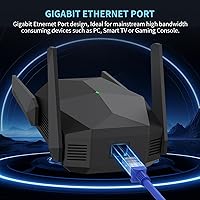
The ingabis M-A25 AX3000 WiFi 6 Range Extender arrived quietly in late 2024, but it has climbed to a top-30 ranking in its category fast enough to warrant a serious look. It targets the middle ground: not a bargain-bin unit with cut-rate specs, but also not a mesh system with a steep price tag. What makes it stand out at this tier is the Gigabit Ethernet port — most extenders at comparable prices offer only Fast Ethernet, which bottlenecks wired connections. The brand ingabis won't ring any bells for most buyers, and that's a fair concern, but the specs and real-world results tell a more reassuring story.
Features & Benefits

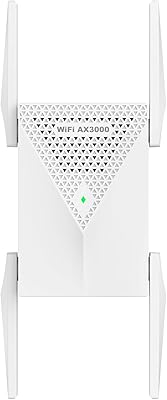
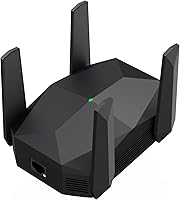
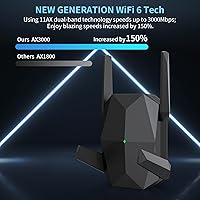
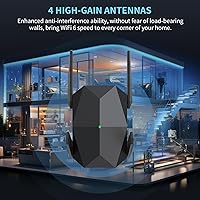
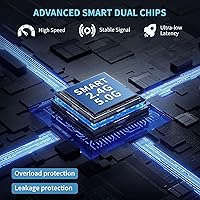
This WiFi 6 extender runs on dual-band Wi-Fi 6, and while the combined 3,000Mbps throughput figure is a theoretical ceiling, even a fraction of that is a meaningful upgrade over older AC-based extenders in practice. Four external antennas push signal in all directions, which matters more than antenna count alone suggests — the goal is reducing the dead-zone effect in hallways, garages, and far corners. The browser-based setup is genuinely straightforward: no app, no account creation, just a quick configuration through any web browser. Security coverage includes WPA2 and 802.1X protocols, and the unit can handle over a hundred connected devices without the traffic collapse that cheaper single-band repeaters are notorious for.

Best For

The ingabis range booster makes the most sense for households where the main router simply can't reach — think sprawling ranch-style homes, multi-story townhouses, or any layout where one end of the building is reliably slower than the other. The Gigabit Ethernet port is a genuine draw for anyone who wants to hardwire a gaming console, smart TV, or desktop PC in a room too far from the router for a cable run. It also suits dense smart-home setups loaded with cameras, thermostats, and speakers, since cheaper extenders tend to choke under that kind of device volume. If your goal is WiFi 6 performance without replacing your existing router, this fits that brief well.

User Feedback

Pulling from nearly 1,900 ratings at a 4.4-star average, the pattern is fairly clear: most buyers are satisfied, particularly with how easy setup was and the speed improvement at the edges of their homes. Praise around coverage and ease of use is consistent enough to feel credible. Where things get more nuanced is placement: some users found this dual-band repeater worked best at moderate distances from the router, with a handful needing to reposition it before results clicked. A few reviewers flagged occasional reboots after long uptime stretches. Compared to TP-Link or NETGEAR at similar price points, buyers frequently cite stronger overall value. That said, this is a newer product, so the review pool is still maturing.

Pros

  • WiFi 6 support delivers noticeably better performance than older AC extenders, especially in congested environments.
  • The Gigabit Ethernet port lets you hardwire devices in remote rooms without pulling cables from your router.
  • Browser-based setup works without any app download or account creation — a genuine time-saver.
  • Handles dense smart-home device loads more reliably than single-band or budget-tier repeaters.
  • Compatible with virtually any router brand right out of the box, with no ecosystem restrictions.
  • Four external antennas provide wide signal dispersion that holds up reasonably well across open floor plans.
  • Buyers consistently rate this WiFi 6 extender as strong value compared to name-brand alternatives at similar prices.
  • WPA2 and 802.1X security support is included without any extra configuration required.
  • Compact and neutral-looking enough to fit most wall outlets without blocking adjacent sockets.
  • Climbed to a top-30 category ranking quickly, suggesting broad buyer satisfaction across diverse home setups.

Cons

  • Placement is finicky — too close to the router adds little value, too far and signal quality drops sharply.
  • Maximum coverage claims reflect ideal open-air conditions; heavily partitioned or multi-story homes will see much less.
  • Only one Ethernet port limits flexibility if you need to connect more than one wired device in the same room.
  • Occasional reboots after extended uptime have been flagged by long-term users, which can disrupt connected devices.
  • Ingabis has no established support infrastructure — no help line, knowledge base, or active user community.
  • Firmware update history and long-term software support are unclear for a brand this new to the market.
  • No guest network feature, which is a common expectation at this price tier for households with frequent visitors.
  • The device runs noticeably warm during sustained heavy use, though no thermal failures have been widely reported.
  • Early review pool may skew positive, as the product has only been available since late 2024.
  • Not suitable for mesh network setups, where a traditional extender can introduce connectivity conflicts.

Ratings

The ingabis M-A25 AX3000 WiFi 6 Range Extender scores below are generated by AI after analyzing verified global buyer reviews, with spam, bot-submitted, and incentivized feedback actively filtered out. Across nearly 1,900 ratings, this dual-band repeater earned a strong overall impression — but real pain points around placement sensitivity and brand familiarity are reflected here just as transparently as its genuine strengths.
Ease of Setup
91%
Buyers consistently report getting this WiFi 6 extender up and running in under five minutes using nothing but a phone browser — no app download, no account, no frustrating QR codes. For less tech-savvy users, the browser-based interface was described as refreshingly clear.
A small portion of users ran into hiccups when their router used uncommon channel configurations, requiring a second attempt. The LED indicator feedback during setup could be more descriptive for first-timers troubleshooting a stuck pairing process.
Signal Coverage
78%
22%
In typical two-story homes and open-plan layouts in the 1,500 to 2,500 square foot range, users noticed a clear improvement in signal strength in rooms that previously struggled. Placement in a central hallway tended to produce the most consistently positive results.
The headline coverage figure is a ceiling under ideal, unobstructed conditions — real-world results in homes with thick walls or multiple floors are notably lower. Some buyers expecting whole-home coverage in larger properties were disappointed and needed to adjust placement expectations significantly.
WiFi Speed Performance
82%
18%
Users upgrading from older AC-based extenders reported a tangible jump in throughput, particularly on the 5GHz band, where streaming 4K content and video calls held up more reliably in rooms far from the main router. The WiFi 6 standard also handles interference better in device-dense environments.
Theoretical combined speeds are marketing-level figures that real-world conditions never reach. Several reviewers noted that speed on the 2.4GHz band remains modest, and users expecting near-router performance at range will likely be underwhelmed by the actual throughput drop-off.
Gigabit Ethernet Port
88%
This is one of the more genuinely useful features at this price point. Buyers who hardwired a gaming console or smart TV through the Gigabit port reported stable, low-latency connections that wireless alone could not deliver in remote rooms. It removes the need to run a separate cable from the router.
There is only one Ethernet port, which limits flexibility if you need to connect multiple wired devices in the same area. A small number of users also noted they had to manually configure the port speed in their device settings to get full Gigabit throughput.
Multi-Device Handling
79%
21%
Households running two dozen or more IoT devices — cameras, smart speakers, thermostats, streaming sticks — found this dual-band repeater held up better than single-band alternatives they had previously tried. It does not appear to throttle bandwidth aggressively when multiple streams are active simultaneously.
Under sustained, heavy load from many high-bandwidth devices at once, some users observed intermittent slowdowns. The 100-plus device capacity claim is a hardware ceiling, not a performance guarantee, and real throughput per device drops noticeably as the connected count rises.
Placement Flexibility
67%
33%
The four external antennas give users some ability to direct signal toward specific areas, and the compact footprint means it fits most wall outlets without blocking adjacent sockets. Several buyers found a sweet spot roughly halfway between their router and the dead zone that worked reliably.
This extender is notably sensitive to placement distance from the source router — too close and it adds little value, too far and it struggles to maintain a strong uplink. A fair number of negative reviews trace directly back to suboptimal placement rather than a hardware fault, which suggests clearer guidance is needed.
Build Quality & Design
73%
27%
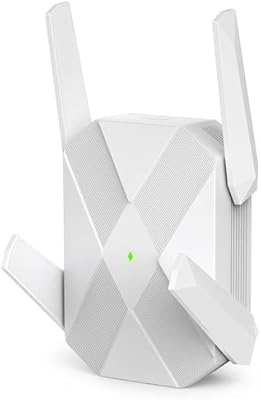
The unit feels solid for its weight class, and the external antennas do not wobble or feel flimsy after repeated repositioning. Its neutral white design blends into most home interiors without drawing attention, which matters when it is plugged into a visible hallway or living room outlet.
The plastic housing does attract dust in textured finishes, and a few users noted the unit runs noticeably warm during extended use, though no one reported thermal shutdowns. It does not feel as premium as TP-Link or NETGEAR units at the same price, and that perception gap is real.
Long-Term Reliability
66%
34%
Many buyers who set this WiFi 6 extender up and left it running for several weeks reported consistent uptime with no major intervention. For straightforward residential use without extreme load, it tends to stay connected without requiring attention.
A recurring theme in longer-term reviews is the occasional need for a manual reboot after extended uptime — some users put it on a smart plug timer as a workaround. Firmware update cadence from ingabis is unclear, and buyers with reliability-critical setups should factor in that this is a newer, lesser-known brand.
Value for Money
84%
Compared to name-brand WiFi 6 extenders with Gigabit Ethernet at a similar price, this ingabis range booster holds its own on paper and largely delivers in practice. Buyers who shopped around before purchasing frequently noted they got more hardware capability per dollar here than from established competitors.
The value equation assumes the device performs as expected long-term — and because ingabis does not yet have the track record of TP-Link or NETGEAR, there is some residual risk priced into the purchase. Return and warranty experiences from buyers are still a limited data set given the product's age.
Router Compatibility
81%
19%
Users reported successful pairings with routers from ISP-issued hardware, ASUS, TP-Link, NETGEAR, and Eero, among others. The universal 802.11ax compatibility and browser-based setup remove most of the ecosystem lock-in that can make some extenders frustrating to configure.
A small segment of buyers with older or ISP-locked routers hit configuration walls that required a call to their internet provider to resolve. Mesh-network router systems sometimes create conflicts with a traditional extender like this one, and buyers on mesh setups should research compatibility first.
Security Features
76%
24%
Support for WPA2 and 802.1X gives this dual-band repeater a security posture that is appropriate for typical home and small home-office use. Most buyers do not need more than WPA2, and having it present out of the box with no extra configuration is a quiet but meaningful plus.
There is no built-in guest network feature, which some buyers expected at this price point. WEP support is included for legacy device compatibility, but its presence alongside modern protocols is a minor concern for security-conscious users who prefer cleaner, modern-only configurations.
Smart Home Integration
74%
26%
Buyers running Alexa, Google Home, Ring cameras, and Fire TV sticks in previously underserved rooms saw improvement after adding this extender. It does not require any hub or smart-home platform account, which is a practical advantage for users who prefer to keep their network simple.
There is no native app, so smart-home users accustomed to network dashboards showing device-level traffic or signal strength have no visibility tools here. For advanced home automation users who want granular control, this extender's no-frills approach can feel limiting.
Brand Trust & Support
61%
39%
Despite being an unfamiliar name to most Western buyers, ingabis responds to questions in the Amazon listing Q&A section, which is a basic but reassuring sign of seller engagement. Buyers who reached out about setup questions generally received timely responses.
Ingabis does not have the established support infrastructure of TP-Link or NETGEAR — there is no dedicated support line, community forum, or detailed knowledge base. For buyers who value post-purchase support or ongoing firmware updates, the lack of a clear long-term support commitment is a genuine gap.

Suitable for:

The ingabis M-A25 AX3000 WiFi 6 Range Extender is a practical pick for homeowners and renters dealing with persistent dead zones in mid-sized homes — particularly layouts in the 1,500 to 2,500 square foot range where a single router simply cannot reach every room. It suits people who want a wired connection option in a remote room without running cables through walls, thanks to the Gigabit Ethernet port that lets you hardwire a gaming console, smart TV, or desktop PC wherever you place the unit. Households running a large number of smart devices — cameras, voice assistants, smart thermostats — will appreciate that this WiFi 6 extender handles congestion better than older, cheaper repeaters. It also works well for people who have been burned by overly complicated setup processes before: the browser-based configuration requires no app, no account, and no technical background to complete. If you want a genuine WiFi 6 upgrade on a budget without committing to a full mesh system replacement, this dual-band repeater makes a compelling case.
Not suitable for:

The ingabis M-A25 AX3000 WiFi 6 Range Extender is not the right tool for buyers with very large or heavily partitioned homes expecting blanket coverage in every corner — the maximum coverage figures are theoretical, and thick concrete or brick walls will shrink usable range considerably. Anyone currently running a mesh network system should approach with caution, as traditional extenders can conflict with mesh topology and may introduce more problems than they solve. Power users who rely on network management dashboards, guest network isolation, or regular firmware updates for security compliance will find this unit's no-frills approach frustrating — there is no dedicated app, no management portal beyond initial setup, and no clear firmware update roadmap from ingabis. Buyers who prioritize long-term brand support, established warranty infrastructure, or community troubleshooting resources will understandably feel more comfortable with TP-Link or NETGEAR. And if you only need to cover a small apartment or a single room, the capability here is more than necessary and the investment does not make practical sense.
Specifications

  • WiFi Standard: Operates on WiFi 6 (802.11ax), with backward compatibility across 802.11ac, 802.11a/b/g/n devices.
  • Combined Speed: Dual-band throughput reaches a theoretical ceiling of 3,000Mbps — 600Mbps on 2.4GHz and 2,400Mbps on 5GHz.
  • Frequency Bands: Transmits simultaneously on both 2.4GHz and 5GHz bands, allowing devices to connect to whichever band suits their needs.
  • Antennas: Equipped with 4 external antennas designed to disperse signal in a 360-degree pattern across horizontal and vertical planes.
  • Max Coverage: Rated up to 13,888 sq ft under ideal open-air conditions; practical coverage in furnished, walled interiors will vary.
  • Device Capacity: Supports connections from more than 100 simultaneous devices, accommodating dense smart-home and multi-user environments.
  • Ethernet Port: Includes a single Gigabit Ethernet port (1Gbps) for wired device connections or direct network backhaul.
  • Security Protocols: Supports WEP, WPA, WPA2, and 802.1X wireless security standards for home and small-office network protection.
  • Setup Method: Configured entirely through a standard web browser on any smartphone or PC — no proprietary app or cloud account required.
  • Model Number: Officially designated as the M-A25 by the manufacturer ingabis.
  • Dimensions: Physical footprint measures 4.92 x 3.54 x 3.74 inches, compact enough to fit most standard wall outlets without obstruction.
  • Weight: Unit weighs 8 ounces, making it lightweight and easy to reposition during placement testing.
  • Special Features: Includes a 1-tap WPS pairing button, an LED status indicator for signal and connection feedback, and a 360-degree antenna orientation.
  • Compatibility: Works with any router or gateway regardless of brand, as long as it operates on a standard 2.4GHz or 5GHz WiFi network.
  • Brand: Manufactured and sold by ingabis, a consumer networking brand that entered the market in late 2024.
  • Power Input: Plugs directly into a standard AC wall outlet with a built-in plug, requiring no external power adapter or cable.
  • Operating Mode: Functions as a traditional range extender and WiFi repeater, creating an extended network that mirrors the existing router signal.
  • LED Indicator: An onboard LED light provides real-time feedback on signal strength and connection status during and after setup.

Related Reviews
Surncest AX3000 WiFi 6 Range Extender
85%
88%
Value for Money
91%
WiFi Performance
85%
Setup & Installation
89%
Coverage & Range
80%
Build Quality
More
TP-Link RE700X AX3000 WiFi 6 Range Extender
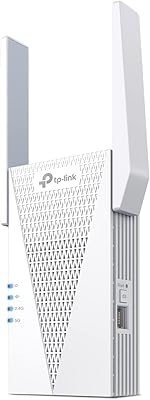
85%
91%
Setup & Installation
88%
WiFi Performance
85%
Coverage Range
80%
Build Quality
90%
App & Software Experience
More
TP-Link RE715X
TP-Link RE715X
75%
88%
Signal Coverage
91%
Setup Experience
63%
WiFi Speed in Extended Zones
79%
EasyMesh & Roaming
72%
Build Quality & Design
More
WAVLINK AX3000 WiFi 6 Outdoor WiFi Extender
87%
94%
Outdoor Coverage
89%
WiFi Performance
90%
Weatherproof Build
86%
Installation Ease
88%
Signal Penetration
More
Eboous AX3000 WiFi 6 Extender
85%
87%
Performance
95%
Ease of Setup
91%
WiFi Coverage
89%
Dual-Band Speed
85%
Compatibility with Mesh Routers
More
NETGEAR WiFi 6 Range Extender EAX12
83%
88%
Performance in Large Homes
85%
Ease of Setup
90%
WiFi Coverage Range
82%
Device Compatibility
87%
Streaming & Gaming Performance
More
HMTYQNB 2025 AX3000 WiFi 6 Extender
87%
87%
Range & Coverage
93%
Setup & Installation
88%
Speed & Performance
91%
Ease of Use
75%
Signal Strength in Large Spaces
More
NETGEAR EAX17 WiFi 6 Range Extender
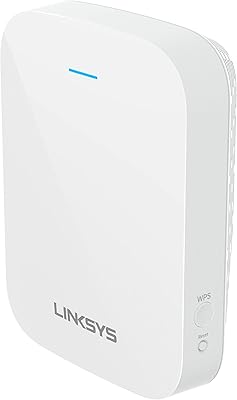
76%
88%
Ease of Setup
82%
Signal Coverage
71%
Real-World Speed Performance
78%
Device Handling Capacity
63%
Roaming & Handoff
More
Linksys RE7310 WiFi 6 Range Extender
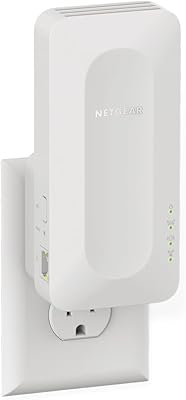
84%
89%
Performance
91%
Ease of Setup
88%
Coverage Area
84%
Speed Stability
92%
Compatibility
More
Linksys RE7350 WiFi 6 Wireless Range Extender
84%
88%
WiFi Performance
84%
Coverage Area
93%
Setup Ease
87%
Build Quality
82%
Speed Consistency
More

FAQ

It works with virtually any router brand — ASUS, TP-Link, NETGEAR, Eero, and ISP-issued gateways included. As long as your router broadcasts a standard 2.4GHz or 5GHz WiFi signal, this WiFi 6 extender will pair with it through the browser-based setup without any brand-specific configuration.

No app is required at any point. You connect to the extender's temporary network from your phone or laptop, open a browser, and follow the on-screen steps — it typically takes about five minutes or less. Most buyers found this noticeably easier than extenders that require account creation or app installs.

This is one area to think through carefully. Traditional range extenders like this one operate differently from mesh nodes, and plugging a repeater into a mesh network can sometimes cause IP conflicts or routing issues depending on your mesh system's setup. If you're running a dedicated mesh network from Eero, Orbi, or similar, check compatibility or consider adding another mesh node instead.

The hardware supports over 100 simultaneous connections, but real-world performance depends on what those devices are doing. A few dozen devices running light traffic — smart plugs, sensors, a couple of phones — will run smoothly. If you're pushing many high-bandwidth streams at once, you will notice some throughput drop, as with any extender in this category.

The sweet spot is roughly halfway between your router and the dead zone you're trying to fix — close enough to receive a strong uplink signal, far enough to actually extend coverage into the problem area. Avoid placing it behind large appliances, inside cabinets, or in corners. Many users found that a central hallway or landing on a second floor worked well.

Yes, and this is one of the standout features of the ingabis M-A25 AX3000 WiFi 6 Range Extender. The Gigabit Ethernet port supports up to 1Gbps wired speeds, so you can hardwire a gaming console, smart TV, or PC wherever the extender is placed without running a cable back to your router. Just note there is only one port, so you can connect one wired device at a time.

By default, this dual-band repeater creates an extended network — typically your existing network name with a suffix like _EXT. Some users prefer this because it makes it obvious which signal they're on, while others find it slightly inconvenient if they want seamless roaming. You can usually rename the extended network to match your main network name during setup if you prefer a unified name.

Not automatically in the way a mesh system handles it. Traditional extenders rely on your devices to decide when to switch networks, and most devices hold onto a known signal longer than they should. For phones and laptops that move around constantly, this can mean manually selecting the extended network once you're in the far zone. Stationary devices like smart TVs or game consoles that stay in one room won't experience this issue.

It does run warm to the touch after several hours of sustained use, which is normal for wall-plug extenders in this performance class. There is no fan, so heat dissipation is passive through the housing. No widespread reports of overheating or thermal shutdowns exist in the user review pool, but if you notice it getting very hot, repositioning it to a less enclosed outlet can help airflow.

This is a fair concern with a newer brand. Ingabis does respond to questions through their product listing, but they do not have a dedicated support line or community forum like TP-Link or NETGEAR maintain. Firmware update availability beyond the initial release is not clearly documented. For buyers who need guaranteed long-term software support, that gap is worth factoring into the decision.