Overview

The Surncest WIFI6 AX3000 WiFi 6 Range Extender arrived in early 2025 and has already carved out a respectable spot among mid-range repeaters, sitting at #117 in its Amazon category after just a few months on sale. For homeowners tired of dead zones in back bedrooms or basements, it offers a meaningful step up from older WiFi 5 hardware at a comparable price point. That said, it is worth being clear upfront: this is a traditional range extender, not a mesh system. You will get broader coverage, but the underlying repeater architecture does come with trade-offs. Surncest is not a household name, so the specs and real-world ratings have to carry the weight here.
Features & Benefits

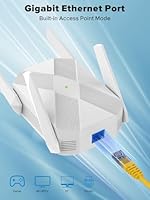
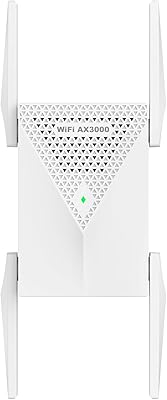
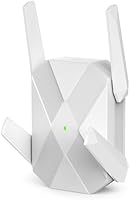
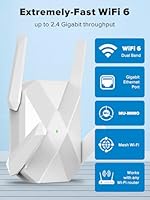
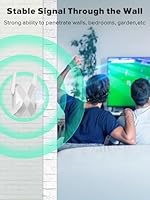
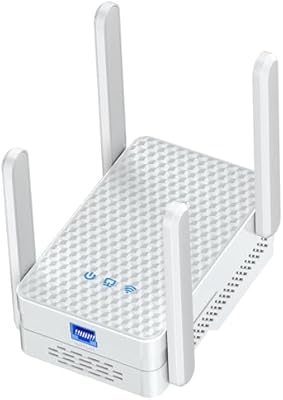
The AX3000 range extender runs on a dual-core processor, splitting bandwidth between 573.5 Mbps on 2.4 GHz for device density and 2400 Mbps on 5 GHz for heavier tasks like streaming or gaming. Four external antennas help push that signal through walls and concrete floors rather than stopping at drywall. The Gigabit Ethernet port is a genuine standout — plug a console or smart TV in directly and sidestep wireless interference altogether. WPA3 encryption keeps things secure without any manual configuration, and Access Point mode lets you convert a wired connection into a full wireless node when needed. Supporting over 99 connected devices simultaneously, this WiFi 6 extender handles busy smart homes with room to spare.

Best For

This WiFi 6 extender is a strong match for anyone dealing with a large single-family home or a multi-floor layout where the main router simply cannot reach certain rooms. Gamers and streamers located far from the router will appreciate the stable 5 GHz band, which reduces lag better than a 2.4 GHz-only solution would. Smart home users juggling dozens of IoT gadgets — cameras, thermostats, voice assistants — benefit from the high device-count support. It also makes a lot of sense for anyone upgrading from an older WiFi 5 extender who wants noticeably faster throughput without jumping to a full mesh system. The built-in Gigabit port is a bonus for anyone who needs at least one wired device connection alongside the wireless coverage boost.

User Feedback

With a 4.2-star average across more than 450 ratings in just a few months, the AX3000 range extender has landed well with most buyers. Setup and signal improvement come up most often in positive reviews — people tend to notice the difference within minutes of plugging it in, especially in rooms that previously had weak or no coverage. The honest caveat is that, like any traditional repeater, you will typically see some speed reduction between the router and the extender due to how the technology works; this is not unique to this Surncest unit. A few buyers noted the web interface could be more polished. Overall, home users find the price-to-performance ratio competitive against bigger brands, though heavy-bandwidth users may want to weigh mesh alternatives.

Pros

  • WiFi 6 support future-proofs the extender as more devices adopt the newer standard.
  • The 5 GHz band delivers noticeably stronger performance for gaming and 4K streaming compared to older WiFi 5 extenders.
  • Four external antennas provide real-world signal penetration through walls and floors, not just open-air range.
  • The Gigabit Ethernet port lets you hard-wire a TV, console, or PC for lower latency with no extra hardware.
  • WPA3 encryption is a meaningful security upgrade that most competing extenders at this price do not include.
  • Access Point mode adds flexibility, letting you use the unit as a wireless node off a wired connection.
  • Setup is consistently praised as quick and straightforward, even for non-technical users.
  • Supporting 99-plus connected devices makes this WiFi 6 extender a strong fit for IoT-heavy households.
  • Over 450 ratings within a few months of launch points to broad real-world adoption and reliability feedback.
  • The price-to-performance ratio holds up well against name-brand alternatives offering similar specs.

Cons

  • Repeater mode cuts usable bandwidth roughly in half for devices connected through the extender — this is an inherent limitation, not a flaw unique to this unit.
  • The 8,000 square foot coverage claim reflects ideal open-space conditions and will be lower in homes with thick walls or multiple floors.
  • Surncest is a relatively new brand with a shorter track record of long-term firmware updates and customer support.
  • The web interface has drawn some criticism for feeling less polished compared to interfaces from more established router brands.
  • There is no dedicated backhaul band, so heavy simultaneous use on both bands can create congestion.
  • No companion mobile app with advanced controls means less flexibility for users who prefer managing their network from a phone.
  • Performance consistency may vary depending on placement and distance from the primary router.
  • Buyers expecting mesh-level roaming and seamless band-switching will find a traditional extender architecture limiting.

Ratings

The scores below were generated by our AI engine after analyzing verified purchaser reviews for the Surncest WIFI6 AX3000 WiFi 6 Range Extender from global sources, with spam, bot activity, and incentivized feedback actively filtered out. The result reflects a balanced picture of what real home users consistently praise and where genuine frustrations surface. Both the strengths and the trade-offs are weighted transparently, so you can make a genuinely informed decision.

Signal Range & Coverage
81%
19%
Buyers in two-story homes and larger single-family properties consistently report the AX3000 range extender pushing usable WiFi into rooms and basements that were previously dead zones. The four external antennas appear to make a real difference in penetrating drywall and standard interior walls, which many users upgrading from older plug-in extenders noticed right away.
The manufacturer's 8,000 sq.ft. figure is a best-case number, and users in homes with concrete walls, brick, or dense multi-floor layouts report noticeably shorter real-world range. A handful of buyers in particularly challenging structures found coverage gains more modest than expected.
Setup & Ease of Use
84%
The web-based setup process draws consistent praise for being quick and accessible, even from buyers who describe themselves as non-technical. Most users report being fully up and running in under ten minutes, which is a meaningful differentiator compared to extenders with more complex pairing steps.
Without a dedicated mobile app, some users find ongoing management less convenient than they would prefer, particularly when adjusting settings from a phone. A small number of reviewers found the web interface layout less intuitive than expected after the initial setup.
5 GHz Performance
83%
Users running gaming consoles and streaming devices on the 5 GHz band through this WiFi 6 extender report stable connections with noticeably lower lag than what they experienced with their previous WiFi 5 repeaters. For rooms within reasonable range of the extender, the 5 GHz throughput holds up well under sustained use.
Speed on the 5 GHz band drops more significantly with distance and wall obstruction than on the 2.4 GHz band, which some users in larger homes discovered when placing the extender further from the router. The inherent repeater bandwidth reduction also compounds this at longer ranges.
Bandwidth Trade-off (Repeater Mode)
58%
42%
Users who understood repeater topology going in — and positioned the extender thoughtfully — found the speed reduction acceptable for everyday tasks like streaming HD video, video calls, and smart home device communication. For those use cases, the WiFi 6 extender delivers enough throughput to feel like a meaningful improvement over no coverage at all.
This is the most common source of disappointment in critical reviews: devices connected through the extender in repeater mode receive substantially less bandwidth than the router delivers directly, which is an architectural limitation of this device class and not something firmware can fix. Buyers expecting near-router speeds at the extended location consistently end up frustrated.
2.4 GHz Device Coverage
78%
22%
The 2.4 GHz band performs well for IoT devices, smart home sensors, and low-bandwidth gadgets, with users reporting stable connections across a wide physical area. Households with dozens of smart devices — cameras, thermostats, voice assistants — find the broad 2.4 GHz reach keeps everything online reliably.
Raw throughput on 2.4 GHz is modest, as expected for the band, and users who try to run high-demand tasks over it rather than switching to 5 GHz will find performance underwhelming. Band steering between 2.4 GHz and 5 GHz is not always seamless depending on device behavior.
Gigabit Ethernet Port
88%
The wired Ethernet port is one of the most positively mentioned hardware features, with gamers and TV users appreciating the ability to get a stable, low-latency wired connection in a room without running a cable from the main router. In Access Point mode, the port enables a cleaner, faster setup that sidesteps the repeater bandwidth penalty entirely.
There is only one Ethernet port, which limits wired connectivity to a single device at a time without an additional switch. Users hoping to wire multiple devices — a console and a smart TV, for example — would need to add hardware.
Security
86%
WPA3 support is a genuine selling point at this price tier, and security-conscious buyers specifically call it out as a reason they chose this Surncest unit over cheaper alternatives that only offer WPA2. Automatic security updates add a layer of ongoing protection that matters more as home networks grow in complexity.
Buyers cannot independently verify how consistently Surncest pushes firmware and security patches, and as a newer brand the long-term update track record is still being established. Users who rely on granular security configuration may find the web interface lacks the depth of more enterprise-oriented extenders.
Build Quality & Design
72%
28%
The physical build feels solid and purposeful for a desktop extender, and the four antenna design reads as more premium than the compact plug-in style extenders it competes against. Buyers report the unit stays cool during extended operation without any reported overheating complaints in the review pool.
The design is functional but unremarkable, and users who care about aesthetics note it is hard to tuck away discreetly given the size and protruding antennas. At 10.5 oz and over 5 inches tall with antennas, it occupies a visible footprint on any shelf or surface.
Value for Money
76%
24%
Against name-brand alternatives offering comparable WiFi 6 specs, most buyers feel the AX3000 range extender delivers fair value, particularly given the inclusion of WPA3 security and a Gigabit Ethernet port at its price point. Users upgrading from WiFi 5 extenders tend to feel the performance jump justifies the cost difference.
Buyers who compare it against entry-level mesh systems at a similar or slightly higher price point sometimes question whether the repeater architecture is worth it when a mesh node would eliminate the bandwidth trade-off. The Surncest brand may also make resale value less predictable than established alternatives.
Smart Home Compatibility
82%
18%
The high device-count capacity and stable 2.4 GHz coverage translate well to smart home environments, with users running Ring cameras, smart speakers, Philips Hue systems, and various IoT sensors reporting solid connectivity across a wider area after adding this WiFi 6 extender to their network. WiFi 6 efficiency improvements also help reduce interference in dense device environments.
Some users with very large smart home ecosystems note that device hand-off between the router and the extender is not always instantaneous, which can briefly affect automations or camera feeds when devices roam. Smart home hubs requiring extremely low-latency responses may perform better on a direct router connection.
Web Interface
63%
37%
The browser-based management interface handles the core tasks — initial setup, network selection, and mode switching — without requiring any software installation, which appeals to users who prefer simplicity. Access Point mode configuration in particular is reportedly straightforward through the interface.
Multiple reviewers describe the interface as dated-looking and occasionally sluggish, especially on mobile browsers. The lack of a native app means there is no push notification for connectivity issues or a dashboard for monitoring connected devices in a convenient format.
Multi-Device Stability
77%
23%
Under moderate load — ten to thirty active devices streaming, browsing, and running smart home tasks simultaneously — the AX3000 range extender holds connections reliably without the random drops some users experienced with older hardware. The dual-core processor appears to manage concurrent traffic reasonably well for a home-use repeater.
Under heavier simultaneous demand, particularly when multiple high-bandwidth streams run at once through the extender, some users notice instability or reduced throughput that requires a reboot to resolve. This is most common when the extender is positioned at the edge of its effective range from the router.
Brand Trust & Support
61%
39%
The volume of reviews accumulated in a short window since March 2025 suggests the product is selling in meaningful numbers, which at least indicates real-world deployment across diverse home setups. The ratings distribution, with a 4.2-star average, points to a majority of satisfactory experiences.
Surncest's support infrastructure and long-term firmware commitment are still unproven compared to brands with multi-year track records. Buyers who prioritize warranty support, responsive customer service, and reliable update cycles may find the lack of an established support history a genuine concern.

Suitable for:

The Surncest WIFI6 AX3000 WiFi 6 Range Extender is a practical choice for homeowners dealing with genuine dead zones in larger or multi-floor properties where the main router simply cannot reach. If your back bedroom, garage, or basement gets weak signal and running new Ethernet cable is not realistic, this extender fills that gap without requiring a full network overhaul. Smart home households running dozens of devices — cameras, smart speakers, thermostats, and similar gadgets — will appreciate the high device-count capacity and the stable 5 GHz band for anything bandwidth-sensitive. It also suits anyone upgrading from an aging WiFi 5 repeater who wants noticeably faster throughput on both bands without spending significantly more. The built-in Gigabit Ethernet port makes it a solid pick for gamers or media streamers who prefer a wired connection in a room too far from the router to run a cable directly.
Not suitable for:

The Surncest WIFI6 AX3000 WiFi 6 Range Extender is not the right tool for every situation, and being honest about that matters. Like all traditional repeaters, it operates in half-duplex mode — meaning it receives and retransmits on the same channel, which typically cuts available bandwidth to extended devices by roughly half compared to what the router delivers directly. If you need full-speed WiFi across a large home without that trade-off, a mesh system from an established brand would serve you better, even if it costs more. Buyers in apartments or smaller homes probably do not need this level of hardware at all — a simpler and cheaper solution would handle the job. Surncest is also a newer, lesser-known brand, which may give pause to buyers who strongly prefer established names with long track records of firmware support and customer service. Power users running enterprise-grade workloads, NAS devices at full throughput, or multiple simultaneous 4K video feeds may find the repeater topology a bottleneck regardless of the AX3000 spec.
Specifications

  • WiFi Standard: The unit runs on WiFi 6 (802.11ax), the current generation standard that improves throughput and efficiency compared to WiFi 5 (802.11ac).
  • Combined Speed: Dual-band throughput is rated at AX3000, combining 573.5 Mbps on the 2.4 GHz band and 2400 Mbps on the 5 GHz band under ideal conditions.
  • Frequency Bands: Operates simultaneously on both 2.4 GHz for broader device coverage and 5 GHz for higher-speed, shorter-range connections.
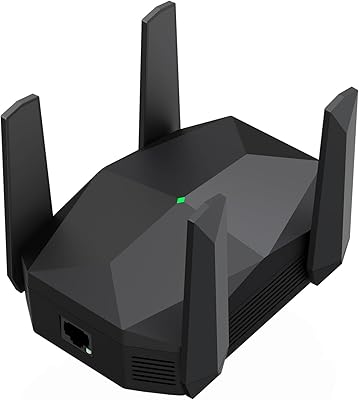
  • Antennas: Equipped with 4 external antennas positioned to improve signal directionality and penetration through walls and floors.
  • Ethernet Port: Includes one Gigabit Ethernet port supporting speeds up to 1 Gbps, suitable for wired device connections or access point deployments.
  • Security: Supports WPA3 encryption as the primary security protocol, with backward compatibility for WPA2 and WEP networks.
  • Device Capacity: Rated to support 99 or more simultaneously connected devices, making it appropriate for dense smart home environments.
  • Coverage Area: Manufacturer-rated coverage reaches up to 8,000 sq.ft., though real-world range will vary based on wall materials, layout, and interference.
  • Processor: Powered by a dual-core processor designed to manage concurrent band traffic and maintain stable throughput under multi-device load.
  • Operating Modes: Supports two modes: Repeater mode for extending an existing wireless network, and Access Point mode for converting a wired connection into a wireless signal.
  • Dimensions: The unit measures 5.12 x 5.04 x 4.41 inches, making it a compact tabletop or shelf-mounted device.
  • Weight: Weighs 10.5 oz, which is typical for a desktop-style range extender with external antennas.
  • Brand: Manufactured by Surncest, a brand that entered the consumer networking market in the mid-2020s.
  • Model Number: The official model designation is WIFI6 AX3000, as listed on the unit and product packaging.
  • Launch Date: First made available for purchase in March 2025, placing it among the more recently released entries in the repeater category.
  • BSR Ranking: Holds a Best Sellers Rank of #117 in the Amazon Repeaters category as of available data, reflecting strong early adoption.

Related Reviews
ingabis M-A25 AX3000 WiFi 6 Range Extender
77%
91%
Ease of Setup
78%
Signal Coverage
82%
WiFi Speed Performance
88%
Gigabit Ethernet Port
79%
Multi-Device Handling
More
TP-Link RE715X
TP-Link RE715X
75%
88%
Signal Coverage
91%
Setup Experience
63%
WiFi Speed in Extended Zones
79%
EasyMesh & Roaming
72%
Build Quality & Design
More
TP-Link RE700X AX3000 WiFi 6 Range Extender
85%
91%
Setup & Installation
88%
WiFi Performance
85%
Coverage Range
80%
Build Quality
90%
App & Software Experience
More
WAVLINK WN588HX3 WiFi 6 Outdoor Access Point
75%
83%
Outdoor Signal Range
91%
Build Quality & Weatherproofing
78%
Installation & Mounting
61%
Setup & Configuration Experience
86%
WiFi 6 Performance
More
Eboous AX3000 WiFi 6 Range Extender
77%
78%
Signal Range & Coverage
91%
Setup & Installation
83%
WiFi 6 Performance
74%
Mesh Integration
88%
Ethernet Port Utility
More
NETGEAR EAX17 WiFi 6 Range Extender
76%
88%
Ease of Setup
82%
Signal Coverage
71%
Real-World Speed Performance
78%
Device Handling Capacity
63%
Roaming & Handoff
More
HMTYQNB M-AX06 AX3000 WiFi 6 Extender
79%
91%
Setup & Ease of Use
77%
Signal Coverage Range
83%
WiFi Speed Performance
89%
Wired Ethernet Performance
84%
Value for Money
More
Linksys RE7310 WiFi 6 Range Extender
64%
83%
Ease of Setup
61%
Signal Coverage
67%
Speed Performance
38%
Device Handoff & Roaming
74%
Multi-Device Handling
More
NETGEAR EAX12 WiFi 6 Range Extender
76%
91%
Ease of Setup
73%
WiFi Coverage
67%
Real-World Speed
69%
Router Compatibility
74%
Connection Stability
More
NETGEAR EAX11 WiFi 6 Mesh Range Extender
73%
91%
Ease of Setup
73%
Signal Coverage
78%
Wireless Speed Performance
61%
Roaming & Handoff
76%
Device Capacity
More

FAQ

Yes, the AX3000 range extender is backward compatible with WiFi 5 (802.11ac), WiFi 4 (802.11n), and older routers. You will not get the full WiFi 6 speed benefits without a WiFi 6 router, but it will still extend your existing network signal effectively.

This is the most important thing to understand before buying any traditional repeater: because the unit uses the same radio to receive and rebroadcast the signal, available bandwidth to connected devices is typically reduced compared to what your router delivers directly. This is not a defect specific to this Surncest unit — it is how all single-band-backhaul repeaters work. For casual browsing, streaming, and smart home devices, most users will not notice. For very high-throughput tasks, a mesh system would be a better fit.

By default, most repeaters in this class broadcast under a slightly different network name — often your existing name with an underscore or suffix added. However, you can typically configure it through the web interface to use the same SSID as your main router, which simplifies device roaming.

Setup is done through a web browser interface rather than a dedicated mobile app. You connect to the extender's temporary network, open a browser, and follow the on-screen steps to link it to your existing WiFi. Most buyers report it takes under ten minutes.

Position it roughly halfway between your router and the dead zone you want to cover — close enough to still receive a strong signal from the router, but far enough to push coverage into the problem area. Avoid placing it behind large appliances, inside cabinets, or near thick concrete walls if possible.

Yes, and this is one of the more useful features on this WiFi 6 extender. Plugging a device like a PlayStation, Xbox, or smart TV directly into the Gigabit Ethernet port bypasses wireless interference entirely and typically delivers more stable, lower-latency performance than a wireless connection through the extender.

Access Point mode is for a different scenario than typical repeating. If you have an Ethernet cable running to a room but no wireless coverage there, you plug that cable into the extender and it broadcasts a wireless signal from that wired source. This avoids the speed reduction associated with repeater mode and gives you a cleaner, faster wireless node in that area.

Generally yes — this WiFi 6 extender connects to any standard 2.4 GHz or 5 GHz wireless network, including those broadcast by ISP-provided gateway devices. The setup process is the same regardless of your router brand or ISP.

WPA3 is a meaningful upgrade over the WPA2 encryption that most older extenders rely on. It makes it harder for outside parties to access your network even if they capture traffic. The backward compatibility with WPA2 means you do not have to worry about older devices being locked out.

Treat that figure as the theoretical maximum under near-perfect open-space conditions — no walls, no interference, and a strong source signal. In a typical two-story home with drywall, furniture, and multiple walls, realistic effective coverage will be noticeably lower. For most average-sized homes, though, the real-world range is still strong enough to eliminate common dead zones in back rooms, garages, or basements.