Overview

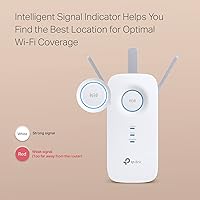
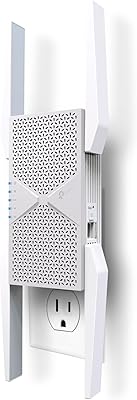
The TP-Link RE550 Wi-Fi Range Extender is a mid-range dual-band unit built for homeowners who are tired of dead zones in larger spaces. With over 18,000 ratings and a spot near the top of the bestseller charts, it has clearly earned real-world credibility. What stands out physically are the three external antennas — most extenders at this price ship with internal antennas or just one stubby external. It also supports EasyMesh, which lets it work as part of a unified network rather than creating a separate, awkward SSID. One thing worth setting straight from the start: this range extender improves coverage, not raw internet speed.
Features & Benefits

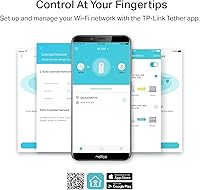
The RE550 runs two frequency bands at once — the faster 5 GHz side handles bandwidth-hungry devices like streaming boxes and laptops, while 2.4 GHz reaches farther through walls for phones and smart home gadgets. Those adjustable antennas are not just for show; pointing them toward problem areas genuinely makes a difference in signal reach across two floors or a long ranch-style layout. The Gigabit Ethernet port on the back is a practical bonus — plug in a wired smart TV or a desktop and you get stable speeds without relying on wireless. The Tether app guides setup in a few taps, no browser login required.

Best For

This Wi-Fi booster hits a sweet spot for homes between roughly 1,500 and 2,200 square feet — think two-story colonials, split-levels, or long ranch layouts where a single router just runs out of reach. It also suits anyone running a mix of wired and wireless devices, since the Ethernet port means a gaming console in a distant room does not have to compete for wireless bandwidth. Home office users who depend on stable coverage for video calls will find the RE550 dependable. TP-Link router owners get the most out of it, as Smart Roaming and EasyMesh function best within the same ecosystem.

User Feedback

Most buyers highlight two things right away: setup was easier than expected, and dead zones actually disappeared. The Tether app earns consistent praise for being approachable even for less tech-savvy users. On the critical side, half-duplex bandwidth is a genuine trade-off — because the extender rebroadcasts on the same radio channel, throughput in extended areas is roughly halved versus sitting next to your router. Several reviewers noted that placement matters more than the spec sheet implies; moving it one room closer to the router often resolved drop-outs entirely. Long-term reliability looks solid overall, though a handful of users mention applying a firmware update early on to iron out stability.

Pros

  • Coverage noticeably improves in dead zones up to roughly 2,100 sq. ft. for most home layouts.
  • Three adjustable external antennas let you fine-tune signal direction toward problem areas.
  • Gigabit Ethernet port allows reliable wired connections for TVs or desktops in distant rooms.
  • Tether app makes setup approachable even for buyers with limited networking experience.
  • Dual-band operation keeps slower smart home gadgets off the 5 GHz band used by laptops and streaming devices.
  • EasyMesh support creates a single unified network name when paired with a compatible router.
  • The RE550 compares favorably to cheaper single-band alternatives at a similar price point.
  • Compact enough to not block a second outlet in most standard wall configurations.
  • Firmware updates have improved long-term stability for buyers who apply them early.

Cons

  • Half-duplex repeater mode cuts throughput in extended zones — do not expect router-level speeds at range.
  • Optimal placement requires trial and error; the ideal spot is often closer to the router than buyers expect.
  • Only one Ethernet port limits wired connections to a single device per location.
  • Band steering is inconsistent — some devices cling to 2.4 GHz even when 5 GHz is available.
  • EasyMesh and Smart Roaming benefits are largely lost when paired with a non-TP-Link router.
  • Out-of-the-box firmware has caused intermittent drop-outs for some users before the first update.
  • Front-line customer support responses often feel scripted and slow to address specific technical issues.
  • Advanced network settings are too limited for users who want manual control over channels or transmit power.

Ratings

The TP-Link RE550 Wi-Fi Range Extender has accumulated tens of thousands of verified purchases worldwide, giving us a rich, diverse pool of real-world feedback to draw from. Our AI scoring system processed global user reviews, actively filtering out incentivized, bot-generated, and duplicate submissions, then weighted each signal by recency and purchase verification. The scores below reflect both where this Wi-Fi booster genuinely delivers and where buyers have run into frustration.
Coverage & Range
86%
The most consistent praise across buyer reviews centers on how reliably this booster pushes signal into previously dead spaces — upstairs bedrooms, detached garages, and far ends of open-plan layouts all come up repeatedly. Most users in homes around 1,800 square feet report full-bar coverage throughout.
A noticeable share of buyers in larger or multi-floor homes found the range fell short of the advertised ceiling, particularly through multiple concrete or brick walls. Placement experimentation was often required to get close to the promised coverage area.
Setup & Installation
91%
The Tether app experience is genuinely one of the smoothest in this category — buyers with limited technical confidence repeatedly noted they were up and running in under ten minutes. WPS pairing works reliably as a fallback for those who skip the app.
A small but vocal group of users ran into issues when their router used uncommon security protocols or older firmware, causing the initial pairing to fail silently. Browser-based setup, which some users prefer, is less intuitive compared to the app flow.
Throughput & Speed Performance
62%
38%
For everyday tasks in extended zones — streaming HD video, joining video calls, browsing — the RE550 provides a noticeably better experience than no extender at all. The 5 GHz band handles bandwidth-hungry devices reasonably well when placement is optimal.
Half-duplex operation is a real-world limitation that many buyers only discover after purchase: throughput in extended areas can drop significantly compared to speeds near the main router. Buyers expecting near-router speeds in distant rooms are routinely disappointed, and this is the single most common complaint.
Build Quality & Design
78%
22%
The three external, adjustable antennas feel more substantial than the plastic stubs found on cheaper extenders, and the overall housing is sturdy enough to stay firmly in a wall outlet without drooping. The compact footprint does not block a second outlet in most standard configurations.
The glossy white plastic finish attracts dust and shows scuffs fairly quickly in high-traffic areas. A few buyers noted the unit runs noticeably warm during extended use, which raised minor long-term durability concerns even if no failures were directly reported.
Gigabit Ethernet Port
88%
For buyers with a wired device stranded in a Wi-Fi dead zone — a smart TV in a back bedroom or a desktop in a basement office — the Gigabit Ethernet port is frequently cited as the deciding factor in choosing this model over cheaper alternatives. Wired connections through the extender proved fast and stable in most setups.
There is only one Ethernet port, which limits flexibility for users with multiple wired devices in the same room. A small number of users also reported the port negotiating at 100 Mbps rather than Gigabit under certain router configurations, requiring a manual fix.
Dual-Band Performance
81%
19%
Having both 2.4 GHz and 5 GHz running simultaneously means phones, tablets, and smart home devices can spread across bands without manual management. The 5 GHz side handled 4K streaming and video conferencing noticeably better than single-band alternatives buyers had used previously.
Band steering is not always reliable — some devices stubbornly attach to the 2.4 GHz band even when 5 GHz would serve them better. Users who expected fully automatic, seamless band management found themselves manually adjusting device connections more than anticipated.
EasyMesh & Roaming
73%
27%
For TP-Link router owners, EasyMesh integration works well in practice — a single network name, consistent handoffs as you move between rooms, and no need to manually switch SSIDs. Buyers who set this up as part of a TP-Link ecosystem reported the smoothest roaming experience.
EasyMesh benefits are largely lost when paired with a non-TP-Link router, which covers a significant portion of buyers. Smart Adaptive Roaming also received mixed feedback, with some devices taking several seconds to switch connections rather than doing so instantly.
Value for Money
83%
Relative to dual-band extenders at similar price points, the RE550 offers a hardware spec sheet — three antennas, Gigabit Ethernet, EasyMesh support — that buyers consistently describe as punching above its weight. Most users felt the price was fair for what they received.
A few reviewers noted that for slightly more money, a basic mesh node from the same brand delivers a meaningfully better experience without the half-duplex penalty. At current pricing, the value case is strong only for buyers who specifically need an extender rather than a full mesh upgrade.
App & Software Experience
79%
21%
The Tether app is polished by extender standards — it shows connected devices, signal strength, and lets you manage basic settings without logging into a web interface. Updates to the app over the product's lifespan have added stability improvements noted by longer-term owners.
Advanced users found the app limiting compared to a full router admin panel — options for channel selection, transmit power adjustment, and detailed diagnostics are either buried or absent. A handful of users also reported the app losing connection to the extender after firmware updates, requiring a re-pair.
Firmware & Long-Term Stability
71%
29%
Most buyers who updated firmware shortly after unboxing reported stable, uninterrupted operation over months of use. TP-Link has pushed at least one meaningful stability patch for this model, which resolved drop-out issues several early adopters experienced.
Out-of-the-box firmware versions have caused intermittent disconnections for a measurable share of users, making the initial firmware update feel like a required first step rather than optional maintenance. A smaller group reported recurring reboots even after updating, though these cases appear to be a minority.
Compatibility with Existing Routers
76%
24%
In standard home setups with mainstream ISP-supplied or retail routers, the RE550 pairs without issue and works as expected. WPA3 support and broad 802.11 standard coverage means compatibility failures are relatively rare across modern networking hardware.
Users with older routers, enterprise-grade gear, or ISP gateways using non-standard configurations occasionally hit pairing walls that required manual troubleshooting. Compatibility with some mesh systems from other brands was also inconsistent, limiting its usefulness as an add-on node outside the TP-Link ecosystem.
Device Capacity
82%
18%
Supporting up to 32 simultaneous connections makes this extender practical for households with a high device count — smart home gadgets, multiple phones, tablets, and a laptop or two can all stay connected without the extender showing signs of congestion under typical usage.
Under heavy simultaneous load — multiple 4K streams alongside active video calls — some users noticed increased latency and occasional buffering, suggesting the 32-device ceiling is more of a theoretical maximum than a comfortable operating number for bandwidth-intensive households.
Physical Footprint & Placement Flexibility
74%
26%
The unit is relatively compact for a three-antenna extender and does not awkwardly jut out from wall outlets the way some bulkier models do. The antennas fold down when moving it between outlets, which is a small but appreciated usability detail.
Because it is a plug-in unit, placement is dictated by where your outlets are rather than where signal optimization logic would suggest. In homes where the ideal midpoint between router and dead zone lacks a conveniently positioned outlet, getting the best coverage requires more compromises than a standalone unit would.
Customer Support Experience
67%
33%
Buyers who reached TP-Link support for setup assistance or warranty replacements generally described the experience as functional — responses came within a reasonable timeframe and replacement units were issued without excessive friction for confirmed hardware defects.
A recurring theme in critical reviews is that front-line support responses feel scripted, often cycling buyers through the same factory reset and re-pair steps regardless of the specific issue described. More complex configuration problems frequently required escalation before receiving genuinely useful guidance.

Suitable for:

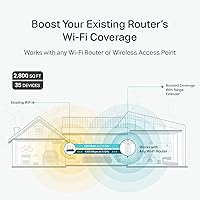
The TP-Link RE550 Wi-Fi Range Extender is a strong fit for homeowners dealing with dead zones in medium-to-large spaces — particularly two-story houses, long ranch-style layouts, or older homes where thick walls sap signal before it reaches back bedrooms or upstairs offices. If your main frustration is simply that Wi-Fi vanishes in certain parts of your home and you want an affordable, low-effort fix, this range extender does exactly what it promises. It works especially well for households running a mix of wired and wireless devices, since the Gigabit Ethernet port lets you hardwire a TV or desktop in a distant room without running cables through walls. Home office workers who need a reliable connection for video calls in a room the router cannot quite reach will find it dependable for day-to-day productivity. TP-Link router owners get the most out of it, as EasyMesh and Smart Roaming work best within a unified ecosystem, reducing the awkward dual-network problem that plagues cheaper extenders.
Not suitable for:

The TP-Link RE550 Wi-Fi Range Extender is not the right choice if your primary concern is maintaining near-router speeds in extended zones — as a repeater, it operates in half-duplex mode, which means throughput in covered areas is inherently lower than what your router delivers directly. Buyers in homes larger than 2,200 square feet, or with particularly challenging layouts involving multiple floors and dense construction materials, will likely find the coverage falls short and should consider a dedicated mesh system instead. If you already own a mesh network from another brand, this unit will not integrate cleanly and the EasyMesh advantages disappear entirely. Power users who want granular control over channel selection, transmit power, or detailed traffic monitoring will find the Tether app too limited for their needs. And if budget allows for even a modest step up, a true mesh node from TP-Link or a competitor will eliminate the half-duplex penalty and deliver a noticeably better experience throughout the home.
Specifications

  • Brand & Model: Manufactured by TP-Link under the model designation RE550.
  • Wi-Fi Standard: Operates on 802.11ac (Wi-Fi 5), with backward compatibility covering 802.11a, 802.11b, 802.11g, and 802.11n.
  • Frequency Bands: Dual-band design runs both 2.4 GHz and 5 GHz simultaneously for flexible device distribution.
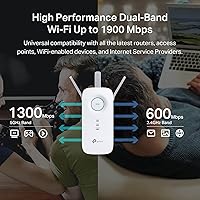
  • 5 GHz Speed: Delivers up to 1,300 Mbps on the 5 GHz band for bandwidth-intensive devices like laptops and streaming players.
  • 2.4 GHz Speed: Provides up to 600 Mbps on the 2.4 GHz band, better suited for smart home devices and longer-range connections through walls.
  • Combined Throughput: Total advertised combined wireless bandwidth reaches 1,900 Mbps across both bands under ideal conditions.
  • Coverage Area: Rated to extend usable Wi-Fi coverage across up to 2,100 sq. ft. depending on layout and construction materials.
  • Device Capacity: Supports up to 32 simultaneously connected wireless devices across both bands.
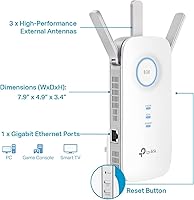
  • Antennas: Equipped with three external, fully adjustable antennas that can be repositioned to direct signal toward specific areas.
  • Ethernet Port: Includes one Gigabit Ethernet port (10/100/1000 Mbps) for wired device connections anywhere the extender is placed.
  • EasyMesh Support: Fully compatible with the EasyMesh standard, enabling integration into a unified whole-home mesh network when paired with a compatible router.
  • Setup Methods: Can be configured via the TP-Link Tether mobile app or using the one-touch WPS button for quick pairing.
  • Operating Mode: Functions primarily as a wireless range extender or repeater, with an additional access point mode available for wired backhaul setups.
  • Security Protocols: Supports WPA, WPA2, and WPA3 wireless security standards to protect the extended network.
  • Dimensions: Physical size measures 6.4 x 3.0 x 2.6 inches, allowing it to plug directly into a standard wall outlet.
  • Weight: Unit weighs 8.2 oz, keeping the wall outlet load minimal and avoiding drooping in most standard socket orientations.
  • Power Source: Powered directly via a built-in AC plug with no external power adapter or cable required.
  • Compatibility: Works with any standard Wi-Fi router or gateway; EasyMesh and Smart Roaming features perform best with TP-Link routers.
  • Certifications: TP-Link is a signatory of the U.S. CISA Secure-by-Design pledge, indicating a commitment to baseline security standards in firmware and hardware design.
  • First Available: This model was first listed for sale in February 2021 and has since accumulated a Best Sellers Rank of #4 in the Repeaters category.

Related Reviews
TP-Link TL-WA860RE Wi-Fi Range Extender
86%
95%
Ease of Setup
84%
Performance in Larger Homes
90%
Wi-Fi Range Extension
88%
Reliability
85%
Build Quality
More
TP-Link RE813XE Wi-Fi 6E Range Extender
86%
91%
Performance
89%
Wi-Fi Coverage
81%
Ease of Setup
95%
Compatibility with TP-Link Routers
88%
Streaming & Gaming Performance
More
TP-Link RE705X Wi-Fi 6 Range Extender
84%
89%
Performance
87%
Wi-Fi Coverage Range
93%
Ease of Setup
85%
Connectivity Reliability
70%
App Experience
More
TP-Link RE653BE Wi-Fi 7 Range Extender
80%
88%
Wireless Performance
83%
Wi-Fi 7 Feature Depth
79%
Coverage Range
93%
Ethernet Port Utility
86%
Setup & App Experience
More
TP-Link RE370K Smart Plug & Wi-Fi Range Extender
85%
92%
Setup and Installation
84%
Wi-Fi Performance and Coverage
88%
Voice Control Integration
80%
App Usability (Kasa)
75%
Reliability and Connection Stability
More
TP-Link BE6300 Wi-Fi 7 Range Extender RE403BE
85%
88%
Performance
91%
Range Coverage
85%
Wi-Fi Speed
89%
Ease of Setup
94%
Compatibility with TP-Link Routers
More
TP-Link RE223BE Wi-Fi 7 Range Extender
81%
88%
Coverage & Dead Zone Elimination
71%
Wi-Fi 7 Feature Implementation
91%
Setup & Ease of Use
67%
Real-World Throughput
78%
Build Quality & Design
More
D-Link AX1800 Mesh Wi-Fi 6 Range Extender
84%
90%
Wi-Fi Range and Coverage
85%
Setup and Installation
88%
Device Compatibility
80%
Wi-Fi Speed and Stability
93%
Security Features
More
TP-Link TL-WPA7817 Powerline Wi-Fi 6 Extender Kit
86%
88%
Wi-Fi Performance
94%
Setup & Installation
91%
Value for Money
85%
Powerline Range
89%
Dual-Band Speeds
More
TP-Link Deco BE25-Outdoor Wi-Fi 7 Mesh Extender
86%
91%
Wi-Fi Performance
95%
Outdoor Durability
80%
Setup & Installation
88%
Speed & Throughput
85%
Mounting & Placement Flexibility
More

FAQ

It moves the signal — it does not increase your internet speed. What the RE550 does is push your existing Wi-Fi into areas your router cannot reach on its own. If you were getting no signal or a weak one in a back bedroom, you will get a usable connection there. But the speeds in the extended zone will be lower than what you get standing next to your router, due to how repeater technology works.

Not at all. The easiest route is the TP-Link Tether app on your phone — it walks you through the process step by step, and most people are done in under ten minutes. If you prefer not to use the app, you can press the WPS button on this range extender and then the WPS button on your router, and they will pair automatically. Browser-based setup is also available but is the least intuitive of the three options.

By default, the RE550 creates its own extended network with a slightly different name (usually your existing name plus an underscore and EXT). However, if your router supports EasyMesh, you can configure both to share a single network name, and your devices will switch between them automatically as you move around your home.

The most common mistake is placing it too far from the router — right inside the dead zone where there is already a weak signal. A better starting point is roughly halfway between your router and the problem area, where it can still receive a strong signal from the router and then rebroadcast it further. If you have a two-story home, the top or bottom of a staircase often works well.

Yes, and this is one of the most useful things about the RE550. The Gigabit Ethernet port lets you hardwire a device in a distant room — a smart TV, a streaming box, a desktop PC, or a gaming console — without needing to run cables across the house. The wired connection through the extender is generally more stable than relying on wireless.

It works with any standard Wi-Fi router for basic range extension. However, the EasyMesh feature and Smart Adaptive Roaming work best when paired with a TP-Link EasyMesh-compatible router. With a non-TP-Link router, you lose those features but still get standard dual-band extension and the Ethernet port.

This is expected behavior with any repeater-type extender, including this one. The unit receives your router signal and retransmits it on the same wireless channel, which effectively cuts available bandwidth roughly in half in the extended zone. It is a trade-off: you gain coverage in areas that previously had none, but speeds will not match what you get close to your router. For most everyday tasks — streaming, video calls, browsing — the difference is manageable.

It is worth doing early on. Some out-of-the-box firmware versions have caused intermittent drop-outs for a portion of users, and TP-Link has issued updates that address this. You can check for and apply firmware updates through the Tether app or through the web-based admin interface by navigating to the extender's settings page. The process takes a few minutes and the unit reboots automatically.

It depends on the brand. If your existing mesh system supports the EasyMesh standard and you are already using a TP-Link mesh setup, the RE550 can integrate cleanly. With mesh systems from other manufacturers — such as Eero, Orbi, or Google Nest — it will not join the mesh natively and would operate as a separate standalone extender, which usually creates more confusion than it solves. In that case, adding another node from your existing mesh brand is a better option.

The official ceiling is 32 devices, but real-world comfort sits lower than that, especially for heavy users. Light-traffic devices like smart plugs, sensors, and e-readers barely register. Where you will notice congestion is if you have several people simultaneously streaming 4K video or joining video calls — at that point, the half-duplex nature of the extender compounds with device load and you may see buffering or latency spikes. For a typical household of three to four people with a moderate device count, it handles things well.