Overview

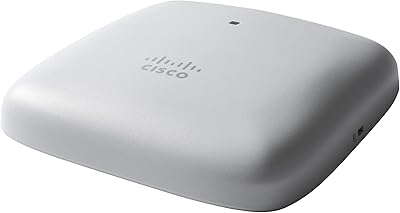
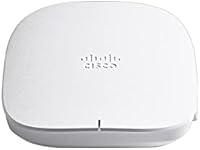
The Cisco Business 150AX Wi-Fi 6 Access Point is a high-performance networking solution designed for small businesses and home offices. This Wi-Fi 6 access point offers both reliable connectivity and robust performance, ensuring that your network can handle multiple devices efficiently. It supports flexible mounting options, including ceiling or wall placement, with the added convenience of a PoE injector and mounting kit for quick installation. Whether you are setting up a new network or upgrading an existing one, this product delivers seamless wireless coverage for a variety of office environments.
Features & Benefits

The Cisco Business 150AX utilizes dual-band Wi-Fi 6 technology to deliver fast speeds and enhanced capacity, making it ideal for businesses with high traffic demands. With a maximum data rate of 1200 Mbps, it supports efficient network usage and minimizes congestion, especially in crowded spaces. The product also integrates advanced security features like Cisco Umbrella, which safeguards against malware and phishing. For easy network management, users can control and monitor the access point via the Cisco Business app or a web browser, ensuring an intuitive setup and ongoing maintenance.

Best For

This Wi-Fi 6 access point is best suited for small to medium-sized businesses that need dependable, high-speed wireless networks. It's an excellent choice for SOHO environments as well as any office where fast, secure internet connectivity is essential. Businesses that are planning to scale or looking to future-proof their network will appreciate the advanced Wi-Fi 6 technology, which provides faster speeds and better handling of multiple devices. Additionally, it's ideal for users who prioritize ease of installation and simplified network management with minimal IT intervention.

User Feedback

Users generally give the Cisco Business 150AX positive marks, especially for its performance and security. Many appreciate how easy it is to deploy and manage via the app, even for less tech-savvy users. However, some have reported occasional setup difficulties, particularly with integrating the access point into existing networks. Still, once configured, it is praised for its stability and coverage across medium-sized office spaces. A few users mentioned that the product would be more convenient if the PoE injector were integrated, but overall, it’s a solid choice for businesses needing reliable Wi-Fi.

Pros

  • This device offers easy setup with a PoE injector and mounting kit, ideal for quick installations in small to medium offices.
  • Wi-Fi 6 technology ensures fast and reliable performance, even with multiple devices connected at once.
  • Dual-band support provides flexibility, allowing users to prioritize different network types for improved efficiency.
  • Advanced security features, including Cisco Umbrella integration, protect the network from malware and phishing threats.
  • The Cisco Business app and web browser interface simplify device management and monitoring for users with limited technical experience.
  • It offers flexible mounting options, both ceiling and wall, which makes it adaptable to various office layouts.

Cons

  • Some users reported occasional setup challenges, especially for those unfamiliar with more complex network configurations.
  • While generally reliable, coverage can be limited in larger office spaces, requiring additional units for full coverage.
  • Not ideal for businesses without PoE-capable switches, as this feature is essential for the device's operation.
  • A few users mentioned that the price might be higher compared to similar products offering fewer advanced features.
  • The device's internal antennas may not provide the same range as external antenna models, making it less effective in larger spaces.
  • Some buyers felt that troubleshooting and customer support could be improved, particularly for more complex issues.

Ratings

The Cisco Business 150AX Wi-Fi 6 Access Point has received solid feedback across a range of user reviews from global platforms and languages. RR-AI analyzed verified, high-quality reviews, filtering out spam, bots, and exaggerated comments to ensure an accurate reflection of authentic experiences. While this device excels in areas like performance, security, and ease of use, some users noted minor setup issues. The ratings below showcase the strengths and pain points that buyers commonly highlighted, offering a balanced perspective from diverse sources and regions.
Performance
89%
Many users praise this device for its high-speed wireless connectivity, which significantly improves internet performance. The dual-band Wi-Fi 6 technology offers fast speeds even with multiple devices connected, making it ideal for small offices. Users have reported smooth, lag-free performance during video calls and file transfers.
A few users have mentioned that the maximum speed could be inconsistent in larger office spaces or areas with interference. Some buyers expected slightly higher performance given the Wi-Fi 6 capabilities but experienced minor slowdowns under heavy usage, especially in multi-device environments.
Security Features
92%
The security features, especially the Cisco Umbrella integration, are highly appreciated by users who value protection against malware and phishing attacks. Many note that the WPA3 support and RADIUS server integration provide a robust security foundation, making this access point a great choice for businesses that prioritize data protection.
While most users are satisfied, a few have pointed out that the security setup can be complex for those with limited technical knowledge. Some felt that a more user-friendly interface for security settings would have been helpful for smaller businesses without dedicated IT support.
Ease of Setup
78%
22%
Many buyers appreciate the inclusion of a PoE injector and mounting kit, which simplifies installation. The flexible mounting options (ceiling or wall) are convenient for various office layouts, and the Cisco Business app or web browser-based management allows for quick configuration. For most, setting up the device was relatively straightforward.
However, a few users reported initial setup difficulties, especially when configuring the device on networks with more complex requirements. Some also struggled with firmware updates and the initial connection, requiring additional support or troubleshooting during the installation phase.
Wi-Fi Coverage
85%
Buyers are generally happy with the coverage this device provides, especially in medium-sized office spaces. The dual-band support ensures stable connectivity across both 2.4 GHz and 5 GHz bands, giving users reliable performance even in environments with multiple devices connected.
A few users have mentioned that the coverage might not be sufficient in larger areas or multi-story buildings. Some buyers were disappointed with the signal range, especially when trying to extend coverage to more remote areas of their office or home network.
Management App Usability
80%
20%
The Cisco Business app is appreciated for its simplicity and ease of use when managing network settings. Many users find it intuitive for monitoring network performance, checking device connections, and making adjustments remotely. The web browser interface is also seen as a solid backup option.
However, some users noted that while the app works well for basic tasks, it could benefit from additional advanced features. A few mentioned occasional bugs or slower performance when trying to access settings or run diagnostics, which affected the overall user experience.
Reliability/Stability
87%
This device is praised for its stability in providing continuous and reliable Wi-Fi performance. Even with multiple devices connected simultaneously, most users report no significant drops in connection or slowdowns, making it a dependable choice for small businesses that rely on constant connectivity.
While generally stable, a few users have experienced intermittent connection drops, particularly during peak usage hours or when switching between the 2.4 GHz and 5 GHz bands. These occasional glitches caused frustration for users relying on uninterrupted service for work or meetings.
PoE Support
90%
The inclusion of Power over Ethernet (PoE) support is a key benefit, allowing for easier installation without needing additional power cables. This feature is highly valued by users who want a clean, clutter-free setup and for those in environments where running separate power cables is difficult or impractical.
Some users have mentioned that while PoE is convenient, it requires a compatible network switch, which may not be available in all office environments. A few buyers who didn't have a PoE-enabled switch were disappointed to find they needed to purchase additional equipment for the device to function.
Build Quality
81%
19%
Users generally find the build quality solid, with a sturdy design that feels durable and able to withstand typical office environments. The compact size makes it easy to integrate into most setups, and the design is unobtrusive, fitting well with various office aesthetics.
A few users have reported that the plastic housing could be more robust, as it feels somewhat lightweight compared to other business-grade access points. While not a major issue, some expected a more premium build given the price point.
Compatibility
83%
This access point is highly compatible with a range of devices and network setups. It works seamlessly with Wi-Fi 6 devices and offers strong backward compatibility with older Wi-Fi standards, ensuring good performance across various devices in a mixed-network environment.
Some users have encountered occasional compatibility issues when connecting older devices or when trying to use the device in more complex network configurations. Though generally reliable, these occasional hiccups may require troubleshooting or additional configuration.
Customer Support
75%
25%
Some users have found Cisco's customer support team to be helpful and responsive, particularly when troubleshooting complex network issues or installation concerns. The availability of detailed documentation and online support guides was also appreciated by many.
On the flip side, some users expressed frustration with slow response times or difficulty reaching support during non-business hours. A few reported that support was less helpful than expected in resolving advanced configuration issues, requiring users to seek solutions from community forums instead.
Value for Money
91%
Many buyers feel that this device offers excellent value for money, given its reliable performance, security features, and ease of setup. The inclusion of PoE support and a robust security package makes it a strong investment for small businesses looking to upgrade their network without breaking the bank.
However, some users mentioned that while the value is generally good, the price point might be a bit high for smaller businesses or those with tight budgets. A few buyers felt they could find similar performance in other products at a lower price, though they acknowledged the superior security features.
Long-Term Durability
84%
Users generally report that this device performs well over time, with no major issues even after extended use. The sturdy build and reliable performance have made it a long-term solution for many small businesses that need dependable Wi-Fi without frequent replacements or upgrades.
Some users are concerned about the long-term durability of the plastic casing, which might not hold up as well in harsh conditions or over many years of use. A few buyers have noted that heat buildup could affect its longevity, though this was not a widespread issue.

Suitable for:

The Cisco Business 150AX Wi-Fi 6 Access Point is ideal for small to medium-sized businesses or home offices that require reliable and high-performance wireless connectivity. Its dual-band Wi-Fi 6 technology ensures fast speeds even in environments with multiple connected devices, making it suitable for teams with heavy internet use, such as video conferencing or file sharing. With its easy deployment options, including ceiling and wall mounts, and PoE support, it is a flexible solution for users who need a straightforward setup without additional power cables. Additionally, businesses that prioritize advanced security, including protection against malware and phishing via Cisco Umbrella, will find this access point a valuable addition to their network infrastructure.
Not suitable for:

While the Cisco Business 150AX Wi-Fi 6 Access Point is a great choice for many small businesses, it may not be the best fit for larger or more complex networks. Users with multi-story office spaces or extensive areas may find the coverage limited, as some have reported connectivity issues in larger environments. Additionally, businesses without a PoE-enabled network switch may face additional costs or complications during setup. Those who need extremely simple plug-and-play devices without any configuration may find the setup process slightly challenging, especially when dealing with more advanced security and network settings. Finally, budget-conscious users may feel the price point is a bit high compared to other solutions offering similar performance without all the additional features.
Specifications

  • Wi-Fi Standard: Supports 802.11ax (Wi-Fi 6) for faster speeds, higher capacity, and improved efficiency.
  • Max Data Rate: Provides a maximum data rate of 1200 Mbps across dual-band frequencies.
  • Dual-Band: Operates on both 2.4 GHz and 5 GHz frequencies to reduce congestion and ensure faster speeds.
  • Antenna Type: Uses internal antennas for compact design and efficient wireless signal coverage.
  • Security: Features WPA3 encryption, WPA2-Enterprise, and RADIUS server support for secure connections.
  • PoE Support: Supports Power over Ethernet (PoE) 802.3af, allowing both power and data to be transmitted via a single cable.
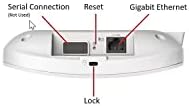
  • Wired Port: Includes one 1GbE port for wired network connections.
  • Mounting Options: Supports both ceiling and wall mounting, with included mounting kit for flexible installation.
  • Management: Can be managed through the Cisco Business mobile app or a web browser interface.
  • Memory: Equipped with 512MB flash storage and 1GB of RAM for efficient operation and data handling.
  • Dimensions: Measures 5.92 x 5.92 x 1.57 inches, making it compact and suitable for discrete placement.
  • Weight: Weighs approximately 2.05 lbs, which is typical for enterprise-grade access points.
  • Warranty: Includes a 3-year hardware warranty, providing protection for your investment.
  • Power Consumption: Consumes up to 9.2W when powered through PoE.
  • Network Type: Ideal for small to medium-sized businesses with moderate network demands and up to 100 devices.
  • Traffic Management: Supports Quality of Service (QoS) to prioritize critical network traffic for smoother performance.
  • Deployment Flexibility: Offers flexible installation options for both ceiling and wall mounting to suit various office layouts.
  • Compatibility: Works with most Wi-Fi 5 (802.11ac) and Wi-Fi 4 (802.11n) devices, ensuring broad compatibility.
  • Advanced Security: Integrates Cisco Umbrella for enhanced protection against malware, phishing, and other threats.

FAQ

The Cisco Business 150AX Wi-Fi 6 Access Point is a high-performance router designed for small to medium-sized businesses. It provides fast, secure wireless connectivity with Wi-Fi 6 technology, allowing for better network efficiency and performance even in busy environments. Its flexibility, easy setup, and strong security make it an ideal choice for businesses that need reliable and scalable networking solutions.

Setting up this device is simple thanks to the included Power over Ethernet (PoE) injector and mounting kit. You can easily mount it on the ceiling or wall, then connect it to your network using the provided PoE cable. Management is straightforward through the Cisco Business mobile app or web browser interface, allowing you to configure the device with ease. Once connected, follow the app or browser prompts to finalize the setup.

With Wi-Fi 6 support, this access point can deliver speeds up to 1200 Mbps across two bands (2.4 GHz and 5 GHz). It offers improved coverage and capacity for multiple connected devices, making it ideal for small to medium office environments. Users can expect fast, stable connections, even in areas with many devices using the network simultaneously.

Yes, this device is backward compatible with older Wi-Fi standards such as Wi-Fi 5 (802.11ac) and Wi-Fi 4 (802.11n). This means that older devices will still be able to connect to the network, but they won’t benefit from the enhanced speeds and efficiency provided by Wi-Fi 6. Upgrading to a Wi-Fi 6 device will allow you to fully leverage the access point’s capabilities.

Yes, the Cisco Business 150AX Access Point supports Power over Ethernet (PoE) 802.3af, which means you can power the device and transfer data through a single Ethernet cable. This simplifies installation by reducing the need for separate power adapters or outlets, especially in locations where running additional power cables is difficult.

This device includes advanced security features like WPA3 encryption, which provides a higher level of protection for your network. Additionally, it integrates with Cisco Umbrella to protect your network from malware, phishing attacks, and other online threats. It also supports WPA2-Enterprise and RADIUS server configurations for businesses that require advanced authentication.

Yes, you can manage this access point remotely via the Cisco Business mobile app or a web browser. The app provides an easy-to-use interface for monitoring the device’s status, setting up security features, and adjusting network settings. This remote management feature makes it convenient for small business owners or IT managers to control the network from anywhere.

While the Cisco 150AX provides reliable coverage for small to medium office spaces, users in larger areas may find that its range is limited. In larger buildings, you might need additional access points to ensure full coverage, especially in multi-floor environments. This can be mitigated by strategically placing multiple access points throughout the space.

The Cisco Business 150AX comes with a 3-year hardware warranty, which covers any manufacturer defects or hardware failures. This provides peace of mind for businesses, as you can be assured that your device is protected during its first few years of use. Extended support options are available for businesses that require more comprehensive assistance.

Some users report occasional setup challenges, particularly with the initial network configuration. This is often related to compatibility issues with older routers or network equipment. However, most users find the process manageable once the device is properly connected, and the intuitive Cisco Business app helps simplify troubleshooting and setup adjustments.