Overview

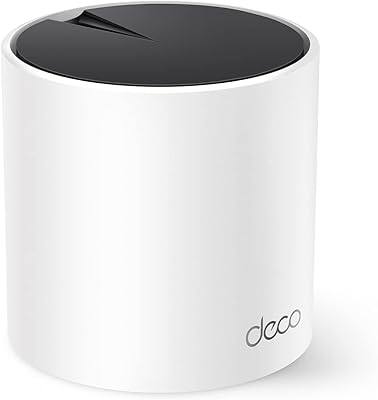
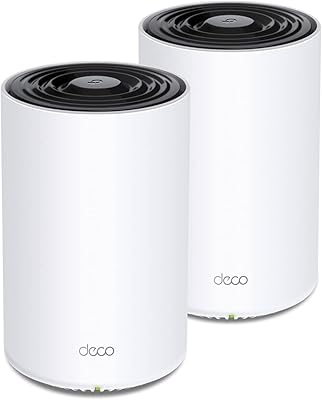
The TP-Link Deco XE75 Mesh WiFi System 1-Pack sits at an interesting crossroads — capable enough to replace a traditional router outright, yet designed to grow into a full mesh network when you're ready to add more nodes. WiFi 6E is the headline here, and the short version is this: a third radio band at 6 GHz is now in play, a frequency so new that only the latest devices can touch it. That exclusivity is actually useful, not just marketing. One unit covers up to 2,900 square feet, which works for most mid-size homes — but if yours runs larger, plan on buying a second node. The AI-driven mesh quietly handles device handoffs in the background.
Features & Benefits

The Deco XE75 runs three simultaneous radio bands, and understanding how they divide labor makes it easier to appreciate what you're actually getting. The 2.4 GHz band carries older gadgets and far-flung devices — smart bulbs, thermostats, the tablet at the end of the hall. The 5 GHz band handles mid-demand tasks like streaming and general browsing. Then there's the 6 GHz backhaul, which by default acts as a private highway between mesh nodes, keeping that inter-node traffic completely off the bands your devices use. If you own a newer 6E-compatible phone or laptop, you can redirect it toward client traffic instead. The Deco app handles setup in minutes and works with Alexa, while TP-Link's CISA security pledge adds real, verifiable commitment to network-level protections.

Best For

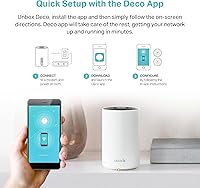
This mesh system is a natural fit for homes roughly between 1,500 and 2,900 square feet — think a two-story house, a townhome, or a ranch-style layout with a few stubborn dead zones. It also makes sense if you routinely have 20 or more devices competing for bandwidth; the tri-band design distributes that load far better than a single-band or dual-band router ever could. If you're not a networking expert, that's fine — the XE75 node doesn't require you to be. The Deco app walks you through setup in well under ten minutes. And when your needs eventually grow, you can add another Deco node to the same network — no full reinstall necessary.

User Feedback

With nearly 8,000 ratings and a 4.3-star average, the Deco XE75 has earned a track record worth taking seriously. The most consistent praise centers on how painless the initial setup is and the noticeably better range compared to whatever router buyers were replacing. That said, power users will notice the gaps — the Deco app prioritizes simplicity over control, and those wanting deep VLAN configuration or fine-grained QoS options often feel underserved. A recurring thread involves cloud dependency: a meaningful subset of reviewers flag discomfort with the system's reliance on TP-Link's servers. And for larger homes, one node clearly isn't enough — most buyers above 3,000 square feet suggest going straight to the two or three-pack.

Pros

  • Setup takes under ten minutes using the Deco app, even without any networking background.
  • The dedicated 6 GHz backhaul keeps node-to-node traffic off the bands your devices actually use.
  • Handles 20-plus simultaneous devices without the slowdowns common on older dual-band routers.
  • AI-driven client steering moves devices to the best available band without manual intervention.
  • Works with Alexa, so basic network controls are available hands-free.
  • TP-Link's CISA Secure-by-Design pledge provides a credible, verifiable security commitment.
  • Expandable — adding more Deco nodes later is straightforward and doesn't require a full reset.
  • Strong real-world range for mid-size homes, consistently praised across nearly 8,000 buyer ratings.
  • Compatible with a wide range of devices spanning older WiFi standards all the way up to 6E.

Cons

  • The Deco app prioritizes simplicity over control, leaving power users with very few advanced configuration options.
  • Full remote management depends on TP-Link's cloud servers, which creates a single point of failure.
  • One unit is not enough for homes above 3,000 square feet, making the 1-pack a costly starting point for larger spaces.
  • No built-in multi-gig WAN port, which limits the ceiling for buyers with very high-speed ISP plans.
  • The 6 GHz band delivers no real-world benefit unless your devices actually support WiFi 6E — most older hardware does not.
  • Some users report that firmware updates have occasionally introduced connectivity instability.
  • Parental controls and guest network features are functional but basic compared to dedicated security-focused mesh systems.
  • Local network management without internet access is restricted, which frustrates users in off-grid or server-heavy setups.

Ratings

The scores below reflect an AI-driven analysis of verified global buyer reviews for the TP-Link Deco XE75 Mesh WiFi System 1-Pack, with spam, bot-generated, and incentivized feedback actively filtered out before scoring. Drawing on thousands of real-world accounts — from households with dense device loads to first-time mesh adopters — these ratings are designed to surface both what this system genuinely does well and where it falls short. Nothing is glossed over.

Setup Experience
91%
Getting online with the Deco app is one of the most consistently praised aspects across all buyer feedback. Most users report being fully connected in under ten minutes, with the guided flow handling everything from modem detection to band configuration without requiring any technical knowledge.
A small but vocal group of users ran into hiccups when trying to configure the system behind an ISP-provided gateway that required bridge mode. In those cases, the app provided limited guidance, leaving some buyers to troubleshoot on their own.
WiFi Coverage
78%
22%
For homes in the 1,500 to 2,500 square foot range with standard drywall construction, a single node delivers impressively consistent signal across floors and around corners. Users frequently mention eliminating dead zones that plagued them with their previous single router.
Buyers in homes above 2,800 square feet, or those with concrete walls, metal doors, or multi-story layouts, report noticeably weaker signal at the edges of coverage. The 1-pack is genuinely not enough for larger spaces, and some felt misled by the stated maximum coverage figure.
Real-World Speed
83%
Households running simultaneous 4K streams, video calls, and online gaming sessions report a meaningful improvement over their previous dual-band routers. The dedicated backhaul keeps inter-node traffic off the client bands, which makes a noticeable difference in multi-node setups.
Raw throughput figures are theoretical, and real-world speeds depend heavily on the client hardware. Users with older laptops or budget phones report modest improvements at best, since those devices cannot take advantage of the faster 5 GHz or 6 GHz bands.
6 GHz Band Utility
62%
38%
For buyers who already own a WiFi 6E-capable phone or laptop, the 6 GHz band offers noticeably lower latency and less congestion than the 5 GHz band, particularly in apartment buildings or dense neighborhoods with heavy neighboring WiFi traffic.
The honest reality is that most buyers in 2024 do not yet have enough 6E-compatible devices in their homes to feel an immediate benefit. The 6 GHz band is genuinely more of a forward-looking investment than a day-one upgrade for the average household.
Multi-Device Performance
86%
Families and home offices with 25 or more active devices consistently report far fewer slowdowns and dropouts compared to their previous routers. The tri-band design distributes device load across three independent radio channels rather than forcing everything onto one or two.
A handful of users with extremely high device counts — think smart home-heavy setups with 60-plus IoT sensors, cameras, and hubs — noted occasional instability that required a router restart. It is uncommon but worth flagging for particularly device-dense environments.
App & Management
74%
26%
The Deco app covers the essentials well: device management, guest network toggling, basic parental controls, and remote access from outside the home. For non-technical users, it strikes the right balance between functionality and approachability.
Power users will hit the ceiling quickly. There is no access to VLAN settings, advanced QoS controls, or detailed traffic logging. Several reviewers who migrated from competing platforms specifically called out the app as a step down in terms of configurability.
Build Quality & Design
81%
19%
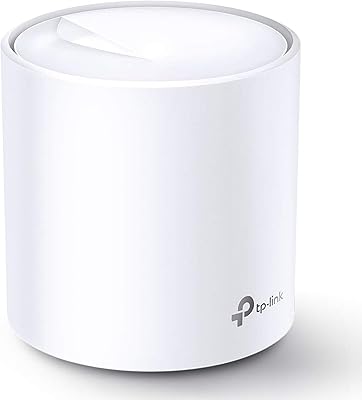
The cylindrical form factor is compact and unobtrusive enough to sit on a bookshelf or entertainment unit without looking like networking equipment. The build feels solid for the price tier, and the finish resists visible dust accumulation better than flat-top alternatives.
There are no status indicator customization options, and the single LED can be distracting in a bedroom or dark living space at night. Some users also noted that the device runs noticeably warm after extended use, though no reports of thermal-related failures were identified.
Security Features
79%
21%
TP-Link's CISA Secure-by-Design pledge adds a layer of credibility that most competing mesh systems in this price range cannot match. Automatic firmware updates are enabled by default, so most households stay protected without remembering to check manually.
The system does rely on TP-Link's cloud infrastructure for full feature access, which raises legitimate questions about long-term data handling. Users who prefer fully local network management will find the cloud dependency uncomfortable, and there is no straightforward way to opt out entirely.
Parental Controls
66%
34%
For households with younger children, the built-in controls cover the basics: content category filtering and time-based access schedules work reliably and are easy to configure through the app without any technical setup.
The filtering categories are fairly broad, and parents looking for per-app restrictions, detailed browsing logs, or age-specific profile customization will find the toolset limited. Families with older teenagers who know workarounds may find these controls easy to circumvent.
Value for Money
82%
18%
At its price point, the Deco XE75 delivers genuine WiFi 6E hardware in a polished, user-friendly package that would have cost significantly more just two years ago. For buyers replacing a several-year-old router, the performance-per-dollar ratio is strong.
Buyers who need more than one node to cover their home will find the total cost climbs quickly, shifting the value equation considerably. At multi-pack prices, it competes directly with alternatives that offer more advanced configuration options for similar money.
Mesh Expandability
84%
Adding a second or third Deco node to an existing network is straightforward through the app, and the AI mesh layer handles the integration automatically. Users who started with one node and expanded later report the process being nearly as easy as the initial setup.
Mixing different Deco models across a network can introduce inconsistencies, particularly around backhaul capabilities. Buyers who purchased an older Deco model years ago and want to add an XE75 node should verify compatibility before purchasing.
Cloud Dependency
58%
42%
Cloud connectivity enables genuinely useful features like remote management from outside the home, automatic firmware updates, and the ability to check network status while traveling. For casual users, this trade-off feels invisible in day-to-day use.
When TP-Link's servers experience downtime — which multiple reviewers documented — remote management features become unavailable entirely. Privacy-conscious users and those running local media servers are the most vocal critics of this architectural choice, and it remains a genuine limitation.
Router-Only Mode
77%
23%
Using a single XE75 node as a standalone router without any mesh aspirations works well and is a legitimate use case. For apartment dwellers or small home users who simply want WiFi 6E without the complexity of a mesh network, it handles that role capably.
The device does not offer the depth of standalone router features that dedicated router-only products provide at comparable prices. If mesh expansion is never on the table and advanced routing features matter, a purpose-built router may serve better.
Reliability & Stability
76%
24%
The majority of long-term owners report months of continuous uptime without needing to restart the router manually. For the core use case of a stable home network, the Deco XE75 holds up well under typical household traffic patterns over time.
A recurring thread in critical reviews involves firmware updates introducing temporary instability — dropped connections or degraded speeds that resolved after a few days or a manual reboot. It is not universal, but it appears often enough across verified reviews to note.

Suitable for:

The TP-Link Deco XE75 Mesh WiFi System 1-Pack is a strong fit for households in the 1,500 to 2,900 square foot range that have outgrown a single router and want a real upgrade without a steep learning curve. If your home regularly juggles 20 or more connected devices — smart TVs, phones, laptops, gaming consoles, and a handful of smart home gadgets all running at once — the tri-band design handles that load far more gracefully than most dual-band routers can. It's also a smart starting point for anyone planning to grow their network over time, since you can add more Deco nodes later without scrapping what you already have. Early adopters who recently bought a WiFi 6E-capable laptop or phone will get the most immediate performance benefit from the 6 GHz band. And if the idea of logging into a router admin panel sounds like a chore, the app-driven setup and management makes day-to-day use genuinely approachable.

Not suitable for:

The TP-Link Deco XE75 Mesh WiFi System 1-Pack is not the right call for larger homes above 3,000 square feet — one node simply won't provide consistent coverage throughout, and you'll likely end up buying additional units anyway, so budgeting for a multi-pack from the start is the smarter move. Network enthusiasts who rely on granular controls — think custom VLAN segmentation, advanced QoS tuning, or detailed traffic monitoring — will find the Deco app frustratingly limited compared to competing platforms that cater to power users. If you're uncomfortable with a system that depends on a manufacturer's cloud infrastructure for full functionality, that's also worth weighing carefully; some buyers have raised valid concerns about what happens to remote management features if TP-Link's servers experience downtime. Apartment dwellers in a compact space are likely overpaying for coverage they don't need. And if none of your current devices support WiFi 6E, the 6 GHz band offers no immediate practical benefit — you'd be paying partly for future-proofing.
Specifications

  • WiFi Standard: This mesh system uses 802.11ax, commonly known as WiFi 6E, which is the first standard to unlock the 6 GHz frequency band for consumer devices.
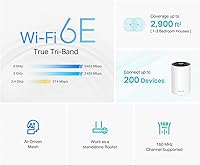
  • Frequency Bands: Three simultaneous radio bands operate concurrently: 2.4 GHz, 5 GHz, and 6 GHz, each serving different device types and use cases.
  • 6 GHz Speed: The 6 GHz band delivers up to 2,402 Mbps using HE160 channel width, reserved by default as a dedicated backhaul between mesh nodes.
  • 5 GHz Speed: The 5 GHz band also reaches up to 2,402 Mbps (HE160) and handles the bulk of mid-to-high-demand client device traffic.
  • 2.4 GHz Speed: The 2.4 GHz band provides up to 574 Mbps and offers the widest range, making it best suited for IoT devices and distant low-bandwidth clients.
  • Max Throughput: Combined theoretical throughput across all three bands totals 5,400 Mbps, though real-world speeds will vary based on client hardware and network conditions.
  • Coverage Area: A single XE75 node is rated to cover up to 2,900 square feet, making it suitable as a standalone router for most mid-size homes.
  • Device Capacity: The system is designed to support up to 200 connected devices simultaneously across all bands.
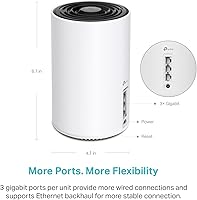
  • Dimensions: Each node measures 4.13 x 4.13 x 6.65 inches, giving it a compact cylindrical footprint that fits unobtrusively on a shelf or desk.
  • Weight: A single unit weighs 1.17 pounds, making it lightweight enough to reposition easily during initial placement and testing.
  • Connectivity: The XE75 node connects to your modem and other wired devices via Ethernet, with Wi-Fi available for all wireless clients.
  • App Control: Network setup, management, parental controls, and guest network configuration are all handled through the Deco app, available for iOS and Android.
  • Voice Assistant: The system is compatible with Amazon Alexa, allowing basic network controls such as toggling guest Wi-Fi on or off via voice commands.
  • Security: TP-Link is a signatory of the CISA Secure-by-Design pledge, committing to building and maintaining this device with security as a core design requirement.
  • Special Feature: WPS (Wi-Fi Protected Setup) support is included, enabling quick and secure connections for compatible client devices without manual password entry.
  • Pack Size: This listing includes one XE75 node; additional Deco nodes can be added later to extend coverage throughout larger or multi-floor homes.
  • In the Box: Each package includes one Deco XE75 node, a power adapter, one RJ45 Ethernet cable, and a quick installation guide.
  • AI Mesh: An onboard AI layer continuously monitors client behavior, signal quality, and environment conditions to automatically steer devices to the most appropriate band.

Related Reviews

TP-Link Deco M5 Mesh WiFi Router 1-Pack
86%
88%
Performance
93%
Setup Ease
85%
Coverage Range
91%
Security Features
77%
App Experience
More
TP-Link Deco S4 Mesh WiFi System (2-Pack)
87%
91%
Wi-Fi Coverage
88%
Performance Stability
94%
Ease of Setup
90%
Parental Controls
85%
Device Support
More
TP-Link Deco BE95 Wi-Fi 7 Mesh System 2-Pack
78%
88%
Wireless Performance
83%
Coverage & Range
93%
Wired Connectivity
86%
Setup & Installation
79%
App & Management Experience
More
TP-Link Deco X95 WiFi 6 Mesh System
86%
92%
Performance
95%
Coverage
82%
Setup/Installation
80%
App Experience
88%
Multi-device Support
More
TP-Link Deco X55 1-Pack Mesh Wi-Fi System
81%
91%
Ease of Setup
84%
WiFi Speed & Throughput
78%
Coverage Reliability
72%
App & Management Experience
88%
Value for Money
More
TP-Link Deco BE75 WiFi 7 Mesh System
85%
94%
Performance
88%
Ease of Setup
91%
Security Features
92%
Coverage & Range
79%
Value for Money
More
TP-Link Deco BE63 WiFi 7 Mesh System
89%
94%
Overall Performance
93%
WiFi Coverage
91%
Device Capacity Handling
88%
Setup & Installation
90%
App Experience
More
TP-Link Deco BE85 WiFi 7 Mesh System
87%
89%
Wi-Fi Performance
91%
Setup Process
85%
Coverage and Range
93%
Security Features
78%
Device Compatibility
More
TP-Link Deco X20 1-Pack Mesh WiFi System
78%
93%
Ease of Setup
71%
Coverage Reliability
84%
Multi-Device Performance
88%
App Experience
86%
Parental Controls
More
TP-Link Deco X68 2-Pack Mesh WiFi System
76%
91%
Setup Experience
78%
WiFi Coverage
83%
Network Performance
74%
App & Management
58%
HomeShield Value
More

FAQ

Not at all. The Deco app walks you through every step with clear visual instructions, and most users report getting fully online in under ten minutes. You just plug it into your modem, open the app, and follow along.

It depends on your layout. For open-plan homes or single-story spaces under 2,500 square feet, one node typically does the job well. If your home is larger, has thick concrete or brick walls, or spans multiple floors, you'll likely want a second node. It's worth starting with one and testing coverage before committing to more.

WiFi 6E is essentially WiFi 6 with access to a third radio band at 6 GHz — a spectrum that older devices simply cannot see or use. As of 2024, support is mostly found in flagship smartphones released after 2021, newer MacBooks, and high-end gaming laptops. If you're unsure about your device, check the specs page for the phrase WiFi 6E or 802.11ax with 6 GHz support.

Yes, the TP-Link Deco XE75 Mesh WiFi System 1-Pack works perfectly well as a standalone router connected directly to your modem. The mesh capability is there if you ever want to expand, but you are not required to buy more nodes.

In most cases, yes. The XE75 connects via Ethernet to your modem or gateway and takes over routing duties from there. If your ISP provides a combo modem-router unit, you may need to enable bridge mode on that device first — your ISP's support team can usually walk you through that in a few minutes.

Yes. Those devices typically use the 2.4 GHz band, which this mesh system handles well. The tri-band setup actually helps here because your smart home gadgets stay on 2.4 GHz while your phones and laptops use the faster 5 GHz or 6 GHz bands, so nothing is competing for the same airspace.

Yes, the Deco app supports remote management as long as your router remains online and connected to TP-Link's cloud servers. You can check device connections, toggle guest Wi-Fi, and run basic diagnostics from anywhere. Keep in mind that this cloud dependency is something a subset of users have flagged as a concern — if TP-Link's servers go down, remote access is temporarily unavailable.

It monitors signal strength, band conditions, and each device's behavior patterns over time, then quietly moves devices to whichever band and node gives the best connection at that moment. You will not see it happening — it just means your phone or laptop stays on a strong signal as you move around, without you manually switching networks.

Yes on both counts. The Deco app lets you create a guest network with its own password, and basic parental controls are built in, including content filtering and scheduled access limits. These features are functional for everyday household needs, though they are not as granular as dedicated parental control platforms.

Generally yes — most Deco models can be mixed within the same mesh network. That said, performance is best when all nodes are the same model, since different hardware generations support different features and backhaul speeds. If you plan to expand, adding another XE75 node is the cleanest option to keep everything consistent.

Where to Buy