


Overview

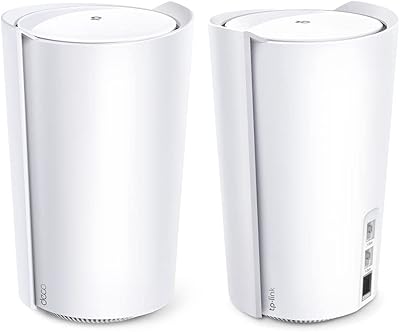
The TP-Link Deco BE85 WiFi 7 Mesh System arrived in January 2024 as one of TP-Link’s most capable Deco nodes yet, aimed squarely at power users ready to leave WiFi 6 and 6E behind. At its premium price point, it makes most sense for buyers who already have multi-gig internet or are actively planning for it. The hardware itself is a tall cylindrical tower — roughly 9.3 inches high — in clean white, which sits neatly on a shelf without looking industrial. One honest caveat worth flagging early: most devices in homes today are still WiFi 5 or 6, so the gains here are partly a future-facing investment rather than an immediate upgrade for everyone.

Features & Benefits

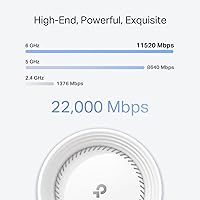
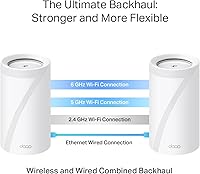
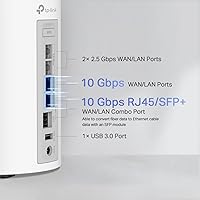
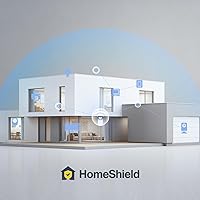
The Deco BE85 runs on tri-band WiFi 7, and that BE22000 headline figure is the combined theoretical maximum across all three bands — not the speed any single device will actually see. What matters more practically are the dual 10G wired ports: think of them as a highway on-ramp for data, letting multi-gig fiber connections reach your network without the router becoming the bottleneck. Two 2.5G ports cover local NAS drives or gaming rigs. The unit supports simultaneous wired and wireless backhaul, meaning mesh nodes stay linked on both paths at once for stronger, more consistent coverage. On the security side, HomeShield’s basic protection is free — but advanced parental controls and detailed reports sit behind a paid subscription, which is worth knowing before you buy.

Best For

This WiFi 7 mesh node is built for a specific kind of buyer. If you have a 2.5G or 10G fiber plan and have been frustrated that your router was throttling the connection before it even hit your devices, the Deco BE85’s port lineup solves that problem directly. It also suits hybrid and remote workers who need a built-in VPN running alongside regular household internet — no juggling separate hardware. Prosumers with a NAS, a gaming PC, or a local media server will appreciate the high-speed wired options too. That said, if you live in a multi-story home, a single node may leave upper floors underserved, and budgeting for a second unit from the start is genuinely worth considering.

User Feedback

Across more than 2,200 ratings, TP-Link’s flagship mesh unit sits at 4.1 stars — solid, but with a spread that tells a more nuanced story than the average alone suggests. Most buyers praise the fast app-guided setup and a noticeable speed improvement over their older routers, with the port selection earning frequent positive mentions. On the other side, the HomeShield subscription wall catches people off guard — many expect full parental controls for free and are disappointed when they hit the paywall. A portion of lower-star reviews also flag firmware update issues and the unit running noticeably warm under sustained heavy loads. Coverage from a single node draws criticism in larger homes. A capable product, but one that rewards buyers who go in with clear expectations.

Pros

  • Dual 10G ports eliminate the router as a bottleneck for multi-gig fiber subscribers.
  • Tri-band WiFi 7 delivers noticeably faster speeds for compatible devices compared to WiFi 6E systems.
  • Simultaneous wired and wireless backhaul keeps mesh nodes connected on two paths at once, improving overall reliability.
  • Built-in VPN client and server support protects the entire network without per-device software installation.
  • The Deco app makes initial setup genuinely quick, even for buyers with limited networking experience.
  • Two 2.5G LAN ports serve NAS drives, gaming PCs, and media servers at high local speeds.
  • AI-Roaming handles device handoff between nodes quietly, reducing dropped connections while moving around the home.
  • The SFP+ combo port adds flexibility for direct fiber connections beyond standard copper ethernet.
  • Supports over 200 connected devices per node without significant performance degradation.

Cons

  • Advanced HomeShield features — including parental controls and usage reports — require a paid subscription most buyers do not expect.
  • A single node struggles to cover larger multi-story homes, making additional units a near-necessity and a significant added expense.
  • The Deco app occasionally loses its connection to the router or lags during configuration, which is frustrating mid-setup.
  • Some users report the unit runs noticeably warm under sustained heavy traffic, raising long-term reliability questions.
  • Firmware updates have caused connectivity drops for a subset of users, often requiring manual reboots to restore service.
  • Network management is app-only with no full web-based dashboard, which limits options for users who prefer browser-based control.
  • WiFi 7 client devices are still uncommon in most homes, so the peak wireless performance gains are largely future-dependent.
  • The high single-unit price makes building out a whole-home multi-node mesh system a genuinely costly undertaking.

Ratings

The scores displayed here for the TP-Link Deco BE85 WiFi 7 Mesh System are generated by AI after analyzing thousands of verified buyer reviews from around the world, with spam, bot activity, and incentivized feedback actively filtered out before any scores are calculated. Each category reflects a balanced synthesis of what real users consistently praise and what genuinely frustrates them in everyday use. No scores have been inflated to favor the product — strengths and pain points are weighted equally so buyers get an honest picture before committing.

Wireless Performance
84%
Buyers upgrading from WiFi 6 or 6E systems consistently report faster sustained speeds and noticeably lower latency, especially in dense multi-device households. The tri-band setup distributes load across frequencies effectively, and the 6 GHz band delivers quicker transfers for compatible laptops and phones in close range.
The headline BE22000 figure is a combined theoretical maximum that requires all connected devices to be WiFi 7 capable — and most homes are nowhere near that yet. Buyers with predominantly WiFi 5 or 6 devices will see real improvements, but not the dramatic leap the marketing implies.
Wired Port Selection
93%
The dual 10G ports are the standout feature for anyone on a multi-gig fiber plan, effectively removing the router as a throughput bottleneck. Having both an RJ45 and an SFP+ combo option in the same unit is rare at this price tier and gives genuine flexibility for direct fiber connections without extra hardware.
The 10G ports only deliver their full value if you have a multi-gig ISP plan and matching devices — buyers on standard gigabit connections are paying for capacity they will never use. The USB 3.0 port’s storage sharing functionality is also basic in practice, falling short of what a dedicated NAS device provides.
Mesh Coverage
67%
33%
For single-story open-plan homes, large apartments, and loft spaces, a single node delivers consistent, strong signal throughout without any dead zones. Users in these layouts frequently report complete coverage without ever needing a second unit, which justifies the single-pack purchase for the right floor plan.
Multi-story homes are where the single-node story falls apart — upper floors and rooms far from the unit frequently report weak or dropped signals, a recurring theme in lower-star reviews. Buying a second node to fix this pushes the total investment significantly higher, frustrating buyers who assumed one unit would suffice.
Setup & App Experience
76%
24%
The Deco app’s guided setup is genuinely among the smoothest in the mesh router category, with most buyers reporting a fully operational network within ten to fifteen minutes of opening the box. The interface is clear enough that non-technical users feel confident managing basic settings without consulting a manual.
A meaningful subset of buyers report the app periodically losing its connection to the router mid-session, requiring a force-close and reopen to restore control. More critically for power users, the complete absence of a web-based dashboard means all configuration changes depend entirely on a smartphone, which feels unnecessarily limiting.
Build Quality & Design
82%
18%
The cylindrical tower form factor feels premium and looks considered sitting on a shelf or entertainment unit — far more refined than typical boxy router hardware. The white finish holds up reasonably well to handling, and the unit’s weight gives it a planted, quality feel that matches the price point.
The tall tower profile can feel awkward in tighter spaces or on low shelves where height clearance is limited. The all-white plastic exterior also attracts and shows dust noticeably, requiring regular wiping to maintain a clean appearance — a minor but consistent annoyance for tidier households.
Backhaul Technology
88%
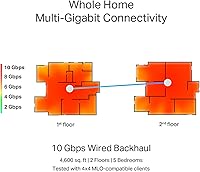
Simultaneous wired and wireless backhaul is a genuine differentiator that most competing mesh systems at this tier do not offer. Users with ethernet running between nodes report noticeably more consistent speeds across the mesh compared to the wireless-only backhaul setups they previously relied on.
The dual-backhaul advantage is only fully realized when you can actually run ethernet cables between nodes, which is impractical in many homes without walls or floors to drill through. Buyers relying on wireless-only backhaul still get a solid connection, but the dual-path benefit becomes theoretical rather than tangible.
Security & HomeShield
61%
39%
The free HomeShield tier is more functional than many competitors’ baseline offerings, covering network vulnerability scanning, IoT device identification, and basic quality-of-service controls without any payment. For households wanting foundational protection without managing a complex dashboard, the free tier holds up adequately.
The recurring frustration is the paywall: buyers expecting full parental controls and detailed usage reports out of the box feel genuinely misled when they discover these require an ongoing subscription. Adding that recurring cost on top of an already premium single-unit purchase compounds the value concern considerably.
VPN Functionality
79%
21%
Having both VPN client and server modes built into the router is a genuinely practical feature that remote workers and privacy-focused households appreciate. The ability to route only specific devices through the VPN while others use the standard connection offers a flexibility that device-level VPN apps simply cannot replicate.
VPN throughput can drop noticeably depending on the protocol used and the distance to the server, which frustrates buyers expecting full-speed VPN performance from a premium device. Configuration options are adequate but not as granular as dedicated VPN routers, which may disappoint technically advanced users wanting fine-grained control.
Value for Money
71%
29%
For buyers specifically needing dual 10G wired ports and multi-gig backhaul in a mesh system, the Deco BE85 is genuinely competitive — comparable units with this port configuration from other brands often cost as much or more. The feature density at this tier is hard to argue with when the hardware matches your actual network needs.
For buyers on standard gigabit plans with no NAS or multi-gig local devices, the premium price is hard to justify when cheaper WiFi 6E systems would deliver nearly identical real-world performance. The HomeShield subscription requirement adds an ongoing cost on top of an already significant single-unit investment.
Network Stability
78%
22%
The majority of buyers report stable, consistent connections day-to-day once setup is complete, with the mesh handling streaming, video calls, and gaming without notable interruptions. AI-Roaming keeps mobile devices connected smoothly between rooms, and this feature earns consistently positive mentions in real-world feedback.
A recurring complaint in lower-star reviews involves connectivity drops following firmware updates, with some users needing to manually reboot the unit to restore service. These incidents are not universal, but they appear frequently enough in the feedback pool to suggest firmware quality control could be meaningfully improved.
Heat Management
58%
42%
Under light to moderate loads — typical browsing, video streaming, and video conferencing — the unit runs at a perfectly acceptable temperature, and users in these everyday scenarios rarely flag heat as a concern. The tall cylindrical shape does allow reasonable passive airflow around the chassis.
Under sustained heavy workloads involving large file transfers, active VPN tunnels, and multiple 10G-connected devices running simultaneously, the unit runs noticeably warm — repeatedly flagged in lower-star reviews. Buyers using the device in enclosed spaces or warm rooms express genuine concern about long-term reliability under these conditions.
Firmware & Updates
63%
37%
TP-Link pushes regular firmware updates to the Deco BE85, which signals ongoing platform investment for a product launched in early 2024. Many users report that updates have delivered useful feature additions and incremental performance improvements over the months since launch.
The consistency problem is hard to ignore: a notable minority of users report specific firmware versions introducing connectivity drops that require a manual reboot to resolve. There is no straightforward rollback mechanism to a previous firmware version, making these incidents more disruptive and harder to recover from without technical confidence.
Roaming Performance
83%
The AI-Roaming system handles device handoffs between nodes without the brief disconnection that older mesh systems often produced mid-transition. Users walking through the home during active video calls or audio streams consistently describe the node-switching experience as transparent and unnoticeable.
Roaming performance is inherently tied to having multiple nodes deployed — with a single-node setup, this feature is entirely irrelevant. In larger homes where nodes are spread far apart to maximize coverage area, some users report handoffs taking slightly longer than expected, causing brief stutter on latency-sensitive applications.

Suitable for:

The TP-Link Deco BE85 WiFi 7 Mesh System is the right call for households that have genuinely outgrown standard gigabit networking — particularly those on 2.5G or 10G fiber plans who are tired of paying for fast ISP speeds only to see them choked at the router. The dual 10G ports remove that bottleneck entirely, whether you are pulling data from a local NAS, feeding a gaming rig at full speed, or simply future-proofing before WiFi 7 client devices become mainstream. Remote and hybrid workers will find real value in the built-in VPN support, which lets every device on the network route securely without installing software on each one individually. Tech-forward buyers already investing in WiFi 7 laptops or phones will see meaningful gains today, with significant headroom as their device ecosystem grows. Single-floor open-plan spaces and large apartments are where a single node performs best, and the system scales cleanly into a full mesh when additional units are added later.

Not suitable for:

If your household runs mostly older devices — WiFi 5 laptops, budget smartphones, or aging smart home sensors — the TP-Link Deco BE85 WiFi 7 Mesh System will not deliver any meaningful performance advantage over a well-configured WiFi 6 router that costs considerably less. Buyers expecting a comprehensive security platform straight out of the box should know upfront that HomeShield’s most useful features, including advanced parental controls and detailed usage reports, sit behind a paid subscription that regularly catches people off guard. This is also a poor fit for anyone trying to cover a large multi-story home with a single unit — coverage gaps on upper floors are a recurring complaint, and adding extra nodes at this price tier makes the total investment climb steeply. Anyone who prefers managing their network through a full desktop browser interface rather than a mobile app will find the Deco ecosystem limiting. Finally, buyers on standard gigabit or slower internet plans with no local NAS or high-speed wired device needs are essentially paying a steep premium for hardware capacity they will never use.

Specifications

  • WiFi Standard: Operates on 802.11be (WiFi 7) across three simultaneous frequency bands, the latest and most capable consumer wireless standard available.
  • Frequency Bands: Tri-band configuration covers 2.4 GHz, 5 GHz, and 6 GHz simultaneously, allowing devices to be distributed across bands for optimal performance.
  • Max Speed: Combined theoretical throughput is BE22000, composed of 11520 Mbps on 6 GHz, 8640 Mbps on 5 GHz, and 1376 Mbps on 2.4 GHz.
  • Channel Width: Supports up to 320 MHz channel width on the 6 GHz band, a core WiFi 7 feature that significantly increases single-link throughput capacity.
  • Wired Ports: Equipped with two 10G ports (one RJ45, one SFP+ fiber/copper combo), two 2.5G ethernet ports, and one USB 3.0 port.
  • Antennas: Contains eight internal high-gain antennas that maximize signal coverage without any external protruding elements.
  • MIMO Config: Implements 4x4 MU-MIMO, enabling multiple devices to transmit and receive data at the same time rather than queuing for bandwidth.
  • Backhaul: Supports simultaneous wired and wireless backhaul, so mesh nodes can maintain both connection types to the network at the same time.
  • Dimensions: Each unit measures 5.04″ x 5.04″ x 9.29″, a tall cylindrical tower profile that fits neatly on a shelf or desk.
  • Weight: Each node weighs 3.22 lbs, providing a stable, grounded footprint without requiring any mounting hardware.
  • Security Suite: HomeShield includes free basic network security scanning, IoT device identification, and QoS; advanced parental controls and detailed reports require a paid subscription.
  • VPN Support: Supports both VPN client and VPN server modes simultaneously alongside standard internet traffic, enabling network-wide VPN coverage without per-device software.
  • Device Capacity: A single node supports over 200 simultaneously connected devices without significant degradation in throughput or latency.
  • App Management: Configured and managed exclusively through the Deco app, available on both iOS and Android; no web-based dashboard is provided.
  • USB Port: One USB 3.0 port is included on each unit for potential local storage sharing or future feature expansion.
  • Color: Available in white with a clean, minimalist cylindrical finish designed to blend into modern home environments.
  • In the Box: Each single-pack ships with one Deco BE85 node, one power adapter, one RJ45 ethernet cable, and a printed quick installation guide.

Related Reviews
TP-Link Deco BE63 2-Pack Mesh WiFi System
82%
91%
Coverage & Range
86%
Network Speed
93%
Setup & Installation
78%
App Experience
89%
Wired Port Flexibility
More
TP-Link Deco BE75 WiFi 7 Mesh System
85%
94%
Performance
88%
Ease of Setup
91%
Security Features
92%
Coverage & Range
79%
Value for Money
More
TP-Link Deco BE95 Wi-Fi 7 Mesh System 2-Pack
78%
88%
Wireless Performance
83%
Coverage & Range
93%
Wired Connectivity
86%
Setup & Installation
79%
App & Management Experience
More
TP-Link Deco X20 1-Pack Mesh WiFi System
78%
93%
Ease of Setup
71%
Coverage Reliability
84%
Multi-Device Performance
88%
App Experience
86%
Parental Controls
More
TP-Link Deco BE23 WiFi 7 Mesh Router
82%
93%
Value for Money
91%
Setup & Ease of Use
84%
Wi-Fi Speed Performance
82%
Coverage & Signal Range
89%
Wired Port Quality
More
TP-Link Deco X55 1-Pack Mesh Wi-Fi System
81%
91%
Ease of Setup
84%
WiFi Speed & Throughput
78%
Coverage Reliability
72%
App & Management Experience
88%
Value for Money
More
TP-Link Deco X95 2-Pack Mesh WiFi System
76%
83%
Coverage & Range
81%
Network Performance
88%
Setup & Installation
71%
App Experience
67%
Value for Money
More
TP-Link Deco XE75 Mesh WiFi System 1-Pack
77%
91%
Setup Experience
78%
WiFi Coverage
83%
Real-World Speed
62%
6 GHz Band Utility
86%
Multi-Device Performance
More
TP-Link Deco S4 2-Pack Mesh WiFi System
75%
91%
Setup & Installation
74%
Coverage & Range
83%
Connection Stability
88%
Value for Money
72%
App Experience
More
TP-Link Deco X68 2-Pack Mesh WiFi System
76%
91%
Setup Experience
78%
WiFi Coverage
83%
Network Performance
74%
App & Management
58%
HomeShield Value
More

FAQ

You don’t need to replace everything first, but it’s worth setting realistic expectations. The TP-Link Deco BE85 WiFi 7 Mesh System is built to take full advantage of WiFi 7 client devices, and most laptops, phones, and tablets in homes today are still running WiFi 5 or 6. That said, any device on your network will benefit from reduced congestion, and wired devices plugged into the 10G or 2.5G ports see immediate improvements regardless of their wireless standard. Think of the wireless WiFi 7 gains as part of a longer investment horizon rather than an overnight upgrade.

It really depends on your floor plan. One node handles large open-plan spaces and single-story homes well, but a multi-story house — or anything over roughly 2,500 square feet with walls and floors breaking up the signal — will likely leave upper rooms underserved. A number of buyers report this frustration after the fact, so if your home fits that description, it’s smarter to budget for two nodes upfront rather than discovering the coverage gap after the return window closes.

Yes, and this is one of the more practical features the Deco BE85 offers. The SFP+ combo port accepts both standard RJ45 copper and SFP+ fiber modules, so if your ISP delivers fiber directly to an ONT or wall outlet with an SFP+ handoff, you can connect without a separate media converter in between. Just confirm with your ISP which specific SFP+ module type their equipment uses before purchasing one separately.

The free tier covers basic network security scanning, IoT device identification, quality-of-service controls, and basic weekly summaries — which is genuinely useful for most households. The paid subscription unlocks more detailed activity reports, advanced per-device parental controls with content filtering, and enhanced threat intelligence updates. If you have children whose internet access you want to actively manage, the paid plan is worth considering. If you just want solid baseline protection, the free tier is adequate and won’t leave you exposed.

Unfortunately, no. The Deco ecosystem is managed exclusively through the mobile app on iOS or Android, and there is no browser-based dashboard available. This is a legitimate limitation worth factoring in before you buy, especially if you prefer desktop access or want to adjust settings from a work computer. It’s a common frustration among power users who expect a more traditional router management interface.

One node works perfectly well as a standalone router. You can also run it in access point mode if you want to keep an existing router handling the WAN connection. The mesh functionality is there when you’re ready to expand, but it isn’t required from day one — buying a single unit and adding more later is a completely supported setup.

Wired backhaul means connecting your mesh nodes to each other via ethernet, which gives a more stable and faster inter-node link than wireless alone. What makes the Deco BE85 stand out here is that it supports both wired and wireless backhaul running at the same time, rather than forcing you to pick one. You’re not required to use wired backhaul, but if you can run a cable between nodes, you’ll notice the difference in consistency and peak speeds.

In most cases, yes. It connects to your ISP-provided modem or gateway just like any other router — plug the WAN cable into the 10G port and run through the Deco app setup. The one thing to watch for is double-NAT: if your ISP gateway also acts as a router, you’ll want to put it in bridge mode first. For multi-gig plans, also confirm your modem can actually pass 2.5G or 10G speeds through, otherwise the high-speed ports won’t reach their potential.

Only for devices you specifically route through the VPN. The Deco BE85 runs VPN client and server functions alongside regular internet traffic simultaneously, so devices not assigned to the VPN connection are completely unaffected. This split-tunnel approach is much more practical than a device-by-device VPN setup, and means a remote worker can stay on a secure VPN tunnel while the rest of the household streams, games, and browses at full speed.

The strongest differentiator is the wired port selection — dual 10G ports including an SFP+ option is uncommon at this price tier, and for multi-gig fiber users it matters a lot. Where it falls slightly behind some competitors is in app reliability, with occasional sync issues that several buyers have flagged, and the HomeShield paywall for advanced features is a point of frustration that a few rival platforms handle more generously. It’s a genuinely strong contender in its category, but if seamless app experience and fully free security features are top priorities for you, a direct comparison with alternatives before purchasing is worthwhile.

Where to Buy