Overview

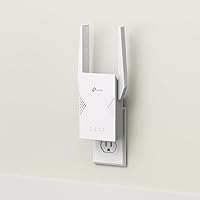
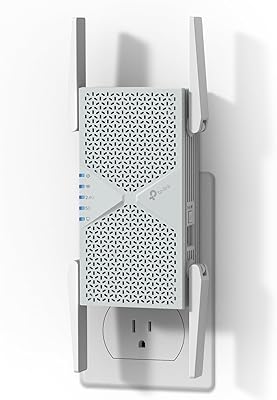
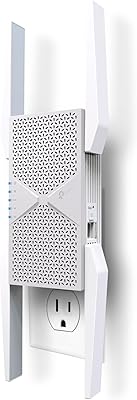
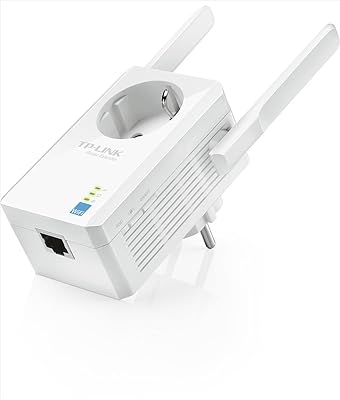
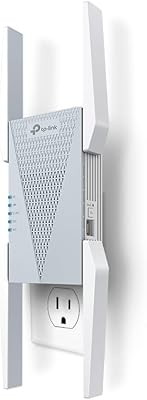
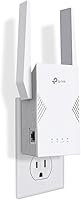
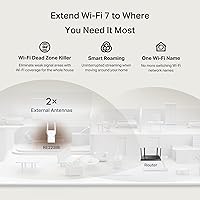
The TP-Link RE223BE Wi-Fi 7 Range Extender is a dual-band plug-in booster aimed at a specific gap in the market: homes already running a Wi-Fi 7 router but still battling dead zones in a back bedroom or detached garage. It operates on 2.4 GHz and 5 GHz only — there is no 6 GHz band, and buyers should know that upfront. Four external antennas and a 1 Gbps Ethernet port round out a capable hardware package for a mid-range price point. TP-Link has also signed CISA's Secure-by-Design pledge, which signals that security is not an afterthought — a small but meaningful differentiator in a crowded extender category.
Features & Benefits

The RE223BE brings genuine Wi-Fi 7 credentials to the table, including Multi-Link Operation, which bonds the 2.4 GHz and 5 GHz bands simultaneously to cut latency and improve reliability under load. In a busy household, that matters more than peak throughput figures. The 5 GHz band tops out near 2594 Mbps and 2.4 GHz at 688 Mbps on paper, but real-world speeds will be lower — extenders always split bandwidth to relay traffic. Beamforming across all four antennas focuses signal toward devices rather than broadcasting evenly, and OFDMA with MU-MIMO keeps things moving across up to 64 simultaneous connections. Access Point mode adds flexibility if you ever run an ethernet cable to its location.

Best For

This Wi-Fi 7 extender makes the most sense for someone who has already invested in a Wi-Fi 7 router and simply needs to push coverage further — not rebuild their entire network. It suits medium-sized homes with one or two persistent dead zones: a far corner of a two-story house, a basement office, or a detached space. If a wired connection is also needed in that area, the Ethernet port is a practical bonus. Households juggling smart home gadgets, phones, and laptops will appreciate the multi-device handling. That said, anyone setting up a network from scratch would likely be better served by a full mesh system rather than this range booster.

User Feedback

With over 7,000 ratings averaging 4.3 stars, the RE223BE has earned broad real-world approval. Buyers most often highlight the easy Tether app setup and stable coverage in areas where their router's signal had previously dropped out entirely. Criticism clusters around one recurring issue: the missing 6 GHz band. For anyone running a true tri-band Wi-Fi 7 router, that omission is a real limitation worth weighing before buying. Some users also flag the speed trade-off common to all wireless extenders — coverage improves, but throughput takes a hit. If you are torn between this and a mesh node, the honest answer is that a mesh node wins on performance; this range booster wins on cost.

Pros

  • Brings real Wi-Fi 7 features like MLO to homes without requiring a full mesh system replacement.
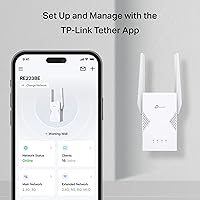
  • Setup via the Tether app is fast and straightforward — most users are running in under five minutes.
  • Four external antennas with beamforming deliver noticeably stronger directed signal compared to compact plug-in extenders.
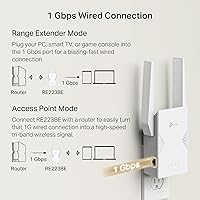
  • The built-in 1 Gbps Ethernet port adds a wired drop in rooms where running a cable to the router is not practical.
  • EasyMesh support means devices roam between the router and the RE223BE without switching networks manually.
  • Handles up to 64 simultaneous devices without significant congestion thanks to OFDMA and MU-MIMO.
  • Access Point mode turns the device into a clean AP when a wired backhaul is available, eliminating the wireless relay penalty.
  • WPA3 support and TP-Link's CISA Secure-by-Design pledge offer more security assurance than most extenders in the category.
  • Broad backward compatibility means every device in a mixed-generation household connects without configuration changes.
  • Stable long-term performance with regular firmware updates and no mandatory cloud account for local setup.

Cons

  • No 6 GHz band support limits usefulness for buyers with true tri-band Wi-Fi 7 routers.
  • Wireless relay mode cuts available throughput noticeably — expected behavior, but often surprises first-time extender buyers.
  • Bulky form factor can block an adjacent wall outlet depending on socket spacing.
  • EasyMesh pairing with non-TP-Link routers is inconsistent and sometimes requires manual workarounds.
  • Only one Ethernet port restricts wired connectivity to a single device without adding an external switch.
  • Real-world coverage falls short of the 2400 sq ft claim in older homes with thick walls or multiple floors.
  • Mode switching between extender and Access Point requires app access or a web login, adding friction for less technical users.
  • Buyers still on Wi-Fi 5 or Wi-Fi 6 routers gain little practical benefit from paying for Wi-Fi 7 features here.
  • Some users in dense apartment buildings report occasional signal drops in high-interference environments.
  • Speed expectations need careful managing — this range booster improves coverage, not raw internet throughput.

Ratings

The TP-Link RE223BE Wi-Fi 7 Range Extender earns an overall strong reception across thousands of verified global reviews, with our AI-assisted scoring system filtering out incentivized and bot-generated feedback to surface what real buyers actually experience day to day. Scores reflect a transparent picture of where this range booster genuinely delivers and where it falls short — so you can make a purchase decision based on honest signal, not marketing copy.
Coverage & Dead Zone Elimination
88%
Most buyers report that the RE223BE reliably pushes usable signal into previously dead areas — a back bedroom, a detached garage, or a basement office that the main router simply could not reach. The four external antennas with beamforming make a noticeable difference compared to single-antenna extenders at similar price points.
Coverage claims of up to 2400 sq ft are optimistic in real-world conditions, particularly in older homes with thick walls or multiple floors. Several users note that placing the extender too far from the router to cover a distant room results in a weaker backhaul and diminishing returns on actual range.
Wi-Fi 7 Feature Implementation
71%
29%
For buyers pairing this with a Wi-Fi 7 router, Multi-Link Operation is a tangible benefit — devices experience lower latency and more consistent speeds under load, which translates to smoother video calls and less stuttering during busy household hours. MLO and 4K-QAM support are features most extenders in this category simply do not offer.
The absence of the 6 GHz band is a real limitation for anyone running a true tri-band Wi-Fi 7 router. The RE223BE cannot participate in 6 GHz backhaul or extend 6 GHz client connections, meaning power users with premium Wi-Fi 7 setups will not unlock the full potential of their existing hardware.
Setup & Ease of Use
91%
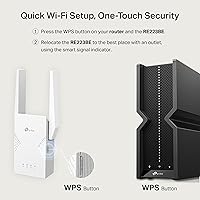
The Tether app setup process draws consistent praise — most users report being up and running in under five minutes without ever touching a web browser or console. WPS pairing also works reliably for those who prefer a button-press approach, which matters for less tech-savvy household members.
A small but vocal group of users report that the Tether app occasionally loses connection to the extender during initial configuration, requiring a restart. Those using third-party routers outside the TP-Link ecosystem sometimes find that EasyMesh pairing requires extra steps not clearly documented in the quick-start guide.
Real-World Throughput
67%
33%
In rooms with strong backhaul to the router, connected devices see speeds that comfortably handle 4K streaming and video conferencing simultaneously. Users with devices positioned relatively close to the extender report noticeably better throughput than they had previously with older Wi-Fi 5 or Wi-Fi 6 extenders.
Like all wireless extenders, the RE223BE splits its radio bandwidth between receiving and retransmitting, which caps practical throughput well below theoretical maximums. Users expecting the same speeds they get standing next to their router will be disappointed — real-world extended speeds are typically 40 to 60 percent of what the main router delivers directly.
Build Quality & Design
78%
22%
The plug-in form factor with four repositionable external antennas feels sturdy and purposeful rather than cheap. The white finish blends into most home interiors without drawing attention, and the device does not run particularly hot even after extended use.
The extender is noticeably bulky for a wall-plug device — it can partially block an adjacent outlet depending on the socket layout. A few users also mention that the antennas feel slightly loose at their pivot points, though this appears cosmetic rather than functional.
Multi-Device Performance
83%
OFDMA and MU-MIMO together handle busy households well. In homes with 20 or more simultaneously active devices — smart speakers, phones, tablets, and a few laptops — users report that the connection remains stable without the kind of congestion-related drops that single-stream extenders suffer.
At the ceiling of 64 connected devices, performance predictably softens, and a handful of users in very high-density environments report occasional lag spikes. The device handles typical family usage comfortably but is not designed for commercial-density scenarios.
EasyMesh & Roaming
76%
24%
When connected to an EasyMesh-compatible router, handoff between the main router and this range booster is smooth enough that most users do not notice the transition while walking through the house. This is a significant step up from traditional extenders that create a separate network SSID.
EasyMesh functionality is only as good as the router it is paired with, and compatibility issues arise with some non-TP-Link EasyMesh routers. Users with Netgear or ASUS routers have reported inconsistent roaming behavior that required manual band management as a workaround.
Ethernet Port Utility
86%
Having a 1 Gbps Ethernet port on an extender at this price point is genuinely useful. Users who run a cable to the extender's location — a home office desk or a media center — can plug in a wired device and get a stable, low-latency connection that wireless alone cannot match.
There is only one Ethernet port, which limits wired connectivity to a single device unless a small switch is added. Users who expected a multi-port setup for a full home office desk will need to budget for an additional accessory.
Security & Privacy
84%
WPA3 support and TP-Link's CISA Secure-by-Design commitment stand out for buyers who pay attention to network security. The device receives firmware updates regularly, and there is no requirement to create a cloud account simply to complete local network setup.
Some privacy-conscious users remain cautious about the Tether app's data collection practices, though TP-Link has made efforts to address concerns raised in previous years. Those managing fully isolated local networks may find the app-centric setup slightly at odds with their preferences.
Access Point Mode
81%
19%
Access Point mode is a practical bonus that many buyers overlook. Users who can run an Ethernet cable from their router to the extender's location can switch it into AP mode for a clean, low-latency wireless extension that avoids the bandwidth penalty of wireless relay entirely.
Switching between modes requires either the Tether app or a web interface login, which adds a small friction point for less experienced users. Documentation on AP mode configuration could be clearer, particularly regarding DHCP server settings when integrating with non-TP-Link routers.
Value for Money
79%
21%
For buyers who want Wi-Fi 7 features — particularly MLO — without paying for a full mesh node, the RE223BE sits at a price point that is hard to argue with. It delivers tangible improvements over Wi-Fi 6 extenders in the same price bracket, especially when paired with a modern router.
Compared to budget Wi-Fi 6 extenders, the price premium requires that buyers actually own a Wi-Fi 7 router to justify the upgrade. For anyone still running Wi-Fi 5 or Wi-Fi 6 hardware, the extra spend on Wi-Fi 7 features delivers little real-world benefit, and the missing 6 GHz band makes the value proposition harder to defend against competing tri-band options.
Backward Compatibility
89%
Support for 802.11a/b/g/n/ac/ax means older devices — an aging laptop, a smart TV, older smartphones — connect without any configuration changes. Buyers who have a mixed-generation device household report that everything just works across the board.
Older devices naturally fall back to slower protocols, which is expected behavior but occasionally confuses buyers who see lower-than-expected speeds on an older phone or tablet and assume the extender is underperforming rather than the device limiting the connection.
Signal Stability
82%
18%
Sustained connection stability over days and weeks of continuous use is consistently praised. Unlike some extenders that require periodic reboots to maintain performance, the RE223BE holds its connection reliably in the majority of reported long-term use cases.
A subset of users — particularly those in apartments with heavy RF interference from neighboring networks — report occasional signal drops that require either repositioning or a manual reboot. The issue is not unique to this device but is worth flagging for dense urban environments.

Suitable for:

The TP-Link RE223BE Wi-Fi 7 Range Extender is the right call for homeowners who have already upgraded to a Wi-Fi 7 router and are dealing with one or two stubborn dead zones — a detached garage, a basement office, or the far end of a two-story house — without wanting to spend significantly more on a full mesh overhaul. It is particularly well-matched to medium-sized homes where the existing router covers most of the space but falls short in one area, making a targeted fix more sensible than replacing the whole network. Families juggling 15 to 40 connected devices across phones, laptops, smart TVs, and home automation gear will appreciate how MU-MIMO and OFDMA keep things moving without constant congestion. Anyone who needs a wired connection point in an otherwise hard-to-cable room — a printer, a gaming console, or a NAS drive — will find the single Ethernet port a practical and often overlooked bonus. Tech-savvy buyers who want MLO benefits without the cost of an additional mesh node are also a natural fit here.
Not suitable for:

The TP-Link RE223BE Wi-Fi 7 Range Extender is not the right tool for buyers who are building a network from scratch or replacing an aging Wi-Fi 5 setup — in those situations, a proper mesh system will outperform any extender at a comparable total cost and with significantly less throughput penalty. Anyone running a tri-band Wi-Fi 7 router and hoping to extend their 6 GHz coverage will run into a hard wall: this range booster operates only on 2.4 GHz and 5 GHz, so the fastest band your newest devices rely on stays limited to the router's reach. Users in densely built apartments with heavy RF interference may find that the extender struggles to maintain a clean backhaul signal, which compounds the inherent bandwidth-halving limitation all wireless extenders carry. If your primary frustration is slow internet speeds rather than coverage gaps, this device will not solve that problem — it extends signal, it does not upgrade your ISP connection. Buyers who need wired connectivity for several devices in the same room will also find a single Ethernet port insufficient without adding a switch.
Specifications

  • Wi-Fi Standard: Supports Wi-Fi 7 (802.11be) with full backward compatibility across 802.11a/b/g/n/ac/ax devices.
  • Frequency Bands: Dual-band operation on 2.4 GHz and 5 GHz only — the 6 GHz band is not supported.
  • Total Bandwidth: BE3200 class with up to 2594 Mbps on 5 GHz and up to 688 Mbps on 2.4 GHz.
  • Wi-Fi 7 Features: Includes Multi-Link Operation (MLO), Multi-RU, 4K-QAM, and 160 MHz channel support when paired with a Wi-Fi 7 router.
  • Antennas: Four external repositionable antennas with beamforming technology to direct signal toward connected devices.
  • Coverage Area: Rated for homes up to 2400 sq ft under typical residential conditions.
  • Device Capacity: Supports up to 64 simultaneously connected devices using MU-MIMO and OFDMA.
  • Ethernet Port: One 1 Gbps Ethernet port for wired device connection or optional wired backhaul in Access Point mode.
  • Operating Modes: Functions as a wireless range extender or can be switched to Access Point mode when a wired connection is available.
  • Mesh Support: EasyMesh-compatible, enabling seamless whole-home roaming and single-network integration with compatible routers.
  • Security Protocols: Supports WPA3 and WPA2 encryption; TP-Link is a CISA Secure-by-Design signatory for this product line.
  • Form Factor: Plug-in wall unit with external antennas — requires a standard two-prong or grounded outlet.
  • Weight: 9.9 oz (approximately 280 g) including antennas.
  • Dimensions: Package dimensions measure 7.95″ x 5.08″ x 3.9″; the unit itself is compact for a four-antenna extender.
  • Color: White finish designed to blend into standard residential interiors without drawing attention.
  • Management App: Configured and monitored via the TP-Link Tether app on iOS and Android, with WPS pairing also supported.
  • Availability Date: First made available on July 25, 2025, placing it among the early retail Wi-Fi 7 extenders on the market.

Related Reviews

TP-Link RE653BE Wi-Fi 7 Range Extender
80%
88%
Wireless Performance
83%
Wi-Fi 7 Feature Depth
79%
Coverage Range
93%
Ethernet Port Utility
86%
Setup & App Experience
More
TP-Link BE6300 Wi-Fi 7 Range Extender RE403BE
85%
88%
Performance
91%
Range Coverage
85%
Wi-Fi Speed
89%
Ease of Setup
94%
Compatibility with TP-Link Routers
More
TP-Link TL-WA860RE Wi-Fi Range Extender
86%
95%
Ease of Setup
84%
Performance in Larger Homes
90%
Wi-Fi Range Extension
88%
Reliability
85%
Build Quality
More
TP-Link RE813XE Wi-Fi 6E Range Extender
86%
91%
Performance
89%
Wi-Fi Coverage
81%
Ease of Setup
95%
Compatibility with TP-Link Routers
88%
Streaming & Gaming Performance
More
TP-Link RE705X Wi-Fi 6 Range Extender
84%
89%
Performance
87%
Wi-Fi Coverage Range
93%
Ease of Setup
85%
Connectivity Reliability
70%
App Experience
More
TP-Link RE370K Smart Plug & Wi-Fi Range Extender
85%
92%
Setup and Installation
84%
Wi-Fi Performance and Coverage
88%
Voice Control Integration
80%
App Usability (Kasa)
75%
Reliability and Connection Stability
More
TP-Link Deco BE25-Outdoor Wi-Fi 7 Mesh Extender
86%
91%
Wi-Fi Performance
95%
Outdoor Durability
80%
Setup & Installation
88%
Speed & Throughput
85%
Mounting & Placement Flexibility
More
TP-Link Archer BE400
80%
88%
Wireless Performance
91%
Setup & Ease of Use
78%
Coverage & Range
87%
Wired Port Performance
83%
Multi-Device Handling
More
TP-Link Archer GE650 Wi-Fi 7 Gaming Router
86%
94%
Gaming Performance
89%
Speed & Connectivity
88%
Setup & Installation
70%
Range & Coverage
91%
RGB Lighting & Customization
More
TP-Link Archer GE800
80%
91%
Wireless Performance
94%
Wired Connectivity
88%
Gaming Latency & Prioritization
83%
Build Quality & Design
69%
RGB Lighting
More

FAQ

No — the RE223BE is backward compatible with Wi-Fi 6, Wi-Fi 5, and older routers, so it will work with whatever you have. That said, you only unlock the Wi-Fi 7-specific benefits like Multi-Link Operation when it is paired with an actual Wi-Fi 7 router. If you are still on an older router, it functions perfectly well as a capable dual-band extender, just without the next-gen extras.

It does not. The TP-Link RE223BE Wi-Fi 7 Range Extender operates exclusively on 2.4 GHz and 5 GHz. If your Wi-Fi 7 router uses the 6 GHz band for its fastest connections and you were hoping to extend that band, this device cannot do that. It is an important distinction to check before buying, especially for tri-band Wi-Fi 7 router owners.
Coverage will improve — speeds at the extended location should be better than what you had with no signal there at all. However, all wireless extenders split their radio bandwidth between receiving from the router and transmitting to your devices, so you should expect extended speeds to be meaningfully lower than what you get standing next to your main router. If slow speeds are your main problem rather than dead zones, an extender will not solve that.

Setup is genuinely straightforward. You can use the TP-Link Tether app on your phone and be up and running in a few minutes, or use the WPS button on your router for an even faster pairing if your router supports it. Most users report no issues, though the occasional hiccup during app-based setup is resolved by unplugging and trying again.

Yes, it works as a standard range extender with any router brand. EasyMesh functionality — the feature that enables smooth roaming under a single network name — works best with EasyMesh-compatible routers, and results with non-TP-Link EasyMesh implementations can be inconsistent. For basic range extension, though, brand compatibility is not an issue.

More than people expect. You can plug a wired device — a gaming console, a desktop PC, a smart TV, or a NAS drive — directly into the extender's Ethernet port to get a stable, lower-latency connection in a room that would otherwise be entirely wireless. If you run an Ethernet cable from your router to the extender's location, you can also switch it into Access Point mode, which eliminates the wireless relay penalty entirely and delivers significantly better throughput.

Multi-Link Operation is a Wi-Fi 7 feature that allows a device to send and receive data across both the 2.4 GHz and 5 GHz bands at the same time, rather than switching between them. The practical result is lower latency and more reliable connections under load — useful during video calls, cloud gaming, or when multiple people are using the network simultaneously. You only benefit from MLO if both this extender and your router support Wi-Fi 7, and your client devices also need Wi-Fi 7 to take full advantage.

The general rule for any extender is to position it roughly halfway between your router and the dead zone you are trying to reach — close enough to the router to maintain a strong backhaul signal, but far enough to actually push coverage into the problem area. Placing it too close to the router wastes its range potential; placing it too far results in a weak backhaul that undermines performance. A spot where your phone still shows two to three bars of your router's signal is usually the sweet spot.

If you already own a good router and just need to fix one or two dead zones without replacing everything, this range booster is a cost-effective and practical solution. If you are building a network from scratch, or if your dead zone issues span most of the house, a mesh system will give you better overall performance and a cleaner roaming experience — though at a significantly higher cost. The honest answer is that a mesh node wins on pure performance; this extender wins on targeted value.

It supports WPA3 encryption and TP-Link has signed the CISA Secure-by-Design pledge, which means security is built into the product's development process rather than bolted on afterward. The device receives firmware updates, and you do not need to create a cloud account just to use it locally. Privacy-conscious users should review TP-Link's current data practices in the Tether app, as the app does collect some usage data.