Overview

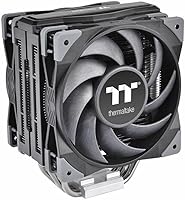
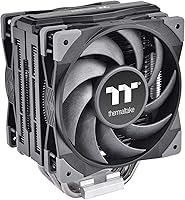
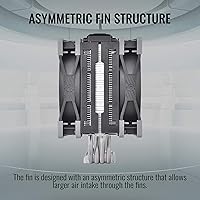
The Thermaltake TOUGHAIR 510 CPU Air Cooler sits comfortably in the mid-range air cooling segment — capable enough to handle real workloads without pushing you toward the added cost and complexity of a liquid setup. This dual-fan tower cooler keeps things practical: a single-tower design that fits most mid-tower cases without drama. One genuinely useful detail is the asymmetric fin stack, which shifts clearance away from the first RAM slot — a small but real benefit when running taller memory kits. It launched in early 2021, and updated bracket support has kept it relevant for current Intel platforms. Strong performer for the price, though not a flagship beater.
Features & Benefits

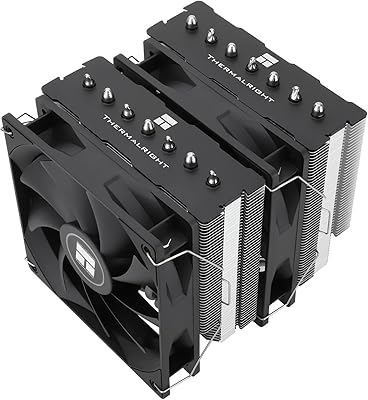
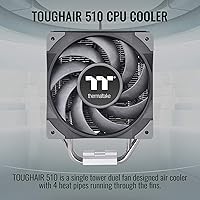
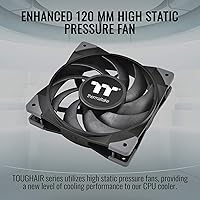
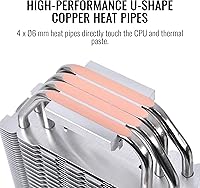
At the core of this air cooler are four direct-contact copper heat pipes, each 6mm wide, sitting flush against the CPU surface rather than passing through an intermediate base plate — that direct path moves heat into the aluminum fin stack faster and more efficiently. Two TOUGHFAN 12 fans push air through at up to 2000 RPM, generating 58.35 CFM of airflow, which is a solid output for a 120mm fan pair. The 4-pin PWM control keeps noise hovering around 23.6 dB during lighter loads. Socket compatibility covers Intel LGA 1700 and 1200 plus AMD AM4 and AM5, and the whole assembly weighs roughly 1 lb, so motherboard flex is a non-issue.

Best For

The TOUGHAIR 510 is a natural fit for anyone building around a mid-range CPU — a Ryzen 5, Core i5, or similar chip that generates real heat but doesn't need exotic thermal management. At 4.72 inches tall, it slides into standard mid-tower cases without clearance headaches. If you've been limping along on a stock cooler and want noticeably better temperatures without installing a pump or dealing with coolant, this is a logical step up. It also suits builders who prefer a clean, understated look over oversized tower designs. That said, it's not the right call for heavily overclocked chips or thermally restricted small-form-factor cases.

User Feedback

Across more than 170 ratings, this dual-fan tower cooler holds a 4.4-star average — consistent enough to suggest it delivers on its core promises for most buyers. The most repeated praise involves a meaningful drop in CPU temps compared to stock coolers, along with an installation process that generally goes smoothly. However, a recurring complaint worth taking seriously is the Intel mounting hardware, which some builders found fiddly and time-consuming to seat correctly — budget extra patience if you're on an LGA platform. At full fan speed, noise does become noticeable, so purely silence-focused builds might want to weigh that carefully. For everyday mid-range use, the overall experience holds up well.

Pros

  • Delivers a genuine and noticeable temperature drop over stock coolers for mid-range CPUs.
  • Direct-contact copper heat pipes transfer heat efficiently without an intermediate base plate.
  • Wide socket support covers current Intel and AMD platforms in a single package.
  • Asymmetric fin stack preserves first DIMM slot access for most standard RAM kits.
  • PWM fan control keeps noise low during everyday workloads and light gaming.
  • At roughly 1 lb, this dual-fan tower cooler puts minimal stress on the motherboard.
  • Fits comfortably in virtually any standard mid-tower ATX case without clearance issues.
  • Thermal paste is included, reducing the parts list for first-time builders.
  • Clean, restrained aesthetic suits understated builds without dominating the interior visually.
  • Strong buyer satisfaction across a meaningful volume of verified ratings confirms consistent real-world reliability.

Cons

  • Intel platform mounting hardware is fiddly and can require multiple attempts to seat correctly.
  • Fan noise becomes clearly audible at full 2000 RPM during sustained heavy workloads.
  • No RGB lighting, which limits appeal for builders focused on a lit or themed interior.
  • Bundled thermal paste performs adequately but trails premium third-party compounds in thermal testing.
  • Included instruction manual lacks clarity on Intel mounting steps, often sending users to online tutorials.
  • Competing coolers at similar price points occasionally match thermal performance at a lower cost.
  • Not enough thermal headroom for overclocked or high-TDP flagship processors.
  • Fan retention clips feel noticeably lighter and less robust than the rest of the assembly.
  • Older Intel sockets like LGA 115x are not supported, limiting use with slightly aged hardware.
  • Performance gains are less impressive in tightly packed cases with restricted internal airflow.

Ratings

The Thermaltake TOUGHAIR 510 CPU Air Cooler has been scored below by our AI system after processing verified buyer reviews from multiple global markets, with spam, bot-generated, and incentivized feedback actively filtered out. The ratings reflect a balanced picture — where this dual-fan tower cooler genuinely earns its place in a build, and where real buyers have run into friction. Both strengths and honest pain points are represented in every category.
Thermal Performance
83%
For mid-range CPUs like a Ryzen 5 or Core i5, buyers consistently reported meaningful temperature drops compared to stock coolers — often 15 to 20 degrees Celsius under sustained load. The direct-contact heat pipe layout translates into faster heat pickup at the CPU surface, and most users found it more than adequate for everyday productivity and moderate gaming sessions.
Push this air cooler toward a high-TDP chip or an aggressive overclock and it starts showing its limits. Reviewers running hotter processors noted thermal throttling under extended stress tests, which confirms this cooler is tuned for mid-range workloads rather than enthusiast-tier thermal demands.
Noise Level
78%
22%
During lighter workloads and browsing sessions, the fans are genuinely unobtrusive — the kind of quiet where you forget the cooler is spinning at all. PWM control keeps fan speed low when CPU load is modest, and the 23.6 dB rating holds up reasonably well in real desktop environments.
At full 2000 RPM, the fans become clearly audible — not objectionable for most people, but noticeable enough that silence-focused builders flagged it. If your case sits on your desk rather than the floor, expect to hear it working hard during gaming or compilation tasks.
Installation Experience
67%
33%
AMD platform users generally found the mounting process straightforward, with the backplate and bracket system coming together without much fuss. The included hardware covers a wide socket range out of the box, which saves time sourcing separate mounting kits for platform switches.
Intel users were a different story — the LGA mounting hardware drew consistent complaints about fiddly alignment and a less intuitive bracket design. Several reviewers mentioned needing a second set of hands or multiple attempts to seat everything correctly, which is a real frustration during a solo build.
RAM Clearance
86%
The asymmetric fin stack is one of the more practical design choices here — it shifts the fin array away from the first DIMM slot, letting most standard and mid-height RAM kits install without any obstruction. Builders running dual-channel memory in the primary slots reported zero clearance issues.
Taller RGB or premium DRAM with oversized heat spreaders can still push the limits on some boards depending on the socket position. A small number of reviewers with especially tall memory kits noted the fins sat uncomfortably close, requiring careful fitment checks before committing.
Build Quality & Materials
81%
19%
The copper-base, aluminum-fin construction feels solid and well-assembled for the price tier. The black and silver finish is understated and holds up without visible wear, and the overall fit of the fan clips and fin stack gives an impression of durability rather than cost-cutting.
The fan retention clips, while functional, feel slightly lightweight compared to the rest of the assembly. A few buyers noted the plastic clip material felt like the most fragile part of the package — not a dealbreaker, but something to handle with care during repeated fan swaps.
Airflow Efficiency
79%
21%
Pushing 58.35 CFM through the fin stack, the dual-fan push-pull arrangement moves a solid volume of air for a 120mm pairing at this price point. Most builders noticed improved case airflow and lower ambient temps around the CPU socket area as a side benefit.
The static pressure figures are competitive but not class-leading — buyers pairing this with densely packed cases or restricted airflow configurations found the performance gains less dramatic. Open mid-towers where air moves freely see better results than tightly packed ITX or mATX enclosures.
Socket & Platform Compatibility
88%
Covering Intel LGA 1700 and 1200 alongside AMD AM4 and AM5 in a single package is genuinely useful — especially for builders who swap platforms between builds. The added LGA 1700 bracket support extended the product's relevance well beyond its 2021 launch date.
Older Intel sockets like LGA 115x are not supported, which may catch some buyers off guard if they are working with slightly older hardware. The compatibility list is broad but not exhaustive, so verifying your specific board before purchase is worth doing.
Value for Money
84%
In the sub-$60 air cooler market, this dual-fan tower cooler sits in a strong position — you get real copper heat pipe contact, PWM fan control, and wide platform support without paying a premium. For first-time upgraders stepping off a stock cooler, the performance-per-dollar ratio is hard to argue with.
Competing options from brands like DeepCool and Cooler Master occasionally undercut this cooler on price while matching it on thermal specs, so value is relative to what is on sale at the time. Buyers who stretch slightly further up the budget ladder can access noticeably better thermal headroom.
Case Compatibility & Fit
87%
At 4.72 inches tall, this air cooler fits comfortably inside virtually any standard mid-tower ATX case with the typical 160mm CPU cooler clearance. Builders working with popular enclosures from NZXT, Fractal, and Corsair reported no fitment surprises.
Compact mATX and ITX cases with tighter CPU clearance measurements may require careful verification before purchasing. Small-form-factor enthusiasts in particular should double-check their case specifications, as even a few millimeters can be the difference between a clean fit and an impossible install.
Fan Quality & Longevity
76%
24%
The TOUGHFAN 12 units included here are a step above generic bundled fans — the bearings run quietly at low RPM and the PWM response feels smooth rather than stepped or abrupt. Several long-term owners noted no bearing noise or performance degradation after more than a year of daily use.
At sustained high RPM over long gaming or rendering sessions, a small number of reviewers reported a faint coil whine or bearing hum developing over time. It is not a widespread complaint, but it is consistent enough to mention for buyers who keep systems running at full load for hours at a stretch.
Aesthetics & Visual Design
72%
28%
The black-and-silver color scheme is restrained and pairs naturally with most mainstream PC builds. For buyers who want a cooler that does not visually dominate the interior of their case, the clean single-tower profile is a genuine selling point.
There is no RGB lighting, which is a deliberate trade-off but one that some buyers only realize after purchase. In a market where even budget coolers now offer addressable lighting options, the absence of any visual flair is a real limitation for builders focused on a lit interior.
Packaging & Included Accessories
74%
26%
Thermal paste is included in the box, which removes one item from the shopping list for first-time builders. The mounting hardware is organized and reasonably labeled, covering the main supported platforms without requiring separate accessory purchases.
The instruction manual received mild criticism for being harder to follow than it should be, particularly around the Intel mounting steps. A few buyers resorted to online tutorials to complete the install confidently, suggesting the included documentation could use a clearer diagram or two.
Weight & Motherboard Stress
91%
Weighing approximately 1 lb fully assembled, this is one of the lighter dual-fan tower coolers available at this performance level. That low weight translates to minimal motherboard sag risk — a practical advantage for system builders who ship rigs or frequently transport their machines.
The lightweight construction, while a positive overall, does raise occasional questions about long-term retention bracket fatigue on boards with softer PCB materials. It is a minor and largely theoretical concern, but worth noting for builders who move their systems frequently.
Thermal Paste Application
69%
31%
Having thermal compound pre-included lowers the barrier for newcomers who might not have a tube on hand. The included paste performs adequately for standard use cases and is sufficient to get the system up and running without additional purchases.
Experienced builders tend to swap the included paste for a higher-quality compound like Thermal Grizzly Kryonaut or similar, noting measurable temperature improvements in testing. The bundled paste is functional but sits at the lower end of what premium thermal compounds can achieve.

Suitable for:

The Thermaltake TOUGHAIR 510 CPU Air Cooler is a strong match for builders putting together a practical mid-range desktop around a Ryzen 5, Core i5, or similarly-tiered processor — the kind of chip that generates real heat under load but does not demand exotic thermal management. First-time upgraders stepping off a stock cooler will notice an immediate and meaningful improvement in temperatures without the added complexity of planning a water cooling loop or managing pump headers. It also suits anyone working within a standard mid-tower ATX case who wants to avoid case compatibility guesswork, since the 4.72-inch height clears most common enclosures without issue. The asymmetric fin design is a practical advantage for builders running taller RAM kits in the primary DIMM slots, and the broad socket support across both current Intel and AMD platforms makes it a flexible choice for anyone who swaps hardware regularly. If you value a clean, understated interior over a lighting showcase, the matte black-and-silver finish fits that brief well.
Not suitable for:

The Thermaltake TOUGHAIR 510 CPU Air Cooler is not the right tool for builders planning aggressive overclocks or running high-TDP processors that push sustained power draw well beyond 180W — under those conditions, it will hit its thermal ceiling and you will see performance compromise rather than headroom to spare. Enthusiasts building around flagship chips like a Core i9 or Ryzen 9 should budget for a larger dual-tower air cooler or a 240mm-plus AIO instead. Small-form-factor builders working with compact mATX or ITX cases need to verify clearance specifications carefully, as the cooler's dimensions can be a tight fit in enclosures with strict CPU cooler height limits. Buyers who are deeply sensitive to fan noise during intensive tasks — video rendering, extended gaming sessions, large compilation jobs — may find the fan ramp-up at full load more intrusive than expected for a near-silent build. And if RGB lighting or a visually striking cooler interior is a priority for your build, this cooler offers no lighting whatsoever and will disappoint on that front.
Specifications

  • TDP Rating: Rated to handle up to 180W of thermal design power, covering the majority of mainstream and mid-range desktop CPUs without thermal throttling under normal use.
  • Fan Size: Ships with two 120mm TOUGHFAN 12 fans arranged in a push-pull configuration across the single fin tower.
  • Max Fan Speed: Both fans spin up to a maximum of 2000 RPM under full PWM-controlled load conditions.
  • Noise Level: Rated at 23.6 dB at operational speeds, which is comparable to a quiet library environment during moderate workloads.
  • Airflow Capacity: The dual-fan setup moves 58.35 cubic feet per minute of air through the fin stack at peak speed.
  • Heat Pipes: Four 6mm copper heat pipes use a direct-contact layout, sitting flush against the CPU integrated heat spreader to minimize thermal resistance.
  • Fin Material: The cooling fin array is constructed from aluminum, offering a good balance of thermal conductivity and low weight.
  • Cooler Height: The assembled cooler stands 4.72 inches tall, fitting comfortably within standard mid-tower ATX cases that offer 160mm or more of CPU cooler clearance.
  • Dimensions: Full product dimensions measure 4.72″ length by 0.98″ width by 4.72″ height, reflecting a compact single-tower footprint.
  • Weight: The complete cooler assembly weighs approximately 1 lb, reducing stress on the motherboard mounting points during transport or handling.
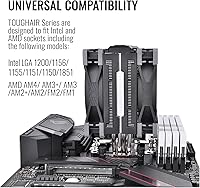
  • Socket Support: Compatible with Intel LGA 1700 and LGA 1200, as well as AMD AM4 and AM5 sockets, covering the major current consumer desktop platforms.
  • Fan Connector: Both fans use a 4-pin PWM connector, allowing the motherboard to regulate fan speed automatically based on CPU temperature readings.
  • Voltage: Operates on a standard 12V DC supply delivered through the motherboard fan header.
  • Fin Design: Uses an asymmetric fin stack layout that offsets the fin array away from the first DIMM slot, improving RAM clearance compatibility.
  • Base Material: The contact base is made from copper, chosen for its superior heat absorption properties compared to an all-aluminum base design.
  • Color: Available in a black and silver colorway, giving it a neutral, understated appearance that suits most build aesthetics without requiring a specific theme.
  • Fan Control: PWM speed control allows the fans to run at reduced RPM during light workloads, keeping noise levels low during everyday desktop use.
  • Thermal Paste: Thermal compound is included in the package, making it ready to install without requiring a separate paste purchase for a standard setup.

Related Reviews

Thermaltake TOUGHAIR 110 Top Flow CPU Cooler
78%
72%
Thermal Performance
74%
Noise Level
78%
Build Quality
81%
Ease of Installation
86%
Value for Money
More
Cooler Master Hyper 212 Black CPU Cooler
79%
83%
Thermal Performance
79%
Noise Level
93%
Value for Money
76%
Installation Experience
81%
Build Quality
More
Cooler Master Hyper 212 Halo CPU Air Cooler
84%
88%
Cooling Performance
91%
Noise Level
85%
Ease of Installation
89%
Build Quality
80%
RGB Aesthetics
More
Cooler Master i70C Low-Profile CPU Cooler
78%
72%
Thermal Performance
88%
Noise Level
93%
Form Factor & Fit
86%
Installation Ease
78%
ARGB Lighting
More
Cooler Master i71C RGB Intel Low-Profile CPU Air Cooler
84%
88%
Cooling Performance
91%
Noise Level
85%
RGB Customization
89%
Build Quality
75%
Installation Ease
More
Cooler Master MasterAir MA824 Stealth CPU Cooler
81%
88%
Thermal Performance
91%
Noise Level
93%
RAM Clearance
72%
Installation Experience
89%
Build Quality & Materials
More
Cooler Master Hyper 622 Halo Dual Tower CPU Cooler
82%
83%
Thermal Performance
88%
Noise Level
89%
Ease of Installation
67%
RAM Clearance
86%
Build Quality
More
Thermalright PS120SE CPU Air Cooler
80%
89%
Thermal Performance
86%
Noise Level
93%
Value for Money
74%
Build Quality
81%
Ease of Installation
More
Vetroo V5 CPU Air Cooler
82%
73%
Thermal Performance
84%
Noise Level
91%
Value for Money
71%
Build Quality
88%
ARGB Lighting Quality
More
NZXT T120 CPU Air Cooler
82%
74%
Thermal Performance
88%
Noise Level
93%
Ease of Installation
91%
Aesthetics & Design
86%
Value for Money
More

FAQ

In most standard mid-tower ATX cases, yes — the cooler stands 4.72 inches tall, and the vast majority of mid-towers offer at least 155 to 165mm of CPU cooler clearance. That said, always cross-check your specific case specifications before buying, especially if you are in a compact mATX enclosure with tighter internal dimensions.

Yes, the Thermaltake TOUGHAIR 510 CPU Air Cooler supports both AMD AM5 and Intel LGA 1700 out of the box. Thermaltake added LGA 1700 bracket support after the cooler's initial 2021 launch, so current Intel 12th and 13th gen builds are covered alongside AMD Ryzen 7000 series systems.
It depends on the exact height of your RAM, but the asymmetric fin design specifically shifts the fin stack away from the first DIMM slot to reduce this problem. Standard and mid-height memory kits install without issue in most cases. If you are running particularly tall RGB or premium DRAM, measure the spreader height and compare it against the cooler's fin clearance just to be safe.

On AMD platforms, most builders find the process fairly intuitive — the backplate and bracket system goes together without too much trouble. Intel is where some buyers hit friction, particularly with the LGA mounting hardware, which can feel fiddly during alignment. Budget some extra time if you are on an Intel board, and having the Thermaltake installation guide open on a second screen helps considerably.

During light tasks and everyday desktop use, it runs quietly enough that most people will not notice it at all. Under sustained heavy load — long gaming sessions or video rendering, for example — the fans ramp up toward 2000 RPM and become audible. It is not an uncomfortable noise, but it is noticeable if your case sits on your desk. If near-silence under full load is a hard requirement, a lower-RPM aftermarket fan swap might be worth considering.

For light to moderate overclocks on a Ryzen 5 or Core i5, this air cooler manages reasonably well. It starts to show its limits under aggressive, sustained overclocks that push power draw significantly beyond the chip's rated TDP. If you plan to run a heavy all-core overclock for extended periods, a larger dual-tower cooler or an AIO liquid cooler will give you more headroom and better stability.

Thermal paste is included in the box, so you do not need to buy it separately for a standard installation. The included compound performs adequately for everyday use. Experienced builders who want to squeeze out every degree of thermal performance sometimes swap it for a premium third-party paste, but for most users the included paste gets the job done without any extra cost.

Technically yes — the cooler is physically designed around the dual-fan push-pull setup, but it will function with a single fan installed. You will lose some airflow and thermal performance doing so, however, and the rated 58.35 CFM output assumes both fans are operating. For optimal performance, keep both fans installed as intended.

The difference is meaningful, particularly under load. Stock coolers are designed to meet minimum thermal requirements, not to maintain comfortable temperatures during extended stress. Most buyers who switched reported temperature drops of 15 degrees Celsius or more under sustained workloads, along with notably lower fan noise since this cooler moves more air at a lower RPM than a typical stock unit working hard.

For a home office machine running productivity software, light video calls, and occasional media playback, this dual-fan tower cooler is a solid option. At low to moderate CPU loads it is genuinely quiet and unobtrusive. Where it becomes less ideal for silence-focused users is if your workloads regularly spike to full CPU utilization, since the fans spin up audibly under those conditions. For a standard office workload, though, it will stay quiet most of the time.

Where to Buy