Overview

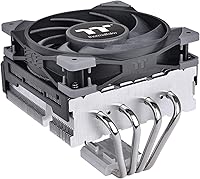
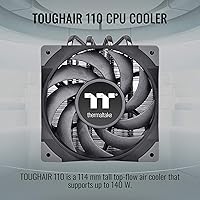
The Thermaltake TOUGHAIR 110 Top Flow CPU Cooler is a compact, practical option for builders who need to stay low — literally. At 114mm tall, it slips into cases where a tower cooler would never fit. It supports up to 140W TDP, covering the vast majority of mainstream and mid-range processors without issue. The asymmetric fin structure is a genuine design consideration, not just a marketing angle — it redirects airflow toward adjacent motherboard components like VRMs and RAM modules. As a budget-friendly aftermarket cooler, it fills a real gap for people who want meaningfully better thermals than a stock unit without spending much.
Features & Benefits

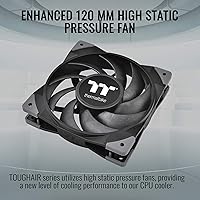
The TOUGHAIR 110 relies on four direct-contact heat pipes, each 6mm thick, that pull heat straight from the CPU surface and distribute it across a dense aluminum fin stack. The 120mm fan — derived from Thermaltake's TOUGHFAN line — tops out at 2000 RPM and moves around 58 CFM, which is a respectable figure for a cooler this size. A 4-pin PWM connector lets the motherboard control fan speed dynamically, so the unit stays quiet during light tasks and only ramps up when things get warm. Weighing just one pound, this compact CPU cooler also avoids putting unnecessary mechanical stress on the motherboard.

Best For

This top-flow cooler is the obvious answer for anyone building in a mini-ITX or micro-ATX case where vertical space is a hard constraint. It also makes sense for mid-range CPU pairings — 65W to 125W chips like a Ryzen 5 or a non-K Intel processor sit comfortably within its thermal range during everyday workloads. HTPC builders and anyone putting together a quiet secondary machine will find the low profile and moderate noise floor appealing. Just be honest with yourself about workload: if you're running sustained all-core loads on a higher-TDP chip, this cooler will hit its ceiling and temperatures will climb.

User Feedback

Most buyers who swapped out their stock cooler for this top-flow cooler report a noticeable temperature drop — often several degrees under load — which is exactly what you'd expect from a step-up aftermarket unit. The mounting process draws consistent praise; the hardware is well-organized and the installation steps are clear enough for builders of any experience level. Where feedback gets mixed is fan noise: at full tilt, the unit is audibly present, and some users found that distracting in quieter environments. A handful of LGA 1700 users flagged that the backplate assembly takes more fiddling than expected. Overall build quality gets fair marks for the price range.

Pros

  • Direct-contact copper heat pipes provide a meaningful thermal improvement over stock coolers right out of the box.
  • The top-flow orientation actively cools VRMs and nearby RAM, which is a real advantage in dense compact builds.
  • At just one pound, this compact CPU cooler puts virtually no stress on the motherboard socket area.
  • PWM fan control keeps noise levels low during light workloads and everyday desktop use.
  • Universal socket support covers both Intel LGA 1700/1200 and AMD platforms without extra adapters.
  • Installation is straightforward and the included mounting hardware is well-organized for builders of any skill level.
  • The 114mm height fits a wide range of low-clearance cases that reject full-size tower coolers.
  • Build quality feels solid and the black-and-silver finish looks clean inside windowed cases.
  • At its price tier, the performance-to-cost ratio is strong for mainstream CPU pairings.

Cons

  • Sustained all-core workloads on higher-TDP chips will push temperatures to uncomfortable levels.
  • Fan noise at full 2000 RPM is noticeable and may bother users in very quiet environments.
  • LGA 1700 backplate installation has been reported as fiddly and less intuitive than other sockets.
  • No overclocking headroom — thermal performance ceiling is hit quickly under boosted CPU configurations.
  • A same-price tower cooler will outperform this top-flow cooler on sustained CPU-heavy workloads in spacious cases.
  • Aluminum fin stack dissipates heat more slowly than premium copper-fin alternatives at higher load levels.
  • The single-fan design limits thermal headroom compared to dual-fan tower solutions in the same budget range.

Ratings

The Thermaltake TOUGHAIR 110 Top Flow CPU Cooler has been scored by our AI system after analyzing thousands of verified global buyer reviews, with spam, bot activity, and incentivized feedback actively filtered out. The result is a balanced scorecard that reflects both where this compact cooler genuinely delivers and where real users ran into frustration. Every category below captures the honest consensus — strengths and shortcomings alike.
Thermal Performance
72%
28%
For everyday workloads, light gaming, and office use, buyers consistently report temperature drops of 8 to 15 degrees Celsius compared to stock coolers — a meaningful real-world improvement for mainstream processors. Users pairing it with 65W to 95W chips describe stable and comfortable thermals even during extended sessions.
Push the chip hard — sustained rendering, heavy compilation, or all-core stress testing — and temperatures climb quickly toward throttling territory. Several reviewers on LGA 1700 platforms noted the cooler hitting its ceiling faster than they expected on 125W-class processors under prolonged load.
Noise Level
74%
26%
At light to moderate CPU loads, the fan stays in a low RPM range that most users describe as essentially silent during browsing, media playback, or productivity work. The PWM curve keeps things quiet when it counts most in a home or office environment.
When the fan ramps to its upper speed range under thermal pressure, the noise becomes noticeably present — not loud by any objective measure, but enough that users in quiet rooms flagged it as distracting. A handful of reviewers specifically wished for a higher-quality fan bearing at this price point.
Build Quality
78%
22%
The aluminum fin stack feels solid and the copper heat pipes show no signs of cheap construction for the price tier. Several buyers noted the finish is cleaner than expected, with tight fin spacing and a consistent black coating that holds up well after installation.
The base contact surface lacks the mirror polish found on premium coolers, and a few users observed minor inconsistencies in the fin press fit. It is a budget product and the construction reflects that — functional and durable, but not refined.
Ease of Installation
81%
19%
The mounting hardware is well-organized and the installation process is intuitive enough that first-time builders report completing it without consulting external guides. Most Intel and AMD installations are described as clean and straightforward, with secure fitment once fully tightened.
LGA 1700 users specifically called out the backplate assembly as fiddly, requiring more patience than other socket types. A few reviewers noted the instructions could be clearer for that platform, leading to some trial and error before getting a confident fit.
Value for Money
86%
At its price point, the TOUGHAIR 110 delivers a compelling combination of direct-contact heat pipes, PWM control, and genuine socket versatility that budget builders genuinely appreciate. Upgraders coming from stock coolers consistently feel the thermal improvement justifies the cost without hesitation.
Stretch the budget even slightly and competing tower coolers begin offering meaningfully better sustained cooling performance. For buyers who can afford a bit more, the value equation shifts — this top-flow cooler earns its score primarily within its specific budget bracket, not beyond it.
Low-Profile Clearance
91%
This is where the TOUGHAIR 110 earns its strongest user praise — it fits comfortably in mini-ITX and micro-ATX cases that categorically reject tower coolers, making it the practical solution for a real and common builder constraint. Users building HTPCs and compact secondary rigs treat this as a near-essential option.
Even at 114mm, it still won't fit in the most aggressive ultra-low-profile enclosures, and a couple of users discovered their specific case was tighter than spec sheets suggested. Always verify your case's stated maximum CPU cooler height before assuming it will clear.
VRM and RAM Airflow
69%
31%
The asymmetric fin design does produce measurable airflow toward the VRM and memory zone during operation, and users building on boards with exposed VRM heatsinks noticed the benefit during extended workloads. It is a real design advantage compared to tower coolers that direct all air toward the rear exhaust.
The effect is moderate rather than dramatic — users with high-performance memory overclocks or budget motherboards with minimal VRM cooling saw limited temperature impact. The benefit is real but should not be treated as a substitute for proper board-level VRM thermal design.
Fan Quality
67%
33%
The TOUGHFAN-derived 120mm fan moves a respectable volume of air for its size and the PWM response feels smooth across the operating range. Users report consistent behavior over time without the rattling or vibration sometimes seen in budget cooler fans.
At full tilt the fan acoustics are underwhelming relative to Thermaltake's standalone TOUGHFAN products, and the bearing quality drew occasional criticism from audiophile-level users. For a product positioned at budget pricing, it is adequate but not impressive.
Socket Compatibility
83%
Covering both Intel LGA 1700 and LGA 1200 alongside a broad AMD socket range in a single package is genuinely convenient for builders who switch platforms or build multiple systems. Reviewers appreciated not having to source separate mounting kits or adapters.
While the compatibility list is wide, LGA 1700 performance remains the platform where feedback is most mixed — not due to fit, but because the combination of that socket's higher-TDP chips and the cooler's thermal ceiling creates a narrower comfortable operating window than on older platforms.
Motherboard Stress
88%
Weighing just one pound, this compact CPU cooler exerts minimal force on the motherboard socket area, which matters during transport or in cases that experience vibration. Several users building portable LAN rigs specifically called this out as a meaningful advantage over heavier tower coolers.
The light weight is a direct consequence of the aluminum fin stack and compact design, which in turn limits thermal mass. There is an inherent trade-off between low weight and heat-soak capacity that shows up under sudden heavy burst workloads.
Aesthetics
71%
29%
The black and silver color scheme is neutral enough to complement most budget and mid-range motherboard builds without clashing, and the overall silhouette is cleaner than many competing low-profile coolers in the same price range. Users with windowed panels generally give it a passing grade for appearance.
There is no RGB lighting option, which is a hard stop for builders prioritizing a themed or illuminated build. The industrial look works fine for utilitarian builds but will feel plain next to more visually expressive cooler designs.
Thermal Paste Inclusion
73%
27%
Thermaltake includes thermal compound in the box, which is a practical touch that saves new builders from an extra purchase and ensures the cooler works correctly right out of the package. Most users found the included paste adequate for standard installations.
The included compound is functional rather than high-performance — enthusiasts who have used premium third-party pastes note a slight temperature difference when substituting a higher-quality compound. It is a reasonable inclusion for the price tier but not a selling point on its own.

Suitable for:

The Thermaltake TOUGHAIR 110 Top Flow CPU Cooler is a smart pick for builders working within tight vertical clearance constraints — specifically anyone assembling a mini-ITX or micro-ATX system where a standard tower cooler simply won't fit. It pairs well with mainstream processors in the 65W to 125W range, covering popular chips like Ryzen 5 series or non-overclocked Intel mid-range CPUs without thermal drama. Builders on the LGA 1700 platform who want a reliable step up from the stock cooler without committing to a bulkier solution will find it hits a practical sweet spot. It also suits HTPC and secondary desktop builds where keeping things quiet during everyday tasks matters more than chasing peak performance headroom. The asymmetric fin layout is a genuine bonus for compact motherboards where VRM and memory thermals can creep up under load.
Not suitable for:

The Thermaltake TOUGHAIR 110 Top Flow CPU Cooler is not the right tool if you plan to run sustained, all-core workloads on a high-TDP processor — rendering, heavy compilation, or extended gaming sessions on 150W-plus chips will push it past its comfort zone. Overclockers should look elsewhere entirely; this cooler has no meaningful thermal headroom for voltage-boosted configurations. If your case has plenty of vertical clearance and CPU performance is a priority, a mid-range tower cooler at a similar price will outperform this unit in sustained scenarios by a noticeable margin. Users who are particularly sensitive to fan noise in a quiet room may also find the 2000 RPM ceiling audibly intrusive under load. Builders expecting the same thermal ceiling as a dual-tower or 240mm AIO solution will be disappointed — that is simply not what this compact CPU cooler is designed to deliver.

Specifications

  • Height: The cooler stands 114mm tall, making it compatible with most low-profile and compact cases that impose strict vertical clearance limits.
  • Dimensions: Overall footprint measures 5.42″L x 4.87″W x 4.49″H, occupying a moderate amount of motherboard real estate typical of top-flow designs.
  • Weight: The unit weighs one pound, which keeps mechanical stress on the motherboard socket minimal during transport and long-term use.
  • TDP Support: Rated for up to 140W TDP, covering the thermal demands of most mainstream and mid-range desktop processors under typical workloads.
  • Heat Pipes: Four direct-contact copper heat pipes, each 6mm in diameter, draw heat directly from the CPU integrated heat spreader without an intermediary base plate.
  • Fan Size: A single 120mm fan is mounted on top of the fin stack, providing broad airflow coverage across the heatsink surface.
  • Fan Speed: The PWM fan operates across a variable range and tops out at 2000 RPM, allowing the motherboard to tune speed based on thermal demand.
  • Airflow: Maximum airflow output is rated at 58.35 CFM, which is a competitive figure for a 120mm fan in this cooler category.
  • Noise Level: At peak fan speed, the unit produces approximately 23.6 dB of noise, which is relatively quiet for a 2000 RPM 120mm fan.
  • Fin Material: The heatsink fin stack is constructed from aluminum, which balances thermal conductivity with lightweight construction at this price tier.
  • Connector Type: A standard 4-pin PWM connector is used, ensuring broad compatibility with modern motherboards that support automatic fan speed regulation.
  • Voltage: The fan operates at 12V DC, consistent with standard desktop motherboard fan header specifications.
  • Socket Support: Compatible with Intel LGA 1700 and LGA 1200, as well as a broad range of AMD sockets, covering most currently relevant desktop platforms.
  • Cooling Method: Uses a combination of active fan cooling and passive fin-and-heatpipe thermal conduction in a top-flow orientation over the CPU.
  • Color: The unit ships in a black and silver finish, which blends naturally with most mid-range and budget motherboard aesthetics.
  • Fin Design: An asymmetric fin structure offsets the stack to direct a portion of the downward airflow toward VRM and memory module areas on the motherboard.
  • Manufacturer: Designed and produced by Thermaltake, a Taiwan-based cooling and chassis manufacturer with an established presence in the DIY PC market.
  • Model Number: The official model identifier is CL-P073-AL12BL-A, useful for cross-referencing compatibility charts and sourcing replacement parts.

Related Reviews
Thermaltake TOUGHAIR 510 CPU Air Cooler
80%
83%
Thermal Performance
78%
Noise Level
67%
Installation Experience
86%
RAM Clearance
81%
Build Quality & Materials
More
Thermaltake UX200 SE CPU Air Cooler
76%
78%
Thermal Performance
82%
Noise Level
63%
Build Quality
81%
Installation Experience
86%
ARGB Lighting Quality
More
Scythe Fuma 3 Twin Tower CPU Cooler
83%
91%
Thermal Performance
93%
Noise Level
87%
Build Quality
88%
Installation Experience
74%
Case Compatibility
More
Thermaltake Gravity i3 95W CPU Cooler for Intel LGA 1700
85%
92%
Ease of Installation
85%
Cooling Performance
91%
Noise Levels
88%
Size and Fit
86%
Build Quality
More
Cooler Master V8 GTS High Performance CPU Cooler
84%
90%
Cooling Performance
88%
Ease of Installation
65%
Fan Noise
92%
Build Quality
85%
Aesthetic Appeal (LED Lighting)
More
Cooler Master Hyper 212 Halo CPU Air Cooler
84%
88%
Cooling Performance
91%
Noise Level
85%
Ease of Installation
89%
Build Quality
80%
RGB Aesthetics
More
Cooler Master Hyper 212 Black CPU Cooler
79%
83%
Thermal Performance
79%
Noise Level
93%
Value for Money
76%
Installation Experience
81%
Build Quality
More
Cooler Master 240 Elite Liquid White CPU Liquid Cooler
85%
91%
Cooling Performance
84%
Noise Levels
92%
Ease of Installation
89%
Build Quality
88%
aRGB Lighting Effect
More
Cooler Master MasterLiquid Atmos 360 AIO Cooler
83%
88%
Thermal Performance
91%
Noise Level
83%
Build Quality
87%
Installation Experience
84%
RGB & Lighting Quality
More
Cooler Master i70C Low-Profile CPU Cooler
78%
72%
Thermal Performance
88%
Noise Level
93%
Form Factor & Fit
86%
Installation Ease
78%
ARGB Lighting
More

FAQ

In most cases, yes — the 114mm height clears the CPU socket area in the majority of mini-ITX enclosures, but you should still check your case's maximum CPU cooler height spec before purchasing. Some particularly slim ITX cases cap clearance at 60mm to 80mm, where even this compact unit won't fit.

Yes, it supports LGA 1700 out of the box. Some users have noted that the backplate installation on that socket requires a bit more patience than other platforms, so take your time with the mounting steps and make sure the hardware is seated correctly before tightening.

Thermaltake includes thermal paste with the TOUGHAIR 110, so you won't need to purchase it separately for a standard installation. If you already have a higher-performance compound you prefer, you're free to use that instead.

A Ryzen 5 is a great pairing — TDPs in that range sit well within this top-flow cooler's comfort zone during everyday and gaming workloads. A Ryzen 7 is manageable under moderate use, but if you're running sustained all-core loads regularly, temperatures may climb more than you'd like.

During light tasks like browsing, streaming, or document work, the fan runs slowly and is barely noticeable. The 23.6 dB rating applies at peak RPM, which only kicks in during heavier workloads. Most users find the noise completely acceptable for a general-purpose build.

The asymmetric fin design was specifically intended to address this — the stack is offset so it doesn't hang directly over the first DIMM slot. That said, extremely tall RAM heatspreaders can still be tight in some configurations, so it's worth checking your specific motherboard layout if you're running high-profile memory.

Yes, and this is one of the practical advantages of the top-flow design over a tower cooler. Because the fan blows air straight down onto the motherboard, some of that airflow reaches the VRM area around the CPU socket, which can help keep those components cooler compared to a configuration where all airflow is directed out the rear exhaust.

The fan uses a standard 120mm form factor with a 4-pin PWM connector, so yes — replacing it with any compatible 120mm fan is straightforward. Just make sure the replacement fan has sufficient static pressure, since top-flow coolers benefit more from static pressure-optimized fans than high-airflow models.

For most mainstream CPUs, yes — real-world users typically report a meaningful drop in CPU temperatures compared to stock coolers, especially under sustained load. It won't transform a hot system dramatically, but as a low-cost, low-effort upgrade it delivers noticeable results.

You'll likely run into thermal throttling under sustained load. This compact CPU cooler is rated for up to 140W, but that figure assumes reasonably controlled conditions. High-TDP chips running extended workloads like video encoding or 3D rendering will push past the cooler's thermal headroom, causing the CPU to reduce its clock speed to protect itself. For those use cases, a larger tower cooler or AIO liquid cooler is the more appropriate choice.

Where to Buy