Overview

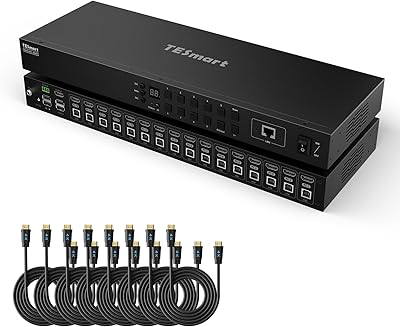
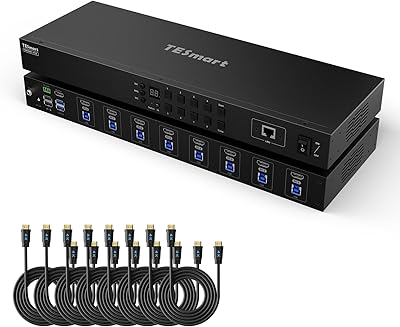
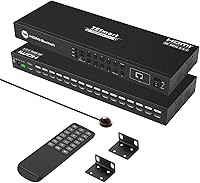
The TESmart HSW1601A1U 16-Port HDMI Switch is a rack-mountable unit built for anyone who needs to route multiple HDMI sources into a single display without compromise. Sitting in the mid-to-premium price range, it targets AV professionals, IT technicians, and serious home lab users rather than casual desktop setups. It supports 4K at 60Hz with full HDCP 2.2 compliance, which matters when dealing with protected content or high-end displays. The standard 1U 19-inch form factor fits neatly into existing server racks or AV cabinets. Just be clear-eyed going in: this is not a plug-and-play gadget for the average user.
Features & Benefits

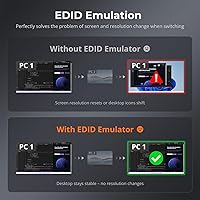
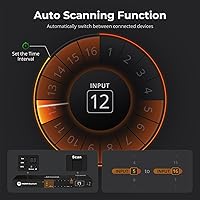
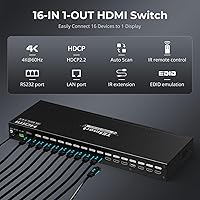
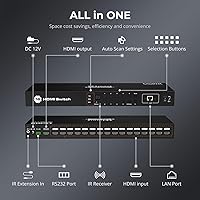
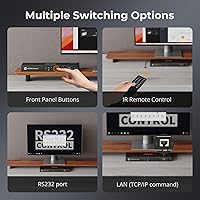
The 16-port HDMI switcher gives you four distinct ways to control which source is active: front panel buttons, an IR remote with an included extender cable, RS232 serial commands, or IP-based network commands. That last option is genuinely useful in rack environments where physical access is awkward. Every input has a built-in EDID emulator, which quietly handles the handshake negotiation that normally causes blank screens when switching between computers with different display profiles. Auto-scan lets you cycle through sources on a timer you configure yourself — anywhere from a few seconds to a full hour. Hot-swap support means you can plug or unplug sources without interrupting whatever is currently on screen.

Best For

This rack-mount switch box makes the most sense for IT professionals and AV technicians who manage a bank of servers or workstations and need a reliable, centrally controlled display solution. Home lab users running five, ten, or more machines will find it a practical upgrade over daisy-chained desktop switchers. It also fits well in conference room installs or small broadcast control rooms where multiple sources need to feed a single monitor or projector on demand. If you need to script or automate source switching via a home automation platform or a custom control system, the RS232 and LAN interfaces make that realistic without additional hardware.

User Feedback

Across roughly 265 reviews, the TESmart rack switcher earns a solid four-star average, with most buyers satisfied by the sturdy metal build and consistent signal handling. The EDID emulator and LAN control draw specific praise from users who have integrated it into more complex setups. On the critical side, a fair number of people mention the IR remote can be sluggish or unreliable at wider angles, and the auto-scan interval takes some trial and error to configure correctly. A handful of buyers note that stable 4K@60Hz output demands quality cables — cheaper ones can cause intermittent dropouts. The LAN control feature divides opinion: network-savvy users find it powerful, while others feel the setup documentation leaves too much to guesswork.

Pros

  • Per-port EDID emulation eliminates blank-screen handshake failures that plague cheaper switchers in multi-machine setups.
  • Four independent control methods give IT and AV professionals real flexibility depending on how the rack is accessed.
  • Stable 4K at 60Hz with full 4:4:4 chroma is reliable when paired with quality cables.
  • Hot-swap support lets you connect or disconnect sources without disrupting whatever is currently on the active display.
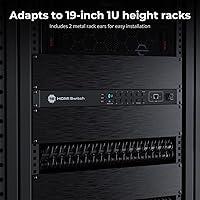
  • The 1U 19-inch rack form factor integrates cleanly into standard server and AV cabinets without any modification.
  • LAN and RS232 control make this rack-mount switch box scriptable for home automation or professional control systems.
  • HDCP 2.2 compliance means protected 4K content from streaming and Blu-ray sources passes through without errors.
  • The metal chassis feels solid and holds up well in always-on professional environments over extended periods.
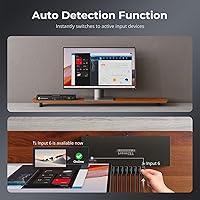
  • Auto-detect switching is useful in conference room installs where presenters expect the display to follow their device automatically.
  • Configurable auto-scan intervals support digital signage or monitoring use-cases where sources need to rotate on a schedule.

Cons

  • The IR remote is unreliable at wider angles and requires near-direct line of sight to work consistently.
  • Documentation for LAN and RS232 configuration is thin — expect to spend time hunting for command syntax online.
  • Budget HDMI cables frequently cause signal dropouts at 4K resolution, adding an unplanned cost to the install.
  • Auto-detect can switch sources unexpectedly when a standby device wakes from sleep in multi-machine environments.
  • The OSD menu for configuring auto-scan timing is not intuitive and takes meaningful trial and error to dial in.
  • No batteries are included for the remote, which is a small but recurring complaint among first-time unboxers.
  • The external power brick rather than an internal supply adds cable clutter behind the rack that requires planning.
  • Port spacing on the rear panel becomes tight with 16 cables installed, especially with thicker or right-angle HDMI connectors.
  • Isolated reports of input recognition issues appearing after a year or more of continuous use raise long-term reliability questions.
  • Buyers who skip the LAN and RS232 features entirely may find the price hard to justify versus simpler 8-port alternatives.

Ratings

Our scores for the TESmart HSW1601A1U 16-Port HDMI Switch were produced by AI after systematically analyzing verified buyer reviews from multiple global markets, with spam, incentivized posts, and bot activity actively filtered out. The result is a balanced picture that reflects both the genuine strengths that keep professionals coming back and the friction points that frustrated a meaningful portion of buyers. Nothing has been smoothed over.
Build Quality
86%
The metal chassis feels reassuringly solid for a rack-mounted unit, and most buyers note it holds up well in always-on environments. IT professionals running it continuously in server closets report no structural issues after months of use, and the front panel buttons have a firm, deliberate feel.
A small number of users mention that the rack-ear brackets feel slightly lighter than expected for the price tier, requiring careful torque when mounting. A few buyers also noted minor cosmetic inconsistencies on the chassis finish straight out of the box.
Signal Integrity at 4K
82%
18%
When paired with quality cables, the TESmart rack switcher delivers stable 4K at 60Hz with no visible artifacts or chroma issues. Users running high-resolution workstations or 4K monitors for color-critical work generally report clean, consistent output across all active ports.
Signal problems correlate strongly with cable quality — several buyers experienced intermittent dropouts or handshake failures when using budget HDMI cables at full 4K resolution. This is a real-world cost consideration that the product listing does not make obvious upfront.
EDID Management
89%
The per-port EDID emulator is one of the most quietly appreciated features among technical buyers. It eliminates the frustrating blank-screen moments that plague cheaper switchers when cycling between computers with different GPU or display profiles, saving meaningful troubleshooting time in multi-machine setups.
A handful of advanced users report that the EDID emulation does not expose all custom resolution profiles, which can be a limitation when working with non-standard display configurations. Documentation on adjusting EDID settings manually is sparse.
Control Flexibility
91%
Having four independent control methods — front panel, IR remote, RS232, and LAN — is a genuine differentiator for rack environments. Home automation enthusiasts and control room operators specifically highlight the IP command interface as the feature that made this switcher worth the investment over simpler alternatives.
The four control modes, while powerful, add setup complexity that catches less technical buyers off guard. Some users report that switching between control methods simultaneously can produce unexpected behavior, and the manual does not clearly explain how priority is handled when multiple inputs are active.
IR Remote Performance
61%
39%
The included IR remote covers the basic switching needs adequately in direct line-of-sight conditions, and the bundled extender cable is a practical addition for rack installs where the unit is behind a door or panel. Casual users in open environments generally find it responsive enough.
This is one of the most consistently flagged pain points in user reviews. The remote requires a relatively precise aim and loses reliability quickly at wider angles or longer distances. Several buyers describe it as sluggish compared to TV remotes, and the absence of included batteries is a minor but recurring irritation.
LAN and IP Control
77%
23%
Network-savvy users and those integrating the switcher into Crestron, Home Assistant, or custom scripts praise the LAN control port as genuinely functional and reliable once configured. In professional AV installs, it removes the need for any physical interaction with the rack unit entirely.
The setup documentation for IP control is widely described as inadequate — command syntax is not well explained, and buyers without prior RS232 or Telnet experience often struggle. A notable portion of users with this use case report spending hours troubleshooting what should be a straightforward configuration.
Auto-Scan Functionality
68%
32%
The configurable auto-scan interval is useful for digital signage or monitoring applications where sources need to cycle on a fixed schedule. Users running surveillance feeds or rotating display content find the OSD-driven timer setup logical once they understand the menu structure.
Getting the timing right takes trial and error, and the OSD menu navigation is not intuitive on first use. A few buyers note that auto-scan can occasionally skip a source or stall on an inactive port, which defeats the purpose when reliability is critical in a professional setting.
Hot-Swap Reliability
83%
The ability to connect or disconnect a source without disrupting the active output is well-implemented and consistently praised. IT technicians who regularly swap laptops or test machines into a rack setup describe it as working reliably without triggering display renegotiation on the active port.
Occasional users report that rapid successive hot-swaps — plugging and unplugging multiple devices in quick succession — can cause the unit to misidentify the active source or temporarily drop the output signal. It recovers quickly, but it is worth noting in fast-paced testing environments.
Setup and Initial Configuration
58%
42%
For buyers with prior AV or IT rack experience, the physical setup is straightforward — mount it, run cables, power on. The front panel buttons and auto-detect function mean basic operation requires no configuration at all for users who just need manual source switching.
The documentation bundled in the box is thin and does not adequately cover the RS232 command set, LAN configuration, or OSD menu depth. Buyers expecting a consumer-grade quick-start experience will be disappointed, and TESmart's online support resources receive mixed reviews for clarity.
Auto-Detect Switching
74%
26%
The automatic input detection works well in straightforward scenarios — plug in a laptop and the switcher prioritizes it immediately without any button press. For conference room setups where a presenter connects a device and expects the display to follow, this behavior is exactly right.
In multi-device environments where several sources are powered simultaneously, auto-detect can switch inputs unexpectedly when a standby device wakes from sleep. A few users in home lab setups describe this as disruptive and note that disabling the feature is not well-documented.
Rack Integration
88%
The 1U 19-inch form factor fits cleanly into standard server and AV racks, and the included rack ears are pre-aligned and functional. Buyers who run structured rack installs appreciate that no modification or third-party hardware is needed to get it seated and secured.
At just under 3.6 pounds, the unit is reasonably light, but a couple of users mounting it in shallow racks noted the rear connector depth requires careful cable management planning. The power brick, rather than an internal power supply, also adds a cable-management consideration behind the rack.
Value for Money
71%
29%
For professional buyers who genuinely need all four control modes, per-port EDID, and rack integration in a single unit, the price is broadly considered fair relative to enterprise-grade alternatives. IT managers replacing a patchwork of smaller switches describe it as a cost-effective consolidation.
Buyers who end up using only the front panel buttons and IR remote may feel they are paying for features they will never touch. If LAN and RS232 control are not relevant to your workflow, lower-cost 8-port alternatives from the same brand offer nearly identical day-to-day performance at a meaningfully lower price.
Cable Management
63%
37%
The rear-panel port layout is organized logically, with inputs numbered clearly and the single output port positioned where it is easy to route a display cable away from the input bundle. Buyers who pre-labeled their cables before installation report a tidy final result.
With 16 HDMI cables converging on a single unit, the rear panel gets congested quickly even with careful planning. Several users note that the port spacing, while workable, leaves little room for thick or right-angle HDMI connectors without adding strain on adjacent cables.
Compatibility
79%
21%
The switcher handles a wide range of source types without issue — workstations, gaming consoles, Blu-ray players, and presentation laptops all coexist without requiring input-specific settings. HDCP 2.2 compliance means protected 4K content from streaming devices passes through without triggering handshake errors.
A small number of users report compatibility quirks with older HDMI 1.4 devices sharing the switch with HDMI 2.0 sources, occasionally causing resolution negotiation to default lower than expected. Testing your specific device mix before committing to a permanent install is advisable.
Long-Term Reliability
76%
24%
Many buyers running the unit in always-on professional environments report stable operation over extended periods, with no thermal or hardware failures noted in the majority of long-term reviews. The unit runs warm but not hot under continuous load, which is typical for a passively cooled rack device.
There are isolated reports of units developing intermittent input recognition issues after a year or more of continuous use. The warranty terms and TESmart support responsiveness for out-of-warranty units receive inconsistent feedback, which is worth factoring into long-term cost calculations.

Suitable for:

The TESmart HSW1601A1U 16-Port HDMI Switch is built for people who have outgrown consumer-grade switching solutions and need something that fits into a structured rack environment. IT professionals managing a bank of servers or workstations will appreciate the LAN and RS232 control options, which allow source switching to be scripted or triggered remotely without anyone physically touching the unit. Home lab enthusiasts running eight, twelve, or sixteen machines from a single monitor will find the per-port EDID emulation alone worth the investment, since it eliminates the display negotiation headaches that cheaper switches cause constantly. AV integrators setting up conference rooms or small control rooms will value the auto-detect and hot-swap functionality, which keeps presentations running smoothly when speakers swap in laptops mid-session. Anyone building or expanding a 19-inch rack setup who wants a single, capable unit to handle all HDMI routing — rather than stacking multiple smaller switches — will find this rack-mount switch box a clean, practical solution.
Not suitable for:

If you need to switch between two or three HDMI sources on a home desk, the TESmart HSW1601A1U 16-Port HDMI Switch is almost certainly the wrong tool — you would be paying for twelve ports you will never use and a form factor that does not belong on a desktop. Buyers who are not comfortable with rack mounting, OSD menus, or at least basic network configuration will find the setup experience frustrating, since the included documentation does not hold your hand through anything beyond the most basic operation. The IR remote, while functional, is not reliable enough to serve as a primary control method in a serious install, so buyers who need wireless control and are not ready to configure IP commands may hit a wall quickly. If your workflow does not involve 4K content, HDCP-protected sources, or any need for RS232 or LAN automation, the feature set here is genuinely oversized for your needs and a simpler 8-port alternative would serve you better at a lower cost. Budget-conscious buyers who only need manual source switching should also weigh whether the premium features they will never activate justify the price difference over more modest options.
Specifications

  • HDMI Inputs: The unit provides 16 individual HDMI input ports, all accessible from the rear panel.
  • HDMI Output: A single HDMI output port connects to the display or monitor receiving the switched signal.
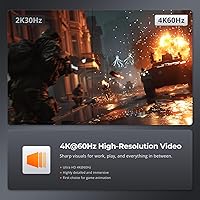
  • Max Resolution: Supports video output up to 3840×2160 at 60Hz with full 4:4:4 chroma subsampling.
  • HDCP Compliance: Fully compliant with HDCP 2.2, allowing protected 4K content from streaming devices and Blu-ray players to pass through without errors.
  • EDID Emulation: Each of the 16 input ports includes a built-in EDID emulator to maintain accurate display handshakes and prevent resolution negotiation failures.
  • Control Methods: Source switching can be triggered via front panel buttons, an IR remote control, RS232 serial commands, or LAN-based IP commands.
  • Auto-Scan Interval: The OSD-configurable auto-scan timer supports intervals between 0 and 3600 seconds for hands-free sequential source cycling.
  • Auto-Detect: The unit automatically detects a newly connected source and switches the active output to that input without manual intervention.
  • Hot-Swap Support: Sources can be connected or disconnected while the unit is powered and active without interrupting the currently displayed signal.
  • Form Factor: Designed to fit a standard 1U slot in a 19-inch equipment rack or AV cabinet.
  • Rack Ears: Two rack-mounting ears are included in the box for direct installation into standard 19-inch rack frames.
  • Dimensions: The chassis measures 12 × 5.91 × 1.75 inches (approximately 304.8 × 150.1 × 44.5 mm).
  • Weight: The unit weighs 3.53 pounds (approximately 1.6 kg) without cables attached.
  • IR Extender: An IR extender cable is included, allowing the IR receiver to be positioned outside a closed rack enclosure.
  • Remote Battery: The IR remote requires AAA batteries, which are not included in the package.
  • Model Number: The official model identifier for this unit is HSW1601A1U.
  • Manufacturer: Designed and manufactured by TESmart, a brand specializing in professional KVM and AV switching equipment.
  • Availability: This product was first made available in March 2020 and remains an active, non-discontinued SKU.

Related Reviews

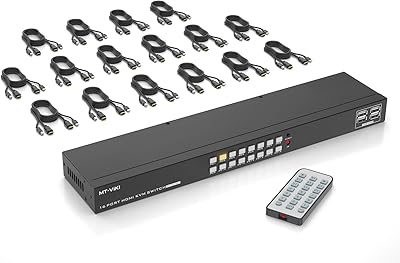
TESmart 16 Ports HDMI KVM Switch 4K@30Hz
85%
87%
Performance
91%
Setup & Installation
75%
Switching Speed
88%
Video Quality
89%
Build Quality
More
MT-VIKI MT-1601HK-C 16-Port HDMI KVM Switch
80%
88%
Switching Reliability
81%
EDID Storage Performance
79%
Build Quality
62%
IR Remote Usability
86%
Value for Money
More
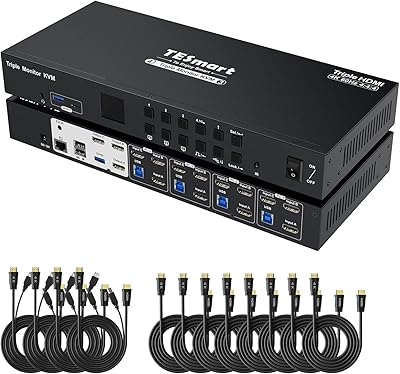
TESmart HKS403-P23 4-Port Triple Monitor KVM Switch
69%
78%
Display Performance
72%
EDID Emulation Reliability
74%
Switching Speed & Reliability
58%
USB Hub Performance
69%
Network Sharing
More
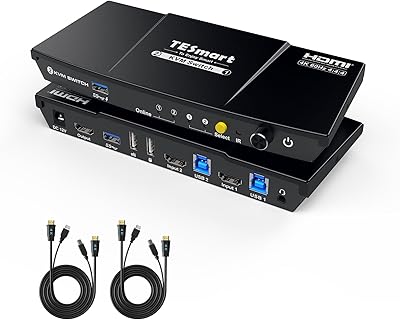
TESmart HKS201-P23 2-Port HDMI KVM Switch
77%
83%
Ease of Setup
88%
Video Quality & Resolution
67%
Switching Reliability
71%
Audio & Microphone Performance
79%
USB Hub Performance
More
TESmart HKS801-P23 USB 3.0 HDMI KVM Switch 8 Port 4K@60Hz
87%
91%
Ease of Setup
95%
Video Quality
88%
Switching Reliability
85%
Build Quality
92%
Value for Money
More
Cisco SG100-16 16-Port Gigabit Network Switch
72%
91%
Ease of Setup
54%
Build Quality
83%
Port Performance
49%
Value for Money
47%
Long-Term Reliability
More
Zyxel GS1100-16 16-Port Gigabit Ethernet Switch
85%
88%
Performance
94%
Ease of Setup
91%
Energy Efficiency
85%
Build Quality
92%
Noise Levels
More
YuLinca UMG16 16-Port Gigabit Network Switch
80%
92%
Value for Money
83%
Build Quality
96%
Ease of Setup
88%
Port Performance
97%
Noise Level
More
NETGEAR GS116PP 16-Port PoE+ Gigabit Switch
83%
96%
Ease of Setup
93%
PoE Port Coverage
68%
Power Budget Adequacy
88%
Build Quality
97%
Noise Level
More
TCNEWCL KS-801 8-Port HDMI KVM Switch
78%
88%
Ease of Setup
91%
Port Capacity & Scalability
74%
Video Quality & Resolution
69%
Switching Speed & Reliability
83%
IR Remote Control
More

FAQ

No adapter needed. The unit is built to 1U 19-inch spec and comes with two rack ears pre-included. You can mount it directly into any standard server or AV rack without sourcing additional hardware.

Yes, through the LAN port. The TESmart HSW1601A1U 16-Port HDMI Switch accepts IP-based commands over your local network, which means it can be integrated with platforms like Home Assistant, Control4, or any system that supports TCP/IP command strings. You will need to locate or request the IP command protocol document from TESmart, as it is not bundled in the box.
It does deliver stable 4K at 60Hz, but cable quality matters a lot here. Several buyers have found that budget HDMI cables introduce dropouts or handshake errors at full resolution. Use cables rated for HDMI 2.0 or higher and you should get solid, consistent output.

It can, which is one of the more commonly reported frustrations. The auto-detect feature is designed to switch to any newly active input, so if multiple sources wake up around the same time, the unit may cycle between them. You can disable auto-detect through the OSD menu if you prefer manual control in a multi-device environment.

Honestly, not in a demanding setup. It works fine in direct line-of-sight conditions at close range, but user feedback consistently flags it as sluggish and angle-sensitive. If the unit will be mounted inside a rack cabinet, the included IR extender cable helps, but for serious professional use, LAN or RS232 control is far more dependable.

Yes, for display only. This rack-mount switch box handles HDMI video switching across 16 sources to one output, but it does not pass keyboard or mouse signals — that is a KVM function. If you also need to share input devices, you would need a separate KVM switch or a combined KVM-over-IP solution.

HDMI carries both video and audio, so whatever audio is embedded in the HDMI signal from your source will pass through to the output along with the video. There are no separate audio inputs or outputs on this unit.

The auto-scan interval is set through the OSD menu accessible from the front panel. You can dial in anywhere from a few seconds to a full hour between source changes. Port exclusion options depend on the firmware version, and the manual is not particularly thorough on this detail — a few buyers have had to experiment to find the full range of options.

There is a brief switching delay while the EDID handshake completes between the new source and the display, which is normal for any HDMI switcher. In practice most users describe it as about one to two seconds, which is acceptable for professional use but would be disruptive in gaming or live performance contexts.

The unit is passively cooled with no internal fan, so it runs silently. It does get warm during continuous operation, which is expected for a passively cooled rack device. Buyers who run it 24/7 in enclosed rack cabinets generally report no thermal issues as long as there is reasonable airflow around the unit.