Overview

The YuLinca UMG16 16-Port Gigabit Network Switch entered the market in April 2024 as a straightforward value play — a metal-bodied, fanless switch aimed at home users, small offices, and prosumers who need more wired ports without paying a premium. YuLinca isn't a household name in networking, and that's worth acknowledging upfront. But the numbers are hard to ignore: 438 verified ratings and a 4.5-star average on Amazon, plus a top-200 ranking in Computer Networking Switches, suggest buyers are genuinely satisfied. For a brand competing purely on practicality, that kind of traction in under a year is worth paying attention to.
Features & Benefits

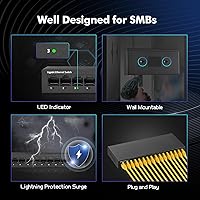
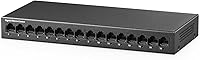
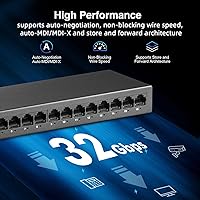
All 16 ports on this 16-port switch run at a full gigabit simultaneously — that's a 32Gbps total backplane, meaning you won't hit a bottleneck even with every port active at once. Auto MDI/MDIX handles cable types automatically, so there's no fussing with crossover cables. The fanless chassis is probably the most underrated aspect: in a quiet home office or a media room, the absence of fan hum genuinely matters. Per-port LED indicators make it easy to spot a dead connection without needing any software. You can mount it on a wall or leave it on a desk, and the 3-year warranty adds a reasonable safety net for a newer brand.

Best For

This fanless network switch is a natural fit for anyone who has run out of ports on a home router and wants a clean wired backbone without the learning curve of managed hardware. It suits IP camera setups particularly well — a dedicated gigabit connection to each camera keeps footage streaming without competition from other traffic. Home theater rooms benefit from the silent operation, with no fan noise bleeding into the space. It also works as a central hub for NAS drives, access points, printers, and workstations. One clear boundary: no VLANs, no QoS, no remote management. If those matter to you, look elsewhere.

User Feedback

With a 4.5-star average across more than 400 reviews, the YuLinca gigabit switch is outperforming many no-name competitors at a similar price point. Buyers consistently cite build quality and silence as standout positives — the metal shell feels substantial, and the lack of fan noise comes up repeatedly. Real-world gigabit speeds are confirmed by reviewers running NAS devices and home lab setups. That said, a handful of buyers have flagged the included power adapter and occasional port dropouts after extended use — outliers, but worth noting. The switch only launched in 2024, so long-term reliability data remains limited. Against TP-Link and NETGEAR rivals, most buyers find it competitive on value, even if the brand recognition gap is real.

Pros

  • All 16 ports run at a full gigabit simultaneously, so no port is ever left starved for bandwidth.
  • The fanless design means absolutely no noise — ideal for quiet rooms where a humming switch would be intrusive.
  • Setup takes under two minutes: plug in power, connect cables, done.
  • The all-metal chassis feels noticeably more solid than plastic competitors at a similar price.
  • Auto MDI/MDIX means any cable type works in any port without adapters or crossover cables.
  • Per-port LED indicators make diagnosing a dead connection quick and obvious without any software.
  • Wall-mount and desktop placement options give genuine flexibility for different installation environments.
  • A 3-year manufacturer warranty provides meaningful coverage for a budget-tier product.
  • Real-world gigabit speeds are consistently confirmed by buyers running NAS and home lab workloads.
  • Strong early review traction — 4.5 stars across 400-plus ratings — suggests reliable quality control.

Cons

  • YuLinca is a relatively new and unknown brand, which makes long-term reliability harder to predict.
  • The included power adapter has drawn criticism from some buyers for feeling underbuilt.
  • No managed features at all — VLANs, QoS, and traffic monitoring are completely off the table.
  • Passive cooling works fine in open air, but enclosed rack or cabinet installs could raise heat concerns.
  • The product only launched in 2024, so there is minimal data on how it holds up after two or more years.
  • A small number of users have reported intermittent port dropouts during extended continuous use.
  • No SFP uplink port, which limits flexibility for users wanting a fiber backbone connection.
  • Customer support relies on email contact, which may not satisfy buyers expecting faster resolution channels.

Ratings

The scores below were generated by our AI after analyzing verified buyer reviews for the YuLinca UMG16 16-Port Gigabit Network Switch from multiple global sources, with spam, bot activity, and incentivized feedback actively filtered out. Both the genuine strengths and the real frustrations buyers encountered are reflected transparently in every category. No score has been inflated to flatter the product — what you see is a fair, data-driven picture of what this fanless network switch actually delivers in everyday use.
Value for Money
92%
Buyers consistently cite this as one of the strongest budget-tier 16-port gigabit switches available, delivering full 1Gbps throughput on all ports simultaneously at a price point well below established brands. For home users and small offices, the cost-to-port ratio is difficult to argue with.
A handful of reviewers noted that if even one or two ports fail after the warranty period, repair costs relative to the original purchase price make replacement the only practical option. The value equation also depends heavily on long-term reliability, which is still an open question given the 2024 launch date.
Build Quality
83%
The all-metal chassis makes an immediately positive impression — buyers frequently mention that it feels noticeably more substantial than plastic-bodied competitors at the same price. In desktop and wall-mount deployments, the rigidity of the enclosure inspires confidence during day-to-day handling.
Some buyers reported that port connectors feel slightly loose compared to enterprise-grade switches, and a few noted minor cosmetic imperfections on arrival. For a product launched in 2024 with limited long-term track record, durability claims still rest more on early impressions than proven endurance.
Ease of Setup
96%
Reviewers across all technical skill levels — from IT professionals to complete novices — agree that setup is essentially instant: plug in the power adapter, connect ethernet cables, and everything works. There is no interface to navigate, no firmware to update on first run, and no account creation required.
Because there is zero configuration available, users who encounter a problem have no diagnostic tools built into the device itself — you are left relying solely on the LED indicators. For advanced troubleshooting scenarios, the complete absence of any management interface can become a genuine limitation.
Port Performance
88%
Real-world throughput tests shared by buyers running NAS arrays, home lab servers, and multi-camera security systems confirm that the switch reliably delivers gigabit speeds across active ports. Auto MDI/MDIX and auto-negotiation work as advertised, eliminating cable compatibility headaches entirely.
A small but consistent segment of reviewers reported isolated port dropouts during sustained high-traffic periods, particularly when multiple ports were simultaneously saturated. These appear to be outlier hardware variance issues rather than a systemic flaw, but they are worth acknowledging.
Noise Level
97%
The completely fanless design delivers on its promise: buyers placing this switch in living rooms, home theaters, and bedroom offices consistently report zero audible output. In noise-sensitive environments where even a quiet fan hum would be intrusive, this switch is genuinely one of the cleanest options at any price.
There is essentially no meaningful con here from a noise perspective. The trade-off is thermal — passive cooling means the chassis runs warmer than fan-cooled alternatives — but in open-air installations this has not translated into a noise complaint from any verified reviewer.
Thermal Management
67%
33%
In standard open-air deployments — desktop surfaces, wall mounts with adequate clearance — the metal chassis handles heat dissipation effectively enough that buyers report the unit staying warm but never alarmingly hot during extended operation.
Buyers who installed this fanless network switch inside enclosed media cabinets or poorly ventilated network closets reported noticeably higher surface temperatures over time. Without active cooling, heat management in confined spaces is a real concern, and the manufacturer does not provide detailed thermal limits for enclosed installations.
Power Adapter Quality
61%
39%
The included adapter functions reliably for most buyers and is compact enough not to block adjacent wall outlets. For users who simply plug it in and leave it, it gets the job done without drawing any attention.
The power adapter is the most consistently criticized component in buyer reviews — multiple users described it as feeling cheap or underbuilt relative to the switch itself, and a small number reported adapter failures requiring replacement. Buyers who want peace of mind may prefer sourcing a quality third-party 12V 1A adapter.
Port Count & Layout
89%
Having 16 full gigabit ports in a chassis this compact is genuinely practical for dense home and small office setups. Buyers running mixed environments — cameras, NAS devices, access points, desktops, and printers — appreciate being able to wire everything into a single switch without compromise.
The switch offers no SFP or fiber uplink port, which limits flexibility for buyers wanting to connect to a fiber backbone or extend the network over longer distances than copper ethernet allows. For purely copper-based setups this is irrelevant, but it is a ceiling some prosumers will hit.
Brand Trust & Support
58%
42%
The 3-year warranty is a genuine differentiator at this price tier, and buyers who have contacted YuLinca support describe responses as reasonably prompt. The strong early review traction on a relatively new product suggests quality control is being managed with some care.
Support is limited to email contact, which frustrates buyers expecting phone or live chat options when urgent network issues arise. More broadly, YuLinca carries none of the institutional trust that comes with established brands — buyers are making a calculated bet on a newer manufacturer with a limited public track record.
LED Indicators
81%
19%
Per-port LEDs are bright and easy to read, giving users an immediate visual snapshot of which ports are connected, which are idle, and which are actively transmitting data — all without touching a screen or opening an app. In rack or shelf installations, quick visual troubleshooting is genuinely useful.
The indicators are functional but basic — they do not differentiate between 100Mbps and 1Gbps link speeds, which means you cannot visually confirm whether a port has negotiated a full gigabit connection without using an external tool. For users who care about per-port speed confirmation, this is a minor but real limitation.
Mounting Flexibility
78%
22%
Both desktop and wall-mount configurations are supported, and at 0.59Kg the switch is light enough that wall mounting does not require heavy-duty anchors. Buyers in tight network closets and home office setups appreciate having both options without needing to purchase add-on accessories.
Some buyers found the wall-mounting hardware minimal — the included accessories are basic, and the mounting points are not positioned for easy integration into standard 19-inch rack enclosures. Users planning a proper rack deployment will need a separate shelf or bracket solution.
Compatibility
91%
The switch works reliably with all major consumer and prosumer networking equipment — routers from ASUS, TP-Link, and Netgear, NAS units from Synology and QNAP, and IP camera systems from Hikvision and Reolink all operate without any configuration adjustments. IEEE standards compliance ensures broad interoperability.
Because the switch is unmanaged, it cannot participate in advanced network topologies requiring tagged VLANs or spanning tree protocol customization. In mixed managed and unmanaged environments, it will function as a basic Layer 2 device with no ability to adapt to more complex network policies set upstream.
Long-term Reliability
63%
37%
Early buyer data — now approaching 15 months of real-world use for the first purchasers — suggests most units operate without issue through the first year. The metal chassis and fanless design eliminate the two most common mechanical failure points found in cheaper switches: fan failure and chassis flex.
The honest reality is that the product launched in April 2024, which means meaningful multi-year durability data simply does not exist yet. Buyers should weigh the strong early signals alongside the fact that YuLinca has a limited public history of standing behind products through years of field use.

Suitable for:

The YuLinca UMG16 16-Port Gigabit Network Switch is a strong fit for anyone who needs to expand a wired home or small office network without touching a configuration interface. If you are running a handful of IP cameras alongside a NAS drive, a few desktops, and a wireless access point, this fanless network switch gives you the port count to handle all of it on a single device. Home theater and media room setups benefit especially from the completely silent operation — no fan drone bleeding into a quiet space. Small business owners who want a simple, set-and-forget network backbone for non-critical infrastructure will find the plug-and-play approach genuinely practical. The solid metal chassis and a 3-year warranty also make it a reasonable choice for buyers willing to take a chance on a newer brand in exchange for meaningful savings.
Not suitable for:

The YuLinca UMG16 16-Port Gigabit Network Switch is not the right tool for anyone who needs advanced network control. If your setup depends on VLANs to segment traffic, QoS to prioritize voice or video calls, or any form of remote monitoring and management, this unmanaged switch simply cannot deliver those features — that is a design boundary, not a flaw. IT professionals managing business-critical infrastructure or multi-tenant environments should look at managed alternatives from Cisco, Ubiquiti, or similar brands with established enterprise track records. Buyers in high-heat environments or enclosed network cabinets with poor airflow should also be cautious — the fanless chassis relies on passive cooling, and there is limited long-term data available given the product only launched in 2024. Anyone who values the reassurance of a globally recognized networking brand over cost savings may find the value proposition less compelling here.
Specifications

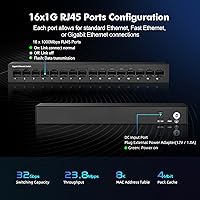
  • Ports: The switch provides 16 x RJ45 ports, each supporting 10/100/1000Mbps auto-negotiation for full gigabit connectivity on every port simultaneously.
  • Backplane Bandwidth: Total backplane bandwidth is 32Gbps, meaning all 16 ports can operate at full gigabit speed at the same time without any internal bottleneck.
  • Forwarding Rate: The packet forwarding rate is 23.8Mpps, providing low-latency data transfer suitable for home and small office workloads.
  • Packet Buffer: The switch includes 4Mbit of packet buffer memory to handle brief traffic bursts without dropping frames.
  • MAC Table: Supports a MAC address table of up to 8,000 entries, sufficient for managing a diverse range of connected devices on a local network.
  • Transfer Mode: Operates using Store and Forward transfer mode, which checks each packet for errors before forwarding to reduce corrupted data on the network.
  • Chassis Material: The enclosure is constructed from metal, providing better heat dissipation and physical durability compared to typical plastic-bodied switches in this price range.
  • Cooling: The switch is fully fanless, relying on passive thermal dissipation through the metal chassis for completely silent operation.
  • Dimensions: The unit measures 240 x 102 x 30mm, making it compact enough for desktop placement or discrete wall mounting.
  • Net Weight: The switch weighs 0.59Kg without packaging, light enough for easy wall mounting without heavy-duty hardware.
  • Power Input: The included power adapter accepts AC 100–240V at 50/60Hz, making it compatible with standard electrical outlets worldwide.
  • Power Output: The adapter delivers 12V at 1A with a maximum draw of 24W, keeping energy consumption low during continuous operation.
  • Standards: The switch is compliant with IEEE 802.3 (10Base-T), IEEE 802.3u (100Base-TX), IEEE 802.3ab (1000Base-T), and IEEE 802.3x (flow control) networking standards.
  • Cable Support: Supports Cat3 or above for 10Mbps links, Cat5 or above for 100Mbps, and Cat5 or above for 1000Mbps connections, all up to 100 meters.
  • Port Indicators: Each port has a dedicated LED indicator that shows link status and flashes during active data transmission, with no software required to read the status.
  • Mounting Options: The switch supports both flat desktop placement and wall mounting, with appropriate hardware included to accommodate either installation method.
  • Management Type: This is a fully unmanaged switch with no configuration interface, web GUI, or CLI — it operates automatically from the moment power is connected.
  • Operating Temp: Rated for operating temperatures between 0°C and 40°C, covering standard indoor environments including offices, living rooms, and home network closets.
  • Warranty: YuLinca provides a 3-year after-sales warranty on the switch, with support available via direct manufacturer email contact.
  • Package Contents: The retail box includes one switch unit, one power cord, and one printed user manual.

Related Reviews

YuLinca F1602GP 16-Port PoE Switch with 2 Gigabit Uplink
84%
72%
Performance at Extended Ranges
92%
Setup & Installation Ease
88%
Build Quality & Durability
85%
Value for Money
90%
PoE Power Output
More
Cisco SG100-16 16-Port Gigabit Network Switch
72%
91%
Ease of Setup
54%
Build Quality
83%
Port Performance
49%
Value for Money
47%
Long-Term Reliability
More
Zyxel GS1100-16 16-Port Gigabit Ethernet Switch
85%
88%
Performance
94%
Ease of Setup
91%
Energy Efficiency
85%
Build Quality
92%
Noise Levels
More
YuLinca 6-Port Gigabit PoE Switch with 4 PoE+ Ports
87%
95%
Ease of Installation
88%
PoE Functionality
91%
Build Quality
87%
Performance and Speed
94%
Fanless Operation (Noise)
More
YuLinca G1002G 8-Port PoE Gigabit Switch
79%
94%
Ease of Setup
89%
Value for Money
82%
PoE Performance
76%
Build Quality
67%
Thermal Management
More
keepLiNK 16-Port Gigabit PoE Unmanaged Switch
81%
91%
Value for Money
93%
Ease of Setup
78%
PoE Power Delivery
84%
Build Quality
71%
Thermal Performance
More
Goalake 16-Port Gigabit Managed Switch
79%
93%
Value for Money
88%
Build Quality
96%
Noise Level
79%
Ease of Initial Setup
66%
Management App Quality
More
STEAMEMO 16-Port Managed Gigabit Ethernet Switch
78%
91%
Value for Money
88%
Ease of Setup
84%
Build Quality
86%
Network Performance
74%
VLAN Functionality
More
NETGEAR GS316 16-Port Gigabit Network Switch
85%
97%
Ease of Setup
96%
Noise Level
78%
Build Quality
91%
Port Performance
88%
Reliability & Longevity
More
Cudy GS1016E 16-Port Managed Gigabit Switch
78%
88%
Value for Money
84%
Ease of Setup
83%
Build Quality
76%
Web Management Interface
81%
VLAN Functionality
More

FAQ

No, there is no software, app, or web interface involved at all. The YuLinca UMG16 16-Port Gigabit Network Switch is fully unmanaged, which means you just plug in the power adapter and connect your devices with ethernet cables. The switch handles everything automatically from that point on.

All 16 ports can run at full 1Gbps simultaneously — the 32Gbps backplane is designed to support non-blocking operation across every port. In real-world home and small office use, you are very unlikely to saturate it.

For gigabit speeds you will want Cat5e or Cat6 cables, which most modern home networks already use. The switch also handles Cat5 for gigabit links if the run is under 100 meters. Older Cat3 or Cat4 cable will limit you to 10Mbps, so it is worth checking what you have in the walls if you are wiring an older building.

Because the switch is fanless, it relies entirely on the metal chassis to dissipate heat passively. In open-air desktop or wall-mount setups it stays warm but not hot. Placing it inside a sealed, poorly ventilated cabinet is not ideal and could lead to heat buildup over time — if you are rack-mounting in an enclosure, make sure there is adequate airflow around the unit.

No, this fanless network switch does not support Power over Ethernet. It will pass data to your cameras and access points just fine, but you will still need a separate PoE injector or a PoE-capable switch upstream if your devices need power delivered through the ethernet cable.

Unfortunately, no. Unmanaged switches like this one do not support VLANs, QoS, or any traffic segmentation. If network isolation is important for your setup — for example, keeping security cameras on a separate logical network — you would need a managed switch that explicitly supports 802.1Q VLAN tagging.

Yes, you can daisy-chain this 16-port switch to another switch using a standard ethernet cable between any available port on each unit. The auto MDI/MDIX feature means a regular patch cable will work fine — no crossover cable needed. Just be aware that daisy-chaining adds a small amount of latency with each hop.

Completely silent. There are no fans or moving parts whatsoever, so the switch produces zero audible noise. It is one of the genuinely practical reasons to choose this over a cheaper fan-cooled model for a living room or media room installation.

YuLinca is a smaller Chinese networking brand without the recognition of TP-Link or NETGEAR, and it is fair to keep that in mind. That said, the product has accumulated over 400 verified Amazon ratings with a 4.5-star average since launching in early 2024, which is a meaningful signal of consistent quality control. The 3-year warranty also provides a reasonable fallback if something goes wrong. It is a calculated value buy, not a luxury purchase.

The box includes the switch, a power cord, and a printed user manual. Wall-mounting hardware is listed as supported, though it is worth confirming the specific bracket or screws are included in your shipment when it arrives, as accessory packaging can vary by production batch. The unit is compact and light enough that most standard wall-mount screw sets work fine with it.