Cisco SG100-16 16-Port Gigabit Network Switch
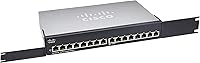
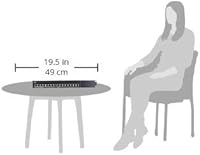
Cisco SG100-16 16-Port Gigabit Network Switch — image 1
Cisco SG100-16 16-Port Gigabit Network Switch — image 2
72%
28%

Overview

The Cisco SG100-16 16-Port Gigabit Network Switch sits in an interesting spot — it carries a well-known enterprise brand name but is built entirely around simplicity rather than advanced management features. This is an unmanaged gigabit switch, meaning there is no web interface, no CLI, and no configuration required whatsoever. You plug it in, connect your devices, and it works. Available in a compact desktop chassis that also fits a standard 1U rack, it targets small offices and home labs that need reliable gigabit connectivity without the complexity — or cost — of a fully managed solution.

Features & Benefits

Every one of the 16 ports runs at full Gigabit speeds, and each port independently negotiates its own speed and duplex setting, so you never have to worry about mismatched connections slowing things down. The inclusion of Quality of Service support is a genuine differentiator at this tier — it lets the switch prioritize latency-sensitive traffic like VoIP calls or video streams over bulk file transfers. The compact 1U rack-mount form factor keeps cable runs tidy in a server closet, and the low-noise operation means it won't be a distraction in an open office environment. Compatibility across Windows, Mac, and Linux is a non-issue given the plug-and-play nature.

Best For

This 16-port gigabit switch makes the most sense for small business environments where someone needs to step up from a consumer-grade switch but has no interest in managing VLANs or monitoring port traffic. IT generalists who want a recognizable brand on the shelf without spending time on configuration will appreciate it. It also works well in a home lab or a small server room where you need multiple gigabit uplinks for NAS devices, workstations, or IP cameras. If you're running a managed switch already and just need an access-layer expansion, this fits that role cleanly too.

User Feedback

Buyer sentiment on the SG100-16 is genuinely mixed, sitting at 3.3 stars across roughly 80 ratings — not a large sample, so take patterns with some caution. On the positive side, users consistently praise the easy out-of-box setup and the comfort of buying a Cisco-branded device. The concerns, however, are harder to ignore: a notable number of reviewers report units running hot or failing after extended use, which raises real questions about long-term reliability. Several buyers also feel the price is harder to justify when competing unmanaged switches from TP-Link or Netgear offer similar specs at a lower cost. Worth factoring in before committing.

Pros

  • True plug-and-play setup — no software, no login, no configuration steps required.
  • All 16 ports run at full gigabit speeds, making local file transfers noticeably faster than older Fast Ethernet switches.
  • QoS support is a genuine bonus on an unmanaged switch, helping VoIP and video traffic stay smooth.
  • Fits both desktop and standard 1U rack installations, giving you flexibility in how you deploy it.
  • Auto-negotiation on every port means mixed-speed devices connect without any manual adjustment.
  • Cisco brand recognition carries real weight in professional environments where vendor trust matters.
  • Wall-mount option makes it practical for conference rooms or small offices with limited desk space.
  • Compatible with any device on any OS — Windows, Mac, Linux, or anything else on your network.

Cons

  • A 3.3-star average rating across buyers signals reliability concerns that should not be brushed aside.
  • Multiple users report the SG100-16 running hot during sustained use, which raises durability questions.
  • Units failing before the end of a reasonable product lifespan is a recurring complaint in user reviews.
  • Priced higher than several competing unmanaged gigabit switches that offer similar or better hardware.
  • Only 80 ratings available, making it hard to gauge long-term reliability with real statistical confidence.
  • No management interface at all means zero visibility into port activity, errors, or traffic patterns.
  • No support for VLANs or network segmentation, which limits usefulness as your network grows in complexity.
  • Warranty and post-purchase support experience from Cisco on this product tier has drawn criticism from some buyers.

Ratings

The scores below reflect an AI-driven analysis of verified global buyer reviews for the Cisco SG100-16 16-Port Gigabit Network Switch, with spam, bot-generated, and incentivized feedback actively filtered out to ensure accuracy. Both the genuine strengths and the real frustrations buyers have encountered are represented transparently — nothing has been inflated to flatter the product.

Ease of Setup
91%
For buyers who just want to expand their network without touching a config screen, setup is as simple as it gets — plug in power, connect cables, done. IT generalists and non-technical office managers consistently praise how quickly the SG100-16 is up and running, often in under five minutes.
Because it is entirely unmanaged, there is also no setup feedback at all — no dashboard to confirm everything is working correctly. Users who want any level of visibility or confirmation of port status have no built-in way to get it.
Build Quality
54%
46%
The chassis has a solid enough feel for a small business switch, and the metal enclosure gives it a more professional appearance than many budget competitors. In straightforward deployments with good airflow, some users run the unit for extended periods without issue.
A recurring thread in user feedback involves units running noticeably hot and, in some cases, failing entirely after months of continuous use. This is the single biggest concern with the SG100-16, and it drags the build quality score down significantly compared to what buyers expect from a Cisco-branded product.
Port Performance
83%
All 16 ports deliver full gigabit throughput, and the auto-negotiation works reliably across mixed-speed devices. Users running NAS boxes, workstations, and IP cameras simultaneously report clean, fast local transfers without any manual port configuration.
There is no per-port activity indicator granularity beyond basic link lights, so diagnosing a slow connection or a flapping port requires external tools. For a fully unmanaged switch this is expected, but it does limit the switch's usefulness when troubleshooting network issues.
Value for Money
49%
51%
The Cisco brand name carries genuine professional credibility, and for buyers where vendor trust and brand recognition on an equipment list matter, the premium over generic alternatives can feel justified. QoS support at this tier is also a feature many cheaper competitors omit.
Against TP-Link and Netgear unmanaged 16-port gigabit switches that cost noticeably less and carry stronger user satisfaction scores, the SG100-16 is a hard sell on pure value. Buyers who prioritize specs-per-dollar will almost certainly find better options elsewhere in this category.
Long-Term Reliability
47%
53%
Units that are deployed in well-ventilated environments with moderate workloads have shown acceptable longevity for some users, and a subset of buyers report years of trouble-free operation in light-duty office roles.
The pattern of early hardware failures and thermal issues reported across buyer reviews is too consistent to dismiss. For a device intended to run 24 hours a day in a business environment, the reliability track record here falls well short of what the Cisco name implies, and this is the most serious concern any prospective buyer should weigh.
QoS Functionality
74%
26%
Having QoS on an unmanaged switch is genuinely useful for small offices running VoIP phones or streaming video surveillance alongside regular data traffic. Users report noticeably smoother call quality after switching from non-QoS alternatives.
Because the switch is unmanaged, QoS operates automatically with no user control over prioritization rules or thresholds. Buyers who need granular traffic shaping will find this implementation too blunt for their needs.
Form Factor & Mounting
81%
19%
The 1U rack-mount compatibility combined with desktop and wall-mount options gives this switch real flexibility for small office deployments. Being able to tuck it under a desk or mount it on a wall in a conference room is a practical advantage many buyers appreciate.
The physical dimensions mean it occupies a full rack unit despite having no management features, which some buyers feel is inefficient rack space usage compared to compact unmanaged alternatives. The wall-mount hardware experience has also drawn occasional complaints about included bracket quality.
Compatibility
88%
As a plug-and-play standards-based switch, the SG100-16 connects without friction to virtually any device on any operating system — Windows workstations, Mac desktops, Linux servers, IP cameras, and NAS drives all coexist without issue. No drivers, no handshake problems.
There is nothing meaningfully negative to report on compatibility — the only caveat is that buyers hoping to integrate this into a managed network environment will find the lack of any management interface a genuine limitation, not a compatibility issue per se.
Noise Level
79%
21%
The low-noise design makes it a reasonable choice for open office spaces or conference rooms where audible fan noise would be disruptive. Several users specifically mention choosing it over louder alternatives for quiet work environments.
The fanless or low-fan design that keeps noise down also appears to contribute to the thermal issues some users experience. In enclosed cabinets or warm rooms, the switch can run hot enough to raise concerns, which is a direct trade-off against its quiet operation.
Port Count Adequacy
84%
Sixteen gigabit ports covers the needs of most small offices comfortably, leaving spare ports for future device additions without requiring an immediate upgrade. For a 10 to 14 device office, this is a practical and well-sized choice.
For growing businesses, 16 ports can feel limiting faster than expected as IP phones, access points, cameras, and workstations accumulate. There is no stacking or expansion capability on this unmanaged platform, so outgrowing it means replacing it entirely.
Brand Confidence
72%
28%
For IT decision-makers who need to justify hardware choices to management or clients, the Cisco name still carries significant weight. Several buyers explicitly cite brand trust as the deciding factor when choosing this switch over cheaper alternatives.
The reliability issues documented by buyers actively erode that brand confidence over time. When a Cisco-branded device fails earlier than expected, the disappointment is often sharper than it would be for a budget brand, because the expectation was higher to begin with.
Indicator Lights
67%
33%
Basic link and activity LEDs on each port give enough at-a-glance information to confirm a cable is live and passing traffic. For simple deployments, this is all most users need during day-to-day operation.
There is no speed indicator to distinguish between a 100Mbps and a 1Gbps connection without testing, which makes it harder to spot a degraded link caused by a damaged cable or a slow legacy device slowing down a segment.

Suitable for:

The Cisco SG100-16 16-Port Gigabit Network Switch is a solid fit for small business owners, office managers, and IT generalists who need to expand their wired network quickly without touching a configuration interface. If your office has grown to the point where a consumer 8-port switch no longer cuts it, this gives you 16 full-gigabit ports in a form factor that fits neatly on a desk or in a 1U rack slot. It works particularly well in environments running VoIP phones or IP cameras, where the built-in QoS support helps keep latency-sensitive traffic moving smoothly alongside regular data. Home lab enthusiasts who want a step up from generic budget hardware — and the reassurance of a known networking brand — will also find it appealing. For anyone who simply wants to plug devices in and have things work, this Cisco unmanaged switch delivers exactly that experience.

Not suitable for:

The Cisco SG100-16 16-Port Gigabit Network Switch is not the right choice for anyone who needs visibility or control over their network traffic. There are no VLANs, no port mirroring, no SNMP monitoring, and no web interface — if those features matter to your setup, you need a managed switch, full stop. Buyers who are price-sensitive should also pause: competing unmanaged gigabit switches from TP-Link and Netgear offer comparable port counts and speeds at meaningfully lower prices, making the SG100-16 a harder sell on value alone. The reported thermal issues from real-world users are also a concern for anyone planning to run this switch in a warm server room or enclosed cabinet without adequate airflow. If long-term hardware reliability is a top priority and your budget is tight, it is worth comparing alternatives carefully before committing to this one.

Specifications

  • Port Count: The switch provides 16 Gigabit Ethernet ports, each supporting 10/100/1000 Mbps speeds.
  • Switching Type: This is a fully unmanaged switch with no configuration interface, web GUI, or CLI access.
  • Data Transfer Rate: Maximum data transfer rate per port is 1000 Mbps (1 Gbps), supporting full-duplex operation.
  • Auto-Negotiation: Each port independently negotiates its own speed and duplex mode without any manual intervention.
  • QoS Support: The switch includes Quality of Service (QoS) functionality to help prioritize time-sensitive network traffic such as VoIP or video.
  • Form Factor: Available in a compact desktop chassis that also supports standard 1U rack-mount installation.
  • Wall Mount: A wall-mount option is included, allowing discreet installation under a desk or on an office wall.
  • Dimensions: The unit measures 11″ in length, 6.7″ in width, and 1.75″ in height.
  • Weight: The switch weighs 4.65 pounds, making it manageable for single-person rack installation.
  • Voltage: The unit operates at 240V and should be used with an appropriately rated power source.
  • Max Temperature: The upper operating temperature rating is 45°C, so adequate airflow is important in warmer environments.
  • OS Compatibility: Compatible with all major operating systems including Windows, Mac OS, and Linux, as no drivers are required.
  • Manufacturer: Manufactured by Cisco Systems under the Small Business 100 Series product line.
  • Model Number: The official model number is SG100-16-NA, identifying this as the North American variant.
  • Interface Type: The product listing notes PoE (Power over Ethernet) as the interface type, though buyers should verify PoE availability on their specific unit before purchase.
  • Availability: The SG100-16 has been available since June 2012 and is listed as not discontinued by the manufacturer.

Related Reviews
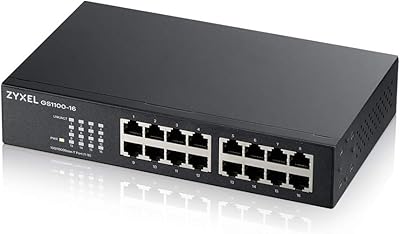
Zyxel GS1100-16 16-Port Gigabit Ethernet Switch
85%
88%
Performance
94%
Ease of Setup
91%
Energy Efficiency
85%
Build Quality
92%
Noise Levels
More
YuLinca UMG16 16-Port Gigabit Network Switch
80%
92%
Value for Money
83%
Build Quality
96%
Ease of Setup
88%
Port Performance
97%
Noise Level
More
Goalake 16-Port Gigabit Managed Switch
79%
93%
Value for Money
88%
Build Quality
96%
Noise Level
79%
Ease of Initial Setup
66%
Management App Quality
More
keepLiNK 16-Port Gigabit PoE Unmanaged Switch
81%
91%
Value for Money
93%
Ease of Setup
78%
PoE Power Delivery
84%
Build Quality
71%
Thermal Performance
More
STEAMEMO 16-Port Managed Gigabit Ethernet Switch
78%
91%
Value for Money
88%
Ease of Setup
84%
Build Quality
86%
Network Performance
74%
VLAN Functionality
More
Cudy GS1016E 16-Port Managed Gigabit Switch
78%
88%
Value for Money
84%
Ease of Setup
83%
Build Quality
76%
Web Management Interface
81%
VLAN Functionality
More
NETGEAR GS316 16-Port Gigabit Network Switch
85%
97%
Ease of Setup
96%
Noise Level
78%
Build Quality
91%
Port Performance
88%
Reliability & Longevity
More
Cisco SG200-08 8-port Gigabit Smart Switch
84%
92%
Ease of Setup
89%
Value for Money
87%
Performance for Small Networks
84%
Power over Ethernet (PoE) Capability
93%
Quiet Operation (Fanless Design)
More
TRENDnet TEG-S17D 16-Port Gigabit Switch
86%
91%
Build Quality
96%
Ease of Setup
88%
Network Performance
89%
Port Count & Density
74%
Thermal Management
More
TRENDnet TEG-S16DG 16-Port Gigabit Switch
84%
96%
Ease of Setup
91%
Build Quality
89%
Network Performance
97%
Noise Level
84%
Value for Money
More

FAQ

No, none at all. The Cisco SG100-16 16-Port Gigabit Network Switch is fully unmanaged, which means you simply plug in the power and connect your devices. There is no setup wizard, no web dashboard, and no configuration app — it just works straight out of the box.

Unfortunately, no. Because this is an unmanaged switch, it has no support for VLANs, port isolation, or any form of traffic segmentation. If network segmentation is something you need, you will want to look at a managed switch instead.

The product specs list PoE as the interface type, but there is genuine ambiguity here. The standard SG100-16 is not widely confirmed as a full PoE switch, so it is strongly recommended that you verify PoE port availability directly with Cisco or your reseller before purchasing with that expectation.

Yes, each port auto-negotiates independently, so a 100Mbps device and a 1Gbps device can both be connected at the same time without any configuration. Each port simply runs at the best speed the connected device supports.

The SG100-16 is designed for quiet operation and should not be a noticeable source of noise in a typical office. That said, some users have reported the unit running warm, so make sure it has good airflow around it — especially in a closed cabinet.

That is honestly the most important question to ask before buying this. Competing 16-port gigabit switches from TP-Link and Netgear are available at lower prices and have generally stronger user satisfaction ratings. The SG100-16 trades on the Cisco brand name, which carries weight in some professional environments, but on pure specs and value the alternatives are competitive.

Both options are available. The unit fits a standard 1U rack enclosure and also works as a desktop switch. There is even a wall-mount option if you want to tuck it out of the way in a conference room or small office.

Warranty terms vary by seller and region, so check the listing carefully before purchasing. It is worth noting that some buyers have reported reliability issues with this unit over time, so understanding your coverage before you buy is a smart move.

It can work well for that use case. The QoS feature helps prioritize video traffic, and 16 gigabit ports give you plenty of room to connect cameras alongside workstations and servers. Just keep in mind that if your cameras require PoE, you will need to confirm whether your specific unit supports that before relying on it.

16 ports should be comfortable for 12 devices, and it leaves you a few spare ports for future additions without immediately needing to expand. If you think you might scale significantly in the near future, factor that in — but for a 12-device office, this 16-port gigabit switch gives you reasonable headroom.

Where to Buy