Overview

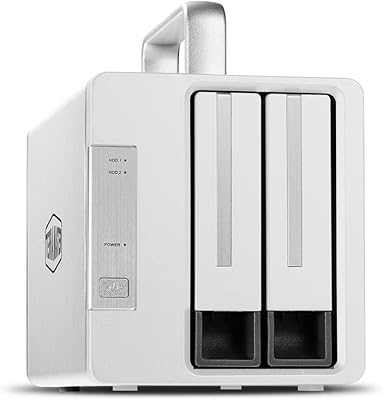
The TERRAMASTER D2-320 USB RAID Enclosure is a versatile and high-performance external storage solution designed for professionals and power users. This RAID enclosure supports two drives, allowing users to configure them in multiple RAID modes including 0, 1, JBOD, and Single. With a USB 3.2 Gen 2 interface, it delivers impressive data transfer speeds of up to 10Gbps, making it an ideal choice for those who need fast and reliable external storage. Whether you need to back up important files or handle large media projects, this device offers the speed and flexibility to meet your needs.
Features & Benefits

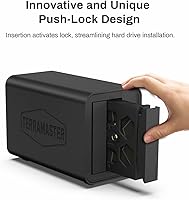
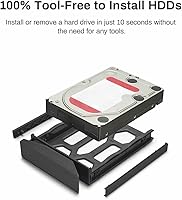
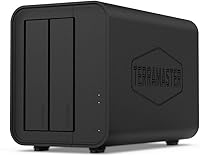
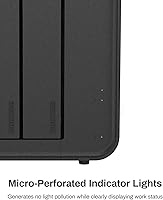
This RAID enclosure stands out for its easy-to-use, tool-free design. You can quickly swap drives in and out thanks to the tool-free tray system, which makes installation a breeze. The device offers robust storage options, supporting up to 44TB of capacity (22TB per drive). For users who prioritize data protection, the RAID 1 auto-rebuilding feature ensures automatic recovery if a drive fails, securing your data with minimal effort. The low-noise, temperature-controlled fan further optimizes the system’s cooling performance, keeping everything running smoothly under load.

Best For

The D2-320 is an excellent choice for anyone in need of a reliable, high-speed external storage solution. It's perfect for professionals working with large media files or needing a secure backup solution, particularly those who prefer the security of RAID 1. Those looking to maximize storage capacity will appreciate its ability to support up to 44TB, providing ample space for both personal and business use. If you're in search of a fast, efficient, and secure external storage device for both HDDs and SSDs, this product delivers solid performance.

User Feedback

The D2-320 generally receives positive reviews, with many users praising its speed and ease of setup. Most find the installation straightforward, especially with the tool-free design. However, some users note that the fan can be a bit noisy during heavy use, which may be a consideration for those with noise-sensitive environments. On the whole, the device is well-regarded for its reliability, but a few reviewers wish the cooling fan could be quieter. Overall, its fast transfer speeds and large storage capacity make it a solid choice for those needing a dependable external RAID solution.

Pros

  • Supports up to 44TB of storage, ideal for handling large media files or backups.
  • RAID 1 auto-rebuilding ensures data security by automatically mirroring drives for redundancy.
  • USB 3.2 Gen 2 provides fast data transfer speeds up to 10Gbps for quick file transfers.
  • Tool-free design allows for easy installation and swapping of drives without the need for screws or tools.
  • Compatible with both HDDs and SSDs, offering flexibility for different storage needs.
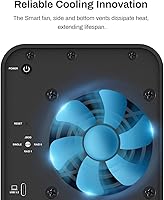
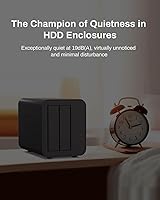
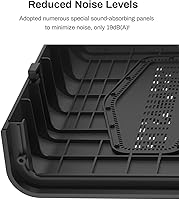
  • Low-noise, temperature-controlled fan operates quietly even under heavy loads, making it suitable for noise-sensitive environments.

Cons

  • Cooling fan noise can become noticeable under heavy load, which may be disruptive in quiet spaces.
  • Large storage capacity (44TB) might be overkill for users with smaller storage needs or light usage.
  • Setup can be intimidating for users unfamiliar with RAID configurations, especially RAID 1.
  • The enclosure is bulky, taking up considerable desk space, which may be a concern for those with limited space.
  • Not the most budget-friendly option, which could be a deterrent for users seeking lower-cost storage solutions.
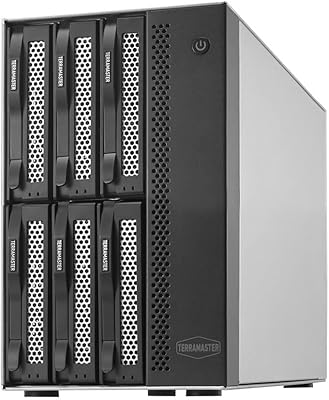
  • Limited to two drives, which may not be sufficient for users needing more drive bays for increased storage capacity.

Ratings

After analyzing verified user reviews from across the globe, including various platforms and languages, we’ve compiled the feedback for this product. Spam, bot-generated, incentivized, and off-topic reviews were filtered out to ensure only authentic and valuable insights are reflected. The scores presented here encompass both the strengths and pain points reported by users, offering a balanced view of this device’s performance and features.

Performance
88%
Users are impressed by the solid performance of this device, especially when using RAID 0. With data transfer speeds up to 10Gbps, it handles large files and demanding tasks effortlessly. Many mention that the device consistently delivers high-speed performance even under heavy workloads, making it ideal for media workflows.
Some buyers have pointed out that while the device performs well overall, there can be occasional dips in speed when used with large drives. A few users have experienced slower-than-expected transfer rates in RAID 1 configurations, likely due to the redundancy features.
Ease of Setup
90%
The tool-free tray design receives widespread praise for making setup incredibly easy. Users often mention how quickly they can install or swap drives without requiring additional tools. The plug-and-play functionality, especially with Windows, Mac, and Linux, simplifies the process for both beginners and experienced users.
A few users have mentioned that the lack of clear instructions could make initial setup tricky for some. While most find it intuitive, first-time users might appreciate more guidance, especially with RAID setup, which can be slightly confusing without prior knowledge.
Data Security (RAID 1)
92%
Many buyers find the RAID 1 auto-rebuilding feature a valuable addition for data security and backup. Users appreciate how the system automatically rebuilds the data in case of drive failure, giving them peace of mind. This makes it an excellent choice for those who need reliable data redundancy without extra manual effort.
Not all users are satisfied with the performance of RAID 1. Some have expressed concerns that rebuilding processes can take time, which might impact performance temporarily, especially when using large capacity drives. The noise level during rebuilding is also a minor issue for some.
Cooling System (Noise)
70%
30%
The cooling system, which includes a low-noise, temperature-controlled fan, helps prevent overheating during extended use. Many users note that the fan operates quietly during normal operations, maintaining efficient cooling without causing a disturbance.
A notable drawback is the fan noise under heavy load. Some users have reported that the fan becomes noticeably louder when the system is under stress, especially with high-capacity drives. This could be an issue in quieter workspaces or environments where noise is a concern.
Build Quality
85%
The build quality is generally praised for its sturdy and durable construction. Users mention the solid feel of the enclosure, making it a reliable storage solution for long-term use. The device’s compact design also ensures it doesn’t take up too much space while still being robust enough to withstand regular handling.
Some users have noted that the plastic casing feels a bit flimsy, especially around the tray slots. Though not a dealbreaker, there is a small concern about the long-term durability of the plastic components, particularly in environments with heavy usage.
Storage Capacity (Max 44TB)
91%
The ability to support up to 44TB of storage is a major advantage for users with large-scale storage needs. Many professionals in media and data backup find this feature crucial, especially when working with high-resolution video files or large databases. The dual 22TB per drive capacity gives flexibility for users needing high storage volumes.
Some users feel that 22TB per drive is overkill for everyday use, especially for personal or smaller business setups. Additionally, while the max capacity is impressive, a few buyers mention that larger drives can sometimes result in slower performance, especially if they are not optimized for high-capacity use.
Connectivity (USB 3.2 Gen 2)
89%
The USB 3.2 Gen 2 interface is frequently praised for providing fast data transfer speeds up to 10Gbps. Users mention that this makes transferring large files quick and seamless, especially for creative professionals or anyone handling high-definition content. The backward compatibility with older USB standards also adds flexibility.
A few users have reported occasional compatibility issues when using certain USB hubs or with older PCs. While the connection works well with most systems, there have been isolated cases of users encountering slower speeds when connecting to non-USB 3.2 Gen 2 ports.
Compatibility (Windows, Mac, Linux)
90%
This device works seamlessly across multiple operating systems, including Windows, Mac, and Linux. Users appreciate the broad compatibility, making it ideal for mixed-device environments. The cross-platform functionality means there's no need to worry about OS-specific limitations, which many buyers find convenient.
While most users experience no compatibility issues, a small number have reported difficulties when setting up on certain Linux distributions. There are also occasional mentions of needing to update drivers on older Windows systems to ensure smooth performance.
Ease of Drive Swapping (Tool-free design)
95%
The tool-free design for swapping drives is widely praised for its convenience and simplicity. Users frequently highlight how easy it is to install or remove drives without needing screwdrivers or tools. This feature is especially valuable for professionals who frequently need to change or upgrade storage drives.
A few users mention that the drive trays can feel a bit stiff when first used, making the initial drive installation slightly more cumbersome. While not a common complaint, this minor inconvenience could impact the experience for those who swap drives often.
Thermal Management
77%
23%
Users note that the temperature-controlled fan helps maintain acceptable temperatures during typical use, preventing overheating even when the drives are running for extended periods. The system is designed to automatically adjust the fan speed based on temperature, which is a helpful feature for maintaining device longevity.
Despite the fan’s temperature control, some users feel the cooling system could be more efficient. In high-performance scenarios or with larger drives, the unit may run warmer than expected, leading to concerns about thermal throttling or potential long-term damage if used in hot environments.
Value for Money
92%
The overall value for money is considered very high by most users. With features like 10Gbps data transfer speeds, RAID support, and tool-free drive swapping, this device offers great functionality at a competitive price point. Many feel that it delivers premium features without the premium price, making it an excellent choice for storage professionals and enthusiasts.
While generally seen as a good value, a few users feel that the price is slightly high compared to similar devices that offer fewer features. Some mention that if the fan noise issue were addressed, the overall experience would feel even more balanced for the price.
Customer Support
80%
20%
Customer support for this device is generally described as responsive and helpful. Users report quick responses from the company when seeking assistance with setup or troubleshooting. Many note that the support team is proactive in resolving issues and providing useful troubleshooting steps.
However, some users have shared that response times can be slow during peak periods, leading to minor frustration. A few buyers also mention that the support team’s advice can sometimes be vague, requiring users to do more troubleshooting on their own.

Suitable for:

The TERRAMASTER D2-320 USB RAID Enclosure is ideal for professionals and enthusiasts who need reliable, high-speed external storage. Its ability to support up to 44TB of storage (22TB per drive) makes it perfect for those dealing with large media files, such as photographers, videographers, or audio engineers. With its fast USB 3.2 Gen 2 connection, it offers seamless data transfer speeds up to 10Gbps, which is highly beneficial for tasks that require fast backups or high-volume file transfers. Additionally, the RAID 1 auto-rebuilding feature ensures secure data redundancy, making it an excellent choice for users who prioritize data security, such as businesses or professionals working on sensitive projects that require backup protection.
Not suitable for:

This RAID enclosure may not be the best choice for casual users or those with basic storage needs. While the 44TB maximum capacity is impressive, it could be overkill for individuals who don't require such large amounts of storage or need a simpler, more affordable solution. The product's reliance on RAID configurations might also pose challenges for those unfamiliar with RAID setups, especially for beginners who may find the initial setup process slightly intimidating without proper guidance. Additionally, the cooling fan’s noise under heavy load could be bothersome in quiet environments, making it less suitable for users who prioritize absolute silence or use their external storage in noise-sensitive spaces.

Specifications

  • Interface: USB 3.2 Gen 2 interface for fast data transfer speeds up to 10Gbps.
  • RAID Modes: Supports four RAID modes: 0, 1, JBOD, and Single for various storage configurations.
  • Storage Capacity: Supports up to 44TB of storage, with each drive bay supporting up to 22TB per drive.
  • Drive Bays: Equipped with two drive bays for dual hard drives or SSDs.
  • Cooling Fan: Low-noise, temperature-controlled fan for effective cooling during operation.
  • Tool-free Tray: Tool-free drive tray design for easy installation and swapping of drives.
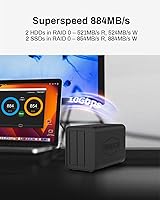
  • Data Transfer Rate: Supports read speeds up to 854MB/s and write speeds up to 884MB/s in RAID 0 with two SSDs.
  • Compatibility: Compatible with Windows, Mac, and Linux operating systems.
  • Dimensions: Measures 8.74″L x 4.69″W x 6.06″H, offering a compact footprint.
  • Weight: Weighs 2.86 pounds, making it portable for users who need to move it between locations.
  • Max Supported Storage: Maximum supported storage capacity is 44TB (22TB per drive).
  • Build Material: Constructed with durable materials for long-lasting performance and reliability.
  • Power Supply: Powered via an included AC adapter for stable and continuous operation.
  • Software Support: Supports RAID management through software for easy configuration and monitoring.
  • Fan Noise: Fan operates quietly under normal load but may increase in noise during heavy usage.
  • Drive Type Compatibility: Compatible with both hard disk drives (HDDs) and solid-state drives (SSDs).
  • Environmental Design: Designed with efficient cooling to prevent overheating and maintain performance.
  • Security Features: RAID 1 offers automatic rebuilding for data security and redundancy.
  • Warranty: Comes with a standard warranty for peace of mind against defects and malfunction.

FAQ

The TERRAMASTER D2-320 USB RAID Enclosure supports up to 44TB of total storage, with each of its two drive bays able to accommodate up to 22TB per drive.
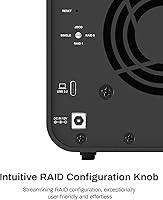
Setup is straightforward with the D2-320, thanks to its tool-free design. Simply insert your hard drives or SSDs into the drive trays, slide them into the enclosure, and connect it via USB 3.2 Gen 2 to your computer. RAID configuration can be managed through software on your PC, depending on the mode you choose (RAID 0, RAID 1, JBOD, or Single).

This device supports four RAID modes: RAID 0 (striping for performance), RAID 1 (mirroring for data redundancy), JBOD (just a bunch of disks), and Single (individual drives without RAID). You can choose the mode that best suits your needs for performance or data protection.

Yes, the D2-320 is compatible with both hard disk drives (HDDs) and solid-state drives (SSDs), giving you flexibility to choose the best storage for your needs. It works well with both types of drives, offering speed for SSDs and cost-effective storage for HDDs.

The D2-320 utilizes USB 3.2 Gen 2 for fast data transfer rates, offering speeds up to 10Gbps. This allows for quick file transfers, which is especially useful when dealing with large files or backup processes.

Yes, the D2-320 is compatible with Windows, macOS, and Linux operating systems, making it a versatile option for a wide range of users across different platforms.

The cooling fan in the D2-320 is designed to be low-noise and temperature-controlled. Most users find it operates quietly under normal use, though some users have reported that the fan can become louder under heavy load or when used continuously.

The D2-320 supports drives up to 22TB per bay, allowing you to install large-capacity drives. It is suitable for users who need substantial storage space, particularly in professional settings that involve media management or large-scale backups.

Yes, you can switch between different RAID modes on the D2-320. However, be aware that switching modes can result in data loss if not done properly, so it's important to back up your data before changing configurations.

While the D2-320 is not particularly lightweight or designed for travel, its compact size (8.74″L x 4.69″W x 6.06″H) makes it somewhat portable for users who need to move it between workspaces. However, it is best suited for stationary use due to its weight (2.86 pounds) and size.