
Overview

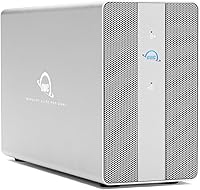
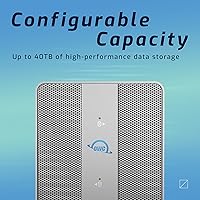
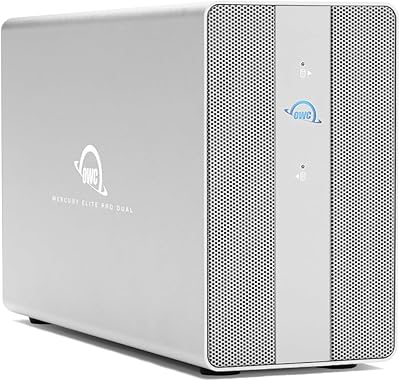
The OWC Mercury Elite Pro Dual 24TB Enclosure is a serious piece of kit built for creative professionals who need fast, reliable local storage without compromise. OWC has long been a go-to brand for Mac users who want hardware that holds up under daily production demands. This dual-bay enclosure ships pre-configured with 24TB of mechanical storage — enough to house years of raw footage, photo libraries, or project archives without constantly juggling drives. The aluminum chassis and a 30dB cooling fan signal that this isn't a budget shelf unit; it's designed to run hard, stay cool, and get out of your way.

Features & Benefits

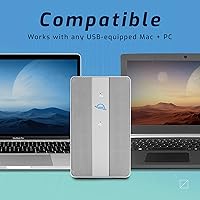
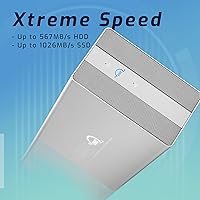
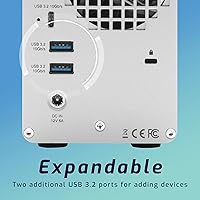
What separates this dual-bay enclosure from cheaper alternatives is how much thought went into real-world usability. The hardware RAID controller lets you switch between RAID 0, RAID 1, Span, or JBOD using a physical toggle on the unit — no software, no configuration menus. That matters if you're an editor who just wants reliable storage, not an IT lesson. Real-world speeds approaching 974MB/s hold up well for moving large video files or working directly off the drive. The built-in three-port USB hub — one Type-C and two Type-A — lets you plug in a card reader or camera without hunting for another adapter. It also works across both Thunderbolt 3 and standard USB-C hosts.

Best For

This storage solution is purpose-built for people who generate and manage large files professionally. Video editors cutting 4K or 8K footage will appreciate the speed headroom and the ability to run RAID 1 for on-drive redundancy — a meaningful safety net when losing a project isn't an option. Photographers sitting on terabytes of raw files will find the 24TB capacity genuinely useful rather than aspirational. It also suits small studio setups where desk clutter matters, since the hub reduces cable sprawl. Casual users or anyone on a tight budget will likely find it hard to justify — this is a tool for people who depend on their storage daily.

User Feedback

Among buyers, the overall sentiment sits at a solid four stars, with praise clustering around the same themes: the unit feels substantial and well-made, speeds hold up consistently over time, and the physical RAID switch earns real appreciation once people have used it. Where buyers push back is more nuanced. A handful mention that the cooling fan becomes noticeable during extended heavy loads — not disruptive, but present. A few PC users note minor compatibility quirks compared to the smoother experience Mac users generally report. On value, opinions split predictably — those who need what it offers feel it earns its keep; those who don't are quick to call it steep.

Pros

  • Real-world transfer speeds near 974MB/s hold up well for demanding 4K and 8K editing workflows.
  • The physical RAID mode switch makes configuring RAID 0, 1, Span, or JBOD genuinely easy for non-technical users.
  • Pre-configured 24TB capacity means it is ready to work right out of the box with no setup headaches.
  • The aluminum chassis feels solid and manages heat effectively during long, continuous sessions.
  • Built-in three-port USB hub reduces desk clutter by eliminating the need for a separate peripheral hub.
  • Compatible with both Thunderbolt 3 and standard USB-C hosts, which extends its useful life across hardware generations.
  • Supports 2.5-inch and 3.5-inch SATA drives, so swapping or upgrading internal drives down the road is straightforward.
  • OWC's reputation for Mac-focused hardware translates into reliable driver compatibility and consistent performance on Apple machines.
  • The enclosure doubles as a peripheral hub, making it practical for tight desk setups with multiple connected devices.

Cons

  • The fan becomes audible during extended heavy loads, which can be distracting in quieter work environments.
  • PC users without Thunderbolt 3 support will not reach the top-end speeds this enclosure is capable of delivering.
  • The significant investment makes it hard to justify unless you are actively working with large files on a regular basis.
  • At over eight pounds, this is not a portable solution — it is strictly a desk-bound unit.
  • Some PC users have reported minor compatibility quirks that Mac users generally do not encounter.
  • Limited to mechanical SATA drives, so users wanting an all-SSD setup will need to source and install their own drives.
  • The physical footprint is substantial, which may be a constraint on smaller workstations or shared desk setups.
  • No built-in cloud backup or network sharing capability — it functions only as direct-attached storage.

Ratings

The OWC Mercury Elite Pro Dual 24TB Enclosure scores here reflect a synthesis of verified buyer experiences sourced globally, with AI-assisted filtering applied to remove incentivized, spam, and bot-generated feedback before analysis. The result is a balanced, honest breakdown that surfaces both what this dual-bay enclosure genuinely excels at and where real users have run into friction. No score has been softened — the pain points are reflected just as transparently as the strengths.

Transfer Speed
91%
Users working in demanding production environments — cutting 4K timelines or moving large RAW photo archives — consistently report that real-world speeds hold close to the advertised ceiling when connected via Thunderbolt 3. That performance headroom means working directly off the drive is a practical option, not just a theoretical one.
Speed drops noticeably when connected via standard USB-C rather than Thunderbolt 3, which catches some buyers off guard. Users without a TB3-capable machine will find the performance gap meaningful enough to affect their workflow expectations.
Build Quality
88%
The aluminum enclosure earns consistent praise for feeling substantial and well-engineered — not the lightweight plastic shell common at lower price points. Buyers who have owned this storage solution for extended periods report no flex, rattling, or deterioration in structural integrity over time.
At over eight pounds, the unit is firmly desk-bound, and the footprint is larger than some users anticipated. A small number of buyers noted that the drive bay access, while functional, feels less refined than the exterior finish suggests.
RAID Configuration
93%
The physical RAID mode switch is one of the most praised aspects of this enclosure across all user feedback. Non-technical buyers especially appreciate being able to switch between RAID 0, RAID 1, Span, and JBOD without touching a single menu or installing any software — it genuinely removes a barrier that puts off many first-time RAID users.
There is no fine-grained RAID management software included, which means advanced users who want deeper configuration control or drive health monitoring will need to rely on third-party utilities. Changing RAID modes also requires powering the unit down, which is a minor but real interruption.
Thermal Management
84%
During standard editing sessions and file transfers, the aluminum chassis does a solid job of dissipating heat passively, and most buyers report the drives staying within safe operating temperatures even during multi-hour sessions. The combination of active and passive cooling appears well-calibrated for sustained workloads.
Under heavy continuous load — think long overnight backup jobs or multi-stream 4K transfers — the unit gets noticeably warm to the touch, which concerns some users even if temperatures remain technically within spec. A few buyers would prefer a secondary ventilation option for extreme-duty scenarios.
Fan Noise
67%
33%
At idle and during light use, the 30dB fan rating holds up reasonably well, and buyers in louder studio environments or those with background music playing rarely flag noise as a problem. For the intended use case in a production studio with ambient noise, it is largely a non-issue.
In quiet home office setups, particularly during heavy transfers or sustained reads, the fan becomes distinctly audible and has drawn repeated criticism from users who expected near-silent operation. This is the single most common complaint across user reviews and the gap between expectation and reality is wide enough to matter.
USB Hub Utility
82%
18%
Having a three-port USB 3.2 Gen 2 hub built into the enclosure is a practical win for users who are already short on ports — plugging in a card reader, a camera, and a tablet simultaneously without reaching for a separate dock is a small but genuinely appreciated daily convenience.
The hub ports, while fast, do not support video output or high-wattage charging, so users hoping to replace a full-featured dock with this enclosure will find its hub functionality limited. Power delivery to connected devices is adequate for peripherals but insufficient for charging larger laptops.
Mac Compatibility
92%
Plug-and-play behavior on macOS is about as smooth as it gets — buyers on Apple Silicon and Intel Macs alike report immediate recognition, consistent speeds, and no driver installation required. OWC's track record in the Mac ecosystem translates directly into a friction-free setup experience for Apple users.
There are no meaningful Mac compatibility complaints in verified user feedback, though buyers on older macOS versions (pre-Catalina) have occasionally reported needing to check for firmware updates before achieving stable performance. This is an edge case, not a widespread issue.
PC Compatibility
71%
29%
For Windows users with confirmed Thunderbolt 3 support, the experience is generally solid and speeds are competitive. Several PC-based video editors report using this storage solution reliably for professional workflows without any ongoing issues after initial setup.
A recurring subset of PC users report compatibility quirks — intermittent disconnections, Thunderbolt certification prompts, or speed inconsistencies — that Mac users almost never encounter. The experience on Windows feels less polished overall, and buyers without guaranteed TB3 support should verify compatibility carefully before committing.
Drive Flexibility
79%
21%
Supporting both 2.5-inch and 3.5-inch SATA drives gives this enclosure genuine long-term value — users who want to upgrade to SATA SSDs or swap to higher-capacity drives in the future are not locked into any single form factor or proprietary hardware.
The enclosure is limited to SATA drives, which rules out NVMe SSDs entirely — a meaningful constraint as NVMe becomes increasingly mainstream and affordable. Users hoping to future-proof with faster storage technology will eventually outgrow the SATA ceiling.
Value for Money
63%
37%
For professional users who genuinely rely on fast, redundant local storage daily, the combination of speed, capacity, build quality, and the integrated USB hub represents a defensible total package. Buyers who extract full use from every feature tend to feel the investment was justified over time.
Casual users and those without a Thunderbolt 3 host consistently feel the price is hard to square against what they actually use. Competing dual-bay enclosures at lower price points close the gap enough that buyers who do not need the full feature set are right to question whether this enclosure is the smartest allocation of their budget.
Setup Experience
86%
Out-of-the-box setup is straightforward for the vast majority of buyers — connect the cable, power on, and the drives appear on the desktop within seconds on macOS. The pre-configured capacity means most users are operational within minutes of unboxing without formatting or partitioning required.
Users who want to change RAID modes out of the box need to understand that reformatting will erase the drives, which is not always made explicit in the packaging. A clearer onboarding guide for RAID mode switching would prevent the confusion that a subset of new buyers encounter.
Cable & Accessory Inclusion
74%
26%
Including a Thunderbolt 3 cable in the box is a genuinely appreciated touch — Thunderbolt cables are not cheap, and their inclusion signals that OWC understands what their buyers actually need to get started without an additional order.
Some buyers have noted that bundle contents can vary depending on where and when the unit is purchased, creating inconsistent expectations. A single Thunderbolt cable is also limiting for users who want to daisy-chain additional peripherals off the port immediately.
Longevity & Reliability
83%
Users who have owned this dual-bay enclosure for one to three years report consistent performance with no degradation in speed or connectivity. OWC's support reputation and the quality of the hardware suggest this is a unit designed to serve a professional workflow for several years.
As with any enclosure relying on mechanical HDDs, long-term reliability is ultimately tied to the drives themselves rather than the enclosure hardware. Buyers running JBOD or RAID 0 without external backup are taking on meaningful risk that RAID 1 users do not face.

Suitable for:

The OWC Mercury Elite Pro Dual 24TB Enclosure was clearly built with working creative professionals in mind, and that focus shows in every design decision. Video editors who regularly handle large raw files — particularly those working in 4K or higher resolutions — will find the speed ceiling and storage capacity genuinely useful rather than over-specced. Photographers managing expansive raw image libraries can finally stop juggling multiple external drives and consolidate into a single, fast, redundant unit. The physical RAID mode switch is a standout feature for anyone who wants data redundancy without the complexity of software-based solutions — you set it and forget it. Mac users will feel especially at home here, given OWC's long track record in that ecosystem, though the dual-interface design means PC users on Thunderbolt 3 or USB-C machines are equally supported. Small studio environments where desk space, noise levels, and reliability all matter simultaneously will find this dual-bay enclosure a genuinely practical fit.

Not suitable for:

The OWC Mercury Elite Pro Dual 24TB Enclosure is not the right call for everyone, and being clear about that matters more than overselling it. Casual home users who store a modest photo collection or stream media will almost certainly not extract enough value to justify the investment — simpler, cheaper single-bay drives cover those needs comfortably. If your workflow runs entirely on cloud storage or you rarely work with files larger than a few gigabytes, this storage solution is solving a problem you do not have. PC users with only older USB-A ports or without Thunderbolt 3 support will also miss out on the performance this enclosure is capable of delivering. Anyone expecting near-silent operation during heavy sustained workloads should be aware that the cooling fan does become audible under pressure — not loud, but noticeable in a quiet room. Budget-conscious buyers exploring the dual-bay category for the first time will likely find the price point a hard barrier relative to more entry-level alternatives.

Specifications

  • Brand: Manufactured by OWC (Other World Computing), a company specializing in Mac-compatible storage and memory solutions since 1988.
  • Model Number: The unit is identified by model number OWCMEDCH7T24, which reflects the specific 24TB pre-configured configuration.
  • Capacity: Ships pre-configured with 24TB of total usable storage across two internal mechanical hard drives.
  • Drive Bays: Houses two drive bays, each supporting either 2.5-inch or 3.5-inch SATA SSDs or HDDs interchangeably.
  • Interface: Connects to host computers via Thunderbolt 3 or USB-C, providing broad compatibility across modern Mac and PC systems.
  • Transfer Speed: Delivers real-world tested sequential transfer speeds of up to 974MB/s under optimal RAID and connection conditions.
  • RAID Modes: Supports four hardware RAID configurations — RAID 0, RAID 1, Span, and JBOD — selectable via a physical switch on the unit.
  • USB Hub: Includes a built-in three-port USB 3.2 Gen 2 hub consisting of one Type-C port and two Type-A ports, each rated at 10GB/s.
  • Drive Interface: Internal drives communicate via Serial ATA-600 (SATA III), the standard interface for mechanical and solid-state SATA drives.
  • Drive Speed: The included mechanical hard drives spin at 7200 RPM, which supports the higher throughput expected in RAID 0 configurations.
  • Enclosure Material: The outer shell is constructed from heat-dissipating aluminum, which passively aids thermal management during sustained workloads.
  • Cooling: An internal fan operates at a rated 30dB noise level, actively drawing heat away from the drives during continuous use.
  • Dimensions: The enclosure measures 13.27 x 11.06 x 4.92 inches, making it a desk-bound unit rather than a portable solution.
  • Weight: The unit weighs 8.79 pounds, reflecting its all-aluminum build and dual internal drive configuration.
  • Platform Support: Compatible with both macOS and Windows systems that include a Thunderbolt 3 or USB-C port.
  • Date Available: This product was first made available on Amazon on August 26, 2020, and represents an established product in OWC's lineup.

Related Reviews
OWC Mercury Elite Pro Dual 32TB RAID Enclosure
79%
91%
Transfer Speed
88%
Build Quality
84%
RAID Configuration Flexibility
86%
Connectivity & Compatibility
74%
USB Hub Utility
More
OWC Mercury Elite Pro Dual 8TB Enclosure
80%
91%
Build Quality
88%
Transfer Speed
86%
RAID Functionality
83%
USB Hub Utility
74%
Noise Level
More
OWC Mercury Elite Pro 12TB External Hard Drive Enclosure
85%
88%
Performance
91%
Build Quality & Durability
93%
Ease of Setup
89%
Compatibility with Multiple Devices
68%
Noise Levels
More
OWC Mercury Elite Pro 6TB External Hard Drive Enclosure
85%
87%
Performance
91%
Build Quality
93%
Data Transfer Speed
90%
Setup & Installation
88%
Compatibility
More
OWC Mercury Elite Pro 2TB Hard Drive Enclosure
74%
83%
Build Quality
71%
Transfer Speed
88%
Ease of Setup
58%
Drive Reliability
63%
Value for Money
More
OWC Mercury Elite Pro 16TB External Hard Drive Enclosure
83%
89%
Performance & Speed
75%
Value for Money
91%
Build Quality & Durability
65%
Noise Levels
88%
Ease of Setup
More
OWC Mercury Elite Pro Mini 2TB External Hard Drive
86%
88%
Performance
91%
Portability
85%
Durability
92%
Compatibility
93%
Setup & Installation
More
OWC Mercury Extreme Pro 6G 2TB SSD
82%
83%
Read/Write Performance
86%
Sustained Speed Consistency
91%
Compatibility
88%
Installation Experience
84%
Build Quality
More
OWC Mercury Pro External Blu-ray Drive
78%
93%
Build Quality
89%
Burn Reliability
91%
M-DISC Compatibility
88%
Mac Compatibility
82%
Windows Compatibility
More
Seagate IronWolf Pro 24TB ST24000NT002
91%
96%
Reliability
91%
Sequential Read/Write Speed
94%
RAID Compatibility
92%
Durability
88%
Heat Management
More

FAQ

It works with any Mac that has a Thunderbolt 3 or USB-C port, which includes most MacBook Pro models from 2016 onward. You will get the best performance — close to the full 974MB/s — when connected via Thunderbolt 3 rather than a standard USB-C port.

The OWC Mercury Elite Pro Dual 24TB Enclosure is fully compatible with Windows PCs that have a Thunderbolt 3 or USB-C port. Most users report straightforward plug-and-play behavior on Windows, though a small number of users have noted occasional quirks that Mac users do not typically encounter, so it is worth confirming your system's Thunderbolt support before purchasing.

No software is required at all. There is a physical switch on the enclosure itself that lets you toggle between RAID 0, RAID 1, Span, and JBOD. Just power down the unit, flip the switch to your preferred mode, and power it back up. It is genuinely one of the most user-friendly aspects of this storage solution.

RAID 0 combines both drives to act as one, which roughly doubles your read and write speeds — great for performance-heavy tasks like editing video directly off the drive. RAID 1 mirrors your data across both drives simultaneously, so if one drive fails, your data is still intact on the other. RAID 0 is faster; RAID 1 is safer. What you prioritize depends on your workflow.

Under light to moderate workloads, the fan is genuinely quiet — most users do not notice it in a typical work environment. During heavy, sustained transfers or long editing sessions, it does become more audible. It is not disruptive for most people, but if you are extremely sensitive to ambient noise, it is worth being aware of.

Yes, the enclosure supports both 2.5-inch and 3.5-inch SATA drives, so you can replace the included mechanical drives with SATA SSDs if you want faster or quieter operation down the line. Just note that the drives currently included are mechanical HDDs spinning at 7200 RPM, not SSDs.

The three USB ports on the hub support both data transfer and charging for connected devices like tablets, card readers, and cameras. Each port runs at USB 3.2 Gen 2 speeds (10GB/s), so transferring files from a camera or card reader while the enclosure is in use is a practical, everyday workflow this unit handles well.

OWC offers the Mercury Elite Pro Dual enclosure in multiple capacity configurations, so 24TB is not your only option. If you need less storage, smaller pre-configured versions are available. The enclosure itself is the same hardware regardless of capacity — only the drives inside differ.

Yes, it will work — the dual-bay enclosure is backward compatible with standard USB-C. However, you will not reach the peak speeds that Thunderbolt 3 enables. For most file management tasks, USB-C speeds are still respectable, but if fast 4K video editing directly off the drive is your primary goal, a Thunderbolt 3 connection makes a meaningful difference.

OWC typically includes a Thunderbolt 3 cable in the box, but it is always worth double-checking what is included at the time of purchase since bundle contents can vary. A power cable is also included. If you need additional cables for a specific setup, those would need to be sourced separately.

Where to Buy