Overview

The Cenmate 4-Bay RAID Enclosure 80TB sits in an interesting middle ground — it's not a bargain-bin plastic box, but it won't break the bank like enterprise-grade gear either. Built around an aluminum-alloy chassis with dual cooling fans, it targets home power users and small businesses who need real, local expandable storage without the complexity of a NAS setup. This is a DAS-only device — no network sharing, no remote access — so set your expectations accordingly. With a 4.1-star rating across roughly 80 reviews and a top-250 ranking in its Amazon category, it has earned enough real-world credibility to take seriously, even if the review pool is still relatively modest.
Features & Benefits

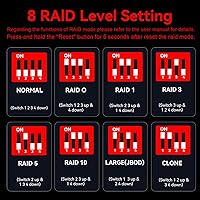
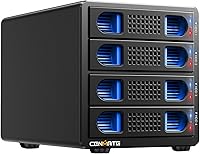
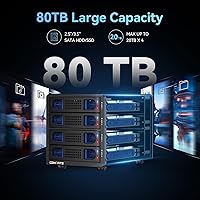
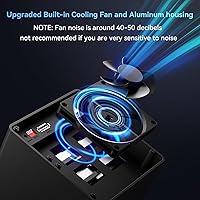
This 4-bay enclosure supports both 2.5″ and 3.5″ SATA drives — up to 20TB per bay, 80TB total — and connects via USB 3.0 Type-A, Type-C, or eSATA. The JMS567+JMB393 chipset handles UASP, pushing transfers up to 5 Gbps. Hardware RAID spans eight modes: RAID 0, 1, 3, 5, 10, CLONE, LARGE, and NORMAL, all configured via a physical paddle switch. No software needed on Windows — just switch, reset, and go. Mac users, however, get no RAID management utility, which is a real limitation worth knowing before you buy. The aluminum body plus dual cooling fans keep thermals manageable, though the fans run at roughly 40–50 dB — audible enough to matter in a quiet room.

Best For

This RAID storage box makes the most sense for people who already understand hardware RAID and want it without paying for a full NAS or dedicated server. Think home media builders stacking large drives for a video archive, freelance editors needing redundancy on client project files, or IT hobbyists consolidating old SATA drives into something organized and protected. It also suits anyone who prefers OS-independent storage, since the hardware RAID configuration survives a system wipe or OS migration intact. Less ideal for casual users expecting a simple plug-in experience — the manual RAID setup carries real friction — or for anyone who needs their storage accessible over a network.

User Feedback

Early buyers of the Cenmate enclosure are generally positive about build quality and the straightforward initial setup on Windows. Fan noise comes up repeatedly though — at 40–50 dB, it's genuinely hard to ignore in a home office or bedroom, and several reviewers feel it wasn't disclosed prominently enough. The RAID mode switching process draws mixed reactions: it technically works, but involves powering down, using a screwdriver, toggling a physical paddle, and holding a reset button for ten seconds — not a quick task. Mac users raise a specific concern: RAID modes don't function without third-party tools. Support responsiveness earns a few positive mentions, though with only around 80 ratings total, long-term reliability remains an open question.

Pros

  • Hardware RAID across 8 modes runs entirely independent of the operating system, surviving OS reinstalls cleanly.
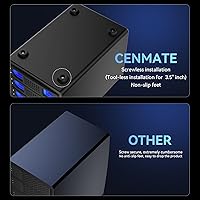
  • Aluminum-alloy chassis feels substantially more durable than plastic alternatives common at this price tier.
  • Mixing 2.5-inch and 3.5-inch SATA drives in the same unit is a practical advantage when reusing existing hardware.
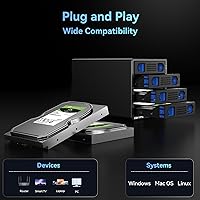
  • Windows setup is genuinely plug-and-play — drives recognized and RAID configured without any driver installation.
  • USB-A, USB-C, and eSATA cables all included in the box, covering most desktop and workstation connection scenarios.
  • Up to 80TB raw capacity with 20TB per bay gives home archivists and small studios meaningful long-term headroom.
  • UASP support pushes real-world USB 3.0 throughput close to the 5 Gbps ceiling on compatible host controllers.
  • Customer support has responded within 24 hours for a meaningful share of buyers who needed configuration help.
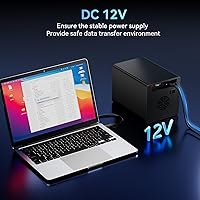
  • The dedicated DC 12V power adapter keeps power delivery stable during sustained high-throughput workloads.

Cons

  • Fan noise runs at 40–50 dB continuously — too loud for quiet offices or bedroom environments.
  • RAID mode switching requires a screwdriver, a physical paddle adjustment, and a timed reset sequence under power — it is not a quick process.
  • Mac users get no RAID management utility, making hardware RAID modes effectively inaccessible without extra software.
  • With around 80 ratings total, long-term reliability data beyond six months is too thin to draw confident conclusions.
  • No NAS capability means storage is inaccessible over a network — a hard limit for multi-device or remote-access setups.
  • Strictly SATA-only; NVMe and M.2 drives are entirely incompatible regardless of adapter use.
  • Getting the RAID-switch sequence wrong risks triggering a reinitialization, with potential data loss as a consequence.
  • The 5 Gbps USB 3.0 ceiling feels dated compared to USB 3.2 Gen 2 or Thunderbolt enclosures at slightly higher price points.

Ratings

The ratings below for the Cenmate 4-Bay RAID Enclosure 80TB were generated by AI after systematically analyzing verified buyer reviews from global markets, with spam, incentivized, and bot-driven feedback actively filtered out. Scores reflect the real distribution of opinions — where users consistently praised something, that shows up; where genuine frustration surfaced, that shows up too. Nothing has been smoothed over to make this enclosure look better than it actually performs in everyday use.
Build Quality
83%
The aluminum-alloy chassis feels noticeably more substantial than the plastic shells common at this price tier. Buyers who have handled multiple enclosures tend to call it sturdy and well-assembled, with no flex or rattling when drives are seated and running.
A handful of users noted that the drive tray mechanism feels slightly less refined than the overall chassis quality would suggest. At this weight class — 4.2 pounds — it's solid, but fit-and-finish on internal components doesn't quite match the exterior impression.
RAID Functionality
78%
22%
Eight hardware RAID modes covering RAID 0, 1, 3, 5, 10, CLONE, LARGE, and NORMAL give Windows users a genuinely flexible setup without needing any dedicated software. The physical paddle-switch approach means the RAID configuration is entirely OS-independent, which IT-minded buyers specifically appreciate.
Switching RAID modes is a multi-step manual process — power down, use a screwdriver to toggle the paddle, hold a reset button for ten seconds on power-up — and getting it wrong can lead to data loss. Mac users face an additional wall: no native RAID management utility means those modes are effectively inaccessible without third-party tools.
Cooling & Thermal Management
71%
29%
The combination of an aluminum body and dual 2-inch active fans keeps drive temperatures in check during sustained read/write workloads, which matters when all four bays are populated with high-capacity drives running for hours at a stretch.
The fans are loud — manufacturer-acknowledged noise sits around 40–50 dB, and real-world buyers confirm it. In a quiet home office or bedroom setup, this enclosure becomes a persistent background presence. It's not office-friendly if your workspace is silent.
Mac Compatibility
47%
53%
The hardware does physically connect and mount drives on macOS without issue under NORMAL mode. Basic single-drive or LARGE mode access works, and buyers using it purely for storage expansion without RAID on a Mac report no major problems.
RAID modes simply do not function on macOS without additional third-party software, which Cenmate does not supply. This is a significant gap for Mac-centric users who are buying specifically for hardware RAID redundancy — the core selling point becomes unavailable out of the box.
Windows Compatibility
89%
Plug-and-play behavior on Windows 7 through Windows 11 is consistently well-reviewed. RAID mode setup works without any driver installation, and buyers report the enclosure being recognized and operational within minutes of first connection — a smooth experience relative to competing products at this tier.
Some users encountered minor quirks when switching RAID modes if they skipped the documented reset procedure. It's not a driver problem per se, but it does mean Windows users who skip the manual steps can confuse themselves and risk an unexpected reinitialization.
Transfer Performance
76%
24%
UASP support via the JMS567+JMB393 chipset enables real-world USB 3.0 throughput that tracks reasonably close to the 5 Gbps ceiling, especially in RAID 0 across quality drives. Video editors transferring large project folders report practically usable speeds for archiving and retrieval workflows.
eSATA users tend to see more consistent throughput ceilings, while USB performance can vary depending on host controller quality. The 5 Gbps cap is also a reality check for anyone used to newer USB 3.2 Gen 2 or Thunderbolt enclosures — this is fast enough, but not cutting-edge.
Capacity & Scalability
86%
Supporting up to 20TB per bay across four bays gives a raw ceiling of 80TB, which is more than enough for a home media archive or a freelance studio's project storage. The ability to mix 2.5-inch and 3.5-inch SATA drives adds practical flexibility when reusing existing hardware.
The 20TB-per-drive cap will eventually feel limiting as high-density consumer drives push beyond that threshold, and there's no expansion path beyond four bays. Users planning a growing archive should factor in that scalability stops here without buying a second unit.
Noise Level
52%
48%
For users in dedicated storage closets, server rooms, or any space where ambient noise is already present, the fan noise is essentially irrelevant — the enclosure just runs and gets on with it without any intervention needed.
At 40–50 dB in normal operation, this RAID storage box is genuinely disruptive in quiet environments. Several buyers specifically flagged that the noise level wasn't made clear enough before purchase, and a few returned or relocated the unit for this reason alone.
Setup & Initial Configuration
74%
26%
Out-of-the-box setup in NORMAL mode is quick — connect power, connect USB or eSATA, and drives appear. The included cable bundle covering USB-A, USB-C, and eSATA means most users won't need to source additional hardware on day one.
RAID configuration setup introduces meaningful friction. The paddle-switch mechanism requires a screwdriver, the reset procedure is time-sensitive, and the consequences of doing it wrong include data loss. This is not a process to rush, and first-timers often find it more stressful than expected.
Value for Money
77%
23%
Relative to enterprise RAID hardware, this 4-bay enclosure delivers meaningful capability at a fraction of the cost. Home users and small studios who need hardware RAID without a NAS subscription or server investment find the overall package genuinely competitive for its tier.
Buyers who factor in the Mac limitations, fan noise, and manual RAID friction may feel the value proposition narrows. If you need quiet operation or seamless Mac RAID support, you'll likely end up spending more on alternatives, which makes this feel less versatile than its spec sheet implies.
Drive Compatibility
82%
18%
Acceptance of both 2.5-inch and 3.5-inch SATA HDDs and SSDs in a single enclosure is a practical advantage for users consolidating a mixed drive collection. Buyers repurposing older desktop and laptop drives into a single array specifically highlight this flexibility as a key reason they chose this unit.
Compatibility is limited strictly to SATA — no NVMe, no SAS. Users with newer M.2 or PCIe-based drives cannot use those here at all, which is an important spec to check before purchasing if your drive inventory is more recent.
Cable & Accessory Bundle
79%
21%
Including USB-A, USB-C, and eSATA cables in the box is a thoughtful move that removes a common first-day frustration. Most buyers can connect immediately regardless of which ports their desktop or workstation provides, which reduces setup friction noticeably.
Cable quality receives occasional criticism — a few users reported that the included USB cable produced slightly inconsistent transfer speeds compared to a premium third-party replacement. It works, but it may not be the final cable you end up using long-term.
Long-Term Reliability
61%
39%
Early buyer reports on build durability are generally encouraging — the aluminum chassis and active cooling suggest a unit designed for sustained uptime rather than intermittent use. Users running it continuously for several months report stable operation without notable hardware failures.
With only around 80 ratings total, the data on long-term reliability beyond six months is genuinely thin. The honest read is that it's too early to draw confident conclusions, and buyers planning to trust this enclosure with irreplaceable data should maintain independent backups regardless.
Customer Support
72%
28%
A subset of buyers who contacted Cenmate support report response times within the claimed 24-hour window, with helpful replies on RAID configuration questions specifically. For a lesser-known brand, this level of responsiveness is a relative positive that a few reviewers called out explicitly.
Support quality is anecdotal at this review volume — positive experiences are noted, but there is not enough data to characterize consistency. Users with complex hardware issues or RMA needs have not yet provided enough feedback to assess how well the process holds up under pressure.

Suitable for:

The Cenmate 4-Bay RAID Enclosure 80TB is a solid fit for technically confident users who want real hardware RAID without committing to a full NAS ecosystem or enterprise-grade hardware. Home media builders stacking large drives for a video archive will appreciate the 80TB raw ceiling and the OS-independent RAID configuration that survives system reinstalls without reconfiguration. Freelance video editors or photographers who need redundancy on client project files — and want that protection to work at the hardware level rather than relying on OS software — will find this enclosure serves that purpose well on a Windows machine. IT hobbyists consolidating a mix of old 2.5-inch and 3.5-inch SATA drives into a single protected array get good mileage from the drive format flexibility here. Anyone placing this unit in a dedicated storage closet, equipment rack, or room where ambient noise is already present will also sidestep the fan noise issue that troubles buyers in quieter setups.

Not suitable for:

Mac-primary users should approach this RAID storage box with real caution — RAID modes do not function on macOS without third-party software that Cenmate does not supply, which effectively strips out the core selling point for that audience. Anyone working in a quiet home office, bedroom studio, or shared living space will likely find the 40–50 dB fan noise a persistent irritant that becomes hard to ignore over long sessions. Users who want network-attached storage, remote access, or any form of shared drive access across multiple machines will need to look elsewhere entirely, since this is a DAS-only device with no NAS capability whatsoever. First-time RAID users or buyers who expect a simple plug-and-configure experience should also reconsider — the RAID mode switching process involves a screwdriver, a physical paddle toggle, and a timed reset sequence, and doing it incorrectly carries a real risk of data loss. Finally, anyone building storage around newer NVMe or M.2 drives cannot use this enclosure at all, as it is strictly limited to SATA-interface drives.

Specifications

  • Drive Bays: The enclosure houses 4 independent drive bays, each accepting one 2.5-inch or 3.5-inch SATA HDD or SSD.
  • Max Capacity: Total raw storage capacity reaches up to 80TB, based on a maximum of 20TB per individual drive bay.
  • RAID Modes: Eight hardware RAID modes are supported: RAID 0, RAID 1, RAID 3, RAID 5, RAID 10, CLONE, LARGE, and NORMAL.
  • Chipset: The unit uses a JMS567 plus JMB393 dual-chip configuration to manage drive communication and RAID operations at the hardware level.
  • Interfaces: Connectivity is provided via USB 3.0 Type-A, USB 3.0 Type-C, and eSATA ports, with all three corresponding cables included in the box.
  • Transfer Rate: Maximum data transfer speed reaches 5 Gbps under UASP protocol when connected via USB 3.0 to a compatible host controller.
  • Chassis Material: The outer enclosure is constructed from aluminum alloy, which contributes to passive heat dissipation and overall structural rigidity.
  • Cooling System: Two 2-inch active cooling fans are built in, with an operational noise level of approximately 40–50 dB under normal running conditions.
  • Power Supply: The enclosure is powered by an included external DC 12V adapter designed to provide stable, uninterrupted power during sustained data transfer sessions.
  • Dimensions: Physical dimensions of the unit measure 7.9″ in length, 5.2″ in width, and 5.5″ in height.
  • Weight: The unit weighs 4.2 pounds without drives installed, reflecting the aluminum-alloy construction.
  • OS Compatibility: Compatible operating systems include Windows 7 and later, macOS 9.1 and later, and Linux distributions — though RAID modes are not natively manageable on macOS.
  • RAID Configuration: RAID mode selection is performed via a physical paddle switch on the unit, requiring a screwdriver to toggle, and is activated through a timed hardware reset sequence.
  • Drive Interface: All four bays support SATA-interface drives only; NVMe, M.2, or SAS drives are not compatible regardless of physical adapter use.
  • Form Factor Support: Both 2.5-inch and 3.5-inch SATA hard disk drives and solid-state drives can be installed across any combination of the four bays simultaneously.
  • Connection Protocol: UASP (USB Attached SCSI Protocol) is supported, enabling more efficient command queuing and lower CPU overhead compared to standard BOT USB transfers.
  • Network Support: This is a DAS (Direct Attached Storage) device only; it has no NAS functionality, no Ethernet port, and no network-sharing capability of any kind.
  • Included Cables: The package ships with one USB Type-A to USB Type-B 3.0 cable, one USB Type-C cable, and one eSATA cable for immediate connection flexibility.

Related Reviews

Cenmate Dual Bay Hard Drive Enclosure
78%
83%
Build Quality
78%
Cooling Performance
76%
Transfer Speed
86%
Hot-Swap Functionality
91%
Ease of Installation
More
Cenmate 10 Bay Hard Drive Enclosure with Cooling Fan
82%
89%
Performance
94%
Ease of Installation
78%
Cooling Efficiency
85%
Data Transfer Speed
83%
Build Quality
More
Yottamaster 5 Bay External Hard Drive Enclosure 80TB
85%
95%
Storage Capacity
88%
Cooling Performance
91%
Setup & Installation
93%
Build Quality
84%
Transfer Speed
More
ORICO 9858RU3 5-Bay RAID HDD Enclosure 110TB
88%
94%
Build Quality
91%
Cooling Efficiency
89%
RAID Performance
88%
Ease of Installation
85%
Data Transfer Speed
More
TERRAMASTER TD2 Thunderbolt 3 2-Bay RAID Enclosure
86%
91%
Performance
95%
Data Transfer Speed
88%
RAID Configuration Flexibility
89%
Build Quality
65%
Noise Level
More
Yottamaster 4 Bay External Hard Drive Enclosure 64TB
82%
94%
Storage Capacity
88%
Ease of Setup
85%
Cooling Performance
90%
Build Quality
91%
Data Transfer Speed
More
ORICO Daisy Chain 4 Bay Hard Drive Enclosure 88TB
85%
97%
Storage Capacity
91%
Ease of Setup
89%
Data Transfer Speed
85%
Build Quality
78%
Thermal Management
More
MAIWO K25272 Dual Bay Hard Drive RAID Enclosure 16TB
84%
89%
Performance
88%
Build Quality
92%
Ease of Setup
87%
Data Transfer Speed
85%
Compatibility
More
Cenmate 3 Bay Hard Drive Enclosure 60TB with Cooling Fan
83%
89%
Setup and Installation
82%
Cooling Efficiency
90%
Build Quality
85%
Data Transfer Speed
62%
Noise Level
More
Yottamaster DF5RU3 5-Bay RAID Hard Drive Enclosure, 90TB Capacity
85%
94%
Storage Capacity
90%
RAID Flexibility
85%
Cooling Efficiency
88%
Build Quality
91%
Ease of Setup
More

FAQ

Yes, you can mix 2.5-inch and 3.5-inch SATA drives across the four bays in any combination you like. Just keep in mind that certain RAID modes — particularly RAID 1 and RAID 5 — will base usable capacity on the smallest drive in the array, so mismatched drive sizes can leave capacity on the table depending on the mode you choose.

No software installation is required on Windows. Once you connect the enclosure and power it on, Windows 7 through Windows 11 will recognize it as a standard storage device. RAID mode selection is handled entirely at the hardware level via the physical paddle switch, so there is no driver or utility to install.

It is a multi-step manual process, so plan for it accordingly. You power down the unit completely, use a screwdriver to physically toggle the paddle switch to your desired mode, then power the unit back on while holding the reset button for approximately ten seconds until the mode registers. Rushing any step or skipping the reset hold can cause the process to fail, and switching RAID modes will erase existing data on the array, so back everything up first.

Partially. The enclosure will physically connect and present drives on macOS without issue in NORMAL or LARGE mode, so basic storage use works fine. However, the multi-drive RAID modes — RAID 0, 1, 3, 5, 10, and CLONE — are not accessible on macOS without third-party RAID management software, which is not included. If hardware RAID is the main reason you are buying this, and your primary machine is a Mac, that is a significant gap to factor in before purchasing.

Genuinely noticeable — the manufacturer specifies roughly 40–50 dB, and real-world buyers confirm that number feels accurate. In a dedicated equipment cabinet, a server closet, or a room with ambient background noise, you will likely tune it out. In a quiet home office, bedroom, or recording space, the fan hum becomes a consistent presence that some users find distracting enough to relocate the unit.

No, this is not possible. The Cenmate 4-Bay RAID Enclosure 80TB is a Direct Attached Storage device, meaning it connects directly to one computer at a time via USB or eSATA. It has no Ethernet port, no Wi-Fi, and no NAS software. If network-shared storage is what you need, you will want to look at a dedicated NAS unit instead.
It depends entirely on which RAID mode you are running. RAID 1, RAID 5, and RAID 10 all offer varying levels of drive failure tolerance, meaning you can lose a drive and recover your data by replacing it. RAID 0 and LARGE offer no redundancy — a single drive failure in those modes means the entire array is lost. Choose your RAID mode based on how critical your data is, and always maintain an independent backup regardless of which RAID mode you use.

The enclosure is Linux-compatible and will be recognized by most modern distributions as a USB or eSATA mass storage device. RAID configuration is handled at the hardware level via the physical paddle switch, so it is not OS-dependent — whatever mode you set at the hardware level will be active regardless of the host operating system, Linux included.

Yes. You can populate any number of bays from one to four — you do not need to fill all four bays to use the enclosure. In NORMAL mode, each drive appears as a separate independent volume, so single or partial-population setups are entirely valid. Some RAID modes, however, have minimum drive count requirements — RAID 5 needs at least three drives and RAID 10 needs four — so your available mode options will depend on how many bays you populate.

It works with both. Any 2.5-inch or 3.5-inch SATA SSD will seat and function in any bay, alongside or instead of traditional spinning hard drives. That said, the 5 Gbps USB 3.0 interface will be the bottleneck well before a modern SATA SSD reaches its read/write ceiling, so the performance gains from using SSDs over fast HDDs in this enclosure will be less dramatic than you might expect in other contexts.