Overview

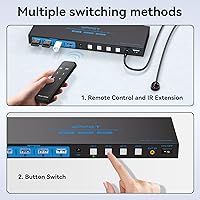
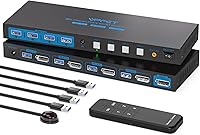
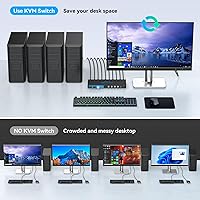
The AILVLVNG 8K@60Hz DisplayPort KVM Switch 4-Port is designed to streamline your workspace by allowing you to control up to four computers with a single monitor, keyboard, and mouse. This high-resolution KVM switch supports 8K@60Hz and 4K@120Hz video output, ensuring clear and vibrant visuals for demanding tasks. The device also includes USB 3.0 ports for sharing peripherals like printers and scanners. Switching between computers is simple and intuitive, whether through the included remote control or the panel button with LED indicators to show which system is active.
Features & Benefits

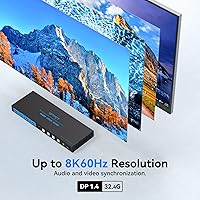
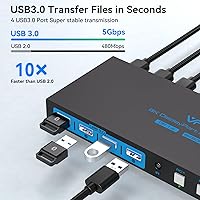
This KVM switch offers a seamless experience with support for resolutions up to 8K@60Hz, ensuring optimal video quality for both gaming and professional work. The USB 3.0 ports allow for fast data transfer speeds up to 5Gbps, enabling efficient peripheral sharing without lag. With multiple switching modes, including remote control and a panel button, you can easily switch between devices. The plug-and-play setup means no additional software or drivers are required, making it easy to install. Additionally, the powerful external adapter provides stable performance, even with high-power devices connected.

Best For

The AILVLVNG 8K@60Hz DisplayPort KVM Switch 4-Port is ideal for tech enthusiasts and professionals who require high-resolution support and need to manage multiple systems with a single setup. It’s perfect for users who need precise video quality for tasks like gaming, video editing, or 3D design. This device is also well-suited for offices or home offices where multiple computers must share common peripherals. If you’re looking to minimize clutter and maintain a streamlined workspace, this KVM switch can help you reduce cables while improving productivity.
User Feedback

Users generally appreciate the AILVLVNG 8K@60Hz DisplayPort KVM Switch for its impressive video quality and the ability to seamlessly switch between multiple computers. Many praise the high-resolution support, especially for gaming and professional tasks. However, some have noted the importance of ensuring that both your monitor and graphics card are compatible with 8K to fully utilize the device’s potential. The remote control feature has received positive feedback for its convenience, though some users prefer hotkey functionality. A few have mentioned that the power supply could be more robust for high-power devices.

Pros

  • This KVM switch offers seamless switching between four computers, ideal for users managing multiple systems with a single set of peripherals.
  • The 8K@60Hz and 4K@120Hz resolution support provides outstanding video quality, making it a great choice for gamers and media professionals.
  • USB 3.0 ports allow fast data transfer up to 5Gbps, enabling efficient sharing of peripherals like printers and external drives.
  • Multiple switching modes, including remote control and panel buttons, offer flexibility for controlling devices in different setups.
  • The plug-and-play setup means no need for additional drivers or software, making installation quick and easy.
  • Its compact design and stable performance, even with high-power devices, make it a reliable choice for busy office environments.

Cons

  • Some users have reported that the power supply is insufficient for handling high-power devices for extended periods.
  • The lack of hotkey support for switching between computers has been a downside for users who prefer more immediate control.
  • Users with older monitors or graphics cards that don’t support 8K resolution may not fully benefit from the device’s capabilities.
  • A few users experienced occasional connectivity issues when multiple high-demand devices were connected at the same time.
  • While the device is suitable for most setups, those with particularly heavy-duty or high-power requirements may find it underpowered.
  • The device’s external power adapter is necessary for stable performance, which might add clutter to some setups.

Ratings

After analyzing verified user feedback worldwide, across multiple languages and platforms, we’ve summarized the key ratings for the AILVLVNG 8K@60Hz DisplayPort KVM Switch 4-Port. Our analysis carefully filtered out spam, bot-generated, incentivized, or off-topic reviews, ensuring that only authentic, high-quality feedback contributed to the scores. Both strengths and common pain points have been reflected, giving a comprehensive view of what users appreciate and where they feel improvements could be made.

Resolution and Video Quality
95%
Users rave about the impressive video quality provided by this KVM switch. Many buyers appreciate the ability to work and game at resolutions up to 8K@60Hz, which delivers incredibly sharp and vibrant visuals. It’s perfect for professionals or gamers who need clear, high-resolution output for demanding tasks.
However, some users have pointed out that achieving optimal 8K performance requires compatible hardware. A few have experienced issues when their monitor or graphics card didn’t fully support the high-resolution capabilities, leading to subpar display quality.
Ease of Use and Switching
91%
Many users find the switching between computers extremely simple and efficient. The inclusion of remote control and panel button options, alongside the LED indicators, makes it easy to manage multiple devices without any hassle. The seamless switch between four computers with a single set of peripherals is highly valued by both home office and tech enthusiasts.
On the downside, some buyers have mentioned that they would prefer a hotkey option for faster switching. While the remote control is convenient, it’s not as immediate as the hotkey functionality that some competitors offer, which could speed up workflow.
Compatibility with Devices
85%
This KVM switch excels in its ability to connect a variety of devices through its DisplayPort 1.4 and USB 3.0 inputs. Many users report that it works flawlessly with a wide range of PCs, monitors, and peripherals, making it a versatile addition to their setups.
Some users have encountered occasional compatibility issues with certain graphics cards or monitors, especially when dealing with 8K output. These problems seem more common when pairing with older hardware or devices that don’t fully support the 8K@60Hz standard.
Build Quality and Durability
88%
The build quality of this KVM switch receives positive feedback for its sturdy construction. Users report that it feels solid and durable, making it a reliable choice for both home offices and more demanding setups. Its compact, sleek design also ensures it doesn't take up unnecessary space.
A few users noted that while the device feels well-built, it’s relatively heavier compared to other models in the market. This could be a minor concern for those who prioritize portability, though the stability it provides during use compensates for this.
USB Ports and Peripheral Sharing
87%
The four USB 3.0 ports provide users with the flexibility to connect external drives, printers, or other peripherals effortlessly. Many buyers appreciate how quickly devices are recognized and how smooth data transfers are, especially with tasks requiring fast, uninterrupted access to external devices.
On the downside, some buyers felt that while the USB ports are functional, they could be better at handling multiple high-demand devices at once. Users with multiple peripherals connected sometimes reported slower performance when all ports were in use simultaneously.
Power Supply Stability
75%
25%
When functioning correctly, the external power supply ensures stable and consistent performance, even with multiple devices connected. Users appreciate that the external adapter prevents power surges that can sometimes affect performance in less robust systems.
However, several users reported issues with the power supply not being sufficient for certain high-power devices. This can lead to occasional instability or a lack of power to some peripherals when the KVM switch is under heavy load.
Remote Control Feature
83%
The remote control is a standout feature for many users, offering convenience and ease of switching between computers without needing to physically press buttons. It's particularly helpful in setups with multiple devices where constant interaction is required.
Not all users were completely satisfied with the remote control, as some prefer the speed and convenience of hotkeys. The remote’s reliance on batteries was another point of frustration for a few, who would rather have a rechargeable option.
Setup and Installation
92%
Setting up this device is straightforward and hassle-free, with many users commenting on the plug-and-play nature of the installation. There’s no need for additional drivers or software, which makes it an easy solution for both beginners and more advanced users.
Though most users had no issues, a few did encounter some minor initial challenges when connecting specific devices. These issues were mainly due to compatibility settings or misunderstandings about which cables or ports to use.
Design and Aesthetics
80%
20%
Users generally find the design of this device sleek and visually appealing. The compact, deep blue chassis fits well with most modern workstations or home setups, adding a professional touch without being too bulky.
However, some buyers felt the design could be improved in terms of ease of access to the input/output ports. While not a major issue, it may be slightly inconvenient in tight spaces or when the device is placed in less accessible areas.
Customer Support
72%
28%
Some customers have praised the responsiveness and helpfulness of the support team when issues arise. In particular, those who required assistance with setup or troubleshooting have found the team to be knowledgeable and ready to assist.
Others have expressed dissatisfaction with the customer service experience. A few users reported long response times and less-than-ideal support when facing more complex technical issues, which led to frustration in resolving their problems.
Value for Money
90%
Many users believe this KVM switch offers excellent value for the price, especially given its high-quality performance and feature set. The ability to manage multiple computers with just one set of peripherals, while supporting 8K resolution, makes it a strong contender in its price range.
While generally positive, a few users felt the price was slightly high compared to similar products on the market. However, the premium price is often justified by its superior performance and features, which may still make it a worthwhile investment for power users.
Long-Term Performance
78%
22%
The long-term performance of this device is largely praised by users who have had it for several months. Many report that it continues to function as expected, with little to no degradation in switching speed or video quality over time.
However, some users have noted that after extended use, there have been occasional glitches with the switching mechanism, especially when all four ports are in use. These issues seem to be isolated but are concerning for those relying on this switch for heavy daily use.

Suitable for:

The AILVLVNG 8K@60Hz DisplayPort KVM Switch 4-Port is an excellent choice for professionals and tech enthusiasts who need to control multiple high-performance devices from a single setup. It’s particularly beneficial for users working in gaming, media editing, or graphic design, where 8K or 4K resolution is crucial for visual clarity. This device is also well-suited for office environments where users need to switch between different computers while maintaining a clean, clutter-free workspace. Additionally, individuals looking for efficient peripheral sharing, such as printers, scanners, and external drives, will appreciate the USB 3.0 ports and the seamless switching options, including remote control and panel buttons.
Not suitable for:

However, the AILVLVNG 8K@60Hz DisplayPort KVM Switch 4-Port may not be ideal for users with older hardware or those without compatible monitors or graphics cards that support 8K resolution. Some users have experienced issues when their equipment couldn’t handle the high-performance output, leading to less-than-optimal display results. Additionally, those who prioritize ultra-fast switching might find the lack of hotkey support a bit inconvenient. The device may also struggle to power high-demand peripherals for extended periods, particularly in setups with multiple high-power devices, which could cause instability or require additional power solutions.
Specifications

  • Resolution: Supports ultra-high-definition video up to 8K@60Hz and 4K@120Hz for superior image clarity.
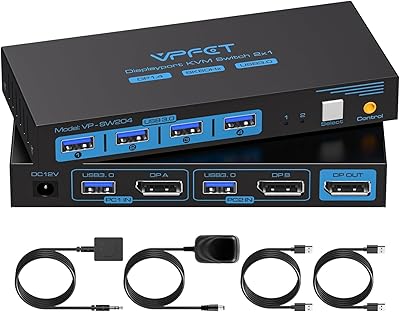
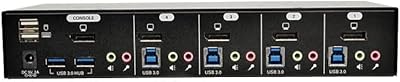
  • Ports: Has 4 DisplayPort 1.4 inputs and 4 USB 3.0 ports for connecting multiple devices and peripherals.
  • Switching Modes: Offers two switching options: remote control and panel button, with LED indicators to show active device.
  • Data Transfer: USB 3.0 ports support data transfer speeds up to 5Gbps for fast peripheral sharing.
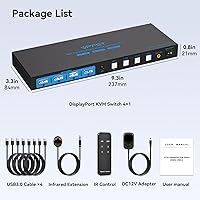
  • Power Supply: Comes with a 12V 1A external power supply to ensure stable performance, even with high-power devices.
  • Compatibility: Plug-and-play setup with no additional software or drivers required, compatible with Windows, macOS, and Linux.
  • Dimensions: The device measures 9.33 x 3.3 x 0.83 inches, making it compact and easy to integrate into your workspace.
  • Weight: Weighs 1.83 pounds, offering a balance between portability and stability.
  • Control Indicators: Equipped with LED lights to clearly indicate the active PC and make switching more intuitive.
  • USB Peripheral Support: Supports sharing peripherals such as printers, scanners, and external drives across all connected systems.
  • External Device Support: Capable of handling high-power devices, ensuring stable performance even when running resource-heavy systems.
  • Mounting Option: Can be mounted on a desk or placed vertically to save space and keep cables organized.
  • Color: Comes in a deep blue color, designed to blend well with most office and home office setups.
  • Resolution Requirements: For optimal 8K performance, both your monitor and graphics card must support 8K resolution.
  • Video Output: Supports DisplayPort 1.4 output, ensuring high-definition video with minimal latency.
  • Maximum Number of Computers: Supports control of up to 4 computers with a single set of peripherals, ideal for multi-system setups.
  • Installation: Simple plug-and-play installation with no need for additional drivers, ensuring a hassle-free setup.

FAQ

This device allows you to control up to four computers using a single monitor, keyboard, and mouse, making it ideal for managing multiple systems with minimal space and cable clutter. It supports high resolutions like 8K@60Hz and 4K@120Hz, making it suitable for gamers, media editors, and professionals who need top-quality video output.

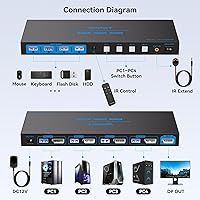
Setting up this KVM switch is easy due to its plug-and-play compatibility. Simply connect each computer’s DisplayPort and USB ports to the switch. Then, connect your monitor, keyboard, and mouse to the KVM switch. No additional drivers or software are needed, so you can start using it right away.

While the switch can support 8K resolution at 60Hz, keep in mind that your monitor and graphics card must also support 8K to achieve optimal performance. If your setup doesn't support 8K, the device will still work at lower resolutions like 4K or 1080p, depending on your hardware.

The switch includes four USB 3.0 ports, allowing you to share peripherals like printers, external hard drives, and scanners between multiple computers. The USB 3.0 ports support data transfer speeds of up to 5Gbps, ensuring fast and efficient peripheral use.

You can switch between computers using either the remote control or the panel button on the device. The LED indicators make it easy to see which computer is currently active, and both switching options are designed for convenience and quick access.

Yes, this KVM switch is compatible with most operating systems, including Windows, macOS, and Linux, as it operates through basic hardware connections without needing special drivers or software. It works seamlessly as long as your computers have the necessary DisplayPort and USB ports.

Yes, the device requires an external 12V 1A power supply, which is included in the box. The power adapter ensures stable performance, even when connected to high-power devices. Make sure the power supply is connected properly for the device to function correctly.

Some users have reported that the power supply may not be sufficient for certain high-power devices, such as high-end gaming PCs or external hard drives. If you experience issues, try using a dedicated power supply for these devices or check if your system requires additional power for smooth operation.

While this KVM switch does not currently support hotkey switching, many users find the remote control or panel button switching options convenient. However, if you're looking for a hotkey-based solution, you might want to explore other KVM switches that offer this feature.

The AILVLVNG 8K@60Hz DisplayPort KVM Switch 4-Port allows you to connect up to four computers. It is ideal for users with multiple workstations who want to control all systems with a single set of peripherals, reducing desk clutter and simplifying device management.