Overview

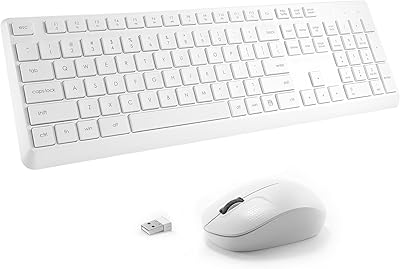
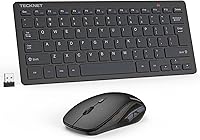
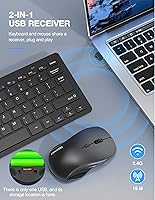
The TECKNET X315 Wireless Keyboard and Mouse Combo entered the market in late 2023 and has quietly climbed into the top 60 of its Amazon category — a solid indicator that real buyers are paying attention. It pairs a compact scissor-switch keyboard with a silent mouse, both sharing a single Nano receiver that tucks neatly inside the mouse's battery compartment when you're on the move. For the price tier it occupies, the 36-month warranty stands out as genuinely reassuring; just know that coverage requires registration, so don't skip that step after unboxing. This wireless combo targets home users, office workers, and frequent travelers who want a clean, portable setup without overspending.
Features & Benefits

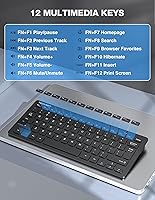
The 2.4GHz connection handles up to 15 meters without noticeable lag, which covers most home office or living-room layouts comfortably. Twelve multimedia hotkeys let you jump between volume control, media playback, and browser tabs without digging through menus — a small but appreciated convenience during long work sessions. The mouse offers three DPI settings (800, 1200, and 1600), useful if you switch between detailed spreadsheet work and casual browsing. Click noise is genuinely muted — noticeably quieter than a typical membrane keyboard, though not something you'd compare to a premium quiet switch. Both devices drop into auto-sleep mode when idle to stretch battery life. One important heads-up: batteries are not included in the box.

Best For

The TECKNET keyboard-and-mouse set works well for remote workers and students who spend their days in shared or quiet spaces — think open-plan offices, libraries, or coffee shops where a loud clicker would earn you dirty looks. Travelers will appreciate how the keyboard's slim 19mm profile and the featherweight mouse (58g) tuck into a laptop bag without adding noticeable bulk. It also makes a capable secondary setup: connect it to a smart TV or media PC and you have a usable couch-friendly input device. Mac and Chrome OS users can pair it, but there is no dedicated Mac layout, so expect to remap a few keys. For budget-conscious buyers who still want warranty coverage, it is a sensible pick.

User Feedback

Buyers consistently highlight two things: how quiet the clicks actually are in practice and how little setup is involved — plug in the receiver, install batteries, and you are working within seconds. On the critical side, users with larger hands note that the compact mouse size can feel cramped during extended sessions, and a few reviewers mention the key travel is shallower than expected. Battery life tends to hold up well, largely thanks to the auto-sleep function, though some buyers are caught off guard when they realize batteries are not included. Signal stability is generally reported as reliable indoors. The overall consensus is that this compact wireless duo punches above its price point, even if it will not replace a dedicated ergonomic setup.

Pros

  • Plug-and-play setup takes under a minute with no software installation required.
  • Click noise is noticeably reduced compared to standard membrane keyboards — comfortable for shared spaces.
  • The single Nano receiver stores inside the mouse, so you will not lose it in transit.
  • At 300g for the keyboard and 58g for the mouse, the combo barely registers in a laptop bag.
  • Auto-sleep on both devices keeps battery consumption low during idle periods.
  • Twelve multimedia hotkeys cut down on unnecessary navigation during everyday browser and media use.
  • The 36-month warranty is a genuine differentiator at this price level — few rivals offer it.
  • Stable 2.4GHz connection handles typical home and office distances without noticeable dropout.
  • Three DPI levels provide enough flexibility to switch between detailed document work and general browsing.
  • Compatible across Windows, Mac, Chrome OS, and Android TV with no drivers needed.

Cons

  • Four AAA batteries are required but not included — an easy-to-miss detail before your first use.
  • The warranty requires product registration; skipping that step voids the coverage.
  • Key travel depth is shallow enough to cause missed keystrokes for fast or heavy typists.
  • The compact mouse is poorly suited for palm-grip users or anyone with larger hands.
  • No companion software means zero customization for keys, shortcuts, or DPI profiles.
  • Mac users face non-standard key positioning and will need to remap some shortcuts manually.
  • The 1600 DPI maximum is limiting on high-resolution or multi-monitor workstation setups.
  • Scroll wheel feedback feels slightly loose on some units straight out of the box.
  • Heavy daily users may find battery cycles shorter than the manufacturer's claims suggest.
  • Performance can degrade in high-interference wireless environments like crowded co-working spaces.

Ratings

The scores below reflect our AI-driven analysis of verified global buyer reviews for the TECKNET X315 Wireless Keyboard and Mouse Combo, with spam, bot activity, and incentivized feedback actively filtered out before any scoring was applied. Each category captures what real users praised and where they ran into friction — nothing is softened to protect the product's image. Whether you are considering this compact wireless duo as your daily driver or a travel backup, the breakdown below gives you an honest picture of what to expect.

Value for Money
91%
This is where the TECKNET keyboard-and-mouse set earns its strongest marks. Buyers repeatedly note that the build quality and feature set feel punching above the price tier, especially given the 36-month warranty that most competitors at this level do not offer. For a no-frills daily setup, the perceived value is hard to argue with.
A handful of users feel that once you factor in the cost of four AAA batteries — which are not included — the out-of-pocket total nudges closer to pricier rivals. For some buyers, that omission felt like a small but avoidable frustration on first use.
Typing Experience
74%
26%
The scissor-key mechanism gives the keyboard a more stable, controlled feel compared to standard rubber-dome boards in the same price range. Everyday typists doing emails and documents report a reasonably satisfying feedback, and the key layout is familiar enough that there is no real adjustment period.
Users who have used higher-end laptop keyboards or dedicated office boards notice the key travel is on the shallow side, which can lead to missed keystrokes during fast, heavy typing sessions. It is a trade-off inherent to the slim, portable form factor, but worth knowing upfront.
Mouse Comfort & Ergonomics
62%
38%
For light daily use — browsing, media control, casual document work — the mouse does its job without complaint. Its featherweight build means extended movement across a desk mat causes zero wrist fatigue for average-sized hands, and the three DPI settings give enough flexibility to switch between precise and fast movement.
Users with larger hands consistently flag the compact dimensions as a real ergonomic issue during multi-hour work sessions. The mouse is sized more like a travel peripheral than a full desktop mouse, and palm-grip users in particular tend to feel the strain after extended use.
Wireless Connectivity & Stability
83%
The 2.4GHz connection is reliable across typical home and office distances, with no perceptible input lag during everyday tasks. Most users report clean, dropout-free performance even with the receiver plugged into the back of a desktop tower several feet away, which is a genuine convenience.
A smaller segment of users noted occasional brief dropouts in environments with heavy wireless interference, such as crowded co-working spaces with many competing 2.4GHz devices. Keeping the Nano receiver in a direct line of sight or using a USB extension cable largely resolves it, but it is not always intuitive for less technical buyers.
Noise Level
86%
The click dampening on the mouse is genuinely effective — quieter than most standard membrane mice and a significant step down from any tactile or clicky mechanical switch. In library settings or quiet shared offices, users report that neither the keyboard nor the mouse draw attention during normal use.
A few users expected near-total silence based on the marketing language and found the keyboard still produces a subtle thud on bottoming out. It is quieter than average but not what you would call whisper-silent — managing expectations here matters.
Build Quality & Durability
71%
29%
The keyboard chassis feels reasonably solid for the weight class, with minimal flex across the middle even during assertive typing. The rated 8-million-press durability on keys and mouse buttons gives some confidence that day-to-day use will not degrade the hardware quickly.
The plastics used on both devices have a lightweight feel that some buyers associate with fragility, even if actual breakages are rarely reported. The mouse scroll wheel, in particular, attracted a few comments about wobble straight out of the box.
Portability & Form Factor
88%
At 300g for the keyboard and 58g for the mouse, this compact wireless duo slides into a laptop bag side pocket without adding meaningful bulk. The Nano receiver stored inside the mouse compartment is a smart design choice that eliminates the classic problem of losing a tiny USB dongle during travel.
The compact keyboard layout, while bag-friendly, omits a dedicated numpad and shortens some keys compared to a full-size board. Users who rely on number entry for accounting or data work will notice the absence fairly quickly.
Setup & Ease of Use
93%
Plug-and-play setup is one of this combo's most consistently praised traits. Buyers report being fully up and running in under a minute with no software installation required, which matters for less tech-savvy users or anyone setting up a secondary machine quickly.
The lack of any companion software means there is no way to remap keys, create macros, or customize DPI profiles beyond the three hardware presets. Power users who like to fine-tune their peripherals will hit that ceiling fast.
Battery Life
77%
23%
The auto-sleep function kicks in reliably after a short idle period on both devices, and most users report weeks of regular use before needing a battery swap. For casual and moderate users, the battery management is genuinely low-maintenance.
Heavy daily users pushing both devices for six-plus hours find the battery cycle shorter than the marketing implies. Also, the fact that four AAA batteries are required but not included catches enough buyers off guard that it warrants a specific call-out before purchase.
Multimedia Hotkeys
79%
21%
Having 12 dedicated function-row shortcuts covering volume, playback, screen brightness, email launch, and browser access genuinely speeds up everyday navigation. Users working across a browser, media player, and email client simultaneously find these hotkeys reduce the need to alt-tab constantly.
The hotkeys require the Fn key to be held on some systems, which negates part of the convenience they promise. A few Mac users also noted that some shortcuts do not map correctly without manual OS-level remapping.
Mac & Cross-Platform Compatibility
63%
37%
The hardware connects to Mac and Chrome OS without any driver installation, and basic input functions work out of the box. For straightforward typing and cursor control on a secondary Mac machine, it functions well enough to get the job done.
There is no dedicated Mac layout, so buyers on macOS will find the Option and Command key positions non-standard, requiring manual adjustments in System Settings. Chrome OS users also report that a few shortcut keys behave unexpectedly, which limits the appeal of the hotkey row on those platforms.
DPI & Mouse Precision
72%
28%
Three DPI settings covering 800, 1200, and 1600 provide a practical range for switching between detailed document navigation and quicker screen traversal. The DPI button is easy to reach mid-use, and the transition between levels is immediate with no visible stutter.
The ceiling of 1600 DPI is sufficient for everyday tasks but limiting if you use a high-resolution or multi-monitor setup. Users accustomed to gaming or design mice with finer granular DPI control will find the three-preset system noticeably coarse.
Warranty & After-Sales Support
81%
19%
A 36-month warranty is a meaningful differentiator at this price point, and buyers who have needed to use it generally report responsive customer service from TECKNET. The confidence of a three-year coverage window makes this a lower-risk purchase for users who have been burned by cheap peripherals failing quickly.
The warranty is not automatic — registration is required, and some buyers only discover this after the fact. If you lose the packaging or forget to register, the coverage reverts to standard consumer protection laws, which varies significantly by region.

Suitable for:

The TECKNET X315 Wireless Keyboard and Mouse Combo is a strong fit for anyone who values a clean, quiet desk without spending heavily on peripherals. Students working in shared dorm rooms or campus libraries will appreciate the muted click noise, and remote workers who jump between a home office and a coffee shop will find the lightweight build genuinely practical to carry. If you already own a laptop but want a more comfortable seated typing setup at a desk, this wireless combo bridges that gap without the cable clutter. It also works well as a secondary or spare set — connecting to a living-room media PC or Android smart TV for couch browsing is straightforward and lag-free. Budget-conscious buyers who want the peace of mind of a multi-year warranty will find the 36-month coverage unusually generous for this price tier, provided they remember to register the product after purchase.
Not suitable for:

The TECKNET X315 Wireless Keyboard and Mouse Combo has real limitations that make it the wrong choice for certain buyers, and it is worth being direct about them. If you spend six or more hours a day at a keyboard — writing, coding, or data entry — the shallow key travel and compact mouse will likely cause discomfort before the day is out, particularly for users with larger hands who need a full-grip mouse. Power users who depend on software customization, macro programming, or DPI profiles beyond three basic presets will hit a hard ceiling with this hardware. Designers and multi-monitor users working at high resolutions will also find the 1600 DPI ceiling restricting for precise cursor control. Mac users should know upfront that there is no dedicated Mac layout, meaning the Command and Option keys sit in non-standard positions and some function-row shortcuts will need manual remapping in System Settings. Finally, anyone expecting a whisper-quiet experience comparable to premium silent switches should temper expectations — the keyboard is quieter than average membrane boards, but it is not silent.
Specifications

  • Model Number: This combo is identified by the model number X315, manufactured by TECKNET.
  • Wireless Protocol: Both devices operate on a 2.4GHz RF wireless connection for stable, low-latency communication.
  • Range: The wireless signal maintains a reliable connection within a 15-meter (49-foot) radius of the receiver.
  • Receiver: A single Nano USB receiver connects both the keyboard and mouse simultaneously and stores inside the mouse battery compartment.
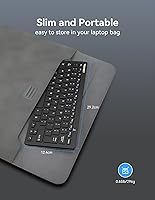
  • Keyboard Dimensions: The keyboard measures 292 x 125 x 19mm and weighs approximately 300g.
  • Mouse Dimensions: The mouse measures 110 x 65 x 30mm and weighs approximately 58g.
  • Key Switch Type: The keyboard uses a scissor-key mechanism designed for low-profile, stable key presses.
  • Multimedia Hotkeys: Twelve dedicated function-row hotkeys provide quick access to media playback, volume, browser, and email controls.
  • DPI Settings: The mouse offers three selectable DPI levels — 800, 1200, and 1600 — switchable via a dedicated button.
  • Click Noise: Both mouse buttons use a dampened click mechanism engineered to reduce audible noise compared to standard membrane mice.
  • Power Source: The keyboard and mouse each require 2 AAA batteries (4 total); batteries are not included in the box.
  • Battery Management: Both devices enter an automatic low-power sleep mode after a period of inactivity, waking instantly on key press or mouse movement.
  • Rated Durability: Keys and mouse buttons are rated to withstand over 8 million presses under standard operating conditions.
  • OS Compatibility: The combo is compatible with Windows 11, 10, 8, 7, 2000, ME, XP, Vista, macOS, Chrome OS, and Android smart TVs.
  • Color Option: The set is available in black with a matte finish across both the keyboard and mouse surfaces.
  • Warranty: TECKNET provides a 36-month warranty on this combo, which requires product registration to activate coverage.
  • Release Date: The X315 was first made available for purchase in December 2023.
  • Total Item Weight: The combined packaged weight of the keyboard and mouse set is approximately 12.7 ounces (360g).

Related Reviews

Arteck HW192 Wireless Keyboard and Mouse Combo


78%
78%
Build Quality
72%
Typing Experience
63%
Mouse Comfort & Ergonomics
81%
Battery Life
69%
Wireless Connectivity
More
KNOWSQT Wireless Keyboard and Mouse Combo
87%
89%
Wireless Performance
83%
Build Quality
86%
Ergonomics & Comfort
91%
Design & Aesthetics
76%
Battery Life
More
TKVPJYYI Wireless Retro Typewriter Keyboard and Mouse Combo

76%
88%
Design & Aesthetics
71%
Typing Experience
62%
Mouse Performance
58%
Build Quality
83%
Wireless Connectivity
More
Arcwares Wireless Keyboard and Mouse Combo
78%
88%
Value for Money
91%
Aesthetic Design
76%
Keyboard Typing Experience
67%
Mouse Performance
84%
Wireless Connectivity
More
Mobifice Wireless Keyboard and Mouse Combo
87%
89%
Ergonomics & Comfort
92%
Design & Aesthetics
83%
Battery Life
95%
Ease of Use & Setup
88%
Wireless Connectivity
More
JOYACCESS Wireless Keyboard and Mouse Combo
82%
88%
Value for Money
83%
Typing Experience
74%
Mouse Performance
86%
Backlight Quality
81%
Battery Life
More
Tayderley Wireless Keyboard and Mouse Combo
86%
88%
Typing Comfort
85%
Mouse Performance
94%
Battery Life
83%
Build Quality
92%
Ease of Setup
More
FOPETT Wireless Keyboard and Mouse Combo
85%
91%
Typing Experience
87%
Battery Life
94%
Design & Aesthetics
88%
Ergonomics
85%
Build Quality
More
ULSOU Wireless Keyboard and Mouse Combo
85%
88%
Ergonomics and Comfort
92%
Battery Life
84%
Typing Experience
87%
Wireless Connectivity
80%
Mouse Performance
More
Harburfine Wireless Keyboard and Mouse Combo
85%
88%
Ergonomics & Comfort
93%
Quietness & Noise Level
85%
Wireless Connectivity & Range
84%
Battery Life & Power Management
90%
Setup & Installation
More

FAQ

No drivers or software are needed. Plug the Nano receiver into a USB port, insert batteries into both devices, and they are ready to use. The entire setup typically takes under a minute.

No, and this catches a surprising number of buyers off guard. You will need four AAA batteries in total — two for the keyboard and two for the mouse — so it is worth picking some up before your order arrives.

It connects to macOS without any driver installation, and basic typing and cursor functions work straight away. However, there is no dedicated Mac layout, so the Command and Option keys are in non-standard positions. Most Mac users adjust by going into System Settings and remapping those keys manually.

There is a dedicated DPI button on the mouse that cycles between 800, 1200, and 1600. The difference is noticeable — 800 is slow and precise, useful for reading dense spreadsheets, while 1600 moves the cursor quickly across the screen for general navigation.

It is genuinely quieter than a typical membrane keyboard — the scissor-key design produces less rattle and the mouse clicks are dampened enough to avoid drawing attention in a shared office or library. That said, it is not silent in the way a premium quiet-switch mechanical keyboard is, so bottoming out the keys still makes a soft thud.

Yes, that is exactly how it works. A single Nano USB receiver handles both devices simultaneously, so you only use one USB port on your computer. The receiver also tucks into a slot inside the mouse battery compartment for safe transport.

Most users report several weeks of use before needing a replacement, thanks to the auto-sleep function that activates when the devices are idle. Heavy users logging six or more hours a day may see shorter cycles. Keeping both devices powered off when not in use will extend battery life further.

For average-sized hands and moderate daily use, it is comfortable enough. Users with larger hands or those who prefer a full palm grip tend to find the compact dimensions tiring over long sessions. If you spend most of your day in a mouse-heavy workflow, a larger dedicated mouse might serve you better alongside the keyboard.

The warranty is valid for 36 months, but it requires registration — it does not activate automatically at purchase. Make sure to register your product with TECKNET shortly after unboxing. If you run into an issue, reach out to their customer service team directly with your registration details.

Yes, the wireless combo connects to Chrome OS without any additional setup. Standard typing and mouse functions work normally. Some of the function-row hotkeys may behave differently or not respond as expected on Chrome OS, since they are primarily mapped for Windows environments.