Overview

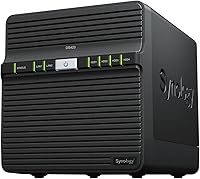
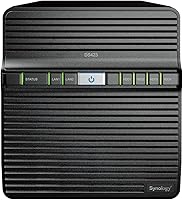
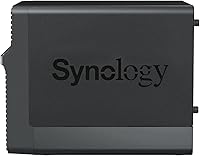
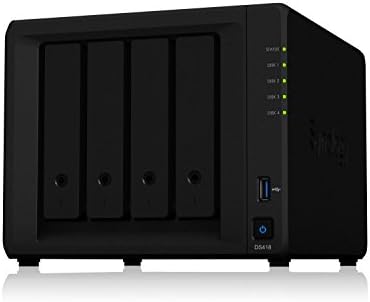
The Synology DS423 4-Bay DiskStation is a versatile and powerful Network Attached Storage (NAS) solution designed for small businesses and home users. This diskless NAS allows for full customization, enabling you to choose and install your own drives for optimal performance. With four available drive bays, it offers ample room for expanding storage capacity. Compact and user-friendly, this NAS device is ideal for environments where space is limited but performance and reliability are key. Additionally, it supports remote access, making it convenient for users to access their files from anywhere with an internet connection.

Features & Benefits

This Synology DiskStation offers a secure private cloud for easy file access and sharing across devices, making it a great solution for remote work. It also comes equipped with robust data backup and snapshot features, ensuring that your important files are safe from potential loss. For those interested in surveillance, it supports integration with up to 30 IP cameras, enhancing security and monitoring capabilities. Additionally, the DS423 NAS is highly expandable, both in terms of storage and memory, allowing you to scale up as your needs grow over time.

Best For

This NAS device is perfect for home users who need a secure and accessible solution for storing and sharing data. Small businesses will appreciate its ability to streamline file sharing and backup, making it a reliable asset in any office environment. Users looking to integrate surveillance systems will benefit from its support for up to 30 IP cameras, providing a comprehensive security setup. Additionally, the customizable storage options make it ideal for anyone needing a flexible solution that can grow with their data requirements.

User Feedback

Users have consistently praised this NAS device for its ease of setup and intuitive user interface. Many have noted its reliability and performance, which make it a solid choice for both personal and business use. However, some users have pointed out that it may not offer sufficient expansion options for larger enterprises, which may require more advanced configurations. Overall, reviews highlight its versatility and the ability to serve a range of needs, from secure data storage to advanced surveillance system integration.

Pros

  • Compact design makes it ideal for home offices and small businesses.
  • Supports up to 30 IP cameras for video surveillance integration.
  • Easy setup and user-friendly interface praised by many users.
  • Diskless nature offers flexibility for custom drive selection and future expansion.
  • Private cloud access allows for secure remote file access and sharing.
  • Expandable storage options ensure the device grows with your needs.
  • Energy efficient, with a low-noise system fan for quiet operation.
  • Ideal for users who need a reliable and secure backup solution.
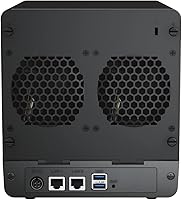
  • Dual Gigabit Ethernet ports provide fast and reliable network connectivity.

Cons

  • Some users find the storage expansion limited for larger enterprises.
  • Performance may slow down under heavy simultaneous data demands.
  • Not suitable for high-performance or enterprise-level workloads.
  • Lacks built-in drives, so users need to purchase drives separately.
  • Limited technical support response times can be frustrating for some.
  • May not be powerful enough for users with intensive, high-volume storage needs.

Ratings

After analyzing verified user reviews from a wide range of sources and languages, the overall feedback on the Synology DS423 4-Bay DiskStation is overwhelmingly positive. This analysis takes into account authentic, high-quality reviews from multiple platforms, ensuring that only credible feedback is considered. While there are clear strengths in areas like performance, ease of use, and scalability, some minor pain points related to expansion for larger businesses were also noted. Below are the detailed ratings reflecting these insights from global users.

Performance & Reliability
88%
Many users highlight the solid performance and reliability of this device, especially for home office and small business use. It provides smooth file access, quick data transfers, and seamless remote connectivity, making it ideal for users with high expectations for uptime and stability.
However, a few users experienced occasional slowdowns when accessing larger files or during heavy multitasking. While performance is generally strong, it may not be suited for more demanding enterprise-scale workloads.
Ease of Setup
91%
The setup process is widely appreciated for its simplicity and user-friendliness. Most buyers were able to get this device up and running in no time, with the intuitive user interface and clear instructions making installation straightforward even for those with limited tech experience.
Some users noted that while the initial setup was easy, they faced challenges when trying to configure more advanced features. The lack of detailed instructions for more complex setups left some buyers seeking additional support.
Storage & Expandability
82%
18%
The ability to customize storage by selecting individual drives makes this NAS device appealing to those with specific storage needs. Users appreciate the flexibility of expanding the storage as their needs grow, ensuring long-term value and adaptability for home or small business use.
While expandability is a key feature, a few users felt that the device's maximum capacity may not be sufficient for larger, enterprise-scale applications. Additionally, some found that the drive bays were not as easy to access for quick upgrades.
Data Protection (Backup & Snapshots)
89%
Buyers are impressed with the robust data protection features, particularly the backup and snapshot functions. These provide peace of mind, allowing users to secure important files and prevent data loss, which is essential for both home and business environments.
A few users have expressed frustration with the backup process, mentioning that it can be time-consuming depending on the volume of data. Some also found the snapshot management interface less intuitive than expected.
Remote Access
84%
Remote access is often highlighted as one of the key advantages, with many users enjoying the ability to access files securely from anywhere. Whether for personal or business use, this feature provides great convenience and flexibility, especially when working remotely or on-the-go.
However, some users reported that remote access could be sluggish at times, particularly when accessing large files. A few noted issues with setting up secure remote connections without additional configuration assistance.
User Interface & Software Experience
87%
The interface is intuitive, making it easy for both beginners and experienced users to manage files, set up features, and navigate through the system. The software is well-optimized and integrates smoothly with various devices, ensuring a good overall user experience.
While most found the interface user-friendly, there were reports of occasional software glitches, particularly after updates. Some users felt that the interface could offer more customization options for advanced configurations.
Surveillance Support
85%
The ability to integrate up to 30 IP cameras is a significant benefit for those looking to set up a security system. Users have praised the ease of configuration and the smooth integration with various camera brands, making it a solid choice for home and business surveillance.
Some users mentioned that the system can become unstable with the maximum number of cameras connected, leading to performance issues. Additionally, configuring advanced surveillance features required some technical know-how that wasn’t always clearly explained.
Build Quality & Design
90%
The build quality of this NAS device is often praised for its durability and compact design. Users appreciate its sleek, modern look, which fits well in both home offices and business environments. The unit is also noted for being energy-efficient and quiet.
Despite the overall solid design, some users felt that the device could be more robust in terms of physical construction. A few also reported that the system fan, while generally quiet, could become noisy during intensive tasks.
Energy Efficiency
86%
Energy efficiency is a strong point for this device, with many users noting that it runs quietly and consumes minimal power, even during extended periods of use. This is especially appreciated in home office setups where noise and power usage are concerns.
While energy-efficient, some users pointed out that the device still requires continuous power, which can be a downside for those trying to reduce overall energy consumption. Additionally, the power-saving features could be more customizable for specific use cases.
Customer Support & Warranty
80%
20%
Users generally report positive experiences with customer support, highlighting the responsiveness and helpfulness of the service team. The warranty provided is also a reassuring aspect, offering protection for the device over an extended period.
On the downside, some users felt that response times from customer support could be slow during high-demand periods. A few others mentioned that troubleshooting advanced issues sometimes required more in-depth assistance than what was initially offered.
Noise Levels
92%
The device is noted for its quiet operation, with many users commenting on its low noise levels even when in use for extended periods. This is especially beneficial for home office environments or shared spaces where noise can be a disturbance.
A small number of users experienced slight noise during heavy use or when the system fan ramped up under load. However, these instances were relatively rare and did not seem to affect most users.
Overall Value for Money
91%
The device offers excellent value for the features it provides, especially considering its flexibility, ease of use, and scalability. Many users felt it offered a great balance of performance, design, and functionality, making it a worthy investment for both personal and business use.
Some users noted that the initial cost might be higher than other NAS devices with fewer features. However, most felt that the investment was justified by the long-term value, especially with its expandability and secure data storage options.

Suitable for:

The Synology DS423 4-Bay DiskStation is ideal for home users and small businesses that require a secure, reliable, and scalable data storage solution. It's particularly beneficial for those looking for a customizable NAS system, as it allows users to select their own drives and expand storage as needed. Users who need remote access to their files or want to set up a private cloud will find this device especially useful. It's also a good choice for individuals or businesses interested in integrating surveillance systems, as it supports up to 30 IP cameras. Overall, this device fits well into home office environments and small businesses that prioritize ease of use, security, and future expandability in their data management workflows.

Not suitable for:

While the Synology DS423 4-Bay DiskStation excels for personal and small business use, it may not be the best fit for large enterprises or those needing to handle extremely high-volume data demands. Some users noted limitations in storage expandability for larger scale applications, and the device may struggle with heavier, enterprise-level workloads. Additionally, those who require a NAS with more immediate setup flexibility or more robust technical support might find the learning curve and support response times a bit challenging. It’s also not ideal for users who need a device with extreme performance capabilities under heavy simultaneous use, as some experienced slowdowns during intensive tasks.

Specifications

  • Drive Bays: Supports up to 4 drive bays for flexible storage configuration and expansion.
  • Diskless: This NAS device is diskless, allowing users to install their own hard drives or SSDs.
  • Processor: Equipped with an efficient ARM-based processor for reliable data management and file access.
  • Memory: Comes with 2GB of DDR4 RAM, expandable to 6GB for improved multitasking and performance.
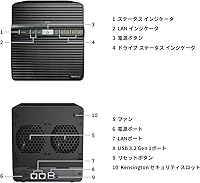
  • Network Ports: Includes dual Gigabit Ethernet ports for enhanced network reliability and speed.
  • Surveillance Integration: Supports integration with up to 30 IP cameras for video surveillance and monitoring.
  • Backup Features: Offers comprehensive backup solutions, including snapshots and scheduled data backups.
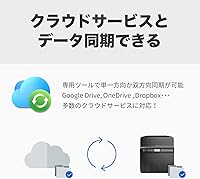
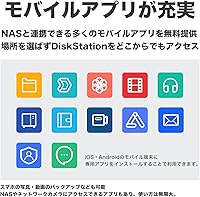
  • Remote Access: Allows secure remote access to data via the Synology Cloud service or mobile app.
  • Energy Efficiency: Designed with energy efficiency in mind, with low power consumption during operation.
  • Noise Level: The system fan operates at low noise levels, making it suitable for quiet home or office environments.
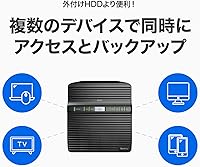
  • Compatibility: Compatible with both Windows and macOS, as well as mobile devices via the Synology apps.
  • Multimedia Management: Supports multimedia file management, including streaming of video and music files.
  • Expansion Slots: Includes USB and eSATA ports for additional storage expansion or connecting external devices.
  • Operating System: Runs on Synology's DiskStation Manager (DSM) operating system, offering a user-friendly interface.
  • Form Factor: Compact design ideal for home office or small business use, with dimensions optimized for desk setups.
  • Power Supply: Powered by an external power adapter, with automatic power recovery in case of outages.
  • File Sharing: Supports multi-user file sharing with customizable access permissions for secure collaboration.
  • Warranty: Comes with a 2-year limited warranty, providing support for hardware and software issues.
  • Weight: Lightweight design at approximately 1.5 kg, making it easy to place and move around.

FAQ

The Synology DS423 4-Bay DiskStation is a Network Attached Storage (NAS) device designed to store, share, and manage data securely. It offers up to 4 drive bays for custom storage setups, and includes features like remote access, backup solutions, and integration with video surveillance systems. This device is ideal for home offices or small businesses looking for reliable and scalable data management.

Setting up this NAS device is straightforward thanks to its easy-to-use interface. First, install your preferred hard drives into the 4 available bays, then connect the NAS to your router via Ethernet. After powering it on, follow the on-screen instructions to create your private cloud and configure data backup, remote access, and other features via the Synology Assistant app or DSM (DiskStation Manager) software.

Yes, the device is diskless, meaning you can select and install your own hard drives. Additionally, it allows for future expansion, either by adding additional drives or connecting external storage devices via USB or eSATA ports, providing flexibility as your storage needs grow.

The NAS device includes strong security features, such as private cloud access, data encryption, and regular snapshot backups. It also supports user and permission management to control access to files, making it a secure solution for sensitive data storage, especially for home offices or small businesses.

Yes, this device supports integration with up to 30 IP cameras for video surveillance. It includes features such as video recording, motion detection, and remote viewing, making it an ideal solution for security monitoring alongside data storage and sharing.

Users typically report solid performance with this device, especially for file storage, backup, and remote access. However, its performance might be affected under heavy workloads or simultaneous data requests from multiple users. For everyday home office or small business use, it should meet most needs without issue.

No, this NAS is diskless, meaning you can use any compatible hard drives of your choice. It supports both 3.5-inch and 2.5-inch hard drives or SSDs, as long as they are compatible with the device's storage capacity and interface specifications. Make sure to check for compatibility before purchasing drives.

Yes, one of the key features of this device is its remote access capabilities. By setting up a private cloud through the Synology software, you can securely access your files from anywhere using the DSM app, making it convenient for remote work or accessing files when traveling.

While this NAS device is highly suitable for home users and small businesses, it may not meet the demands of larger enterprises. Some users have reported that its storage and performance capacity are better suited to more moderate workloads. For enterprises with high-volume or complex data needs, a more robust system might be required.

Like most NAS devices, regular maintenance is important for optimal performance. This includes ensuring that the system software is up-to-date, monitoring storage health, and checking backup schedules. It also helps to periodically clean the device to avoid dust buildup, especially if it's placed in a dusty environment.