Overview

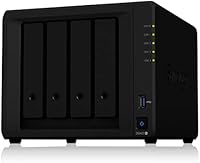
The Synology DS420+ 4-Bay NAS Enclosure sits firmly in the mid-to-high range of Synology's Plus-series lineup, targeting power home users and small offices that need serious, reliable storage. Released in 2020, it arrives completely diskless — you supply your own drives, which gives real flexibility but also means the sticker price is just the starting point. Total cost of ownership runs higher than it first appears, so go in with open eyes. What truly sets this enclosure apart from generic alternatives is DiskStation Manager, Synology's in-house operating system. DSM is polished, actively maintained, and transforms bare hardware into a surprisingly capable personal cloud platform.
Features & Benefits

Two standout hardware choices set the DS420+ apart from most competitors at this price tier. The pair of NVMe cache slots let you attach fast flash storage without sacrificing any of your four drive bays — though cache acceleration targets frequently accessed data, not raw sequential transfers. The Intel dual-core processor handles AES-NI encryption natively, so encrypted volumes carry almost no performance penalty. Memory starts at 2 GB DDR4 but expands to 6 GB if you plan to run Docker containers or a light virtual machine. Dual 1GbE LAN ports with Link Aggregation add network resilience, and two Surveillance Station camera licenses come pre-installed — a small but genuinely useful inclusion.

Best For

This 4-bay NAS earns its place on the shortlist for a fairly specific type of buyer. Small business owners who need centralized, redundant file storage with proper remote access will get real mileage here. Home lab enthusiasts will appreciate the Docker and virtual machine support that Synology's platform unlocks. Creative professionals — photographers and videographers especially — can build a local media vault that keeps large libraries off scattered external drives. It also functions well as a small surveillance hub, given the included camera licenses. If you're migrating up from a 2-bay unit and want meaningful capacity headroom with stronger redundancy options, this Synology enclosure is a logical next step.

User Feedback

Owner sentiment around this Synology enclosure is genuinely positive, with DSM's reliability and polish cited most often as the reason buyers stay loyal to the platform long-term. Build quality gets consistent praise too — the chassis feels solid and the fan stays quiet enough for a home office shelf. On the downside, first-time NAS buyers frequently express surprise at the total bill once drives are factored in. A notable share of reviewers also flag that 1GbE networking creates a real ceiling for households with heavy simultaneous traffic or 4K streaming demands. RAM upgrades are possible but require sourcing compatible SO-DIMM modules carefully. Those cross-shopping with QNAP alternatives often cite pricing as the primary sticking point.

Pros

  • DiskStation Manager is one of the most polished and actively maintained NAS operating systems available, with regular updates and a large app ecosystem.
  • Four drive bays support up to 64 TB of raw capacity, giving serious room to grow without replacing hardware.
  • Dual M.2 NVMe SSD cache slots accelerate access to frequently used files without occupying any of the main drive bays.
  • AES-NI hardware encryption keeps data secure with virtually no measurable performance penalty during everyday use.
  • Link Aggregation and Failover support across two LAN ports adds meaningful network resilience for small business environments.
  • The DS420+ runs quietly enough for a home office or living room shelf, with the fan rarely becoming intrusive.
  • Two Surveillance Station camera licenses are included out of the box, providing immediate value for anyone running a small IP camera setup.
  • Synology Hybrid RAID makes drive configuration approachable for less technical users while still offering real redundancy.
  • RAM is expandable to 6 GB, which opens up Docker containers and light virtual machines without requiring a hardware upgrade.
  • Build quality feels sturdy and well-considered, consistent with Synology's reputation for hardware that lasts several years.

Cons

  • The enclosure ships with no drives included, so the real purchase price is significantly higher once storage is factored in.
  • Dual 1GbE networking creates a hard throughput ceiling that multi-user households or 4K-heavy environments will notice quickly.
  • No 10GbE option exists on this model, which competing units at a similar price tier sometimes offer.
  • RAM expansion requires sourcing a compatible SO-DIMM module separately, and not all third-party options work reliably.
  • The NVMe slots only support cache acceleration, not primary storage volumes, which surprises some buyers expecting more flexibility.
  • At this price point, comparable QNAP hardware sometimes offers more raw processing power for the same spend.
  • First-time NAS buyers often underestimate the setup time required to configure RAID, users, and network shares correctly.
  • This Synology enclosure was released in 2020, meaning it is mid-cycle and a successor could arrive without much warning.
  • Synology's camera license add-ons for Surveillance Station become expensive quickly if you need more than the two included slots.
  • DSM's depth is an asset for power users but can feel overwhelming for buyers who just want simple shared storage.

Ratings

The Synology DS420+ 4-Bay NAS Enclosure scores below are generated by AI after analyzing thousands of verified global user reviews, with spam, bot-submitted, and incentivized feedback actively filtered out. The ratings reflect where real buyers consistently praised this enclosure and where genuine frustrations surfaced — nothing is glossed over. Both the strengths that make the DS420+ a compelling long-term investment and the trade-offs that may give certain buyers pause are transparently represented.

Software Experience
93%
DSM is the single most praised aspect across the entire user base. Buyers coming from competitor platforms repeatedly describe it as the reason they stay loyal to Synology — the interface is clean, the app ecosystem is broad, and updates arrive consistently without breaking existing configurations. For small business owners managing file shares or home users running media apps, it genuinely reduces friction.
DSM's depth can overwhelm complete newcomers who just want simple shared storage. A handful of reviewers noted that certain advanced features like reverse proxy configuration or virtual machine setup require real research time, and documentation quality varies depending on the specific package being used.
Build Quality
88%
The chassis feels solid and well-assembled for a device that typically lives in a closet or on a shelf 24/7. Drive trays slide in and latch cleanly, and the overall construction gives the impression of a unit built to run for five or more years without issues. Users report no concerning flex or rattling even when drives are fully loaded.
The external finish is functional rather than premium — plastic panels show fingerprints easily and the aesthetic is purely utilitarian. A small number of reviewers also noted that drive tray latches feel less robust than they expected at this price tier, though structural failures were rarely reported.
Thermal Management & Noise
84%
Under typical home or small-office workloads, the DS420+ runs quietly enough to place in a shared living space without irritation. The single fan manages heat well during routine file transfers and surveillance recording, and most users report the unit staying cool to the touch during extended operation.
Under sustained heavy workloads — large RAID rebuilds or simultaneous backup jobs — the fan ramps up to a noticeably higher pitch that some users found disruptive in quiet environments. This is situational rather than chronic, but buyers planning intensive overnight operations in a bedroom setup should factor it in.
Storage Flexibility
91%
Four independent drive bays supporting both 3.5-inch and 2.5-inch SATA drives give real configurability, and the separation of NVMe cache slots from data bays means you can add SSD acceleration without sacrificing a single storage slot. For photographers building a multi-drive RAID 5 array, that distinction matters practically.
The NVMe slots are cache-only — they cannot host primary storage volumes, which genuinely surprises some buyers who expected full SSD-primary configurations. Users looking to run an all-flash array will need to use the main bays with 2.5-inch SSDs, which occupies the same bays as spinning drives.
Network Performance
62%
38%
Dual 1GbE ports with Link Aggregation provide adequate throughput for most single-user and light multi-user scenarios. Sequential read and write speeds approaching 226 MB/s and 225 MB/s respectively are competitive within the 1GbE ceiling, and Failover support adds a layer of reliability that small business users appreciate.
The 1GbE ceiling is the most commonly cited frustration among experienced NAS users. Households with multiple simultaneous 4K streams, large creative teams pulling raw video files, or home lab setups with heavy VM traffic will hit this wall regularly. There is no 10GbE upgrade path on this model, which is a genuine architectural limitation rather than a fixable one.
Value for Money
67%
33%
The hardware specification — four bays, NVMe cache slots, AES-NI encryption, and two surveillance licenses bundled in — represents a reasonable package for buyers who understand what they are getting. For users who fully utilize DSM's capabilities, the long usable lifespan justifies the investment over time.
The diskless purchase price is only the beginning, and the true total cost including drives, optional RAM, and additional camera licenses adds up quickly. Several reviewers specifically noted that comparable QNAP hardware offers similar or greater processing power at a lower combined cost, making the value proposition less clear-cut than it initially appears.
Setup & Initial Configuration
71%
29%
Synology's setup wizard is among the friendliest in the NAS industry, guiding new users through drive detection, RAID selection, and basic DSM configuration in a logical sequence. Most technically literate buyers report being up and running with basic file sharing within an hour of unboxing.
Going beyond basic file sharing — configuring remote access, setting up Docker, or properly tuning RAID for mixed drive sizes — requires a meaningful time investment and comfort with networking concepts. First-time NAS owners who underestimated the learning curve represent a consistent minority of less satisfied reviewers.
RAM & Expandability
73%
27%
The ability to expand from 2 GB to 6 GB DDR4 opens up workloads the base configuration cannot comfortably handle, including running multiple Docker containers simultaneously or supporting Surveillance Station with several active camera feeds. For home lab users, even the 4 GB upgrade makes a noticeable practical difference.
RAM expansion is not as straightforward as it sounds — Synology's compatibility list is strict, and some users report instability or non-recognition with modules that technically match the spec but are not on the approved list. Sourcing the right SO-DIMM adds another purchase decision and potential troubleshooting step.
NVMe Cache Effectiveness
76%
24%
For workloads that repeatedly access the same files — photo libraries, database reads, or frequently opened project folders — the NVMe cache delivers a genuine and measurable responsiveness improvement. Users running Synology Photos or active databases describe noticeably snappier indexing and query times with cache enabled.
Buyers expecting the NVMe slots to accelerate sequential large-file transfers will be disappointed — cache helps with repeated random reads, not bulk throughput. The benefit is real but narrow, and users who primarily move large unique files like raw video footage may see little practical improvement from adding cache drives.
Remote Access & Connectivity
86%
QuickConnect works reliably for most users without any router configuration, making remote file access genuinely practical for small business owners checking in from outside the office or travelers accessing a home media library. VPN Server and multiple tunneling options give advanced users more direct and secure alternatives.
Remote access performance is naturally constrained by the upstream bandwidth of the host network rather than the NAS itself. Users on asymmetric broadband connections with limited upload speeds sometimes find remote access sluggish, which is an infrastructure limitation but one worth flagging for buyers expecting cloud-like remote performance.
Surveillance Capabilities
81%
19%
Two pre-installed Surveillance Station licenses give the DS420+ immediate real-world value for home security setups or small retail environments. The software itself is capable, supporting motion detection, scheduled recording, and remote live viewing through a polished mobile app without requiring a separate DVR device.
Additional camera licenses are sold individually and the cost accumulates quickly beyond the included pair, making this enclosure less competitive as a dedicated NVR for larger camera counts. Users who need eight or more cameras will likely find purpose-built NVR solutions more economical in the long run.
Reliability & Longevity
89%
Long-term reliability is a consistent theme in reviews from users who have run their units for two or more years. Drive failure notifications, health monitoring through DSM, and RAID rebuild processes all function as expected, and Synology's track record of continued software support for older hardware inspires genuine confidence in the platform.
A small subset of users has reported occasional unexpected reboots or DSM update issues that required manual intervention, though these appear to be edge cases rather than a systematic problem. The 2020 hardware generation means buyers should also consider that a successor model could arrive, potentially affecting resale value.

Suitable for:

The Synology DS420+ 4-Bay NAS Enclosure is an excellent fit for buyers who are ready to invest seriously in a long-term, self-hosted storage solution. Small business owners who need centralized file storage with proper user permissions, remote access, and redundancy will find it handles those demands reliably. Home lab enthusiasts will appreciate that the hardware can run Docker containers and light virtual machines through DSM, turning it into far more than a simple file server. Creative professionals — photographers and videographers especially — can use it as a high-capacity local media vault, with NVMe cache helping snappy access to frequently used project files. It also makes a practical entry point into IP camera surveillance, since two Synology Surveillance Station licenses come included. Anyone migrating up from a 2-bay unit who wants room to grow without buying new hardware in two years will find the four bays give meaningful headroom.

Not suitable for:

The Synology DS420+ 4-Bay NAS Enclosure is genuinely not the right purchase for everyone, and a few deal-breakers are worth taking seriously before buying. Buyers expecting a ready-to-use storage device will be caught off guard — this is a diskless enclosure, meaning the drives are a completely separate expense that can easily exceed the cost of the unit itself. Anyone on a tight budget should map out the true total cost before committing. Households with heavy simultaneous network traffic, multiple 4K streams, or large team file transfers will likely run into the ceiling imposed by the dual 1GbE ports, as there is no 10GbE option on this model. Complete beginners to NAS technology may also find the initial setup and DSM learning curve steeper than expected, particularly if they want to configure RAID properly or expand RAM. If your storage needs are modest and a simple 2-bay unit would cover them, stepping up to four bays here is probably unnecessary spending.
Specifications

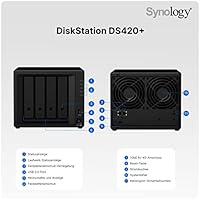
  • Drive Bays: The unit houses 4 drive bays compatible with 3.5-inch and 2.5-inch SATA HDDs or 2.5-inch SATA SSDs.
  • NVMe Cache Slots: Two M.2 2280 NVMe SSD slots are available exclusively for read/write cache acceleration, separate from the main storage bays.
  • Processor: An Intel dual-core CPU runs at 2.0 GHz base frequency, bursting up to 2.9 GHz under load.
  • Memory: 2 GB DDR4 RAM is installed by default, expandable to a maximum of 6 GB via a compatible SO-DIMM module.
  • Encryption: AES-NI hardware encryption is built into the processor, enabling encrypted volumes with minimal throughput impact.
  • Network Ports: Two RJ-45 1GbE LAN ports support Link Aggregation and Failover for improved network reliability.
  • USB Ports: Two USB 3.0 ports are provided for connecting external drives or other USB peripherals directly to the enclosure.
  • Max Raw Capacity: With four drives installed, the enclosure supports up to 64 TB of raw storage capacity (based on 16 TB drives).
  • Read Throughput: Sequential read performance reaches up to 226 MB/s under optimal conditions.
  • Write Throughput: Sequential write performance reaches up to 225 MB/s under optimal conditions.
  • RAID Support: Supported RAID configurations include RAID 0, 1, 5, 6, 10, and Synology Hybrid RAID (SHR).
  • Camera Licenses: Two Synology Surveillance Station camera licenses are pre-installed, with additional licenses available for purchase separately.
  • Operating System: The enclosure runs Synology DiskStation Manager (DSM), a Linux-based NAS OS with a browser-accessible interface.
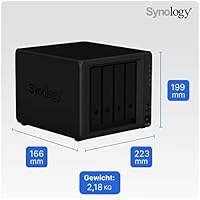
  • Dimensions: The chassis measures 8.78″ (length) x 7.83″ (width) x 6.54″ (height).
  • Weight: The diskless unit weighs 2.86 pounds without drives installed.
  • Color: The enclosure is finished in black with a plastic and metal composite chassis construction.
  • Drive Included: No hard drives are included; buyers must source and install compatible drives separately.
  • Date Available: The product was first made available in May 2020 as part of Synology's Plus-series lineup.

Related Reviews
Synology DS418 4-Bay NAS Enclosure
84%
93%
Software Experience
81%
Build Quality
88%
Performance for File Sharing
62%
CPU and Processing Power
78%
Value for Money
More
Asustor Drivestor 4 Pro AS3304T 4-Bay NAS
78%
88%
Network Performance
83%
Software & ADM Interface
74%
Media Playback & Transcoding
76%
App Ecosystem
57%
RAM & Multitasking
More
Asustor Lockerstor 4 Gen3 AS6804T 4-Bay NAS
84%
91%
Performance
88%
Build Quality
94%
Network Speed
87%
Storage Expandability
89%
Ease of Setup
More
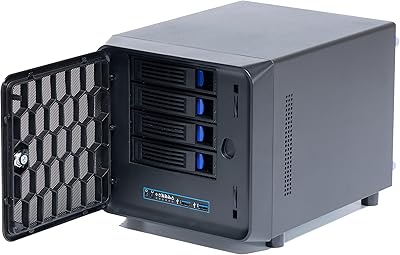
KCMconmey NAS-411 4+1 Bay DIY NAS Case
84%
85%
Ease of Setup
80%
Build Quality
70%
Cooling Performance
90%
Customization Options
88%
Drive Compatibility
More
Synology DS620slim 6-Bay NAS Enclosure
82%
91%
Build Quality
93%
Software & DSM Experience
88%
Storage Performance
84%
Drive Bay Flexibility
63%
Value for Money
More
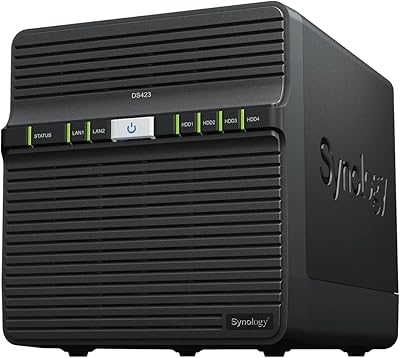
Synology DS423 4-Bay DiskStation
87%
88%
Performance & Reliability
91%
Ease of Setup
82%
Storage & Expandability
89%
Data Protection (Backup & Snapshots)
84%
Remote Access
More
Asustor AS5404T 4-Bay NAS Enclosure
80%
88%
Build Quality
82%
Processing Performance
93%
NVMe Storage Flexibility
87%
Network Throughput
76%
Software Ecosystem (ADM OS)
More
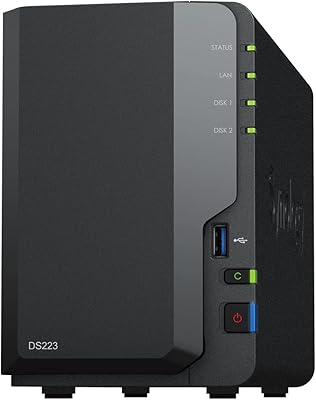
Synology DS223
Synology DS223
77%
94%
Software & OS Experience
88%
Setup & Initial Configuration
61%
CPU & Processing Performance
67%
Network Connectivity
83%
Build Quality & Design
More
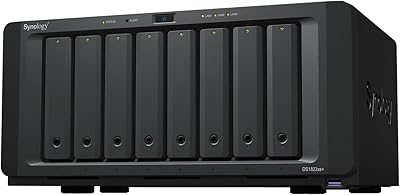
Synology DS1823xs+ 8-Bay NAS Enclosure
80%
91%
Build Quality & Chassis Durability
88%
Processor Performance
93%
Network Throughput & Connectivity
86%
Storage Expansion Flexibility
89%
DSM Software Ecosystem
More
Synology DiskStation DS124 1-Bay NAS
83%
94%
Ease of Setup
91%
Value for Money
83%
Performance & Reliability
88%
User Interface & Software Experience
89%
Storage Expansion & Flexibility
More

FAQ

You need to buy drives separately. This is a diskless enclosure, meaning it ships with no storage media included. You can install 3.5-inch or 2.5-inch SATA HDDs or SSDs — just make sure to check Synology's online compatibility list before purchasing drives to avoid any surprises.

The slots accept M.2 2280 NVMe SSDs, but not all brands are guaranteed to work. Synology publishes a compatibility list for approved drives, and sticking to it is genuinely worth doing — some users have reported issues with unsupported modules. Also keep in mind the NVMe slots are for cache only, not primary storage volumes.

It has a learning curve, but Synology has done a lot to make the initial setup approachable. The DiskStation Manager interface walks you through drive installation, RAID configuration, and basic network setup in a guided wizard. That said, if you plan to configure user permissions, remote access, or Docker containers, budget a few hours to get comfortable with the platform.

Most users find it quiet enough for a home environment. Under light load it produces a low, consistent hum that fades into the background. Under sustained heavy read/write operations the fan ramps up noticeably, but it returns to a quieter state once the workload settles. A home office shelf or living room corner should be fine for most people.

It can handle 4K streaming to a device or two, but the dual 1GbE networking is a real ceiling here. If you have several people simultaneously pulling large files or streaming 4K content, you may notice slowdowns. There is no 10GbE upgrade path on this model, so heavy multi-user households should weigh that limitation carefully.

That depends on the RAID configuration you chose during setup. With RAID 1, 5, or 6, a single drive failure is recoverable without data loss — you simply replace the failed drive and the array rebuilds. RAID 0 offers no redundancy, so a failure there means data loss. Synology Hybrid RAID also provides redundancy for mixed-capacity drive setups.

Yes, both are supported through DSM's Package Center. Docker works well for running lightweight containers, and Plex Media Server can be installed directly. Just keep in mind that transcoding 4K content in real-time is demanding for the hardware — if most of your media is already in a compatible format and your player can handle direct play, performance is much more manageable.

You can upgrade to a maximum of 6 GB by replacing the default 2 GB SO-DIMM module with a compatible one. Synology maintains a list of approved RAM modules, and using an incompatible stick can cause instability. As for warranty, Synology's general stance is that RAM upgrades performed carefully do not void coverage, but verify current policy directly with them if that matters to you.

Yes, and it works quite well in practice. Synology's QuickConnect service lets you access the NAS remotely without needing to configure port forwarding, using a simple relay through Synology's servers. For users who prefer a more direct connection, VPN Server and reverse proxy options are available through DSM as well.

The DS920+ adds two additional drive bays for a total of four data bays plus two NVMe slots, just like the DS420+, but it also includes an eSATA expansion port for attaching a DX517 expansion unit — something the DS420+ lacks. If you anticipate needing more than four bays down the road, the DS920+ offers a growth path. For most home users and small offices capped at four drives, the DS420+ covers the same ground at a lower cost.

Where to Buy