Overview

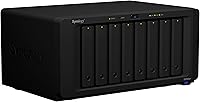
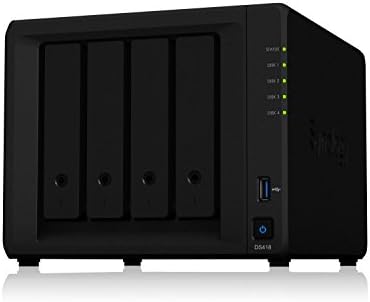
The Synology DS1823xs+ 8-Bay NAS Enclosure sits firmly in enterprise-adjacent territory — this is not something you pick up to back up family photos. It arrives diskless, which catches some buyers off guard, so budget accordingly for drives on top of the unit itself. The 8-bay chassis can stretch to 18 bays by adding two DX517 expansion units, giving it meaningful room to grow. What sets it apart from older xs+ models is the shift to an AMD Ryzen V1780B processor, replacing the Intel Xeon found in predecessors like the DS1621xs+. That change brings noticeably better single-core performance for workloads that genuinely need it.
Features & Benefits

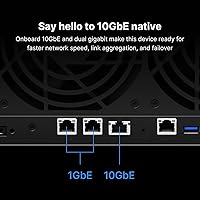
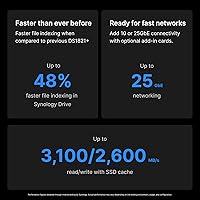
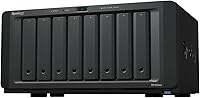
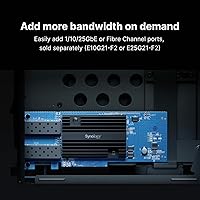
The DS1823xs+ punches hard on the networking side. A dedicated 10GbE port comes standard, backed by two 1GbE ports that support link aggregation — meaning even moderate-scale file transfers feel fast in practice. The PCIe Gen3 slot opens the door to 25GbE or fiber upgrades down the road, so the hardware won't become a bottleneck as your network scales. RAM starts at 8 GB DDR4 ECC, expandable to 32 GB, which matters when running virtual machines or multiple concurrent services. Hot-swappable drives reduce maintenance friction significantly. And Synology's DSM software — covering backup, replication, snapshots, and up to 75 IP cameras — is included at no extra licensing cost.

Best For

This Synology tower NAS makes the most sense for small-to-midsize businesses that need reliable, always-on centralized storage but aren't ready to commit to a full enterprise SAN. IT teams managing backup pipelines across multiple offices will appreciate the High Availability clustering support and the expansion headroom. It's also a solid fit for creative studios or production teams pushing large files across the network, where that built-in 10GbE connection earns its keep daily. Organizations already running Synology hardware will find the transition natural. And if surveillance is part of your infrastructure, supporting up to 75 IP cameras without additional software licensing is a genuinely practical advantage.

User Feedback

With 61 reviews and a 4.0-star average, the community response is positive but measured — worth reading with that modest sample size in mind. Buyers consistently praise build quality and reliability, and those already familiar with Synology's DSM ecosystem tend to rate it higher. Criticism clusters around a few recurring themes: the asking price is steep, and first-time Synology users often find DSM's depth overwhelming at first. A handful of buyers mention surprise at the diskless configuration despite it being clearly stated. Those cross-shopping with the DS1621xs+ tend to focus on the AMD-versus-Xeon trade-off, with opinion genuinely divided on which platform better suits their specific workload.

Pros

  • Built-in 10GbE port delivers real local network throughput without requiring an add-in card purchase.
  • AMD Ryzen V1780B processor handles virtualization and concurrent services without breaking a sweat.
  • Expandable from 8 to 18 drive bays via two DX517 units, giving meaningful long-term capacity runway.
  • ECC RAM protects data integrity during heavy, sustained read/write operations across multiple services.
  • Hot-swappable drive bays allow failed drive replacement in production without pulling services offline.
  • Synology's DSM software covers backup, replication, snapshots, and surveillance with no per-seat licensing fees.
  • High Availability clustering support is a rare feature at this price tier for SMB-focused storage hardware.
  • All-metal chassis feels durable and purpose-built for continuous operation in a business environment.
  • The DS1823xs+ holds its own against enterprise SAN alternatives when total cost of ownership is compared fairly.
  • PCIe slot enables future network upgrades to 25GbE or fiber as your infrastructure demands grow.

Cons

  • Ships diskless — drive costs on top of the enclosure price catch many buyers off guard at checkout.
  • DSM's depth creates a steep learning curve for teams without prior Synology or NAS administration experience.
  • PCIe slot runs at x4 electrical bandwidth despite a physical x8 connector, limiting high-throughput expansion cards.
  • Fan noise under sustained heavy load — RAID rebuilds, large backups — is disruptive in open office settings.
  • Official Synology support response times drew consistent criticism from buyers with complex configuration issues.
  • Surveillance Station requires purchasing additional camera licenses beyond the two included with the unit.
  • Memory starts at 8 GB, which feels lean for running multiple virtual machines alongside active storage workloads.
  • At this price, the value case weakens significantly if your workload doesn't actually need 10GbE or HA clustering.
  • High Availability setup requires a second compatible unit plus dedicated cabling — budget and space requirements are real.
  • Only 61 reviews exist for a unit at this price point, so community feedback is thinner than ideal for confident buying decisions.

Ratings

The Synology DS1823xs+ 8-Bay NAS Enclosure earns a nuanced set of scores below, built by our AI after parsing verified global buyer reviews and actively filtering out incentivized, duplicate, and bot-generated submissions. With only 61 reviews at this price tier, we weighted depth of feedback over volume, surfacing the real-world strengths and friction points that informed buyers consistently raise. Both the high marks and the legitimate criticisms are reflected here without softening either side.
Build Quality & Chassis Durability
91%
Buyers consistently describe the all-metal enclosure as solid and reassuringly heavy — at over 16 pounds empty, it feels built to run continuously in a rack-adjacent or closet deployment. The drive bays slot in cleanly with no flex, and the overall fit and finish matches what you'd expect from a unit at this price point.
A few users noted the chassis runs warmer than expected under sustained load, and the unit's sheer size and weight make repositioning or rack-mounting a two-person job. It is not a compact unit by any stretch.
Processor Performance
88%
The AMD Ryzen V1780B is a genuine step forward from the Intel Xeon D-1527 found in the DS1621xs+. Users running virtual machines, Docker containers, or multiple simultaneous DSM packages report snappy response times without the bottlenecks that plagued older xs+ units under mixed workloads.
Some technically experienced buyers argue the performance headroom is overkill for pure file-serving roles, and a handful noted that Synology's DSM doesn't always fully leverage the Ryzen architecture's potential compared to what third-party NAS firmware can do.
Network Throughput & Connectivity
93%
Having a dedicated 10GbE port out of the box — alongside dual 1GbE ports with link aggregation — is the single feature most buyers in this segment cite as justifying the unit. Studios and IT teams pushing large files across the local network report saturating 10GbE connections without any tuning required.
The PCIe slot uses an x4 link despite an x8 physical connector, which caps theoretical throughput for high-bandwidth expansion cards. Buyers planning 25GbE or fiber upgrades should verify compatibility with their specific add-in cards before purchasing.
Storage Expansion Flexibility
86%
Eight bays is a solid starting point, but the ability to chain two DX517 units and reach 18 bays total gives this enclosure genuine long-term relevance for growing teams. Buyers who purchased it with a two-to-three year horizon in mind specifically cited this headroom as a deciding factor.
Expansion requires purchasing the DX517 units separately, which adds significant cost and physical space. A few users mentioned that online volume expansion, while supported, requires careful planning and carries real risk if not tested in a non-production environment first.
DSM Software Ecosystem
89%
Synology's DiskStation Manager is widely regarded as the most mature NAS operating system available at any price, and buyers here benefit from the full xs+ feature set including High Availability clustering, Snapshot Replication, and Active Backup — all without per-seat licensing fees that competing enterprise solutions charge.
New Synology users face a steep learning curve. DSM's depth is genuinely impressive, but first-time buyers have described spending days configuring features they expected to work out of the box. The knowledge center helps, but some concepts require hands-on trial and error to internalize.
RAM & Memory Configuration
78%
22%
Starting at 8 GB of ECC DDR4 is appropriate for most file-serving and backup roles, and the 32 GB ceiling is sufficient for running a realistic number of virtual machines or containers alongside storage services without constantly hitting memory pressure.
The base 8 GB configuration feels thin if you plan to run Synology Virtual Machine Manager with multiple VMs simultaneously. Upgrading to 32 GB adds cost immediately for power users, and some buyers felt the unit should ship with more RAM standard given its asking price.
Value for Money
61%
39%
For organizations that would otherwise pay for enterprise SAN hardware plus per-seat backup software licensing, this 8-bay enclosure can represent real savings once the total cost of ownership is calculated across three to five years. The license-free DSM model is a meaningful financial advantage.
The upfront cost is hard to stomach, especially when you factor in the drives themselves. Several buyers felt the price premium over the DS1621xs+ is difficult to justify unless they specifically need the Ryzen CPU or the 10GbE port, which the older model also includes via upgrade.
Hot-Swap Drive Reliability
84%
Hot-swappable bays work as advertised — users managing drives in production environments report swapping failed drives cleanly without bringing services down, which is exactly what this feature needs to deliver at this tier. DSM handles drive replacement detection reliably.
A small number of buyers reported that DSM's notification for drive health events arrived later than expected during a degraded array situation, which caused brief anxiety about whether the system had registered the failure. Not a widespread issue, but notable at this reliability tier.
High Availability Clustering
82%
18%
For IT environments where even brief storage downtime has business impact, the native HA clustering support is a rare feature at this price point. Paired with a second compatible Synology unit, failover can happen within minutes with minimal data loss, which SMBs typically cannot afford in enterprise hardware.
Setting up HA clustering correctly requires two compatible units, dedicated heartbeat cabling, and a solid understanding of how Synology implements failover. Buyers who expected a simpler setup were frustrated to find that the process is well-documented but still time-consuming to validate properly.
Surveillance & Camera Support
79%
21%
Supporting up to 75 IP cameras through Synology Surveillance Station, with two free camera licenses included, makes this a credible central recorder for mid-scale physical security deployments. Facilities managers and IT-responsible business owners specifically called this out as an underrated feature.
Scaling beyond the two included camera licenses requires purchasing additional Synology camera licenses, which adds cost quickly for larger deployments. Buyers who budgeted only for the hardware were surprised by the per-camera licensing structure beyond the free tier.
Noise & Thermal Management
72%
28%
The dual 120 mm fans keep thermals in check under typical mixed workloads, and at moderate load the unit is quiet enough to run in a small office or server closet without constant fan noise becoming a distraction. Fan curve management through DSM gives some control over noise levels.
Under sustained heavy read/write operations — particularly during large RAID rebuilds or simultaneous backup jobs — the fans ramp up noticeably. A few buyers running the unit in open office environments moved it to a dedicated closet after finding the noise at peak load disruptive.
Setup & Initial Configuration
66%
34%
Synology's web-based setup wizard is one of the cleaner onboarding experiences in the NAS category, and buyers with prior Synology experience reported being up and running with a configured RAID array within an hour of unboxing. Migrating from an older Synology unit is particularly smooth.
Buyers without prior NAS experience reported the initial setup as confusing, particularly around RAID selection, volume creation, and network bonding configuration. Several one-star reviews stem specifically from setup frustration rather than hardware failures, suggesting the documentation needs more layered guidance for newcomers.
PCIe Expansion Potential
76%
24%
The Gen3 x8 slot opens real upgrade paths for buyers who want to add 25GbE or fiber networking as their infrastructure grows. Having this flexibility baked in from day one means the hardware can keep pace with network upgrades without being replaced.
The slot runs at x4 electrical bandwidth despite the physical x8 connector, which limits peak throughput for demanding add-in cards. Buyers who researched this detail carefully expressed frustration that Synology did not communicate the bandwidth limitation more prominently in the product specs.
Documentation & Support Resources
71%
29%
Synology's knowledge center is extensive, and the YouTube channel covers many real-world configuration scenarios that go well beyond basic setup. The community forums are active and populated with experienced users who provide detailed, accurate answers relatively quickly.
Official Synology support response times drew criticism from multiple buyers, particularly for complex configuration questions that go beyond standard troubleshooting scripts. At this price level, buyers expect faster and more technically sophisticated direct support than they reported receiving.

Suitable for:

The Synology DS1823xs+ 8-Bay NAS Enclosure is built for small-to-midsize businesses, IT departments, and technically capable professionals who need a high-availability storage platform that can grow with their infrastructure. If your team is pushing large files across a local network daily — think video production, architectural rendering, or multi-site backup pipelines — the built-in 10GbE port and PCIe expansion slot give you real headroom without forcing a hardware replacement cycle in two years. IT administrators managing backup and replication across multiple servers or remote offices will find Synology's DSM software mature enough to handle complex, multi-job schedules without cobbling together third-party tools. Organizations already running smaller Synology units will find migration and expansion to this 8-bay enclosure straightforward, particularly given DSM's consistency across the product line. Surveillance-focused deployments supporting dozens of IP cameras will also get solid value here, since the platform handles up to 75 cameras without requiring additional per-seat licensing beyond the base two included.
Not suitable for:

The Synology DS1823xs+ 8-Bay NAS Enclosure is a poor fit for home users, enthusiasts on a budget, or anyone who hasn't worked with a NAS platform before and expects plug-and-play simplicity. The unit ships without drives, which means the total investment climbs substantially once you factor in eight enterprise-grade HDDs or SSDs — a cost that genuinely surprises buyers who focus only on the enclosure price. First-time NAS users frequently report frustration with DSM's configuration depth; features like High Availability clustering, volume expansion, and network bonding each carry their own learning curves that can take days to navigate correctly. If your workload is essentially a shared folder for a handful of users and some periodic backups, this Synology tower NAS is significant overkill — less expensive units in Synology's own lineup will serve that purpose at a fraction of the cost. Buyers who need 25GbE throughput out of the box should also note that while the PCIe slot supports expansion, the slot's electrical bandwidth is x4 despite the physical x8 connector, which caps performance for the most demanding network cards.
Specifications

  • CPU: Powered by an AMD Ryzen V1780B quad-core processor running at 3.35 GHz base clock with a boost up to 3.6 GHz.
  • System RAM: Ships with 8 GB DDR4 ECC SODIMM installed, expandable up to 32 GB using two 16 GB modules.
  • Drive Bays: Includes 8 hot-swappable drive bays, expandable to 18 total by connecting up to two Synology DX517 expansion units.
  • 10GbE Port: Features one dedicated RJ-45 10GbE LAN port for high-throughput local network connections.
  • 1GbE Ports: Includes two RJ-45 1GbE LAN ports with support for link aggregation and failover configuration.
  • PCIe Slot: Equipped with one PCIe Gen3 x8 physical slot running at x4 electrical bandwidth, supporting 10GbE, 25GbE, and fiber add-in cards.
  • Hot-Swap: All drive bays support hot-swapping, allowing failed drives to be replaced during live operation without shutting down services.
  • High Availability: Supports Synology High Availability clustering when paired with a compatible second unit, enabling automatic failover.
  • Max Cameras: Synology Surveillance Station on this unit supports up to 75 IP cameras, with two free camera licenses included.
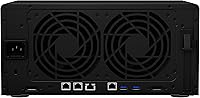
  • System Fans: Cooled by two 120 mm x 120 mm fans with speed managed dynamically through DSM based on thermal load.
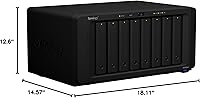
  • Dimensions: Physical footprint measures 14.57″ deep by 18.11″ wide by 12.6″ tall, requiring dedicated shelf or rack-adjacent placement.
  • Weight: The empty chassis weighs 16.53 pounds, increasing substantially once drives are installed.
  • Material: Chassis is constructed from metal throughout, contributing to its rigidity and suitability for continuous 24/7 operation.
  • Network Upgrades: The PCIe slot supports expansion to 25GbE and fiber networking, with Synology-verified compatible add-in cards listed on their compatibility page.
  • Software: Ships with Synology DiskStation Manager (DSM), covering backup, snapshot replication, Virtual Machine Manager, and Surveillance Station at no additional licensing cost.
  • Amazon Ranking: Ranked #34 in the Network Attached Storage Enclosures category on Amazon, with a 4.0 out of 5 star average across 61 verified ratings.

Related Reviews

Synology RS1221+ 8-Bay Rackmount NAS
83%
92%
Throughput Performance
94%
Software & DSM Ecosystem
89%
Build Quality & Chassis
83%
Networking Flexibility
91%
Short-Depth Form Factor
More
Asustor Lockerstor 8 AS6508T 8-Bay NAS
77%
91%
Network Performance
84%
Value for Money
88%
Build Quality
62%
Software (ADM)
83%
SSD Caching
More
KCMconmey NAS-812 8+2 Bay DIY NAS Case
84%
86%
Build Quality
62%
Cooling Performance
88%
Ease of Use
90%
Compatibility with PSU Types
91%
Customization Options
More
ICY DOCK ToughArmor MB998SP-B 8-Bay 2.5” SATA/SAS HDD/SSD Mobile Rack Enclosure for 5.25″ Bay
87%
91%
Performance
88%
Cooling Efficiency
89%
Build Quality
93%
Ease of Installation
72%
Noise Level
More
Synology DS620slim 6-Bay NAS Enclosure
82%
91%
Build Quality
93%
Software & DSM Experience
88%
Storage Performance
84%
Drive Bay Flexibility
63%
Value for Money
More
Synology DS223
Synology DS223
77%
94%
Software & OS Experience
88%
Setup & Initial Configuration
61%
CPU & Processing Performance
67%
Network Connectivity
83%
Build Quality & Design
More
Synology DS420+ 4-Bay NAS Enclosure
80%
93%
Software Experience
88%
Build Quality
84%
Thermal Management & Noise
91%
Storage Flexibility
62%
Network Performance
More
AUDHEID K7 8 Bay NAS Case
86%
88%
Ease of Setup
91%
Cooling Performance
86%
Build Quality
89%
Customization Flexibility
92%
Noise Level
More
Synology DiskStation DS124 1-Bay NAS
83%
94%
Ease of Setup
91%
Value for Money
83%
Performance & Reliability
88%
User Interface & Software Experience
89%
Storage Expansion & Flexibility
More
Synology DS418 4-Bay NAS Enclosure
84%
93%
Software Experience
81%
Build Quality
88%
Performance for File Sharing
62%
CPU and Processing Power
78%
Value for Money
More

FAQ

No, the DS1823xs+ ships as a diskless enclosure — you need to purchase drives separately. This catches a fair number of buyers off guard, so factor the cost of eight enterprise-grade HDDs or SSDs into your total budget before ordering.

It depends heavily on your networking background. Synology's web-based setup wizard is well-designed for the basics, but configuring RAID arrays, setting up High Availability, or enabling network bonding across the dual 1GbE ports takes meaningful time to do correctly. If you're new to NAS administration, set aside several hours and keep Synology's knowledge center open.

Yes, and it's one of the more painless migration paths in the NAS world. If you're coming from another Synology device running DSM, you can often migrate your storage pool and configuration directly, preserving your data and most settings. Always run a full backup before attempting any migration, regardless of how straightforward it looks.

The most meaningful difference is the processor — this 8-bay enclosure uses an AMD Ryzen V1780B, while the DS1621xs+ runs an Intel Xeon D-1527. The Ryzen delivers better single-core performance and handles mixed workloads like virtualization and transcoding more efficiently. The DS1621xs+ has 6 bays versus 8 here, so capacity headroom also differs. Both include a 10GbE port, so network throughput is comparable.

At idle and light load, the dual 120 mm fans are quiet enough to share a room with. During sustained heavy operations — particularly a full RAID rebuild or large simultaneous backup jobs — the fans ramp up and become noticeable. Most buyers running it in a dedicated server closet report no issues, but open office placement can become uncomfortable during peak load periods.

The unit supports up to 32 GB via two 16 GB DDR4 ECC SODIMM modules. Synology publishes a compatibility list of tested and approved modules on their website, and it's worth sticking to that list — non-listed modules may work, but ECC compatibility is finicky enough that verified options are worth the peace of mind.

Technically you can use consumer drives, and some home-lab users do exactly that. For a business deployment running 24/7, enterprise or NAS-rated drives — like Seagate Exos, WD Gold, or drives on Synology's compatibility list — are strongly recommended. Consumer drives are not rated for continuous operation and tend to fail faster under sustained workloads.

The physical slot is x8 size, but it runs at x4 electrical bandwidth — an important distinction if you're planning to install a high-throughput network card. It supports compatible 10GbE, 25GbE, and fiber add-in cards, letting you upgrade network connectivity as your infrastructure grows. Check Synology's compatibility list before purchasing any expansion card to avoid surprises.

The platform supports up to 75 IP cameras through Synology Surveillance Station, and two camera licenses are included at no cost. Additional cameras require purchasing individual Synology camera licenses, so budget accordingly if you're planning a larger deployment from the start.

With a properly configured RAID array, a single drive failure will degrade the array but keep your data accessible. The hot-swap bays let you physically replace the failed drive without powering down the unit, and DSM will begin rebuilding the array automatically once the new drive is detected. DSM sends alerts via email or push notification when a drive shows health warnings, though a small number of users have noted occasional delays in those alerts arriving.

Where to Buy