
Overview

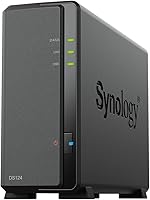
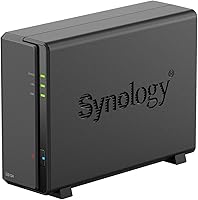
The Synology DS124 1-Bay NAS Enclosure is Synology's entry point into personal network storage — a compact, no-frills unit built for home users and small offices who want real control over their own data. One important thing upfront: no hard drive is included, so factor in the cost of a compatible drive before purchasing. The enclosure itself is surprisingly solid, built from alloy steel and light enough at 2.75 pounds to sit unobtrusively on a desk or shelf. Backed by a 2-year warranty and Synology's well-earned reputation for long-term software support, this home NAS unit is a sensible starting point — just don't expect it to handle heavy or demanding workloads.

Features & Benefits

Running on a quad-core Realtek processor with 1 GB of RAM, the DS124 handles everyday tasks like file sharing, cloud syncing, and scheduled backups without issue. The standout here is Synology's DSM software — a browser-based interface that feels genuinely intuitive and doesn't require a technical background to navigate confidently. Files are reachable from Windows, macOS, Linux, and mobile devices, which makes it practical for mixed-device households. A USB 3.2 Gen 1 port lets you connect an external drive for direct manual backups or expanded storage. Surveillance Station support means you can hook up one IP camera for basic home monitoring without paying for additional licenses.

Best For

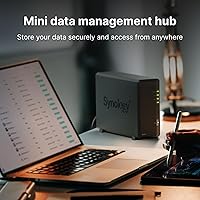
This single-bay NAS earns its place with a specific kind of buyer. If you're done paying recurring fees for cloud storage and want to own your files outright, it's a natural fit. It works well as a shared household hub for photos, documents, and media, and remote workers will appreciate being able to reach files securely from anywhere using Synology's QuickConnect. First-time NAS users will find the learning curve manageable. It also makes a practical lightweight backup node for anyone already running a larger Synology setup who needs a secondary, low-power device to complement their existing system.

User Feedback

With hundreds of ratings and a strong overall score, buyer sentiment skews positive — but the honest picture is more nuanced. People consistently mention how painless the initial setup is, even without a technical background, and the unit earns quiet praise for running silently and staying cool. The criticism worth taking seriously is the lack of redundancy: one bay means one drive, and a failure puts all your data at risk with no fallback — an off-site backup is essential, not optional. The 1 GB RAM ceiling also frustrates users who push multiple DSM apps at once. On the upside, Synology's reliable firmware updates and long support windows remain a genuine selling point.

Pros

  • Synology's DSM interface is genuinely approachable — most users are up and running within an hour.
  • Runs quietly and stays cool, making it comfortable to place in a living space or home office.
  • Cross-platform support covers Windows, macOS, Linux, iOS, and Android without extra configuration.
  • Built-in backup tools let you push data to external USB drives or cloud destinations on a schedule.
  • QuickConnect enables secure remote file access without touching router port-forwarding settings.
  • Compact alloy steel build feels solid and takes up minimal desk or shelf space.
  • Surveillance Station lets you connect an IP camera for basic home monitoring at no extra cost.
  • Synology's long firmware support track record means the unit stays useful and secure for years.
  • A 2-year warranty provides reasonable peace of mind for a always-on home device.
  • Ranked among the top NAS enclosures on Amazon, reflecting consistent buyer satisfaction over time.

Cons

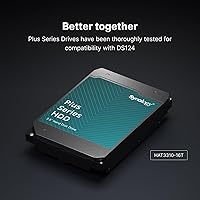
  • No hard drive is included — budget for a compatible drive on top of the enclosure price.
  • Single-bay design means zero redundancy; one drive failure and your data is gone without a separate backup.
  • 1 GB of RAM becomes a bottleneck when running more than one or two DSM applications at once.
  • No path to add a second bay later — outgrowing this unit means buying an entirely new device.
  • Only one free camera license is included; expanding a surveillance setup costs extra.
  • The single 1GbE LAN port limits throughput for households with heavy simultaneous network traffic.
  • No PCIe expansion slot rules out any future network or performance upgrades.
  • USB-only hard drive interface is slower than the SATA connections found on higher-tier Synology models.
  • Buyers focused on media streaming may find the CPU underpowered for on-the-fly video transcoding.

Ratings

Our AI rating engine analyzed thousands of verified global buyer reviews for the Synology DS124 1-Bay NAS Enclosure, actively filtering out incentivized, duplicate, and bot-generated submissions to surface what real owners actually experience. The scores below reflect a transparent, balanced picture — genuine strengths are credited and recurring pain points are not glossed over. Whether you are researching your first NAS or comparing options, these ratings are designed to give you an honest baseline for your decision.

Ease of Setup
91%
Buyers across skill levels consistently report that getting the DS124 online takes under an hour. Synology's DSM installation wizard is genuinely guided, walking users through drive formatting, network configuration, and account creation without requiring any command-line knowledge or networking background.
A small number of reviewers ran into initial hiccups with drive recognition or QuickConnect registration, usually tied to network firewall settings rather than the unit itself. For those cases, Synology's community forum is helpful but can feel intimidating to complete beginners.
Software Quality
93%
DSM is widely regarded as the best operating system in its class, and owners of this home NAS unit consistently back that up. The browser-based interface is clean, logically organized, and receives regular updates that add features and security patches without disrupting existing setups.
The package ecosystem, while broad, occasionally surfaces apps that feel underdeveloped or poorly maintained compared to the core DSM experience. Users who want to run multiple third-party packages simultaneously also find that the 1 GB RAM constraint becomes a software bottleneck before it becomes a hardware one.
Build Quality
84%
The alloy steel chassis feels noticeably more substantial than the plastic shells found on competing budget NAS units. At 2.75 pounds the DS124 sits firmly without sliding, and reviewers frequently note that nothing about the enclosure feels cheap or flimsy after months of continuous use.
The single drive bay means the internal tray mechanism gets more wear over time compared to multi-bay units where swaps are less frequent. A few owners noted the drive mounting screws are small and easy to lose during installation.
Performance
63%
37%
For its intended workload — file sharing across a home network, scheduled cloud backups, and light remote access — the quad-core Realtek CPU handles tasks reliably without noticeable lag. Transferring large photo libraries or syncing documents between devices works smoothly under normal single-user conditions.
Push beyond the basics and the cracks show quickly. Running Plex with transcoding, combining backup jobs with active file access, or loading several DSM packages simultaneously all expose the 1 GB RAM ceiling in a way that causes real slowdowns. This is not a unit that multitasks well under pressure.
Data Protection
47%
53%
The DS124 supports robust backup configurations through DSM, including scheduled jobs to USB drives, rsync to remote servers, and sync to multiple cloud providers. For users who set up a proper 3-2-1 backup strategy, the software side of data protection is genuinely capable.
The fundamental hardware limitation is impossible to ignore: one bay means no RAID, no redundancy, and no safety net if the drive fails. A significant portion of critical reviews stem directly from this constraint, and buyers who treat it as a set-and-forget storage solution without an external backup are taking a real risk.
Noise & Heat
89%
Living-room placement is a realistic option with this unit. Owners consistently describe it as near-silent during typical operation, and the low heat output means the fan rarely ramps up to audible levels during everyday file serving or sync tasks.
Drive choice has a meaningful impact here — a loud or heat-prone hard drive will undercut the enclosure's quiet credentials. A handful of reviews mention increased fan noise after prolonged continuous write operations, though this appears to settle once the workload eases.
Remote Access
82%
18%
QuickConnect works reliably for the majority of users and requires zero router configuration, which is a genuine practical advantage for non-technical buyers who just want their files reachable from a hotel or office. The DS File mobile app paired with it is stable and functional on both iOS and Android.
Transfer speeds over QuickConnect depend heavily on the upload bandwidth of your home internet connection, and users on slower broadband plans notice this limitation quickly. A small number of reviewers report intermittent QuickConnect outages during Synology server maintenance windows.
Value for Money
76%
24%
For buyers entering the personal cloud storage space for the first time, the combination of polished software, solid build, and long firmware support makes the DS124 a justifiable purchase. The ongoing cost of owning your storage versus paying indefinitely for a cloud subscription also tips the value calculation positively over time.
The diskless design means the real cost of ownership is higher than the enclosure price alone, and that catches some buyers off guard. Given the 1 GB RAM ceiling and single-bay limitation, buyers who quickly outgrow it and upgrade to a two-bay model may feel they paid twice for the learning experience.
Compatibility
88%
Day-to-day compatibility across Windows, macOS, iOS, and Android is genuinely broad and well-implemented. Mixed-platform households — a common scenario — find that everyone can access shared folders without any platform-specific workarounds or driver installs.
A narrow set of users running very old operating system versions or niche Linux distributions report occasional authentication quirks through SMB. These edge cases are uncommon but worth checking against Synology's compatibility documentation before purchasing.
Surveillance Features
61%
39%
The included free camera license is enough for a basic home monitoring setup, and Surveillance Station itself is a mature, capable application. For someone who just wants to keep an eye on a front door or garage using a single network camera, it covers the requirement without any extra spend.
One free license is the ceiling without paying for additional camera slots, which limits the usefulness for anyone thinking beyond a single camera. The CPU is also underpowered for processing high-resolution camera feeds with motion detection enabled, leading to some frame drops in demanding configurations.
Long-Term Support
92%
Synology's reputation for maintaining firmware updates over multi-year product lifespans is one of the strongest arguments for buying into their ecosystem. Owners of the DS124 can reasonably expect security patches and DSM compatibility updates for years after purchase, which is not a given in the NAS market.
DSM major version upgrades occasionally deprecate older packages or require manual intervention to complete cleanly. While Synology provides migration guides, less technical users sometimes find these transitions stressful if they occur unexpectedly.
Physical Footprint
87%
The compact dimensions — roughly the size of a thick hardcover book — make placement genuinely flexible. It sits cleanly on a desk corner, a shelf, or tucked beside a router without dominating the space, which matters for home users who want a tidy setup.
The vertical form factor, while space-efficient, means it can tip if nudged on a smooth surface without something to brace it. A rubber base mat would have been a welcome addition to the accessory kit.
Initial Cost vs. Capability
58%
42%
Relative to the feature set of Synology's DSM platform and the quality of the enclosure, the DS124 entry price is fair for what you get. Buyers who use only the core features — file storage, backup, and remote access — feel the hardware adequately supports their investment.
When compared directly to the two-bay DS223 at a modest price premium, the single-bay format starts to look like a constrained choice rather than a bargain. Several buyers who purchased the DS124 later posted follow-up comments saying they wished they had stretched the budget from the start.

Suitable for:

The Synology DS124 1-Bay NAS Enclosure is a strong fit for anyone who wants to stop paying monthly fees to cloud storage providers and start keeping their files on hardware they actually own. Families and small households will find it practical as a centralized spot for photos, documents, and media that every device on the network can reach. First-time NAS buyers in particular benefit here, because Synology's DSM software lowers the learning curve considerably compared to competing platforms. Remote workers who need reliable access to personal files from outside the home will appreciate QuickConnect, which handles remote access without fiddly router configuration. It also slots in neatly as a secondary backup node for anyone already running a larger Synology device and looking for a low-power companion unit.

Not suitable for:

The Synology DS124 1-Bay NAS Enclosure is the wrong choice if data redundancy is a priority — a single bay means a single point of failure, and a dead drive takes all your data with it unless you maintain a separate backup. Anyone planning to run multiple DSM applications simultaneously will likely hit the 1 GB RAM ceiling and find performance sluggish under that kind of load. Power users who need fast transcoding, heavy Plex usage, or 10GbE networking should look further up Synology's lineup, starting with the DS223 or DS723+. Buyers who expect an all-in-one package should also know upfront that no hard drive is included, so the real out-of-pocket cost is higher than the enclosure price alone. If your storage needs are likely to grow beyond a single drive within a year or two, a two-bay model will save you the hassle of replacing the unit entirely.

Specifications

  • Drive Bays: The unit houses a single 3.5-inch or 2.5-inch SATA hard drive or SSD, purchased separately.
  • CPU: Powered by a Realtek RTD1619B quad-core processor running at 1.7 GHz.
  • RAM: Comes with 1 GB of built-in memory, which is not user-expandable.
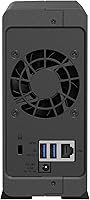
  • LAN Port: One RJ-45 1GbE Ethernet port provides wired network connectivity.
  • USB Port: One USB 3.2 Gen 1 port supports external drives and direct device connections.
  • Hard Drive Interface: Internal drive connection uses a USB-based interface rather than a direct SATA link.
  • Operating System: Runs Synology DiskStation Manager (DSM), a browser-based NAS operating system with regular long-term updates.
  • Compatible OS: Works with Windows, macOS, Linux, iOS, and Android devices on the same network or remotely.
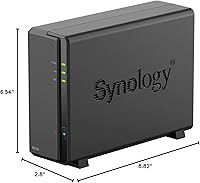
  • Dimensions: The enclosure measures 2.8″ deep, 6.54″ wide, and 8.82″ tall.
  • Weight: The unit weighs 2.75 pounds without a hard drive installed.
  • Material: Chassis is constructed from alloy steel, giving the unit a solid and durable feel despite its compact size.
  • Color: Available in black only.
  • Surveillance: Surveillance Station is supported with one free camera license included out of the box.
  • Backup Support: Supports backup to external USB drives, rsync destinations, and multiple cloud storage providers through DSM packages.
  • Remote Access: Synology QuickConnect allows remote file access from outside the home network without manual router configuration.
  • Diskless: No hard drive is included in the box; only the enclosure, power adapter, Ethernet cable, and screws are provided.
  • Warranty: Covered by a 2-year limited hardware warranty from Synology.
  • Power Supply: Includes an external AC power adapter; exact wattage varies by region but idle draw is low.
  • Noise Level: Operates quietly under normal workloads, with user reports consistently noting minimal fan and drive noise.
  • BSR Ranking: Ranked number 3 in the Network Attached Storage Enclosures category on Amazon at time of listing.

Related Reviews
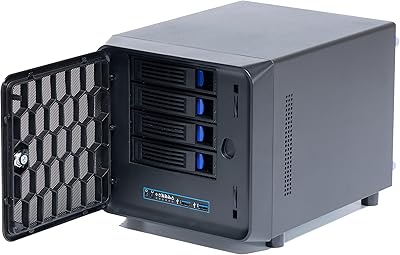
KCMconmey NAS-411 4+1 Bay DIY NAS Case
84%
85%
Ease of Setup
80%
Build Quality
70%
Cooling Performance
90%
Customization Options
88%
Drive Compatibility
More
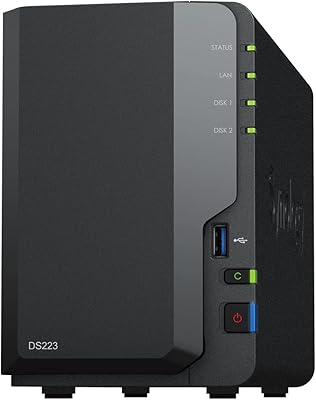
Synology DS223
Synology DS223
77%
94%
Software & OS Experience
88%
Setup & Initial Configuration
61%
CPU & Processing Performance
67%
Network Connectivity
83%
Build Quality & Design
More
Synology DS620slim 6-Bay NAS Enclosure
82%
91%
Build Quality
93%
Software & DSM Experience
88%
Storage Performance
84%
Drive Bay Flexibility
63%
Value for Money
More
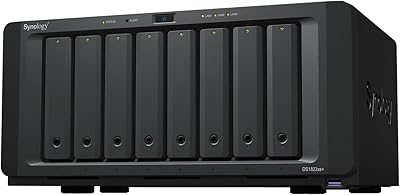
Synology DS1823xs+ 8-Bay NAS Enclosure
80%
91%
Build Quality & Chassis Durability
88%
Processor Performance
93%
Network Throughput & Connectivity
86%
Storage Expansion Flexibility
89%
DSM Software Ecosystem
More
Synology RS1221+ 8-Bay Rackmount NAS
83%
92%
Throughput Performance
94%
Software & DSM Ecosystem
89%
Build Quality & Chassis
83%
Networking Flexibility
91%
Short-Depth Form Factor
More
Synology DS420+ 4-Bay NAS Enclosure

80%
93%
Software Experience
88%
Build Quality
84%
Thermal Management & Noise
91%
Storage Flexibility
62%
Network Performance
More
Synology DS418 4-Bay NAS Enclosure
84%
93%
Software Experience
81%
Build Quality
88%
Performance for File Sharing
62%
CPU and Processing Power
78%
Value for Money
More
QNAP TS-133 1-Bay Desktop NAS Drive
73%
83%
Value for Money
81%
Software & Ecosystem
74%
Ease of Setup
78%
Build Quality
62%
Performance
More
KCMconmey NAS-812 8+2 Bay NAS Case
68%
83%
Build Quality
81%
Hot-Swap Mechanism
78%
Value for Money
61%
Compatibility & Fit
52%
Ease of Assembly
More
ICY DOCK ToughArmor MB998SP-B 8-Bay 2.5” SATA/SAS HDD/SSD Mobile Rack Enclosure for 5.25″ Bay
87%
91%
Performance
88%
Cooling Efficiency
89%
Build Quality
93%
Ease of Installation
72%
Noise Level
More

FAQ

Yes, absolutely. The enclosure ships without any storage drive inside. You will need to purchase a compatible 3.5-inch or 2.5-inch SATA hard drive separately before the unit is usable. Synology maintains a compatibility list on their website, so check that before buying a drive to avoid any surprises.

Not really. The Synology DS124 1-Bay NAS Enclosure is one of the friendlier entry points into the NAS world, largely because DSM walks you through the initial configuration step by step. Most first-time users report being fully set up and accessing files within an hour. A basic understanding of your home network is helpful, but no technical background is required.

Yes. Synology's QuickConnect service lets you reach your files remotely through a browser or the DS File mobile app without needing to touch your router's port-forwarding settings. It is straightforward to set up during the initial DSM configuration.

This is the single biggest limitation to understand before buying. With only one bay, there is no way to run a mirrored drive setup for redundancy. If the drive fails, any data stored solely on that drive is at risk. You should always maintain a secondary backup — whether on an external USB drive connected to the unit or synced to a cloud service — as a safety net.

It depends on the drive you install. Synology officially supports drives up to several terabytes in their compatibility list, and most modern consumer or NAS-rated 3.5-inch drives in common capacities will work fine. Check Synology's compatibility page for confirmed drive models to be safe.

Yes, that is one of this home NAS unit's practical strengths. DSM supports simultaneous access from Windows, macOS, Linux, and mobile devices, so mixed-device households can all share the same storage without any compatibility headaches.

You can install the Plex Media Server package through DSM, but be realistic about the hardware limits. With a 1.7 GHz quad-core CPU and just 1 GB of RAM, the DS124 can handle direct-play streams reasonably well for one or two clients, but on-the-fly transcoding will likely struggle. If heavy Plex use is the main goal, a more powerful NAS model would serve you better.

Quiet enough for most living spaces, based on consistent user feedback. The unit generates minimal heat, which keeps the fan from spinning aggressively, and the drive noise depends more on which hard drive you install than on the enclosure itself. A NAS-optimized drive designed for low noise will help keep things unobtrusive.

The unit supports Synology Surveillance Station, but it is designed for IP cameras that connect over your network, not USB webcams plugged directly into the enclosure. One free camera license is included, so you can add a single compatible IP camera to start a basic home monitoring setup without extra cost.

It depends entirely on your needs. If you want an affordable introduction to personal cloud storage, file sharing across devices, or a straightforward backup destination, the DS124 does the job cleanly. If you want drive redundancy, more RAM headroom for running multiple apps, or room to grow your storage over time without replacing the unit, the DS223 is the smarter long-term investment. The single-bay design is a genuine constraint, not just a minor footnote.