
Overview

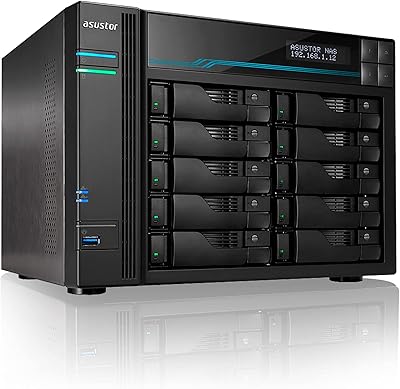
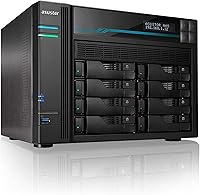
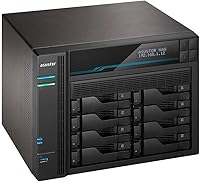
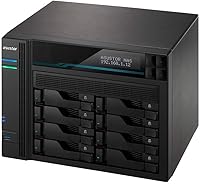
The Asustor Lockerstor 8 AS6508T 8-Bay NAS sits firmly in the business-grade tier — this is not a casual home media box. Where most consumer NAS units ship with 2 or 4GB of RAM and a single gigabit port, this 8-bay NAS arrives with 8GB DDR4 installed and four network ports, two of which run at 10 gigabits. The metal chassis is solid and substantial — at nearly 14 pounds without drives, it demands a proper shelf or dedicated rack space. The price reflects a serious investment, one that makes most sense for small offices, prosumers, or home lab enthusiasts who genuinely need the throughput rather than just the bay count.

Features & Benefits

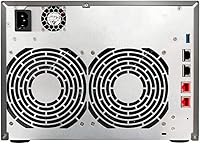
The Intel Atom C3538 processor handles simultaneous multi-user workloads well — transcoding a 4K stream while other users pull files does not cause the kind of stutter you would see on an entry-level unit. The real headline is the networking: two 10GbE ports open up link aggregation or a dedicated high-speed backup lane, while the two 2.5GbE ports handle lighter client traffic. Pair that with the two M.2 NVMe slots for SSD read/write caching, and random I/O performance on spinning drives becomes noticeably snappier. All eight SATA bays accept 3.5-inch or 2.5-inch drives, pushing raw capacity as high as 144TB. RAM can be expanded to 64GB, which matters when running Docker containers or virtual machines through ADM. A 3-year warranty rounds out a competitive hardware package.

Best For

This 8-bay NAS makes the most sense for people who have outgrown consumer-grade hardware and genuinely need the bandwidth to justify a 10GbE switch. Small business teams sharing large files across multiple workstations will appreciate the multi-lane network setup right away. Content creators dealing with multi-terabyte video projects benefit from fast local access without relying on cloud subscriptions. IT administrators looking for a self-hosted storage platform with full control over their data will find the Lockerstor 8 capable enough to replace a dedicated file server in many scenarios. Home lab enthusiasts running containers or lightweight VMs are also well-served here. That said, if all you need is a basic media streamer or simple backup target, this Asustor unit is almost certainly more hardware than you need.

User Feedback

Buyers who prioritize raw network performance tend to be satisfied, with many reporting that the 10GbE throughput lives up to expectations — especially those upgrading from older gigabit-only enclosures. Hardware value relative to comparable Synology or QNAP models is frequently cited as a deciding factor. On the software side, ASUSTOR's ADM platform draws more mixed reactions; many users find it functional but less polished than Synology's DSM, with occasional complaints about firmware update pace. Fan noise and heat management under sustained load come up periodically, though most consider it acceptable for a unit of this class. Build quality generally earns praise. Drive compatibility has caused friction for a handful of buyers, so checking the official HDD compatibility list before purchasing is a worthwhile step.

Pros

  • Dual 10GbE ports deliver real multi-gigabit throughput for teams sharing large files simultaneously.
  • Ships with 8GB DDR4 RAM out of the box, well ahead of most competitors in this class.
  • Two M.2 NVMe SSD cache slots noticeably improve random I/O performance on spinning drives.
  • Eight SATA bays with support for up to 144TB of raw capacity gives serious long-term headroom.
  • RAM is user-expandable to 64GB, making containerized apps and light virtualization practical.
  • Solid metal build quality inspires confidence in a device meant to run around the clock.
  • A 3-year manufacturer warranty is reassuring for a unit at this investment level.
  • Four network ports allow flexible configurations, including link aggregation or separated traffic lanes.
  • Competitive pricing compared to equivalent Synology or QNAP models with similar hardware specs.
  • Compatible with both Mac and PC environments without additional configuration headaches.

Cons

  • ADM software lags behind Synology DSM in polish, third-party app availability, and overall user experience.
  • Firmware update frequency has been inconsistent, which concerns buyers who depend on timely security patches.
  • Drive compatibility issues have been reported by some users — checking the official compatibility list before buying is essential.
  • Fan noise under sustained load can be noticeable in quiet office or home environments.
  • The large physical footprint requires dedicated shelf or rack space that not everyone has available.
  • No HDMI output, which limits direct local display use compared to some competing models.
  • Only two USB 3.2 ports feels limited for a unit positioned at this tier.
  • Getting the most out of 10GbE networking requires an existing compatible switch, adding to total setup cost.
  • The learning curve on ADM can frustrate users migrating from more established NAS platforms.
  • At this price point, buyers who only need basic backup or media playback are paying for features they will never use.

Ratings

The scores below for the Asustor Lockerstor 8 AS6508T 8-Bay NAS were produced by an AI system trained to analyze verified global buyer reviews, actively filtering out incentivized, duplicate, and bot-generated submissions to surface genuine ownership experiences. Both the standout strengths and the recurring frustrations are reflected honestly in each category score. No aspect has been inflated to flatter the product — if buyers ran into real friction, that shows up in the numbers.

Network Performance
91%
Buyers who upgraded to this unit from gigabit-only NAS hardware consistently describe the jump to 10GbE as transformative for their workflows. Teams transferring large video files or running multi-user backups simultaneously report sustained throughput that finally matches what their network infrastructure was capable of delivering.
Getting the full benefit requires a 10GbE switch, which adds meaningful cost to the overall setup. A handful of users report occasional link negotiation quirks when mixing the 10GbE and 2.5GbE ports in certain managed switch configurations.
Value for Money
84%
Many buyers arrive after pricing out comparable Synology or QNAP units and find the Lockerstor 8 noticeably less expensive for equivalent or better hardware specs — particularly given the 8GB RAM and NVMe cache slots included at no extra cost. That combination makes the hardware price feel defensible for small business buyers.
The total cost of ownership climbs quickly once you add eight enterprise-grade drives and a 10GbE switch. Buyers who do not fully utilize the multi-gigabit networking or advanced features may feel they overpaid relative to simpler alternatives.
Build Quality
88%
The all-metal chassis earns consistent praise from buyers who have owned plastic-bodied NAS units before. Drive trays feel solid, the enclosure shows no flexing under load, and the overall construction gives the impression of a unit designed to run continuously for years without issues.
A few buyers mention that the drive bay latching mechanism feels stiffer than expected, making hot-swap operations slightly awkward compared to competing units. The physical footprint is also substantial enough to surprise first-time buyers who did not measure their shelf space beforehand.
Software (ADM)
62%
38%
ADM covers the fundamentals competently — SMB file sharing, Docker containers, remote access, and scheduled backups all work reliably once configured. Users coming to this platform fresh, without prior Synology or QNAP experience, tend to find it perfectly workable for day-to-day storage tasks.
Experienced NAS users migrating from Synology's DSM frequently describe ADM as noticeably less polished, with a smaller app ecosystem and less intuitive package management. Firmware update cadence has drawn criticism, with some buyers waiting longer than expected for security patches or feature improvements.
SSD Caching
83%
Buyers who installed NVMe SSDs in the M.2 cache slots report a clear difference in responsiveness for active workloads, particularly when accessing frequently used files from spinning drives. Home lab users running mixed hot and cold storage describe the caching tier as one of the more practical features at this price point.
The M.2 slots are strictly for caching — they cannot be used to expand the primary storage pool, which confuses some buyers expecting more flexibility. Users with purely cold storage or sequential backup workloads may see limited benefit from the caching tier.
CPU Performance
79%
21%
The quad-core Intel Atom C3538 handles multi-user file sharing and Docker container workloads without obvious strain under typical small business loads. For simultaneous backup jobs, surveillance streams, and basic container services running together, the processor manages concurrent tasks well.
Buyers attempting to run multiple active virtual machines or heavy real-time transcoding workloads report hitting CPU limits faster than expected. The platform is capable but not abundant — power users pushing complex multi-service deployments may find the processor becomes the bottleneck before storage or networking does.
RAM & Expandability
86%
Starting at 8GB DDR4 is a meaningful advantage over competitors shipping 2 or 4GB in equivalent enclosures, giving buyers enough headroom for containers and basic virtualization without an immediate upgrade. The ability to scale to 64GB makes this unit viable as a lightweight application server, not just a file store.
Sourcing compatible SO-DIMM DDR4 modules for expansion requires checking Asustor's compatibility list carefully, as not all market-available sticks are officially supported. A few buyers report having to return mismatched RAM after assuming any standard DDR4 module would work.
Drive Compatibility
71%
29%
The eight SATA bays accept a wide variety of 3.5-inch and 2.5-inch drives from major manufacturers including Seagate, WD, and Toshiba, with many popular NAS-rated models confirmed working out of the box. Most buyers populating bays with well-known NAS drives report no compatibility friction at all.
A recurring thread in buyer feedback involves less common or newer drive models not appearing on Asustor's official compatibility list, leaving buyers uncertain whether to proceed. Some users report drives being detected inconsistently at initial setup, requiring a reboot or re-seating before ADM recognizes them correctly.
Noise & Acoustics
68%
32%
Under light to moderate workloads — basic file access, scheduled backups running overnight, or low-traffic container services — fan noise stays in a range that most buyers describe as acceptable for a utility closet or server room.
Under heavy sustained load, fan speed increases noticeably, and several buyers describe the noise level as too prominent for an open office or home workspace. Heat management under prolonged multi-bay write operations draws occasional criticism, with some users wishing for more granular fan curve controls in ADM.
Setup & Installation
74%
26%
Physical assembly is well thought out — drive installation is tool-free for most configurations, cable management is straightforward, and the ADM initial setup wizard walks through the core storage and network configuration steps without requiring deep technical knowledge.
New NAS users who are unfamiliar with RAID concepts or storage pool configuration can find the setup process daunting despite the wizard. Migrating from another NAS platform adds complexity, particularly when transferring permission structures or Docker configurations that do not map cleanly to ADM's architecture.
Remote Access
73%
27%
Asustor's EZ Connect and myasustor.com relay service get remote access working without requiring manual port forwarding, which many buyers appreciate for straightforward personal or small business use cases. Basic mobile access to files and media works reliably for most users.
The remote access experience is considered noticeably less refined than competing platforms, with the companion mobile apps receiving lower ratings than the desktop ADM interface. Users with strict privacy requirements report discomfort relying on Asustor's cloud relay, and direct VPN-based access requires additional configuration effort.
Warranty & Support
77%
23%
A 3-year manufacturer warranty provides meaningful peace of mind on a unit designed for continuous operation, and many buyers cite it as a factor that tipped the decision in Asustor's favor over shorter-warranty competitors. Direct support ticket response quality is described positively by most buyers who used it.
Community and documentation resources are noticeably thinner than what Synology or QNAP offer, making self-service troubleshooting harder for edge cases. A few buyers report longer-than-expected resolution times for RMA claims, which is particularly stressful when the unit is serving as primary business storage.
Ecosystem & App Availability
59%
41%
The ADM App Central covers the most common use cases — Plex, Docker, surveillance, cloud sync, and backup utilities are all present and functional. For buyers whose needs align with the mainstream NAS app catalog, the selection is adequate.
The breadth and update frequency of available packages falls noticeably short of Synology's package center, and several popular self-hosted applications lack native ADM support entirely. Buyers who rely on a specific niche application should verify its ADM availability before purchasing, as workarounds through Docker are not always straightforward.

Suitable for:

The Asustor Lockerstor 8 AS6508T 8-Bay NAS is built for buyers who have hit a real ceiling with consumer-grade hardware and need a step up in both throughput and expandability. Small business teams sharing large files across multiple workstations will get immediate value from the dual 10GbE ports, especially if the office already runs a 10GbE switch. Content creators archiving multi-terabyte video projects benefit from the combination of high bay count, NVMe SSD caching, and fast local network access — without paying recurring cloud storage fees. IT administrators who want full data sovereignty and the flexibility to run self-hosted services like surveillance, backups, or containerized apps will find the processing headroom and expandable RAM genuinely useful. Home lab enthusiasts who enjoy running Docker workloads or lightweight virtual machines on a single appliance will also be well-served, provided they are comfortable managing a more complex system.

Not suitable for:

The Asustor Lockerstor 8 AS6508T 8-Bay NAS is almost certainly overkill for anyone whose primary use case is personal media streaming or simple household backups. If you do not have a 10GbE-capable switch already, much of the networking advantage is wasted, and the cost of building out that infrastructure on top of this unit may not be justifiable. Buyers who rely heavily on a mature, app-rich software ecosystem may find ASUSTOR's ADM platform a step down from Synology's DSM in terms of polish and third-party integrations. The physical footprint is substantial, so anyone working with limited shelf or desk space should measure carefully before committing. Budget-conscious buyers who only need two or four bays would be better served by a smaller, less expensive unit rather than paying for capacity they will not realistically use.

Specifications

  • Processor: The unit runs an Intel Atom C3538 quad-core CPU clocked at 2.1GHz, capable of handling concurrent workloads including transcoding and containerized services.
  • RAM: 8GB of DDR4 SO-DIMM memory is included at purchase, and the system supports expansion up to a maximum of 64GB.
  • Drive Bays: Eight SATA3 6Gb/s bays accept both 3.5-inch and 2.5-inch hard drives or SSDs, with a combined raw capacity ceiling of 144TB.
  • SSD Cache Slots: Two M.2 NVMe PCIe Gen2 slots are dedicated to SSD caching, which can significantly improve mixed read/write performance on traditional spinning drives.
  • 10GbE Networking: Two 10 Gigabit Ethernet ports allow for link aggregation or separation of high-speed storage and backup traffic across the network.
  • 2.5GbE Networking: Two additional 2.5 Gigabit Ethernet ports provide flexible connectivity for lighter client traffic or secondary network segments.
  • USB Ports: Two USB 3.2 Gen 1 ports are available for attaching external drives, printers, or UPS devices.
  • Operating System: The Lockerstor 8 runs ASUSTOR Data Master (ADM), which supports Docker, virtual machines, surveillance applications, and a range of downloadable packages.
  • Chassis Material: The enclosure is constructed from metal, providing structural rigidity and passive heat dissipation for 24/7 continuous operation.
  • Dimensions: The unit measures 14.96″ deep by 13.39″ wide by 12.6″ tall, requiring a dedicated shelf, cabinet, or rack space.
  • Weight: Without installed drives, the chassis weighs 13.64 pounds, reflecting its all-metal construction.
  • Platform Support: ADM is compatible with both Mac and PC client environments, with no additional software licensing required for basic file sharing.
  • Warranty: Asustor covers this unit with a 3-year manufacturer warranty, which is standard for business-grade NAS hardware at this tier.
  • Max Raw Capacity: With eight bays populated by 18TB drives, the system can reach up to 144TB of total raw storage before any RAID overhead.
  • ASIN: The Amazon product identifier for this unit is B07Y2BJZKC, useful when cross-referencing accessories or compatible drive lists.

Related Reviews
Asustor Lockerstor 4 Gen3 AS6804T 4-Bay NAS
84%
91%
Performance
88%
Build Quality
94%
Network Speed
87%
Storage Expandability
89%
Ease of Setup
More
Asustor Lockerstor 6 Gen3 AS6806T 6-Bay NAS
79%
93%
Raw Throughput Performance
91%
NVMe Cache Flexibility
89%
Network Connectivity
88%
CPU & Processing Headroom
86%
Build Quality & Chassis
More
Asustor Lockerstor 10 Pro AS7110T 10-Bay NAS
83%
92%
Performance
96%
Storage Capacity
89%
Connectivity
62%
Setup and Installation
90%
Build Quality
More
Asustor Lockerstor 10 Gen3 AS6810T 10-Bay NAS
87%
95%
Network Performance
92%
Drive Flexibility
93%
CPU & Processing Speed
90%
Memory Reliability
78%
Setup & Installation
More
KCMconmey NAS-812 8+2 Bay DIY NAS Case
84%
86%
Build Quality
62%
Cooling Performance
88%
Ease of Use
90%
Compatibility with PSU Types
91%
Customization Options
More
Asustor AS5402T 2-Bay NAS Enclosure
78%
88%
Hardware Value
82%
Processing Performance
86%
Network Throughput
84%
Thermal Management
63%
Software & OS Experience
More
Asustor AS5404T 4-Bay NAS Enclosure
80%
88%
Build Quality
82%
Processing Performance
93%
NVMe Storage Flexibility
87%
Network Throughput
76%
Software Ecosystem (ADM OS)
More
Synology DS1823xs+ 8-Bay NAS Enclosure
80%
91%
Build Quality & Chassis Durability
88%
Processor Performance
93%
Network Throughput & Connectivity
86%
Storage Expansion Flexibility
89%
DSM Software Ecosystem
More
AUDHEID K7 8 Bay NAS Case
86%
88%
Ease of Setup
91%
Cooling Performance
86%
Build Quality
89%
Customization Flexibility
92%
Noise Level
More
Synology RS1221+ 8-Bay Rackmount NAS
83%
92%
Throughput Performance
94%
Software & DSM Ecosystem
89%
Build Quality & Chassis
83%
Networking Flexibility
91%
Short-Depth Form Factor
More

FAQ

Drives are sold separately — the Lockerstor 8 ships as a diskless enclosure. You will need to source your own 3.5-inch or 2.5-inch SATA drives. Before buying, it is worth checking the official Asustor HDD compatibility list, as a small number of users have reported issues with certain drive models.

No, but you will only get full use of the 10GbE ports if your switch supports it. The two 2.5GbE ports work fine on a standard network for lighter workloads. That said, if high-speed multi-user file transfers are the main reason you are buying this unit, planning for a compatible 10GbE switch is worth doing before you commit.

Under light to moderate load, fan noise is generally described as acceptable for an office or utility room. Some buyers report it becomes more audible under sustained heavy workloads, so this is probably not a unit you want sitting right next to your desk in a quiet room.

Yes, ADM supports Docker and has a built-in virtual machine manager. With 8GB of RAM included and the option to expand to 64GB, there is enough headroom for several containers running simultaneously, though heavy VM workloads will benefit from a RAM upgrade.

ADM is functional and covers the core use cases well — file sharing, backups, surveillance, Docker, and remote access. However, many experienced NAS users consider Synology's DSM more polished, with a broader app ecosystem and more consistent updates. ADM has improved over the years, but if software depth is your top priority, that trade-off is worth knowing about upfront.

Yes, ADM supports AFP and SMB protocols, and Time Machine backup over the network is a supported use case on Mac systems. Setup is straightforward through the ADM interface.

The unit supports standard RAID modes including RAID 0, 1, 5, 6, and 10, as well as JBOD and Asustor's own iSCSI configurations. The right choice depends on your balance between redundancy and usable capacity across the eight bays.

Plex is available through the ADM app center and the quad-core processor handles direct-play streaming well. Hardware transcoding support is more limited compared to some Intel Core-based NAS units, so if you have a large library with lots of clients needing active transcoding simultaneously, that is worth factoring in.

The two M.2 slots are specifically designed for SSD caching, not additional primary storage. Installing NVMe SSDs there allows the system to cache frequently accessed data, which speeds up read and write performance on your spinning hard drives. It is a meaningful performance boost for active workloads but does not increase your usable storage pool.

The physical setup — inserting drives, connecting cables, and powering on — is straightforward. The initial ADM configuration wizard walks you through the basics. That said, this unit is aimed at users who are comfortable making decisions about RAID levels, network configuration, and storage pools. First-time NAS buyers may want to spend some time with Asustor's documentation or community forums before diving in.

Where to Buy

NAS Headquarters
In stock $3,334.00