Overview

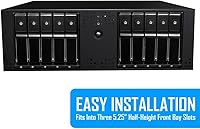
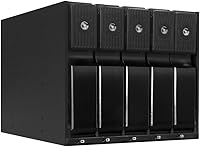
The Kingwin MKS-535TL 5-Bay Hot Swap Drive Enclosure is built for PC users who need to manage multiple drives without constantly shutting down their system. It occupies three 5.25″ bays in a standard tower, turning that often-wasted optical drive space into a five-bay storage hub. The aluminum shell gives it a solid, purposeful feel — not the flimsy plastic you sometimes find at this price tier. Designed with prosumers, home lab enthusiasts, and workstation builders in mind, this hot-swap enclosure sits in the mid-to-premium segment where buyers expect durability and reliable daily performance, not just a spec sheet that looks good on paper.
Features & Benefits

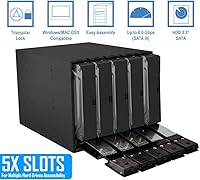
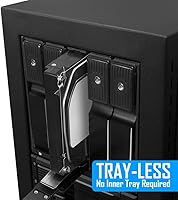
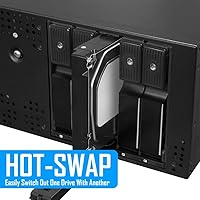
The trayless design is where this internal drive bay really earns its keep. Drives slide straight in and lock into place — no screws, no adapters, no fumbling. The backplane handles all SATA connections internally, so cable clutter inside your case stays manageable. It supports both SATA and SAS drives, giving builders running enterprise-grade disks alongside consumer HDDs real flexibility in one enclosure. The aluminum body does offer passive thermal relief, though it works best in cases with decent airflow — don't expect it to compensate for a poorly ventilated build. Integrated power controls add a layer of protection against unexpected drive events during operation.

Best For

The Kingwin 5-bay rack makes most sense for anyone who regularly rotates drives — home lab operators testing configurations, video editors cycling through project archives, or small IT shops building low-cost internal servers without dedicated NAS hardware. If you have a full-tower or mid-tower case with unused 5.25″ bays, this is a smart way to put that space to work. It also appeals to users running a mix of SAS and SATA drives under one roof. That said, it is not the right fit for compact mATX builds or anyone without at least three open 5.25″ slots available in their chassis.

User Feedback

Across close to 2,000 ratings, community response is broadly positive, with most praise focused on build quality and day-to-day hot-swap reliability. Buyers appreciate that drives go in and come out cleanly during normal operation. Where things get mixed is in the specifics: some users report a snug fit with certain HDD brands, and the lock mechanism has drawn occasional criticism for feeling imprecise. SAS users should take note — a handful of reviewers flag compatibility issues with specific HBA controllers, so verifying your controller before purchasing is a worthwhile step. Installation in tighter cases can also require patience. Overall satisfaction is high, but edge-case setups deserve extra research.

Pros

  • Aluminum shell feels solid and handles the weight of five loaded drives without flexing or rattling.
  • Trayless design means drive swaps take seconds — no tools, no screws, no trays to misplace.
  • Backplane connection keeps internal cabling clean and manageable compared to running individual SATA cables.
  • Supports both SATA and SAS drives, giving builders real flexibility when mixing drive types.
  • Hot-swap works reliably in daily use for most SATA configurations right out of the box.
  • Repurposes unused 5.25-inch bay space that would otherwise sit empty in full-tower and large mid-tower cases.
  • No integrated fan means zero added noise to your system acoustic profile.
  • Broad drive size support accommodates high-capacity mechanical drives without compatibility concerns.
  • The enclosure holds up well over time — long-term owners generally report no structural issues under normal use.

Cons

  • Requires three consecutive open 5.25-inch bays, which rules out most modern and compact PC cases entirely.
  • SAS controller compatibility is inconsistent and poorly documented, creating real risk for enterprise drive users.
  • Drive fitment tightness varies by HDD brand — some drives require uncomfortable force to seat properly.
  • Passive-only cooling has meaningful limits under sustained, high-throughput workloads across all five bays.
  • Lock mechanism quality does not match the overall build standard and can feel imprecise on some units.
  • Bay alignment during installation can be frustrating in cases where the 5.25-inch rail spacing is less forgiving.
  • No published compatibility list makes it difficult to verify SAS HBA support before committing to a purchase.
  • Connector wear from hundreds of insertion cycles can gradually affect hot-swap reliability over the long term.

Ratings

The Kingwin MKS-535TL 5-Bay Hot Swap Drive Enclosure earns a well-rounded but honestly scored profile here — our AI has processed verified buyer reviews from global marketplaces, actively filtering out incentivized, bot-generated, and outlier feedback to surface what real users consistently experience. Scores reflect both where this internal drive bay punches above its weight and where genuine friction points exist. Nothing has been smoothed over to flatter the product.
Build Quality
86%
The aluminum shell feels substantial in hand, and buyers consistently note it does not flex or creak under the weight of five loaded drives. For a rack that lives inside a case and gets handled regularly during drive swaps, that structural rigidity genuinely matters over months of use.
A few reviewers point out that the drive slot openings show minor cosmetic imperfections on some units, and the lock tabs, while functional, feel slightly less refined than the overall chassis quality would suggest.
Hot-Swap Reliability
83%
Day-to-day hot swapping works as advertised for the majority of users running SATA drives. Home lab operators report pulling and reinserting drives during active workloads without incident, which is the core promise of this type of enclosure.
Occasional reports mention that repeated swapping over many months can introduce slight connector wear, and a handful of users experienced intermittent drive recognition after extended use — not widespread, but worth noting for mission-critical setups.
Drive Compatibility
78%
22%
Supporting both SATA and SAS drives in a single enclosure gives this rack genuine flexibility for builders mixing enterprise leftovers with consumer HDDs. Most mainstream 3.5-inch drives from major brands slide in without issue.
Fitment tightness varies noticeably by HDD brand — some drives require more force than feels comfortable, which creates anxiety around connector alignment. SAS compatibility also depends heavily on the host controller, and not all HBA cards play nicely without additional configuration.
SAS Controller Compatibility
62%
38%
When paired with a confirmed compatible SAS HBA, the enclosure handles SAS I and II drives reliably and the backplane negotiates speeds without manual intervention. For users who have done their homework on controller pairing, it works well.
This is the single biggest buyer risk area. A meaningful subset of reviewers ran into compatibility walls with specific SAS controllers, requiring firmware tweaks or discovering incompatibility only after installation. Kingwin does not publish a comprehensive compatibility list, which leaves buyers doing guesswork.
Thermal Management
67%
33%
The aluminum body does absorb and redistribute some heat generated by five spinning drives, and in a well-ventilated full-tower case with active airflow, drive temperatures remain within acceptable ranges during normal workloads.
Passive cooling has real limits. In cases with poor airflow or during sustained high-throughput operations across all five bays simultaneously, temperatures can climb into ranges that cautious users would find uncomfortable. There is no fan, and there is no option to add one directly to the unit.
Installation Experience
71%
29%
The 3x5.25-inch footprint is a clever use of space that most full-tower and large mid-tower owners will appreciate. Cabling is simplified by the backplane design, and the lack of individual drive trays removes a common frustration from the setup process.
Getting the unit seated and aligned correctly in tighter mid-tower cases takes patience. Some users report needing multiple attempts to get the bay screws to line up properly, and the enclosure's depth can conflict with cable routing in more compact builds.
Trayless Design Usability
81%
19%
Sliding a drive in without tools, trays, or screws is genuinely faster than alternatives once you get a feel for the insertion angle. Users who swap drives frequently cite this as the feature they rely on most, especially in time-sensitive situations.
The trayless mechanism does require a consistent insertion technique — drives that go in slightly off-angle can feel stuck or incomplete. New users occasionally mistake partial insertion for a secure seat, which can cause connection errors until they reseat the drive properly.
Cable Management
79%
21%
The internal backplane consolidates what would otherwise be five separate SATA data and power runs into a much cleaner single-connection arrangement. Builders who value a tidy interior consistently praise this aspect in long-form reviews.
The backplane connection still requires a reliable power feed and a compatible host connection — if your case is already cable-dense, the enclosure adds bulk in the 5.25-inch bay zone even if it reduces loose cable count overall.
Value for Money
73%
27%
At its price point, this hot-swap enclosure delivers aluminum construction and five-bay capacity that cheaper plastic alternatives cannot match. For a builder who genuinely needs frequent drive access, the cost-per-bay math works out reasonably well.
Buyers who only occasionally swap drives may find the investment harder to justify, particularly given the SAS compatibility uncertainty that could require additional troubleshooting time. There are cheaper single or dual-bay options that suit lighter use cases better.
Noise Level
84%
Because the enclosure has no fan of its own, it adds zero acoustic signature to a build. Users in quiet home office environments appreciate that five drives can run through this rack without introducing a new noise source.
This acoustic neutrality comes at the thermal cost already noted. If a builder compensates by adding case fans to support the passive cooling, overall system noise may actually increase compared to an alternative that includes a low-speed integrated fan.
Fit for PC Case Compatibility
68%
32%
Full-tower cases with three or more open 5.25-inch bays accommodate this enclosure without any modification, and it sits flush and secure once properly installed in a well-matched chassis.
The product is simply not viable for mATX or mini-tower builds, and even some mid-towers lack the required three consecutive open bays. This limits the addressable audience more than the marketing materials acknowledge, and first-time buyers occasionally discover the size issue only after purchase.
Long-Term Durability
76%
24%
Aluminum construction ages better than plastic in thermal cycling conditions, and users who have run this rack for two or more years generally report no structural degradation or backplane failures under normal operating loads.
The lock mechanisms on individual bays have drawn some durability criticism over extended use, with a few long-term owners noting increased sloppiness in the locking action after hundreds of insertion cycles.
Ease of Use After Setup
82%
18%
Once installed and configured correctly, daily interaction with the enclosure is genuinely low-friction. Swapping a drive takes seconds, and the system recognizes inserted drives quickly in most SATA configurations.
The learning curve front-loads some frustration — getting the first setup right, understanding the controller requirements, and learning the insertion feel all take a session or two before the workflow becomes natural.

Suitable for:

The Kingwin MKS-535TL 5-Bay Hot Swap Drive Enclosure was built for people who interact with their storage regularly — not just set it and forget it. Home lab enthusiasts who test different drive configurations, spin up new pools, or rotate backup drives will find the trayless hot-swap workflow a genuine time-saver compared to unscrewing drives from standard bays. Video editors and photographers juggling multiple project archives across several drives also fit naturally here, since pulling one drive and sliding in another without powering down keeps a workstation productive. IT professionals building compact internal servers on a budget get five bays of flexible, backplane-connected storage in a footprint that repurposes what is typically dead space in a tower case. If you already own a full-tower or large mid-tower with three or more unused 5.25-inch slots, this internal drive bay turns that wasted real estate into something genuinely useful. Users running a mixed fleet of SATA and SAS drives will also appreciate having a single enclosure that handles both without adapters or compromises.

Not suitable for:

The Kingwin MKS-535TL 5-Bay Hot Swap Drive Enclosure has a hard physical requirement that immediately disqualifies a large portion of modern PC builds — you need three consecutive open 5.25-inch bays, and many contemporary mid-towers and virtually all mATX or mini-ITX cases simply do not have them. If your chassis was built in the last few years without optical drive bays, this product is not a fit regardless of how appealing the feature set looks. Buyers planning to use SAS drives should approach with caution: a meaningful number of users have run into compatibility friction with specific HBA controllers, and Kingwin does not maintain a clear compatibility list to help you verify in advance. Passive cooling works adequately in well-ventilated cases during typical workloads, but if your build already runs warm or you plan to push all five drives hard simultaneously for extended periods, the lack of any active airflow on the enclosure itself is a genuine limitation. This hot-swap enclosure is also not the most economical choice for someone who rarely swaps drives — if you are just adding permanent storage, a standard drive cage at a lower price point will serve you just as well without the added complexity.
Specifications

  • Model Number: The enclosure carries the manufacturer model designation MKS-535TL, produced by KWI Technology Inc. under the Kingwin brand.
  • Drive Bays: Provides five independent bays, each accommodating a single 3.5″ hard disk drive or solid-state drive.
  • Form Factor: Installs into three consecutive 5.25″ internal bay slots in a standard desktop PC tower case.
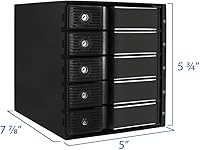
  • Dimensions: The unit measures 7.88″ in length, 5.75″ in width, and 5″ in depth when installed.
  • Weight: The enclosure weighs 2.5 pounds without drives installed.
  • Material: Shell and structural frame are constructed from an aluminum alloy, contributing to both rigidity and passive thermal transfer.
  • Color: Finished in gunmetal gray with a brushed aluminum aesthetic intended to match typical prosumer and workstation case interiors.
  • Drive Interface: Each bay supports SATA I, II, and III as well as SAS I and II drive protocols via the internal backplane connection.
  • Transfer Speed: Maximum supported data transfer rate is up to 6 Gbps per bay under SATA III or compatible SAS operation.
  • Backplane Type: Uses an internal SATA backplane design that consolidates individual drive connections into a single host-side interface, reducing cable clutter.
  • Hot-Swap Support: All five bays support hot-swapping, allowing drives to be inserted or removed while the system remains powered on, provided the host controller supports this feature.
  • Trayless Design: Drives insert directly into each bay without requiring a separate tray, caddy, or any tools for installation or removal.
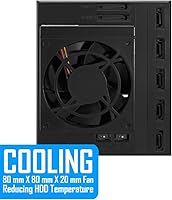
  • Cooling Method: Thermal management is entirely passive, relying on the aluminum enclosure body to dissipate heat generated by installed drives; no fan is included.
  • Power Management: Integrated power control circuitry on the backplane is designed to regulate drive power delivery and reduce risk during insertion and removal events.
  • Max Drive Capacity: Compatible with mechanical hard drives up to 12 TB in capacity based on manufacturer specifications at time of product listing.
  • Drive Form Factor: Designed exclusively for 3.5″ form factor drives; 2.5″ drives are not natively supported without an adapter bracket.
  • Fan Included: No fan is included with the unit; active cooling must be sourced from the surrounding case airflow environment.
  • Manufacturer: Designed and sold by KWI Technology Inc., operating under the Kingwin brand, with the product first made available in early 2016.

Related Reviews

ICY DOCK ToughArmor MB508SP-B 8-Bay 2.5” SAS/SATA Hot Swap Backplane Enclosure
86%
94%
Build Quality
88%
Ease of Installation
81%
Cooling Performance
90%
Data Transfer Speed
89%
Durability Over Time
More
Yottamaster 5 Bay External Hard Drive Enclosure 80TB
85%
95%
Storage Capacity
88%
Cooling Performance
91%
Setup & Installation
93%
Build Quality
84%
Transfer Speed
More
Yottamaster PS500C3 5-Bay Hard Drive Enclosure 90TB
82%
85%
Build Quality
91%
Ease of Installation
78%
Cooling Performance
82%
Data Transfer Speed
96%
Storage Capacity
More
Yottamaster DF5RU3 5-Bay RAID Hard Drive Enclosure, 90TB Capacity
85%
94%
Storage Capacity
90%
RAID Flexibility
85%
Cooling Efficiency
88%
Build Quality
91%
Ease of Setup
More
ICY DOCK ToughArmor MB998SP-B 8-Bay 2.5” SATA/SAS HDD/SSD Mobile Rack Enclosure for 5.25″ Bay
87%
91%
Performance
88%
Cooling Efficiency
89%
Build Quality
93%
Ease of Installation
72%
Noise Level
More
Syba 5 Bay 2.5″/3.5″ SATA HDD External RAID Enclosure SY-ENC50122
85%
87%
Performance
91%
Ease of Use
89%
Build Quality
85%
Data Transfer Speed
90%
RAID Flexibility
More
ICY DOCK ToughArmor MB604SPO-B 4 Bay 2.5 SSD/HDD & Optical Disk Drive Enclosure
85%
88%
Build Quality
85%
Cooling Performance
91%
Ease of Installation
87%
Value for Money
89%
Compatibility with Drives
More
ikuai 3.5″ USB 3.0 Hard Drive Enclosure
80%
93%
Ease of Setup
71%
Build Quality
62%
Cable Quality & Reliability
88%
Drive Compatibility
74%
Data Transfer Speed
More
Cenmate 10 Bay Hard Drive Enclosure with Cooling Fan
82%
89%
Performance
94%
Ease of Installation
78%
Cooling Efficiency
85%
Data Transfer Speed
83%
Build Quality
More
Yottamaster 4 Bay External Hard Drive Enclosure 64TB
82%
94%
Storage Capacity
88%
Ease of Setup
85%
Cooling Performance
90%
Build Quality
91%
Data Transfer Speed
More

FAQ

It depends entirely on how many open 5.25″ bays your mid-tower has. You need three consecutive open bays, which some mid-towers provide and others do not. Check your case specifications before purchasing — this is the most common installation mismatch buyers run into.

Yes, hot-swapping is supported, but with an important caveat: your host controller or HBA also needs to support hot-swap for it to work safely. On a standard desktop motherboard with AHCI mode enabled in BIOS, most users report successful live swaps without issue. If you are unsure about your controller, test with a non-critical drive first.

The Kingwin MKS-535TL 5-Bay Hot Swap Drive Enclosure supports SAS I and II drives on paper, but real-world compatibility with SAS HBA cards is inconsistent. A notable portion of buyers have run into issues with specific controllers. Before committing, search for your exact HBA model alongside this enclosure in user forums — it will save you a frustrating return.
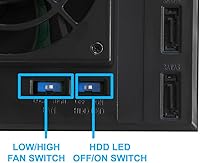
Since there is no fan in the unit itself, the enclosure adds zero noise on its own. The only sound you will hear is from the drives you install. That said, if your case relies on added airflow fans to compensate for the passive cooling, those fans may affect your overall system noise level.

Most standard 3.5″ drives fit without issue, but fitment tightness does vary by manufacturer and model. Some Seagate and WD drives with slightly different tolerances can feel snug going in. It is not a dealbreaker, but you should expect a firm insertion rather than a loose slide on some drive models.

It is entirely passive — the aluminum body absorbs and spreads heat, but there is no fan of any kind. In a case with solid airflow this works reasonably well under normal loads. If you plan to run all five bays hard simultaneously for extended periods, make sure your case fans are moving enough air over the enclosure to prevent heat buildup.

The backplane uses a standard SATA interface on the host side, so a single SATA data cable and a power connection are all you need for each connection point. It simplifies what would otherwise be five separate cable runs into a much neater setup. No special adapters are required for basic SATA operation.

Unfortunately, no. The enclosure physically requires three consecutive 5.25″ bays and cannot be modified or trimmed to fit in fewer. If you only have two open slots, this internal drive bay is simply not compatible with your case.

Each bay has a locking mechanism that holds the drive in place. To remove a drive, you disengage the lock and slide the drive straight out — no tools required. The mechanism works smoothly when new, though some users report it becomes slightly less precise after many hundreds of insertion cycles over a long period.

It is a solid match if your case supports it. A media server that needs occasional drive additions or swaps benefits directly from the hot-swap capability, and five bays give you meaningful storage room to grow. Just ensure your case has the required bay space and that your airflow setup is adequate, since a media server often runs around the clock.