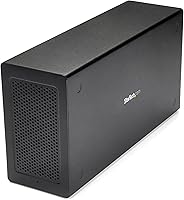
StarTech TB31PCIEX16 Thunderbolt 3 PCIe Expansion Chassis
StarTech TB31PCIEX16 Thunderbolt 3 PCIe Expansion Chassis — image 1
StarTech TB31PCIEX16 Thunderbolt 3 PCIe Expansion Chassis — image 2
StarTech TB31PCIEX16 Thunderbolt 3 PCIe Expansion Chassis — image 3
StarTech TB31PCIEX16 Thunderbolt 3 PCIe Expansion Chassis — image 4
StarTech TB31PCIEX16 Thunderbolt 3 PCIe Expansion Chassis — image 5
StarTech TB31PCIEX16 Thunderbolt 3 PCIe Expansion Chassis — image 6
76%
24%

Overview

The StarTech TB31PCIEX16 Thunderbolt 3 PCIe Expansion Chassis is a purpose-built external enclosure that plugs into any Thunderbolt 3 or 4 port and hands you a full PCIe x16 slot without cracking open a single case panel. It targets professionals who need a capture card or fiber NIC running off a laptop but have no interest in building a tower. The aluminum and alloy steel construction feels solid rather than plasticky, and an active cooling fan keeps thermals in check under sustained load. A Thunderbolt 3 cable and universal power adapter ship in the box, and TAA compliance makes it viable for government and enterprise buyers who need that checkbox ticked.

Features & Benefits

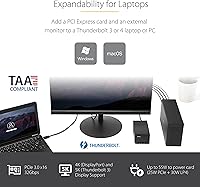
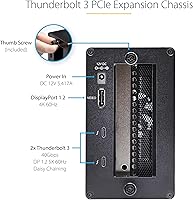
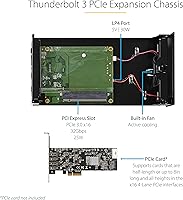
The single PCIe 3.0 x16 slot accepts cards up to 8 inches long, covering most capture hardware, NVMe adapters, 10GbE NICs, and FireWire controllers without issue. Thunderbolt 3's 40Gbps bandwidth is genuinely useful — cards that push heavy data streams don't get choked the way they might over slower external connections. The enclosure also handles display output through its DisplayPort and TB3 passthrough ports, supporting up to 5K/4K at 60Hz, so you can drive an external monitor from the same unit. Power delivery reaches 25W through the slot and up to 30W via the LP4 connector. Setup is driverless on both macOS and Windows, and daisy-chain support means this doesn't have to be the last device in your Thunderbolt chain.

Best For

This Thunderbolt PCIe enclosure suits video editors and streamers who need a dedicated capture card connected to a laptop, especially when a full desktop isn't practical. IT buyers in government or regulated industries will appreciate the TAA compliance, which often determines whether a product can be procured at all. Mac and Windows users looking to add 10GbE networking, an NVMe controller, or legacy FireWire support to a modern notebook will find the process refreshingly straightforward. Worth stating clearly: this external PCIe box offers no GPU support and is not an eGPU solution — buyers chasing graphics acceleration should look at purpose-built alternatives rather than expecting this unit to fill that role.

User Feedback

Owners consistently praise the build quality, with the aluminum chassis drawing comparisons to professional-grade equipment rather than consumer accessories. Compatibility is broadly positive, though some Windows users report that certain network adapters needed firmware updates or BIOS adjustments before operating reliably; macOS tends to be more plug-and-play. The fan is audible under load — not disruptive in a typical office or studio, but not silent either. Opinions diverge on value: professionals who depend on it daily generally feel the premium price is warranted, while occasional users are less convinced. A smaller number of reports flag host compatibility edge cases, particularly with Thunderbolt 3 controllers that lack full certification, so verifying your host hardware beforehand is a sensible precaution.

Pros

  • Solid aluminum and alloy steel chassis feels professional-grade, not like consumer-tier plastic hardware.
  • Driverless setup on macOS typically works within minutes of first connection.
  • TAA compliance opens the door for government and enterprise procurement without exception requests.
  • Included Thunderbolt 3 cable and universal power adapter mean no immediate accessory hunting after unboxing.
  • DisplayPort and TB3 passthrough ports let you drive a high-resolution display directly from the enclosure.
  • Daisy-chain support keeps the rest of your Thunderbolt peripheral chain intact downstream.
  • 40Gbps bandwidth handles capture cards and 10GbE NICs without meaningful throughput compromise.
  • LP4 auxiliary connector adds up to 30W for cards that need more than the slot alone provides.
  • Active cooling fan prevents throttling during sustained, demanding workloads.
  • Compatible with both macOS and Windows across a wide range of OS versions.

Cons

  • The PCIe x16 physical slot runs at x4 electrical speeds, which catches some buyers off guard post-purchase.
  • Fan noise becomes distracting in quiet home offices or recording environments during sustained loads.
  • Windows users on non-Intel Thunderbolt controllers frequently encounter driver or BIOS compatibility friction.
  • Printed documentation is thin and leaves first-time Thunderbolt enclosure buyers without enough guidance.
  • Premium pricing is hard to justify for users who only need occasional or experimental PCIe access.
  • Outer shell can run noticeably warm during extended heavy-use sessions despite active cooling.
  • Support response times have been slow for users dealing with edge-case host compatibility problems.
  • Card length limit of 8 inches excludes some longer professional cards without clear warning in listings.
  • Total power headroom is tight for cards with high or unpredictable peak draw requirements.
  • Shared bandwidth across daisy-chained devices can measurably reduce PCIe card performance in complex setups.

Ratings

The StarTech TB31PCIEX16 Thunderbolt 3 PCIe Expansion Chassis has been evaluated by our AI system after processing verified buyer reviews from multiple global markets, with spam, bot activity, and incentivized submissions actively filtered out. The scores below reflect a genuine cross-section of professional and power-user experiences — both the strengths that keep buyers recommending it and the friction points that hold some back. Nothing has been smoothed over.

Build Quality
88%
The aluminum and alloy steel chassis draws consistent praise from users who have owned cheaper plastic enclosures before. Professionals setting it up on a permanent desk note that it feels like equipment rather than an accessory, and there are few reports of flex, rattle, or finish degradation over time.
A handful of users note that the unit runs noticeably warm on the outer shell during extended sessions, even with the fan active. A small number of long-term owners have reported minor cosmetic scratching around the cable ports after repeated daily connections.
Compatibility
76%
24%
On certified Thunderbolt 3 and 4 hosts — particularly modern MacBooks and Intel-based Windows laptops — most PCIe cards install and run without any manual intervention. Capture card users and 10GbE NIC installers report especially clean experiences on macOS, often describing it as genuinely plug-and-play.
Windows users with certain Thunderbolt controllers face a steeper path, sometimes requiring BIOS updates or firmware patches before the enclosure is recognized reliably. A recurring theme in negative reviews is that non-Intel Thunderbolt implementations on some AMD-based systems introduce instability that StarTech support cannot always resolve remotely.
Ease of Setup
84%
The driverless design means most users are operational within minutes of unboxing, particularly on macOS where the OS handles Thunderbolt device authorization cleanly. The included Thunderbolt cable and power adapter eliminate the usual hunt for correct accessories.
A portion of Windows users encounter a security prompt or Thunderbolt authorization step that is not clearly explained in the included documentation. First-time PCIe enclosure buyers occasionally report confusion about card seating, as the toolless design has a less intuitive locking mechanism than traditional tower slots.
Thermal Management
72%
28%
The built-in active fan does its job under sustained workloads — cards running continuous data capture or high-throughput network traffic stay within operational temperature ranges in most reported use cases. Users in professional studio environments appreciate that the enclosure does not throttle connected cards during long recording sessions.
The fan is audible, and in quiet home office or recording studio environments it becomes a noticeable background hum. A few users running particularly power-hungry expansion cards report that the thermal headroom is tighter than expected, with occasional throttling during worst-case sustained loads.
PCIe Performance
83%
The 40Gbps Thunderbolt 3 link provides enough headroom for most practical PCIe workloads — 10GbE cards, NVMe controllers, and capture hardware all perform close to their rated throughput in real-world testing reported by users. For capture and networking use cases, the bandwidth ceiling rarely becomes a limiting factor.
Users pushing multi-lane NVMe RAID configurations or demanding professional capture setups at very high bitrates occasionally bump into the bandwidth constraints inherent to any Thunderbolt-to-PCIe bridge. The x16 physical slot runs at x4 electrical speeds in practice, which is standard for this enclosure class but surprises buyers who do not read the fine print.
Fan Noise
61%
39%
At idle and light loads, the fan is relatively unobtrusive in a normal office environment. Users who place the unit under a desk or behind a monitor report that it blends into typical ambient noise without drawing attention.
Under sustained load the fan ramps up to a pitch that multiple reviewers describe as distracting in quiet spaces. Podcast producers and voice-over artists who considered keeping this enclosure on their recording desk report relocating it specifically because of the noise profile.
Power Delivery
79%
21%
The 25W PCIe slot power plus up to 30W via the LP4 auxiliary connector covers the majority of capture cards and network adapters without issue. The included 65W universal adapter works across NA, EU, UK, and ANZ outlets, which frequent travelers appreciate.
Users running cards with higher sustained power draws — some 10GbE NICs and certain specialized PCIe devices — report that the total available wattage sits at the edge of what is comfortable. There is no power headroom for unexpected spikes, and a couple of users have experienced resets under peak draw conditions.
Display Output
81%
19%
The combination of a DisplayPort output and a TB3 passthrough port is practically useful — videographers and editors can drive a high-resolution monitor directly from the enclosure without adding a separate adapter to their chain. Support for 5K and 4K at 60Hz covers virtually every professional monitor on the market.
The display output is dependent on the connected PCIe card not interfering with the signal path, and a small number of users report that certain cards cause display instability when first connected. GPU-based display acceleration is not supported, so display performance is limited to what the host system's integrated or discrete graphics can push through.
Value for Money
67%
33%
For professionals who use it daily — broadcast engineers with a permanent capture card setup, IT administrators running fiber NICs on laptops in the field — the price reflects a reliable, TAA-compliant solution with few direct competitors at the same specification level. Those buyers tend to rate it highly once they factor in total workflow value.
Occasional or experimental users frequently flag the price as hard to justify against the relatively limited feature set. Buyers who discover the x4 electrical limitation after purchase feel the pricing implies more headroom than the hardware actually delivers, and the premium does not come with the kind of warranty support experience some expect.
Daisy-Chain Functionality
77%
23%
Users building multi-device Thunderbolt setups appreciate that this enclosure does not terminate the chain — docking stations, external drives, and displays can be connected downstream without adding another host port. The TB3/TB4 compatibility extends the usefulness for buyers already invested in a Thunderbolt ecosystem.
Available bandwidth is shared across all chained devices, and users running several high-throughput peripherals simultaneously report measurable performance drops on their PCIe card. The daisy-chain port works cleanly in simple setups but adds complexity in dense multi-device configurations that not everyone anticipates.
Documentation & Support
58%
42%
StarTech maintains an online knowledge base and provides firmware downloads that have resolved compatibility issues for a portion of affected Windows users. Their support team is reachable and generally knowledgeable about Thunderbolt-specific troubleshooting.
The printed documentation shipped with the unit is minimal and does not adequately prepare first-time buyers for the Thunderbolt authorization process on Windows or the electrical x4 slot reality. Several users report slow email response times when seeking help with edge-case host compatibility problems.
Portability
73%
27%
At just under 3.6 pounds and with a compact footprint, this external PCIe box is realistic to carry in a laptop bag for field work — broadcast technicians and live event engineers mention using it exactly this way. The universal power adapter removes one travel concern.
It is still a meaningful addition to a travel kit, and users who hoped to use it as a daily commute companion often reconsider once they account for the enclosure, cable, power brick, and inserted card as a combined package. It is portable, but not effortlessly so.
TAA Compliance
91%
For enterprise and government buyers, TAA compliance is non-negotiable, and this enclosure is one of the few Thunderbolt PCIe solutions that meets that requirement outright. Procurement officers and IT managers in regulated sectors cite this as a primary reason for choosing it over cheaper alternatives.
TAA compliance adds to the unit cost in a way that consumer buyers — who will never need it — end up absorbing. For a home user comparing on specification and price alone, this compliance premium feels invisible and unwelcome.
Physical Card Compatibility
74%
26%
The 8-inch maximum card length covers the vast majority of single-width professional expansion cards including most popular capture and network cards. Users report that the toolless installation process, once understood, is genuinely quick for card swaps.
The single-slot limitation rules out dual-width cards entirely, and users wanting to run cards just over 8 inches long have been caught out by listings that do not emphasize this constraint. Some users also note that certain cards with large heatsinks or non-standard backplates require minor physical adaptation to fit cleanly.

Suitable for:

The StarTech TB31PCIEX16 Thunderbolt 3 PCIe Expansion Chassis is built for professionals who need desktop-class expansion without a desktop — and that niche is more crowded than it sounds. Broadcast engineers and video producers who rely on a specific capture card but work from a laptop will find this external PCIe box solves a real daily problem with minimal fuss. IT administrators in government agencies or regulated enterprises benefit directly from the TAA compliance, which clears procurement hurdles that cheaper alternatives cannot. Mac users who want to add 10GbE networking or a legacy FireWire controller to a modern MacBook — without waiting for a USB adapter that might not even exist — will find the setup process refreshingly clean. Content creators who need both a PCIe expansion card and an additional high-resolution display output in a single compact unit also get a practical two-for-one here. If you have a specific, well-supported card in mind and a certified Thunderbolt 3 host, this Thunderbolt PCIe enclosure is one of the most reliable ways to bridge the gap between laptop portability and workstation capability.

Not suitable for:

Anyone shopping with graphics acceleration in mind should stop here: the StarTech TB31PCIEX16 Thunderbolt 3 PCIe Expansion Chassis explicitly does not support GPU cards, and no configuration or firmware update changes that. Buyers hoping for an eGPU solution to boost gaming or GPU-accelerated rendering performance on their laptop need to look at purpose-built eGPU enclosures instead. Casual or occasional users who only need a PCIe card a few times a year will struggle to justify the premium price against the actual hours of use, especially when rental or alternative solutions might serve them better. Users with AMD-based laptops or systems using non-Intel Thunderbolt implementations should research their specific host controller carefully before buying, as compatibility is less consistent than on certified Intel-based machines. Anyone working in a quiet recording or podcasting environment should also think carefully — the active cooling fan is functional but audible, and placing this external PCIe box near a sensitive microphone is not a workable setup. Finally, buyers needing to run dual-width cards, cards over 8 inches, or multiple PCIe devices simultaneously will find the single-slot design an immediate dealbreaker.

Specifications

  • Host Interface: Connects to the host computer via a single Thunderbolt 3 port, delivering up to 40Gbps of bidirectional bandwidth.
  • PCIe Slot: Features one PCIe 3.0 x16 physical slot, operating at x4 electrical lanes in practice.
  • Max Card Length: Accepts single-width PCIe expansion cards up to 8 inches (20.3 cm) in length.
  • Slot Power: Delivers up to 25W of power directly through the PCIe slot to the installed expansion card.
  • Aux Power: The LP4 auxiliary connector supplies up to 30W split across the 12V and 5V rails for more demanding cards.
  • Power Adapter: Ships with a 12V 5A (65W) universal AC adapter compatible with NA, JP, UK, EU, and ANZ outlet standards.
  • Display Output: Provides one DisplayPort output and one Thunderbolt 3 passthrough port for connecting external displays.
  • Max Resolution: Supports external display output at up to 5K or 4K resolution at 60Hz via DisplayPort or TB3 passthrough.
  • Cooling: Uses a built-in active fan for continuous airflow over the installed PCIe card during operation.
  • Dimensions: Measures 11 x 5.6 x 3.2 inches, making it compact enough to sit alongside a laptop on a desk.
  • Weight: Weighs 3.57 pounds (approximately 1.62 kg) including the chassis but excluding cables and adapter.
  • Materials: Constructed from aluminum and alloy steel for a durable, professional-grade external enclosure.
  • OS Support: Compatible with macOS 10.12 through 14.0 and Windows 7 through 11 without requiring additional drivers.
  • Daisy-Chain: Includes a Thunderbolt 3 passthrough port that supports daisy-chaining additional TB3 or TB4 devices downstream.
  • GPU Support: Does not support PCIe graphics cards or eGPU configurations; intended for non-GPU expansion cards only.
  • TAA Compliance: Fully TAA-compliant, making this enclosure eligible for U.S. federal government and regulated enterprise procurement.
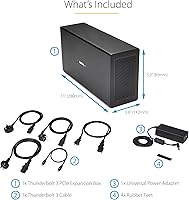
  • Included Cables: Ships with one Thunderbolt 3 cable in the box, eliminating the need to source a compatible cable separately.
  • Model Number: Sold under the model identifier TB31PCIEX16, manufactured by StarTech.com.

Related Reviews
StarTech 3 Port PCIe USB 3.0 Card + Gigabit Ethernet
84%
94%
Installation Ease
88%
Connectivity & Performance
90%
Compatibility
78%
Power Stability
85%
Build Quality
More
StarTech PEX1394B3 3-Port FireWire PCIe Card
87%
91%
Data Transfer Speed
89%
Ease of Installation
93%
Compatibility with Operating Systems
84%
Build Quality
88%
Reliability
More
StarTech 7-Port PCIe USB 3.0 Card
85%
88%
Installation Ease
91%
Data Transfer Speed
76%
Power Supply Consistency
83%
Compatibility with Older Devices
85%
Durability and Build Quality
More
Moonqkuses 4-Port SATA 3.0 PCIe Expansion Card
86%
88%
Performance
91%
Compatibility
93%
Setup & Installation
80%
Thermal Management
85%
Build Quality
More
Belkin Thunderbolt 3 Dock Core
88%
88%
Performance
92%
Ease of Setup
91%
Compatibility
89%
Design and Build Quality
87%
Port Variety
More
Belkin Thunderbolt 3 Dock Mini
86%
92%
Performance
75%
Compatibility
94%
Setup & Installation
89%
Portability & Size
88%
Build Quality
More
Belkin Thunderbolt 3 Dock Pro
86%
91%
Performance
88%
Connectivity
93%
Display Support (Dual 4K)
90%
Charging Capabilities (85W)
87%
Setup/Installation
More
OWC ThunderBay 4 with Thunderbolt 3, 16TB
86%
92%
Performance
89%
Build Quality
95%
Speed/Transfer Rate
88%
Reliability
74%
Ease of Setup
More
StarTech 8-Port SATA PCIe Card
88%
89%
Performance
95%
Ease of Installation
85%
Compatibility with Systems
88%
Data Throughput (16Gbps)
84%
Build Quality
More
G-Technology 4TB G-DRIVE with Thunderbolt 3
84%
91%
Performance & Speed
88%
Build Quality & Durability
90%
Connectivity & Versatility
67%
Portability & Weight
85%
Setup & Installation
More

FAQ

Yes, modern MacBooks with Thunderbolt 3 are among the most compatible hosts for this enclosure. macOS handles the Thunderbolt device authorization cleanly, and most standard PCIe cards install without any driver hunting. Just make sure your specific card has macOS support, as that is a card-level requirement, not an enclosure one.

No — this is one of the most important things to clarify before buying. The StarTech TB31PCIEX16 Thunderbolt 3 PCIe Expansion Chassis explicitly does not support GPU or graphics cards of any kind. If your goal is external graphics acceleration, you need a purpose-built eGPU enclosure designed for that use case.

It works with both platforms, but the experience can differ. On macOS the setup tends to be smoother and more consistent. On Windows, most users with Intel-based Thunderbolt controllers have a clean experience, but some AMD-platform laptops with less standardized Thunderbolt implementations have reported needing BIOS updates or driver adjustments before the enclosure is recognized reliably.

Capture cards, 10 Gigabit Ethernet NICs, fiber network adapters, NVMe storage controllers, FireWire cards, and similar single-width expansion cards all work well within the 8-inch length limit. The main restrictions are no GPU cards, no dual-width cards, and nothing longer than 8 inches. If your card fits those parameters and has drivers for your OS, you are almost certainly good to go.

At idle or light loads it is relatively unobtrusive in a typical office environment. Under sustained heavy workloads — like continuous capture or high-throughput network traffic — the fan ramps up to a noticeable hum. It is not disruptive in most desk setups, but if you work in a quiet recording space or near a sensitive microphone, you will want to position it carefully or consider an alternative.

A Thunderbolt 3 cable is included in the box, along with the universal power adapter. You should be able to connect and power it up straight out of the packaging without ordering additional accessories.

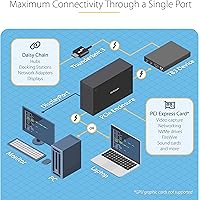
The enclosure has a Thunderbolt 3 passthrough port on the unit itself, which means you can daisy-chain other TB3 or TB4 devices — like an external drive or a dock — downstream from it. That said, all those devices share the same 40Gbps bandwidth back to the host, so performance-sensitive combinations need to be planned accordingly.

Physically it is an x16 slot, but electrically it operates at x4 speeds — which is standard across virtually all Thunderbolt-to-PCIe enclosures on the market. For capture cards, 10GbE NICs, and most practical expansion cards, x4 bandwidth is more than sufficient. Where it matters is in multi-lane NVMe RAID or other very high-bandwidth configurations, which may see some throughput limitations.

Yes, the enclosure provides both a DisplayPort output and a Thunderbolt 3 passthrough port, supporting up to 5K or 4K at 60Hz. You can drive a high-resolution display directly from the unit while your expansion card runs simultaneously, which is useful for compact setups where you want to consolidate connections.

It is one of the few Thunderbolt PCIe enclosures that is TAA-compliant, which is a genuine procurement requirement for U.S. federal agencies and many regulated industries. If your IT department has a TAA mandate, this external PCIe box clears that hurdle where most consumer-grade alternatives do not. The aluminum build and driverless operation also align well with managed deployment scenarios.