Overview

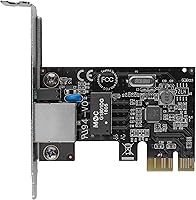
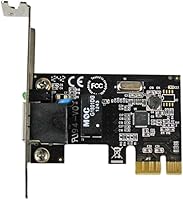
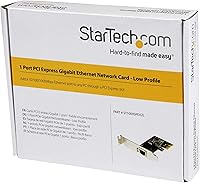
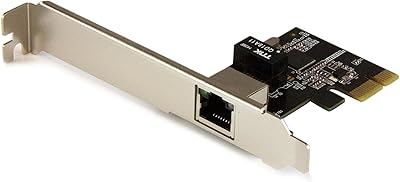
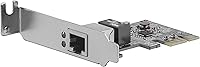
The StarTech ST1000SPEX2L 1-Port PCIe Network Card is exactly what it sounds like: a straightforward, no-nonsense way to add or restore a wired Ethernet connection to any desktop with an open PCIe slot. It ships with a low-profile bracket already attached, which matters more than it might sound when you are working inside a compact or slim-line case. The Realtek RTL8111H chipset has a long track record of broad compatibility, so driver headaches are rare. This is not a card for enthusiasts chasing maximum throughput — it is a practical fix for a practical problem, and it does that job well.
Features & Benefits

At its core, this PCIe NIC delivers full Gigabit speeds over a standard RJ45 port, which is all most home or office desktops will ever need from a wired connection. The included low-profile bracket is a genuine plus for anyone building or upgrading a small form factor machine. Wake-on-LAN support is there if you manage systems remotely or want your PC to power on automatically on a schedule. Auto-MDIX means the card handles cable type automatically, and 9K jumbo frame support is a quiet but useful feature for anyone pushing large file transfers across a local NAS.

Best For

This network adapter is an ideal fit for anyone whose onboard Ethernet port has died and needs a reliable, low-cost replacement without ordering a new motherboard. It also makes a lot of sense in home lab or small office environments where a stable wired connection matters but budget is a real consideration. The low-profile design makes it compatible with mini-ITX and slim desktop builds where a full-height card simply will not fit. Linux and Windows Server users will appreciate that the Realtek chipset typically gets picked up by the OS without any manual driver work, which saves real time.

User Feedback

Buyers consistently point to hassle-free installation as the card's biggest strength — plug it in, boot up, and it is detected immediately in most cases. The low-profile bracket earns specific praise from users in compact builds who had limited options. On the less positive side, a handful of Linux users on specific kernel versions have reported driver conflicts that required manual intervention, so it is worth checking your kernel version if you run a less common distro. A few buyers noted the card runs slightly warm under sustained network load, though no one flagged actual stability or overheating problems. Overall sentiment sits solidly in reliable-and-does-the-job territory.

Pros

  • Detected automatically by Windows on first boot in nearly all cases — zero driver hunting required.
  • The Realtek RTL8111H chipset has years of driver maturity behind it, which translates to real-world stability.
  • Low-profile bracket ships pre-attached, making it immediately usable in slim and compact desktop cases.
  • Wake-on-LAN works reliably for remote system management when configured correctly through BIOS.
  • 9K jumbo frame support gives home NAS users a practical throughput advantage over standard MTU settings.
  • Auto-MDIX handles cable type automatically, so you will never need a crossover cable for a direct connection.
  • Fits in a single PCIe x1 slot without blocking adjacent slots in most standard motherboard layouts.
  • Priced at a level where it is easy to justify as a quick fix, even for a secondary or rarely used machine.
  • Long-term reliability reports from users running it continuously over one to three years are largely positive.
  • Broad OS support spans Windows 7 through Server 2019, Linux, and macOS — useful across mixed environments.

Cons

  • No full-height bracket included, which is an oversight for users installing it in standard ATX tower cases.
  • Driver compatibility on non-mainstream Linux kernel versions is inconsistent and has caused real headaches for some users.
  • Printed documentation is thin to the point of being nearly useless for anyone unfamiliar with PCIe card installation.
  • The card runs noticeably warm under sustained heavy network load, which is worth monitoring in poorly ventilated cases.
  • The RJ45 port retention clip feels less robust than on more premium cards, raising minor durability questions over time.
  • macOS users may need to manually source and install drivers for older OS versions, adding friction to initial setup.
  • Jumbo frame benefits are only realized when every device on the network path supports the same MTU — easy to overlook.
  • Build materials feel lightweight compared to pricier NICs, which may not inspire confidence in demanding or always-on environments.

Ratings

The scores below for the StarTech ST1000SPEX2L 1-Port PCIe Network Card were generated by our AI engine after processing verified buyer reviews from multiple global markets, with spam, incentivized, and bot-flagged submissions actively filtered out. We looked at what real users said after weeks and months of daily use — not just first impressions. Both the standout strengths and the friction points are reflected honestly in every score.
Ease of Installation
91%
The vast majority of buyers report the card is detected automatically on Windows and most mainstream Linux distributions the moment the system boots. No driver disc, no manual INF file hunting — just slot it in and get connected. For a user replacing a dead onboard NIC at 11pm, that kind of friction-free setup is genuinely valuable.
A smaller but vocal group of Linux users on less common kernel versions or rolling-release distros ran into detection failures that required manual driver compilation. It is not a widespread issue, but it is real enough to mention if you run something other than Ubuntu or Debian.
Connection Stability
88%
Day-to-day reliability is where this network adapter earns its reputation. Users running it in home offices and small server racks report consistent uptime over months without dropped packets or unexplained disconnects. For replacing a flaky onboard port, it does exactly what you need it to do.
A handful of users noted occasional instability when pairing the card with older or budget-tier switches, though it is difficult to isolate whether the card or the switch was at fault. Under sustained heavy transfers, a small number reported minor hiccups that resolved after a driver update.
Low-Profile Compatibility
93%
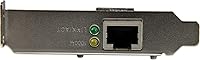
Including the low-profile bracket in the box is a practical decision that saves real frustration. Users fitting this PCIe NIC into mini-ITX or slim desktop cases specifically called out the bracket as the reason they chose this card over cheaper alternatives that ship standard-height only. It fits cleanly and securely.
The card does not include a full-height bracket in the box, so if you are installing it in a standard ATX tower you will need to either source one separately or leave the slot cover open. Most users in that scenario do not care, but it is worth knowing before you buy.
OS & Driver Compatibility
82%
18%
The Realtek RTL8111H chipset has years of driver maturity behind it, and that shows. Windows 10 and 11 users almost universally report zero driver friction, and the card works well on Windows Server 2016 and 2019 environments. macOS and mainstream Linux users generally have a smooth experience too.
Specific Linux kernel versions — particularly some 5.x and 6.x builds on Arch or Gentoo-based systems — have caused headaches for a subset of users who needed to manually patch or compile drivers. It is a niche problem, but for a home lab running a non-standard distro it can be an unwelcome surprise.
Value for Money
94%
At its price point, this network adapter is almost hard to argue against. Buyers consistently frame it as a sensible, no-regret purchase — especially when the alternative is replacing a motherboard just to get a working Ethernet port back. The feature set you get, including WoL and jumbo frame support, exceeds what the price suggests.
The value equation only holds if your expectations are calibrated correctly. Users who bought this expecting premium build quality or enthusiast-grade performance and paid the same money for it came away less impressed. It is excellent value for what it is, but it is not trying to be anything more than that.
Build Quality
71%
29%
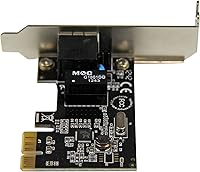
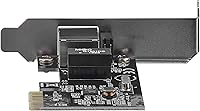
The card feels solid enough for what it is. The PCB is clean, the RJ45 port seats firmly, and the bracket alignment is accurate out of the box. For a utilitarian networking component that will sit unseen inside a case, the construction is entirely fit for purpose.
Users who handled more premium NICs noted the StarTech Gigabit card feels noticeably lightweight and plasticky by comparison. The retention clip on the RJ45 port has received a few complaints about feeling less robust than expected, though actual failures from normal use appear to be uncommon.
Thermal Performance
74%
26%
Under typical office or home use — browsing, video calls, moderate file transfers — the card runs at a perfectly comfortable temperature and has never been flagged as a heat concern in those scenarios. Most users never think about thermals with this card at all, which is the ideal outcome.
Under sustained high-throughput conditions, such as continuous large file transfers to a NAS, some buyers noted the card gets noticeably warm to the touch. There are no reports of thermal throttling or shutdowns, but users in poorly ventilated cases may want to keep an eye on airflow near the slot.
Wake-on-LAN Performance
79%
21%
WoL works reliably for users who configured it correctly through their BIOS and OS power settings. Home lab users managing machines remotely praised this feature specifically, noting it performed consistently across reboots and power cycles without needing to be re-enabled.
WoL configuration can be finicky depending on motherboard firmware and OS sleep state settings, and a few users blamed the card when the issue was actually upstream in their BIOS. The card itself supports the feature correctly, but the setup requires a bit more patience than plug-and-play installation.
Jumbo Frame Support
76%
24%
The 9K jumbo frame capability is a meaningful feature for users running NAS-heavy home networks or small office file servers. Those who enabled it reported a noticeable improvement in sustained transfer efficiency compared to standard MTU settings, with less CPU overhead during large bulk transfers.
Jumbo frames only help when every device on the network path supports them, and several users who enabled the feature without checking their switch compatibility saw degraded performance instead of improved performance. It is a useful feature, but one that requires some network knowledge to use correctly.
Plug-and-Play Convenience
87%
Outside of the Linux edge cases already noted, the out-of-box experience on Windows is about as smooth as it gets. Boot up, open Device Manager, and the card is already listed and active. For non-technical users who just need Ethernet to work again, that immediacy genuinely matters.
Users on macOS noted the experience is slightly less instant, occasionally requiring a manual driver download for older OS versions. It is a minor inconvenience rather than a dealbreaker, but macOS users should budget a few extra minutes for initial setup.
Form Factor & Physical Fit
88%
The card is genuinely compact and installs cleanly into a single PCIe x1 slot without blocking adjacent slots in most standard layouts. Builders working inside cramped mini-ITX cases appreciated how little physical space it consumes once seated.
The dimensions listed are for the card itself, and the RJ45 port does protrude a few millimeters beyond the bracket face, which caused minor clearance issues for a small number of users with particularly tight rear-panel configurations. Not a dealbreaker, but worth measuring if space is extremely tight.
Documentation & Packaging
63%
37%
The card arrives in straightforward packaging with the low-profile bracket pre-attached, which is a sensible default. Basic setup information is included, and StarTech's online resources fill most gaps for users who want more detail.
Several buyers noted the printed documentation is minimal to the point of being nearly useless for anyone who is not already comfortable installing PCIe cards. First-time builders who needed guidance on bracket swapping or driver sourcing had to rely entirely on third-party forums and YouTube videos.
Long-Term Reliability
83%
Users who have run this PCIe NIC continuously for one to three years generally report no degradation in performance or connectivity. It appears to be the kind of component you install and forget about, which for a networking card is exactly the right outcome.
There is a small cohort of users who reported card failures after twelve to eighteen months of continuous use, particularly in always-on server environments. Whether that reflects a batch issue or normal attrition at this price tier is hard to say, but it is enough to keep the long-term score from being higher.

Suitable for:

The StarTech ST1000SPEX2L 1-Port PCIe Network Card is a natural fit for anyone who has lost the use of their desktop's onboard Ethernet port and needs a reliable, low-cost way to get back online without touching the motherboard. It is equally well-suited to home lab builders and small office admins who prioritize stable wired connectivity over wireless convenience — the kind of people who would rather run a cable than troubleshoot intermittent Wi-Fi drops. The included low-profile bracket makes it a particularly smart pick for compact and mini-ITX builds, where finding a NIC that physically fits is half the battle. Windows users across multiple OS versions will find setup almost effortless, and Linux users running mainstream distributions like Ubuntu or Debian typically have an equally smooth experience thanks to the Realtek chipset's mature driver ecosystem. Anyone who needs Wake-on-LAN functionality for remote system management or wants jumbo frame support for NAS-heavy file transfers will find those features present and working without paying a premium for them.
Not suitable for:

This network adapter is not the right tool if you are chasing high-end networking performance, building a workstation that demands multi-gigabit throughput, or running applications where sub-millisecond latency is a genuine requirement — this PCIe NIC operates at standard Gigabit speeds and makes no claims beyond that. Users running niche or bleeding-edge Linux distributions on recent kernel versions should proceed with caution, as driver compatibility is not guaranteed across every configuration and manual intervention has been required in documented cases. The card does not include a standard full-height bracket in the box, which is a minor but real inconvenience for users installing it in a full-tower ATX case who prefer a clean, covered rear panel. If you are a first-time PC builder who has never swapped out a PCIe card before, the minimal documentation included in the box will leave you relying on external resources. And if build quality and component feel matter to you — if you are the kind of buyer who inspects every piece before it goes into a build — the lightweight construction may feel underwhelming compared to more expensive alternatives.

Specifications

  • Model Number: The card is identified by the model number ST1000SPEX2L, manufactured by StarTech.
  • Interface: It connects to the host system via a PCI Express (PCIe) slot, compatible with x1, x4, x8, and x16 PCIe slots.
  • Network Port: One RJ45 Gigabit Ethernet port is included for standard Cat5e or Cat6 wired network connections.
  • Chipset: The card uses the Realtek RTL8111H controller, a widely supported and mature Gigabit Ethernet chipset.
  • Network Speed: Supports 10, 100, and 1000 Mbps (Gigabit) Ethernet speeds with automatic speed negotiation.
  • Form Factor: Designed as a low-profile card, measuring 2.6″ in length and 1.7″ in height with the low-profile bracket attached.
  • Bracket: Ships with a low-profile bracket pre-installed; a standard full-height bracket is not included in the package.
  • Dimensions: Physical card dimensions are 2.6″ x 0.01″ x 1.7″, making it suitable for compact and slim desktop enclosures.
  • Weight: The card weighs 0.95 ounces (approximately 0.03 kg), making it one of the lightest PCIe networking add-in cards available.
  • Wake-on-LAN: Wake-on-LAN (WoL) is fully supported, allowing the host system to be powered on remotely over the network.
  • Jumbo Frames: Supports jumbo frames up to 9K bytes, which can improve throughput efficiency during large local network file transfers.
  • Duplex Support: Operates in both full-duplex and half-duplex modes, with automatic negotiation based on the connected switch or router.
  • Auto-MDIX: Auto-MDIX is supported, meaning the card automatically detects and adjusts for straight-through or crossover cable types.
  • OS Support: Compatible with Windows 7, 8, and 10, macOS Mavericks (10.9), Linux, Windows Server 2012, 2016, and 2019.
  • Compliance: Fully compliant with IEEE 802.3, IEEE 802.3u (Fast Ethernet), IEEE 802.3x (flow control), and IEEE 802.3ab (Gigabit over copper) standards.
  • Data Protocol: Uses standard Ethernet as the data link protocol, consistent with all modern wired networking infrastructure.
  • First Available: This product was first made available for purchase in August 2013 and has not been discontinued by the manufacturer.
  • UPC: One of the registered UPC codes for this product is 065030852265, confirming its authenticity as a genuine StarTech item.

Related Reviews

StarTech ST1000SPEXI PCIe Gigabit Network Card
82%
94%
Driver Stability & OS Compatibility
92%
Connection Reliability & Uptime
91%
Installation Ease
67%
Value for Money
96%
Chipset Quality
More
StarTech 8-Port SATA III PCIe Expansion Card
80%
88%
Drive Detection Reliability
84%
Multi-Controller Architecture
79%
OS Compatibility
86%
Motherboard Compatibility
81%
Included Cables
More
StarTech PEX1394B3 3-Port FireWire PCIe Card
87%
91%
Data Transfer Speed
89%
Ease of Installation
93%
Compatibility with Operating Systems
84%
Build Quality
88%
Reliability
More
StarTech PEX2S1050 2-Port PCIe Serial Card
80%
88%
Driver Installation & Setup
61%
OS Compatibility
91%
Signal Reliability & UART Performance
83%
Physical Build Quality
86%
Low-Profile Bracket Usability
More
GLOTRENDS LE8202 2-Port Gigabit PCIe Network Card
82%
88%
Driver Compatibility
91%
Ease of Installation
94%
Value for Money
86%
OS & Platform Coverage
79%
Build Quality
More
StarTech PEXUSB3S7 7-Port PCIe USB 3.0 Card
79%
91%
Ease of Installation
84%
Build Quality
88%
Port Count & Layout
76%
Transfer Performance
78%
Driver & OS Compatibility
More
ULANSeN Intel 82576 Dual-Port Gigabit Network Card
81%
91%
Driver Compatibility
84%
Virtualization Support
88%
Value for Money
79%
Throughput Performance
63%
Build Quality
More
GLOTRENDS ST7315 1-Port 10Gb SFP+ Ethernet Network Card
84%
91%
Performance
88%
Compatibility
84%
Ease of Installation
92%
Value for Money
70%
Driver Support
More
StarTech PEXUSB3S3GE USB 3.0 PCIe Card
75%
83%
Ease of Installation
78%
USB Port Performance
57%
Ethernet Reliability
61%
Build Quality
68%
Value for Money
More
Euqvos PCIe Ethernet Network Card X710-DA4 10Gb 4 Port SFP+
85%
92%
Performance
89%
Value for Money
80%
Compatibility with Operating Systems
87%
Heat Dissipation
85%
Ease of Installation
More

FAQ

It will work in any PCIe slot — x1, x4, x8, or x16. The card is electrically a PCIe x1 device, so it physically fits in an x1 slot, but it will also function correctly if you slot it into a larger PCIe connector. Just make sure the slot is open and unobstructed.

On Windows 10 and 11, the card is detected and set up automatically in most cases — no disc, no manual download needed. Windows will pull the driver on its own. On older Windows versions like 7 or 8, you may occasionally need to grab the driver from StarTech's website, but it is a straightforward process.

On mainstream Debian and Ubuntu-based distributions, the Realtek RTL8111H chipset is well supported by the kernel and typically works out of the box. If you are on a rolling-release distro like Arch or a custom kernel build, there have been isolated compatibility issues that required manual driver work, so it is worth checking your kernel version against the Realtek driver release notes before buying.

The low-profile bracket comes pre-installed on the card, which is exactly what you want if you are putting it straight into a compact or slim desktop case. You do not need to swap anything unless you are installing it in a standard full-height case, in which case you will need to source a full-height bracket separately since one is not included.

Yes, and this is honestly one of the most common reasons people buy it. As long as your desktop has an available PCIe slot, the StarTech ST1000SPEX2L 1-Port PCIe Network Card slots right in and gives you a working Gigabit Ethernet port without any motherboard replacement needed. Most users are up and running within ten minutes.
It does, but Wake-on-LAN requires correct setup on two fronts: the card itself supports the feature, but you also need to enable WoL in your BIOS or UEFI settings and configure it in your OS power management settings. Once that is done, users report it works consistently across reboots and power cycles.

Yes, and the 9K jumbo frame support makes it a slightly better fit for NAS environments than a basic NIC without that feature. Enabling jumbo frames can reduce CPU overhead and improve throughput during sustained large transfers — just make sure your switch and NAS also support jumbo frames at the same MTU setting, or you will see performance drop instead of improve.

That is actually one of its strengths. The pre-installed low-profile bracket brings the card's height down to fit the rear I/O cutout in slim and mini-ITX cases. As long as your case has a PCIe slot and a low-profile card cutout — which most mini-ITX cases do — it should fit cleanly.

Under typical everyday use — web traffic, video streaming, general office work — it runs at a perfectly normal temperature and is not a concern. Under sustained heavy transfers over extended periods, some users have reported it gets warm to the touch, but there are no documented cases of thermal throttling or heat-related failures in normal ventilated conditions.

MacOS compatibility is listed starting from Mavericks (10.9), and most users on supported versions report it working without issues. That said, macOS support has occasionally lagged behind Windows in terms of driver updates, so if you are running a more recent macOS version that is not on the official compatibility list, it is worth checking the StarTech support page for the latest driver availability before purchasing.

Where to Buy