Overview

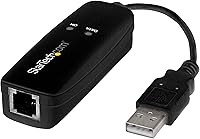
The StarTech.com USB56KEMH2 56K USB Dial-Up Modem is one of those rare peripherals that exists because there is still a genuine need for it. Dial-up is not a relic for everyone — rural communities with no broadband access, businesses dependent on fax lines, POS terminals, and security systems all still rely on this kind of connection daily. What separates this unit from cheaper alternatives is its hardware-based design: processing is handled by the onboard Conexant chipset rather than borrowing cycles from your CPU. It draws power directly from the USB port, so there is no wall adapter to track down. Treat it as a specialty tool with a specific job, and it does that job well.
Features & Benefits

This USB modem supports the V.92 data standard, which translates to download speeds up to 56 Kbps and uploads up to 33.6 Kbps — the practical ceiling for analog phone line connections. For fax workflows, it reaches 14.4 Kbps using well-established fax protocols, and it also handles voice calls and Caller ID through your computer. Setup is about as simple as it gets: one RJ-11 cable to your phone jack, one USB-A connection to your machine. Driver support spans Windows 7 through 11, multiple Windows Server editions, macOS 10.9 through 12, and Linux LTS kernels from 3.16 onward. Government and regulated-industry buyers will note it carries TAA compliance — something many comparable devices quietly omit.

Best For

The StarTech dial-up modem makes the most sense for a fairly specific group of buyers. If you are in a rural area where fiber or cable has not arrived, this is a practical last-mile option for getting online over a standard phone line. Medical offices, law firms, and financial businesses that still transmit documents by fax for compliance reasons will find it reliable for that workflow alone. IT administrators managing Windows Server environments get clean, tested driver support without wrestling with unsigned software. Field technicians and travelers who need an occasional dial-up or fax connection — but cannot justify a dedicated machine — will appreciate just how compact and light this device actually is.

User Feedback

Across nearly 450 ratings, this external fax modem holds a 4.0 out of 5 average — a respectable score for a niche device serving an exacting audience. Windows users consistently report smooth driver installation and dependable performance on modern OS versions. Linux users have generally had success too, though some note they needed to consult forums before everything clicked on their specific kernel. The clearest pain point involves macOS: compatibility is well-documented through version 10.10, but buyers on newer releases have occasionally hit friction. On the upside, the hardware chipset draws repeated praise for outperforming software-based alternatives in day-to-day stability, and build quality is a frequent compliment given how small the device is.

Pros

  • Hardware-based Conexant chipset delivers more stable connections than software modems, especially under sustained load.
  • Bus-powered over USB — no wall adapter, no extra cable, nothing extra to pack or forget.
  • Fax transmission is consistently reliable, even over aging or degraded phone line infrastructure.
  • TAA compliance makes this USB modem procurement-ready for government and regulated-industry environments.
  • Driver support for Windows 7 through 11 is well-maintained and installation is straightforward for most users.
  • Compact enough to carry daily without noticing the weight — just over an ounce.
  • Supports voice calls and Caller ID through your PC, adding utility beyond pure data or fax use.
  • Works with Linux LTS kernels from 3.16 onward, covering a broad range of server and desktop deployments.
  • V.44 compression and a wide protocol stack allow reliable handshakes with older remote systems and legacy infrastructure.

Cons

  • macOS compatibility is unreliable on versions beyond 10.10, a real problem for Mac users on current systems.
  • Linux setup requires research and community documentation — not a straightforward experience for non-technical users.
  • Real-world dial-up speeds fall below the 56 Kbps ceiling on most phone lines due to line quality limitations.
  • Carrying the required RJ-11 phone cable adds bulk that the device itself avoids — phone cables are rarely on hand.
  • Voice call management software varies widely by OS, making the calling feature inconsistent to configure.
  • No built-in indicator lights to confirm connection status, which makes troubleshooting more inconvenient than it should be.
  • Some users report the RJ-11 port feels less secure after repeated cable connections over time.
  • Power delivery inconsistencies on older USB hubs can cause intermittent disconnections during active sessions.

Ratings

The StarTech.com USB56KEMH2 56K USB Dial-Up Modem was evaluated by our AI rating system after processing hundreds of verified global buyer reviews, with spam, bot-submitted, and incentivized feedback actively filtered out before scoring. Ratings reflect the full picture — where this USB modem genuinely earns its reputation and where real buyers have run into friction. Both the strengths that keep it ranked among the top dial-up modems and the pain points that prevent a perfect score are transparently represented below.
Driver Support & Setup
88%
Windows users across versions 7 through 11 consistently report that installation is refreshingly straightforward — plug in, install the driver, connect the phone line, and you are online. IT administrators managing Windows Server environments particularly appreciate that drivers are officially maintained and available directly from the manufacturer.
Linux users generally get there, but it often takes some forum research to confirm which kernel version and LTS release works without friction. The process is not broken, but it is not quite as hands-off as the Windows experience.
Fax Reliability
91%
For offices that still transmit legal documents, medical records, or compliance paperwork over fax lines, this external fax modem has become a quiet workhorse. Buyers frequently note that fax transmission is consistent and error-free even on aging phone line infrastructure.
A small number of users report occasional dropped fax sessions on particularly noisy or degraded telephone lines, though this is more a limitation of the analog medium than the hardware itself. No fax modem is immune to line quality issues.
macOS Compatibility
58%
42%
For Mac users running older systems — roughly Mavericks through Mojave — the StarTech dial-up modem works as advertised and driver installation is manageable. For those specific OS versions, it fills a genuine gap that few competing products address.
Buyers on newer macOS releases beyond 10.10 have reported real compatibility friction, and this is the single most consistent complaint in the negative reviews. If your Mac runs a recent OS version, verify driver availability for your exact release before purchasing.
Hardware Chipset Performance
86%
The onboard Conexant CX93010-21Z chipset handles all processing independently, which means the modem does not compete with your CPU for resources the way cheaper winmodems do. Users who have tried both approaches note that this hardware-based design is noticeably more stable during extended dial-up sessions.
The performance advantage is real but modest in everyday use — most buyers will not notice the difference unless they are running the modem on a low-powered machine or a server under load. It is a meaningful differentiator, just not a dramatic one.
Build Quality & Form Factor
83%
For something that weighs roughly an ounce and fits in a shirt pocket, the build feels solid and deliberate rather than flimsy. Field technicians who toss this into a laptop bag alongside other gear report that it holds up well without any protective case.
The plastic housing, while sturdy for its size, does not inspire the same confidence as heavier commercial-grade networking equipment. Some buyers note the RJ-11 port connection feels slightly loose over time with repeated plugging and unplugging.
Voice & Caller ID Function
74%
26%
The ability to make and receive phone calls through your PC — complete with Caller ID support — is a bonus feature that some buyers discover after purchasing it purely for fax or data. For remote workers with a single active phone line, this adds genuine utility.
Voice functionality tends to be treated as secondary, and the software experience for call management varies depending on your OS and the telephony application you pair with it. A few users found setup for voice calls less intuitive than for data or fax modes.
Value for Money
77%
23%
For a TAA-compliant, hardware-based modem with documented driver support across multiple operating systems, the pricing sits in a reasonable range given what you are getting. Buyers who have dealt with unreliable budget alternatives tend to view the cost as justified.
Buyers who only need basic fax functionality and stumble onto cheaper winmodems may find the price gap hard to rationalize without understanding what the hardware chipset actually contributes. Context matters — the value proposition depends heavily on your specific use case.
Dial-Up Data Performance
69%
31%
Operating at the V.92 standard, this USB modem reaches the practical ceiling of what any analog phone line connection can deliver. For the use cases where dial-up is the only option — rural access points, backup connections — it performs at the top of its class.
56 Kbps is still 56 Kbps, and no hardware can change the fundamental constraints of analog phone line speeds. Buyers sometimes express surprise at real-world throughput being lower than the stated maximum, which is a function of line conditions rather than the device.
OS Breadth & Cross-Platform Support
81%
19%
Supporting Windows desktop and server editions, a wide range of macOS versions, and Linux LTS kernels from a single piece of hardware is genuinely impressive for a product in this category. IT environments with mixed operating systems will find this flexibility valuable.
The breadth of OS support comes with uneven depth — Windows gets the smoothest experience by a meaningful margin, and support for the latest macOS versions has lagged. Cross-platform support is real, but it is not equally polished across every environment.
TAA Compliance
89%
Government agencies, defense contractors, and regulated-industry buyers often have no choice but to source TAA-compliant hardware, and this modem checks that box without requiring a custom procurement workaround. It is a short list of dial-up modems that can make this claim.
For buyers outside government or regulated sectors, TAA compliance adds no practical benefit and may contribute to a slightly higher price point than non-compliant alternatives. It is a meaningful credential for a specific audience, and largely irrelevant to everyone else.
Portability
84%
At roughly an ounce and smaller than a standard USB flash drive in profile, this external fax modem is genuinely easy to carry. Consultants and field technicians who need occasional dial-up or fax access at client sites appreciate not having to budget space or weight for it.
The RJ-11 cable required to connect to a phone jack adds bulk that the device itself avoids — you still need to carry a phone cable, which most people do not have on hand. The modem is compact; the full setup kit is slightly less so.
Power & Cable Management
87%
Drawing power directly from the USB port eliminates one more cable and adapter from your kit. In environments where power outlets are scarce or inconvenient — server rooms, field deployments, temporary workstations — this bus-powered design genuinely simplifies things.
On older machines or USB hubs that deliver inconsistent power, a small number of users have reported intermittent disconnections that disappeared when they switched to a direct motherboard USB port. This is an edge case, but worth noting for unusual deployment scenarios.
Compression & Protocol Range
78%
22%
Support for V.44 compression alongside a broad stack of legacy data and fax protocols means this modem can communicate reliably with a wide range of remote systems, including older infrastructure that newer modems sometimes struggle to negotiate with.
Protocol depth is largely invisible to end users unless they are diagnosing a failed handshake, which is rare. Buyers who are not technically fluent may never extract the full value of having this many supported standards available.

Suitable for:

The StarTech.com USB56KEMH2 56K USB Dial-Up Modem was built for a specific kind of buyer, and those buyers will find very little to complain about. If you are in a rural or remote area where broadband infrastructure simply does not reach, this USB modem gives you a reliable, hardware-driven connection over a standard phone line without requiring any additional power source or complicated setup. Small businesses in legal, medical, or financial sectors that still send and receive documents over fax lines — whether by choice or by regulatory requirement — will find this external fax modem handles those workflows consistently. IT administrators supporting Windows Server environments get a well-documented, driver-supported device that installs without the usual headaches that plague cheaper alternatives. POS operators and businesses that need a dial-up fallback for credit card authorization terminals will appreciate its dependability. Field technicians and consultants who occasionally need fax or dial-up access at client sites can drop this into a laptop bag and forget it is there until they need it.
Not suitable for:

The StarTech.com USB56KEMH2 56K USB Dial-Up Modem is not a general-purpose internet solution, and buyers who approach it as one will be disappointed before they finish setup. If you have access to broadband — even slow or inconsistent broadband — this device is not going to improve your situation; 56 Kbps is the hard ceiling of what any analog phone line can deliver, and that is a constraint no hardware can change. Mac users running recent versions of macOS should do careful research before buying: compatibility is well-established for older OS releases, but buyers on current macOS versions have run into driver friction that StarTech has not fully resolved. Linux users can get this working, but it is not a plug-and-play experience on every distribution — expect to spend time in documentation or community forums. If your only goal is cheap faxing and you have a software-based winmodem sitting in a drawer, the performance difference may not justify the cost for very light use. This is a specialist tool priced accordingly, and buyers who do not fit one of its core use cases are likely paying for capabilities they will never use.
Specifications

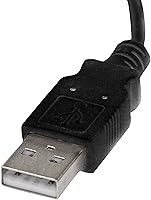
  • Interface: Connects to your computer via a standard USB Type-A port and draws all required power directly from that connection, eliminating the need for an external adapter.
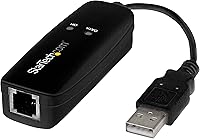
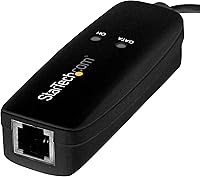
  • Phone Connector: A single RJ-11 jack allows direct connection to any standard analog telephone wall jack or phone line.
  • Download Speed: Supports data download rates up to 56 Kbps under the V.92 standard, which represents the practical maximum for analog phone line connections.
  • Upload Speed: Upstream data transmission reaches up to 33.6 Kbps, consistent with the V.92 protocol's asymmetric speed design.
  • Fax Speed: Fax transmission operates at up to 14.4 Kbps using established fax protocols including V.17 and V.29.
  • Data Standards: Supports a broad stack of ITU data standards: V.92, V.90, V.34, V.32bis, V.32, V.22bis, V.22, V.23, V.21, Bell 212A, and Bell 103.
  • Fax Standards: Compatible with V.17, V.29, V.27, V.21 Channel 2, EIA/TIA 578 Class 1, and T.31 Fax Class 1.0 for wide legacy fax system interoperability.
  • Chipset: Built around the Conexant CX93010-21Z, a dedicated hardware modem chipset that processes all modem functions independently from the host CPU.
  • Compression: V.44 data compression is supported, which can improve effective throughput on compressible data over analog connections.
  • Voice & Caller ID: Supports voice call management and Caller ID display through compatible telephony software on the host computer.
  • DTMF Support: Dual-Tone Multi-Frequency signaling is supported, enabling compatibility with automated phone systems and interactive voice response services.
  • Dimensions: The unit measures 3″ in length, 1.1″ wide, and 0.8″ tall — small enough to carry in a jacket pocket or laptop bag without dedicated storage.
  • Weight: Weighs approximately one ounce, making it one of the lightest full-featured external modems available in its category.
  • Power Source: Fully bus-powered via USB; no wall outlet, power brick, or separate cable is required to operate the device.
  • OS Compatibility: Officially supported on Windows 7 through 11, Windows Server 2008 R2 through 2019, macOS 10.9 through 12.x, and Linux LTS kernels from version 3.16 onward.
  • TAA Compliance: Meets Trade Agreements Act requirements, making it eligible for U.S. federal government procurement and regulated-industry purchasing programs.
  • Color & Housing: Ships in a black plastic housing with a compact rectangular profile designed for minimal desk footprint or portable use.
  • Model Number: The official model identifier is USB56KEMH2, used for driver downloads, warranty claims, and procurement documentation.

Related Reviews
StarTech ICUSBAUDIO7D
78%
93%
Plug-and-Play Setup
81%
Audio Quality Improvement
68%
7.1 Surround Performance
74%
SPDIF Digital Output
84%
Build Quality & Durability
More
USRobotics USR5637 56K USB Dial-Up Modem
79%
88%
Connection Stability
79%
Driver & Software Support
91%
Fax Performance
63%
Value for Money
84%
Ease of Setup
More
StarTech 129N-USBC-KVM-DOCK Dual-Laptop KVM Docking Station
75%
83%
KVM Switching Reliability
88%
Display Performance
51%
Setup & Driver Experience
72%
Power Delivery
81%
Build Quality
More
StarTech.com Triple Monitor USB 3.0 Docking Station
83%
89%
Performance
91%
Ease of Setup
88%
Display Support
85%
Connectivity Options
80%
Build Quality
More
StarTech SDOCKU33BV USB 3.0 Hard Drive Dock
78%
93%
Ease of Setup
84%
Drive Compatibility
78%
Transfer Speed
58%
Build Quality
81%
Hot-Swap Reliability
More
StarTech SDOCKU313 USB 3.1 Hard Drive Dock
80%
88%
Transfer Speed
83%
Drive Compatibility
79%
Build Quality
94%
Ease of Setup
62%
Value for Money
More
StarTech USB-C / USB-A Hybrid Docking Station for MacBook Pro/Air & Windows - Triple 4K 60Hz HDMI/DP, 85W Power Delivery
83%
94%
Multi-Display Performance
89%
Charging Efficiency
80%
Compatibility with OS
91%
Data Transfer Speed
88%
Ethernet Stability
More
StarTech 4-Port 8K HDMI 2.1 Switch
84%
91%
Signal Integrity
88%
Build Quality
93%
4K 120Hz Performance
74%
Auto-Switching Reliability
89%
Gaming Feature Passthrough
More
Yosoo Health Gear 4G Portable USB Modem
84%
85%
Connectivity Performance
91%
Battery Life
78%
Ease of Setup
89%
Portability
87%
Charging Flexibility
More
StarTech SV231USB 2-Port VGA USB KVM Switch
81%
88%
Switching Reliability
91%
Setup & Out-of-Box Experience
79%
Video Quality
67%
Compatibility
74%
Value for Money
More

FAQ

It works on Windows 11. StarTech provides downloadable drivers that cover Windows 7 through 11, and most users on modern Windows versions report a smooth installation process. Just grab the driver from StarTech's support site before you start.

No, you do not. Plenty of buyers use this USB modem purely as an external fax modem with no intention of connecting to the internet. As long as you have an active analog phone line and compatible faxing software, the fax functionality works completely independently of any ISP account.

This is the honest answer: it depends on exactly which version you are running. The StarTech.com USB56KEMH2 56K USB Dial-Up Modem has well-documented driver support through macOS 10.9 to 12.x, but some users on the very latest macOS releases have run into compatibility friction. Before buying, check StarTech's driver download page for your exact OS version — that will tell you faster than anything else whether you are covered.

Yes, but plan for a bit of setup work. The modem is supported on Linux LTS kernels from version 3.16 onward, which covers most major long-term-support distributions. Users on rolling-release distros or very recent kernels have had mixed results. Checking the StarTech support forums or community threads for your specific distro is a smart first step.

With a software modem, the host CPU handles all the processing that the modem would normally do on its own. Under light use that is barely noticeable, but on a server under load or a lower-powered machine, it can cause instability and dropped connections. This modem uses a dedicated Conexant chipset that handles everything internally, which translates to more stable, consistent performance — particularly for extended sessions or business-critical fax workflows.

You need an active analog phone line — one that carries a dial tone. The physical wall jack alone is not enough if the line has been disconnected. For dial-up internet, you also need an account with a dial-up ISP. For faxing, you just need the active phone line and a receiving fax number on the other end.

Generally yes, and the hardware chipset actually helps here — it manages line negotiation more reliably than software-based alternatives. That said, severely degraded or noisy lines can cause transmission errors on any fax modem. If your line quality is consistently poor, that is a telephone infrastructure issue rather than a hardware limitation.

For data and fax use, you need the modem driver plus compatible software — Windows Fax and Scan works for basic faxing on Windows, and most standard fax applications recognize the modem once the driver is installed. For voice features, you will need telephony software that supports TAPI or a similar interface, which adds a small layer of configuration depending on what you use.

It can work through a USB hub, but a small number of users have experienced intermittent disconnections on hubs that deliver inconsistent power. For the most stable experience — particularly for extended fax sessions or active dial-up use — plugging directly into a port on the machine itself is the safer choice.

Yes, this is one of the more common professional use cases for this modem. POS systems and credit card terminals that require a dial-up authorization path work well with this device, particularly on Windows-based systems where driver support is strongest. If your payment terminal software requires a specific COM port configuration, that can be set through Device Manager after installation.

Where to Buy