Overview

The StarTech ICUSBAUDIO7D has been quietly solving a very common problem since 2012: what do you do when your computer's built-in audio is noisy, broken, or just embarrassingly weak? This USB sound card sits comfortably in the mid-range — capable enough for gaming sessions and casual home recording, but not pretending to be a professional DAC. What makes it stand out at this price is the combination of 7.1 surround support and an SPDIF optical output, which you rarely see together without paying significantly more. Plug it in, and Windows recognizes it immediately. No driver disc hunting, no compatibility headaches. It won't replace a dedicated audio interface for serious studio work, but for most everyday use cases, it genuinely delivers a noticeable improvement over integrated sound.
Features & Benefits

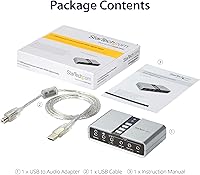
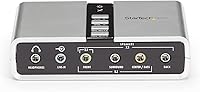
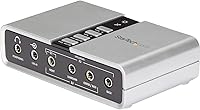
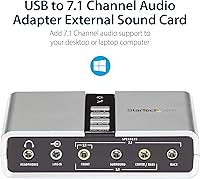
On the hardware side, this USB sound card covers a lot of ground without demanding anything complicated from the user. The analog outputs handle 7.1, 5.1, and stereo configurations through standard 3.5mm jacks, so you can connect existing speakers without adapters. The SPDIF optical output feeds clean digital audio directly to a receiver or soundbar — useful for home theater PC setups where cable noise is a concern. Since it draws power straight from the USB port, there's no wall adapter cluttering your desk. A physical volume knob and mute button on the unit itself are small touches that make a real daily difference. The included software lets you switch between output configurations without digging through Windows audio settings every time.

Best For

The StarTech external audio adapter makes the most sense for a few specific types of users. If your laptop's headphone jack has developed a crackle or died entirely, this is probably the fastest fix short of a repair shop visit. Desktop users who want surround sound but would rather not crack open their PC case will find it equally practical. It works well in home theater PC builds where routing audio via SPDIF to an AV receiver cuts down on analog cable clutter. Remote workers and streamers benefit from the dedicated microphone input, which tends to be cleaner than a laptop's onboard circuit. Gamers on a budget get functional virtual surround without the cost of a standalone headset DAC.

User Feedback

Owners of this 7.1 audio upgrade tend to stick around long enough to leave detailed reviews — and that alone says something. The most consistent praise centers on plug-and-play reliability on Windows, with many users noting they never once touched a driver installer. Build quality draws favorable comments too, particularly the solid feel of the volume knob. On the critical side, a fair number of users have been caught off guard by the SPDIF optical input: it passes audio through but does not support recording or multichannel decoding, which matters if that was the main draw. A smaller group reports occasional audio pops when the device runs through a USB hub rather than a direct port connection — worth testing that early.

Pros

  • Recognized instantly by Windows with no driver installation — just plug in and it works.
  • The StarTech ICUSBAUDIO7D includes both analog surround output and SPDIF digital output at a mid-range price.
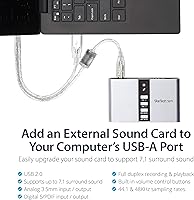
  • Bus-powered design means zero extra cables or wall adapters cluttering your workspace.
  • Physical volume knob and mute button let you control audio without tabbing out of any application.
  • SPDIF optical output delivers clean, hum-free digital audio directly to receivers and soundbars.
  • Has been on the market since 2012 with consistent availability and a proven durability track record.
  • Multiple analog output configurations support 2.0, 5.1, and 7.1 speaker setups using standard 3.5mm cables.
  • Compact and lightweight enough to live permanently in a laptop bag without any noticeable bulk.
  • Long-term owners regularly report 3 to 5 years of reliable daily use without hardware failure.
  • A meaningful audio upgrade over broken or noisy onboard laptop audio at a fraction of a repair cost.

Cons

  • SPDIF optical input is passthrough only — it cannot be used to record from an external digital source.
  • Virtual 7.1 surround is a simulated effect, not discrete multi-speaker output, which limits spatial accuracy.
  • Users on USB hubs report intermittent popping and static that disappears only on a direct USB port.
  • The bundled software looks and feels outdated, and occasionally conflicts with Windows after major OS updates.
  • The USB cable is hardwired to the unit — a damaged cable means replacing the entire adapter.
  • Microphone preamp gain is limited, making it a poor match for condenser mics or demanding recording work.
  • SPDIF digital output is locked to 48kHz, creating a minor friction point for 44.1kHz audio workflows.
  • No LED indicator confirms whether the mute button is active, which has caused issues during live calls.
  • The included USB cable at 1 meter is short for desktop tower setups positioned away from the desk.
  • Plug-and-play reliability is primarily a Windows feature — Mac and Linux compatibility requires extra verification.

Ratings

Our AI rating system analyzed thousands of verified global reviews for the StarTech ICUSBAUDIO7D, actively filtering out incentivized submissions and bot-generated feedback to surface what real buyers consistently experience. The scores below reflect a balanced view — genuine strengths are recognized, but recurring frustrations are not glossed over. Whether this USB sound card fits your setup depends heavily on your use case, and the breakdown below is designed to make that call easier.

Plug-and-Play Setup
93%
The overwhelming majority of Windows users report that the adapter is recognized instantly the moment it hits a USB port — no driver disc, no manual downloads, no restarts. For someone whose laptop audio just died mid-workday, that kind of friction-free recovery is genuinely hard to overstate.
A small but consistent group of users running older or heavily customized Windows installs report needing a manual driver update before full functionality kicks in. The experience is near-universal on modern systems, but not quite guaranteed on legacy setups.
Audio Quality Improvement
81%
19%
Compared to the noisy, thin output typical of budget laptop audio circuits, the improvement is immediately audible — cleaner highs, better channel separation, and a noticeably lower noise floor during quiet passages. For gaming and casual music listening, most users feel it punches above its price.
Discerning listeners and anyone coming from a dedicated external DAC will find the output unremarkable. At higher volumes, a faint background hiss occasionally surfaces, and the analog output lacks the warmth that more expensive audio adapters deliver.
7.1 Surround Performance
68%
32%
For gamers using stereo headsets, the virtual surround processing does create a broader, more directional soundstage than standard two-channel playback — and in competitive gaming scenarios, that spatial awareness is a real functional benefit that users consistently mention.
It is worth being clear: this is simulated surround, not eight discrete audio channels. Users expecting true positional audio from a multi-speaker array will be disappointed, and some find the virtualization processing makes certain music genres sound artificially wide or hollow.
SPDIF Digital Output
74%
26%
Routing audio digitally to an AV receiver or soundbar via the optical output works cleanly and reliably. Users building home theater PC setups consistently praise this feature for eliminating the analog cable buzz and ground loop hum that plagues cheaper connections.
The optical input is passthrough only — it does not support multichannel decoding or recording from an optical source. Users who bought this specifically to record from an optical input, or to decode Dolby Digital streams, frequently discover this limitation only after purchase.
Build Quality & Durability
84%
The unit feels solid and purposeful for its size — the housing does not flex, the 3.5mm jacks seat firmly, and the volume knob has a satisfying, measured resistance rather than the wobbly feel common on cheaper adapters. Multi-year ownership reviews are unusually frequent for this category.
The silver plastic casing does pick up light scratches over time, and a handful of long-term users report that the USB cable connector can develop intermittent contact issues after 18 to 24 months of daily plugging and unplugging.
Physical Controls
88%
Having a dedicated volume knob and a one-touch mute button directly on the device means you can respond instantly during calls or gaming without tabbing out of an application. Users who work from home specifically flag this as a feature they did not realize they needed until they had it.
The mute button does not provide any tactile or audible confirmation that it has engaged, which has led to some embarrassing moments on video calls where users assumed they were muted. A small LED indicator would resolve this entirely.
Bus-Powered Convenience
91%
Drawing power directly from the USB port means the entire setup travels with just the adapter and its cable — no wall adapter, no extra bag pocket dedicated to a power brick. For laptop users who move between desks or work from coffee shops, this is a meaningful practical advantage.
On systems with underpowered USB ports — particularly older ultrabooks or overloaded USB hubs — some users notice intermittent audio dropouts that disappear when the adapter is moved to a direct motherboard port. It is a narrow edge case, but worth knowing before buying.
Microphone Input Quality
66%
34%
The stereo microphone input is a genuine step up from a typical laptop's built-in mic circuit — background noise is lower and voice clarity improves enough for video conferencing and basic streaming without any post-processing.
Anyone doing serious voice recording or podcasting will quickly outgrow this input. The preamp gain is limited, condenser microphones requiring more signal headroom perform poorly, and at higher gain settings a faint hiss becomes noticeable in recordings.
USB Hub Compatibility
58%
42%
When connected directly to a motherboard or laptop USB port, the adapter performs consistently without incident. Most users in standard desktop and laptop configurations never encounter any connectivity-related issues across months of regular use.
Through a powered or unpowered USB hub, a recurring subset of users report audible popping, static bursts, or brief dropouts — particularly during high system load. The issue is reproducible enough across different hardware that it points to sensitivity around USB power delivery quality.
Software & Output Switching
63%
37%
The bundled software does its core job — letting you toggle between output configurations without hunting through Windows audio settings each time. For users who regularly switch between headphone and speaker setups, the convenience is real.
The software interface looks dated and has not received meaningful updates in years. It occasionally conflicts with Windows audio session management after major OS updates, and several users report having to reinstall it after upgrading to Windows 11.
Value for Money
82%
18%
Considering it includes both analog multi-channel output and SPDIF digital output at its price point, the StarTech external audio adapter covers more ground than most competitors in the same bracket. Users replacing a broken laptop jack find the cost-to-fix ratio particularly compelling.
For users who only need stereo output and a basic mic input, there are simpler and slightly cheaper options that do not come with the complexity of unused ports and output-switching software. The value case is strongest when you actually use the full feature set.
Sampling Rate & Recording Fidelity
72%
28%
Support for both 44.1kHz and 48kHz covers the two standard rates used in consumer music and video production workflows. For casual home recording and voice-over work, the fidelity is more than adequate without any special configuration.
The SPDIF digital output is locked to 48kHz, which creates a minor workflow friction for users working in 44.1kHz projects and routing audio digitally. There is no 96kHz support anywhere on the device, closing the door on any higher-resolution recording ambitions.
Form Factor & Portability
87%
At just over three ounces and smaller than a deck of cards, this 7.1 audio upgrade fits easily in a laptop bag pocket or even a coat pocket. The compact, no-frills shape means it does not obstruct neighboring USB ports the way bulkier adapters sometimes do.
The 1m included USB cable is functional but slightly short for desktop setups where the tower sits on the floor. A 1.5m cable would have been more universally practical, and the cable is not detachable, so a damaged cable means replacing the whole unit.
Long-Term Reliability
79%
21%
The volume of three-to-five year ownership reviews for this adapter is notably high for the category, and a good share of those users report continued daily use without hardware failure. For a bus-powered peripheral, that track record is reassuring.
The USB cable attachment point is the most cited failure mode over time, with repeated daily connects and disconnects gradually wearing the joint. Users who leave the adapter semi-permanently plugged in report far fewer issues than those who pack and unpack it daily.

Suitable for:

The StarTech ICUSBAUDIO7D was built for a very practical problem, and it solves it well for the right person. If your laptop's headphone jack has developed an irritating crackle, or your desktop PC's onboard audio puts a noticeable hiss behind every track, this adapter is a fast and non-invasive fix that requires zero technical knowledge to install. Desktop users who want to connect a multi-speaker surround setup without touching the inside of their case will find the multiple 3.5mm output jacks genuinely useful. Home theater PC builders get a clean digital path to their AV receiver via the SPDIF optical output, which alone justifies the purchase if you have been tolerating analog cable buzz. Remote workers and streamers who need a cleaner microphone input than their laptop provides will also benefit — the dedicated mic input is a step up from embedded laptop circuits. Budget-conscious gamers looking for a wider soundstage from their existing stereo headset will find the virtual surround processing a noticeable improvement over nothing, as long as expectations are appropriately calibrated.
Not suitable for:

If your audio requirements go beyond everyday listening, gaming, or basic home recording, the StarTech ICUSBAUDIO7D will likely leave you wanting more. Audiophiles or anyone investing in a high-quality headphone amp or speaker system should look at a dedicated external DAC — this USB sound card does not have the output resolution or analog circuitry to serve as the weak link in a premium chain. Podcasters and voice-over artists who need a clean, low-noise preamp with adjustable gain will outgrow the microphone input quickly, especially with condenser microphones that demand more signal headroom. If you were planning to use the SPDIF optical input to record from an external digital source, stop now — it is a passthrough only, meaning it carries audio out to a device but cannot capture incoming optical signals for recording. Anyone relying on a USB hub as their primary connection point may experience intermittent popping or dropouts, making this a poor fit for hub-dependent setups. Finally, Mac users or Linux users should verify driver compatibility carefully before purchasing, as the plug-and-play experience that defines this product is largely a Windows story.
Specifications

  • Interface: Connects to any computer via a standard USB-A port, requiring no external power adapter.
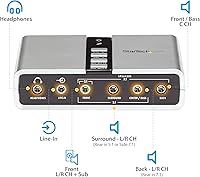
  • Analog Output: Supports 7.1, 5.1, and 2.0 channel analog audio output through multiple 3.5mm jacks.
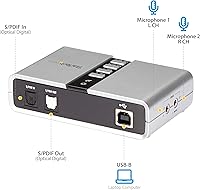
  • Digital Output: Features an SPDIF optical output for stereo digital passthrough playback at 48kHz.
  • Digital Input: SPDIF optical input supports passthrough only, limited to two-channel audio at 48kHz — recording is not supported.
  • Sampling Rates: Analog playback and recording are supported at both 44.1kHz and 48kHz sampling rates.
  • Connectors: Includes multiple 3.5mm analog jacks, a dedicated headphone output, a line-in port, and a stereo microphone input.
  • Physical Controls: Features an on-unit volume control knob and a one-touch mute button for direct hardware-level audio management.
  • Power Source: Fully bus-powered via USB — no wall adapter or external power supply is needed.
  • Included Cable: Ships with a 1-meter hardwired USB cable for connecting the adapter to a host computer.
  • Dimensions: The unit measures 3.9 x 1 x 2.4 inches, making it compact enough to carry in a laptop bag pocket.
  • Weight: Weighs 3.17 ounces, light enough that it adds negligible bulk to any mobile or desktop setup.
  • OS Compatibility: Officially compatible with Windows XP, Vista, 7, 8, 8.1, 10, and 11 across both 32-bit and 64-bit platforms.
  • Plug-and-Play: Recognized automatically by Windows without requiring manual driver installation in most configurations.
  • Included Software: Ships with a software utility for switching between available analog output configurations without entering Windows audio settings.
  • Manufacturer: Designed and sold by StarTech.com, a Canadian peripheral and connectivity hardware company founded in 1985.
  • Market Availability: First made available in February 2012 and has remained in active production without discontinuation.
  • BSR Ranking: Holds a Best Sellers Rank of number 18 in the External Sound Cards category on Amazon.
  • Model Number: The official model identifier is ICUSBAUDIO7D, as designated by the manufacturer StarTech.com.

Related Reviews

StarTech 56K USB Dial-Up & Fax Modem
82%
87%
Performance
70%
Compatibility with OS
92%
Ease of Setup
94%
Portability
85%
Reliability
More
StarTech 12U Wall-Mount Network Rack
86%
92%
Build Quality
89%
Space-Saving Design
91%
Weight Capacity
88%
Ease of Installation
85%
Cooling Efficiency
More
StarTech VS222HDQ 2x2 HDMI Matrix Switch
74%
88%
Build Quality
91%
Switching Reliability
83%
EDID Emulation
31%
4K and Resolution Support
86%
Ease of Setup
More
StarTech 8-Port SATA PCIe Card
88%
89%
Performance
95%
Ease of Installation
85%
Compatibility with Systems
88%
Data Throughput (16Gbps)
84%
Build Quality
More
StarTech RK2236BKF 22U Server Rack Cabinet
79%
83%
Build Quality
91%
Depth Adjustability
88%
Assembly Experience
86%
Mobility & Casters
68%
Cooling Performance
More
StarTech RK1820WALHM 18U Wall Mount Network Cabinet
82%
92%
Build Quality
74%
Ease of Installation
94%
Rear Access & Swing-Out Design
78%
Mounting Depth Flexibility
81%
Security & Lock Quality
More
StarTech 2-Port DisplayPort KVM Switch
82%
85%
Performance
88%
Build Quality
90%
Visual Quality
80%
Ease of Use
75%
Peripheral Compatibility
More
StarTech Cell Phone Repair Kit CTKRPR
86%
89%
Ease of Use
91%
Tool Variety
84%
Build Quality
87%
Ergonomics
90%
Storage & Organization
More
StarTech 12U Wall-Mount Server Rack Cabinet
86%
91%
Build Quality
88%
Ease of Installation
80%
Cooling Efficiency
95%
Space-Saving Design
85%
Security Features
More
StarTech RK4OD 4U 2-Post Desktop Server Rack
79%
83%
Build Quality
91%
Ease of Assembly
61%
Capacity & Scalability
88%
Value for Money
86%
Footprint & Space Efficiency
More

FAQ

In most cases, no. The StarTech ICUSBAUDIO7D is recognized automatically by Windows 10 and 11 the moment you plug it in. A small number of users on highly customized or older system builds have needed to manually update the audio driver afterward, but that is the exception rather than the rule for modern Windows setups.
The plug-and-play experience is primarily designed and tested for Windows. Some users have reported getting it to work on macOS and certain Linux distributions, but official Mac and Linux support is not listed by the manufacturer. If you are on either platform, verify compatibility carefully before purchasing.

It is a virtual surround effect, not true discrete 8-speaker output. The adapter processes stereo audio to create a wider, more directional soundstage — which works noticeably well for gaming through a headset — but if you are expecting eight independently driven channels from separate speakers, that is not what this does. For immersive gaming audio on a budget, most users find the effect genuinely useful.

No, and this is the most important limitation to understand before buying. The optical input is passthrough only, meaning it can carry a digital signal through to another output, but it does not feed audio into your computer for recording. If optical recording was your main reason for considering this adapter, you will need a different device.

Not necessarily. The most common cause of audio pops and static with this USB sound card is running it through a USB hub rather than directly into a motherboard or laptop port. Try plugging it directly into a port on the machine itself before assuming the unit is faulty — most users find the issue disappears immediately when they do.

It can accept a condenser microphone through the 3.5mm mic input, but the preamp gain is limited and there is no phantom power. For basic voice recording or video calls, it performs adequately. For professional vocal recording or podcast production where clean gain and low noise floor matter, you will likely outgrow this adapter quickly and want a dedicated USB audio interface instead.

The included software handles exactly this. Once installed, it gives you a simple panel for selecting which output configuration is active — headphones, stereo speakers, or a surround setup — without digging through Windows Sound settings. It is not the most polished piece of software, but it does the job reliably for most users.

Unfortunately, no — the USB cable is hardwired to the unit and is not detachable. If the cable develops a fault at the connector, you would need to replace the entire adapter. This is worth factoring in if you plan to pack and unpack it daily, as that repeated stress is the most common point of long-term wear.

Yes, and this is actually one of the better use cases for the StarTech external audio adapter. It provides the necessary 3.5mm analog outputs for a standard 5.1 speaker configuration, letting you connect a surround speaker set to a laptop that would otherwise only have a single headphone jack. You will need to configure the output mode in Windows and the included software after connecting.

Durability is one of the stronger points of this adapter. Long-term ownership reviews spanning three to five years are unusually common for a product in this category, suggesting it holds up well under regular use. The most frequently cited weak point over time is the USB cable connection joint, particularly for users who plug and unplug it daily rather than leaving it semi-permanently connected.