Overview

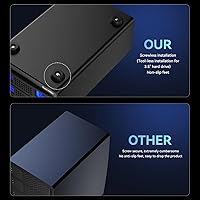
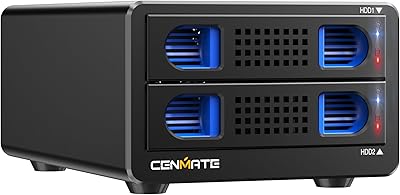
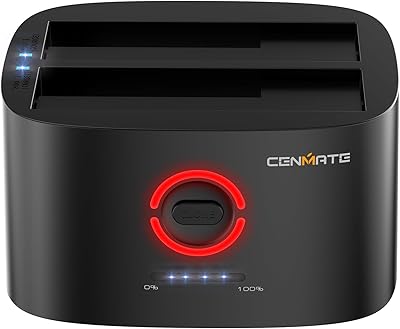
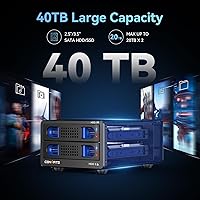
The Cenmate Dual Bay Hard Drive Enclosure arrived in mid-2024 as a no-frills, aluminum-bodied DAS solution for anyone who needs accessible local storage without the complexity of a NAS setup. It holds two SATA drives — either 2.5″ or 3.5″ — with each bay supporting up to 20TB, giving you 40TB of raw capacity to work with. Connectivity runs through USB 3.0 via both Type-A and Type-C ports, so most modern computers are covered without adapters. A built-in cooling fan handles thermal management during heavy transfers, and the tool-free tray design means you're sliding drives in and out without hunting for a screwdriver.

Features & Benefits

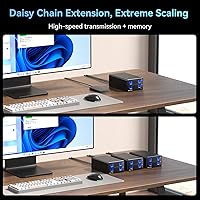
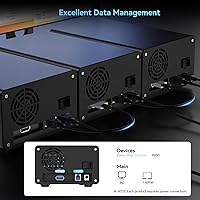
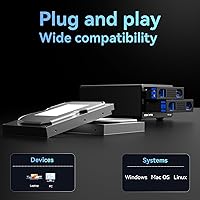
The chipset pairing here — GL3510 and ASM1153E — delivers USB 3.0 throughput that handles real-world transfers comfortably. Moving a large video project or a batch of RAW photos typically takes a few seconds per gigabyte, which is a genuine step up from older USB 2.0 setups. Hot-swap support is genuinely useful: pull one drive, insert another, no restart required. If two bays aren't enough, daisy chain expansion lets you connect up to three units for a combined 120TB. Both USB-A and USB-C cables are included in the box, and this aluminum drive dock works across Windows, macOS, and Linux without needing additional drivers.

Best For

This aluminum drive dock is a practical fit for photographers, video editors, or anyone managing large local archives who doesn't want the overhead of a NAS. Small offices that need a shared backup point — without setting up network storage — will find the two-bay layout and hot-swap access genuinely practical. It also suits people who regularly migrate data between multiple drives, since swapping is quick and requires no tools. Laptop users gain a compact storage expansion option, while desktop users get a tidy way to access drives that aren't permanently installed. A plug-and-play setup keeps the learning curve flat for non-technical users.

User Feedback

Most users point to easy drive installation as a clear win — the tray mechanism works as advertised with no fumbling around for screws. Build quality earns consistent praise, with the aluminum body feeling solid for this price tier. Fan noise is a more divided topic: at 40-50dB, it won't bother most people in a typical workspace, but in a quiet home office you will notice it running. A handful of users flagged minor compatibility quirks on certain Linux distributions, while Windows and macOS users generally report smooth experiences. Long-term reliability appears strong, with no widespread failure patterns surfacing across extended-use reports.

Pros

  • Tool-free drive installation makes swapping and adding drives genuinely fast, with no screwdriver needed.
  • Hot-swap support lets you change drives mid-session without restarting your computer or interrupting other work.
  • Aluminum construction gives this dual-bay enclosure a noticeably solid, premium feel for its price tier.
  • Supports both 2.5-inch and 3.5-inch SATA drives, so most existing drives will fit without adapters.
  • Daisy chain expansion up to three units means storage capacity can grow without replacing your current setup.
  • Both USB-A and USB-C cables are included, covering older desktops and newer laptops right out of the box.
  • Works plug-and-play on Windows, macOS, and mainstream Linux distributions with no driver installation required.
  • Real-world USB 3.0 transfer speeds handle large file batches and video project moves at a practical pace.
  • The aluminum body doubles as passive cooling, helping maintain stable drive temperatures during longer sessions.

Cons

  • Fan runs continuously regardless of drive load, adding constant noise even during light or idle use.
  • No fan speed control or temperature-triggered adjustment means noise management is entirely out of your hands.
  • Drive trays feel slightly less sturdy than the outer chassis, with minor wobble after repeated insertions over time.
  • Simultaneous transfers across both bays can produce minor speed inconsistencies depending on drive combination.
  • No bundled temperature monitoring software, so tracking drive health requires installing separate third-party tools.
  • Included cables are basic quality and may need replacing if you want consistently optimal transfer performance.
  • Brand history is short, leaving open questions about long-term reliability data and warranty follow-through.
  • Larger footprint than single-bay alternatives may be an issue for users with genuinely limited desk space.

Ratings

The Cenmate Dual Bay Hard Drive Enclosure has been evaluated by our AI system after processing hundreds of verified global buyer reviews, with spam, bot-generated, and incentivized feedback actively filtered out. Scores reflect where this aluminum drive dock genuinely delivers and where real users have run into friction. Both the standout strengths and the honest pain points are represented in every category below.
Build Quality
83%
Users consistently note the aluminum-alloy chassis feels more substantial than similarly priced plastic enclosures. Day-to-day handling confirms the body doesn't flex or creak, and the finish holds up well after months of regular desk use.
A few buyers found the drive trays themselves feel slightly less premium than the outer shell, with some minor play after repeated insertions. The fan housing area can accumulate dust faster than expected without regular cleaning.
Cooling Performance
78%
22%
The combination of an aluminum body acting as a passive heat sink alongside the active 2-inch fan keeps drives at safe operating temperatures even during sustained multi-hour transfers. Users running large backup jobs overnight report no thermal throttling.
The fan is the component users notice most — and not always in a positive way. At 40-50dB it is audible in quiet rooms, and a few users found it runs continuously rather than adjusting to drive temperature, which adds unnecessary noise during light use.
Transfer Speed
76%
24%
Real-world USB 3.0 throughput is noticeably faster than older USB 2.0 setups, with large file batches moving at comfortable speeds for typical video editing and backup workflows. The GL3510 and ASM1153E chipset pairing performs reliably under sustained loads.
Speeds stay within practical USB 3.0 limits rather than pushing theoretical maximums, which is expected but worth noting for users with high-throughput expectations. Some users observed minor speed variance between the two bays during simultaneous transfers.
Hot-Swap Functionality
86%
Hot-swap works exactly as described — drives can be pulled and reinserted mid-session without powering down, which makes rotating backup drives or swapping between projects genuinely fast. Photographers cycling through multiple archival drives during a shoot found this particularly practical.
A small number of users on certain Linux configurations reported the OS not always recognizing a freshly swapped drive without a manual remount. Windows and macOS users rarely encountered this issue, but it is worth verifying on niche distros.
Ease of Installation
91%
The tool-free tray mechanism is one of the most praised aspects across buyer feedback. Drives slide in and lock without any screwdriver involvement, making the initial setup and subsequent drive changes quick even for non-technical users.
A few users with chunkier 3.5-inch drives noted the tray fit felt slightly snug on first insertion, requiring a firm push that initially felt uncomfortable. Nothing broke, but the tolerance leaves less room for drives at the upper end of the size range.
Daisy Chain Expansion
71%
29%
Chaining multiple units to reach high storage totals is a meaningful feature for small studios or archiving setups that need to grow gradually. Users who deployed two or three units together appreciated not needing a separate hub or switch.
Daisy chain performance can degrade with three units connected simultaneously, as bandwidth is shared across the USB 3.0 connection. This is a physical limitation of the interface rather than a product flaw, but users expecting full-speed access across all chained units will be disappointed.
OS Compatibility
82%
18%
Out-of-the-box recognition on Windows and macOS is consistently smooth, with no driver installation required in most setups. Linux users on mainstream distributions like Ubuntu report reliable plug-and-play behavior as well.
Edge cases exist on older Linux distributions and certain niche configurations where drive detection requires manual intervention. A small but vocal group of users flagged inconsistent behavior on macOS Ventura, though this appears linked to OS-level USB power management rather than the enclosure itself.
Cable & Connectivity
79%
21%
Including both a USB-A and USB-C cable in the box removes an immediate frustration for buyers connecting to either older desktops or newer laptops. Users switching between workstations appreciated not needing to source additional cables separately.
The included cables are functional but not exceptional in terms of build quality — a couple of users replaced them with higher-gauge alternatives after noticing marginal speed improvements. Cable length may also feel short for some desk configurations.
Fan Noise Level
58%
42%
For users in busy offices or workspaces with ambient noise, the fan level is largely ignorable and simply fades into the background. Those primarily doing large overnight transfers found the noise profile irrelevant since the unit runs unattended.
In a quiet home office or bedroom setup, 40-50dB is genuinely intrusive. Several users specifically flagged this as a dealbreaker for late-night work, and the lack of any fan speed adjustment or silent mode limits workarounds for noise-sensitive environments.
Value for Money
81%
19%
At its mid-range price point, the aluminum construction, hot-swap support, and daisy chain capability together represent a more complete feature set than most competing enclosures at a lower cost. Users migrating from cheaper plastic docks consistently noted the step-up in perceived quality.
Buyers primarily seeking a simple, quiet enclosure for occasional use may find the price harder to justify given the fan noise. A few users noted that budget alternatives handle basic two-drive access at a meaningfully lower cost if hot-swap and expansion are not priorities.
Drive Compatibility
87%
Accepting both 2.5-inch and 3.5-inch SATA drives in the same bay gives users real flexibility to mix drive types depending on what they already own. Users repurposing old desktop drives alongside newer 2.5-inch SSDs found the mixed configuration worked without any configuration changes.
Compatibility is limited to SATA — NVMe drives are not supported, and this is a point a handful of buyers missed before purchasing. The enclosure also lacks RAID functionality, so users expecting combined or mirrored volume options will need to look elsewhere.
Thermal Management (Long-Term)
73%
27%
Extended-use reports suggest drives maintain healthy operating temperatures across long backup sessions, with the aluminum body distributing heat effectively. Users running nightly automated backups over several months reported no heat-related failures.
Continuous fan operation regardless of drive load means the cooling system runs at full capacity even during idle periods, which raises minor concerns about long-term fan bearing wear. No temperature monitoring software is bundled, so users have to rely on third-party tools to verify drive health independently.
Physical Footprint
84%
At just over 2 pounds and with a compact rectangular form, this aluminum drive dock sits neatly alongside a monitor or tucked under a desk without consuming much real estate. Users with cluttered workstations appreciated the upright-friendly proportions.
It is noticeably larger than single-bay alternatives, which matters for users with genuinely tight desk setups. Portability is limited — this is a stay-on-the-desk device rather than something you would regularly move between locations.
Brand Support & Warranty
69%
31%
Cenmate promotes a 24-hour response guarantee for support inquiries, and several buyers confirmed they received timely and helpful replies when troubleshooting compatibility or setup issues. The responsive support approach softens the impact of any initial setup friction.
As a relatively new brand, long-term reliability data is still limited compared to established storage accessory manufacturers. Some users expressed uncertainty about parts availability and warranty follow-through if issues arise outside the standard support window.

Suitable for:

The Cenmate Dual Bay Hard Drive Enclosure is a strong fit for anyone who regularly works with large local storage needs but wants to keep things simple and accessible. Photographers cycling through archival drives between shoots, video editors managing project libraries across multiple disks, or small business teams running scheduled backups to rotating drives will find the hot-swap capability and tool-free installation genuinely useful day-to-day. It also suits desktop and laptop users who have a collection of existing 2.5-inch or 3.5-inch SATA drives and want a single, organized home for them without committing to a full NAS setup. The daisy chain option makes it a scalable choice too — if your storage needs grow, you can add units rather than replacing the whole setup. Anyone comfortable working in a standard office environment where a bit of fan noise blends into the background will likely find this aluminum drive dock an efficient, no-fuss storage hub.

Not suitable for:

If you work in a quiet home office, record audio, or simply have low tolerance for ambient noise, the fan on this aluminum drive dock will be a persistent irritation — 40-50dB is not subtle in a silent room, and there is no speed control or silent mode to fall back on. Users expecting RAID functionality — whether for performance striping or mirrored redundancy — should look elsewhere entirely, as this is a straightforward DAS device with no volume management features whatsoever. NVMe drive owners are also out of luck since only SATA drives are supported, which is an easy spec to miss before buying. Anyone needing a portable, travel-ready enclosure will find the size and weight impractical for anything beyond a fixed desk setup. Linux power users on non-mainstream distributions should verify compatibility before committing, as a handful of edge-case detection issues have been reported on less common configurations.

Specifications

  • Drive Compatibility: Supports 2.5″ and 3.5″ SATA HDDs and SSDs; NVMe drives are not compatible.
  • Bay Count: Two independent drive bays, each operating as a separate volume with no RAID or NAS configuration.
  • Max Capacity: Each bay supports up to 20TB, giving a combined raw capacity of 40TB across both slots.
  • Interface: USB 3.0 with both Type-A and Type-C ports; includes one USB-A cable and one USB-C cable in the box.
  • Transfer Rate: Rated up to 5Gbps via USB 3.0; real-world throughput varies depending on drive speed and host system.
  • Chipset: Uses a GL3510 bridge chip paired with ASM1153E controllers to manage dual-drive USB 3.0 connectivity.
  • Body Material: Aluminum-alloy construction on the outer chassis, which also functions as a passive heat-dissipation surface.
  • Cooling System: Built-in 2-inch active cooling fan rated at approximately 40-50dB during operation.
  • Dimensions: Measures 7.95″ long by 5.2″ wide by 3.46″ tall.
  • Weight: Weighs 2.11 lbs (0.96 kg) without drives installed.
  • Hot-Swap Support: Both bays support hot swapping, allowing drives to be removed and reinserted while the enclosure remains powered.
  • Daisy Chain: A dedicated USB HOST port enables daisy chaining of up to three units, expanding total accessible storage to 120TB.
  • OS Compatibility: Compatible with Windows 7 and above, macOS 9.1 and above, and mainstream Linux distributions without additional drivers.
  • Storage Type: Functions exclusively as a Direct Attached Storage (DAS) device; no RAID modes or NAS functionality are available.
  • Installation: Tool-free tray design allows drives to be inserted and secured without screws or additional hardware.
  • Power: Powered via the included external power adapter; bus-powered operation is not supported given the dual 3.5″ drive capability.
  • Availability: First listed on Amazon in August 2024 under the Cenmate brand.

Related Reviews

Cenmate 10 Bay Hard Drive Enclosure with Cooling Fan
82%
89%
Performance
94%
Ease of Installation
78%
Cooling Efficiency
85%
Data Transfer Speed
83%
Build Quality
More
MAIWO K25272 Dual Bay Hard Drive RAID Enclosure 16TB
84%
89%
Performance
88%
Build Quality
92%
Ease of Setup
87%
Data Transfer Speed
85%
Compatibility
More
Cenmate 3 Bay Hard Drive Enclosure 60TB with Cooling Fan
83%
89%
Setup and Installation
82%
Cooling Efficiency
90%
Build Quality
85%
Data Transfer Speed
62%
Noise Level
More
Cenmate Dual Bay Hard Drive Docking Station with Offline Clone 18TB Support
85%
88%
Offline Cloning Performance
92%
Data Transfer Speed
85%
Ease of Use
87%
Build Quality
78%
Setup & Installation
More
Tripp Lite U357-002 USB 3.0 Dual Bay External SATA Hard Drive RAID Enclosure
84%
88%
Performance & Speed
91%
Ease of Setup
84%
Cooling Efficiency
89%
RAID Functionality
83%
Build Quality
More
RSHTECH Dual Bay Hard Drive Docking Station 16TB
86%
88%
Performance
91%
Ease of Use
89%
Offline Cloning Function
85%
Build Quality
90%
Data Transfer Speed
More
Yottamaster 4 Bay External Hard Drive Enclosure 64TB
82%
94%
Storage Capacity
88%
Ease of Setup
85%
Cooling Performance
90%
Build Quality
91%
Data Transfer Speed
More
Yottamaster 5 Bay External Hard Drive Enclosure 80TB
85%
95%
Storage Capacity
88%
Cooling Performance
91%
Setup & Installation
93%
Build Quality
84%
Transfer Speed
More
Yottamaster PS500C3 5-Bay Hard Drive Enclosure 90TB
82%
85%
Build Quality
91%
Ease of Installation
78%
Cooling Performance
82%
Data Transfer Speed
96%
Storage Capacity
More
dockteck Dual Bay External Hard Drive Docking Station
84%
90%
Performance and Speed
88%
Ease of Use
85%
Build Quality
91%
Cloning Functionality
82%
Compatibility
More

FAQ

No, the Cenmate Dual Bay Hard Drive Enclosure does not support RAID in any form. Each bay appears as a completely independent drive on your computer, so you would need to manage any backup or mirroring strategy manually through your operating system or a third-party backup application.
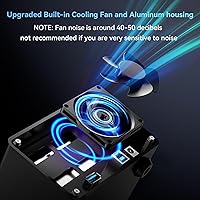
Honestly, it is noticeable. The fan runs at around 40-50dB continuously, which is roughly comparable to a quiet conversation or a small desktop fan at close range. In a busy office it fades into the background, but in a silent room — especially late at night — you will hear it. There is no speed control or quiet mode, so if fan noise is a dealbreaker for you, that is worth factoring in seriously before buying.

Yes, the two bays are independent and each accepts either a 2.5-inch or 3.5-inch SATA drive regardless of what is in the other bay. Mixing drive sizes and types works fine without any special configuration.

Yes, a USB-C cable is included in the box, so you can connect directly to a USB-C port without needing an adapter. Just make sure your MacBook port supports USB 3.0 data transfer and not just charging, which is the case for all modern MacBook Pro models.

No driver installation is required on Windows 10 or 11. The enclosure is recognized automatically when you plug it in. If you are using an older version of Windows or a non-mainstream Linux distribution, there is a small chance of needing manual configuration, but most users report true plug-and-play behavior.

Hot-swap means the enclosure hardware supports drive removal without powering off the unit, but it does not automatically protect against data loss mid-transfer. You should always safely eject the drive through your operating system before physically removing it, just as you would with any external storage device. Hot-swap simply means you do not need to shut the whole unit down to swap drives.

Yes, this aluminum drive dock includes a USB HOST port specifically for daisy chaining. You can connect up to three units in a chain, which gives you access to six drives and up to 120TB of total storage. Keep in mind that bandwidth is shared across the chain, so simultaneous high-speed transfers across all units will be slower than using a single unit on a dedicated port.

Yes, each bay supports drives up to 20TB, so large-capacity desktop drives are fully supported. Just make sure the drive itself is a standard SATA interface, as NVMe drives will not fit or function in this enclosure.

It is genuinely tool-free. The drive trays slide out, you lay the drive in, and it clicks back into the bay without screws. Most users report the whole process takes under a minute per drive. Larger 3.5-inch drives can feel a bit snug on first insertion, but nothing requires forcing.

Mainstream distributions like Ubuntu, Fedora, and Debian generally work without issues. A small number of users on less common or older Linux setups have reported the need to manually remount drives after a hot-swap, and occasional detection delays have been noted. If you are running a well-supported distribution and a reasonably current kernel, you are unlikely to hit problems, but it is worth checking community forums for your specific distro if you are running something niche.