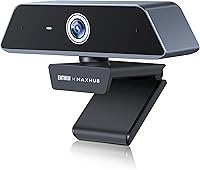
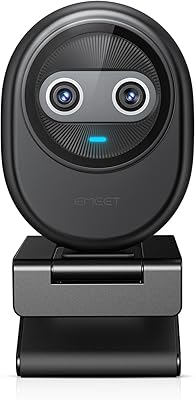
Enther MAXHUB 4K Webcam




Overview
The Enther MAXHUB 4K Webcam enters the mid-range conference camera market with a clear pitch: enterprise-grade video quality without the enterprise price tag. The MAXHUB partnership is worth noting — it's a brand with roots in boardroom display and collaboration hardware, which lends some credibility to the build quality and compatibility claims. Setup is genuinely straightforward; plug it into a USB-C port and it works. With a 4.1-star average across over 600 ratings and a top-600 ranking in webcams, buyer reception has been solid. That said, long-term durability is still an open question, so treat first-impression reviews with some caution.
Features & Benefits
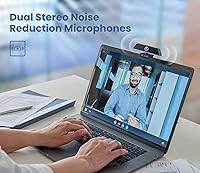
At the core of this 4K conference webcam is a Sony 1/3.06″ image sensor paired with 13-megapixel resolution — and while Sony branding isn't a magic guarantee, it does typically mean better color reproduction and dynamic range than generic sensors at this price point. The TLens autofocus system uses liquid lens technology rather than a mechanical motor, which makes focusing noticeably quicker and smoother when you shift position. The dual microphones handle noise cancellation intelligently, with a pickup range extending up to 4 meters — genuinely useful in shared spaces or multi-person setups. Automatic light correction handles tricky backlit situations without any manual fiddling.
Best For
This USB-C webcam hits a practical sweet spot for a few specific buyer types. Remote workers dealing with inconsistent home lighting will appreciate the automatic exposure adjustments that keep them looking sharp without needing a ring light. Small teams sharing one camera in a huddle room benefit from the wide mic pickup instead of adding a separate speakerphone. Budget-conscious streamers can get 4K output without stepping up to a Logitech Brio or comparable prosumer option. It also works well for anyone who bounces between Windows and Mac regularly — no driver headaches involved. Teams and Zoom users will find it ready to go immediately.
User Feedback
Buyers generally come away impressed with how little tweaking is needed right after unboxing — strong image sharpness and fast setup are the most repeated positives. On the critical side, some users flag the autofocus as inconsistent in dim conditions, which matters if your workspace gets dark in the evenings. A handful mention cable length limitations and note the mount could offer more tilt flexibility. Comparisons to Logitech options at a similar price tend to split opinions — some find the MAXHUB webcam holds its own, others lean toward the Logitech ecosystem for software polish. Long-term reliability data remains limited, so it is worth revisiting reviews as more accumulate.
Pros
- 4K at 30fps delivers noticeably sharper video than most webcams in this price range.
- Sony image sensor produces accurate color reproduction, especially in well-lit environments.
- TLens autofocus transitions smoothly when you shift position during calls.
- Dual noise-canceling mics handle common home-office background sounds without extra hardware.
- Plug-and-play USB-C setup works immediately on both Windows and Mac without any driver installs.
- Automatic backlight correction keeps you visible even when sitting in front of a bright window.
- Wide 4-meter microphone pickup is genuinely useful in small shared meeting spaces.
- Compatible out of the box with Teams, Zoom, Skype, and most major streaming platforms.
- Compact and lightweight at under 10 ounces, easy to reposition or travel with.
Cons
- Autofocus becomes unreliable in dim conditions, occasionally hunting without settling on a subject.
- No companion app means you cannot manually adjust exposure, zoom, or color settings.
- The bundled cable is too short for desk setups where the port sits far from the monitor.
- The clip mount can loosen over time with repeated repositioning, reducing stability.
- Noise cancellation occasionally clips softer voices in acoustically complex environments.
- Fixed field of view limits usefulness for wider conference tables or group setups beyond two people.
- No 60fps option at any resolution, which matters for fast-moving or demonstration content.
- Long-term durability remains an open question given the limited volume of older owner reviews.
- The plastic housing shows surface scuffs more readily than competitors at a similar price point.
Ratings
The scores below were generated by AI after systematically analyzing verified global buyer reviews for the Enther MAXHUB 4K Webcam, with spam, bot activity, and incentivized feedback actively filtered out. Each category reflects the honest distribution of real user experiences — not just the highlights. Where buyers consistently flagged friction points alongside genuine praise, both are represented transparently in the scores and explanations.
Video Clarity
Low-Light Performance
Autofocus Reliability
Microphone Quality
Ease of Setup
Build Quality & Durability
Mount & Positioning Flexibility
Software Compatibility
Value for Money
Frame Rate Consistency
Cable Quality & Length
Noise Cancellation Depth
Cross-Platform Consistency
Field of View
Suitable for:
The Enther MAXHUB 4K Webcam is a strong fit for remote professionals who spend a meaningful portion of their workday on video calls and want noticeably sharper image quality without investing in a prosumer setup. If your home office lighting shifts throughout the day — morning backlight from a window, dimmer evenings under a lamp — the automatic exposure and backlight correction will save you constant manual adjustments. Small teams using a single shared camera in a huddle room or small conference space will also get real value from the wide microphone pickup range, which reduces the need for a separate speakerphone. Frequent platform-switchers who move between Windows laptops and Macs will appreciate the genuinely zero-fuss USB-C setup. Budget-conscious streamers or educators recording video content who want 4K resolution without crossing into high-end camera territory will find this USB-C webcam a practical middle ground.
Not suitable for:
The Enther MAXHUB 4K Webcam will likely disappoint buyers who work primarily in low-light environments and expect consistent, reliable autofocus throughout the day. If your workspace gets dim in the evenings and you cannot supplement with dedicated lighting, the combination of autofocus instability and increased image noise in darker conditions is a real limitation rather than a minor quirk. Power users who want a companion app to manually dial in exposure, zoom, or white balance will find the lack of proprietary software frustrating — what you see out of the box is largely what you get. Buyers with larger conference tables needing a wide field of view, or those who require 60fps for smooth motion in product demonstrations or fast-moving content, should look elsewhere. Finally, anyone prioritizing long-term build durability backed by an established track record may prefer sticking with brands like Logitech that have a deeper history of sustained quality across product generations.
Specifications
- Video Resolution: Captures video at 4K (3840x2160) resolution at 30 frames per second for sharp, detailed conference and recording footage.
- Image Sensor: Uses a Sony 1/3.06″ CMOS image sensor rated at 13 megapixels for accurate color reproduction and improved dynamic range.
- Autofocus: TLens liquid lens technology enables rapid, motor-free autofocus that locks onto subjects faster than conventional mechanical systems.
- Microphones: Dual built-in microphones feature echo cancellation and intelligent dynamic noise reduction to isolate voice from background ambient sounds.
- Mic Pickup Range: The microphone array captures clear audio from participants at distances of up to 4 meters from the camera unit.
- Low-Light Tech: Combined 2D and 3D DNR processing automatically adjusts white balance, exposure sensitivity, and backlight compensation in varying ambient light.
- Connectivity: Connects via a fixed USB Type-C cable with plug-and-play recognition — no drivers or additional software installation required.
- Dimensions: The camera unit measures 4 x 2 x 2 inches, keeping it compact enough to sit unobtrusively on top of most monitors or laptop screens.
- Weight: Weighs 9.1 ounces including the mounting clip, making it light enough to travel easily in a laptop bag.
- OS Compatibility: Officially supports Windows 7, 8, and 10 as well as macOS 10.10 and higher, with basic functionality also reported on Linux systems.
- Platform Support: Tested and compatible with Zoom, Microsoft Teams, Skype, and most other major video conferencing and streaming applications.
- Video Format: Records and streams video in ASF (Advanced Systems Format), a Microsoft-developed container format widely supported across Windows environments.
- Audio Format: Outputs audio in both PCM and AAC formats, covering compatibility with a broad range of recording and conferencing software.
- Aperture: The lens operates at a maximum aperture of f/2, allowing more light intake in lower-brightness environments to support cleaner image output.
- Focal Length: Maximum focal length is rated at 4mm, suited to close-to-mid distance framing typical of desk-based video calls and recordings.
- Brand & Manufacturer: Manufactured by Enther in partnership with MAXHUB, a brand with an established presence in enterprise display and collaboration hardware.
- Release Date: First made available for purchase on October 11, 2021, making it a relatively established product with a growing base of long-term user reviews.
Related Reviews

PEATOP 4K-C80CCMD Webcam

PixelForge 4K Webcam

Diccik 4K HD Webcam

Lusinx TW 4K Webcam

Combess XIAOJINGLING 4K Webcam

MOERTEK MT 4K Webcam

Lumina LX011 4K Webcam
VIZOLINK W8GS 4K Webcam
EMEET Piko 4K Webcam