Overview

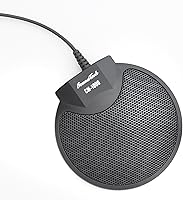
The SoundTech CM-1000 Conference Microphone has been a quiet staple in the shared-desk audio market since 2004 — and two decades of consistent sales says something real about its utility. It connects via a standard 3.5mm jack, requires no drivers or software, and works on both Mac and PC straight out of the box. The metal build feels noticeably sturdier than most plastic alternatives at this tier. That said, be clear-eyed about what this is: a conferencing tool, not a studio recorder. What you get is dependable voice pickup for video calls, small team huddles, and occasional portable recording. Practical, uncomplicated, and backed by a long track record.

Features & Benefits

The CM-1000's most useful characteristic is its 360-degree omnidirectional pickup — place it in the center of a table and everyone in range gets heard without repositioning. Built-in echo cancellation and noise reduction do a solid job cleaning up the signal on calls, though they won't salvage audio in a genuinely loud environment. The 75 dB signal-to-noise ratio is workable for conferencing — voices come through clearly without a distracting hiss underneath. The corded 3.5mm connection is both a constraint and a convenience: no Bluetooth headaches, no battery to manage, just a direct plug-in to your device. Metal construction rounds out a design that feels more considered than its modest footprint might suggest.

Best For

This desktop pickup mic is a natural fit for small teams — think three or four people gathered around a shared laptop or conference phone, where nobody should have to lean in to be heard. Remote workers who spend most of their day on Zoom, Teams, or Google Meet will notice a genuine improvement over a built-in laptop mic, without needing a full audio interface. It also pairs well with portable recorders, which makes it a handy secondary option for on-the-go voice capture. If your priority is a simple, affordable omnidirectional mic that requires zero configuration, this conference mic is well-suited to the task.

User Feedback

Sitting at 4.2 stars across more than 370 ratings, the CM-1000 earns its score through reliability rather than any wow factor. The most consistent praise centers on multi-person pickup — buyers regularly note that a group of three or four can hold a clear call without anyone struggling to be heard. Setup gets high marks too; it's genuinely plug-and-play with no configuration drama. Where things get more mixed is in noisier settings: several users flag that the mic picks up ambient room sound more than they'd like, and the built-in noise reduction has its limits. A handful of buyers also wish the cord were longer for better desk flexibility. Those using it for casual vocal recording mostly come away satisfied, as long as expectations stay grounded.

Pros

  • Truly plug-and-play — no drivers, no software, no setup friction whatsoever.
  • 360-degree pickup means a small group can sit naturally without clustering around the mic.
  • Metal construction feels noticeably more durable than plastic alternatives at this price tier.
  • Works on both Mac and PC out of the box with zero configuration.
  • Built-in echo cancellation keeps calls sounding clean in typical home office environments.
  • Lightweight enough at under 5 ounces to toss in a laptop bag without a second thought.
  • Compatible with portable recorders, making it useful beyond just desk-based calls.
  • A 20-year sales history signals this is a design that has earned consistent buyer trust.
  • Voice clarity on calls is a meaningful upgrade over built-in laptop or monitor microphones.

Cons

  • Ambient noise sensitivity is a real problem in louder or open-plan environments.
  • No physical mute button or gain control — call management relies entirely on your software.
  • Cable length limits where you can center the mic on larger tables or in bigger rooms.
  • The 3.5mm connector is incompatible with modern laptops that have dropped the headphone jack.
  • Cable durability is a weak point — the cord near the jack can fray with heavy daily use.
  • Pickup range drops off noticeably beyond a small group, making it impractical for larger meetings.
  • No carrying case or cable management solution included, which creates tangle issues in transit.
  • The CM-1000 produces a slightly processed sound when noise reduction is working hard in difficult rooms.
  • No USB version available, limiting flexibility for users with audio interface or USB-only setups.

Ratings

The SoundTech CM-1000 Conference Microphone has been scored across 12 performance categories by our AI rating system, which processed hundreds of verified global buyer reviews while actively filtering out incentivized, bot-generated, and spam submissions. The result is an honest, data-grounded snapshot that reflects both what this desktop pickup mic genuinely does well and where real users ran into frustration. No category has been inflated — the scores mirror the full spectrum of owner experiences.

Voice Pickup Range
84%
Users consistently praise how the CM-1000 captures everyone around a shared desk without anyone needing to lean in or reposition. For a team of three or four on a group call, this is the feature that earns it repeat purchases and word-of-mouth recommendations.
At larger table setups — say, six or more participants spread across a long conference table — voices at the far end start to sound noticeably thinner. The omnidirectional pattern has practical limits that become apparent in bigger rooms.
Audio Clarity
76%
24%
For standard video calls on Zoom, Teams, or Google Meet, voices come through clean and intelligible. Remote workers upgrading from a built-in laptop mic notice an immediate and meaningful improvement in how they sound to the other end of the call.
This is not a high-fidelity recording device, and buyers who expected studio-grade clarity were disappointed. At 75 dB SNR, the mic is respectable for conferencing but lacks the nuance needed for music recording or professional voiceover work.
Echo Cancellation
71%
29%
The built-in echo cancellation works reliably in typical home office or small meeting room environments, reducing the hollow, reverb-heavy sound that plagues cheaper mics on calls. Most buyers noted their remote colleagues stopped complaining about echo shortly after switching to this mic.
In rooms with hard floors, bare walls, or significant ambient sound, the echo suppression noticeably struggles. Several users reported that the cancellation added a slightly processed quality to voices when working hard, which some call recipients found slightly unnatural.
Noise Reduction
63%
37%
In quiet home office settings, the noise reduction keeps the audio channel clean and focused on speech. Users in low-traffic environments found it handled keyboard clicks, minor HVAC hum, and desk movement without bleeding too much into the call.
Open-plan offices, kitchens, or any space with ongoing background activity exposed the limits of the CM-1000 quickly. Multiple reviewers flagged that it picked up ambient noise far more than expected, and the noise reduction could not compensate for a genuinely loud room.
Ease of Setup
93%
Plug the 3.5mm jack in, and you are on a call within seconds — no drivers, no installation wizard, no software to configure. This zero-friction setup is one of the most consistently praised aspects across all buyer segments, from non-technical home users to IT professionals who just need something that works.
The simplicity is also a ceiling: there are no gain controls, no mute button, and no companion app. Users who want any degree of customization or quick call management will need to handle those functions entirely through their computer or conferencing platform.
Build Quality
78%
22%
The metal housing gives the CM-1000 a heft and solidity that stands out for a mic at this price point. Several buyers mentioned it survived being tossed in a laptop bag regularly without any structural issues or rattling after months of use.
The cable feels noticeably less premium than the body — a few long-term users reported fraying near the jack connector after extended daily use. The metal finish also shows fingerprints and desk scuffs more readily than a matte plastic alternative would.
Cord Length & Desk Flexibility
58%
42%
The corded design itself is appreciated for its reliability — no connectivity drops or latency spikes that wireless alternatives can introduce. For a fixed desk setup where the mic sits permanently near the computer, the cord length works fine.
Buyers frequently flagged the cord length as a real limitation when trying to center the mic on a larger table while the laptop sits at one end. There is no USB alternative offered, which restricts placement flexibility considerably for modern laptops with only USB-C ports.
Compatibility
82%
18%
The standard 3.5mm jack works across a wide range of devices — Windows PCs, Macs, and portable digital recorders all recognized it instantly with no configuration needed. Buyers using it with older desktop setups particularly valued the universal connectivity.
Modern ultrabooks and MacBooks that have dropped the 3.5mm input entirely require a separate adapter, which adds cost and an extra potential point of failure. A few users found their adapters introduced a faint interference hum, which undermined the mic's otherwise clean signal.
Value for Money
81%
19%
For a group conferencing mic that needs zero setup and holds up over time, most buyers feel the price is well justified. The longevity of the product on the market — and the fact that repeat buyers exist — suggests it delivers on its core promise consistently.
Users who pushed it beyond basic conferencing — into casual recording or louder meeting environments — felt the price-to-performance ratio dropped off sharply. At that point, a slightly higher investment in a USB condenser mic with a tighter polar pattern starts to make more financial sense.
Portability
74%
26%
Weighing under five ounces and built from solid metal, this conference mic travels well for its category. Users who carry it between a home office and a co-working space found it compact enough to slip into a laptop bag without adding meaningful bulk.
The fixed cord creates a tangle-prone situation in transit, and there is no carrying pouch or cable management solution included. A few buyers who traveled frequently noted the exposed connector eventually suffered wear from repeated packing and unpacking.
Performance for Singing & Vocal Recording
54%
46%
A smaller group of buyers picked up the CM-1000 specifically for casual vocal recording or practice sessions, and some reported it captured their voice adequately for low-stakes use — demo recordings, voice memos, or online singing games.
It is simply not designed for this use case, and the audio output reflects that clearly. The lack of directional focus, the modest SNR, and the absence of any gain control make it a frustrating tool for anyone expecting even entry-level recording microphone performance.
Longevity & Reliability
86%
A product that has been in continuous production since 2004 without major design overhauls earns a degree of trust that newer entrants simply cannot claim yet. Buyers with units several years old reported the audio quality remaining consistent with no degradation.
The primary durability complaint centers on the cable rather than the capsule itself. Long-term users who subject the cord to daily flexing — wrapping and unwrapping — tend to see connector wear before anything else fails on the unit.

Suitable for:

The SoundTech CM-1000 Conference Microphone is a strong fit for anyone who needs a shared, center-of-table mic that just works without any technical fussing. Remote workers who spend their days on Zoom or Teams calls will find it a genuine step up from the tinny, directional mic buried in their laptop lid — and small teams of two to four people collaborating around a single desk will appreciate that everyone gets picked up clearly without crowding the mic. It pairs equally well with desktop PCs and portable recorders, making it a practical choice for people who occasionally need to capture voice notes or field recordings on the go. Budget-conscious buyers who want reliable omnidirectional audio without committing to a full USB audio interface setup will find this conference mic hits a comfortable sweet spot of simplicity and performance. If your priority is clarity on calls in a reasonably quiet room, this desktop pickup mic delivers without asking much of you in return.

Not suitable for:

The SoundTech CM-1000 Conference Microphone is not the right tool for anyone whose environment is noisy, whose table is large, or whose use case goes beyond basic voice calls. Open-plan offices, shared kitchens, or rooms with hard reflective surfaces will expose the mic's limited noise rejection quickly — participants on the far end of the call will hear your surroundings as clearly as they hear you. Serious podcasters, voiceover artists, or anyone recording music should look elsewhere entirely; the 75 dB SNR and omnidirectional pattern simply are not built for that kind of work. Users with newer laptops that have dropped the 3.5mm input will need an adapter, and that extra step introduces both cost and potential interference issues. If you need gain control, a physical mute button, or any kind of on-device audio management, this mic offers none of that — everything has to be handled through your computer or conferencing software.

Specifications

  • Polar Pattern: Omnidirectional (360-degree), capturing sound equally from all directions around the microphone.
  • Connector Type: Standard 3.5mm auxiliary jack, compatible with most PCs, desktops, and portable recording devices.
  • Signal-to-Noise Ratio: 75 dB, providing a clean voice signal with minimal background hiss for conferencing applications.
  • Power Source: Corded electric — the mic draws power directly through the host device via the 3.5mm connection; no batteries required for operation.
  • Material: Metal housing construction, providing greater durability and resistance to everyday wear compared to all-plastic alternatives.
  • Weight: 4.6 oz (approximately 130g), making it light enough to pack into a laptop bag without adding meaningful bulk.
  • Dimensions: 9 x 3 x 6 inches overall footprint, sized for stable tabletop placement in home office or small conference room setups.
  • Channels: Single-channel (mono) audio output, standard for voice conferencing and compatible with all major calling platforms.
  • OS Compatibility: Fully compatible with both macOS and Windows PCs without requiring driver installation or additional software.
  • Noise Reduction: Built-in hardware-level echo cancellation and noise reduction to minimize room reverb and background interference during calls.
  • Compatible Devices: Designed for use with desktop PCs, laptops, and handheld portable recording devices that feature a 3.5mm audio input.
  • Form Factor: Handheld and tabletop-compatible design, intended for placement on a flat surface at the center of a shared workspace.
  • Driver Requirement: No drivers or software installation required — recognized immediately as a standard audio input device by all major operating systems.
  • Brand & Manufacturer: Manufactured by Executive Communication Systems under the SoundTech brand, with continuous availability since June 2004.
  • Model Number: FBA_CM-1000, as listed by the manufacturer; ASIN B004E1VIPC on Amazon marketplace.
  • Average Rating: 4.2 out of 5 stars based on 374 verified customer ratings, ranked #168 in the Computer Microphones category.

Related Reviews
SoundTech CM-1000USB Conference Microphone Kit (4-Mic)
75%
93%
Ease of Setup
81%
Voice Clarity & Call Intelligibility
67%
Echo Cancellation Performance
88%
Table Coverage & Mic Array Scalability
54%
Cable Management
More
TONOR TM310
TONOR TM310
79%
83%
Voice Clarity
76%
Noise Rejection
68%
Noise Reduction Feature
94%
Ease of Setup
79%
Clip Design & Mounting
More
TONOR TM20
TONOR TM20
78%
83%
Voice Clarity
71%
Noise & Echo Handling
96%
Ease of Setup
91%
Mute Button & LED Indicator
76%
Omnidirectional Coverage
More
WISE TIGER USB Conference Microphone
77%
94%
Ease of Setup
76%
Audio Clarity for Calls
58%
Noise & Background Pickup
91%
Mute Button Functionality
63%
Build Quality & Durability
More
TONOR G11 Conference USB Microphone
81%
96%
Ease of Setup
83%
Voice Clarity
77%
Omnidirectional Pickup Range
52%
Background Noise Rejection
81%
Build Quality
More
Bonke UM02
Bonke UM02
78%
94%
Ease of Setup
71%
Audio Clarity
63%
Noise Handling
78%
Build Quality
82%
Mute Button
More
ANSTEN OSM09 Conference USB Microphone
75%
83%
Voice Clarity on Calls
78%
Omnidirectional Pickup Coverage
94%
Ease of Setup
89%
Mute Button Usability
61%
Background Noise Reduction
More
Movo MC1000
Movo MC1000
75%
84%
Pickup Range & Coverage
67%
Audio Clarity
93%
Ease of Setup
81%
Headphone Monitoring
54%
Background Noise Rejection
More
PolaTab Q95 Mini
PolaTab Q95 Mini
77%
83%
Audio Clarity (Microphone)
67%
Speaker Volume & Quality
79%
Echo & Noise Cancellation
74%
Pickup Range & Coverage
93%
Setup & Ease of Use
More
Marantz Professional MPM-1000
81%
84%
Vocal Clarity
87%
Build Materials
76%
Background Noise Rejection
93%
Value for Money
68%
Shock Mount Effectiveness
More

FAQ

No, not at all. The CM-1000 is recognized instantly by both Windows and macOS as a standard audio input device the moment you plug it in. There is nothing to install, configure, or update — it is genuinely plug-and-play.

Yes, it works with all of them. Since your operating system sees it as a standard 3.5mm audio input, any conferencing platform that lets you select your microphone source will pick it up without any issues. Just set it as your default input device in your system audio settings or within the app itself.

You can, but you will need a 3.5mm to USB-C audio adapter. These are widely available and inexpensive, though it is worth noting that a small number of users have reported a faint interference hum when using lower-quality adapters. If you go this route, investing in a decent-quality adapter is worthwhile.

For most call situations, three to four people seated around a standard desk works well. Beyond that, voices at the edges of the pickup range start to sound thinner and less present. If you are regularly hosting larger group calls, a dedicated speakerphone with a wider effective range would serve you better.

Honestly, not especially. The built-in noise reduction and echo cancellation perform well in quiet home offices or small meeting rooms, but in open-plan offices, shared spaces, or rooms with a lot of hard surfaces, it picks up significantly more ambient sound than most buyers expect. If your workspace is noisy, this mic will likely disappoint you.

A small number of buyers do use it for casual vocal practice or basic demo recordings, and results are mixed but generally acceptable for very low-stakes use. That said, the omnidirectional pattern, single-channel output, and lack of gain control make it a poor fit for any serious recording work. If audio quality in recordings matters to you, a dedicated USB condenser mic would be a much better investment.

No, there is no physical mute button or any on-device controls at all. If you need to mute yourself during a call, you will have to use the mute function within your conferencing app or your operating system's audio settings. This is a common frustration for users coming from headsets or speakerphones with dedicated call controls.

The cable length is a recurring complaint among buyers, particularly those who want to place this desktop pickup mic at the center of a longer table while their laptop sits at one end. For a standard desk or small round table it works fine, but for anything larger you may find it falls just short of where you actually need it to sit.

The mic ships on its own — no stand, no carrying case, and no cable management accessories are included. It can sit flat on its base on a desk, which works well enough for everyday use, but if you want to angle it or raise it off the surface you would need a separate mic stand or mount.

The metal body itself holds up very well — users with units several years old report no degradation in sound quality or structural wear to the housing. The weak point is the cable, particularly near the 3.5mm connector, which can show fraying over time if you regularly wrap and unwrap the cord. Treating the cable gently and avoiding tight bends near the jack will extend its life considerably.

Where to Buy