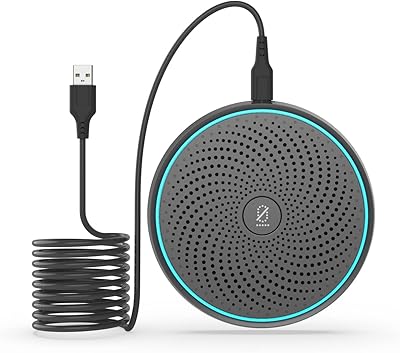
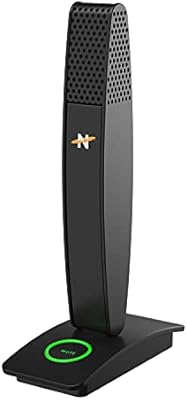
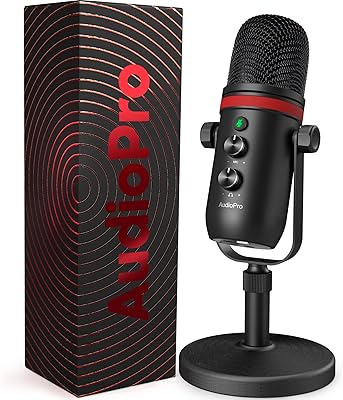
Overview

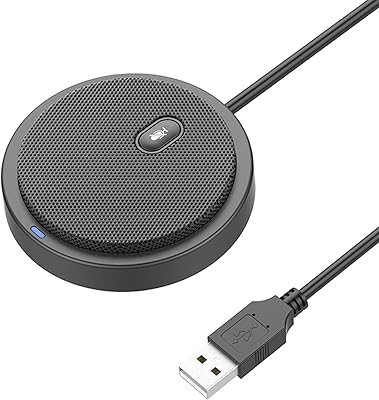
The WISE TIGER USB Conference Microphone is a compact, budget-friendly puck-style mic built for remote workers and casual gamers who want better audio without the complexity of a studio setup. Unlike boom-arm or condenser mics that demand desk real estate and driver installation, this desk mic sits flat, plugs in via USB-C, and works instantly — no drivers, no software, nothing to configure. It holds a 4.3-star average and ranks #202 in Computer Microphones, which is a respectable showing for a no-frills device at this price point. Just set expectations accordingly: this is a convenience-first tool, not something you would reach for when recording a podcast or streaming professionally.
Features & Benefits

The omnidirectional condenser capsule picks up sound from all directions equally, which makes this conference mic genuinely useful when two or three people are gathered around a laptop. The hardware mute button is a real highlight — one press cuts the audio instantly, no fumbling through Zoom controls mid-sentence. In terms of range, the mic can realistically capture voices up to about three meters away, though performance drops noticeably in echoey rooms. The 88dB signal-to-noise ratio means background hiss stays low, and the 16-bit audio keeps voice calls sounding clear without digital artifacts. A noise-absorbing cotton base reduces vibration from the desk surface, and broad OS compatibility — Windows, macOS, Chrome OS — means it works on virtually any machine without configuration.

Best For

This desk mic punches well above its price for anyone who needs a shared conference room mic — think a small huddle space where two or three colleagues are dialing into a Zoom or Teams call together. Students on video calls will notice an immediate improvement over built-in laptop microphones. It also works well for casual gamers who want squad voice chat without strapping on a headset. And because it is barely larger than a hockey puck, it is easy to toss in a bag for travel. That said, solo podcasters, streamers, or anyone working in a noisy environment should look elsewhere — the omnidirectional pattern has no way to reject sound coming from behind, so room noise comes through clearly.

User Feedback

Buyers who picked up the Wise Tiger puck mic as an upgrade from their laptop's built-in microphone tend to come away satisfied — the most common praise is that call clarity improves noticeably and the setup genuinely takes under a minute. The mute button gets specific shout-outs from people in back-to-back meetings who appreciate not having to mouse around between calls. On the critical side, a recurring complaint involves background noise pickup: users in open-plan offices or rooms with hard floors found that the mic captures too much ambient sound for their liking. A few buyers also noted the build feels light, which raises durability questions, and some wished the cable were longer for more flexible desk placement. Overall, the satisfaction rate skews positive for the price.

Pros

  • Truly plug-and-play — no drivers, no software, works immediately on Windows, macOS, and Chrome OS.
  • The hardware mute button cuts audio instantly, with no fumbling through app controls mid-meeting.
  • A genuine, noticeable upgrade over built-in laptop microphones for everyday video calls.
  • 360-degree pickup makes this conference mic practical for small groups gathered around a shared screen.
  • Compact enough to slip into a laptop bag without taking up meaningful space.
  • Low background hiss keeps voice calls clean without requiring any audio post-processing.
  • The three-year replacement warranty is unusually strong for a budget-tier accessory.
  • Rubber base grips most desk surfaces and the cotton layer reduces vibration from typing.
  • Works reliably across a wide range of operating systems, including older Windows versions.

Cons

  • The omnidirectional pickup pattern captures room echo and ambient noise with no way to reject it.
  • No visible LED mute indicator makes it easy to stay accidentally muted during live calls.
  • The included cable is short and untidy, with no clip or wrap for clean cable management.
  • Plastic construction feels lightweight in hand, and the USB-C port can loosen with repeated use over time.
  • Real-world pickup range drops significantly in rooms with hard floors or minimal soft furnishings.
  • Audio sounds noticeably flat for any use case beyond voice calls — narration or voiceovers will disappoint.
  • Mechanical keyboard users will transmit keystrokes clearly to anyone on the other end of the call.
  • On glass or very smooth desk surfaces, the base grip is unreliable when the cable is pulled.
  • Cable length frustrated buyers who needed to position the Wise Tiger puck mic away from their laptop.

Ratings

The WISE TIGER USB Conference Microphone has been scored by our AI engine after processing verified buyer reviews from global marketplaces, with spam, bot-submitted, and incentivized feedback actively filtered out before any score was calculated. The ratings below reflect honest consensus across a wide range of real use cases — from home office Zoom calls to student study sessions and casual gaming — and both the strengths and the genuine frustrations buyers encountered are transparently represented.
Ease of Setup
94%
Buyers consistently praised the zero-configuration experience — plug in the USB-C cable and it works immediately on Windows, macOS, and Chrome OS without touching a settings menu. Remote workers who bounce between machines found this especially valuable, since there is nothing to reinstall or reconfigure when switching laptops.
A small number of users on older Windows 7 machines reported a brief driver recognition delay, and a handful of Chrome OS users noted they had to manually select the mic as the default input device before it registered correctly.
Audio Clarity for Calls
76%
24%
For everyday video calls, the voice reproduction is clean and free of the tinny, hollow quality that plagues built-in laptop microphones. Colleagues on the other end of Zoom calls frequently notice the improvement, and the low background hiss means voices come through without fatigue-inducing static.
This desk mic is not engineered for nuance — the 16-bit capture is perfectly adequate for speech but lacks the warmth or texture that even entry-level studio mics deliver. Users who tried it for voiceovers or narration found it sounding flat and somewhat compressed compared to similarly priced cardioid alternatives.
Noise & Background Pickup
58%
42%
In quiet, carpeted home offices or small meeting rooms with soft furnishings, the noise-absorbing cotton base does a reasonable job dampening desk vibrations and low-frequency rumble. Users in those environments reported that call participants rarely complained about background noise during normal conversations.
The omnidirectional pattern is the core issue here — it captures everything in the room with equal enthusiasm, including keyboard clicks, air conditioning hum, and street noise through a window. Open-plan office workers and anyone in a hard-surfaced room reported that colleagues could clearly hear ambient noise, which became distracting on longer calls.
Mute Button Functionality
91%
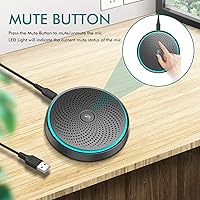
The one-key hardware mute button earned consistent praise from people in back-to-back meeting schedules who need an instant, reliable way to cut their audio mid-call. Because it operates at the hardware level rather than through software, there is no lag — the mic goes silent the moment you press it, which matters when something distracting happens in the background unexpectedly.
There is no LED indicator visible from a normal seated position to confirm mute status, which led several users to accidentally stay muted for longer than intended. A light on the top face of the unit rather than the side would have resolved this complaint entirely.
Build Quality & Durability
63%
37%
The puck-style form factor feels solid enough sitting on a desk, and the rubber base keeps it from sliding around during typing. For users who leave it permanently on their home office desk, the lightweight plastic construction has proven perfectly adequate over months of daily use.
At 220 grams with a lightweight plastic shell, the Wise Tiger puck mic does not feel particularly robust. Buyers who tossed it in a bag for travel reported scuff marks appearing quickly, and a few noted the USB-C port connection felt slightly loose after several months of regular plug-and-unplug cycles.
Pickup Range
71%
29%
For a mic this size, the ability to capture voices from up to roughly two to three meters away in a quiet room is genuinely useful during group huddles around a conference table. Small teams of two or three people reported being able to sit naturally without clustering around the mic.
The three-meter range claim holds up only in acoustically forgiving spaces. In rooms with hard floors or minimal soft furnishings, effective pickup quality degrades noticeably beyond about 1.5 meters, and distant voices can sound slightly hollow or echo-prone to remote participants.
Portability & Form Factor
88%
The footprint is genuinely compact — about the size of a hockey puck — and light enough that most users tuck it into a laptop bag without thinking twice. For people who work from different locations throughout the week, the size means it does not feel like a burden to bring along.
The cable, while functional, is not retractable and lacks a tidy wrap or clip, which means it tends to tangle loosely at the bottom of a bag. A few buyers also mentioned wishing the cable were longer to give more flexible desk placement options.
Value for Money
83%
Measured against what it actually delivers — reliable plug-and-play audio for calls, a hardware mute button, and multi-person pickup — most buyers felt the price was justified. The three-year replacement warranty adds meaningful peace of mind that is not common at this price tier.
Users who purchased expecting near-studio audio quality felt let down, especially those comparing it directly to USB cardioid mics in a similar price range. For solo use cases where a directional mic would perform better, the value equation weakens considerably.
Compatibility
89%
Wide OS support covering everything from Windows XP to current macOS and Chrome OS means this conference mic works reliably on virtually any hardware a buyer is likely to own. Users who rotate between a personal Mac and a work-issued Windows laptop appreciated not needing separate setups for each machine.
A small number of users reported that certain video conferencing apps required them to manually assign the mic in audio settings on first use, particularly on macOS Monterey and later. This is a minor friction point but caught a few buyers off guard who expected fully automatic recognition.
Multi-Person Conference Use
78%
22%
The 360-degree pickup pattern is legitimately well-suited to scenarios where two or three people are gathered around a shared laptop or tablet. Small team stand-ups and family video calls were frequent use cases where buyers reported the mic handled multiple voices naturally without one person needing to dominate the mic position.
Beyond three people, or in any room larger than a small huddle space, the mic begins to struggle — distant voices lose presence and the room acoustics start to overwhelm the useful signal. It is not a substitute for a dedicated speakerphone system in a proper meeting room.
Gaming Voice Chat Performance
72%
28%
Casual gamers using it for squad voice chat in Discord or in-game comms reported that teammates found their audio noticeably clearer than a typical headset boom mic at the same price. The hardware mute button also worked well for quickly cutting audio between rounds.
Mechanical keyboard users found that the omnidirectional pattern transmitted keystrokes loudly enough to annoy teammates, since the mic has no directional rejection to help with that scenario. Competitive gamers or streamers needing clean, isolated voice audio would find a cardioid headset mic far more suitable.
Cable Quality
61%
39%
The included USB-C cable is functional and long enough for standard desk setups where the computer sits nearby. Users who keep the mic in a fixed position at their home desk reported no issues with the cable over extended periods.
The cable braiding is basic and showed signs of fraying near the connectors for several buyers after a few months of regular travel use. Multiple reviewers specifically mentioned wishing the cable were longer — around 1.8 to 2 meters — to allow more flexibility when positioning the mic away from the laptop.
Desk Stability
82%
18%
The rubber-lined base grips most desk surfaces well, and the low center of gravity of the puck design means it is rarely knocked over accidentally. The noise-absorbing cotton layer also prevents the plastic base from transmitting hard tapping sounds into the audio feed during active typing.
On glass desk surfaces or very smooth laminates, the grip becomes less reliable and the mic can drift slightly when the cable is tugged. A few buyers who used it on standing desks with vibrating motors reported picking up some mechanical hum through the base during desk height adjustments.

Suitable for:

The WISE TIGER USB Conference Microphone is a well-matched tool for remote workers who share a mic across a small team huddle or dial into Zoom calls from a home office where simplicity matters more than studio-grade audio. If you are a student attending online lectures and tired of your laptop microphone making you sound like you are calling from a tunnel, this desk mic is a meaningful and affordable step up. Casual gamers who want clear squad voice chat without committing to a full headset will find the plug-and-play setup and hardware mute button genuinely convenient. It also suits frequent travelers and people who hot-desk across different machines, since the USB-C connection works on Windows, macOS, and Chrome OS with zero configuration — you plug it in and you are done. Anyone who primarily needs a shared mic for a two-to-three person table setup, rather than personal directional capture, will get the most out of what this conference mic was actually designed to do.

Not suitable for:

The WISE TIGER USB Conference Microphone is a poor fit for anyone who needs directional audio isolation — solo podcasters, streamers, or content creators who record in untreated rooms will find the omnidirectional pickup pattern works against them, pulling in keyboard noise, room echo, and ambient hum alongside their voice. If you are doing any kind of serious voice recording — narration, voiceovers, or music — the 16-bit, speech-tuned audio chain will sound noticeably flat and compressed compared to even modestly priced cardioid USB mics. Competitive gamers who use mechanical keyboards will likely frustrate their teammates, since the mic has no way to reject the sound of keystrokes directly behind it. People working in open-plan offices or noisy households should also temper expectations; the cotton base reduces desk vibration but does nothing about background voices, air conditioning, or street noise. And if you need a mic for a larger conference room with more than three or four participants spread across a table, this puck-style form factor simply will not have the raw pickup power to serve everyone clearly.
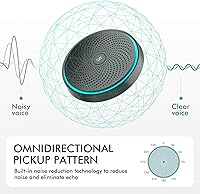
Specifications

  • Polar Pattern: Omnidirectional condenser capsule captures sound equally from all directions, making it suitable for group calls and shared table setups.
  • Frequency Response: Covers the full audible range from 20Hz to 20kHz, though the design is optimized for speech clarity rather than music reproduction.
  • Sensitivity: Rated at -38dB (+/- 3dB), meaning the mic requires a reasonably loud or close signal to perform at its best in noisy environments.
  • Signal-to-Noise Ratio: 88dB A-weighted SNR keeps background hiss low enough that voice calls sound clean and free of distracting static under normal conditions.
  • Bit Depth: 16-bit audio resolution is standard for voice communication and video conferencing, though it is not suited to high-fidelity recording applications.
  • Pickup Range: Designed to capture voices up to approximately 3 meters away in a quiet, acoustically treated space; effective range is shorter in reverberant rooms.
  • Connector: USB-C connector provides a modern, reversible connection directly to the host device with no adapter required on compatible hardware.
  • Power Source: Bus-powered via USB, meaning no batteries, external power supply, or dedicated audio interface is needed to operate the microphone.
  • Dimensions: The microphone body measures 9.0 x 9.0 x 1.3 cm (W x D x H), making it small enough to sit unobtrusively on most desks or conference tables.
  • Weight: At 220 grams (7.8 oz), the unit is light enough for daily transport in a laptop bag without adding meaningful bulk.
  • Base Material: The underside features a high-density noise-absorbing cotton layer designed to reduce desk vibration and prevent low-frequency rumble from reaching the capsule.
  • Mute Function: A dedicated one-key hardware mute button cuts the audio signal at the physical level, providing instant and lag-free mute toggling during live calls.
  • OS Compatibility: Natively compatible with Windows XP through Windows 10, macOS 7 or higher, and Chrome OS without requiring driver installation or additional software.
  • Operating Temperature: Rated for use between 0°C and 55°C (32°F to 131°F), covering all standard indoor environments where it would typically be deployed.
  • Storage Temperature: Can be safely stored in temperatures ranging from -25°C to 70°C (-13°F to 158°F), suitable for transport in most climates.
  • Transducer Type: Condenser transducer design offers higher sensitivity and a wider frequency response compared to dynamic microphones at a similar price point.
  • Warranty: Backed by a 3-year manufacturer replacement warranty and a 90-day no-questions-asked return policy direct through Amazon messaging.

Related Reviews

Movo MC1000
Movo MC1000
75%
84%
Pickup Range & Coverage
67%
Audio Clarity
93%
Ease of Setup
81%
Headphone Monitoring
54%
Background Noise Rejection
More
TONOR TM310
TONOR TM310
79%
83%
Voice Clarity
76%
Noise Rejection
68%
Noise Reduction Feature
94%
Ease of Setup
79%
Clip Design & Mounting
More
ANSTEN OSM09 Conference USB Microphone
87%
86%
Audio Quality
94%
Ease of Use
80%
Noise Cancellation
88%
Portability
97%
Setup & Installation
More
TONOR TM20
TONOR TM20
78%
83%
Voice Clarity
71%
Noise & Echo Handling
96%
Ease of Setup
91%
Mute Button & LED Indicator
76%
Omnidirectional Coverage
More
TONOR G11 Conference USB Microphone
81%
96%
Ease of Setup
83%
Voice Clarity
77%
Omnidirectional Pickup Range
52%
Background Noise Rejection
81%
Build Quality
More
Bonke UM02
Bonke UM02
78%
94%
Ease of Setup
71%
Audio Clarity
63%
Noise Handling
78%
Build Quality
82%
Mute Button
More
Neat Microphones Skyline USB Desktop Condenser Microphone
89%
94%
Audio Quality
91%
Ease of Use
89%
Build Quality
90%
Mute Button Functionality
92%
Value for Money
More
Logitech USB Desktop Microphone
82%
91%
Ease of Setup
76%
Audio Quality
85%
Noise Cancellation
78%
Build Quality
83%
Design & Ergonomics
More
YEYIAN AGILE USB Microphone
85%
88%
Sound Quality
94%
Ease of Setup
85%
Noise Reduction
79%
Build Quality
92%
Compatibility with Devices
More
Samson Meteor USB Microphone
86%
89%
Audio Quality
95%
Ease of Use
83%
Build Quality
91%
Portability
94%
Setup Process
More

FAQ

No, the WISE TIGER USB Conference Microphone is completely plug-and-play. You connect it via the USB-C cable and your operating system — whether Windows, macOS, or Chrome OS — recognizes it automatically as an audio input device. The only thing you may need to do is select it as your default microphone input in your system sound settings or within your conferencing app, which takes about ten seconds.

It works on all three without any setup hassle. The mic is recognized as a standard USB audio device on macOS 7 and above, Windows XP through 10, and Chrome OS straight out of the box. If you switch between a MacBook and a Windows laptop regularly, you can use the same mic on both with no reconfiguration needed.

Honestly, yes — and that is worth knowing before you buy. Because this desk mic uses an omnidirectional pickup pattern, it captures sound from all directions equally, which means it will pick up keyboard clicks, a nearby television, family conversation, or air conditioning alongside your voice. In a quiet, carpeted room it performs well, but in a lively household or open-plan office, remote participants will hear your environment too. If background noise rejection is a priority for you, a directional cardioid mic would serve you better.

It operates at the hardware level, which is the better option. One press physically cuts the audio signal from the capsule itself, so there is no delay, no reliance on Zoom or Teams responding to a software command, and no risk of it failing to register during a call. The only limitation is that there is no clearly visible LED indicator to confirm mute status from a normal seated distance, so it is worth developing a quick habit of checking before you start speaking.

It is genuinely designed for small group use. The 360-degree omnidirectional capsule picks up voices from all around the mic, so two or three people sitting around a laptop or small conference table can all be heard reasonably well. Beyond three people, or in a larger room, the more distant voices start to sound thinner and the room acoustics begin to overwhelm the useful signal. For a small huddle setup it works well; for a boardroom it is not the right tool.

The cable is attached directly to the mic body and is not removable. Several buyers have mentioned wishing it were a bit longer for flexible desk placement, and because it is fixed, damage to the cable over time could become a functional issue. That said, for the typical home office use case where the mic sits a short distance from your laptop, the cable length is generally sufficient.

The difference is noticeable for people on the other end of your calls. Built-in laptop mics are usually positioned awkwardly, pick up a lot of fan noise and keyboard sound, and produce thin, distant-sounding audio. This conference mic sits on the desk between you and the screen, uses a proper condenser capsule, and delivers cleaner voice reproduction with less background hiss. It is not a dramatic upgrade in absolute terms, but for everyday video calls and online classes, it is a meaningful one.

Unfortunately, yes — this is one of the most commonly noted real-world limitations. Because the omnidirectional pattern has no directional rejection, anything happening near the mic gets captured, and mechanical keyboard clicks are loud enough to be clearly audible to call participants. If you type frequently during calls and use a loud keyboard, this is a significant practical drawback. The cotton base reduces desk vibration, but it does not solve the airborne noise problem.

It is portable but not rugged. The plastic shell is lightweight, which makes it easy to carry, but several users who tossed it loose in a bag reported scuff marks appearing relatively quickly and noted that the USB-C port felt slightly less secure after months of daily plug-and-unplug use. If you are carrying it daily, a small pouch or case would help protect it and extend its lifespan.

The manufacturer offers a 3-year replacement warranty, which covers defects and failures under normal use. There is also a 90-day no-questions-asked return window through Amazon if you decide it does not meet your needs. For warranty support, you contact the brand directly via Amazon messaging. At this price point, a 3-year replacement guarantee is notably generous and adds a meaningful layer of buyer confidence.