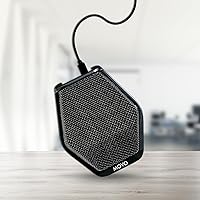

Overview

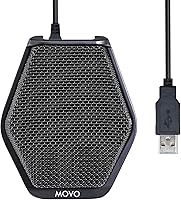
The Movo MC1000 has been around since 2016, and it still holds its own as a practical tabletop USB conference mic aimed at remote workers, small teams, and anyone tired of sounding like they are calling from a tin can. At around $104, it sits in a tricky spot — more expensive than a basic webcam mic, but short of dedicated podcast territory. What helps it stand out is the super-cardioid pickup pattern, which claims a 20-foot radius — a meaningful spec for a mic meant to cover a room rather than a single voice. The polycarbonate body weighs just 9 ounces, so carrying it in a bag is effortless. With 794 ratings averaging 4.2 stars, expectations should be realistic: solid, not spectacular.

Features & Benefits

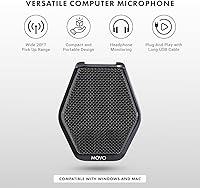
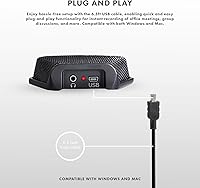
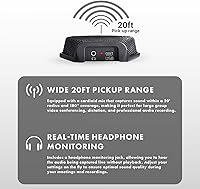
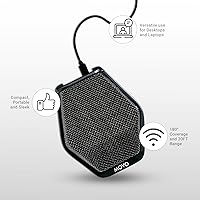
The most practical thing about this conference mic is what you do not have to do: install drivers, fiddle with settings, or ask colleagues to huddle closer. Plug it into a USB port and it works, on both Windows and Mac. The 180-degree pickup range means four people spread around a desk can all be heard clearly without anyone shifting their chair. A 6.5-foot cable gives genuine flexibility in table positioning. The headphone monitoring jack is a quietly useful addition — you hear exactly what is being captured in real time, which matters during dictation or a voiceover session. A mute button and voice-activated recording round out the hands-on controls without overcomplicating things.

Best For

This USB table mic makes the most sense for people who need to cover a room, not just a single voice. A small conference setup with three or four participants is its sweet spot — everyone gets picked up without the awkward lean-in that tighter directional mics demand. It also suits remote workers who travel and want a reliable step up from a laptop microphone without carrying an audio interface. Content creators running a budget podcast setup or recording YouTube commentary will appreciate the monitoring capability. It is less suited for solo studio recording or anyone chasing broadcast-quality audio, but for practical multi-person calls and daily communication, it covers the ground well.

User Feedback

Buyers tend to land in two fairly distinct camps. Those using the MC1000 for regular group calls are generally satisfied — the wide pickup range delivers on its promise, and setup is fast enough that even non-technical users get it running without frustration. Headphone monitoring gets singled out by dictation users and solo recorders as a feature they genuinely rely on. On the other side, buyers expecting studio-tier clarity at this price have come away let down. Background noise in open offices is a recurring complaint, and the 58 dB signal-to-noise ratio does show its limits in less-than-quiet rooms. A few reviewers also point out that comparable options exist for under $80, which is worth factoring into the decision.

Pros

  • Covers a full room of participants without anyone needing to lean toward the mic.
  • Plug-and-play USB setup works instantly on both Windows and Mac — no drivers, no fuss.
  • Real-time headphone monitoring lets you catch audio problems while they are happening, not after.
  • At 9 ounces, this USB table mic is light enough to pack into any laptop bag without a second thought.
  • The 6.5-foot cable gives genuine flexibility in how you position it on a shared table.
  • Physical mute button is a practical addition for long meetings where you need quick, reliable control.
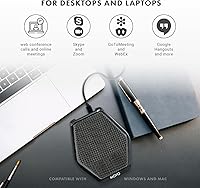
  • Works immediately with Zoom, Teams, Skype, Google Meet, and most other major conferencing platforms.
  • A meaningful upgrade over built-in laptop mics without requiring any audio interface or extra hardware.

Cons

  • Background noise rejection is weak in open offices or rooms with hard, reflective surfaces.
  • No LED mute indicator means you can accidentally speak while muted without realizing it.
  • The fixed, non-detachable cable is a long-term reliability risk for frequent travelers.
  • Voice-activated recording sensitivity cannot be adjusted and behaves inconsistently in practice.
  • No onboard gain control forces you into OS-level audio settings to manage input levels.
  • Audio output lacks warmth and depth compared to dedicated condenser mics at a similar price.
  • No carrying case or protective pouch is included despite being marketed as a portable solution.
  • Flat, fixed base offers no tilt or angle adjustment, limiting placement options in non-standard room setups.
  • Competing conference mics exist at lower price points, making the value case harder to defend for some buyers.

Ratings

The Movo MC1000 scores here reflect AI analysis of verified global buyer reviews, with spam, bot-generated, and incentivized feedback actively filtered out to surface what real users actually experience. Ratings cover everything from pickup performance to long-term durability, so you get a transparent picture of where this conference mic genuinely delivers and where it falls short.

Pickup Range & Coverage
84%
For a tabletop mic, the 20-foot, 180-degree coverage is genuinely useful. Buyers running four- or five-person home office calls consistently report that everyone gets picked up without anyone leaning toward the center of the table — a real advantage over tighter directional mics.
The wide pickup pattern is a double-edged sword in practice. In open-plan offices or rooms with hard walls, the same reach that captures distant voices also pulls in keyboard clatter, HVAC noise, and ambient room echo that narrower mics would reject.
Audio Clarity
67%
33%
In a quiet, treated room, voice reproduction is clean and intelligible — more than adequate for a Zoom call or a dictation session where the goal is accuracy rather than warmth. Users upgrading from built-in laptop mics notice an immediate, meaningful difference.
The 58 dB signal-to-noise ratio is modest by current standards, and it shows when the environment is less than ideal. Buyers who expected podcast-level richness at this price came away underwhelmed, particularly when comparing directly to condenser mics in the same range.
Ease of Setup
93%
Plug it in and it works — that about covers it. No drivers, no configuration panels, no compatibility headaches on Windows or Mac. Users who are not technically inclined specifically call this out as a reason they stuck with the MC1000 rather than returning it.
The simplicity is also a ceiling. There are no onboard EQ controls, no gain adjustment knob, and no software companion app, so users who want to fine-tune the input level have to navigate their OS audio settings, which can frustrate less experienced buyers.
Headphone Monitoring
81%
19%
The real-time 3.5mm monitoring jack is a standout feature at this price point. Dictation users and solo creators doing voiceover work particularly appreciate hearing exactly what the mic is capturing as it happens, catching issues before they make it into a recording.
There is no independent volume control on the monitoring output itself, which means you are dependent on system-level adjustments to manage the listening level. A few users found the monitoring signal slightly delayed, which can be distracting during live speech.
Background Noise Rejection
54%
46%
In quiet home offices, the super-cardioid pattern does a reasonable job of keeping the focus on voices near the mic rather than sounds behind or beside it. Users in carpeted, softly furnished rooms rarely raised noise rejection as a concern.
In real-world open offices, shared workspaces, or rooms with reflective surfaces, background noise rejection is a consistent pain point. Multiple reviewers noted that colleagues on the other end of calls could hear typing, doors, and ambient chatter more clearly than they expected.
Build Quality
72%
28%
The polycarbonate shell feels solid enough for daily desk use, and the low 9-ounce weight makes it easy to slip into a laptop bag without hesitation. The form factor is compact and sits stably on a flat surface without any additional mounting hardware.
Polycarbonate construction does not inspire premium confidence at the $104 price point. A handful of longer-term users noted that the finish scuffs relatively easily and the cable connection point showed signs of wear after repeated plug-and-unplug travel cycles.
Cable Quality & Length
78%
22%
The 6.5-foot USB cable is a practical length that most users found generous enough to position the mic at the center of a conference table while keeping the laptop at one end. No need for an extension cable in most standard room setups.
The cable is not detachable, which is a limitation if it gets damaged — you cannot simply swap it out. A few buyers also felt the cable was stiffer than expected, making it slightly awkward to route neatly on a crowded desk.
Portability
86%
At under 10 ounces and with a footprint smaller than a paperback book, this USB table mic is genuinely easy to pack. Frequent travelers who need to run professional-sounding calls from hotel rooms or coworking spaces found it a reliable go-bag staple.
There is no included carrying pouch or protective case, so the mic and its fixed cable get tossed loosely into a bag. Over time, travel without protection risks surface scratches and cable stress at the connector ends.
Mute Function
74%
26%
Having a dedicated physical mute button is genuinely useful during long meetings where you need to step away briefly or manage background noise on the fly. Users appreciated not having to hunt for a software mute button in the middle of a call.
There is no LED indicator to visually confirm mute status, which led to several reviewers accidentally speaking while muted without realizing it. A simple status light would resolve this entirely and is a common feature on competing models.
Voice-Activated Recording
61%
39%
For unattended dictation sessions or automatic recording scenarios, the voice-activation feature does reduce manual intervention and keeps file sizes manageable by not capturing long silences. Occasional users found it a convenient secondary capability.
The activation sensitivity is not adjustable, and in practice the feature was unreliable enough that most buyers defaulted to manual recording modes. Soft-spoken users or those in rooms with ambient noise found it either triggered too easily or cut in too slowly.
Compatibility
91%
USB class-compliant audio means this conference mic works natively across Windows and Mac without any software installation. Users running Zoom, Microsoft Teams, Google Meet, and Skype reported it appearing immediately as an audio input option without extra steps.
Compatibility with Linux or Chromebook is not officially documented, and a small number of buyers using those platforms reported inconsistent recognition. Mobile device use via USB-C adapters also produced mixed results that the product does not officially support.
Value for Money
63%
37%
For buyers whose specific need is covering a multi-person room without any technical setup, the MC1000 fills a real gap. The combination of wide pickup range, plug-and-play simplicity, and headphone monitoring in one unit is not trivially matched at lower price points.
At $104, the value case is genuinely hard to make when capable single-speaker USB mics and even some competing omnidirectional conference units exist below $80. Buyers who discover those alternatives after purchasing tend to feel the price premium is difficult to justify.
Frequency Response
69%
31%
The 20 Hz to 20 kHz frequency range covers the full audible spectrum on paper, and in practice mid-range voice frequencies come through clearly in call environments. Intelligibility on the receiving end of conference calls is consistently rated as good by users.
Low-end warmth and high-frequency air are both noticeably absent compared to large-diaphragm condenser mics. For voice recording intended for publishing — YouTube, podcasts, audiobooks — the output sounds a bit flat and would need post-processing to compete with dedicated recording mics.
Stability & Desk Footprint
82%
18%
The table-array form factor sits flat and low, which keeps it out of the way visually and physically on a shared conference surface. The base does not skid under normal conditions, and its slim profile avoids blocking sight lines between meeting participants.
The fixed flat base means there is no tilt or height adjustment, so users in rooms where the mic needs to project upward toward standing participants or mounted screens have no physical way to reposition the capture angle without propping it on something.

Suitable for:

The Movo MC1000 is a strong fit for anyone who needs to cover a room rather than a single voice without getting into complex audio hardware. Small teams running daily Zoom, Teams, or Skype calls from a shared home office or a compact conference room will get the most out of its wide pickup pattern — think three or four people spread around a table who all need to be heard clearly without adjusting their seats. Remote workers who travel frequently and want something more capable than a laptop mic, but compact enough to slip into a bag, will find the combination of light weight and plug-and-play USB setup genuinely practical. Dictation users and YouTubers recording voiceovers on a budget also benefit, especially those who value the headphone monitoring jack for catching audio problems in real time. If your environment is reasonably quiet and your use case is communication rather than studio production, this conference mic hits a sensible middle ground.

Not suitable for:

The Movo MC1000 is not the right tool for anyone chasing broadcast-quality audio or working in a noisy, open-plan environment. Its 58 dB signal-to-noise ratio is honest enough for calls, but falls noticeably short for podcasters, voiceover artists, or musicians who need clean, rich recordings that can stand up to professional post-production. The wide pickup range that makes it useful for group calls becomes a liability in echo-prone rooms or offices full of keyboard noise and ambient chatter, where competing sounds get captured almost as readily as voices. Solo users who only ever speak one at a time would likely get better audio quality for less money from a tighter cardioid desk mic. And if you are comparing price tags carefully, there are capable alternatives under $80 that handle single-speaker scenarios just as well, making the premium harder to justify unless the multi-person coverage is genuinely the feature you need.

Specifications

  • Brand & Model: Manufactured by Movo under the model designation MC1000, first made available in June 2016.
  • Form Factor: Table array desktop microphone designed to sit flat on a surface without any stand or mounting hardware required.
  • Polar Pattern: Super-cardioid pickup pattern captures sound in a focused forward arc while providing some rejection of off-axis noise.
  • Pickup Range: Rated for a 20-foot radius with 180-degree horizontal coverage, suited for multi-person room environments.
  • Audio Sensitivity: Sensitivity rated at 47 dB, reflecting the mic's ability to convert acoustic sound pressure into an electrical signal.
  • Signal-to-Noise Ratio: Signal-to-noise ratio of 58 dB, providing acceptable clarity for voice calls and dictation in quiet-to-moderate environments.
  • Frequency Response: Captures audio across the full audible spectrum from 20 Hz to 20 kHz, covering the complete range of human speech and beyond.
  • Connectivity: USB plug-and-play connection requires no drivers and is compatible with both Windows and Mac operating systems natively.
  • Cable Length: Attached, non-detachable USB cable measures 6.5 feet, allowing flexible positioning relative to the connected computer.
  • Monitoring Output: Includes a 3.5mm headphone jack for real-time audio monitoring, allowing users to hear captured sound live during recording or calls.
  • Power Source: Bus-powered via USB, drawing all necessary power directly from the connected computer with no external adapter required.
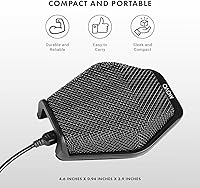
  • Dimensions: Body measures 4.6 x 0.94 x 3.9 inches, keeping the desk footprint compact and unobtrusive on a shared work surface.
  • Weight: Weighs 9 ounces, light enough to pack into a standard laptop bag without adding meaningful bulk.
  • Material: Housing is constructed from polycarbonate, a durable and lightweight thermoplastic commonly used in portable electronics.
  • Special Features: Includes a physical mute button, voice-activated recording mode, and real-time headphone monitoring as onboard functional controls.
  • Compatible Devices: Works with laptops, desktop PCs, and any USB-equipped device that supports standard USB audio class drivers under Windows or Mac.
  • Included Contents: Package includes the microphone unit, the attached long USB cable, and access to the headphone monitoring jack built into the body.
  • Channels: Single-channel (mono) audio capture, standard for conference and voice-focused microphones of this form factor.

Related Reviews
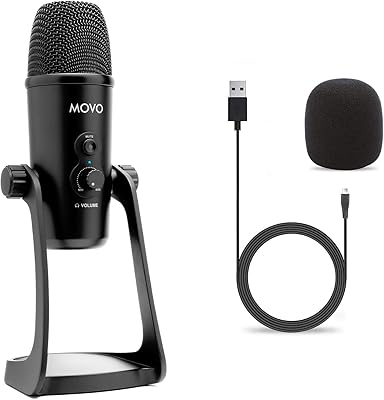
Movo UM700
Movo UM700
82%
83%
Audio Clarity
89%
Polar Pattern Versatility
94%
Ease of Setup
81%
Build Quality
86%
Gain Control & Mute Function
More
Movo X3-II Shotgun Microphone
86%
86%
Audio Quality & Focus
93%
Value for Money
89%
Handling Noise Reduction
92%
Power Flexibility
83%
Build Quality & Durability
More
Movo VXR10
Movo VXR10
88%
92%
Build Quality
87%
Vocal Clarity
94%
Value for Money
96%
Portability
91%
Ease of Use
More
Movo Wireless Mini UC with WMX-HM
85%
96%
Portability
93%
Ease of Setup
89%
Interview Versatility
84%
Vocal Clarity
87%
Battery Performance
More
Movo WMX-1 Wireless Lavalier Microphone System
87%
88%
Audio Quality
94%
Ease of Use
85%
Wireless Range
91%
Battery Life
93%
Portability
More
Movo GH800 MKII Carbon Fiber Gimbal Tripod Head
86%
91%
Performance in Wildlife Photography
89%
Build Quality & Durability
85%
Ease of Use
87%
Portability/Weight
92%
Stability Under Load
More
Movo WMX-7-TH
Movo WMX-7-TH
80%
82%
Audio Clarity for Speech
93%
Setup & Ease of Use
78%
Build Quality & Ergonomics
89%
Value for Money
67%
Signal Stability
More
Movo LED-WP Underwater High-Power LED Video Light
85%
86%
Overall Performance
90%
Build Quality
88%
Battery Life
84%
Ease of Use
93%
Waterproof Capability
More

FAQ

No installation needed at all. The Movo MC1000 is USB class-compliant, which means Windows and Mac both recognize it automatically as an audio input device the moment you plug it in. Just set it as your default microphone in your system audio settings and you are ready to go.

In a typical small conference room or home office setup, the wide pickup range handles a table of three to five people without anyone needing to lean in. That said, the further someone sits from the mic and the more ambient noise is in the room, the less cleanly their voice will be captured — so quieter environments definitely help.

It can work for voiceover and YouTube recording, especially if your room is quiet and you are not expecting studio-grade results. The headphone monitoring jack is genuinely useful for that kind of work. For podcasting where audio quality is central to your brand, though, a dedicated large-diaphragm condenser mic will outperform this conference mic noticeably.

You plug standard 3.5mm headphones into the jack on the mic body and you hear the audio being captured in near real time. A small number of users have reported a slight perceptible latency, though it is minimal. For most voice monitoring purposes it is not distracting, but if you are extremely sensitive to latency during recording it is worth being aware of.

Unfortunately, no. There is no LED or visual indicator on the mute button, which means you have to rely on your conferencing software to confirm whether the mic is muted. Several buyers have flagged this as a real-world frustration, particularly during back-to-back meetings where it is easy to lose track of mute status.

No — the cable is hardwired into the mic and cannot be detached or swapped out. If the cable is damaged, you would need to repair or replace the entire unit. If you travel frequently with it, protecting the cable connection point at the mic end is worth being deliberate about.

Yes, it works with all of those and more — including Skype, WebEx, GoToMeeting, and any other platform that lets you select a USB audio input. Because it shows up as a standard audio device, there is no special configuration required within those apps beyond selecting it as your microphone source.

Honestly, yes — this is one of the more commonly cited limitations of this USB table mic. The wide pickup range that makes it great for covering multiple people also means it does not aggressively reject room noise the way a tightly directional mic would. If your workspace has keyboard noise, air conditioning, or ambient conversation, those will likely come through on calls. A quieter room makes a significant difference.

Officially, compatibility is only stated for Windows and Mac computers. Some users have had success using USB-C adapters or OTG connectors with mobile devices, but results are inconsistent and not guaranteed. If mobile use is a primary need, it is worth testing within a return window rather than assuming it will work reliably.

The mic detects incoming audio above a certain volume threshold and starts capturing automatically, then pauses during silence — useful in theory for unattended dictation sessions. In practice, many users find the fixed sensitivity threshold either triggers too readily from ambient noise or cuts in too slowly for natural speech, so most end up recording manually. It is a secondary feature rather than a core selling point.