

Overview

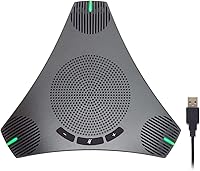
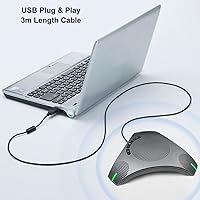
The PolaTab Q95 Mini is a mid-range USB conference speakerphone that packages a microphone, speaker, and USB hub into one compact puck — a practical setup for small teams meeting in a shared room. It connects via USB Type-A with no driver installation required, and the 9.8-foot cable gives you real flexibility in how you position it on a table. Since its 2021 launch, it has quietly built a solid reputation in its category, ranking among the top 35 computer microphones on Amazon. For hybrid workers or small offices without a dedicated audio system, this is a genuinely sensible starting point.

Features & Benefits

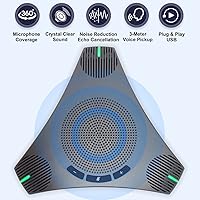
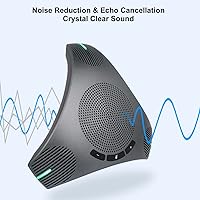
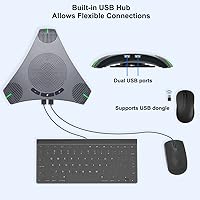
What sets this conference speakerphone apart from a basic USB mic is how its features work together rather than just stacking on paper. The 360° omnidirectional pickup covers up to a 3-meter radius, meaning people seated around a standard table can speak naturally without leaning in. DSP processing handles echo cancellation and noise suppression quietly in the background — not perfectly, but well enough for typical home or office environments. The physical mute button cuts the mic without silencing the speaker, so you can still hear the call while muted. And the built-in USB hub genuinely earns its place, letting you plug in a mouse or keyboard without hunting for a spare port.

Best For

This USB speakerphone fits most naturally into small conference rooms or home offices where a group of four to ten people need a shared audio solution for regular video calls. It works particularly well for educators running virtual classes — the wide pickup means participants don't have to crowd the device. Anyone who runs Zoom, Teams, or Webex calls from a desk and wants to ditch the headset will find it a practical everyday upgrade. One honest caveat: if your room stretches beyond roughly 10 feet across, voices near the edges may not be captured as reliably. Within that range, however, it handles the job well.

User Feedback

With a 4.6-star average across more than 180 ratings, the Q95 Mini earns its reputation largely on voice clarity and setup ease — buyers consistently note that it works right out of the box with no driver headaches. The USB hub is mentioned positively, though most reviewers treat it as a welcome bonus rather than the primary reason to buy. On the critical side, some users flag that the speaker volume tops out lower than expected for noisier rooms, and a handful report that the mute button or cable showed wear after extended daily use. Long-term durability remains the main open question; for moderate use, the overall consensus leans clearly positive.

Pros

  • Plug-and-play USB setup works immediately — no drivers, no software, no waiting.
  • The 9.8-foot cable is longer than most competitors, giving real flexibility in room layouts.
  • 360° pickup covers a standard meeting table comfortably without anyone leaning toward the mic.
  • Built-in USB hub lets you connect a mouse, keyboard, or USB drive without a separate adapter.
  • Echo cancellation handles typical home and office environments well enough to avoid awkward feedback loops.
  • Physical mute button cuts the mic cleanly while keeping the speaker active — exactly how it should work.
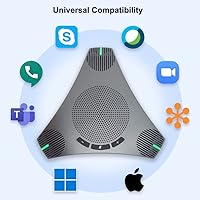
  • Compatible out of the box with every major platform: Zoom, Teams, Webex, Google Meet, and more.
  • At its price point, combining mic, speaker, and USB hub in one device offers solid consolidated value.

Cons

  • Speaker volume maxes out too low for rooms with ambient noise or more than a handful of people.
  • Pickup drops noticeably beyond 3 meters, making it unreliable in larger or oddly shaped rooms.
  • Plastic build shows scratches easily and the mute button loses its crisp feel after extended daily use.
  • Cable is not braided or reinforced, and strain relief near the device end feels thin for a long cord.
  • USB hub is limited to 2.0 speeds, ruling it out for fast storage or modern peripheral transfers.
  • macOS users may need to manually set it as the default audio input after each system restart.
  • No cable management solution is included, making storage and transport messier than it needs to be.
  • Long-term durability is the biggest unknown — some buyers report connectivity issues after a year of heavy use.

Ratings

Our AI-driven scoring for the PolaTab Q95 Mini was built by analyzing verified purchase reviews from buyers worldwide, with automated filters applied to remove incentivized, bot-generated, and outlier feedback. The result is a transparent breakdown that reflects what real users experienced — the genuine strengths that keep this USB speakerphone ranked near the top of its category, alongside the honest limitations that matter before you buy.

Audio Clarity (Microphone)
83%
Most buyers in standard home offices and small meeting rooms report that voices come through cleanly on the receiving end, with noticeably less muffling than cheaper alternatives. The DSP processing does a credible job of smoothing out background noise during typical work-from-home conditions.
In louder environments — open-plan offices or rooms with hard surfaces — some users find the noise suppression overshoots, making voices sound slightly processed or thin. It is not a flaw that ruins calls, but attentive listeners on the other end may notice it.
Speaker Volume & Quality
67%
33%
For one-on-one or small group calls in a quiet room, the built-in speaker handles vocal reproduction well enough that participants rarely ask others to repeat themselves. It covers the basics without requiring an external speaker for normal meeting use.
This is where the most consistent criticism surfaces: the maximum volume ceiling feels limiting in any room with ambient noise, air conditioning hum, or more than a few people talking simultaneously. Users expecting a room-filling sound will be disappointed — this is a communication device, not a presentation speaker.
Echo & Noise Cancellation
79%
21%
The acoustic echo cancellation is a genuine strength in controlled settings — callers report that feedback loops are rare and the mic does not pick up the speaker output during active calls. For regular Zoom or Teams meetings, this alone saves a lot of awkward audio moments.
Echo suppression performs well within its design envelope but starts to struggle when multiple people speak at once or when the device is placed near a reflective surface like a glass table. Users in acoustically challenging rooms should temper expectations.
Pickup Range & Coverage
74%
26%
The 3-meter omnidirectional range is genuinely practical for a standard 8 to 10-person table setup — participants seated at normal conversational distances are picked up consistently without anyone needing to lean toward the device or raise their voice.
Beyond roughly 10 feet, pickup fidelity drops noticeably, and buyers who tried using this in a larger boardroom or training room report that voices from the far end of the table came through weakly. The effective range is real but firm, and it is not a substitute for a room mic array.
Setup & Ease of Use
93%
Plug-and-play USB setup is one of the most consistently praised aspects across all buyer feedback. There are no drivers to hunt down, no pairing sequences, and no software to configure — users report being on a call within 60 seconds of unboxing, which matters enormously in professional settings.
A small number of users on older Windows machines or certain Linux distributions reported the device not being recognized immediately, requiring a port swap or system restart. These cases are rare but worth knowing if you are working with non-standard hardware.
Built-in USB Hub
81%
19%
The integrated USB hub is a practical differentiator that buyers in laptop-heavy setups genuinely appreciate — being able to plug in a mouse and a USB drive without reaching for a separate hub makes the device more useful than its primary function alone.
The hub only provides USB 2.0 throughput, which limits it to peripherals and storage devices rather than fast data transfers. Users expecting to run a high-speed external drive or a USB-C adapter through it will find the bandwidth constraining.
Build Quality & Materials
62%
38%
The plastic shell feels reasonably solid for its weight class, and the low-profile puck design sits stably on most desk surfaces. For a device that mostly sits in one place, the construction is adequate for daily professional use.
Several longer-term users note that the plastic finish scratches easily and that the mute button develops a slightly softer click feel over months of repeated use. A few buyers also flagged that the cable strain relief near the device end feels thinner than expected for a 9.8-foot cord.
Cable Length & Management
86%
The 9.8-foot cable is longer than almost any competitor at this price tier, and buyers with larger desks, conference tables set away from the wall, or awkward port placement specifically mention this as a reason they chose this device over shorter-cabled alternatives.
There is no cable management solution included, and the cord is not braided or reinforced along its full length, so it can tangle or kink over time with repeated repositioning. For a permanently installed setup this is a non-issue, but for those who pack it away regularly it shows wear faster.
Platform Compatibility
91%
Broad out-of-the-box compatibility with every major conferencing platform — Zoom, Teams, Webex, Google Meet, Skype, GoToMeeting — means buyers rarely encounter conflicts. Switching between platforms on the same machine requires no reconfiguration at all.
macOS users on recent Apple Silicon machines report that the device works but is not always automatically selected as the default audio input, requiring a manual switch in system preferences. It functions correctly once configured, but it is a small friction point that more polished devices avoid.
Mute Button Functionality
77%
23%
The physical mute button is one of those small design choices that earns appreciation in real use — pressing it gives tactile confirmation, the LED indicator is clearly visible even in bright rooms, and crucially, it mutes only the microphone, leaving the speaker active so you can still follow the conversation.
A few users note that the mute indicator LED could be brighter for use in sunlit offices, and the button position on the top face of the unit can occasionally be bumped accidentally when reaching past the device. Neither issue is serious, but both come up repeatedly enough to note.
Value for Money
71%
29%
At its price point, the combination of functional omnidirectional audio, echo cancellation, and a working USB hub in one device offers a reasonable package for small businesses or individuals who would otherwise need to buy these capabilities separately.
The mid-range price puts it in direct competition with more established conference audio brands that offer better speaker output and more durable build quality. Buyers who push the speaker hard or need the device to last several years of intensive daily use may find the value proposition thinner over time.
Design & Portability
76%
24%
The flat, disc-shaped form factor is unobtrusive on a desk and compact enough to slip into a laptop bag for occasional travel between office locations. It does not scream budget hardware, which matters in client-facing meeting rooms.
At just under 11 ounces with a nearly 10-foot cable to manage, it is not as grab-and-go as truly portable Bluetooth speakerphones. The wired-only design is a reasonable trade-off for stability, but buyers who move between locations frequently may find it mildly cumbersome.
Long-term Durability
58%
42%
For users who set it up in a fixed location and do not move it frequently, the device holds up well enough over the first year or so of regular use, with the core audio functions remaining stable and the mute button staying responsive.
The longer-term durability picture is less clear. A recurring thread in negative reviews involves the cable developing connectivity issues after extended use, and the mute button losing its crisp feel. For a device priced in the mid-range, a stronger build warranty and more resilient materials would significantly improve buyer confidence.

Suitable for:

The PolaTab Q95 Mini is a practical fit for small teams, hybrid workers, and solo home office setups where reliable shared audio is the priority without a large budget or complicated installation. If your typical meeting involves four to ten people gathered around a standard conference table or kitchen counter, this speakerphone covers the room comfortably without anyone needing to crowd the device or repeat themselves. Small business owners who want a dedicated conference audio solution without hiring an AV installer will appreciate the zero-configuration USB setup — plug it in and your call is ready to go. Educators running virtual classes or remote workshops also benefit from the wide pickup pattern, since students or co-presenters spread across a room can all be heard clearly without microphone juggling. For anyone who regularly runs out of USB ports on a laptop during meetings, the built-in hub quietly solves a genuinely annoying problem without requiring an extra accessory on the table.

Not suitable for:

The PolaTab Q95 Mini is not the right tool for larger meeting rooms, open-plan spaces, or any environment where the far end of the table sits more than about 10 feet from the device — voices at that distance become noticeably weaker, and the single-channel mic has no way to compensate. Users who need strong speaker output for a noisy environment, or who want the call audio to fill a room rather than just be audible nearby, will find the volume ceiling underwhelming compared to purpose-built room speakerphones in a higher price tier. If your work involves frequent travel or hot-desking across multiple locations, the wired-only USB connection and nearly 10-foot cable become a mild inconvenience compared to a compact Bluetooth alternative. Buyers expecting premium build quality — reinforced cable, metal chassis, or long-term warranty backing — should also look elsewhere, as the plastic construction and thinner cable strain relief show their limits with heavy daily handling over time. And if you need USB 3.0 transfer speeds through the hub, this device will not deliver them.

Specifications

  • Brand & Model: Manufactured by PolaTab under the model designation Q95 Mini.
  • Connectivity: Connects via USB Type-A 2.0; no Bluetooth or wireless option is available.
  • Cable Length: Includes a fixed, non-detachable USB cable measuring 9.8ft (3 meters).
  • Pickup Pattern: Omnidirectional microphone captures audio from all directions at a 360° horizontal plane.
  • Pickup Range: Effective voice capture radius is rated up to 3 meters (approximately 10ft) from the device center.
  • DSP Features: Onboard digital signal processing provides Acoustic Echo Cancellation (AEC) and Automatic Noise Suppression (ANS).
  • Signal-to-Noise Ratio: Microphone signal-to-noise ratio is rated at 70 dB, suitable for standard voice conferencing applications.
  • Frequency Response: Audio frequency response is rated at 8000 Hz, optimized for voice clarity rather than full-range music reproduction.
  • Speaker Impedance: The built-in speaker carries a 4 Ohm impedance rating, standard for compact conference speakerphones.
  • USB Hub: Integrated USB 2.0 hub provides additional ports for connecting peripherals such as a mouse, keyboard, or USB storage device.
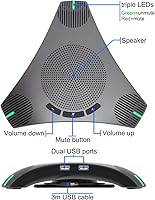
  • Mute Control: Physical top-mounted mute button silences the microphone only; the speaker remains fully active while muted.
  • Dimensions: Device body measures 7.01 x 7.99 x 1.57 inches, with a low-profile puck-shaped form factor.
  • Weight: Unit weighs 10.9 oz (310g), not including the attached cable.
  • Material: Outer shell is constructed from plastic with a matte gray finish.
  • Power Source: Powered entirely via USB from the connected host device; no external power adapter or batteries are required.
  • OS Compatibility: Officially supports Windows 7 through 10 and macOS; no driver installation is required on these platforms.
  • Platform Support: Compatible with Zoom, Microsoft Teams, Webex, Skype, Google Meet, GoToMeeting, FaceTime, and most other major conferencing applications.
  • Microphone Channels: Single-channel (mono) microphone configuration with omnidirectional polar pattern.
  • Number of Channels: Audio output uses a 2-channel configuration for stereo speaker playback.
  • Date Released: First made available for purchase in March 2021 and remains actively sold as of the current date.

Related Reviews

Beelink Mini S12 Pro (N100, 16GB, 500GB)

83%
83%
Everyday Performance
91%
Value for Money
76%
Build Quality & Design
84%
Thermal Management & Noise
88%
Connectivity & Ports
More
Beelink Mini S12 Mini PC, Intel 12th Gen, 8GB RAM, 256GB SSD
86%
87%
Performance for Everyday Tasks
92%
Energy Efficiency
82%
Multitasking Capability
89%
Setup and Installation
85%
Display Quality
More
ACEMAGICIAN Kron Mini K1 Mini PC, Ryzen 7 7730U, 16GB RAM, 512GB SSD
85%
88%
Value for Money
91%
Performance for Everyday Tasks
94%
Compact Design & Portability
90%
Setup & Ease of Use
78%
Gaming Performance (Light)
More
ehomful Mini Camera
ehomful Mini Camera
84%
84%
Overall Performance
89%
Video Quality
61%
Battery Life
90%
Ease of Use
95%
Portability
More
VOPLLS Mini Projector
79%
92%
Value for Money
88%
Portability & Weight
76%
Image Quality
90%
Setup & Installation
85%
Screen Size & Projection Range
More
Rode Mini Boompole
Rode Mini Boompole
86%
93%
Portability & Weight
89%
Ease of Setup
85%
Build Quality & Durability
87%
Flexibility & Reach
91%
User-Friendliness
More
Starlink Mini Kit
Starlink Mini Kit
84%
88%
Performance for Streaming and Video Calls
93%
Portability and Ease of Setup
85%
Battery Life and Power Consumption
79%
Reliability in Remote Locations
90%
Compatibility with Devices
More
Polaring Mini Projector
83%
92%
Value for Money
89%
Portability
86%
Display Quality
88%
Ease of Setup
84%
Connectivity
More
Sonos Sub Mini
Sonos Sub Mini
88%
92%
Bass Performance
90%
Integration with Sonos Devices
88%
Size and Design
87%
Wi-Fi Connectivity
93%
Setup Process
More
YGSKK Mini Projector
86%
91%
Value for Money
87%
Image Quality
94%
Ease of Setup
89%
Portability
90%
Bluetooth Connectivity
More

FAQ

No, you do not. The device is fully plug-and-play over USB — your Windows or macOS computer will recognize it automatically as an audio device the moment you plug it in. You should be ready to join a call within about a minute of unboxing.

It works with both platforms without any reconfiguration on Windows. You may need to manually set it as your default audio input in your Mac system preferences once, but after that, any conferencing platform you launch should pick it up automatically.

The PolaTab Q95 Mini is designed for groups of around 4 to 10 people seated within roughly 10 feet of the device. For a standard meeting table that size, it handles coverage well. If your room is significantly larger or people are seated farther than 3 meters from the center, voices near the edges may sound noticeably quieter to the far end of the call.

Yes, and this is one of its more thoughtful design choices. Pressing the physical mute button on top of the unit silences your microphone while keeping the speaker fully active, so you can still hear everything happening on the call while you are muted.

The hub adds extra USB Type-A 2.0 ports, which work well for connecting a wired mouse, keyboard, USB flash drive, or a dongle. Keep in mind the 2.0 speed limitation — it is not suited for fast external hard drives or high-bandwidth peripherals, but for everyday desk accessories it does the job cleanly.

Honest answer: it sits somewhere in between. For a quiet office or home setup, the volume is sufficient for everyone around the table to hear clearly. In a noisier environment or a room with hard reflective surfaces, some users find that the maximum volume does not fully compensate, and voices can feel a little flat. It is not a room-filling speaker by any stretch.

It may function on Chromebook as a generic USB audio device, but PolaTab does not officially list ChromeOS or Linux as supported platforms. A small number of users report success on both, but you should treat compatibility outside of Windows and macOS as untested rather than guaranteed.

The cable is fixed and non-detachable, so it cannot be swapped out if it fails. The cord itself is adequate for stationary use, but the strain relief near where the cable meets the device is on the thinner side. If you are packing and unpacking this regularly, handling the cable carefully near that junction point is a good habit to develop.

There is an LED indicator on the device that lights up when the microphone is muted. It is visible in most office lighting conditions, though a few users in very bright or sunlit rooms find it slightly harder to read at a glance. It is functional, just not the brightest indicator on the market.

Yes, there is a volume control on the unit itself, which is a practical convenience during live calls. You can adjust speaker volume directly on the device without tabbing away from your meeting window, which is more useful than it might sound when you are mid-conversation.