
Overview

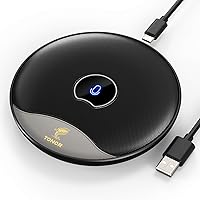
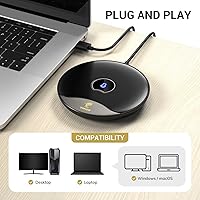
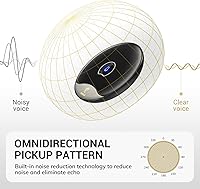
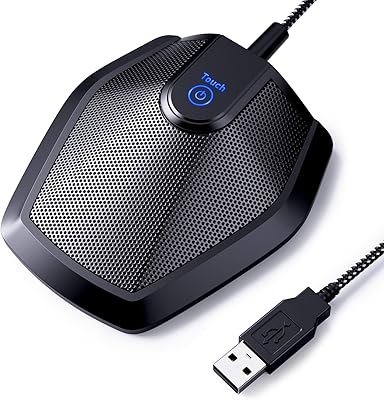
The TONOR TM20 is a boundary-style USB conference microphone designed to sit flat on your desk and capture voices from every direction in the room. Unlike a traditional directional mic, this conference mic uses an omnidirectional polar pattern — meaning it picks up sound from all sides equally, which makes it a practical choice when two or three people are sharing one device on a call. The low-profile puck shape takes up minimal desk space, and there's no stand to assemble or drivers to install. Just plug it into a USB-A port on Windows or macOS and you're ready to go. It launched in late 2020 and has since earned over 1,900 ratings, sitting at #76 in the Computer Microphones category.

Features & Benefits

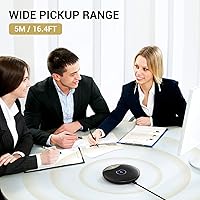
The TM20 runs at 48kHz/16-bit with a full 20Hz–20kHz frequency response, which keeps voice reproduction clean and natural for everyday calls. Its 360° omnidirectional pickup is rated to a maximum range of five meters, though in practice quality is noticeably better when speakers sit within two or three meters of the mic. A built-in noise reduction circuit helps cut down on background hum and echo, which matters a lot in a typical home office environment. The two-meter USB cable gives you enough reach to center the mic on a table rather than right next to a laptop. With a signal-to-noise ratio of 78dB, voices come through consistently clear without any manual gain adjustments needed.

Best For

This USB boundary mic is a strong fit for anyone who needs shared audio coverage without the hassle of multiple headsets. It works particularly well in small group settings — a two- or three-person home office, a classroom where the teacher is moving around, or a huddle room that doesn't warrant an expensive dedicated conference system. Online educators running live sessions on Zoom or Google Meet will appreciate the wide pickup and the physical mute button, which is far faster than hunting for a software control mid-lesson. It's also a solid pick for budget-conscious remote workers who need reliable, clear audio on daily calls without spending on higher-end equipment.

User Feedback

Owners broadly rate this conference mic well, with a 4.4-star average across nearly 2,000 reviews. The most repeated praise centers on voice clarity for price — most buyers find it punches above its cost on standard Zoom or Teams calls. The mute button gets specific mentions for being responsive and easy to locate by touch. On the downside, the boundary design is a double-edged trait: it sits flush on your desk, which means it can also pick up keyboard clicks and desk thumps if you're not careful. Buyers in rooms with hard floors or bare walls also note that echo can creep in. Manage those expectations and it holds up well for everyday meeting use.

Pros

  • Physical mute button with a color-coded LED makes silencing yourself mid-call genuinely fast and intuitive.
  • Truly plug-and-play — recognized immediately on both Windows and macOS with zero driver installation.
  • Omnidirectional pickup covers multiple speakers around a table without anyone needing to reposition.
  • The 2-meter cable gives enough reach to center the mic on a shared desk rather than parking it next to a laptop.
  • Voice clarity is consistently praised by buyers for a device in this price range.
  • Compact, low-profile shape takes up minimal desk space and requires no stand or arm.
  • Works with every major video conferencing platform out of the box — Zoom, Teams, Meet, Webex, and others.
  • At under $40, it replaces the need for individual headsets in a small shared workspace.

Cons

  • Boundary design means desk vibrations and heavy typing transfer directly to the mic capsule during calls.
  • Real-world pickup quality drops off noticeably beyond two to three meters, well short of the advertised range.
  • Rooms with hard surfaces or minimal soft furnishings will expose the limits of the onboard echo reduction.
  • No USB-C option means newer slim laptops require a separate adapter not included in the box.
  • No companion app or hardware controls means gain and EQ adjustments must be handled through OS or software settings.
  • The plastic finish picks up fingerprints easily and does not feel particularly durable under daily handling.
  • Cable is not braided or reinforced, and long-term users report fraying near the connector with extended use.
  • LED indicator is quite bright in dim rooms and cannot be turned off if you find it distracting.

Ratings

The TONOR TM20 scores below are generated by AI after analyzing thousands of verified global user reviews, with spam, bot-submitted, and incentivized feedback actively filtered out. The result is an honest, balanced picture of where this USB conference mic genuinely delivers and where it falls short — no whitewashing, no cherry-picking.

Voice Clarity
83%
For everyday Zoom and Teams calls, most buyers are genuinely impressed by how cleanly the mic captures speech at normal conversational distances. The 78dB signal-to-noise ratio keeps background hiss low, and voices come through without that hollow or tinny quality common in cheaper speakerphone-style devices.
At distances beyond two to three meters, clarity noticeably drops off — the stated five-meter range is an ideal-room figure, not a real-world guarantee. Users in larger or busier rooms report that voices at the far end of a table sound slightly recessed and less defined.
Noise & Echo Handling
71%
29%
The built-in noise reduction does a reasonable job filtering out steady background hum — things like HVAC systems or a fan running in the background tend to get attenuated fairly well. For a solo user in a relatively quiet home office, the difference is noticeable compared to a basic laptop mic.
In rooms with hard surfaces — bare floors, large windows, no rugs — echo is a persistent problem that the onboard processing cannot fully compensate for. Buyers who tried this mic in open-plan spaces or tiled rooms consistently mention that call participants notice reverb on their end.
Ease of Setup
96%
Plug-and-play via USB-A means there is genuinely nothing to install — Windows and macOS both recognize it immediately as an audio input device. Several teachers and first-time remote workers specifically called this out as the reason they chose it, since configuring audio drivers is not something everyone wants to deal with.
The lack of any companion software also means there are no EQ controls, gain adjustments, or input level settings to fine-tune. Users with very quiet voices or unusual room acoustics have no way to compensate through the mic itself — they have to rely entirely on software settings in Zoom or their OS.
Mute Button & LED Indicator
91%
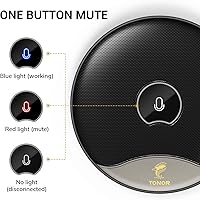
The physical one-touch mute button is one of the most praised features across reviews. It is tactile, responsive, and the blue-to-red LED switch gives an immediate, glanceable status read — particularly useful during busy calls when you need to mute fast without hunting through a software UI.
A small number of users report that the LED is quite bright in a dim room, which can be mildly distracting during evening calls or in low-light setups. There is also no way to disable the indicator light if you find it intrusive.
Omnidirectional Coverage
76%
24%
For two to three people sitting around a shared desk or small table, the 360-degree pickup works well and captures everyone without anyone needing to lean in or reposition. Teachers running a small group discussion over a video call find it especially practical for not having to pass a mic around.
The omnidirectional pattern is a genuine trade-off — it picks up everything, including keyboard typing, desk knocking, and shuffling papers. Users on busier desks noticed that background sounds crept into their calls more than they expected, which is a fundamental boundary-mic limitation rather than a product defect.
Build Quality & Materials
68%
32%
The polycarbonate shell feels solid enough for desk use and the low-profile shape means it is unlikely to get knocked over. At around 400 grams, there is enough weight to keep it stable without a base or mount.
The plastic finish shows fingerprints easily and a few buyers noted it feels noticeably lightweight and budget-grade in hand. At this price point it is acceptable, but buyers expecting a premium or metal-bodied device will be underwhelmed by the tactile impression.
Cable Quality & Length
78%
22%
The two-meter USB cable is genuinely useful — it gives enough reach to center the mic on a conference table while the laptop stays at one end or to the side. Most buyers mention the cable length as a practical positive in multi-person setups.
The cable itself is not braided or reinforced, and a few long-term users have reported fraying near the connector after extended daily use. There is no cable management solution included, which is a minor but noticeable omission for tidy desk setups.
Compatibility
93%
Works out of the box on Windows 10, Windows 11, and macOS without any driver installation, which makes it broadly compatible with virtually any modern laptop or desktop. Chromebook users and those on older Windows versions have also reported successful plug-and-play operation.
There is no USB-C version, so users with newer MacBooks or slim laptops that only have USB-C ports will need a separate adapter. This is not a deal-breaker but it is an extra step and an extra cost that a few buyers flagged as inconvenient.
Value for Money
88%
At its typical price point under $40, this USB boundary mic offers a combination of features — omnidirectional coverage, mute button, decent noise reduction — that would cost significantly more from branded conferencing hardware companies. For small teams or individual remote workers on a tight budget, it represents a sensible spend.
Buyers who compare it against USB headsets in the same price range sometimes feel the headset delivers better per-person audio isolation. If only one person needs to be heard on a call, a similarly priced directional mic or headset will outperform this conference mic in raw voice quality.
Desk Footprint & Portability
82%
18%
The flat puck form factor takes up very little desk real estate and requires no assembly — there is no stand arm to extend or angle to adjust. It is light enough to drop into a bag for carrying between rooms or to a co-working space.
Because it sits directly on the desk surface, any vibration transfers straight to the mic capsule. Heavy typists or people who tend to tap or rest their hands on the desk will need to be aware of this and adjust their habits during calls.
Pickup Range (Real-World)
61%
39%
In a quiet, moderately furnished room, the mic does a credible job capturing voices from across a small table — roughly two to three meters in practice — which is sufficient for most home office and small-huddle-room scenarios.
The advertised five-meter pickup range overstates real-world performance in typical indoor environments. Several reviewers specifically tested it at longer distances and noted that voice pickup became unreliable beyond three meters, especially if the room had any ambient noise or hard reflective surfaces.
Software & App Support
44%
56%
Because it is a class-compliant USB audio device, it integrates cleanly with any platform that accepts a standard audio input — Zoom, Teams, Google Meet, OBS, and others all recognize it without extra configuration.
There is no companion app, no firmware updates, and no onboard DSP controls accessible to the user. Buyers who want to fine-tune gain, apply EQ, or adjust pickup sensitivity are entirely dependent on their video conferencing software or OS audio settings, which limits flexibility considerably.
LED Visibility & Feedback
79%
21%
The blue and red LED status indicator is intuitive at a glance — most users find it far more reliable than checking a software icon buried in a taskbar. During busy calls, that quick visual cue reduces the chance of speaking when muted.
The LED is not visible from all angles when the mic is placed flat on a wide table, so users sitting farther away or to the side may not always see the status clearly. In very bright office lighting, the indicator can also be hard to distinguish from a distance.

Suitable for:

The TONOR TM20 is a practical pick for anyone who regularly hosts or participates in multi-person video calls and wants a single shared mic rather than individual headsets for everyone at the table. Small teams working from a shared home office, educators running live online classes, and remote workers who hop between Zoom, Webex, or Google Meet several times a day will find it covers their needs without any setup friction. The omnidirectional boundary design is particularly well-suited to situations where the speaker moves around a bit — a teacher pacing while explaining, or two colleagues taking turns talking — since there is no need to stay close to a fixed capsule. People who hate fumbling for software mute buttons mid-call will genuinely appreciate having a physical control with a clear LED status light right on the desk. If your room has soft furnishings, carpeting, or curtains — anything that dampens reflections — this conference mic performs noticeably better and the noise reduction has less heavy lifting to do.

Not suitable for:

The TONOR TM20 is not the right tool for solo podcasters, voiceover artists, streamers, or anyone who needs to sound polished and broadcast-ready. A boundary mic sitting on a hard desk captures everything in the room — keyboard noise, desk taps, chair scrapes — and that is a fundamental limitation of the form factor, not something a firmware update can fix. Buyers in open-plan offices, rooms with tile or hardwood floors, or spaces with no acoustic treatment will likely struggle with echo and ambient noise bleed that makes calls noticeably less clean. The USB-A connector is also a friction point for users with modern thin laptops that only offer USB-C ports, requiring an adapter that adds cost and a potential failure point. Anyone expecting studio-level voice isolation or the kind of directional rejection you get from a cardioid mic aimed at a single speaker will be disappointed — this is a shared-room tool built around convenience, not precision.

Specifications

  • Form Factor: Boundary-style flat puck design that sits directly on a desk surface without requiring a stand or mount.
  • Polar Pattern: Omnidirectional, capturing sound equally from all 360 degrees around the microphone.
  • Sampling Rate: 48kHz digital sampling rate for clean, detailed voice reproduction during calls and recordings.
  • Bit Depth: 16-bit audio resolution, which is standard for voice conferencing and online communication use.
  • Frequency Response: 20Hz to 20kHz, covering the full range of human speech and ambient sound the capsule can detect.
  • Sensitivity: Rated at -38dB ±3dB (0dB = 1V/Pa at 1kHz), suitable for picking up normal conversational voices at close-to-mid range.
  • Signal-to-Noise Ratio: 78dB SNR, meaning the mic produces very little self-noise relative to the audio signal it captures.
  • Output Impedance: 2.2kΩ output impedance, compatible with standard USB audio input circuits found in modern computers.
  • Max SPL: Maximum sound pressure level of 105dB, sufficient for normal speech and small group conversations without distortion.
  • Pickup Range: Manufacturer-rated pickup range of up to 5 meters (16.4 ft), though real-world performance is most reliable within 2 to 3 meters.
  • Connection: USB-A plug-and-play connection requiring no driver installation on Windows or macOS.
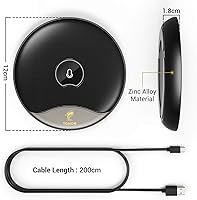
  • Cable Length: Attached USB cable measures 2 meters, providing flexibility in positioning the mic on a shared desk or table.
  • Mute Control: One-touch physical mute button with a built-in LED indicator: blue when active, red when muted.
  • Dimensions: 5.79 x 5.79 x 1.3 inches (approximately 14.7 x 14.7 x 3.3 cm) for the mic unit itself.
  • Weight: 400 grams (14.1 oz), giving the unit enough mass to stay stable on a desk without a separate base.
  • Material: Polycarbonate housing construction used for the main mic enclosure.
  • Compatibility: Compatible with Windows and macOS operating systems; also reported to work on Chromebooks without additional configuration.
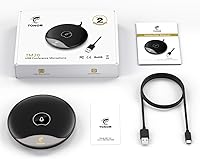
  • In the Box: Package includes one USB condenser microphone, one 2-meter USB cable, and a printed user manual.

Related Reviews
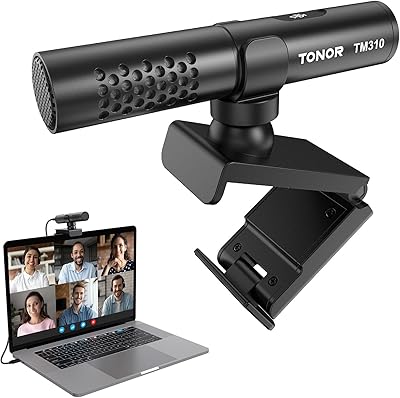
TONOR TM310
TONOR TM310
79%
83%
Voice Clarity
76%
Noise Rejection
68%
Noise Reduction Feature
94%
Ease of Setup
79%
Clip Design & Mounting
More
TONOR G11 Conference USB Microphone
81%
96%
Ease of Setup
83%
Voice Clarity
77%
Omnidirectional Pickup Range
52%
Background Noise Rejection
81%
Build Quality
More

FAQ

No software or drivers needed at all. The TONOR TM20 is a class-compliant USB audio device, so both Windows and macOS recognize it automatically the moment you plug it in. Just set it as your input device in your system sound settings or directly in Zoom/Teams, and you are good to go.

Yes, that is exactly what this conference mic is designed for. Its omnidirectional pickup captures voices from all directions around the table, so a small group of two to three people seated within a couple of meters should all be heard clearly without anyone needing to lean in or pass the mic around.

In practice, expect reliable pickup within about two to three meters of the mic. The manufacturer lists a five-meter range, but that figure assumes a quiet, acoustically treated space. In a typical home office or meeting room with some ambient noise, quality drops noticeably beyond three meters.

Potentially yes, and it is worth knowing upfront. Because this is a boundary mic that sits directly on your desk, vibrations and surface noise can travel into the capsule. Heavy typists may find that keyboard clicks are audible to call participants, especially in quiet meetings. Placing a thin foam pad under the mic can help reduce this somewhat.

It works with all of them, plus Webex, Skype, GoToMeeting, and any other platform that accepts a standard USB audio input. No special configuration is needed — just select it as your microphone source within the app.

The cable uses a USB-A connector, so you will need a USB-A to USB-C adapter if your laptop lacks a full-size USB port. An adapter is not included in the box, so factor that in if you are buying for a newer MacBook or slim Windows laptop.

Most users find it one of the most practical features on the mic. The button is soft-touch and responsive, and the LED switches instantly from blue to red so you can confirm your status at a glance without looking at your screen. It is noticeably faster than clicking a software mute button buried in a taskbar.

Rooms with bare floors, large windows, or no soft furnishings do tend to produce audible echo with this mic. The onboard noise reduction helps with steady background hum, but it cannot fully correct for room reflections. Adding a rug, curtains, or even just closing blinds can make a meaningful difference to call quality.

No — it is a microphone only and has no speaker output at all. You will need separate speakers, a headset, or your laptop's built-in speakers to hear the other side of the call. This is a common point of confusion, and it is worth being clear on before purchasing.

Not on the mic itself — there are no hardware controls beyond the mute button. Any gain or sensitivity adjustments need to be made through your operating system's sound settings or within your video conferencing app. Users with naturally quiet voices may need to bump the input level up slightly in software to get the best results.