Overview

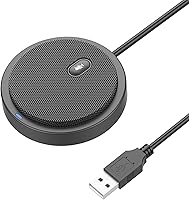
The Bonke UM02 is a flat, puck-shaped USB microphone that launched in 2020 and has quietly built a loyal following among people who just want audio that works without fuss. Made from aluminum and small enough to slip into a laptop bag, this desk microphone punches above its weight class in terms of build quality. It sits comfortably in the budget tier, which means you should go in with calibrated expectations — this is not a studio recording tool. But for daily calls and casual use, the UM02 has earned its spot near the top of its Amazon category through consistent, no-drama performance.

Features & Benefits

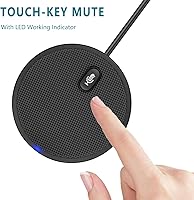
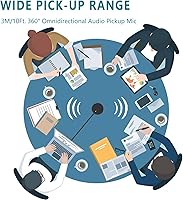
The standout here is the omnidirectional pickup — the mic listens in every direction equally, so it catches voices from across a small table without anyone needing to lean in. A two-meter cable gives you real flexibility in where you place it on your desk. The touch-sensitive mute key is genuinely useful mid-call; one tap silences the mic without diving into system settings. A layer of noise-absorbing foam on the housing helps take the edge off keyboard clatter and room echo, though it is not a replacement for acoustic treatment in a bare, reverberant room. The UM02 draws power directly from USB, so there is nothing to charge and no external adapter required.

Best For

This desk microphone is a natural fit for anyone on frequent video calls — if your day involves back-to-back Zoom or Teams meetings, the ease of just plugging in and going is hard to beat. Students who are tired of muffled laptop audio will notice an immediate improvement in how they come across in online classes. It also works well in small shared spaces where two or three people need to be picked up by one mic. Casual gamers wanting cleaner voice chat on Discord will find it sufficient without the bulk of a traditional stand-mounted mic. It even travels well — the flat profile and lightweight build make it easy to pack for anyone working from hotels or co-working spaces.

User Feedback

Buyers consistently praise the ease of setup, which says a lot — a large chunk of reviewers mention buying it for a parent or non-technical family member, and the feedback is almost uniformly positive on that front. The physical mute button earns praise too, though a few people note that the indicator light can be hard to read in bright ambient light. On the downside, the omnidirectional design is a double-edged sword: it picks up everything in the room, so if your space is echoey or noisy, background noise becomes noticeable. Some longer-term owners flag early cable junction wear. For the price, most feel it delivers solid value — but manage expectations if you are in a challenging acoustic environment.

Pros

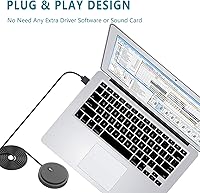
  • Plug-and-play setup works on both Windows and macOS with zero driver installation required.
  • The physical mute key on the unit itself saves you from hunting for a software button mid-call.
  • Aluminum housing feels genuinely solid and premium for a mic in this price range.
  • Flat, lightweight profile fits easily into a laptop bag for workers on the move.
  • Omnidirectional pickup covers a whole small table, making group calls surprisingly practical.
  • The attached cable is long enough to reach most desk configurations without an extension.
  • A meaningful audio upgrade over built-in laptop mics for everyday calls and classes.
  • USB bus-powered with no charging, no dongle, and no external power adapter needed.
  • An ideal no-fuss gift for non-technical users who just want better call quality instantly.

Cons

  • Omnidirectional pickup amplifies room echo and background noise in acoustically untreated spaces.
  • The fixed cable cannot be swapped out, so a worn junction point can render the whole unit unusable.
  • The mute indicator LED is easy to miss in bright ambient light, leading to accidental unmuted moments.
  • No USB-C connector means newer laptop users need an adapter that is not included.
  • Audio quality has a clear ceiling — it falls short for any recording beyond casual calls.
  • No gain control or onboard EQ, leaving advanced users with no way to tune the sound.
  • Long-term owners report cable joint wear after months of frequent plugging and unpacking.
  • Cannot isolate a single voice in a shared space the way a directional microphone would.

Ratings

The scores below for the Bonke UM02 were generated by our AI engine after analyzing thousands of verified purchaser reviews from global marketplaces, with spam, bot activity, and incentivized submissions actively filtered out. Each category reflects the honest distribution of buyer sentiment — strengths are credited where earned, and recurring pain points are not glossed over. The result is a transparent snapshot of what real users actually experience after weeks or months of daily use.

Ease of Setup
94%
Plug-and-play is not just a marketing claim here — buyers consistently report being on a live call within minutes of opening the box, with zero driver installation on both Windows and macOS. This resonates especially with first-time mic buyers and those who purchased the UM02 as a gift for less tech-savvy family members.
A small number of users on older Windows systems reported a brief driver recognition delay, though most resolved it by switching USB ports. There is no setup app, which means advanced users who want EQ control or gain adjustment have nowhere to turn.
Audio Clarity
71%
29%
For everyday video calls and online classes, the UM02 delivers noticeably cleaner audio than a built-in laptop microphone — voices come through with decent intelligibility and without the hollow, distant quality that plagues many budget options. Call participants on the other end rarely need to ask for repeats.
The audio fidelity has a ceiling that becomes apparent in any demanding context. Recordings lack warmth and detail, and at higher volumes the mic can sound slightly compressed. Anyone hoping to use this for podcasting or voiceover work will quickly feel its limitations.
Noise Handling
63%
37%
The foam layer on the housing does take some edge off light keyboard noise and minor ambient hum, which buyers in quieter home offices appreciate. In controlled environments, background intrusion is manageable enough that call quality stays clear and professional.
The omnidirectional pickup pattern is the core trade-off — it hears everything equally, which means a noisy open-plan space, a loud fan, or a reverberant bare room will all bleed into your audio noticeably. Users in echo-prone rooms frequently mention that the mic amplifies room acoustics rather than taming them.
Build Quality
78%
22%
The aluminum chassis is a genuine differentiator at this price point — it feels solid and substantial in hand, avoiding the cheap plastic rattle common in similarly priced competitors. The low-profile puck form factor also means it sits stably on a desk without tipping.
The weak point flagged by longer-term owners is the cable junction where the USB cord meets the mic body. After several months of daily connect-and-disconnect cycles, some users notice fraying or intermittent signal at that joint, suggesting the internal strain relief is not as robust as the housing itself.
Mute Button
82%
18%
Having a physical mute key directly on the microphone is a legitimately useful feature during back-to-back meetings — one tap silences the mic instantly without needing to find a software button buried in a video call interface. Buyers working from shared living spaces particularly appreciate this.
The LED indicator that shows mute status gets mixed reviews. In a well-lit room or in bright sunlight near a window, the light is easy to miss, leading to occasional awkward moments where users thought they were muted but were not. A brighter or differently colored indicator would address this completely.
Omnidirectional Range
76%
24%
The 360-degree pickup genuinely shines in small group settings — a mic placed in the center of a table can capture two or three participants in a huddle without anyone straining toward it. Students doing group study sessions over video call have found this particularly handy.
That same wide pickup range becomes a liability when you are the only speaker. It offers no way to focus on your voice and reject what is behind or beside you, so room acoustics matter far more with this mic than with a directional cardioid alternative.
Portability
89%
At roughly the diameter of a large cookie and barely thicker than a stack of credit cards, the UM02 genuinely fits in a laptop bag side pocket or even a jacket pocket. Remote workers and frequent travelers rate this as one of the most practical physical attributes of the mic.
The attached cable cannot be detached, which means you are always traveling with a two-meter cord coiled up alongside the mic. A detachable cable or a shorter travel-friendly cord option would make an already portable device even more convenient on the road.
Value for Money
83%
Against the backdrop of what built-in laptop microphones deliver, the UM02 offers a meaningful audio upgrade at a price that most buyers describe as very easy to justify. The aluminum construction makes it feel like a product worth more than its retail cost.
Buyers who later upgraded to a cardioid USB mic in a similar or slightly higher price bracket often note that the jump in audio isolation and clarity was significant. The UM02 holds its value well only if omnidirectional pickup is genuinely what you need.
Cable Quality & Length
69%
31%
The two-meter cord is genuinely adequate for the vast majority of desk setups, giving enough slack to place the mic away from the computer tower or laptop without needing a USB extension. Buyers working at a standing desk particularly appreciate the extra length.
The cable itself is on the thin side, and as noted in durability feedback, the junction point near the mic body is the likeliest failure point over time. The cord is also fixed, so if it does fail, the whole unit effectively becomes unusable without a repair.
Compatibility
91%
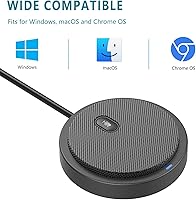
USB bus-powered and driver-free, the UM02 works across Windows and macOS without any configuration. Buyers routinely move it between a work laptop and a personal desktop without a second thought, and compatibility issues are almost entirely absent from user feedback.
There is no USB-C variant, which means users on modern MacBooks or recent ultrabooks with only USB-C ports will need a hub or adapter. This is a minor friction point, but it comes up often enough in reviews from Mac users to be worth noting.
Design & Aesthetics
74%
26%
The matte aluminum finish and low-profile silhouette look tidy on a desk without drawing attention — buyers who care about a clean, minimal workspace tend to appreciate that the UM02 does not look like a piece of gaming hardware.
It only comes in black, and a few style-conscious buyers mention wishing for a white or silver option to match lighter desk setups. The design is functional rather than distinctive — it will not turn heads, but it will not clash either.
Performance in Video Conferencing
79%
21%
The primary use case is where the UM02 performs most reliably. Call participants on Zoom, Teams, and Google Meet consistently report that audio sounds natural and clear, and the instant-mute feature makes it well-suited to the rhythm of multi-participant calls.
In louder or more dynamic meeting environments — say, a home office with children in the background or a co-working space — the omnidirectional mic struggles to keep your voice front and center. The experience degrades noticeably compared to a directional mic in those conditions.
Gift Suitability
86%
A surprisingly large share of buyers purchased this for someone else — parents working from home, college students starting remote classes, older relatives struggling with muddy laptop audio on family calls. The zero-configuration setup makes it genuinely stress-free to gift.
Because it requires a USB-A port, gifting it to someone with a newer laptop that lacks a standard USB port could result in an immediate need for an adapter, which slightly undermines the plug-and-play appeal. Worth checking the recipient's setup before buying.
Long-Term Durability
61%
39%
The aluminum body holds up well to daily desk use and the occasional toss into a bag. Buyers who use it primarily as a stationary desk mic and rarely unplug it report no degradation in performance even after extended use.
The durability concern centers squarely on the fixed USB cable — specifically the strain point where the cord exits the housing. Users who frequently pack and unplug the mic report wear and eventual signal issues there, pointing to a design choice that prioritizes cost over longevity.

Suitable for:

The Bonke UM02 is a strong fit for anyone whose primary need is reliable, no-hassle audio for video calls — remote workers grinding through daily Zoom and Teams meetings will get the most out of it. Students attending online classes are another natural audience, since even a modest step up from a built-in laptop mic makes a real difference in how clearly you come across to instructors and classmates. The omnidirectional pickup also makes it a smart choice for small group settings, like a shared home office or a compact conference room where two or three people need to be captured by a single device. Casual gamers who want cleaner Discord voice chat without committing to a full desk mic setup will find it does the job quietly and without clutter. It also makes for a genuinely thoughtful gift — especially for parents working from home or older relatives who want better call quality but have no interest in configuring software or fiddling with settings.

Not suitable for:

If you work in a noisy or acoustically bare room, the Bonke UM02 will likely frustrate you — its omnidirectional design picks up everything in the vicinity, and there is no way to tell it to focus on your voice and ignore the rest. Content creators, podcasters, or anyone recording audio intended for an audience should look elsewhere, as this boundary mic lacks the directional control and tonal richness that those applications demand. People who move their microphone frequently — packing it into a bag daily or constantly switching it between devices — should note that the fixed USB cable has a known weak point at the junction with the mic body, which can wear over time with repeated stress. If your laptop has only USB-C ports and no hub, you will need an adapter out of the box, which undercuts the plug-and-play experience. And if you are comparing options even slightly above the budget tier, a directional cardioid USB mic at a similar or modestly higher price will offer noticeably better voice isolation for solo speakers.

Specifications

  • Brand & Model: Manufactured by Bonke under the model designation UM02.
  • Form Factor: Boundary table-array (puck) design that sits flat on a desk surface rather than standing upright on a traditional mic stand.
  • Dimensions: The mic body measures approximately 70mm in diameter and 15mm in thickness — roughly the footprint of a large coin stack.
  • Weight: The unit weighs 100g (3.53 oz), light enough to carry in a jacket pocket or laptop bag side pocket.
  • Material: The outer chassis is constructed from aluminum, giving it a more solid feel than the plastic-bodied competitors common at this price tier.
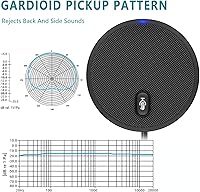
  • Polar Pattern: Omnidirectional (360°), meaning the mic captures sound equally from all directions around the unit with no preferred axis.
  • Pickup Range: Rated to capture voices from up to approximately 3 meters (10 ft) away under typical conditions.
  • Audio Sensitivity: Sensitivity is rated at 30 dB, suited to normal conversational voice levels in quiet-to-moderate environments.
  • Channels: Mono, single-channel audio output — standard for conferencing and voice communication applications.
  • Connectivity: Connects via a fixed USB-A cable; the mic is bus-powered directly from the USB port with no external power source required.
  • Cable Length: The permanently attached USB cable measures 2 meters (6.56 ft), sufficient for most standard desk-to-computer distances.
  • Mute Control: Features a touch-sensitive mute key built into the top surface of the unit, with an LED indicator to show mute status.
  • Noise Absorption: The housing incorporates a high-density foam layer designed to reduce ambient echo and attenuate light keyboard and surface noise.
  • Driver Requirement: Fully plug-and-play with no driver installation required on either Windows or macOS operating systems.
  • Compatibility: Compatible with Windows and macOS laptops and desktop PCs; works with standard USB-A ports without additional software.
  • Power Source: USB bus-powered — the mic draws all operating power from the connected computer via the USB cable, requiring no batteries or adapter.
  • In the Box: Package includes the USB conference microphone with integrated cable and a printed user manual.
  • Color Option: Available in a single color option: matte black.

Related Reviews

FAQ

No, the Bonke UM02 is fully plug-and-play. You just connect it to a USB port on your Windows or macOS computer and the system recognizes it automatically. There is nothing to download, no sound card needed, and no settings to configure before your first call.

The mic uses a standard USB-A connector, so you will need a USB-A to USB-C adapter or a hub with a USB-A port. That adapter is not included in the box, so it is worth having one ready before you need it — especially if you are buying this as a gift for someone on a newer MacBook or ultrabook.

It is a touch-sensitive key, so a single tap toggles mute on or off. There is an LED indicator that shows the current state, though a few users note the light can be hard to spot in a very bright room. It works instantly and does not require any interaction with your call software.

Honestly, yes — because this boundary mic listens in all directions equally, it does not have a way to focus on your voice and ignore the rest of the room. In a quiet, reasonably treated space it works well. But in an echoey room, an open-plan environment, or anywhere with significant background activity, you will likely hear that bleed into your audio. If noise isolation is a priority, a directional cardioid mic would serve you better.

Yes, this is actually one of the stronger use cases for an omnidirectional desk mic. Place it in the center of a table and it will pick up voices from all sides without anyone needing to lean in or take turns speaking near the mic. It handles small group huddles around a desk quite naturally.

Unfortunately, no — the USB cable is permanently attached to the mic body and cannot be swapped out. This is worth keeping in mind if you plan to pack and unplug the mic regularly, as repeated stress at the cable junction is where wear tends to show up over time. If you primarily leave it on a desk and rarely unplug it, this is much less of a concern.

In practice, the difference on calls is noticeable. Built-in laptop mics tend to sound thin, distant, or hollow — especially when the laptop is sitting at arm's length. This desk microphone places a dedicated pickup closer to desk level, captures a fuller voice, and handles a wider room range. For most people on daily calls or online classes, the upgrade is immediately apparent to the people listening on the other end.

It is not the right tool for that. This mic performs well for live calls and real-time voice communication, but recording use cases demand better directional control, more tonal richness, and lower self-noise than this boundary mic provides. For content creation or any recording intended for an audience, a dedicated cardioid condenser mic — even a budget one — will give you significantly better results.

It genuinely is — you plug it in and it works. Several buyers have mentioned gifting it to older relatives or non-technical family members specifically because there is no software to install or configure. As long as the recipient has a USB-A port available, they will be up and running within seconds. The only caveat is checking that their laptop is not a USB-C-only model.

Yes, it works with all of them. Since the mic registers as a standard USB audio input device, any video conferencing app that lets you select your audio source will recognize it. You may need to go into the app's audio settings once to switch the input from your built-in mic to this desk mic, but that is a one-time step and takes about thirty seconds.