
Overview

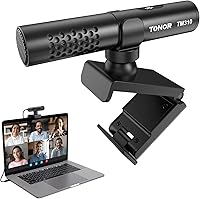
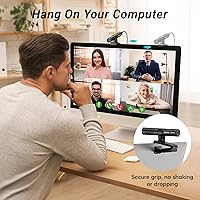
The TONOR TM310 is a clip-on USB conference microphone that mounts directly onto your laptop screen or monitor, giving you a dedicated voice input without occupying any desk space. At around $25, it sits in an interesting spot — cheap enough to be an impulse buy, but genuinely capable enough to replace the tinny built-in mic on most laptops. It uses a supercardioid pickup pattern to focus on what is in front of it, which already puts it ahead of omnidirectional mics commonly found at this price. No drivers, no setup headaches — just plug in via USB-A or USB-C and you are live. For a mic that launched in early 2024, reaching the top 40 in its category is a meaningful signal.

Features & Benefits

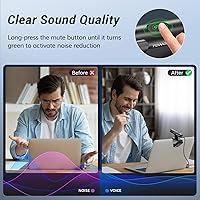
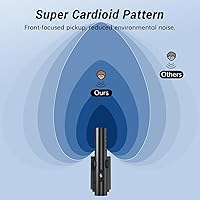
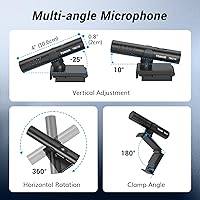
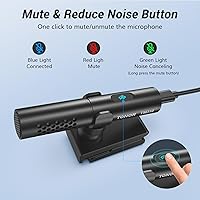
The clip-on conference mic uses a dynamic capsule with a supercardioid pattern, which naturally narrows its listening angle to focus on your voice rather than a nearby fan or background chatter. Positioning is flexible — you get 360-degree horizontal rotation plus a small vertical tilt range, so finding your sweet spot takes seconds. One button handles both mute and noise reduction: a quick tap toggles mute with a red or blue LED, while a long press activates noise reduction, confirmed by a green light. That noise reduction mode is easy to miss if you skip the manual, but it is genuinely useful in noisier environments. The included cables cover both USB-C and USB-A ports, and the 78 dB SNR keeps background hiss minimal.

Best For

This desk-free USB microphone makes the most sense for people who spend large chunks of their day on video calls — remote workers, teachers, online tutors, and students hopping between Zoom and Teams throughout the week. The clip-on design is a real advantage in compact setups where a stand mic would crowd the workspace. Casual content creators on a budget will also find it serviceable for YouTube voiceovers or light streaming, though it is not built for studio-quality recording. It also works with PS4 and PS5 via USB, which opens it up to console gamers who want voice chat without strapping on a headset. Note that very thin, modern laptop bezels may limit how securely the clip fits.

User Feedback

People who switch from a built-in laptop mic are generally satisfied — the improvement in call clarity tends to be noticeable right away, and buyers in work-from-home setups consistently praise how natural their voice sounds to colleagues. The plug-and-play setup earns particular appreciation from less tech-savvy users. That said, there are a few recurring gripes worth knowing. The noise reduction mode, when used at close range, can make voices sound slightly processed or hollow. A handful of buyers have noted the clip feels snug on very slim laptop lids, and the LED brightness may be distracting in a dark room. Gaming users tend to report positive results, though their expectations naturally differ from those doing serious audio work.

Pros

  • Clips directly onto your laptop screen, freeing up the entire desk surface.
  • Plug-and-play on Windows and macOS — recognized instantly, no drivers to hunt down.
  • Supercardioid pickup pattern reduces background noise without any software setup.
  • Physical mute button with color-coded LED means you always know your mic status at a glance.
  • Ships with both USB-C and USB-A cables, so port compatibility is rarely an issue.
  • At around $25, the TM310 is a genuinely low-risk investment for daily call users.
  • Soft-padded clip protects your screen and leaves no marks on the bezel.
  • Works with PS4 and PS5 for voice chat without requiring a headset.
  • Long-press noise reduction mode adds a useful layer of processing in moderately noisy rooms.
  • Adjustable rotation and tilt let you dial in the best mic angle for your specific setup.

Cons

  • Noise reduction mode can make voices sound processed or hollow when used at close range.
  • The clip struggles to grip ultra-thin modern laptop bezels securely.
  • Vertical tilt range is narrow, limiting flexibility for unusual desk or monitor setups.
  • The LED indicator is bright enough to be distracting during late-night or low-light sessions.
  • No protective pouch or case is included, making it vulnerable when carried in a bag.
  • The dual-function button occasionally triggers noise reduction when users only intend to unmute.
  • Clip pivot hinge can loosen gradually with daily use, causing the mic to droop over time.
  • Not compatible with smartphones or tablets despite having a USB-C connection.

Ratings

The TONOR TM310 scores below are generated by AI after analyzing thousands of verified buyer reviews worldwide, with spam, bot-driven, and incentivized feedback actively filtered out. The result is an honest, balanced picture of where this clip-on conference mic genuinely delivers and where real users have run into friction. Both the strengths and the recurring pain points are reflected transparently in every category score.

Voice Clarity
83%
Buyers consistently report a meaningful jump in call quality compared to their laptop's built-in mic. On Zoom and Teams calls, colleagues notice the difference right away — voices come through fuller and more intelligible, especially in quieter home office settings.
The improvement is most obvious at conversational distances. Users who sit far from the screen or speak softly report that the mic struggles to maintain the same crispness, and some say it sounds slightly thin compared to pricier USB options.
Noise Rejection
76%
24%
The supercardioid pattern does a solid job of ignoring keyboard clatter, HVAC hum, and moderate room noise during calls. Buyers in open-plan apartments and shared offices say background distractions are noticeably reduced without any software tweaking.
It is not foolproof in loud environments. Heavy keyboard users and people with loud fans nearby note that some ambient sound still bleeds through, and the noise rejection is less effective when the mic is angled away from the optimal front-facing position.
Noise Reduction Feature
68%
32%
The long-press noise reduction mode adds a genuinely useful layer of processing for calls in moderately noisy rooms. Users who discovered it — usually after reading the manual — appreciated having the option without needing third-party software.
The feature is easy to miss entirely since it requires a long press rather than a dedicated button. When activated at close range, several buyers noted it makes their voice sound processed or slightly robotic, which is distracting for professional calls.
Ease of Setup
94%
Plug-and-play is genuinely plug-and-play here. Buyers on both Windows and macOS report zero driver issues — plug it in and it is recognized immediately. This is repeatedly called out as a standout quality by less tech-savvy users who have struggled with other mics.
A small number of PS4 and PS5 users experienced recognition issues depending on how they connected the adapter, and a handful of Windows 7 users reported needing to manually set it as the default input device, which is a minor but real friction point.
Clip Design & Mounting
79%
21%
The clip attaches securely to most standard laptop lids and monitors, and the soft rubberized padding means it does not scratch screens. Users in tight workspaces particularly appreciate that it frees up the entire desk without requiring a stand or arm.
Thin modern laptop bezels — common on premium ultrabooks — can be a poor fit, with the clip feeling loose or unable to grip properly. A few buyers also noted that the clip pivot loosens over time and can allow the mic to droop if bumped.
Build Quality
71%
29%
The aluminum and ABS plastic combination gives the TM310 a more substantial feel than its price suggests. The rotational joint has a satisfying amount of resistance, and the overall construction does not rattle or feel hollow when handled.
It is still budget hardware. The plastic casing shows fingerprints easily and a few buyers reported the clip hinge feeling slightly loose out of the box. Longevity is a realistic concern for daily commuters carrying it in a bag.
LED Indicator
66%
34%
The tri-color LED is a practical touch — red for muted, blue for active, green for noise reduction — and buyers who regularly jump between muted and unmuted find it quicker to read than fumbling through software controls mid-call.
In a dark room or late-night work session, the LED is noticeably bright and can become distracting. Several users mention covering it or wishing for a brightness setting, and a small number found the green noise-reduction indicator hard to distinguish from blue.
Mute Button Usability
81%
19%
Having a physical mute button is something buyers genuinely value, especially those tired of hunting through Zoom or Teams toolbars mid-conversation. The tap response is reliable and the LED confirmation removes any guessing about current status.
The dual-function button combining mute and noise reduction on a single press-vs-hold mechanism leads to occasional accidental activations. A handful of users have accidentally triggered noise reduction when they only meant to unmute quickly.
Adjustability & Positioning
77%
23%
The 360-degree horizontal rotation lets users angle the mic toward them regardless of how the laptop is oriented on the desk. Teachers and streamers who move around their setup appreciate being able to recenter pickup without repositioning the whole unit.
The vertical tilt range is narrow — only about 35 degrees total — which limits options if the mic is clipped high on a large monitor. Users with unconventional desk layouts or who position their screen at unusual angles found the adjustment range restrictive.
Cable & Connectivity
86%
Including both a USB-C to USB-C cable and a USB-C to USB-A adapter in the box is a thoughtful move that covers nearly every modern laptop configuration. Buyers who have been burned by single-cable mics in the past specifically call this out as a plus.
The cable length may feel short for some monitor setups where the USB port is on the back or far side of a desktop. A couple of users also noted the USB-C connector fits snugly but not with the firm click you get from higher-end cables.
Value for Money
89%
At around $25, the TM310 offers a tangible audio upgrade over built-in laptop mics without requiring any meaningful investment. Buyers who just need clean voice audio for daily work calls repeatedly describe it as exactly what they needed at a fair price.
Once you factor in its limitations — noise reduction quirks, narrow vertical tilt, potential clip fit issues on slim laptops — it starts to feel like a product that serves a specific use case well but falls short if your needs are even slightly more demanding.
Compatibility
88%
Windows 7 through 11, macOS, and PS4/PS5 support covers the vast majority of buyers. The dual-cable bundle removes nearly all port-related friction, and the zero-driver design means it works in conference room shared machines without any IT involvement.
It is explicitly not recommended for smartphones, which frustrates a subset of buyers who assumed USB-C meant universal compatibility. Mobile content creators or anyone hoping to use it with an Android tablet will need to look elsewhere.
Audio for Gaming
72%
28%
PS4 and PS5 users who want clear party chat without wearing a headset find this a practical alternative. The supercardioid pattern keeps in-game audio from bleeding into the mic pick-up during intense sessions, which teammates generally appreciate.
Gamers with mechanical keyboards or in loud setups will notice the mic picks up more ambient noise than a close-proximity headset would. It works, but it is a compromise solution rather than an optimized gaming peripheral.
Portability
74%
26%
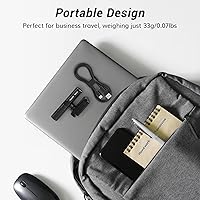
At 300g and with no stand required, this desk-free USB microphone is easy to toss into a laptop bag for co-working spaces or travel. The clip-on form factor means setup at a new location takes under a minute, which remote workers find genuinely convenient.
The clip and rotational joint are the most fragile parts, and they are exposed when the mic is loose in a bag. There is no carry pouch or protective case included, so buyers who travel frequently will want to wrap it carefully to avoid joint wear.

Suitable for:

The TONOR TM310 is a practical pick for anyone who spends a significant portion of their workday on video calls and is tired of sounding like they are speaking through a tin can. Remote employees, online educators, and students who live inside Zoom, Teams, or Google Meet will notice an immediate and meaningful improvement over their laptop's built-in mic — without spending serious money or cluttering their desk with a stand. The clip-on form factor is especially well-suited to compact home offices, dorm rooms, or hot-desking environments where surface space is genuinely limited. Casual content creators who want cleaner voiceover audio for YouTube or light streaming on a tight budget will also find it more than capable for the task. PS4 and PS5 users who want hands-free voice chat without committing to a gaming headset have a legitimate use case here too. If your primary goal is simply sounding noticeably better on calls without any setup friction, this clip-on conference mic delivers exactly that.

Not suitable for:

The TONOR TM310 is not the right tool if your needs go beyond basic call clarity or casual recording. Podcasters, musicians, voiceover artists, or anyone who cares about studio-grade audio quality will find the dynamic capsule and mono output fundamentally limiting — this is a communication mic, not a recording mic. People using premium ultrabooks with very thin bezels may also find the clip an impractical or unstable fit, which is a real physical limitation worth checking before buying. The noise reduction mode, while useful in concept, has a tendency to over-process voices at close range and can make you sound unnatural in professional or client-facing calls — so it is not a reliable substitute for a genuinely quiet recording environment. Smartphone and tablet users should also look elsewhere, as the mic is explicitly not recommended for mobile devices despite the USB-C connection. And if you are already using a decent headset or a dedicated USB desk mic, this desk-free USB microphone is unlikely to represent a meaningful upgrade.

Specifications

  • Polar Pattern: Supercardioid directional pickup focuses on sound from the front while significantly rejecting audio from the sides and rear.
  • Frequency Response: Captures audio across a range of 80Hz to 20kHz, covering the full spectrum of human speech and most vocal recordings.
  • Sensitivity: Rated at -36dB ±3dB, meaning it picks up voice clearly at normal speaking distances without requiring the speaker to lean in.
  • Signal-to-Noise Ratio: A 78 dB SNR keeps self-noise low, so background hiss remains minimal even during quiet passages in a call or recording.
  • Connectivity: Connects via USB-A or USB-C; the package includes both a USB-C to USB-C cable and a USB-C to USB-A adapter.
  • Compatibility: Works with Windows 7, 8, 10, and 11, macOS, and PS4/PS5 consoles; not recommended for use with smartphones or tablets.
  • Driver Requirement: Fully plug-and-play with no driver installation needed on any supported operating system.
  • Controls: Single multi-function button handles mute and unmute on a tap, and activates noise reduction on a long press.
  • LED Indicator: Tri-color LED displays red when muted, blue when active, and green when the noise reduction mode is engaged.
  • Mounting Style: Clip-on design attaches directly to a laptop screen or monitor bezel, with soft padding to prevent scratches.
  • Adjustability: Offers 360-degree horizontal rotation and a vertical tilt range of -25° to 10° for flexible microphone positioning.
  • Channels: Mono single-channel output, standard for voice communication and conferencing applications.
  • Dimensions: The unit measures 5.91 x 3.94 x 1.97 inches, making it compact enough to clip onto most standard display bezels.
  • Weight: Weighs 300g (10.6 oz) including the clip mount, which is light enough not to stress most laptop lids.
  • Materials: Housing is constructed from ABS plastic and aluminum, balancing lightweight design with moderate structural rigidity.
  • Power Source: Bus-powered entirely through the USB connection, requiring no external power supply or batteries.
  • Form Factor: Classified as a shotgun-style microphone in terms of its narrow directional pickup, housed in a compact clip-on body.
  • In the Box: Includes one microphone unit, one bendable mic stand, one USB-C to USB-A adapter, one USB-C to USB-C cable, and a user manual.

Related Reviews
TONOR G11 Conference USB Microphone
81%
96%
Ease of Setup
83%
Voice Clarity
77%
Omnidirectional Pickup Range
52%
Background Noise Rejection
81%
Build Quality
More
TONOR TM20
TONOR TM20
78%
83%
Voice Clarity
71%
Noise & Echo Handling
96%
Ease of Setup
91%
Mute Button & LED Indicator
76%
Omnidirectional Coverage
More

FAQ

It is completely plug-and-play. Just connect it to your laptop or desktop via the included cable and your operating system recognizes it automatically — no drivers, no setup screens, nothing to install. Windows and macOS both handle it without any fuss.

The button has two functions depending on how you press it. A quick tap mutes or unmutes the mic, with red meaning muted and blue meaning active. If you hold the button down for a moment, it activates a built-in noise reduction mode indicated by a green light. That long-press function is easy to overlook, but it can help in moderately noisy environments.

For most standard laptops and monitors, yes — the clip has soft padding on both contact points to prevent scratches. That said, very thin modern laptop bezels, like those on premium ultrabooks, may not give the clip enough surface to grip securely. If your laptop lid is particularly slim, it is worth checking the bezel thickness before buying.

No — the manufacturer explicitly states it is not recommended for use with smartphones. Even though USB-C is involved, mobile operating systems handle audio input differently and this mic is not designed to work with them reliably.

The built-in mic on most laptops is omnidirectional and positioned poorly for picking up voice clearly, which is why you often sound distant or echoey to others on calls. The TONOR TM310 uses a supercardioid pattern that focuses directly on you, and the dynamic capsule produces noticeably fuller and cleaner voice audio. Most buyers report that colleagues can hear the difference immediately.

Yes, without any special configuration. Once your computer recognizes the mic, you just select it as your input device in the audio settings of whichever platform you use. It works the same way with any conferencing or streaming software that lets you choose your microphone input.

Absolutely — it clips onto any display with a bezel wide enough for the grip. Many users attach it directly to their external monitor, which positions the mic closer to their face than a laptop on a desk would and often results in better pickup clarity.

It depends on your environment. In a moderately noisy space — say, a home office with HVAC noise or light background activity — the noise reduction mode can make a real difference. However, when you are sitting close to the mic in a quiet room, the processing can make your voice sound slightly unnatural. The safest approach is to try it both ways and stick with whichever sounds more natural to the people you are calling.

Yes, it is compatible with both consoles via USB. It is a practical option for players who want clearer party chat without wearing a headset during long sessions. Just be aware that it picks up more ambient room noise than a close-proximity headset would, so a quiet space helps.

The aluminum and ABS plastic construction is reasonably solid for the price, but the clip hinge and rotational joint are the most vulnerable parts with regular handling. There is no protective case included, so if you carry this desk-free USB microphone in a bag daily, wrapping it or keeping it in a small pouch will help preserve the joint mechanism over time.